

This document explains how to configure the CrowdStrike Falcon Cloud Security v1.0.1 plugin with the Risk Exchange module of the Netskope Cloud Exchange platform. This plugin fetches Users from the Cloud Security > Detections > Cloud Indicators of Attack (IOA) page and Cloud Workloads (Applications) from the Cloud Security > Posture and Compliance > Cloud Security Posture > Indicators of Misconfiguration (IOM) page. This plugin does not support any actions on Users or Cloud Workloads (Applications) in CrowdStrike Falcon Cloud Security.
Netskope normalization score calculation for users => (100 – CrowdStrike’s IOA score) x 10.
Prerequisites
To complete this integration, you need:
- A Netskope tenant (or multiple, for example, production and development/test instances).
- A Netskope Cloud Exchange tenant with the Tenant plugin and Risk Exchange plugin already configured.
- CrowdStrike Falcon Cloud Security platform access (Base URL, Client ID, Client Secret).
- Connectivity to the following host: https://api.<region>.crowdstrike.com
- If you have the IP allowlist configured on CrowdStrike, make sure to add the public IP of the machine where cloud exchange is running. For more information, refer to the documentation.
CrowdStrike Falcon Cloud Security Plugin Support
The CrowdStrike Falcon Cloud Security plugin fetches users from the Cloud Indicators of Attack (IOAs) page and cloud workloads (applications) from the Indicators of Misconfiguration (IOMs) page. Both pages are available under Cloud Security > Cloud Posture in the CrowdStrike tenant. This plugin does not support any actions on users or applications in the CrowdStrike Falcon Cloud Security.
| Type of Data Pulled | Type of Actions Supported |
|---|---|
| No Action |
Mappings
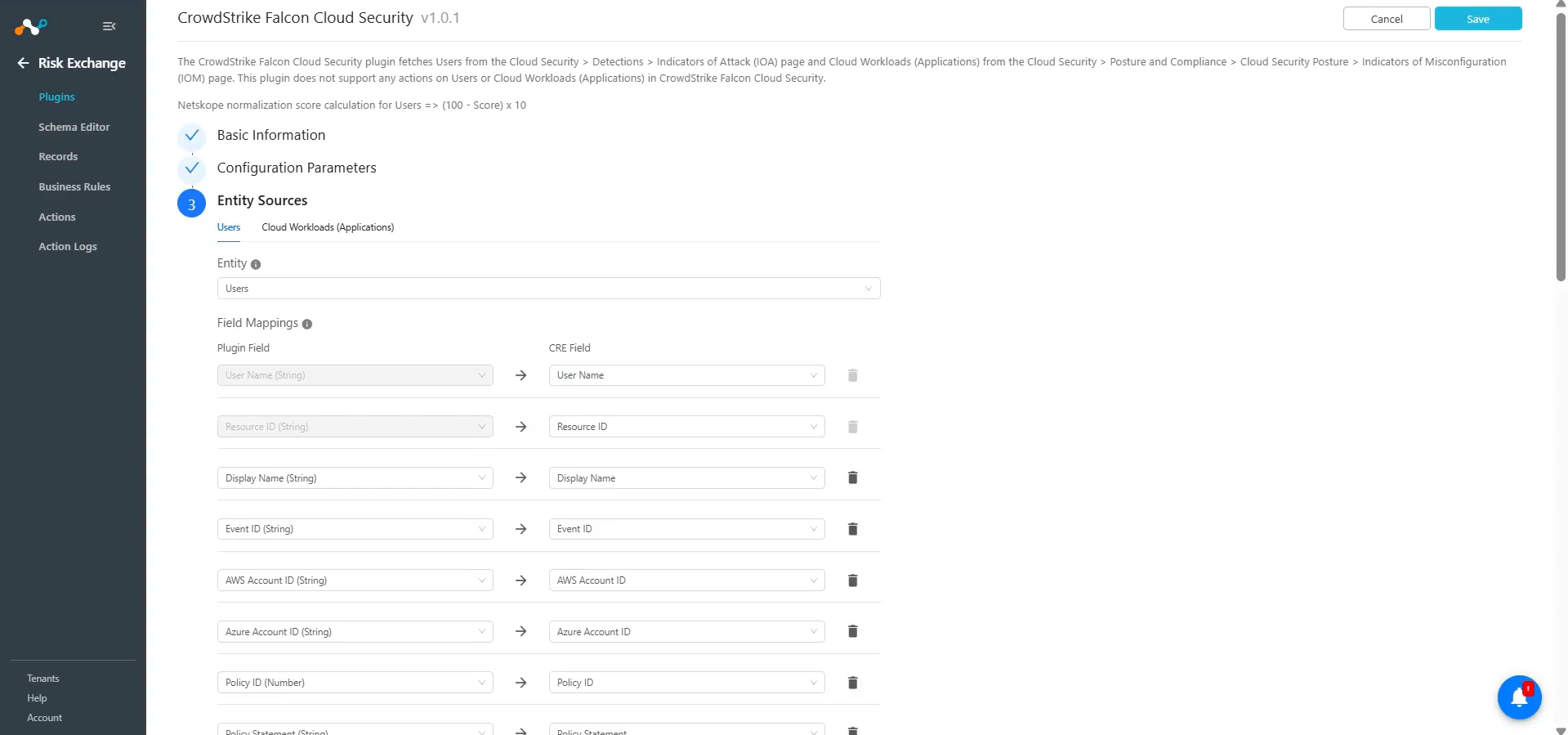
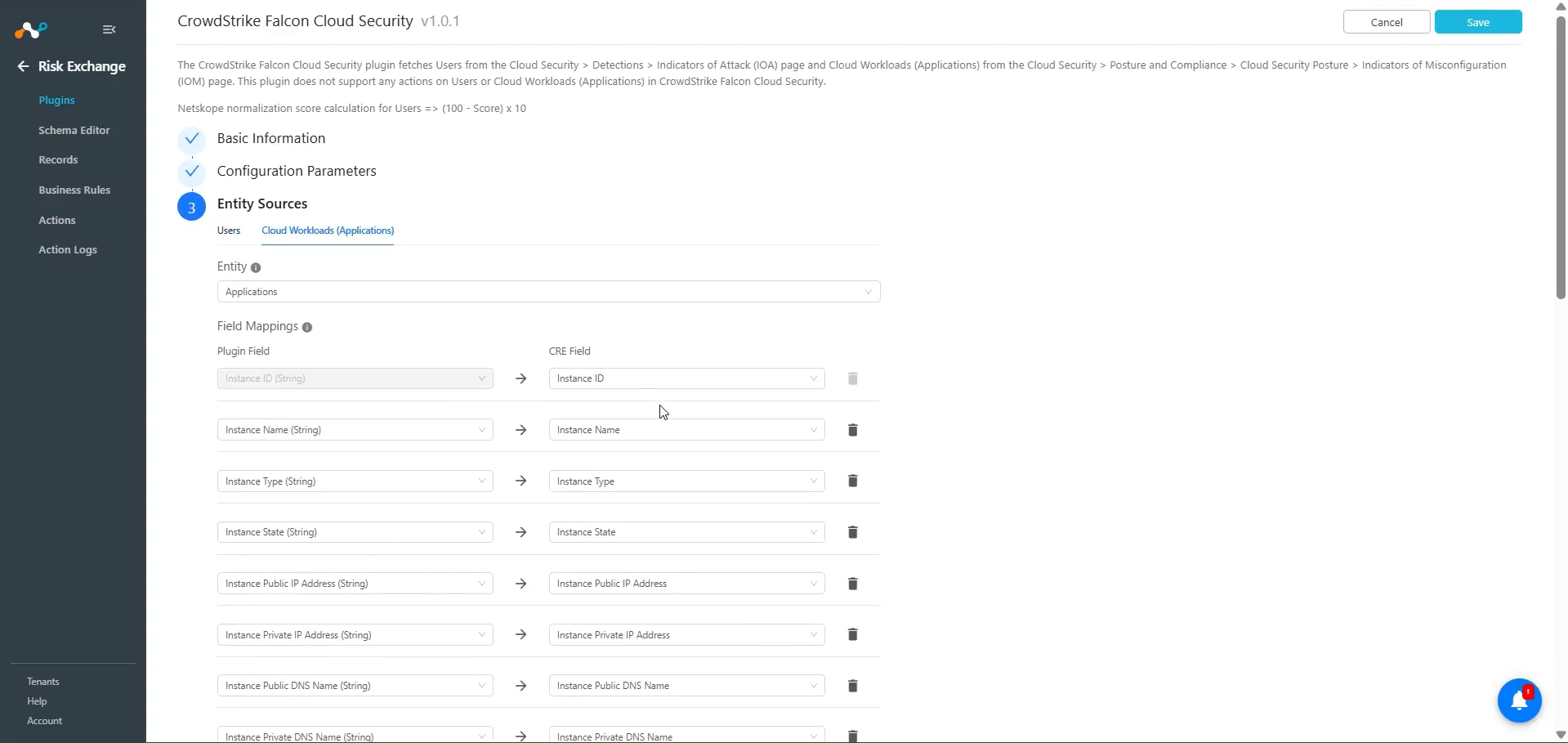
Mappings are used to view the pulled users and applications along with their respective details. Mapped fields during plugin configuration will be visible on the Records page after the data is pulled. Here are the suggested mappings to use while configuring the plugin.
Pull Mappings for Users
| Plugin Field | Expected Datatype | Suggested Field Name | Suggested Field Aggregate Strategy |
|---|---|---|---|
| User Name | String | CrowdStrike Falcon Username | Unique |
| Display Name | String | CrowdStrike Falcon Display Name | Overwrite |
| Event ID | String | CrowdStrike Falcon Event ID | Overwrite |
| AWS Account ID | String | CrowdStrike Falcon AWS Account ID | Overwrite |
| Azure Account ID | String | CrowdStrike Falcon Azure Account ID | Overwrite |
| Policy ID | Number | CrowdStrike Falcon Policy ID | Overwrite |
| Policy Statement | String | CrowdStrike Falcon Policy Statement | Overwrite |
| Severity | String | CrowdStrike Falcon Severity | Overwrite |
| Cloud Provider | String | CrowdStrike Falcon Cloud Provider | Overwrite |
| Cloud Service | String | CrowdStrike Falcon Cloud Service | Overwrite |
| Cloud Region | String | CrowdStrike Falcon Cloud Region | Overwrite |
| Vertex ID | String | CrowdStrike Falcon Vertex ID | Overwrite |
| Vertex Type | String | CrowdStrike Falcon Vertex Type | Overwrite |
| Event State | String | CrowdStrike Falcon Event State | Overwrite |
| Event Category | String | CrowdStrike Falcon Event Category | Overwrite |
| Event Name | String | CrowdStrike Falcon Event Name | Overwrite |
| Event Source | String | CrowdStrike Falcon Event Source | Overwrite |
| Event Type | String | CrowdStrike Falcon Event Type | Overwrite |
| Management Event | String | CrowdStrike Falcon Management Event | Overwrite |
| Request ID | String | CrowdStrike Falcon Request ID | Overwrite |
| Source IP Address | String | CrowdStrike Falcon Source IP Address | Overwrite |
| User ARN | String | CrowdStrike Falcon User ARN | Overwrite |
| AWS Access Key ID | String | CrowdStrike Falcon AWS Access Key ID | Overwrite |
| Principal ID | String | CrowdStrike Falcon Principal ID | Overwrite |
| Confidence | String | CrowdStrike Falcon Confidence | Overwrite |
| Join Keys | String | CrowdStrike Falcon Join Keys | Overwrite |
| Score | Number | CrowdStrike Falcon Score | Overwrite |
| Resource ID | String | CrowdStrike Falcon Resource ID | Unique |
| Resource UUID | String | CrowdStrike Falcon Resource UUID | Overwrite |
| Netskope Normalized Score | Number | CrowdStrike Falcon Netskope Normalized Score | Overwrite |
Pull Mappings for Applications
| Plugin Field | Expected Datatype | Suggested Field Name | Suggested Field Aggregate Strategy |
|---|---|---|---|
| Instance ID | String | CrowdStrike Falcon Instance ID | Unique |
| Instance Name | String | CrowdStrike Falcon Instance Name | Overwrite |
| Instance Type | String | CrowdStrike Falcon Instance Type | Overwrite |
| Instance State | String | CrowdStrike Falcon Instance State | Overwrite |
| Instance Public IP Address | String | CrowdStrike Falcon Instance Public IP Address | Overwrite |
| Instance Private IP Address | String | CrowdStrike Falcon Instance Private IP Address | Overwrite |
| Instance Public DNS Name | String | CrowdStrike Falcon Instance Public DNS Name | Overwrite |
| Instance Private DNS Name | String | CrowdStrike Falcon Instance Private DNS Name | Overwrite |
| Instance VPC ID | String | CrowdStrike Falcon Instance VPC ID | Overwrite |
| Instance Subnet ID | String | CrowdStrike Falcon Instance Subnet ID | Overwrite |
| Instance Platform | String | CrowdStrike Falcon Instance Platform | Overwrite |
| Instance Architecture | String | CrowdStrike Falcon Instance Architecture | Overwrite |
| IOM Event ID | String | CrowdStrike Falcon IOM Event ID | Overwrite |
| Resource ID | String | CrowdStrike Falcon Resource ID | Overwrite |
| Resource ID Type | String | CrowdStrike Falcon Resource ID Type | Overwrite |
| Resource URL | String | CrowdStrike Falcon Resource URL | Overwrite |
| Resource UUID | String | CrowdStrike Falcon Resource UUID | Overwrite |
| Cloud Provider | String | CrowdStrike Falcon Cloud Provider | Overwrite |
| Cloud Service | String | CrowdStrike Falcon Cloud Service | Overwrite |
| Security Group | String | CrowdStrike Falcon Security Group | Overwrite |
| NACL ID | String | CrowdStrike Falcon NACL ID | Overwrite |
| Port(s) | Number | CrowdStrike Falcon Port(s) | Overwrite |
| Region | String | CrowdStrike Falcon Region | Overwrite |
| Severity | String | CrowdStrike Falcon Severity | Overwrite |
| Status | String | CrowdStrike Falcon Status | Overwrite |
| Policy Statement | String | CrowdStrike Falcon Policy Statement | Overwrite |
| Tags | List | CrowdStrike Falcon Tags | Append |
| Is Managed | String | CrowdStrike Falcon Is Managed | Overwrite |
Permissions
CSPM Registration: Read access.
API Details
List of APIs Used
| API Details | Method | Endpoint | API Scope |
|---|---|---|---|
| Get auth token | POST | /oauth/token | None |
| Fetch IOA Events | GET | /detects/entities/ioa/v1 | CSPM Registration: Read access |
| Fetch IOM Event IDs | GET | /detects/queries/iom/v2 | CSPM Registration: Read access |
| Fetch IOM Event Details | GET | /detects/entities/iom/v2 | CSPM Registration: Read access |
| Fetch IOA Events for update records | GET | /detects/entities/ioa/v1 | CSPM Registration: Read access |
| Update IOM Event IDs for update records | GET | /detects/queries/iom/v2 | CSPM Registration: Read access |
| Get Details for IOM Events for Update functionality | GET | /detects/entities/iom/v2 | CSPM Registration: Read access |
Get an Auth Token
API Endpoint: <Base URL>/oauth2/token
Method: POST
Headers
| Key | Value |
|---|---|
| User-Agent | netskope-ce-6.0.0-cre-crowdstrike-falcon-cloud-security/1.0.1 |
Parameters
| Key | Value |
|---|---|
| grant_type | client_credentials |
| client_id | <Client ID> |
| client_secret | <Client Secret> |
Sample API Response
{
 "access_token": "eyJhbGciOiJSUzI1NiIsImtpZCI6InB1YmxpYzphNDdiNTc2MS0zYzk3LTQwMmItOTgzNi0wNmNhODI0NTViOTMiLCJ0eXAiOiJKV1QifQ..a8oiNJivyV1AJKoICvr1IH5r4kMsWZ2xds7Qb_JRB6sD1JcbGqAkFq_wgw5-EAB-hHiRB-coF2Yy_PeP-8IvjWQVIjlDJrRmRQ-s-NmAkm8XaG9GojFZvaT-sufiBxKEDmpdntABNkEG1fcbVvd7tVW-vi36PFPoc3p1t4sbaMhf9_Kts8iAHsv6BudVyFsPhPAreGc2OXUFT39ZvuDTN5BxOFiPT_9_gadXt-7N*************************************************************************************",
 "expires_in": 1799,
 "token_type": "bearer"
}
Fetch IOA Events
API Endpoint: <Base URL>/detects/entities/ioa/v1
Method: GET
Headers
| Key | Value |
|---|---|
| Authorization | Bearer <Bearer Token> |
| User-Agent | netskope-ce-6.0.0-cre-crowdstrike-falcon-cloud-security/1.0.1 |
Parameters
| Key | Value |
|---|---|
| limit | 1000 |
| date_time_since | 2024-06-28T12:45:55Z |
| cloud_provider | aws or azure |
| service | EC2 |
Sample API Response
{
    "meta": {
        "query_time": 0.034113355,
        "powered_by": "cspm-registration",
        "trace_id": "8e2d3332-c402-4d2d-862d-e4f244cccc63",
        "pagination": {
            "offset": 0,
            "limit": 1,
            "total": 10,
            "next_token": "MTox"
        }
    },
    "errors": [],
    "resources": {
        "events": [
            {
                "cid": "c17f3a80ded0418eb107db3d26a27983",
                "cloud_account_id": {
                    "aws_account_id": "208764385157"
                },
                "policy_id": 211,
                "policy_statement": "EC2 security group modified to allow ingress from the public internet",
                "service": "EC2",
                "severity": "High",
                "cloud_provider": "aws",
                "cloud_region": "us-east-1",
                "vertex_id": "211:2ce0321e-48d0-419c-bbae-9daef1133c0d:ioa",
                "vertex_type": "ioa",
                "state": "open",
                "event_category": "Management",
                "event_created": "2024-07-31T14:25:40Z",
                "event_id": "2ce0321e-48d0-419c-bbae-9daef1133c0d",
                "event_name": "AuthorizeSecurityGroupIngress",
                "event_source": "ec2.amazonaws.com",
                "event_type": "AwsApiCall",
                "management_event": true,
                "request_id": "21e73b1e-5ec4-40c7-bb79-064795b6ed2c",
                "source_ip_address": "116.73.77.236",
                "user_agent": "Mozilla/5.0 (Macintosh; Intel Mac OS X 10_15_7) AppleWebKit/537.36 (KHTML, like Gecko) Chrome/127.0.0.0 Safari/537.36",
                "request_parameters": {
                    "ipPermissions": {
                        "items": [
                            {
                                "ipProtocol": "tcp",
                                "fromPort": 3389,
                                "toPort": 3389,
                                "groups": {},
                                "ipRanges": {
                                    "items": [
                                        {
                                            "cidrIp": "0.0.0.0/0"
                                        }
                                    ]
                                },
                                "ipv6Ranges": {},
                                "prefixListIds": {}
                            },
                            {
                                "ipv6Ranges": {},
                                "prefixListIds": {},
                                "ipProtocol": "tcp",
                                "fromPort": 443,
                                "toPort": 443,
                                "groups": {},
                                "ipRanges": {
                                    "items": [
                                        {
                                            "cidrIp": "0.0.0.0/0"
                                        }
                                    ]
                                }
                            },
                            {
                                "ipRanges": {
                                    "items": [
                                        {
                                            "cidrIp": "0.0.0.0/0"
                                        }
                                    ]
                                },
                                "ipv6Ranges": {},
                                "prefixListIds": {},
                                "ipProtocol": "tcp",
                                "fromPort": 80,
                                "toPort": 80,
                                "groups": {}
                            }
                        ]
                    },
                    "groupId": "sg-02d8f8ce94a97d8f0"
                },
                "response_elements": {
                    "requestId": "21e73b1e-5ec4-40c7-bb79-064795b6ed2c",
                    "_return": true,
                    "securityGroupRuleSet": {
                        "items": [
                            {
                                "securityGroupRuleId": "sgr-0675ee169e0b5c992",
                                "isEgress": false,
                                "ipProtocol": "tcp",
                                "fromPort": 3389,
                                "toPort": 3389,
                                "cidrIpv4": "0.0.0.0/0",
                                "groupOwnerId": "208764385157",
                                "groupId": "sg-02d8f8ce94a97d8f0"
                            },
                            {
                                "fromPort": 443,
                                "toPort": 443,
                                "cidrIpv4": "0.0.0.0/0",
                                "groupOwnerId": "208764385157",
                                "groupId": "sg-02d8f8ce94a97d8f0",
                                "securityGroupRuleId": "sgr-06aca1ba549b2f084",
                                "isEgress": false,
                                "ipProtocol": "tcp"
                            },
                            {
                                "ipProtocol": "tcp",
                                "fromPort": 80,
                                "toPort": 80,
                                "cidrIpv4": "0.0.0.0/0",
                                "groupOwnerId": "208764385157",
                                "groupId": "sg-02d8f8ce94a97d8f0",
                                "securityGroupRuleId": "sgr-09aff7747dce9ae06",
                                "isEgress": false
                            }
                        ]
                    }
                },
                "user_identity": {
                    "user_name": "kmaheshwari@netskope.com",
                    "aws_access_key_id": "ASIATBG2TW6CW5KOAJGY",
                    "display_name": "kmaheshwari@netskope.com",
                    "arn": "arn:aws:iam::208764385157:user/kmaheshwari@netskope.com",
                    "account_id": {
                        "aws_account_id": "208764385157"
                    },
                    "principal_id": "AIDATBG2TW6CTVCBTSOBK",
                    "mfa_authenticated": "true",
                    "creation_date": "2024-07-31T06:56:42Z"
                },
                "aggregate": {
                    "confidence": 75,
                    "count": 1,
                    "first_timestamp": "2024-07-31T14:25:40Z",
                    "last_timestamp": "2024-07-31T14:25:40Z",
                    "timestamps": [
                        "2024-07-31T14:25:40Z"
                    ],
                    "events": [
                        "2ce0321e-48d0-419c-bbae-9daef1133c0d"
                    ],
                    "join_keys": [
                        "211:208764385157",
                        "us-east-1",
                        "sg-02d8f8ce94a97d8f0",
                        "AuthorizeSecurityGroupIngress",
                        "116.73.77.236",
                        "AIDATBG2TW6CTVCBTSOBK:ASIATBG2TW6CW5KOAJGY"
                    ],
                    "score": 75,
                    "resource": {
                        "id": [
                            "sg-02d8f8ce94a97d8f0"
                        ],
                        "uuid": [
                            "9ef86af7d028faf2b09a175af900d1fa3bb621dc38dd88de3094710509ba636d"
                        ]
                    }
                },
                "enrichments": {}
            }
        ]
    }
}
Fetch IOM Event IDs
API Endpoint: <Base URL>/detects/queries/iom/v2
Method: GET
Headers
| Key | Value |
|---|---|
| Authorization | Bearer <Bearer Token> |
| User-Agent | netskope-ce-6.0.0-cre-crowdstrike-falcon-cloud-security/1.0.1 |
Parameters
| Key | Value |
|---|---|
| limit | 1000 |
| sort | timestamp|asc |
| filter | scan_time: >=’2024-06-28T12:45:55Z’ + +cloud_provider: [‘aws’, ‘azure’, ‘gcp’] + cloud_service_keyword: [‘EC2’, ‘AMI’] |
| next_token | For pagination initially not set but in other page requests it is the value got in response and sent in the next request. |
Sample API Response
{
    "meta": {
        "query_time": 0.645592294,
        "powered_by": "cspm-registration",
        "trace_id": "89240319-cb80-4843-ae38-272e44b33065",
        "pagination": {
            "offset": 0,
            "limit": 500,
            "total": 172095,
            "next_token": "eyJwYXJhbXMiOlsxNzIwNjEyNzQyMzczLDE3MjA2MTI3NDIzNzNdLCJzb3J0X2ZpZWxkIjoiQHRpbWVzdGFtcCIsInNvcnRfZGlyZWN0aW9uIjoiYXNjIiwib2Zmc2V0Ijo1MDB9"
        }
    },
    "errors": [],
    "resources": [
        "5ee912ec88bcda9b79ce661c_f1675a3acbf3d0c4ce946bf36837d6e19d016459435b7b8372fbbbf701296f9d",
]
}
Fetch IOM Event Details
API Endpoint: <Base URL>/detects/entities/iom/v2
Method: GET
Headers
| Key | Value |
|---|---|
| Authorization | Bearer <Bearer Token> |
| User-Agent | netskope-ce-6.0.0-cre-crowdstrike-falcon-cloud-security/1.0.1 |
Parameters
| Key | Value |
|---|---|
| ids | [“5ee912ec88bcda9b79ce661c_f1675a3acbf3d0c4ce946bf36837d6e19d016459435b7b8372fbbbf701296f9d”] |
Sample API Response
{
    "meta": {
        "query_time": 0.888697747,
        "powered_by": "cspm-registration",
        "trace_id": "a0042645-c191-4663-b387-9f83742167a6"
    },
    "resources": [
        {
            "id": "509248b1864fb0e8f0fc0c7a_f69a895ace9a575ae3e488fcc457831343ac948f87c5f4eab9fbee26e494e140",
            "account_id": "208764385157",
            "account_name": "208764385157",
            "cid": "c17f3a80ded0418eb107db3d26a27983",
            "cloud_provider": "aws",
            "scan_time": "2024-07-26T03:51:07.570266034Z",
            "finding": {
                "NACL Id": "acl-0d4de7e314cee3ebc",
                "Port(s)": "1514",
                "Public IP Address": "3.84.123.40",
                "SG Owner": "208764385157",
                "Security Group": "sg-0a063c5907aa3b644"
            },
            "findings": [
                {
                    "NACL Id": "acl-0d4de7e314cee3ebc",
                    "Port(s)": "1514",
                    "Public IP Address": "3.84.123.40",
                    "SG Owner": "208764385157",
                    "Security Group": "sg-0a063c5907aa3b644"
                },
                {
                    "NACL Id": "acl-0d4de7e314cee3ebc",
                    "Port(s)": "22",
                    "Public IP Address": "3.84.123.40",
                    "SG Owner": "208764385157",
                    "Security Group": "sg-0a063c5907aa3b644"
                },
                {
                    "NACL Id": "acl-0d4de7e314cee3ebc",
                    "Port(s)": "8000",
                    "Public IP Address": "3.84.123.40",
                    "SG Owner": "208764385157",
                    "Security Group": "sg-0a063c5907aa3b644"
                }
            ],
            "policy_id": 1005,
            "policy_statement": "EC2 instance allows global public internet access on non-web ports while running",
            "policy_type": "default",
            "region": "us-east-1",
            "report_date_time": "2024-07-26T03:54:25.577823632Z",
            "resource_attributes": {
                "EBS Optimized": false,
                "Hypervisor": "xen",
                "Instance Architecture": "x86_64",
                "Instance Id": "i-05581b174aa59cc20",
                "Instance Image Id": "ami-080e1f13689e07408",
                "Instance Launch Time": 1718619847,
                "Instance Name": "DataGenerationInstance",
                "Instance Placement Availability Zones": "us-east-1d",
                "Instance Placement Tenancy": "default",
                "Instance Platform": "Linux",
                "Instance Private DNS Name": "ip-172-31-37-148.ec2.internal",
                "Instance Private IP Address": "172.31.37.148",
                "Instance Profile Arn": "arn:aws:iam::208764385157:instance-profile/AmazonSSMRoleForInstancesQuickSetup",
                "Instance Profile Id": "AIPATBG2TW6CUVAK3BLEK",
                "Instance Public DNS Name": "ec2-3-84-123-40.compute-1.amazonaws.com",
                "Instance Public IP Address": "3.84.123.40",
                "Instance Root Device Name": "/dev/sda1",
                "Instance Root Device Type": "ebs",
                "Instance Source Destination Check": true,
                "Instance State": "running",
                "Instance Subnet Id": "subnet-053b1726e297ac5bb",
                "Instance Type": "t2.xlarge",
                "Instance VPC Id": "vpc-043241d3e23fd223e",
                "Instance Virtualization Type": "hvm"
            },
            "resource_create_time": "2024-06-17T10:24:07Z",
            "resource_id": "i-05581b174aa59cc20",
            "resource_id_type": "Instance Id",
            "resource_url": "https://us-east-1.console.aws.amazon.com/ec2/home?region=us-east-1#InstanceDetails:instanceId=i-05581b174aa59cc20",
            "resource_uuid": "15851e2e3798696fc80c6b22aa60ede7a205beef7f39e32cfc39ebcb5fbba980",
            "service": "EC2",
            "severity": "High",
            "status": "reoccurring",
            "tags": {
                "Name": "DataGenerationInstance"
            },
            "is_managed": false
        }
]
}
Fetch IOA Events for update records
API endpoint: <Base URL>/detects/entities/ioa/v1
Method: GET
Headers
| Key | Value |
|---|---|
| Authorization | Bearer <Bearer Token> |
| User-Agent | netskope-ce-6.0.0-cre-crowdstrike-falcon-cloud-security/1.0.1 |
Parameters
| Key | Value |
|---|---|
| limit | 1000 |
| date_time_since | 2024-06-28T12:45:55Z |
| cloud_provider | aws or azure |
| service | EC2 |
| resource_id | [“sg-02d8f8ce94a97d8f0”] |
Sample API Response
{
    "meta": {
        "query_time": 0.11061447,
        "powered_by": "cspm-registration",
        "trace_id": "a3b62d75-4710-456b-815b-35a92dfee4a6",
        "pagination": {
            "offset": 0,
            "limit": 200,
            "total": 1
        }
    },
    "errors": [],
    "resources": {
        "events": [
            {
                "cid": "c17f3a80ded0418eb107db3d26a27983",
                "cloud_account_id": {
                    "aws_account_id": "208764385157"
                },
                "policy_id": 211,
                "policy_statement": "EC2 security group modified to allow ingress from the public internet",
                "service": "EC2",
                "severity": "High",
                "cloud_provider": "aws",
                "cloud_region": "us-east-1",
                "vertex_id": "211:2ce0321e-48d0-419c-bbae-9daef1133c0d:ioa",
                "vertex_type": "ioa",
                "state": "open",
                "event_category": "Management",
                "event_created": "2024-07-31T14:25:40Z",
                "event_id": "2ce0321e-48d0-419c-bbae-9daef1133c0d",
                "event_name": "AuthorizeSecurityGroupIngress",
                "event_source": "ec2.amazonaws.com",
                "event_type": "AwsApiCall",
                "management_event": true,
                "request_id": "21e73b1e-5ec4-40c7-bb79-064795b6ed2c",
                "source_ip_address": "116.73.77.236",
                "user_agent": "Mozilla/5.0 (Macintosh; Intel Mac OS X 10_15_7) AppleWebKit/537.36 (KHTML, like Gecko) Chrome/127.0.0.0 Safari/537.36",
                "request_parameters": {
                    "ipPermissions": {
                        "items": [
                            {
                                "ipProtocol": "tcp",
                                "fromPort": 3389,
                                "toPort": 3389,
                                "groups": {},
                                "ipRanges": {
                                    "items": [
                                        {
                                            "cidrIp": "0.0.0.0/0"
                                        }
                                    ]
                                },
                                "ipv6Ranges": {},
                                "prefixListIds": {}
                            },
                            {
                                "ipv6Ranges": {},
                                "prefixListIds": {},
                                "ipProtocol": "tcp",
                                "fromPort": 443,
                                "toPort": 443,
                                "groups": {},
                                "ipRanges": {
                                    "items": [
                                        {
                                            "cidrIp": "0.0.0.0/0"
                                        }
                                    ]
                                }
                            },
                            {
                                "ipRanges": {
                                    "items": [
                                        {
                                            "cidrIp": "0.0.0.0/0"
                                        }
                                    ]
                                },
                                "ipv6Ranges": {},
                                "prefixListIds": {},
                                "ipProtocol": "tcp",
                                "fromPort": 80,
                                "toPort": 80,
                                "groups": {}
                            }
                        ]
                    },
                    "groupId": "sg-02d8f8ce94a97d8f0"
                },
                "response_elements": {
                    "requestId": "21e73b1e-5ec4-40c7-bb79-064795b6ed2c",
                    "_return": true,
                    "securityGroupRuleSet": {
                        "items": [
                            {
                                "securityGroupRuleId": "sgr-0675ee169e0b5c992",
                                "isEgress": false,
                                "ipProtocol": "tcp",
                                "fromPort": 3389,
                                "toPort": 3389,
                                "cidrIpv4": "0.0.0.0/0",
                                "groupOwnerId": "208764385157",
                                "groupId": "sg-02d8f8ce94a97d8f0"
                            },
                            {
                                "fromPort": 443,
                                "toPort": 443,
                                "cidrIpv4": "0.0.0.0/0",
                                "groupOwnerId": "208764385157",
                                "groupId": "sg-02d8f8ce94a97d8f0",
                                "securityGroupRuleId": "sgr-06aca1ba549b2f084",
                                "isEgress": false,
                                "ipProtocol": "tcp"
                            },
                            {
                                "ipProtocol": "tcp",
                                "fromPort": 80,
                                "toPort": 80,
                                "cidrIpv4": "0.0.0.0/0",
                                "groupOwnerId": "208764385157",
                                "groupId": "sg-02d8f8ce94a97d8f0",
                                "securityGroupRuleId": "sgr-09aff7747dce9ae06",
                                "isEgress": false
                            }
                        ]
                    }
                },
                "user_identity": {
                    "user_name": "kmaheshwari@netskope.com",
                    "aws_access_key_id": "ASIATBG2TW6CW5KOAJGY",
                    "display_name": "kmaheshwari@netskope.com",
                    "arn": "arn:aws:iam::208764385157:user/kmaheshwari@netskope.com",
                    "account_id": {
                        "aws_account_id": "208764385157"
                    },
                    "principal_id": "AIDATBG2TW6CTVCBTSOBK",
                    "mfa_authenticated": "true",
                    "creation_date": "2024-07-31T06:56:42Z"
                },
                "aggregate": {
                    "confidence": 75,
                    "count": 1,
                    "first_timestamp": "2024-07-31T14:25:40Z",
                    "last_timestamp": "2024-07-31T14:25:40Z",
                    "timestamps": [
                        "2024-07-31T14:25:40Z"
                    ],
                    "events": [
                        "2ce0321e-48d0-419c-bbae-9daef1133c0d"
                    ],
                    "join_keys": [
                        "211:208764385157",
                        "us-east-1",
                        "sg-02d8f8ce94a97d8f0",
                        "AuthorizeSecurityGroupIngress",
                        "116.73.77.236",
                        "AIDATBG2TW6CTVCBTSOBK:ASIATBG2TW6CW5KOAJGY"
                    ],
                    "score": 75,
                    "resource": {
                        "id": [
                            "sg-02d8f8ce94a97d8f0"
                        ],
                        "uuid": [
                            "9ef86af7d028faf2b09a175af900d1fa3bb621dc38dd88de3094710509ba636d"
                        ]
                    }
                },
                "enrichments": {}
            }
        ]
    }
}
Update IOM Event IDs for update records
API Endpoint: <Base URL>/detects/queries/iom/v2
Method: GET
Headers
| Key | Value |
|---|---|
| Authorization | Bearer <Bearer Token> |
| User-Agent | netskope-ce-6.0.0-cre-crowdstrike-falcon-cloud-security/1.0.1 |
Parameters
| Key | Value |
|---|---|
| limit | 1000 |
| sort | timestamp|asc |
| filter | scan_time:>=’2024-06-28T12:45:55Z’ + +cloud_provider: [‘aws’, ‘azure’, ‘gcp’] + cloud_service_keyword: [‘EC2’, ‘AMI’]+ resource_id: [“i-05581b174aa59cc20”] |
| next_token | For pagination initially not set but in other page requests it is the value got in response and sent in the next request. |
Sample API Response
{
    "meta": {
        "query_time": 0.288582613,
        "powered_by": "cspm-registration",
        "trace_id": "02c50d49-8d95-4470-8412-3eef177e9678",
        "pagination": {
            "offset": 0,
            "limit": 500,
            "total": 1377,
            "next_token": "eyJwYXJhbXMiOlsxNzIxMzc4NzAwOTcwLDE3MjEzNzg3MDA5NzBdLCJzb3J0X2ZpZWxkIjoiQHRpbWVzdGFtcCIsInNvcnRfZGlyZWN0aW9uIjoiYXNjIiwib2Zmc2V0Ijo1MDB9"
        }
    },
    "errors": [],
    "resources": [     "5ee912ec88bcda9b79ce661c_2c9dccde64f8e3a010e426545e7a3b7c49674be6c8ea2bb4ec3473536f5c4916",
]
}
Get Details for IOM Events for Update functionality
The API call for this functionality is same as the Fetch IOM Event Details section above.
Performance Matrix
Here is the performance matrix conducted on a Large CE Stack with below-mentioned specifications by pulling 500K applications and users records.
| Description | Specification |
|---|---|
| Stack Size | Large RAM: 32 GB Core: 16 |
| Time taken to store the pulled and updated Users records | ~33 minutes |
| Time taken to store the pulled and updated Application records | ~32 minutes |
User Agent
netskope-ce-6.0.0-cre-crowdstrike-falcon-cloud-security/1.0.1
Workflow
- Generating the Client ID and Client Secret
- Configure CRE CrowdStrike Falcon Cloud Security plugin
- Add Business Rule
- Add Actions
- Validation
Watch a Video
Click play to watch a video.
Get Client ID and Client Secret from CrowdStrike Platform
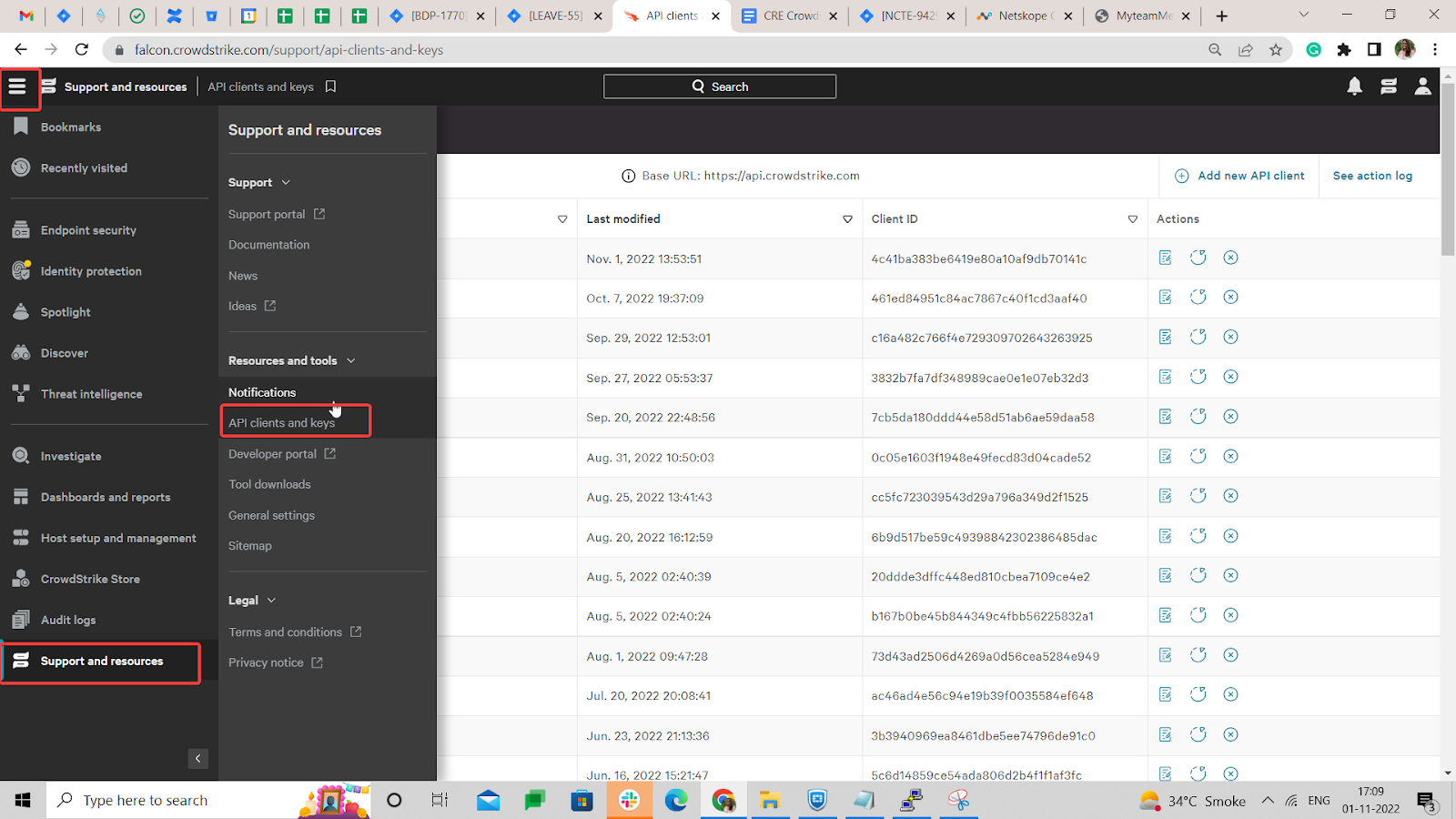
- In CrowdStrike, go to the menu Icon > Support and resources > API clients and Keys.
- Click Add new API Client.
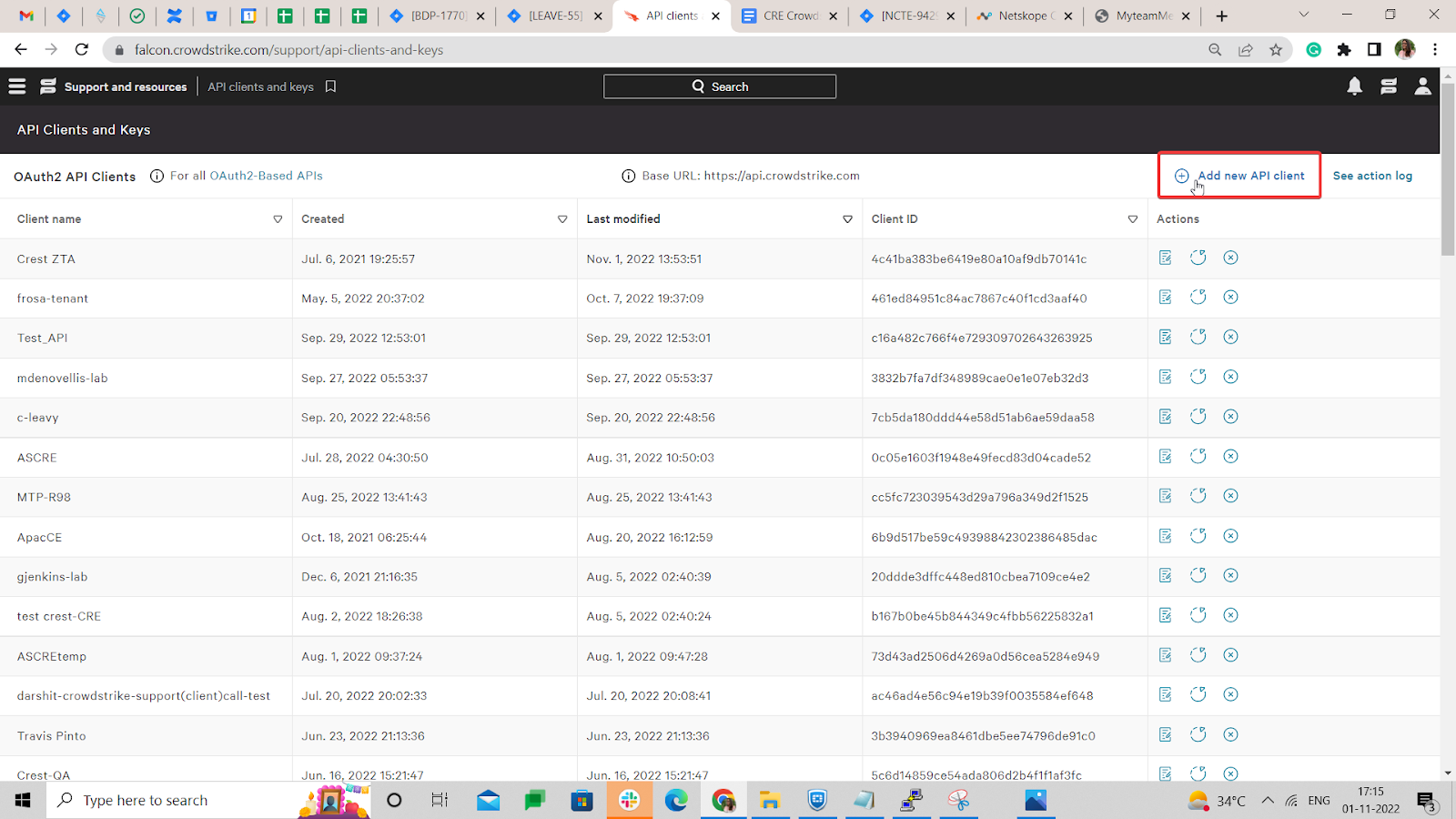
- Add the following scopes for using the CrowdStrike plugin:
Scope Read Write CSPM Registration Yes – - Make a copy of the Client ID and Client Secret. You’ll need these to configure the plugin.
Configure the CrowdStrike Falcon Cloud Security Plugin
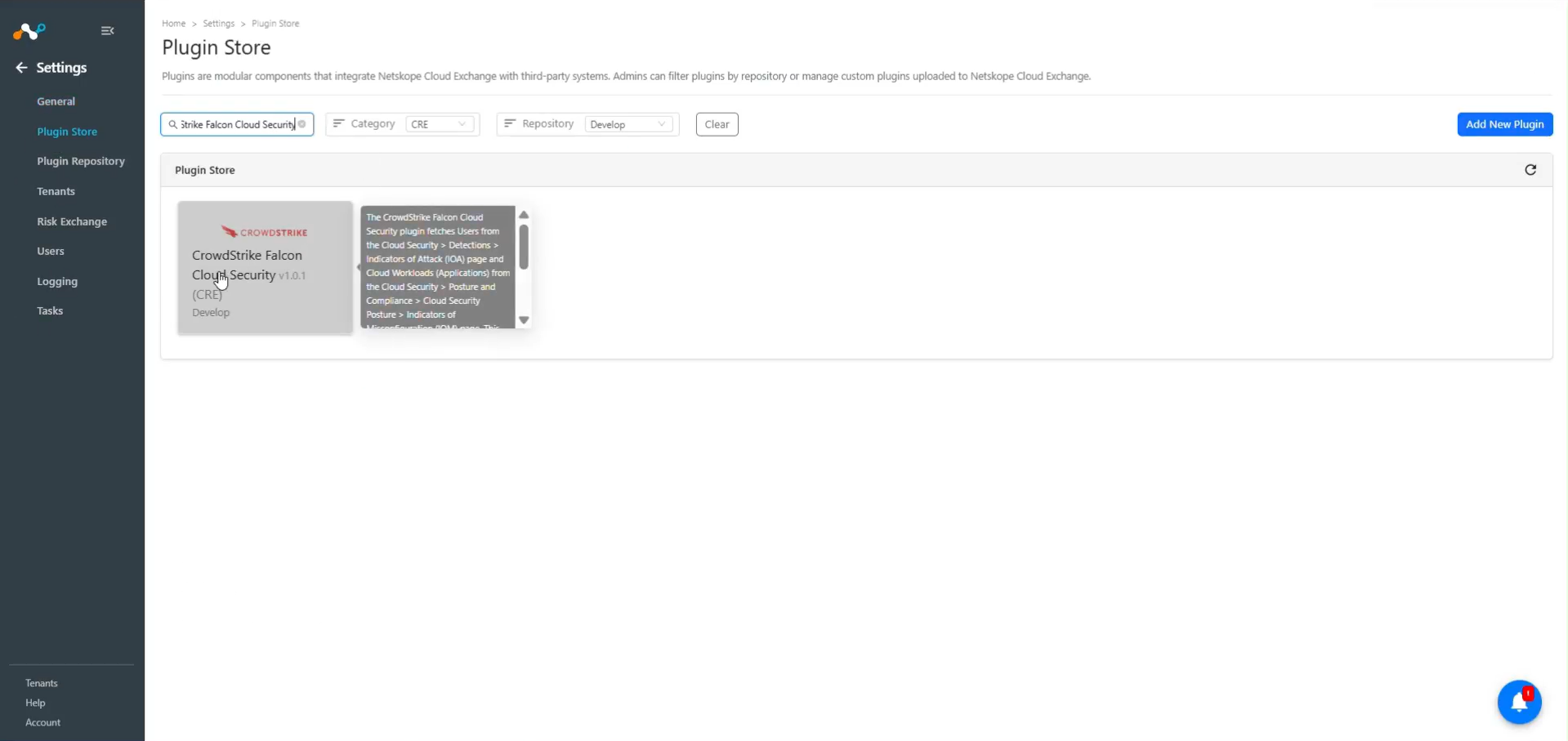
- In Cloud Exchange, go to Settings > Plugin Store. Search for and select the CrowdStrike Falcon Cloud Security v1.0.1 (CRE) plugin box.
- Add a plugin configuration name and change the sync interval if needed.
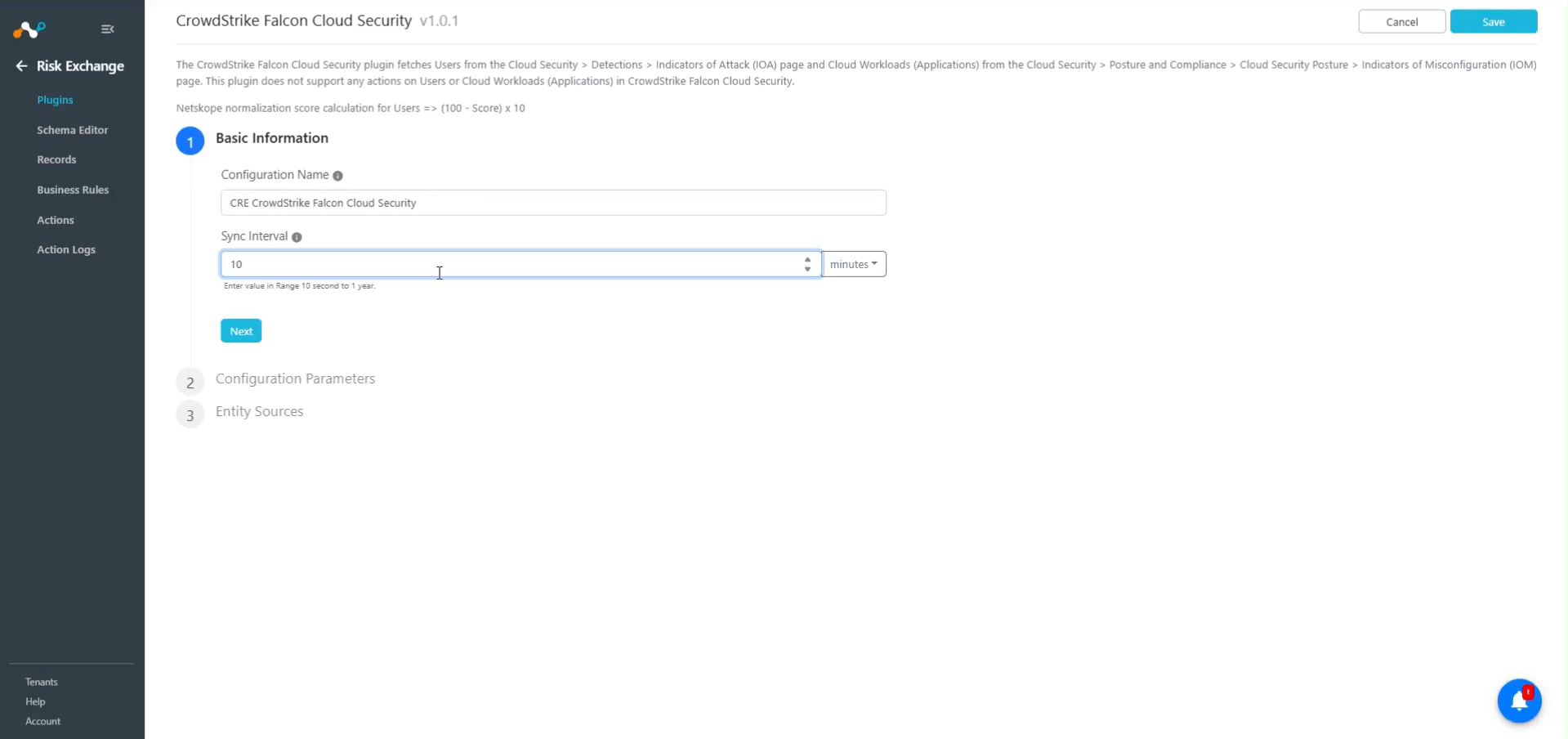
- Click Next and add the Configuration Parameters:
- Base URL: Base URL of CrowdStrike instance, like https://api.crowdstrike.com.
- Client ID: Client ID generated from the CrowdStrike platform.
- Client Secret: Client Secret generated from the CrowdStrike platform.
- IOA Cloud Provider: Users from the specified IOA Cloud Provider will be pulled from the Cloud Indicators of attack (IOAs) events.
- IOA Cloud Service: Users from the specified IOA Cloud Service will be pulled from the Cloud Indicators of attack (IOAs). Keep empty to fetch users from all Cloud Services.
- IOM Cloud Provider: Applications (Cloud Workloads) from the specified IOM Cloud Provider will be pulled from Indicators of misconfiguration (IOMs) events. Keep empty to pull Applications (Cloud Workloads) from all Cloud Providers.
- IOM Cloud Service: Applications (Cloud Workloads) from the specified IOM Cloud Service will be pulled from Indicators of misconfiguration (IOMs) events. Keep empty to pull Applications (Cloud Workloads) from all Cloud Services.
- Initial Range (in days): Number of days to pull the data for the initial run.
- Click Next and select the Entity from the Entity dropdown. The Entity fields can be created from the Schema Editor page, or using the + Add Field option from the field dropdown. Provide the field mappings. For the suggested mapping, please refer to the section Mappings.
Note
Username and resource ID field will be required to pull the Users, and instance ID is required to pull applications.
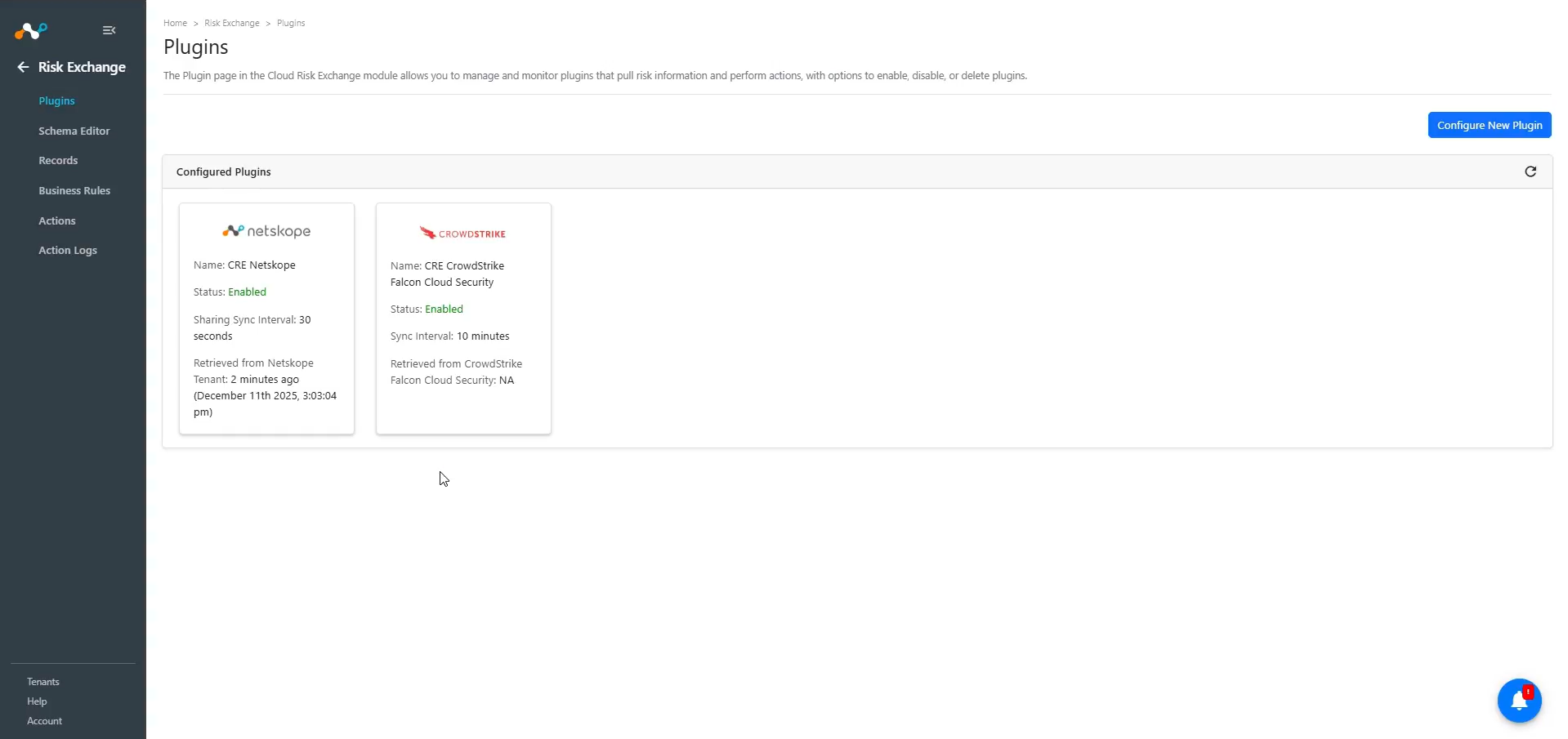
- Click Save.
Add a Risk Exchange Business Rule for CrowdStrike
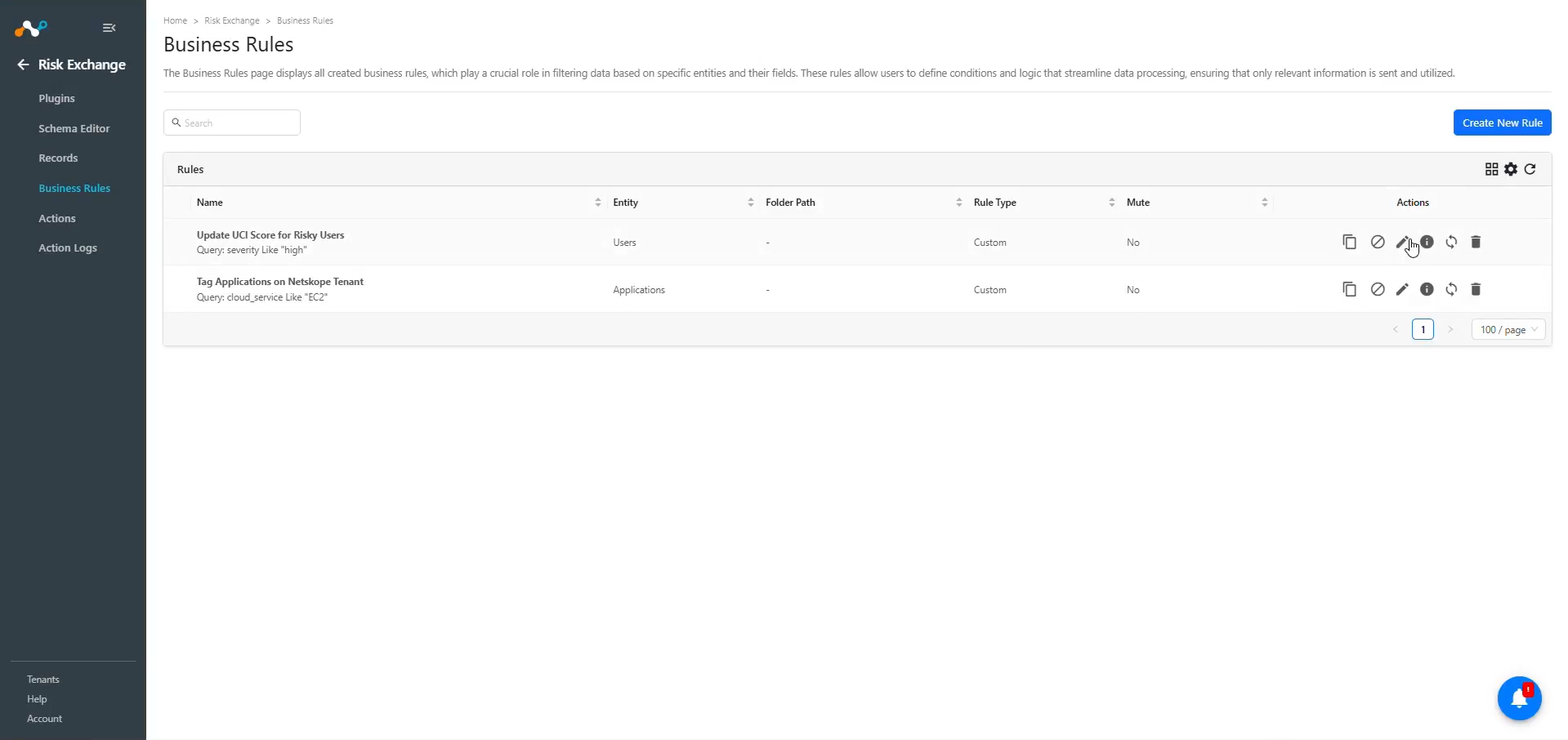
- In Risk Exchange, go to Business Rules and click Create New Rule.
- Enter a Rule Name. Select the Entity for the Fields configured for the CrowdStrike Falcon Cloud Security plugin, and configure the query based on your requirements. These are example filters for the data fetched from the plugin.
- Click Save.
Add Risk Exchange Actions for CrowdStrike
CrowdStrike Falcon Cloud Security supports the following action type:
No Action
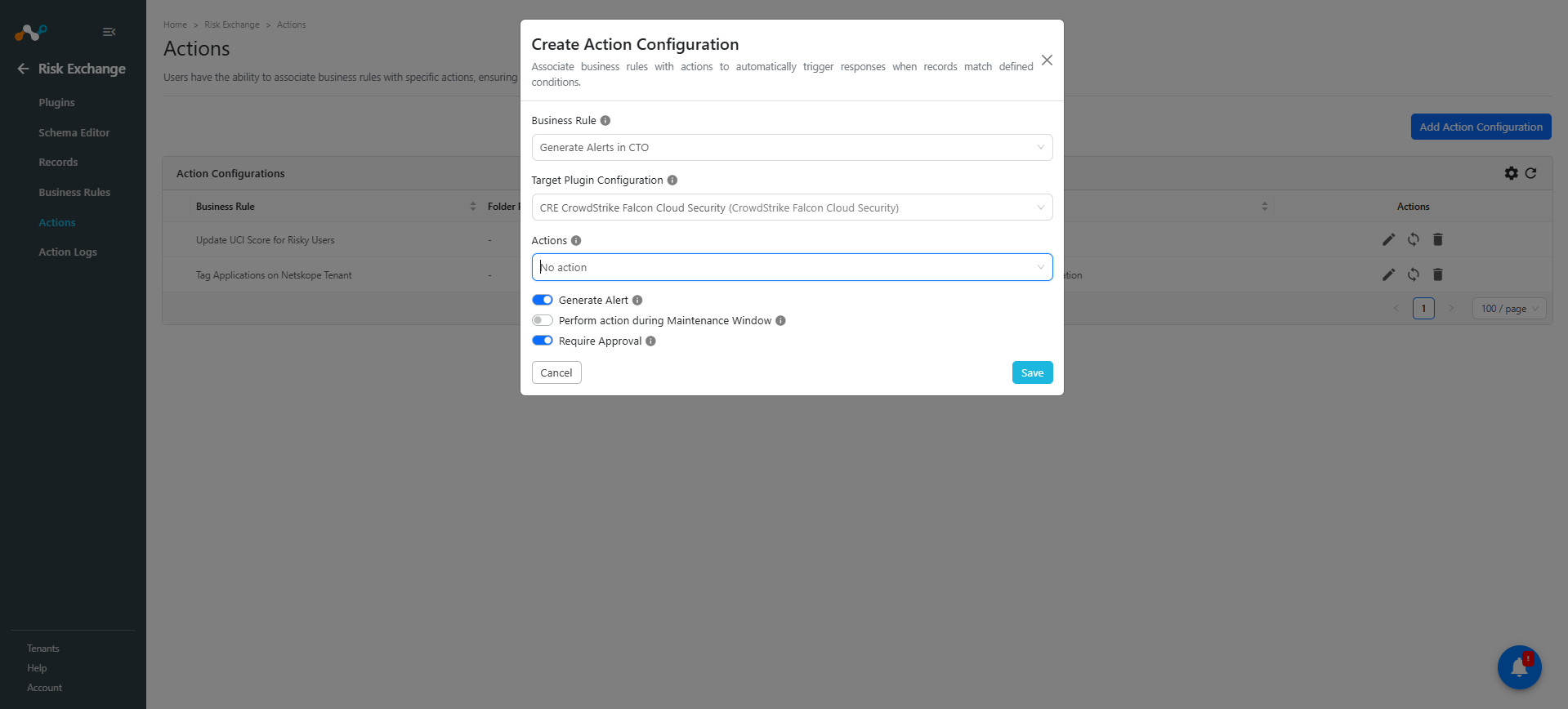
No action will be performed for this action. You can generate UBA alerts in Ticket Orchestrator by using this action and enabling the Generate Alerts toggle.
Note
You can perform the actions on the users and application pulled from CrowdStrike Falcon Cloud Security on the Netskope Tenant.
Steps to configure the Action
- In Risk Exchange, go to Actions and click Add Action Configuration.
- Select the required Business Rule, Configuration, and Action from their respective dropdown.
- Enable the Require Approval toggle if Approval is needed before performing an action on the Users/Applications.
- Click Save.
Validate the CrowdStrike Plugin
Validate in Cloud Exchange
In Cloud Exchange, to Validate the pulling, follow the below steps.
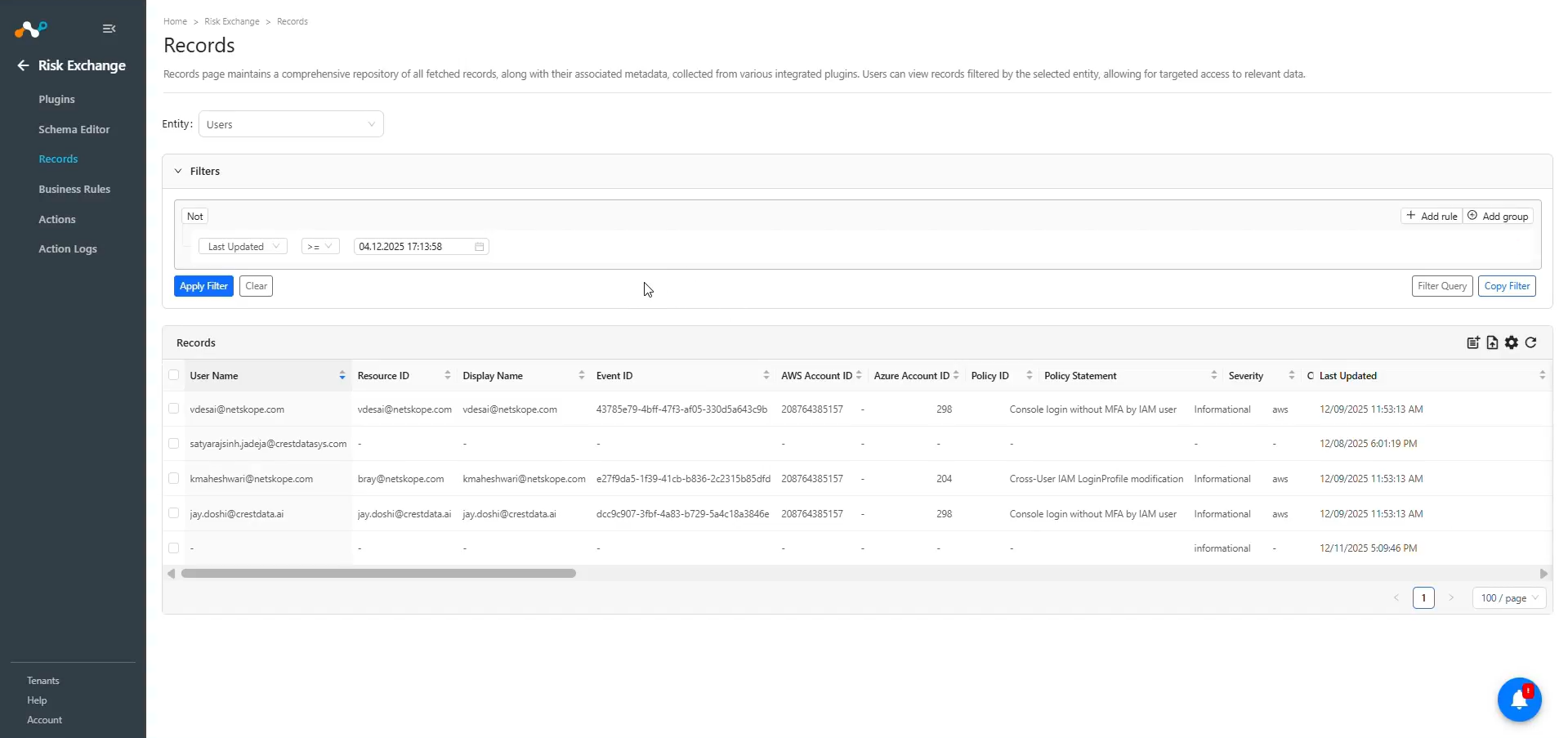
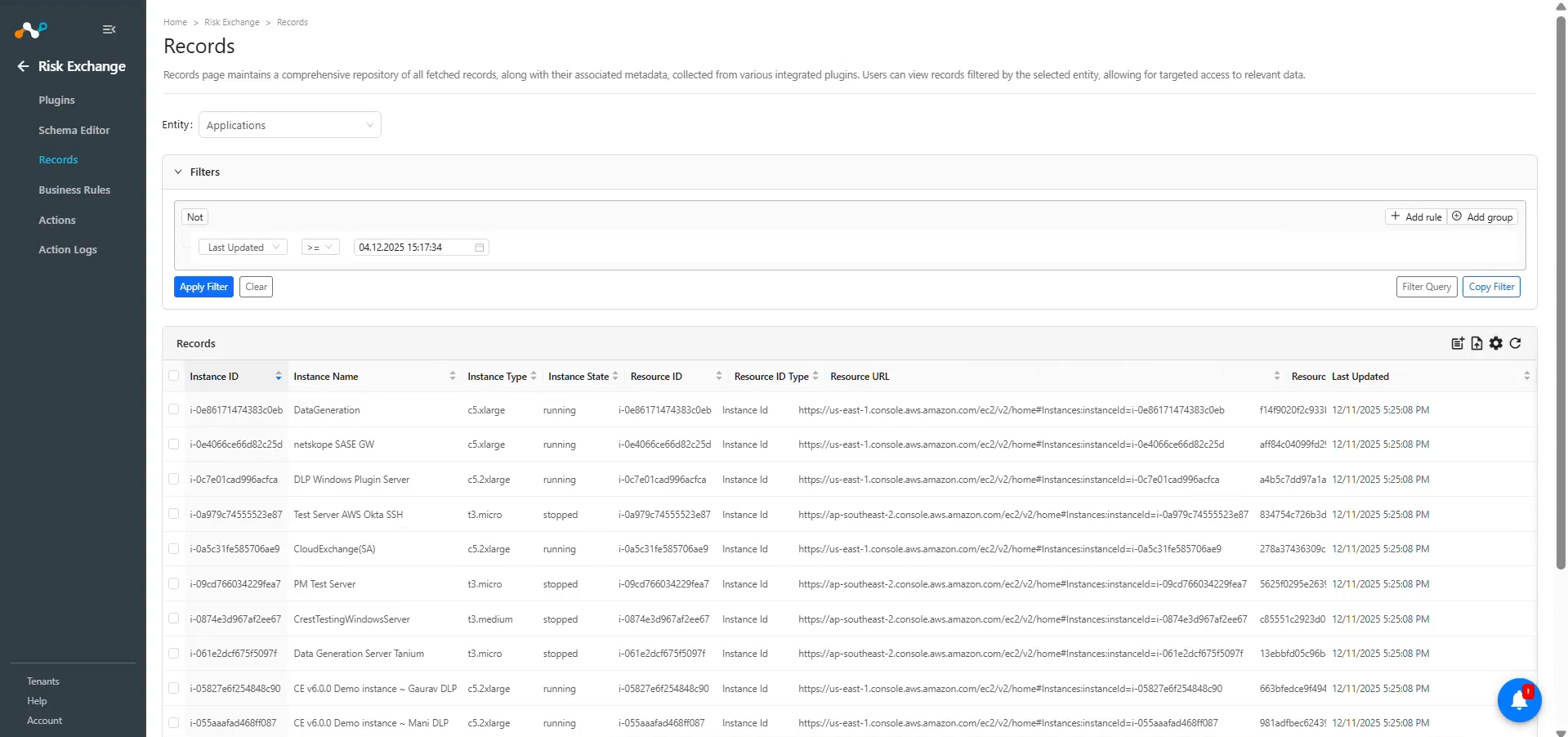
In Risk Exchange go to Records. Select the Entity that was used while configuring the field mappings for Users and Applications to view the pulled data from the plugin.
For Users
For Applications
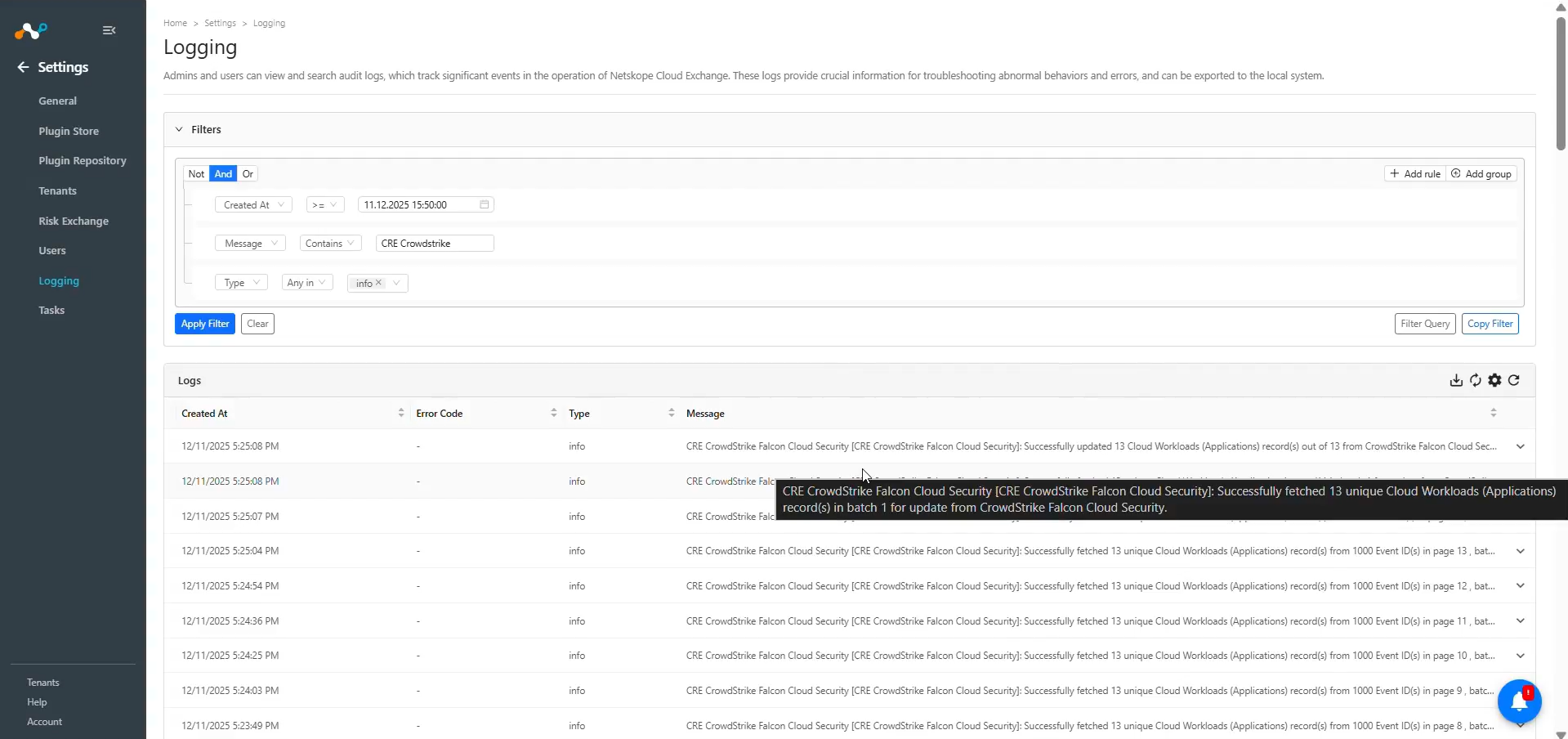
Go to Logging and search for the logs of the plugin.
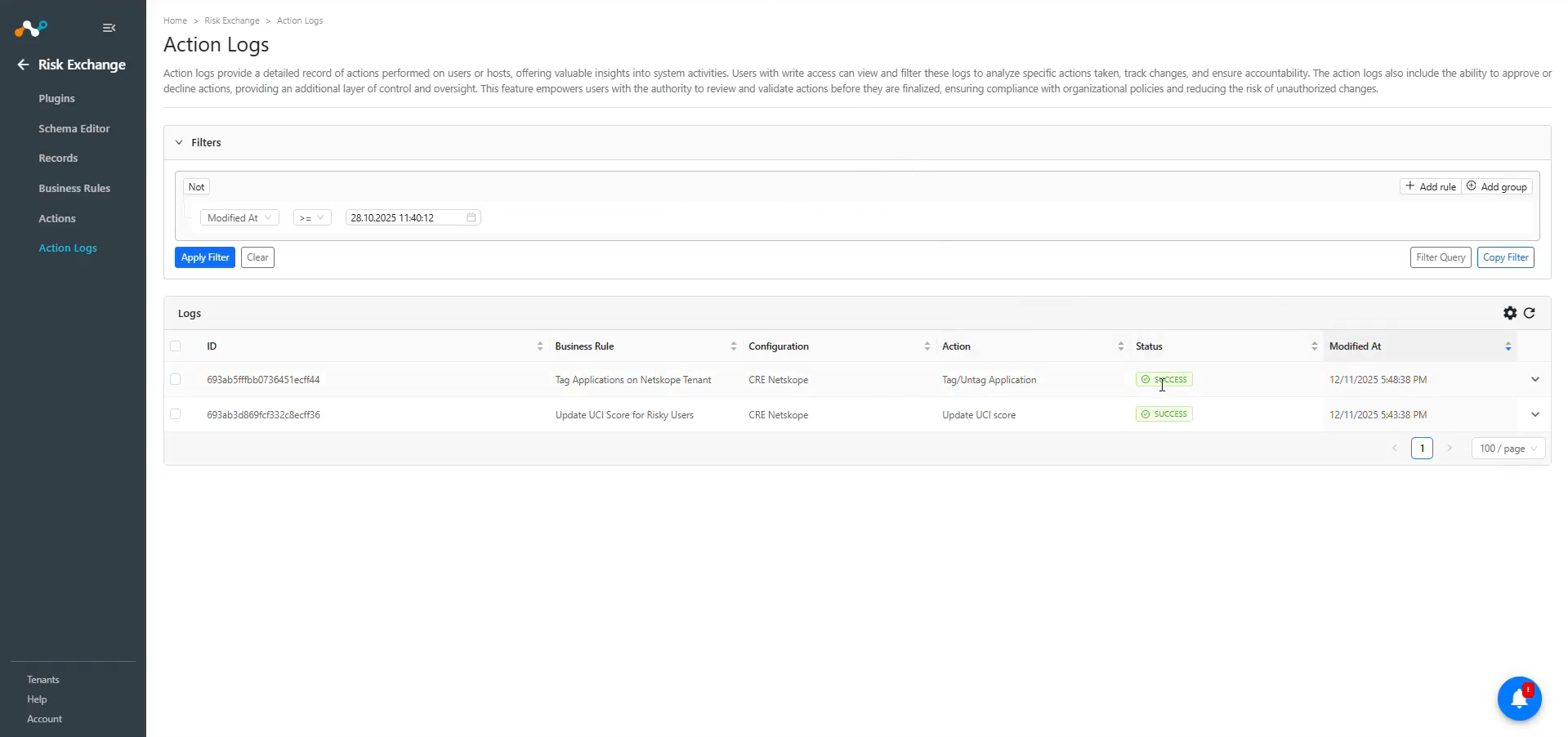
When a record matches one of the configured business rules, the configured action will be performed on the user/application. This can be seen in Risk Exchange at Action Logs.
Validate in CrowdStrike Falcon Cloud Security
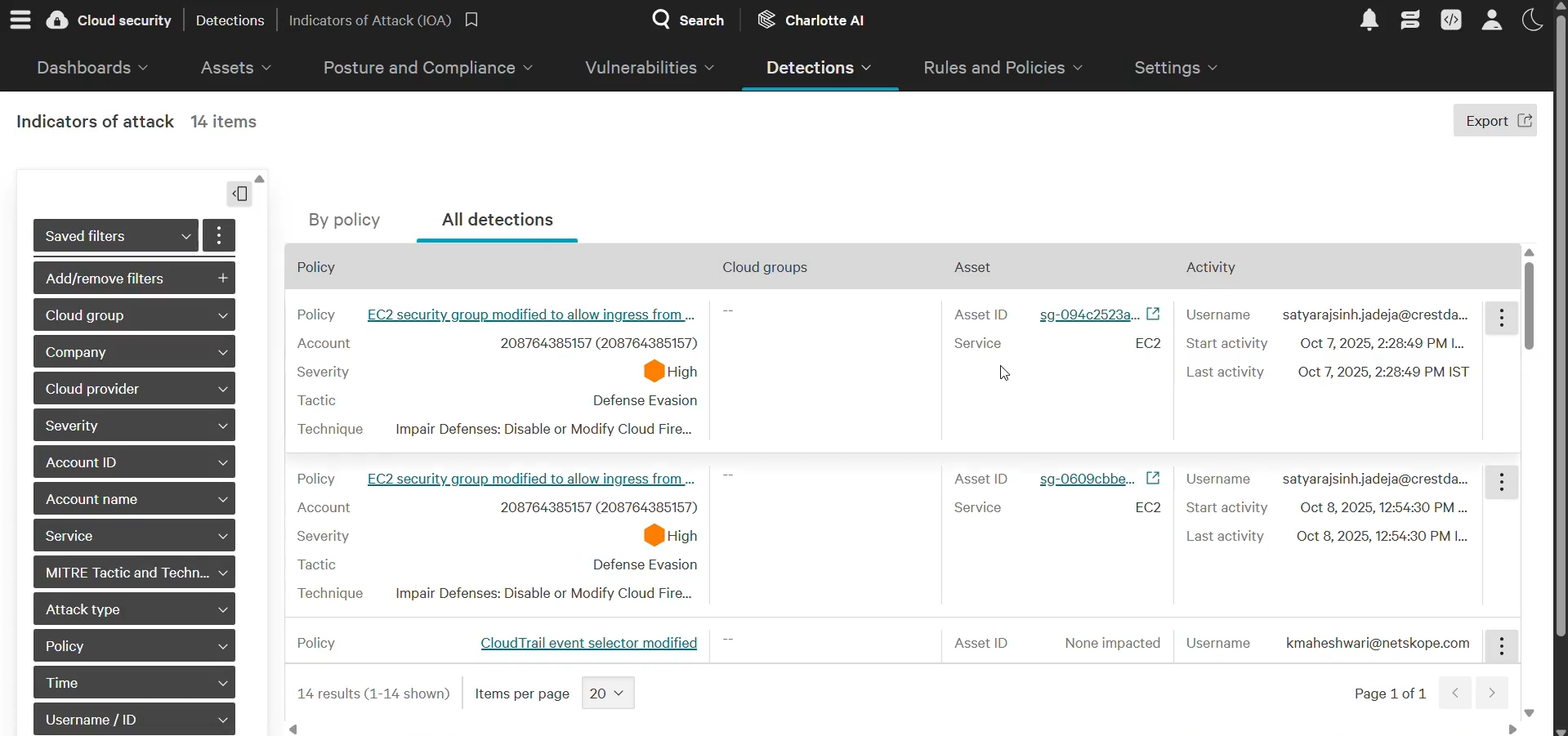
To verify the Users for pulling from CrowdStrike, note that the plugin pulls the user details from the Indicators of attack (IOAs) page under Cloud Security > Detections in the CrowdStrike tenant.
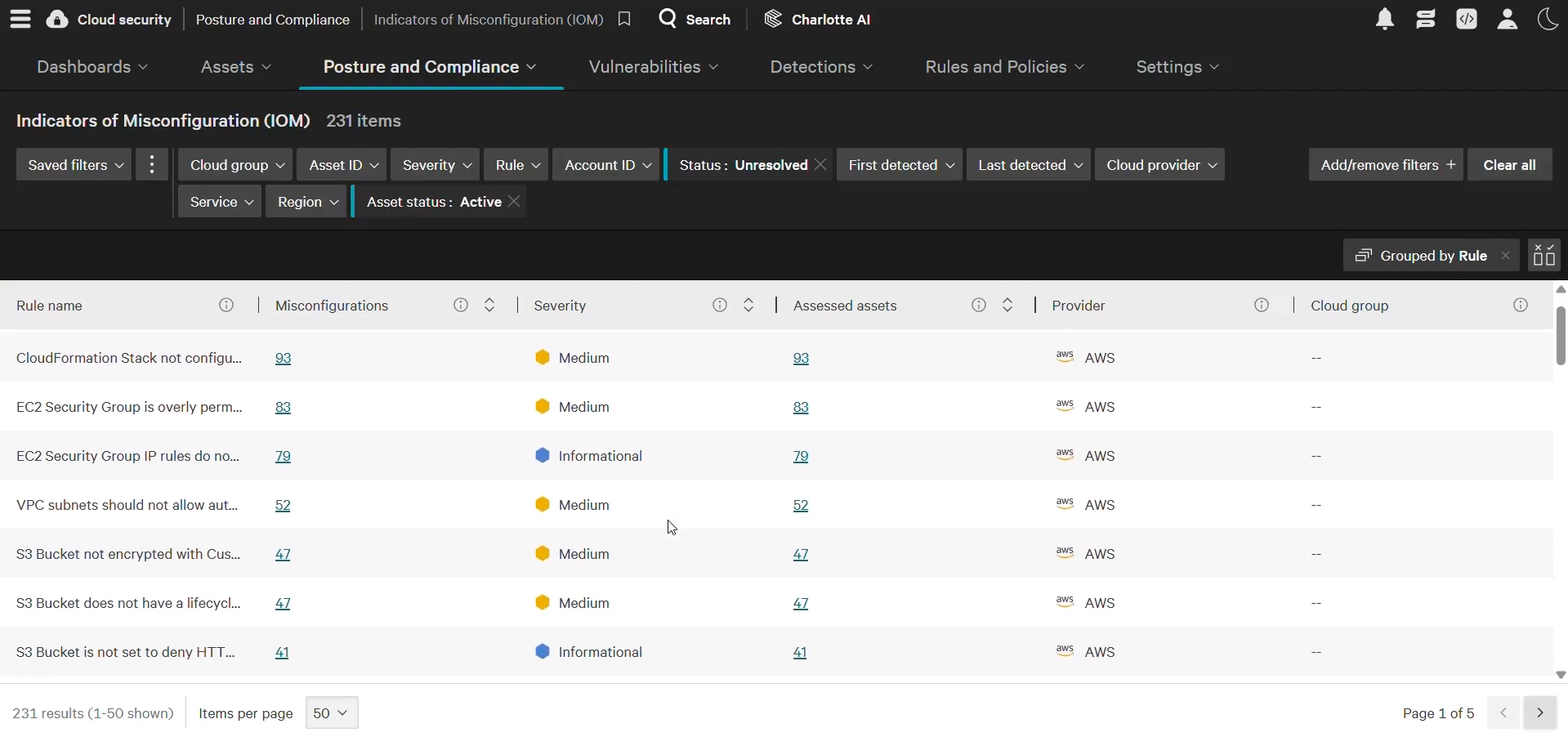
To verify the Applications for pulling from CrowdStrike, note that the plugin pulls the application details from the cloud workloads (applications) from the Indicators of misconfiguration (IOMs) page under Cloud Security > Posture and Compliance in the CrowdStrike tenant.
Troubleshooting the CrowdStrike Plugin
Unable to configure the CRE CrowdStrike Falcon Cloud Security plugin.
If you are unable to configure the CrowdStrike Falcon Cloud Security plugin, it could be due to one of these reasons:
- Provided incorrect Client ID or Client Secret.
- Provided Credentials don’t have sufficient permissions.
What to do:
- To get the Client ID and Client Secret, follow these steps.
- To provide proper permissions to the configuration parameter, follow these steps.
Receiving 403 forbidden error while configuring the plugin
If you are receiving 403 error, it may be due to one of these reasons:
- Check if the provided Client ID and Client Secret values are correct.
- The API client has proper permissions. Check if you have proper permissions provided to the API Client.
- You have IP groups added in the IP Allowlist Management page.
What to do:
Follow these steps to add your Cloud Exchange public IP to CrowdStrike’s IP allowlist
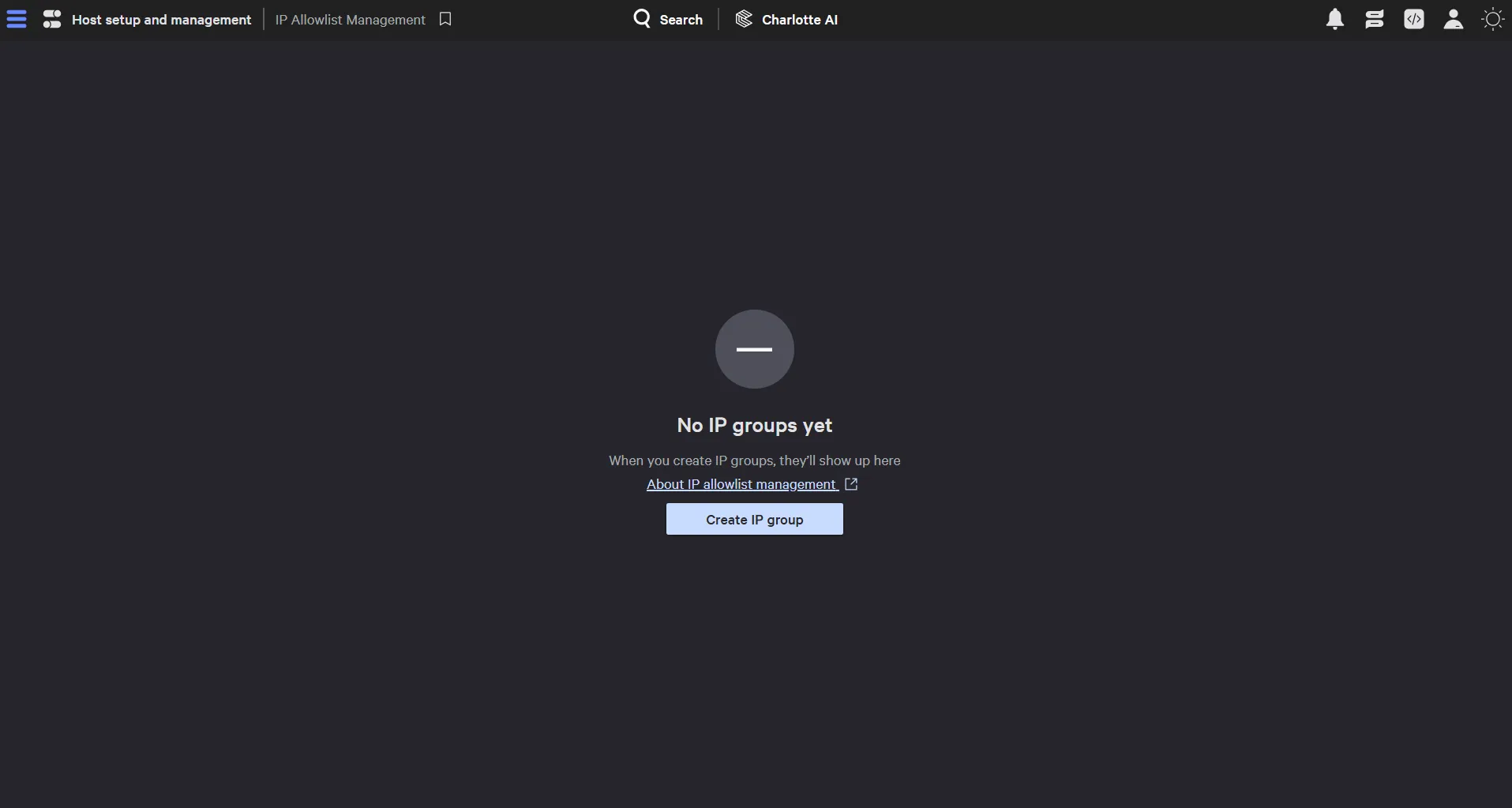
- In CrowdStrike, go to Host setup and management > Falcon users > IP Allowlist Management and check if any IP groups are added. If added, it will be listed on the page. If not, your screen will look as below. Continue in case you have the IP groups added in the IP Allowlist Management page.
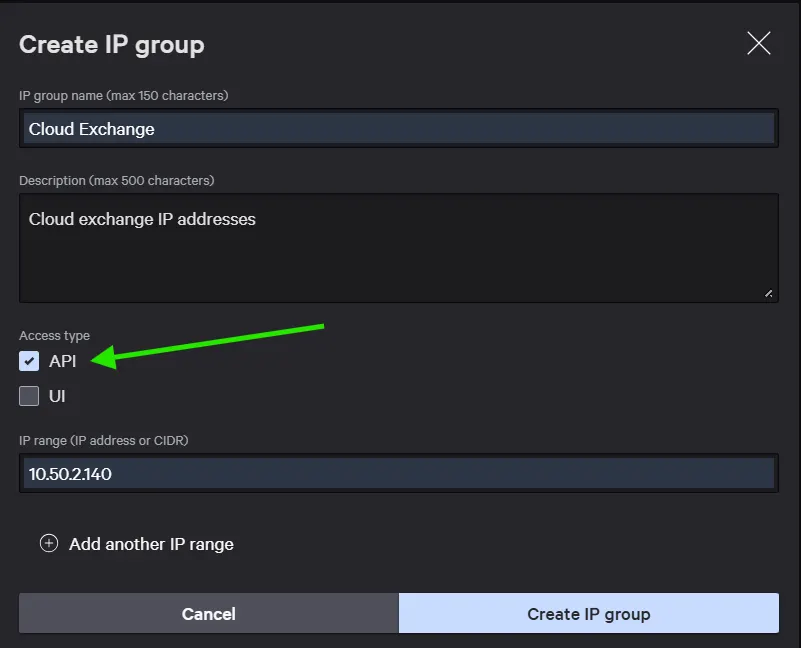
- If you have some IP allowlist groups configured on your CrowdStrike tenant, make sure to add the Public IP Address of the virtual machine where Cloud Exchange is running into an existing group, or you can create a new IP allowlist Group. While adding that, make sure you have Access Type API selected as shown.
Unable to pull Users/Applications
If you are unable to pull applications from the plugin, it could be due to one of these reasons:
- An error is received while pulling the data from the platform.
- Mapping is not added while configuring the plugin in the entity source page.
What to do:
- Check on the platform if applications exist or not.
- Receiving 500 error: The server might be down. Wait for a while and check later.
- Receiving 403 error: The plugin configuration parameter does not have sufficient permissions or the credentials no longer exist. Verify the permission for the Client ID and Client Secret.
- Receiving 401 error: The provided credentials while configuring the plugin no longer exist. Verify credentials and edit the plugin configuration with valid credentials if required.
- If there is no error in the logs, it might be the case that the applications are not available on the Platform to pull. Check the applications available on CrowdStrike and confirm the same.
- Make sure that the mapping is added and the id field is mapped while configuring the plugin.
Unable to View Users/Application details on the Record
If you are unable to view application details on the record table, it could be due to one of these reasons:
- Mapping for the mandatory/any fields was not provided while configuring the plugin.
- Pulled records are displayed in a row with comma-separated values.
What to do:
- Make sure to provide the needed mapping while configuring the plugin.
- Make sure that the fields created in an entity are according to the Mapping.