

Release Notes
1.1.1
Changed
- URL encode the attachment name before making API call for attachment details.
- Removed skipped IOC values from logger message, due to None values.
- Updated maximum allowed value for Initial Range and Retraction Interval to 100k days.
1.1.0
Added
- Added support for fetching IoCs of type IPv6.
- Added API URL for FedRAMP GovCloud instances.
Fixed
- Fixed sub_checkpoint logic.
- Fixed IoC fetched and skipped count error in log messages.
1.0.0
Added
- Initial Release.
This document explains how to configure the CTE Abnormal Security v1.1.1 plugin for the Threat Exchange module of the Netskope Cloud Exchange platform.This plugin is used to pull IOCs of type SHA256, MD5, URL, Domain, IPv4 and IPv6 from Threat Log page of Abnormal Security platform. This plugin supports retraction of IOCs pulled from the Abnormal Security platform. This plugin does not support sharing of indicators to the Abnormal Security platform.
Prerequisites
To complete this configuration, you need:
- A Netskope tenant (or multiple, for example, production and development/test instances).
- A File Profile on your Netskope tenant.
- A URL List on your Netskope tenant.
- A Destination Profile on your Netskope tenant.
- A Private App on your Netskope tenant.
- A DNS Profile on your Netskope Tenant
- A Netskope Cloud Exchange instance with the Tenant plugin and Threat Exchange plugin already configured.
- Abnormal Security platform credentials.
- Connectivity to the following hosts:
- Production Server (api.abnormalplatform.com/v1)
- EU Production Server (eu.rest.abnormalsecurity.com/v1)
- FedRAMP GovCloud (rest.abnormalsecurity.us)
Abnormal Security Plugin Support
| Fetched Indicator Types | Shared Indicator Types |
|---|---|
| Not Supported |
Mappings
Pull Mappings
| Cloud Exchange Fields | Abnormal Security Fields |
|---|---|
| Value | value corresponding to field (senderDomain or senderIpAddress or md5 or sha256 or urls or url) |
| Type | senderDomain, senderIpAddress, md5, sha256, urls, url |
| firstSeen | receivedTime (for senderDomain and senderIpAddress and urls) or createdOn (for md5 and sha256 and url) |
| lastSeen | receivedTime (for senderDomain and senderIpAddress and urls) or lastUpdated (for md5 and sha256 and url) |
| tags | summaryInsights, remediationStatus |
| comments | subject |
IoC Retraction
IoC Retraction (Pull): Indicators will be fetched from Abnormal and in the subsequent pull cycles. If some indicators are deleted from Anomali, they will be marked as Retracted in Cloud Exchange.
IoC Retraction (Push): Retracted indicators present on Cloud Exchange will be deleted from Abnormal during sharing.
| Type | Description |
|---|---|
| IoC Retraction (Pull) | Yes |
| IoC Retraction (Push) | No |
Permissions
You will need below permissions for the API Toke:
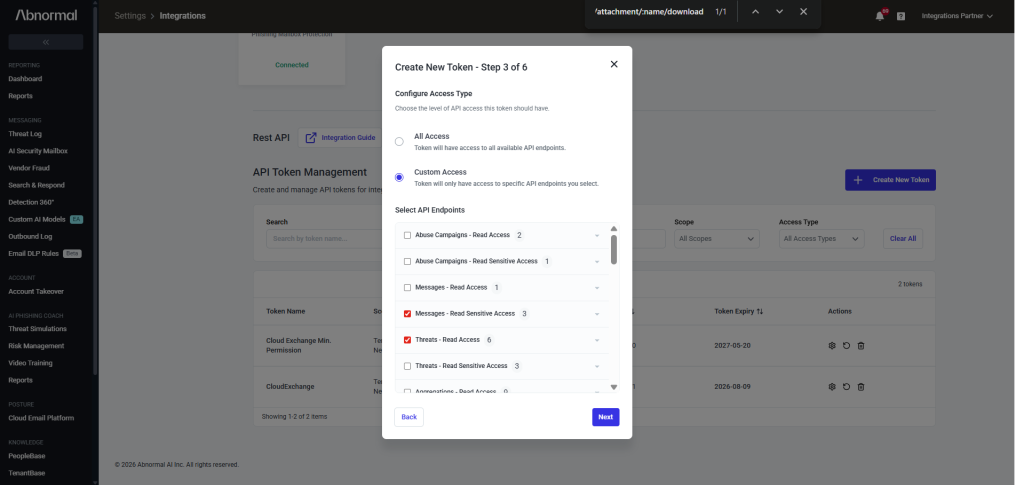
- Threats – Read Access
- Messages – Read Sensitive Access
API Details
List of APIs Used
| API Endpoint | Method | Use Case |
|---|---|---|
| /threats | GET | Get all threats within given timerange, paginated |
| /threats/<threat_id> | GET | Get threat details of given threat |
| /messages/<message_id>/attachment/<attachemnt_name> | GET | Get message and attachment details, message_id and attachment_name taken from above Threat details endpoint |
Pull Threats
Endpoint: /threats
Method: GET
Headers
| Key | Value |
|---|---|
| User-Agent | netskope-ce-6.1.0-cte-abnormal-security-v1.1.1 |
| Accept | application/json |
| Content-Type | application/json |
| Authorization | Bearer token |
Parameters
| Key | Value |
|---|---|
| pageSize | 100 |
| pageNumber | 100 |
| filter | receivedTime gte <start_time> lte <end_time> |
Sample Response
{
  "threats": [
    {
      "threatId": "184712ab-6d8b-47b3-89d3-a314efef79e2"
    }
  ],
  "pageNumber": 1,
  "nextPageNumber": 2
}
Pull Threat details
Endpoint: /threats/<threat_id>
Method: GET
Headers
| Key | Value |
|---|---|
| User-Agent | netskope-ce-6.1.0-cte-abnormal-security-v1.1.1 |
| Accept | application/json |
| Content-Type | application/json |
| Authorization | Bearer token |
Parameters
| Key | Value |
|---|---|
| pageSize | 100 |
| pageNumber | 100 |
Sample Response
{
  "threatId": "184712ab-6d8b-47b3-89d3-a314efef79e2",
  "messages": [
    {
      "threatId": "184712ab-6d8b-47b3-89d3-a314efef79e2",
      "abxMessageIdStr": "4551618356913732000",
      "abxPortalUrl": "https://portal.abnormalsecurity.com/home/threat-center/remediation-history/4551618356913732076",
      "subject": "Phishing Email",
      "fromAddress": "support@secure-reply.org",
      "fromName": "Support",
      "senderDomain": "secure-reply.org",
      "toAddresses": "example@example.com, another@example.com",
      "recipientAddress": "example@example.com",
      "receivedTime": "2020-06-09T17:42:59Z",
      "sentTime": "2020-06-09T17:42:59Z",
      "internetMessageId": "<5edfca1c.1c69fb81.4b055.8fd5@mx.google.com>",
      "remediationStatus": "Auto Remediated",
      "attackType": "Extortion",
      "attackStrategy": "Name Impersonation",
      "returnPath": "support@secure-reply.org",
      "replyToEmails": [
        "reply-to@example.com"
      ],
      "ccEmails": [
        "cc@example.com"
      ],
      "senderIpAddress": "100.101.102.103",
      "impersonatedParty": "None / Others",
      "attackVector": "Text",
      "attachmentNames": [
        "attachment.pdf"
      ],
      "attachmentCount": 0,
      "urls": [
        "https://www.google.com/"
      ],
      "urlCount": 0,
      "summaryInsights": [
        "Bitcoin Topics",
        "Personal Information Theft",
        "Unusual Sender"
      ],
      "remediationTimestamp": "2020-06-09T17:42:59Z",
      "isRead": true,
      "attackedParty": "VIP",
      "autoRemediated": "True",
      "postRemediated": "False"
    }
  ],
  "pageNumber": 1,
  "nextPageNumber": 2
}
Pull Threat Message and Attachment details
Endpoint: /messages/<message_id>/attachment/<attachment_name>
Method: GET
Headers
| Key | Value |
|---|---|
| User-Agent | netskope-ce-6.1.0-cte-abnormal-security-v1.1.1 |
| Accept | application/json |
| Content-Type | application/json |
| Authorization | Bearer token |
Sample Response
{
    "data": [
        {
            "attachmentName": "image.jpg",
            "type": "jpg",
            "md5": "d38deea567961e23059d3edd310a82d0",
            "sha1": "1caeee0cca7ac0e8f95fac59acf4d06d48884622",
            "sha256": "f2ccf68511b93832ea8dd7195fb60319de7a03b1795081aed53272d8d82268f1",
            "size": "200KB",
        }
    ]
}
Performance Matrix
This performance has been conducted on a large CE instance with these specifications by pulling 100k IoCs.
| Description | Specification |
|---|---|
| Stack details | Size: Large RAM: 32 GB CPU: 16 Cores |
| Indicators fetched from Abnormal Security | ~20k IoCs per min |
User Agent
netskope-ce-6.0.0-cte-abnormal-security-v1.1.0
Workflow
- Get the API Token for Abnormal Security.
- Configure the Abnormal Security plugin.
- Add a Business Rule for Abnormal Security.
- Configure Sharing for Abnormal Security and Netskope Threat Exchange
- Validate the Abnormal Security plugin.
Watch a Video
Click play to watch a video:
Get the API Token for Abnormal Security
-
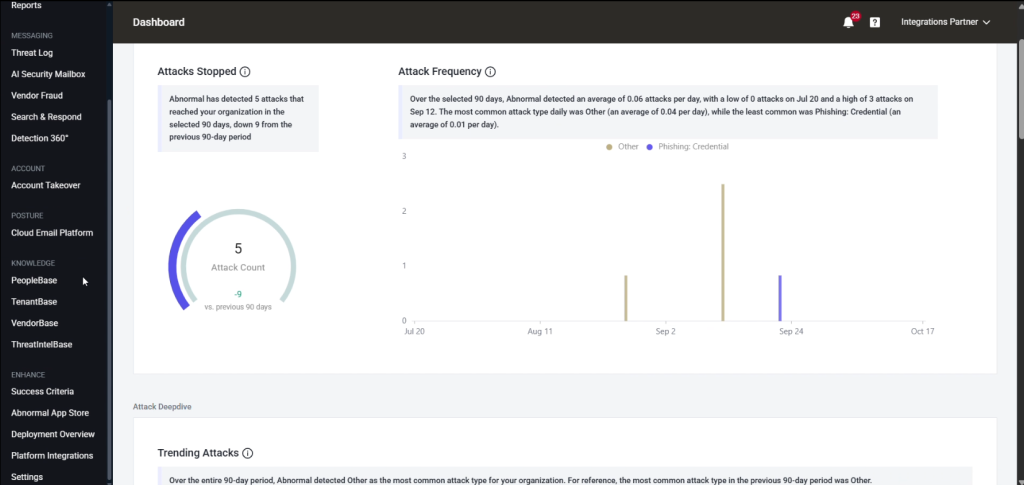
Log in to Abnormal Security.
-
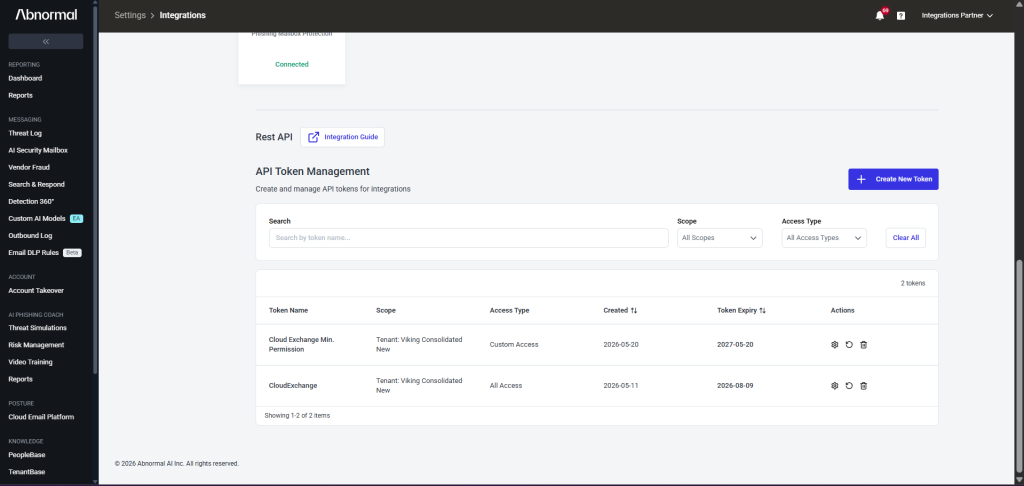
Go to Settings > Integrations.
-
Scroll down to the API Token Management section and click Create New Token.
-
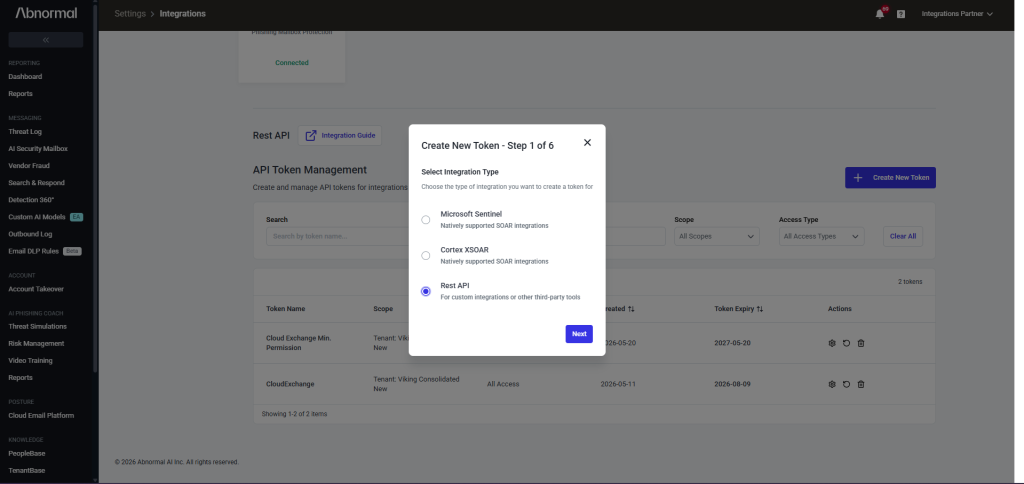
Select Rest API, and click Next.
-
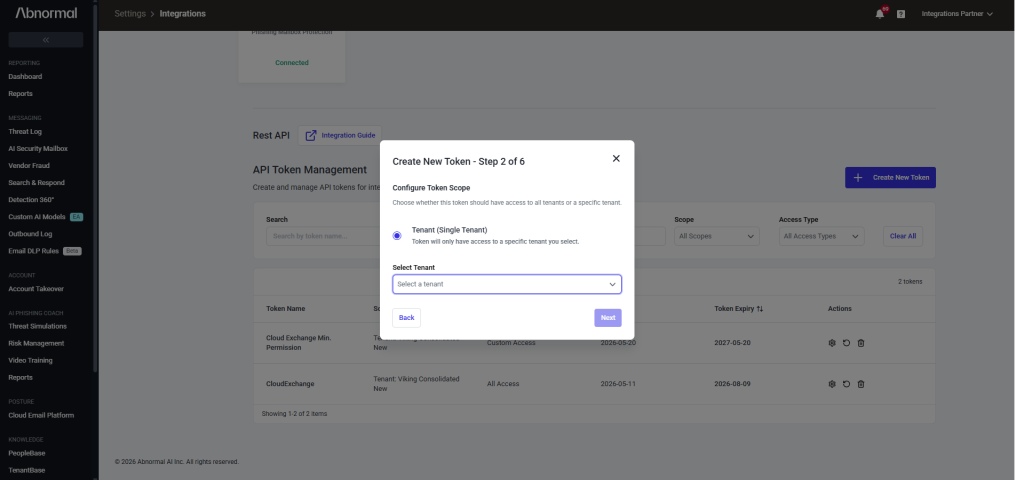
Select the tenant from the dropdown, and click Next.
-
Select Custom Access for Configure Access Type, select the permissions listed in the permissions section, and click Next.
-
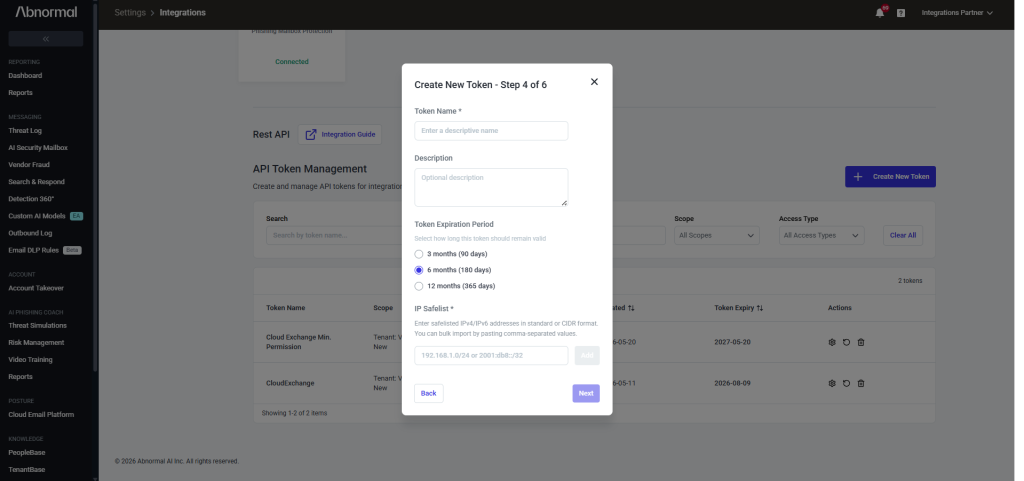
Enter a Token Name, Description and select Token Expiration Period, and provide the public IP of the instance hosting your Cloud Exchange in the IP Safelist, and then click Next.
-
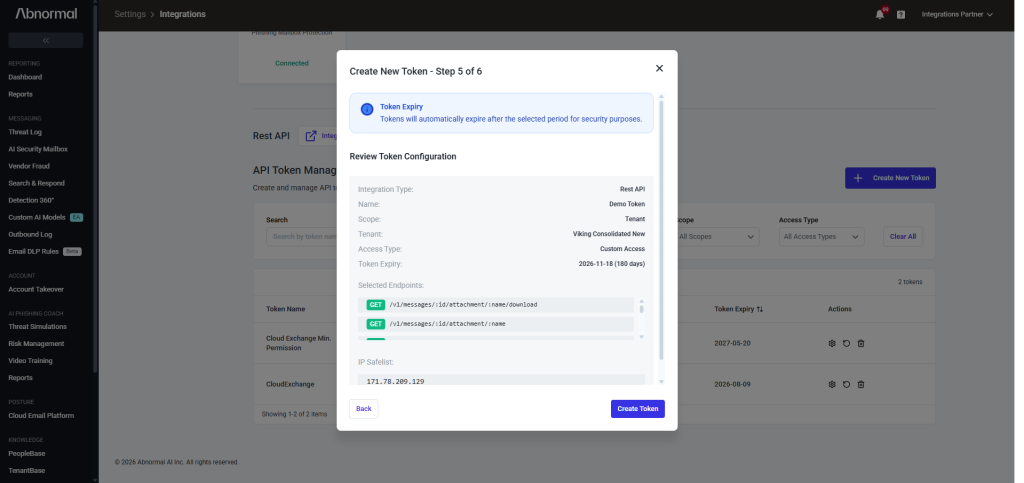
Review the Token Configuration and click Create Token.
-
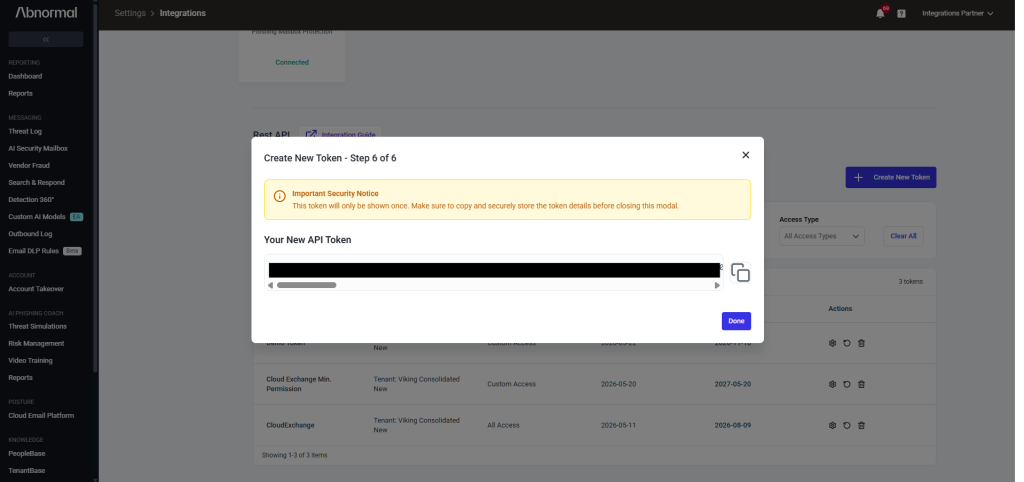
Copy the created API Token.


Configure the Abnormal Security Plugin
-
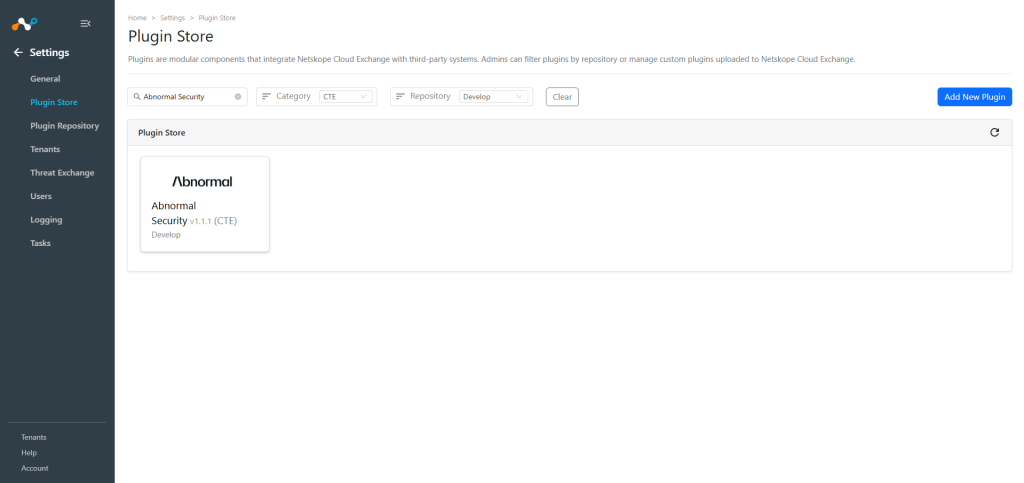
In Cloud Exchange and go to Settings > Plugin Store. Search for and select the Abnormal Security v1.1.1 (CTE) plugin.
-
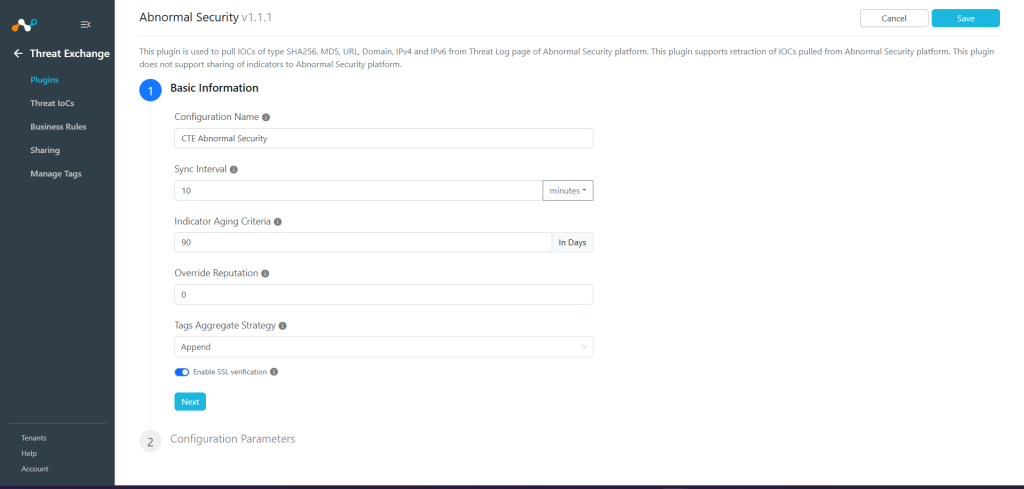
Enter the Basic Information:
- Configuration Name: Unique name for the configuration.
- Sync Interval: Leave the default
- Aging Criteria: Expiry time of the plugin in days. ( Default: 90 )
- Override Reputation: Set a value to override the reputation of indicators received from this configuration.
- Enable SSL Validation: Enable SSL Certificate validation.
- Use System Proxy: Enable if the proxy is required for communication.
-
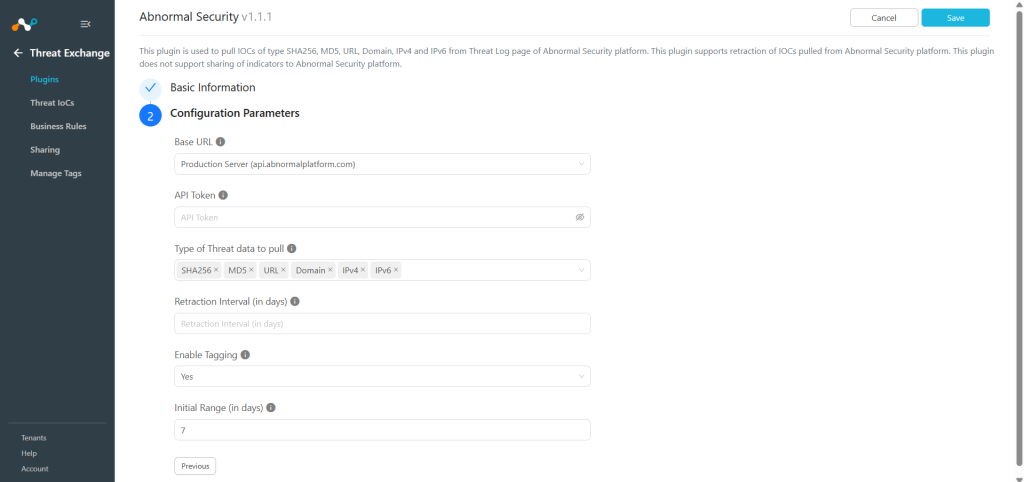
Click Next and enter the Configuration Parameters.
- Base URL: Base URL of Abnormal Security API endpoint.
- API Token: Provide the API Token from Abnormal Security.
- Type of Threat Data to Pull: Type of Threat data to pull. Allowed values are SHA256, MD5, URL, Domain, IPv4 and IPv6.
- Retraction Interval (in days): Retraction Interval days to run IoC(s) retraction for Abnormal Security indicators. Note that this parameter will only be considered if IoC(s) Retraction is enabled in Threat Exchange Settings. This parameter is applicable only for Netskope CE version 5.1.0 and above.
- Enable Tagging: Enable/Disable tagging functionality.
- Initial Range (in days): Number of days Threat IoCs to pull in the initial run.
-
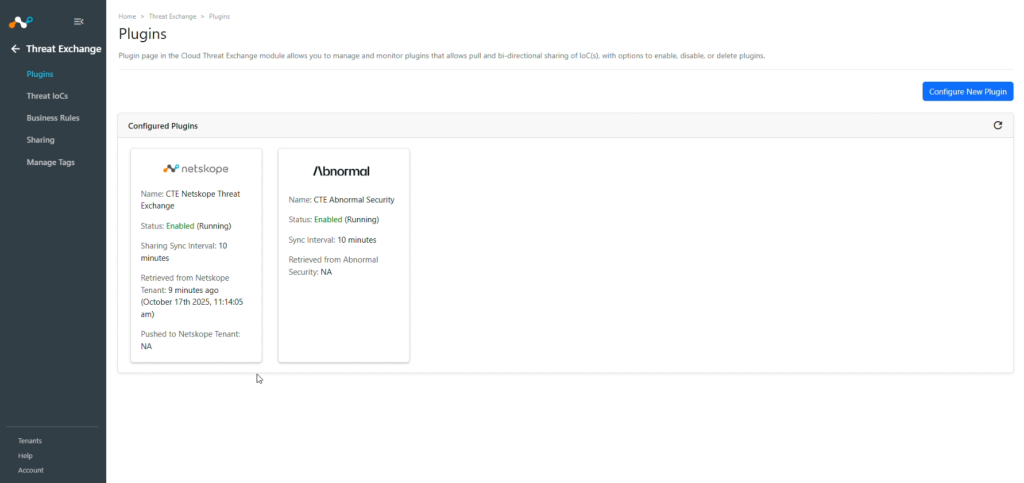
Click Save.


Add a Threat Exchange Business Rule for Abnormal Security
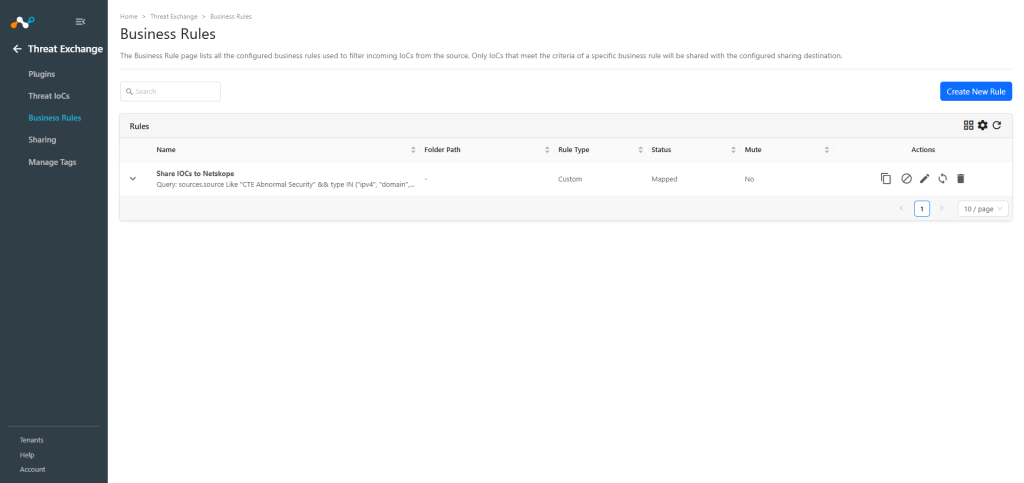
To share indicators fetched from Abnormal Security to the Cloud Exchange, you need to have a business rule that will filter out the indicators that you want to share.
-
In Threat Exchange, go to Business Rules and Create New Rule.
-
Add the filter according to your requirement in the rule, and then click Save.

Configure Sharing for Abnormal Security and Netskope
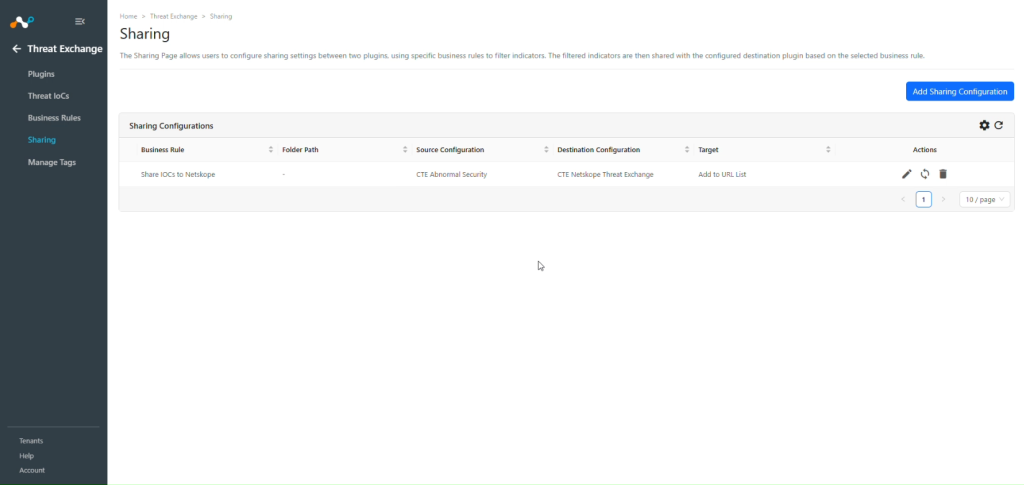
To share IoCs from the Abnormal Security to other third party platform:
-
In Threat Exchange, go to Sharing and click Add Sharing Configuration.
-
Select your Source Configuration (CTE Abnormal Security), Business Rule, Destination Configuration (CTE Netskope), and Target.
-
Click Save.

Note
- The Abnormal Security plugin does not support sharing of IoCs, but the IoCs pulled from this plugin can be shared to other 3rd-party platforms.
- As you are pulling SHA256, MD5, URL, Domain, IPv4 and IPv6 from Abnormal Security, you can add URL, IPv4 and Domains to the URL list, plus SHA256 and MD5 to File hash List, IPv4 and Domain to Private App. URL, IPv4, and Domains to Destination Profile, and Domains to DNS Profile.
Validate the Abnormal Security Plugin
Validate the Pull
To verify pulled logs in Cloud Exchange, go to Logging and search logs from the CTE Abnormal Security plugin. You can filter the logs using the filter: message Like “[<plugin configuration name>]”
Pulled data will be listed on the Threat IoCs page. You can filter the IoCs pulled from the platform using the filter: sources.source Like “<plugin configuration name>”


To verify the data available for pulling on Abnormal Security, log in to Abnormal Security and go to the Threat Log page.
Open any of the Threat logs, and there you can find different IoCs that can be pulled.
- The plugin pulls URLs from the Links section.
- IPv4 and IPv6 from Sender IP Address.
- Domain from Sender Domain.
- SHA256 and MD5 from the Attachments of Email Content.

Validate the Pull Retraction
To verify the Retracted IoCs, check the logs for IoC Retraction example: message Like CTE Abnormal Security [CTE Abnormal Security] [Retraction].
You can filter the retracted IoCs from the platform using the filter: sources.source Is equal “<plugin configuration name>” && sources.retracted Is equal true
The IoCs that fall under the Retraction Interval will be marked as Retracted: Yes in Cloud Exchange.
Troubleshooting the Abnormal Security Plugin
Receiving error while configuring the plugin or pulling data
If you are receiving the below error while configuring the plugin.
CTE Abnormal Security [CTE Abnormal Security]: Validation error occurred, Received exit code 403 (Forbidden), Verify Base URL and API Token provided in the configuration parameters.
This issue may be due to one of these reasons:
- Base URL and API Token is invalid/deleted.
- Your public IP address where your Cloud Exchange hosted is not added in IP Safelist.
What to do:
- Check the plugin credentials if the Base URL and API Token is valid, if it is valid check if the credentials that you are using are still available on the Abnormal Security.
- Make sure you have added the public IP of the instance where Cloud Exchange is hosted to the IP Safelist as mentioned in the Get the API Token for Abnormal Security section.
- If your cloud exchange is running in a private network then add your machine’s Public IP Address to this safelist.
- To get your machine’s Public IP address run the below command on the machine where Cloud Exchange is hosted.
curl ifconfig.me
- For Cloud Exchange hosted on AWS or Azure copy your machine’s Public IP address from the AWS or Azure portal and add it to the safelist.
Getting the error “HTTP Error while fetching attachment data for Document-for-Payment @.pdf with Message ID -xxxxxxxxxxxxx.”
If you have configured the plugin with v1.1.0 or earlier and facing this error while pulling the indicators from Abnormal Security, it might be due to the attachment details having special characters like ‘#’. To resolve this issue, follow the steps given below.
What to do: Upgrade the plugin to the latest version, and verify the indicators pulled.
Unable to pull IoCs from the Abnormal Security platform
After the plugin configuration, if the IoCs are not pulled from the platform, it might be due to one of these reasons:
- No IoCs are available on the platform to pull
- IoCs are not available for the given configuration parameters (i.e. Types of Threat data to pull).
What to do: Identity your root cause from above and follow these steps to resolve the issue.
No IoCs are available on the platform to pull:
Check if the IoCs are available on the platform to pull. If available, check the resolution for the next point.
IoCs are not available for the given time range
If the IoCs are available on the platform to pull, but the plugin has not pulled the IoCs in Cloud Exchange, check the number of days mentioned in the initial range parameter of the plugin configuration. On the Abnormal Security platform, check if you have data for the given time range.
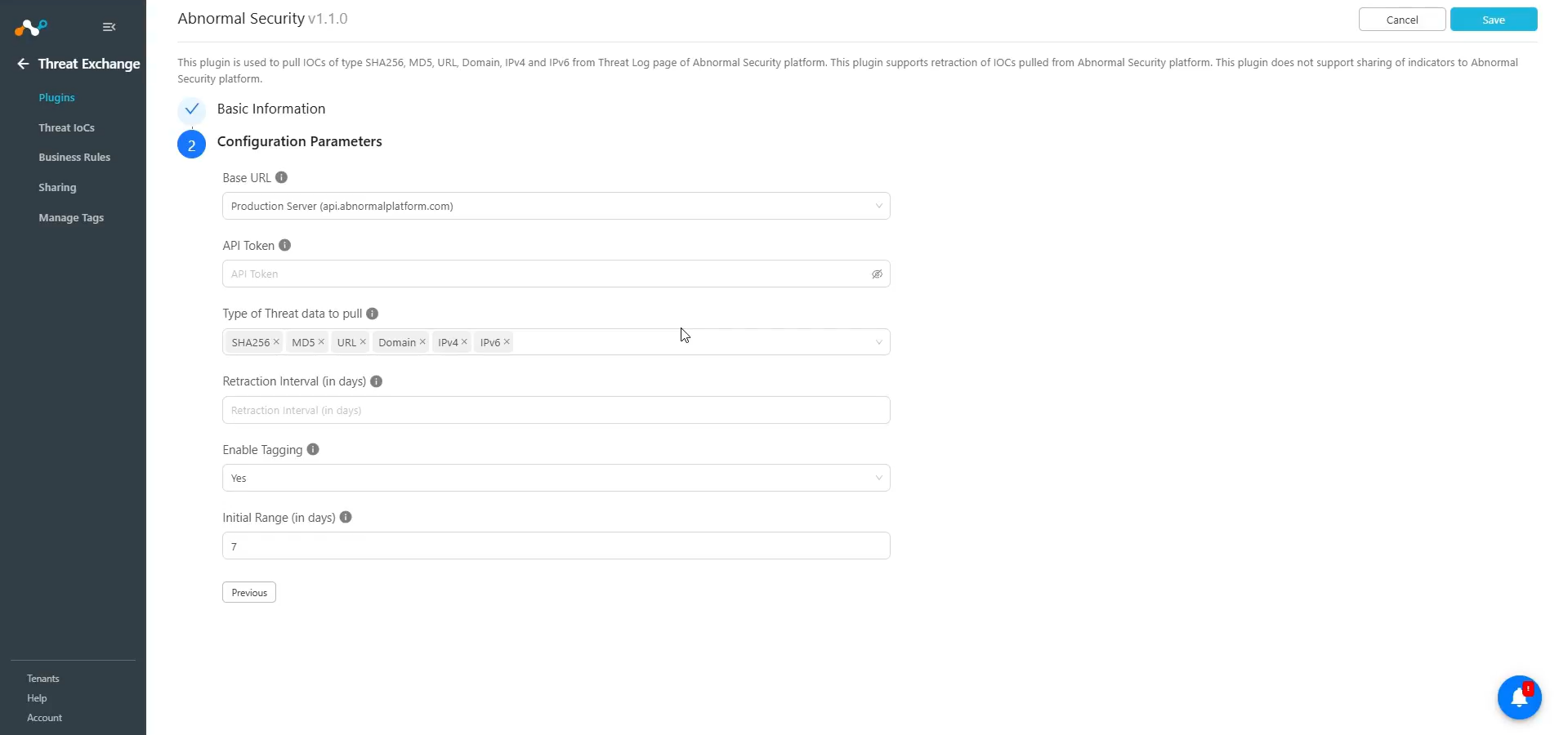
If the data is still available for the given time range, it might be possible that the IoCs for the provided filter in the plugin configuration are not available, so check the values from the plugin configuration parameter and filter the same on the Abnormal Security platform.