

Once you add a custom AI provider, you can associate it to an AI Gateway. To associate it to an AI Gateway, follow the steps below.
-
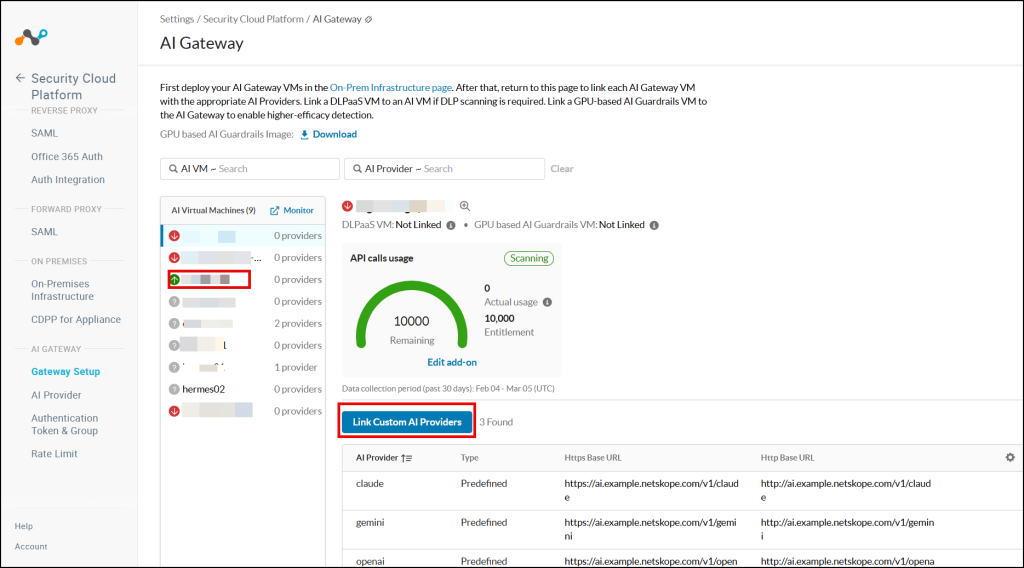
Log in to the Netskope tenant UI and go to Settings > Security Cloud Platform > AI Gateway > Gateway Setup.
-
In the AI Gateway page, from the AI Virtual Machines list choose an AI Gateway that you want to associate with the custom AI provider.
-
Click Link Custom AI Providers.
-
In the Link Ai Providers page, select a custom AI provider.
-
Click Save.
Saving the settings enables the AI Gateway to manage and secure traffic between the AI Agent and your custom AI provider.

In the AI Gateway page, you can also find the HTTPS/HTTP Base URL that your AI agent needs to use to reach an AI provider.
