

Netskope LogoNetskope Logo
  • Security Services
  • AI Services
  • Networking Services
  • Analytics Services
  • Integrations
  • getting-started.svgGetting Started
    • Support
    • Community
    • Netskope.com
    © 2026 All Rights Reserved. Netskope Inc.
    Home
    Netskope Cloud Exchange
    Operating Cloud Exchange
    Cloud Exchange Users

    Cloud Exchange Users

    New users can be added only by the Super Admin (user with the admin user name). There are these types of user roles:

    • Admin: An Admin has write level access to the application, and will be able to create configurations, upload plugins, configure sharing, and edit settings.
    • Read-only User: The read-only user will have limited access to the application, and will not be able to perform any edit or update actions on plugins and their configuration settings.
    • Custom Admin: The users can be given custom read/write permissions so they can perform module-specific admin actions based on the type of permissions provided.

    The Users page displays all the current users in a table. Users can be edited or deleted.
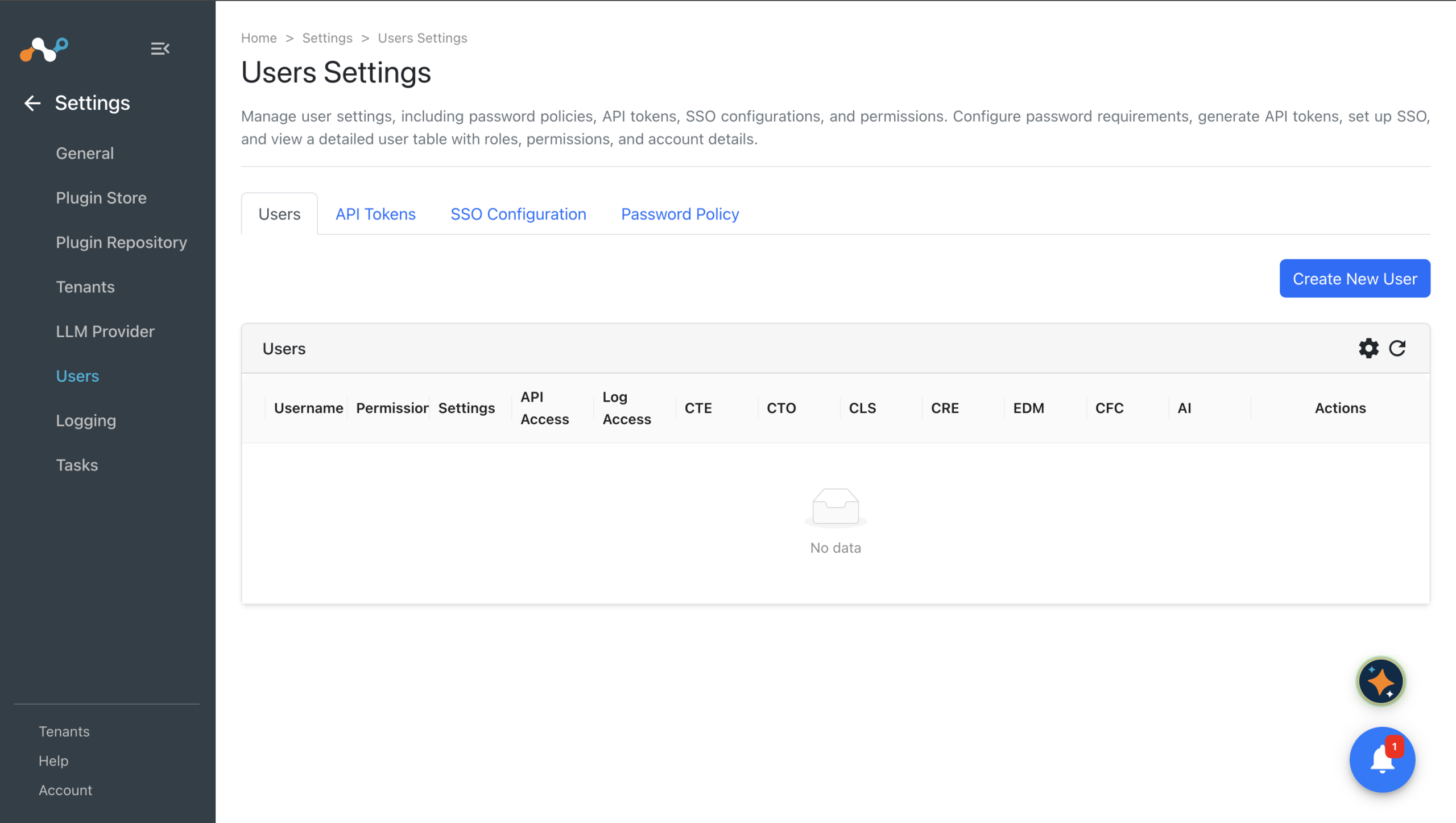
    New users can be created by clicking the Add User icon in the upper right corner. Create a user by entering these parameters:

    • Username: Username associated with this account.
    • Password: Initial password for the user. User will be prompted to change password at the first login.
    • User Role: Super admin, Read-only User or Custom User roles can be assigned. The Custom User can have module-specific read/write permissions (refer to User Roles below). Enable the check boxes to give the Custom User API access and the ability to generate API tokens.
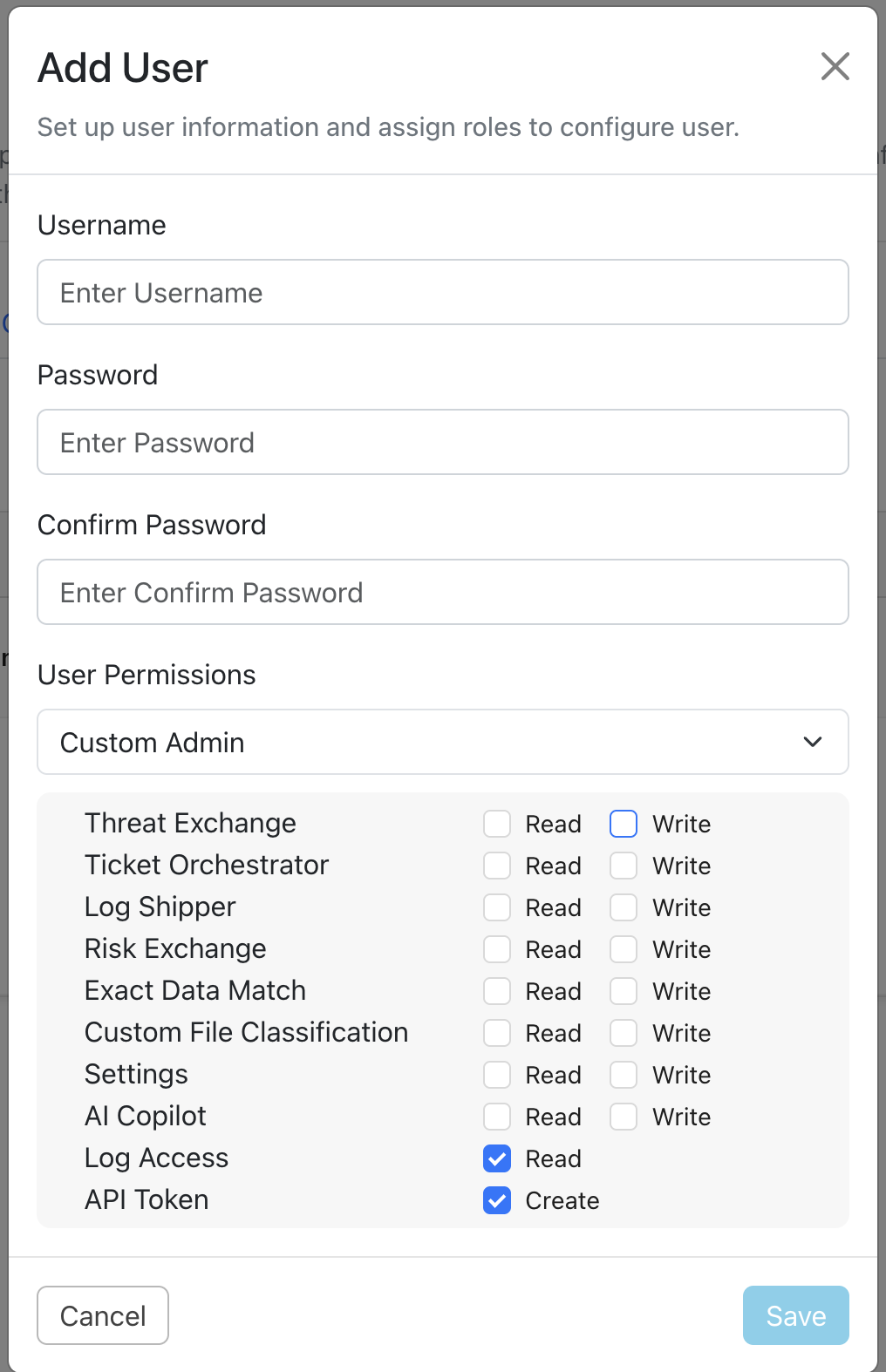
    When finished, click Save.

    User Roles

    Admin User

    This user will have write level access to the application. Users will be able to create configurations, upload plugins, configure sharing and edit settings.

    Admin users will not be able to create new users.

    Read-Only User

    The read-only user will have limited access to the application. This user will not be able to perform any edit/update action on plugins and their configuration and settings.

    Custom User

    The custom user can be given module-specific permissions that allow the following actions:

    ReadWrite
    Settings
    • Read only logs settings. General > Logs tab.
    • Read only proxy settings. General > Proxy tab.
    • Read only tasks cleanup settings. General > Task Cleanup
    • Read only SSO configuration. Users > SSO Configuration
    • Read only Plugins page. Need module wise read role to see the plugin list
    • Read only Plugin Repository page.
    • Read only Netskope Tenants page.
    • Change logs settings.
    • Change proxy settings.
    • Change SSO Configurations.
    • Change tasks cleanup settings.
    • User can upload new plugin from Plugins page. Need module wise write role to configure the plugin.
    • User can add, delete or update plugin repositories. User can perform all actions.
    • User can add, update or delete Netskope Tenants.
    Log Shipper
    • Read only settings of Cloud Log Shipper. User can open mapping files in read only format.
    • Read only Log Shipper plugins on Plugins page.
    • Read only configured Log Shipper plugins.
    • Read only business rules.
    • Read only SIEM Mappings page.
    • User can change Log Shipper settings. User can add, update or delete the mapping files.
    • User can configure, edit, delete or disable the configured Log Shipper plugins.
    • User can perform all actions on Business Rules.
    • User can perform all actions on SIEM Mappings.
    Ticket Orchestrator
    • Read only Ticket Orchestrator.
    • Read only Ticket Orchestrator plugins on Plugins page.
    • Can view configured Ticket Orchestrator plugins.
    • Read only Alerts page.
    • Read only Business Rules page.
    • Read only Queues configuration page.
    • Read only Tickets page.
    • Can change Ticket Orchestrator Settings.
    • User can configure new Ticket Orchestrator plugin. User can edit, delete and disable the existing plugins.
    • User can delete alerts on Alerts page.
    • User can perform all actions on business rules.
    • User can perform all actions on Queues configuration.
    • User can see and delete tickets on Tickets page.
    Threat Exchange
    • Read only Threat Exchange settings page.
    • Read only available Threat Exchange plugins on Plugins page.
    • Read only configured Threat Exchange plugins page.
    • Read only Threat IoCs page. User can not delete, modify or add tags to the IoCs.
    • Read only Business Rules.
    • Read only Sharing configuration.
    • Read only Tags page. User can not add or delete tags.
    • User can include Threat Exchange indicators in a unified mapping, and preview or run a mapping that joins them. Needs the Risk Exchange role to reach the Universal Schema Builder.
    • Can change Threat Exchange settings.
    • User can configure Threat Exchange plugin, update the existing one, disable the plugin and delete plugins.
    • User can delete and tag Threat IoCs.
    • User can perform all actions on business rules.
    • User can perform all actions on Sharing Configuration.
    • User can create or delete tags.
    • User can save, edit or delete a unified mapping that joins Threat Exchange indicators, and configure Threat Exchange sharing on a unified mapping business rule.
    Risk Exchange
    • Read only Risk Exchange settings.
    • Read only Risk Exchange plugins on Plugins page.
    • Read only configured Risk Exchange plugins.
    • Read only Schema Editor page.
    • Read only Records page.
    • Read only Business Rules page.
    • Read only Actions page.
    • Read only Action Logs page.
    • Read only Universal Schema Builder Unified Mapping page.
    • Read only Universal Schema Builder Business Rules page.
    • User can change Risk Exchange Settings.
    • User can configure, edit, delete or disable the configured Risk Exchange plugins.
    • User can add, delete or update schema fields in Schema Editor page.
    • User can perform all actions on Business Rules.
    • User can perform all actions on Actions page.
    • User can delete records, upload records on Records page.
    • User can see Action Logs page.
    • User can perform all actions on Universal Schema Builder Unified Mapping and Business Rules pages.
    Exact Data Match
    • Read only Exact Data Match plugins under Plugins page.
    • Read only configured EDM plugins.
    • Read only Sharing page.
    • Read only Sharing and Upload Management page.
    • User can configure, edit, delete or disable the configured EDM plugins.
    • User can perform all actions on Sharing page.
    • User can Upload hashes CSV file in Sharing and Upload management page.
      Custom File Classification
      • Read only Custom File Classification plugins under Plugins page.
      • Read only configured CFC plugins.
      • Read only File Metadata page.
      • Read only Business Rules page.
      • Read only Sharing page.Read only Sharing and Upload Management page.
      • User can configure, edit, delete or disable the configured CFC plugins.
      • User can check the file metadata and perform actions on metadata.
      • User can perform all actions on Business Rules.
      • User can perform all actions on Sharing page.
      • User can Upload CFC hashes training files in Sharing and Upload management page.

        The Universal Schema Builder is covered by the Risk Exchange permissions, because it is part of Risk Exchange rather than a separately enabled module. A unified mapping that joins the Threat Exchange indicators entity additionally requires the Threat Exchange permission: read to preview or run it, write to save or modify it. Granting only Risk Exchange write is therefore not enough for a mapping that uses indicators.

        RBAC Privileges

        API Access

        If this role is given then user can create new api token under Users > API Tokens. The user can access the API Docs page as well.

        Logs Access

        If this role is given the user will be able to access the Logging and Tasks page.

        In this Topic
        • Cloud Exchange Users