

Overview
This article guides you through configuring Entity Data Types (EDT) and Entity Sensitivity Levels (ESL) for your Data Loss Prevention (DLP) entities. These settings enable Netskope DSPM to group data effectively and prioritize risk in your dashboard reporting.
Understand the DSPM Inventory Approach
Unlike traditional DLP, Netskope DSPM adopts an “Inventory-First” approach. The goal of configuring EDT and ESL is to build a comprehensive map of your data landscape, not just to trigger violation alerts. Even if no policy is violated, these settings allow you to visualize exactly where your sensitive data resides.
Access Entity Settings
To configure the DSPM-specific metadata (EDT and ESL), you must edit the individual DLP entity.
-
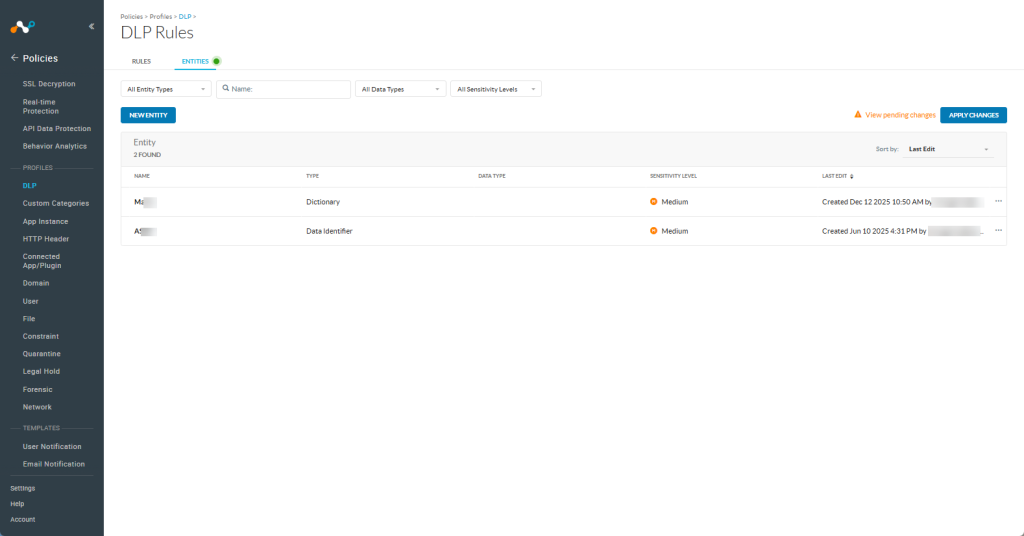
Go to Policies > DLP > DLP Rules > Select Entities.
-
Click on an existing custom entity name to edit it, or click New Entity to create one.

Configure the Entity Data Type
The Entity Data Type (EDT) unifies structured and unstructured rules that detect similar content to simplify reporting and policy creation. For example, instead of selecting every individual rule that looks for a Social Security Number (SSN), you can assign the “National ID” EDT to those entities. This allows you to filter reports or build policies using a single data type rather than managing multiple distinct rules.
To configure the EDT:
- In the entity configuration window, locate the Data Type field.
- Select the category that best fits your entity (e.g., select “Address” for any entity related to geographic locations).
Entity Data Type Display for SaaS Data Stores
When DSPM classifies data from SaaS applications (such as OneDrive, SharePoint, or Google Drive), each classified item displays an EDT that identifies the category of sensitive data detected.
In some cases, the classification source may not provide an explicit EDT value. When this occurs, DSPM applies the following fallback logic to determine the displayed value:
- Entity name: If the EDT is unavailable, DSPM displays the name of the matched entity (e.g.,
US-SSN-Nameorpersons/proper_names/us/last). - Rule name: If neither the EDT nor the entity name is available, DSPM displays the name of the matched DLP rule (e.g.,
Name-Credit Card (CC)).
As a result, you may see entity names or rule names in the Entity Data Types column for SaaS data stores on the Classification Management, Data Store Inventory, and Deep Privilege Analysis pages. These values represent valid classification matches and can be used for filtering and policy configuration.
Set the Entity Sensitivity Level (ESL)
The Entity Sensitivity Level (ESL) defines the severity of the risk if this specific data is exposed. DSPM uses the ESL to filter incidents and highlight the most critical risks on your dashboard:
To set the ESL:
- In the entity configuration window, locate the Sensitivity Level dropdown.
- Select Critical, High, Medium, Low, or Not Sensitive based on the risk definitions below.
Sensitivity Levels Reference
| Level | Description | DSPM Priorization |
|---|---|---|
| Critical | Data posing the most severe risk or highest regulatory impact. | Top priority. Immediate attention required. |
| High | Data that carries significant risk or regulatory fines (e.g., PHI, SSNs). | High priority. Triggers significant alerts. |
| Medium (Default) | Sensitive data with moderate risk. This is the default if you do not select a level. | Standard priority. Standard monitoring. |
| Low | Low-risk or internal-only data (e.g., internal project codes). | Lower priority. Appears in reports but rarely triggers critical alerts. |
Not Sensitive | Data that does not require security monitoring or is public. | Excluded from risk prioritization. |
Apply Changes
After saving any DLP configuration, you must click Apply Changes for your settings to take effect in DSPM. This action pushes your new configurations to the DLP appliance and to DSPM for SaaS Apps.
You can apply changes at any time; you do not need to wait until a profile is fully configured. For example, you can define a profile, tweak one of its rules, and then apply changes immediately.