

You can create a configuration to share the Exact Data Match hashes of a file/data to the Netskope Tenant. This also facilitates hash sharing to Cloud Exchange to support isolation and/or cross region hash sharing to the Netskope Tenants.
- Go to Exact Data Match.
- Click Sharing. The Sharing configuration list is paginated with a count of 10 or less.
- Click Add Sharing Configuration.
- Select the source configuration and destination configuration. Click Save.

- Optionally, you can trigger Manual Sync for the sharing configuration.

- If needed, you can delete sharing configurations.

Monitor the Status of Sharing Configuration
View the hashing and upload status for Sharing Configuration to monitor their processing and ensure successful completion. All entries with Source Type as a Plugin indicates status of the Sharing Configuration.
- Go to Exact Data Match > Sharing and Upload Management.
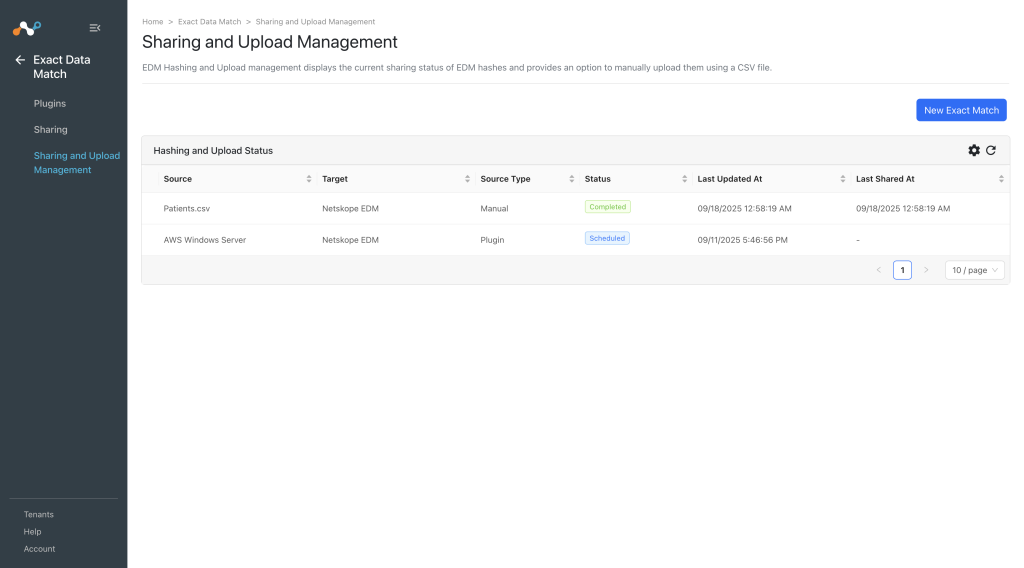

- The following details will be shown for the sharing configuration.
- Source: The name of the source plugin configuration, or the name of the manually uploaded CSV file.
- Target: The name of the destination plugin configuration. Currently EDM supports sharing file hashes to Netskope Tenant only, hence the target field will be fixed and cannot be updated.
- Source Type: Plugin or Manual.
- Status: Displays the current status of pull/push operation as following:
- Scheduled: Indicates that the sharing has been configured and the pull and push operation are still waiting in the queue for processing.
- Generating Hash: Indicates that the generating hash process has been started. At this stage, in the background Fetching > Validating > Sanitization (if opted for) > Generating Hash staged will be included.
- Uploading Hash: Indicates that uploading hash to the destination configuration has been started.
- Upload Completed: Indicates that hashes are uploaded to the Netskope Tenant for processing.
- Checking Apply Status: At this stage, checking the status of apply process of the hashes on the Netskope Tenant.
- Apply In Progress: Represents that the hash processing is started and in progress state on the Netskope Tenant.
- Completed: Indicates that hash file has been shared successfully to destination configuration.
- Failed: Indicates that the final result of the action has been failed to execute. The actions are Generating Hash/Uploading Hash/Checking Apply Status.
- Last Updated At: Indicates last time the status has been updated for the sharing.
- Last Shared At: The last time when hashes were successfully shared with the destination configuration.
- Click Sync to refresh and view the latest details in the table.