

You now have to configure two aspects of this appliance: interface configuration and DNS or proxy settings that steer cloud app traffic through the appliance.
In the sample network below, Dataplane On-Premises appliance’s inbound client-facing interface is connected to the 172.16.0.0/23 subnet. The interface configuration uses IP ranges within the subnet for accepting client traffic. The dataplane interface will be assigned the IP 172.32.0.2 in the management subnet 172.32.0.0/24, and its outbound egress interface will be assigned the IP 10.100.1.2 in the subnet 10.100.1.0/24.
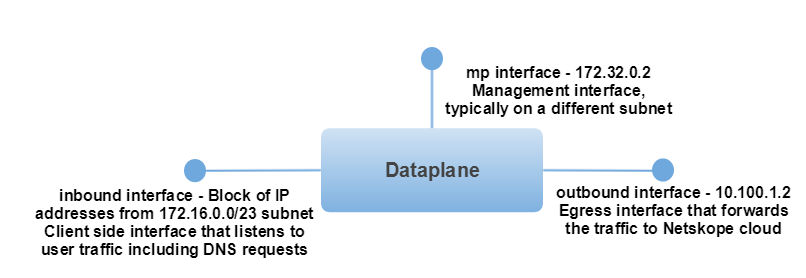
To configure the inbound and outbound (dp1 and dp2 for virtual appliance) interfaces,
- In configuration mode, run the following commands.
set interface inbound ip 172.16.1.10-172.16.1.60, 172.16.1.64, 172.16.1.65-172.16.1.125, 172.16.1.200-172.16.1.225
set interface inbound netmask 255.255.254.0
set interface inbound gw 172.16.0.1
set interface outbound ip 10.100.1.2
set interface outbound netmask 255.255.255.0
set interface outbound gw 10.100.1.1
Note
The inbound interface IP address can either be a full /24 block of IPs, or you can also assign non-contiguous IP addresses and IP address range. The above example shows the non-contiguous IP address and IP address range assigned for inbound.
- Enter
save.
You can use the show command to verify the configuration.