

Enterprise Browser for Private Apps provides secure, seamless access to SaaS and private applications on managed and unmanaged devices without compromising data protection. Built on Chromium with a self‑service install, it’s ideal for BYOD, contractors, and fast onboarding (e.g., M&A). It enforces browser‑level controls (like copy/paste, print, etc.) and simplifies private app access by avoiding complex DNS configurations or URL rewrites, creating a secure, efficient workspace for IT and end users.
How private app definitions work when Enterprise Browser is enabled
For customers with both Enterprise Browser and Netskope Private Access (NPA) entitlements, Browser Access apps fall into two categories:

Two types of NPA browser applications
- “Any Browser” applications
These are the traditional reverse-proxy, browser-based access apps (Browser Access) and continue to operate the same way when Enterprise Browser is enabled.

- Can be accessed from any standard browser.
- Always have a Public Host (and optionally a Custom Host).
- Users reach them via the portal or by directly typing the Public/Custom Host, e.g.
https://ns-xxxx-443-tenant.region.npaproxy.goskope.com - In policy, these are evaluated only when the Access Method is “Browser Access”.
- Enterprise Browser can also use them, but when it does so via the Public Host, it is still treated as Browser Access, not “Enterprise Browser” access.
- “Enterprise Browser” applications
These are designed specifically for use with Enterprise Browser.

- No Public Host is defined.
- Defined only by internal host/IP and port (for example: 172.31.46.99:8080 or app.internal.corp:443).
- Users access them via the portal or by typing the internal URL or IP directly in Enterprise Browser.
- Traffic is steered by Enterprise Browser to the NPA explicit proxy (“ebnpa” proxy) on port 8090.
- In policy, these are evaluated only when the Access Method is “Enterprise Browser”.
- Key enhancement: Enterprise Browser applications support:
- IP subnets (e.g. 10.0.0.0/24)
- Wildcard hostnames (e.g. *.corp.local)
This is not supported for “Any Browser” apps, making Enterprise Browser apps more flexible for large / dynamic internal environments.
Conceptual takeaway for customers:
- “Any Browser” apps = reverse-proxy browser-based access model with a public entry point, usable from any standard browser.
- “Enterprise Browser” apps = private/internal entry point, Enterprise Browser only, with subnet/wildcard support.
What changes in policy behavior
When creating an NPA policy, customers choose an Access Method and then attach browser apps:

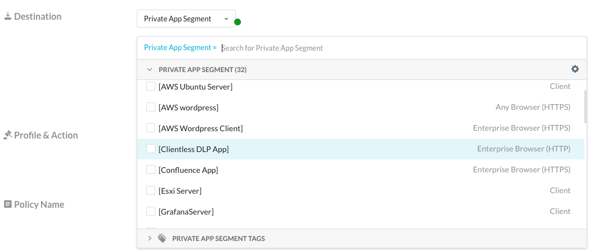
- Browser Access access method
- Evaluates only “Any Browser” applications.
- Enterprise Browser access method
- Evaluates both:
- “Any Browser” applications for backward compatibility, and
- “Enterprise Browser” applications.
- Gives Enterprise Browser users a unified experience for all browser‑based private apps.
- Evaluates both:
- Client access method
- Evaluates only Client applications (unchanged behavior).
High‑level workflow
Prerequisites
Before you start, make sure the following are in place:
- Enterprise Browser is deployed
- Enterprise Browser is installed for target users and linked to the correct Netskope tenant.
- Enterprise Browser is configured with the Netskope explicit proxy / PAC so web traffic is steered through Netskope.
- NPA Private app segments and Publishers are configured for access via Enterprise Browser
- NPA Publishers are deployed, healthy, and can reach the internal apps.
- Required private app segments are configured so Publishers know how to reach the appropriate application networks.
- Identity and access are ready
- SAML and IDP integration with Netskope is configured and tested.
- The users / groups who will use Enterprise Browser + NPA are synchronized to Netskope and available for policy.
- Network connectivity requirements
- Enterprise Browser proxy bypass is configured so Enterprise Browser can reach required auth and control‑plane endpoints (for example, authservice.goskope.com, IdP URLs) without being accidentally bypassed.
Configure NPA policies and Enterprise Browser browser‑control policy
Configure or update policies as follows:
- NPA policies
- Use Access Method = Enterprise Browser.
- Allow the NPA Browser Applications you defined in the previous step.
- Best practice: keep separate policies for:
- Browser Access (for “Any Browser” reverse‑proxy browser‑based apps), and
- Enterprise Browser (for Enterprise Browser apps).
- Enterprise Browser browser‑control policies for private apps
- Create or update Enterprise Browser browser‑control policies for Enterprise Browser private apps.
Publish configuration and update Enterprise Browser
- Save and publish the relevant NPA applications and policy changes.
- Enterprise Browser will download an updated PAC file that:
- Lists all internal hosts / ports from your NPA Browser Applications (npaList).
- Steers matching destinations to the NPA Proxy (<tenant>.ebnpa.goskope.com:8090).
Access private apps using Enterprise Browser
Once policies and the PAC file are updated:
- Users open the app in Enterprise Browser using the internal host / IP:port configured on the NPA Browser Application (there is no Public Host).
How private apps are accessed via Enterprise Browser
When users access private applications with Netskope Enterprise Browser, they connect using the internal host or IP defined on the NPA Browser Application (for example, https://172.31.46.99:22 or https://app.internal.local:443).
Enterprise Browser uses an explicit proxy PAC configuration that classifies these destinations as NPA traffic and forwards them to the dedicated NPA Proxy (<tenant>.ebnpa.goskope.com:8090). The NPA Proxy terminates TLS from Enterprise Browser, authorizes the user and application, and then builds the internal HTTP/HTTPS or TCP connection toward the private app via the Publisher.
You can verify this behavior from Enterprise Browser by navigating to netskope://policy and expanding ProxySettings. The ProxyPacUrl section contains a PAC file where the npaList array includes all internal hosts/ports for NPA Browser Applications. Any URL whose host:port matches an entry in npaList is steered to the NPA Proxy; everything else goes to the Enterprise Browser Edge Proxy (eproxy-<tenant>.goskope.com:8090) or is sent direct if it matches the bypassList.
Feature parity with reverse‑proxy browser‑based access
Enterprise Browser for private apps extends the same key capabilities available with reverse proxy, browser based private apps, including the User Portal, Browser based AnyApp (RDP/SSH), and Data Loss Prevention (DLP) controls for web traffic to private applications. In addition, Enterprise Browser adds broader matching and application handling, including: support for IP subnets (e.g. 10.0.0.0/24), wildcard hostnames (e.g. *.corp.local), support for mixed content and embedded resources, and robust handling of complex applications that rely on multiple chained URL redirects and cross‑host navigations.
For configuration guidance and the full list of supported capabilities, including how Enterprise Browser extends support for existing reverse proxy features, see
Configure Browser Access for Private Apps.
When to use Enterprise Browser + NPA
Use Enterprise Browser + NPA when you want:
- “Inside-the-network” app behavior from the browser
- Users access private apps using internal hostnames/IPs.
- Internal redirects and hard‑coded internal links keep working without exposing “public vs. private” URLs to users.
- Simpler handling of complex internal environments
- You need to cover ranges of internal servers (e.g. RDP farms, multiple admin consoles).
- Apps use many internal hostnames under the same domain and you don’t want to manage them one by one.
- Stronger, layered security for private web apps
- You prefer a managed enterprise browser with fine‑grained controls (e.g. user actions in the browser).
- You want per‑app Zero Trust access to private apps without installing a full client on the endpoint.
Continue using “Any Browser” / Reverse-proxy Browser Access when:
- You must support any standard browser for partners, contractors, or unmanaged/BYOD devices that can’t run Enterprise Browser.
- You want a simple web portal with tiles that resolve to public entry points and your apps already work well that way.