

Netskope LogoNetskope Logo
  • Security Services
  • AI Services
  • Networking Services
  • Analytics Services
  • Integrations
  • getting-started.svgGetting Started
    • Support
    • Community
    • Netskope.com
    © 2026 All Rights Reserved. Netskope Inc.
    Home
    Netskope Cloud Exchange
    Threat Exchange Module
    Configure your Netskope Tenant for Threat Exchange File Hash Sharing
    Create a Malware Detection Profile in Your Netskope Tenant to use Threat Exchange File Hashes

    Create a Malware Detection Profile in Your Netskope Tenant to use Threat Exchange File Hashes

    After you have hashes going to your Netskope tenant, you will need to build a policy to check this new data source.

    1. Go to Policies > Threat Protection > New Malware Detection Profile.
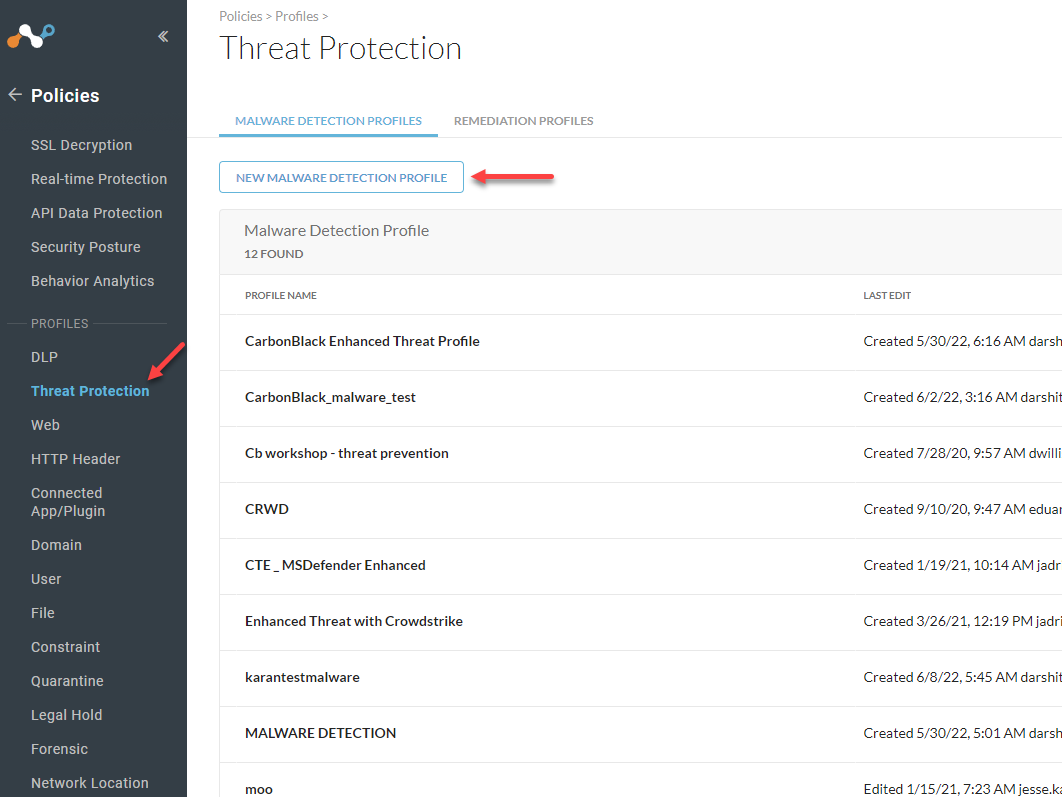
      image7.png
    2. Click Next a couple of times to get to the Blocklist section. Select the Threat Exchange sharing file you created and click Next.
      image8.png
    3. Ensure that you have provided an APIv1 token to the Netskope tenant configuration as a file hash file management does not have a v2 equivalent.
    4. Name the profile and Save
      image9.png
    In this Topic
    • Create a Malware Detection Profile in Your Netskope Tenant to use Threat Exchange File Hashes