

To regulate and control the actions performed by agents across your organization, you need a Real-time Protection policy so you can apply the policy to the agents across your organization.
To create an Agent Guardrails policy for Real-time Protection:
-
Go to Policies > Real-time Protection.
-
Click New Policy and select Agent Guardrails.

-
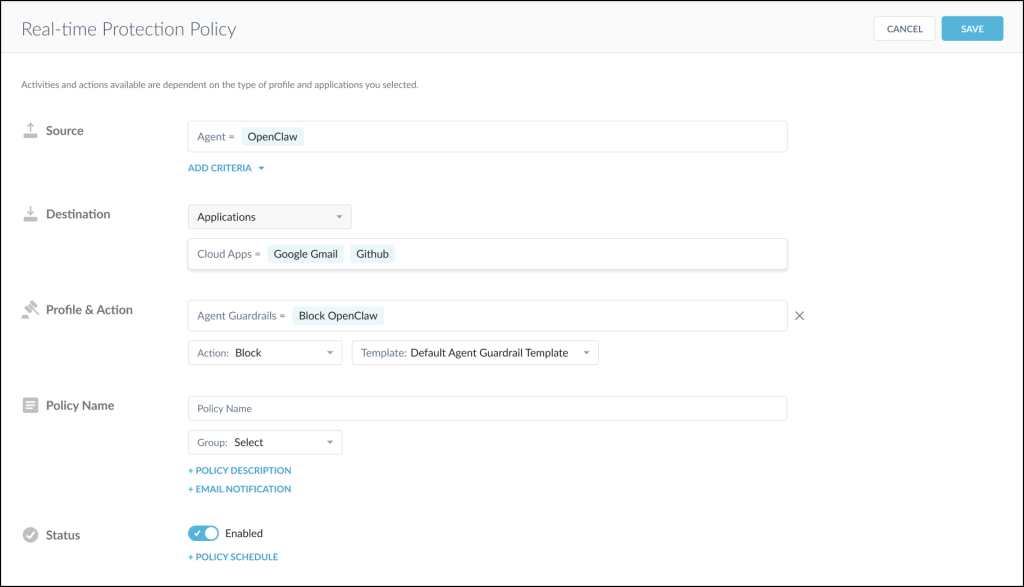
Enter the policy information.
-
Source: Search for and select the Agents to use. Click Add Criteria to add other sources, like users, user groups, organizational units, source IP, and Source IP (egress) that you want to group with the agents to restrict the scope.
-
Destination: Select the traffic destination you want to apply the Agent Guardrails policy to. Select Applications from the dropdown, and then add the Cloud Apps to manage with this policy.
-
Profile & Action: Configure the following.
-
Agent Guardrails: Select the Agent Guardrails profiles you want to add to the Real-time Protection policy. You can add multiple profiles to a Real-time Protection policy.
-
Profile Action: Select the action you want Netskope to take when users trigger the policy.
-
Alert
-
Allow
-
Block
If you select Block, you can also choose a default or custom notification template to send to the end-user for user coaching if Netskope detects a policy violation.
-
-
-
Policy Name: Enter a policy name. You can only use alphanumeric characters and symbols such as underscore (_), dash (-), and square brackets ([ ]). You cannot use the greater-than (>) or less-than (<) symbols in policy names.
-
+ Policy Description: Click to add notes or information.
-
+ Email Notification: Netskope doesn’t send email-based notifications for Agent Guardrails alerts.
-
-
Status: Ensure it’s Enabled so the policy is active.
-
-
Click Save. The new policy appears on the Real-time Protection Policy page.

-
In the Move Policy window, move the Agent Guardrails policy based on your interpretation of the severity of the content moderation.

-
Click Save.
-
Click Apply Changes.


After creating an Agent Guardrails policy, you can view the matched policy alerts in Skope IT.