

Netskope recommends creating a security policy (i.e., [Utility] Block DNS over HTTPS) that blocks DNS operating over port 443 (HTTPS) due to its incompatibility for steering. This policy will block silently. Netskope recommends placing this policy with your other Threat Protection policies.
 |
Recommended Threat Protection Policy
DNS over HTTPS is not a supported protocol for Netskope steering (CASB/NGSWG/NPA) and can be compromised by malicious actors. Therefore, Netskope recommends configuring a policy to steer and block this traffic.
- Go to Policies > Real-time Protection.
- Click New Policy and then Cloud App Access.
- On the Real-time Protection Policy page:
- Source: Click X on the right to change scope to Any.
- Destination: Ensure it’s Application or Cloud App, and select DNS over HTTPS. Ensure the Activities & Constraints is Any.
- Profile & Action: Choose the following.
- Action: Choose Block.
- Template: Choose a custom template that doesn’t send a notification and blocks silently.
- Set Policy: Enter a name for the policy.
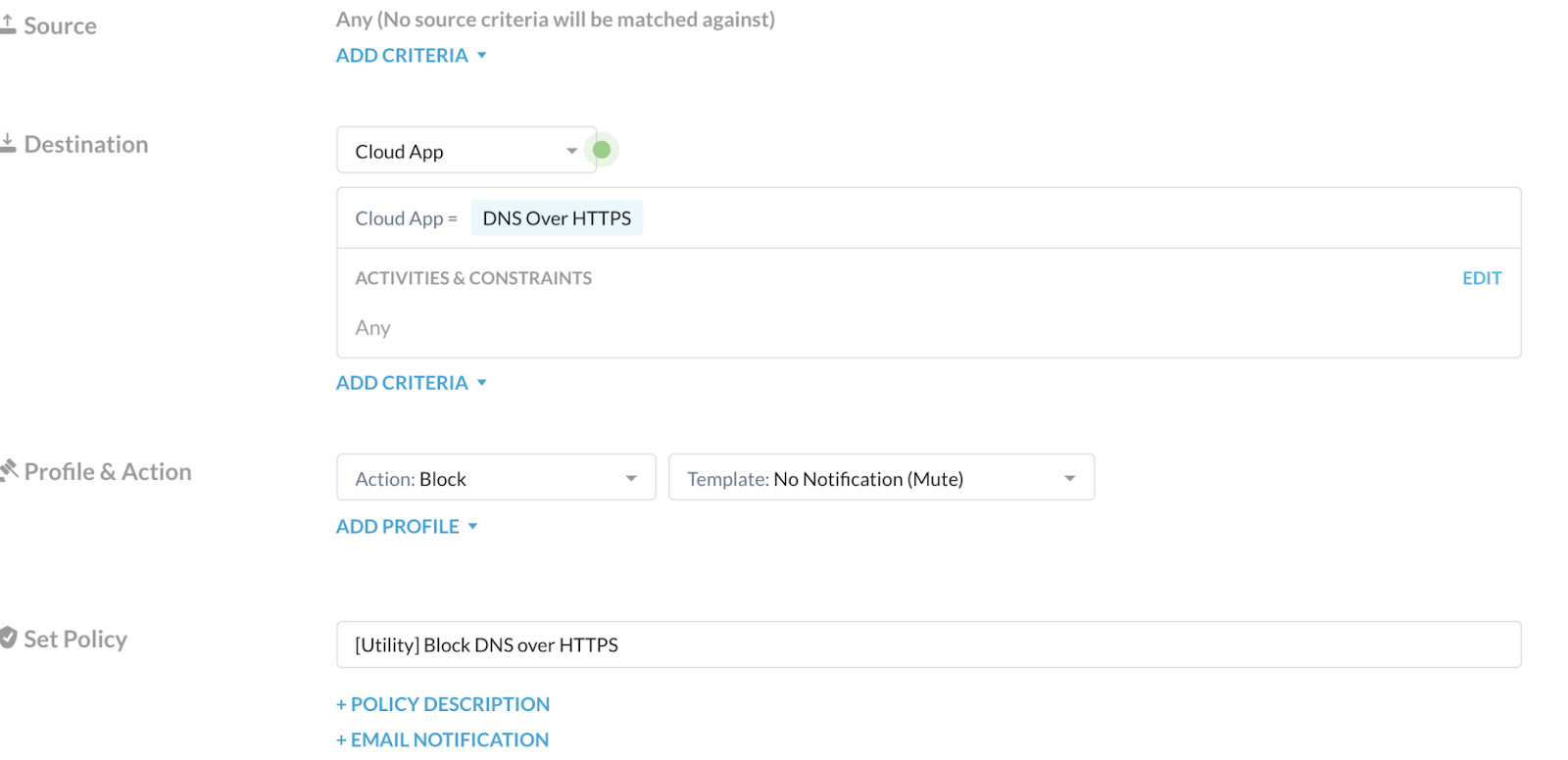
To learn more about any of these fields: Real-time Protection Policies.
- Click Save and then Apply Changes.
 |