

This document explains how to configure the CrowdStrike Falcon Spotlight v1.0.0 plugin with the Risk Exchange module of the Netskope Cloud Exchange platform. This plugin is used to fetch Vulnerabilities from the Exposure Management > Vulnerability Management > Vulnerabilities page in your CrowdStrike tenant. This plugin does not support any actions on Vulnerabilities in the CrowdStrike tenant.
Prerequisites
To configure this plugin, you need:
- A Netskope tenant (or multiple, for example, production and development/test instances).
- A Netskope Cloud Exchange instance with the Netskope Tenant and Risk Exchange plugin already configured.
- CrowdStrike Falcon Spotlight platform access (Base URL, Client ID, Client Secret)
- Connectivity to the following host: https://api.<region>.crowdstrike.com
- If you have the IP allowlist configured on CrowdStrike, make sure to add the public IP of the machine where cloud exchange is running. For more information, refer to the documentation.
CrowdStrike Falcon Spotlight Plugin Support
This plugin is used to fetch Vulnerabilities from the Exposure Management > Vulnerability Management > Vulnerabilities page of the CrowdStrike tenant. This plugin does not support any actions on Vulnerabilities in CrowdStrike tenant.
| Type of Data Pulled | Actions Supported |
|---|---|
| Vulnerabilities | No action |
Mappings
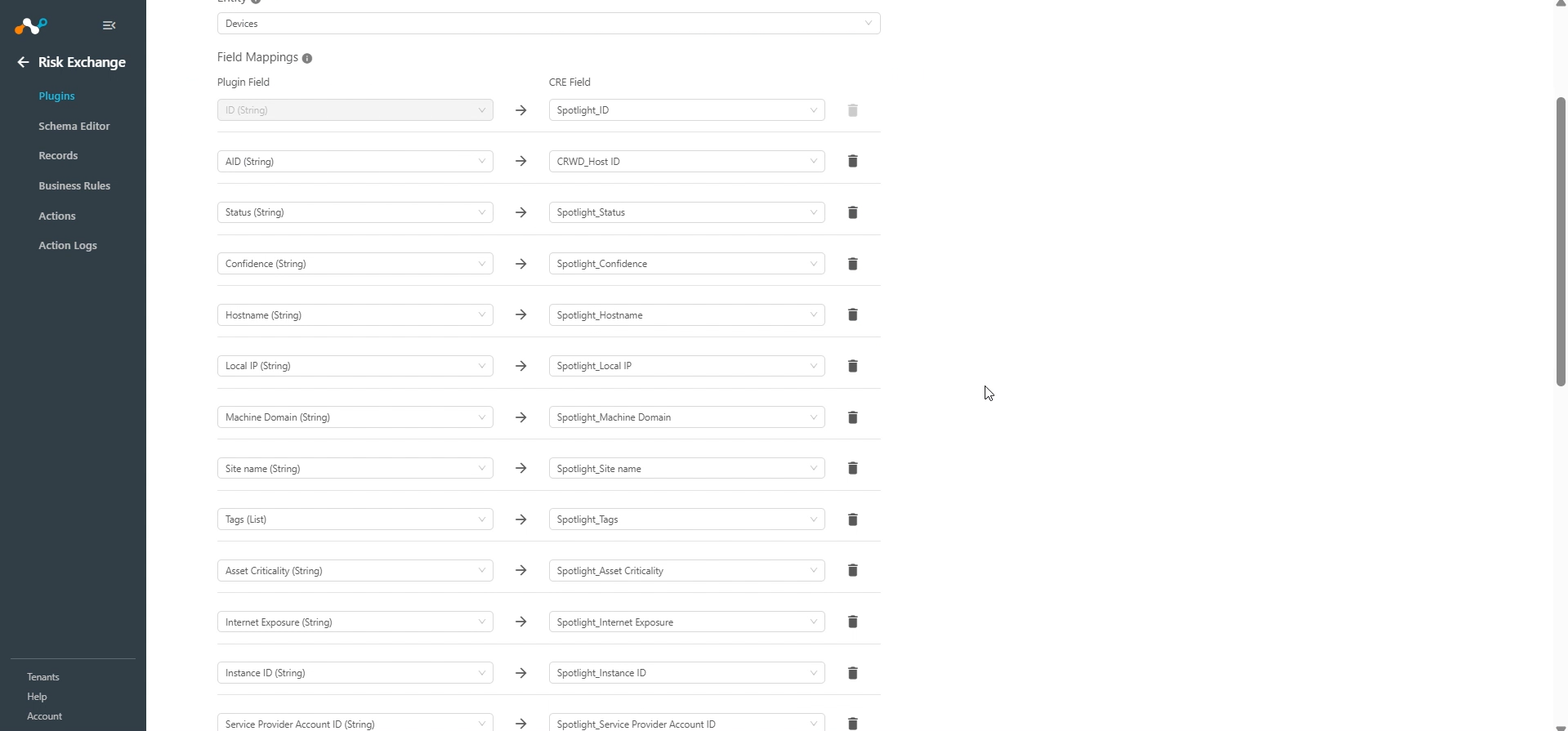
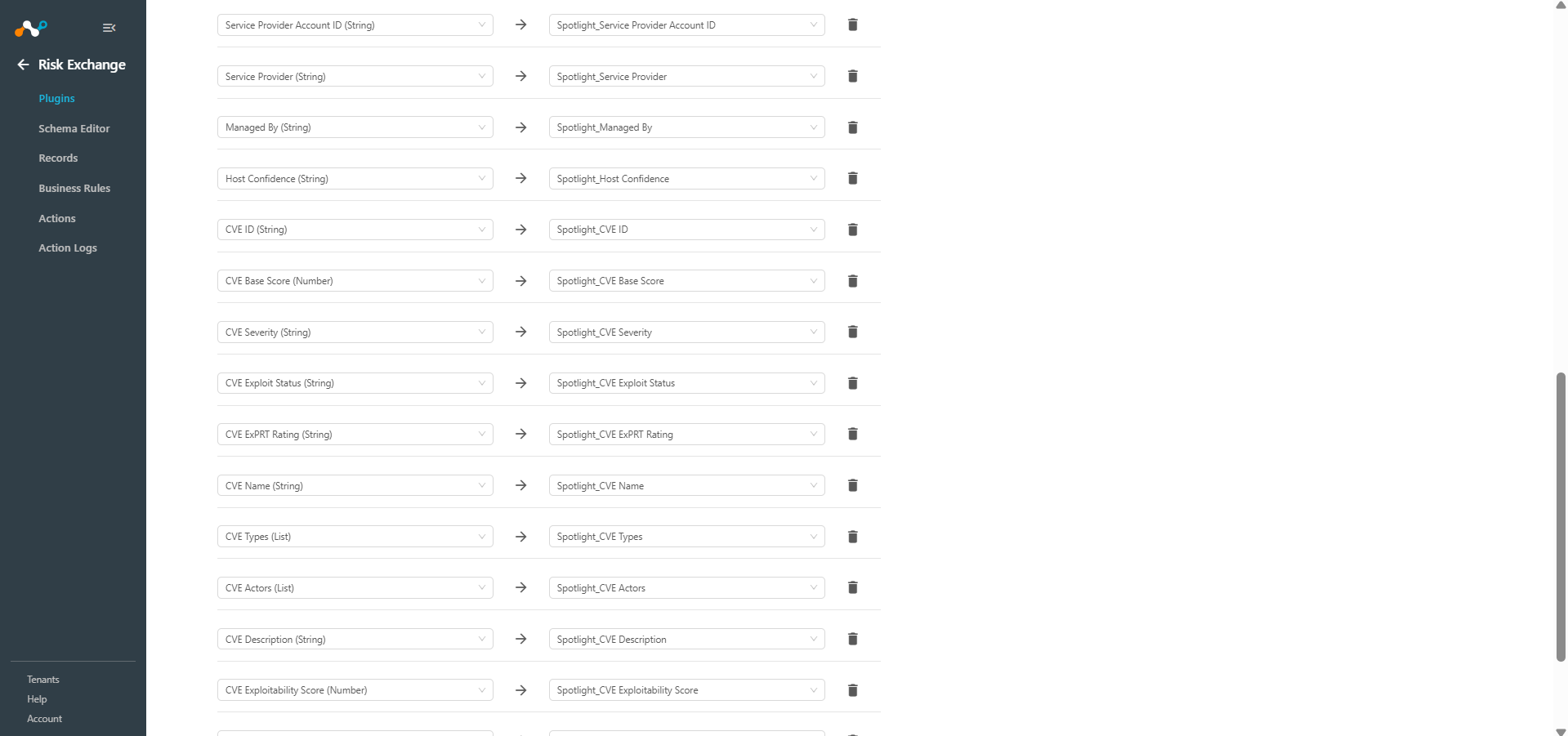
Mapping will be used to view the pulled Vulnerabilities and their respective details. Mapped fields during plugin configuration will be visible on the Records page once the data is pulled. Below is the suggested mapping that should be used while configuring the plugin.
Pull Mapping for Vulnerabilities
|
Plugin Field Label |
Expected Data Type |
Suggested Field Label |
Suggested Aggregate Strategy |
|---|---|---|---|
|
ID |
String |
ID |
Unique |
|
AID |
String |
AID |
Overwrite |
|
Status |
String |
Status |
Overwrite |
|
Confidence |
String |
Confidence |
Overwrite |
|
Hostname |
String |
Hostname |
Overwrite |
|
Local IP |
String |
Local IP |
Overwrite |
|
Machine Domain |
String |
Machine Domain |
Overwrite |
|
Site Name |
String |
Site Name |
Overwrite |
|
Tags |
List |
Tags |
Overwrite |
|
Asset Criticality |
String |
Asset Criticality |
Overwrite |
|
Internet Exposure |
String |
Internet Exposure |
Overwrite |
|
Instance ID |
String |
Instance ID |
Overwrite |
|
Service Provider Account ID |
String |
Service Provider Account ID |
Overwrite |
|
Service Provider |
String |
Service Provider |
Overwrite |
|
Managed By |
String |
Managed By |
Overwrite |
|
Host Confidence |
String |
Host Confidence |
Overwrite |
|
CVE ID |
String |
CVE ID |
Overwrite |
|
CVE Base Score |
Number |
CVE Base Score |
Overwrite |
|
CVE Severity |
String |
CVE Severity |
Overwrite |
|
CVE Exploit Status |
String |
CVE Exploit Status |
Overwrite |
|
CVE ExPRT Rating |
String |
CVE ExPRT Rating |
Overwrite |
|
CVE Name |
String |
CVE Name |
Overwrite |
|
CVE Types |
List |
CVE Types |
Overwrite |
|
CVE Actors |
List |
CVE Actors |
Overwrite |
|
CVE Description |
String |
CVE Description |
Overwrite |
|
CVE Exploitability Score |
Number |
CVE Exploitability Score |
Overwrite |
|
CVE Impact Score |
Number |
CVE Impact Score |
Overwrite |
|
CVE Vector |
String |
CVE Vector |
Overwrite |
Note
If you have the same records across multiple plugins, make sure you map the same field in the plugins.
Permissions
You will need this permission to pull Users and Applications records: Vulnerabilities – Read access.
API Details
List of API Details
| API Endpoint | Method | Use Case |
|---|---|---|
| /oauth2/token | POST | Generate Access Token |
| /spotlight/combined/vulnerabilities/v1 | GET | Fetch Vulnerabilities |
Generate Access Token
Endpoint: https://<BASE_URL>/oauth2/token
Method: POST
Headers:
| Key | Value |
|---|---|
| User-Agent | netskope-ce-6.0.0-cre-crowdstrike-falcon-spotlight/1.0.0 |
| Content-Type | application/x-www-form-urlencoded |
Request Body:
| Key | Value |
|---|---|
| grant_type | client_credentials |
| client_id | <Client ID> |
| client_secret | <Client Secret> |
Sample Response
{
  "access_token": "eyJhbGciOiJSUzI1NiIsInR5cCI6IkpXVCJ9...",
  "expires_in": 1799,
  "token_type": "bearer"
}
Fetch Vulnerabilities
Endpoint: https://<BASE_URL>/spotlight/combined/vulnerabilities/v1
Method: GET
Headers:
| Key | Value |
|---|---|
| User-Agent | netskope-ce-6.0.0-cre-crowdstrike-falcon-spotlight/1.0.0 |
| Authorization | Bearer <access_token> |
Query Parameters
| Key | Value |
|---|---|
| limit | 5000 |
| facet | [“host_info”, “cve”] |
| sort | updated_timestamp.asc |
Sample Response
{
    "meta": {
        "query_time": 0.47325536,
        "pagination": {
            "limit": 500,
            "total": 96128,
            "after": "next_page_token"
        },
        "powered_by": "spapi",
        "trace_id": "6120930d-fb71-45e6-b93b-b7e938d5bc22"
    },
    "resources": [
        {
            "id": "u:ip:a6dc46f29f9d952826910ea2baca3c1a4d1e857949b9f0e59f04c84e8d6c1f5e_bc5f0e094c76339fa2da49dac2943448",
            "cid": "c17f3a80ded0418eb107db3d26a27983",
            "aid": "c17f3a80ded0418eb107db3d26a27983_ASCB75xg0shOejrl80b5msNO4NpbjSrOX5OYPq_e34Yk1JUn2NDFbK0a",
            "vulnerability_id": "CVE-2023-48795",
            "data_providers": [
                {
                    "provider": "Falcon EASM"
                }
            ],
            "created_timestamp": "2025-10-16T02:08:07Z",
            "closed_timestamp": "2025-10-25T21:50:43Z",
            "updated_timestamp": "2025-10-25T21:50:54Z",
            "status": "closed",
            "apps": [
                {
                    "vendor_normalized": "Openbsd",
                    "product_name_version": "openssh 6.0",
                    "product_name_normalized": "openssh",
                    "sub_status": "closed",
                    "remediation": {},
                    "evaluation_logic": {
                        "id": ""
                    }
                }
            ],
            "suppression_info": {
                "is_suppressed": false
            },
            "services": [
                {
                    "port": 122,
                    "transport": "tcp",
                    "protocol": "ssh"
                }
            ],
            "confidence": "potential",
            "host_info": {
                "hostname": "54.193.116.198",
                "local_ip": "",
                "machine_domain": "",
                "os_version": "",
                "ou": "",
                "site_name": "",
                "system_manufacturer": "",
                "tags": [],
                "platform": "",
                "asset_criticality": "Unassigned",
                "internet_exposure": "Yes",
                "instance_id": "i-09d14923a29da1be3",
                "service_provider_account_id": "703303484057",
                "service_provider": "AWS",
                "third_party_asset_ids": [
                    "Falcon EASM: a6dc46f29f9d952826910ea2baca3c1a4d1e857949b9f0e59f04c84e8d6c1f5e"
                ],
                "managed_by": "Unmanaged",
                "confidence_label": "High",
                "subsidiaries": [
                    "Netskope"
                ],
                "host_last_seen_timestamp": "2025-10-15T00:00:00Z"
            },
            "remediation": {},
            "cve": {
                "id": "CVE-2023-48795",
                "base_score": 5.9,
                "severity": "MEDIUM",
                "exploit_status": 90,
                "exprt_rating": "CRITICAL",
                "cisa_info": {
                    "is_cisa_kev": false
                },
                "spotlight_published_date": "2023-12-19T11:39:00Z",
                "name": "Terrapin",
                "types": [
                    "Vulnerability"
                ],
                "actors": [
                    "COZY BEAR",
                    "LABYRINTH CHOLLIMA",
                    "SILENT CHOLLIMA"
                ],
                "cwes": [
                    "CWE-222"
                ],
                "description": "",
                "published_date": "2023-12-18T00:00:00Z",
                "vendor_advisory": [
                    "https://lists.fedoraproject.org/archives/list/package-announce%40lists.fedoraproject.org/message/MKQRBF3DWMWPH36LBCOBUTSIZRTPEZXB/"
                ],
                "references": [
                    "http://packetstormsecurity.com/files/176280/Terrapin-SSH-Connection-Weakening.html",
                    "http://seclists.org/fulldisclosure/2024/Mar/21"
                ],
                "exploitability_score": 2.2,
                "impact_score": 3.6,
                "vector": "CVSS:3.1/AV:N/AC:H/PR:N/UI:N/S:U/C:N/I:H/A:N"
            }
        },
        {
            "id": "09ea7af71597467089d06313b4fe337d_ce97718801cb38ef9d3d7908fd878ae4",
            "cid": "c17f3a80ded0418eb107db3d26a27983",
            "aid": "09ea7af71597467089d06313b4fe337d",
            "vulnerability_id": "CVE-2025-26634",
            "data_providers": [
                {
                    "provider": "Falcon sensor"
                }
            ],
            "created_timestamp": "2025-03-13T02:39:46Z",
            "updated_timestamp": "2025-03-13T02:39:46Z",
            "status": "open",
            "apps": [
                {
                    "vendor_normalized": "Microsoft",
                    "product_name_version": "Windows Server 2022",
                    "product_name_normalized": "Windows Server 2022",
                    "sub_status": "open",
                    "remediation": {
                        "ids": [
                            "07c271aa28eb328da300ebaf6afa625f"
                        ]
                    },
                    "evaluation_logic": {
                        "id": "eab3262f71893574b3ea99391191845c"
                    },
                    "remediation_info": {
                        "recommended_id": "07c271aa28eb328da300ebaf6afa625f"
                    }
                }
            ],
            "suppression_info": {
                "is_suppressed": false
            },
            "confidence": "confirmed",
            "host_info": {
                "hostname": "EC2AMAZ-32GSOEF",
                "local_ip": "172.31.19.16",
                "machine_domain": "",
                "os_version": "Windows Server 2022",
                "ou": "",
                "site_name": "",
                "system_manufacturer": "Xen",
                "tags": [],
                "platform": "Windows",
                "instance_id": "i-09d14923a29da1be3",
                "service_provider_account_id": "703303484057",
                "service_provider": "AWS",
                "os_build": "20348",
                "product_type_desc": "Server",
                "asset_criticality": "Unassigned",
                "internet_exposure": "No",
                "managed_by": "Falcon sensor"
            },
            "cve": {
                "id": "CVE-2025-26634",
                "base_score": 7.5,
                "severity": "HIGH",
                "exploit_status": 0,
                "exprt_rating": "HIGH",
                "remediation_level": "O",
                "cisa_info": {
                    "is_cisa_kev": false
                },
                "spotlight_published_date": "2025-03-12T17:23:00Z",
                "types": [
                    "Vulnerability"
                ],
                "cwes": [
                    ""
                ],
                "description": "Heap-based buffer overflow in Windows Core Messaging allows an authorized attacker to elevate privileges over a network.\n",
                "published_date": "2025-03-11T07:00:00Z",
                "vendor_advisory": [
                    "https://msrc.microsoft.com/update-guide/en-us/vulnerability/CVE-2025-26634",
                    "https://msrc.microsoft.com/update-guide/vulnerability/CVE-2025-26634"
                ],
                "exploitability_score": 1.6,
                "impact_score": 5.9,
                "vector": "CVSS:3.1/AV:N/AC:H/PR:L/UI:N/S:U/C:H/I:H/A:H"
            }
        },
        {
            "id": "280f4d789bcexxxxxxxxx9abcc3811914f",
            "cid": "0123456789ABCDEFGHIJKLMNOPQRSTUV-WX",
            "aid": "280f4d…2a7f7bbd",
            "vulnerability_id": "CVE-2025-26633",
            "data_providers": [
                {
                    "provider": "Falcon sensor"
                }
            ],
            "created_timestamp": "2025-06-03T00:38:46Z",
            "updated_timestamp": "2025-06-06T00:10:34Z",
            "status": "open",
            "apps": [
                {
                    "vendor_normalized": "Microsoft",
                    "product_name_version": "Windows Server 2012 R2",
                    "product_name_normalized": "Windows Server 2012 R2",
                    "sub_status": "open",
                    "remediation": {
                        "ids": [
                            "91b4ee1abe763150a74150dfddf93840"
                        ]
                    },
                    "evaluation_logic": {
                        "id": "9b022daf26493769863d5a22be528b9b"
                    },
                    "remediation_info": {
                        "recommended_id": "91b4ee1abe763150a74150dfddf93840",
                        "minimum_id": "ec48482667043f9e9578742143ed29bf",
                        "patch_publication_date": "2025-03-11T00:00:00Z"
                    },
                    "patch_publication_date": "2025-03-11T00:00:00Z"
                }
            ],
            "suppression_info": {
                "is_suppressed": false
            },
            "confidence": "confirmed",
            "app": {
                "vendor_normalized": "Microsoft",
                "product_name_version": "Windows Server 2012 R2",
                "product_name_normalized": "Windows Server 2012 R2"
            },
            "cve": {
                "id": "CVE-2025-26633",
                "base_score": 7,
                "severity": "HIGH",
                "exploit_status": 90,
                "exprt_rating": "CRITICAL",
                "remediation_level": "O",
                "cisa_info": {
                    "is_cisa_kev": true,
                    "due_date": "2025-04-01T00:00:00Z"
                },
                "spotlight_published_date": "2025-03-12T17:23:00Z",
                "name": "MSC EvilTwin",
                "types": [
                    "Vulnerability"
                ],
                "cwes": [
                    ""
                ],
                "description": "CVE-2025-26633 is a security feature bypass vulnerability (CWE-1023) in Microsoft Management Console due to improper neutralization of input.",
                "published_date": "2025-03-11T07:00:00Z",
                "vendor_advisory": [
                    "https://msrc.microsoft.com/update-guide/en-us/vulnerability/CVE-2025-26633"
                ],
                "references": [
                    "https://www.vicarius.io/vsociety/posts/cve-2025-26633-security-feature-bypass-in-microsoft-management-console-detection-script"
                ],
                "exploitability_score": 1,
                "impact_score": 5.9,
                "vector": "CVSS:3.1/AV:L/AC:H/PR:N/UI:R/S:U/C:H/I:H/A:H"
            },
            "host_info": {
                "hostname": "CsFlows_win_280f4d789bce47a28e3769052a7f7bbd",
                "local_ip": "222.116.81.67",
                "machine_domain": "nelsonosborn.com",
                "os_version": "Windows 10",
                "ou": "chase79",
                "site_name": "desktop-66.maxwell.org",
                "system_manufacturer": "CsFlows System Manufacturer Inc",
                "groups": [
                    {
                        "id": "7023064081fa41578f00c5f6f8aaeba0",
                        "name": "CsFlows_win"
                    }
                ],
                "tags": [
                    "SensorGroupingTags/main/tags",
                    "SensorGroupingTags/wp-content/explore"
                ],
                "platform": "Windows",
                "os_build": "17134",
                "product_type_desc": "Workstation",
                "asset_criticality": "Unassigned",
                "internet_exposure": "No",
                "managed_by": "Falcon sensor",
                "host_last_seen_timestamp": "2025-06-03T00:00:00Z"
            }
        }
    ]
}
Performance Matrix
Here is the performance matrix conducted on a Large Cloud Exchange stack with these specifications by pulling 500k Vulnerabilities.
| Description | Specification |
|---|---|
|
Stack Size | Large RAM: 32 GB Cores: 16 |
|
Time taken to store the pulled and updated device records |
~9 mins |
User Agent
netskope-ce-6.0.0-cre-crowdstrike-falcon-spotlight/1.0.0
Workflow
- Get your Client ID and Client Secret in CrowdStrike.
- Configure the CrowdStrike Falcon Spotlight plugin.
- Add a Business Rule for CrowdStrike Falcon Spotlight.
- Add an Action for CrowdStrike Falcon Spotlight.
- Validate the CrowdStrike Falcon Spotlight plugin.
Watch a Video
Click play to watch a video.
Get your Client ID and Client Secret from CrowdStrike Platform
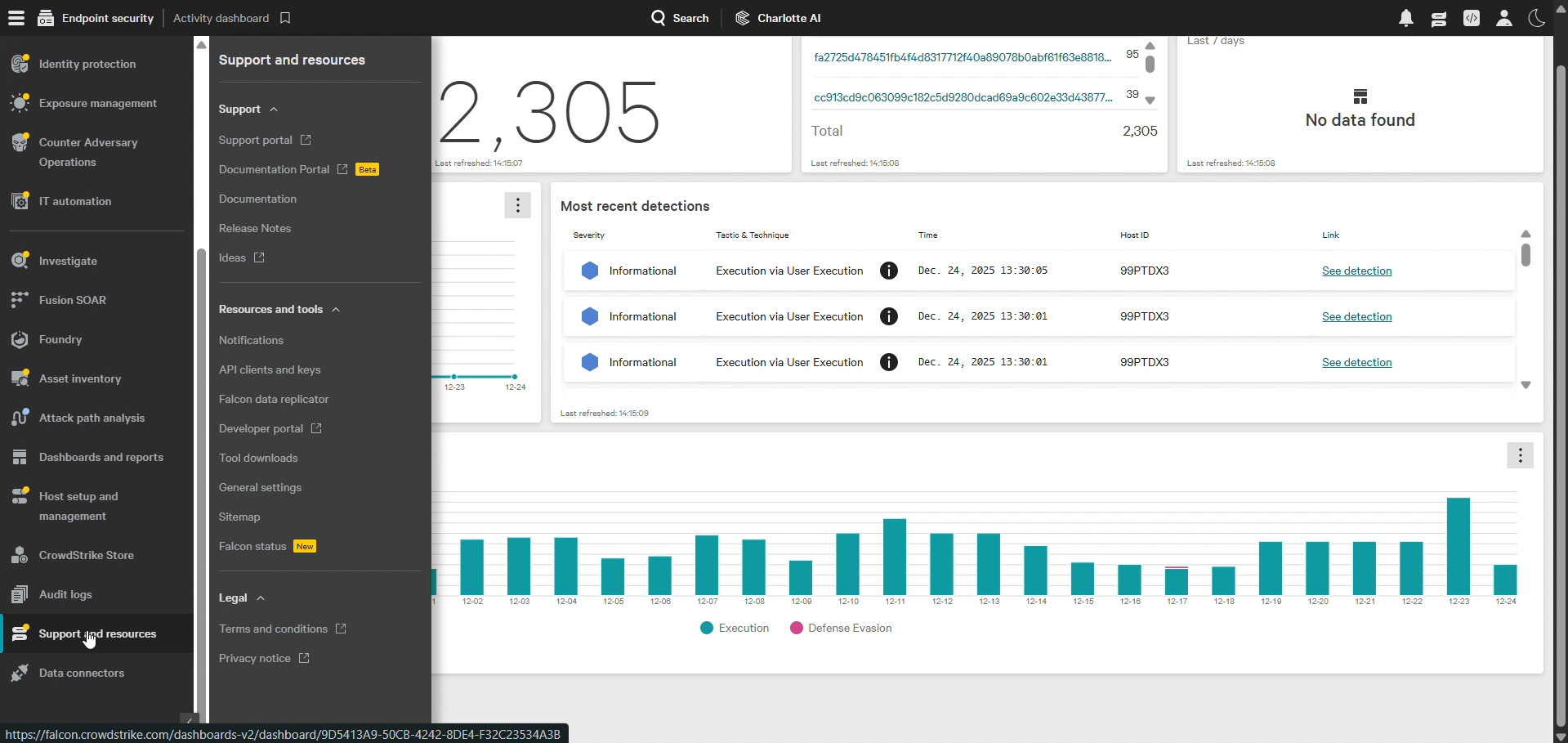
- Log in to CrowdStrike and go to menu Icon > Support and resources > API clients and Keys.
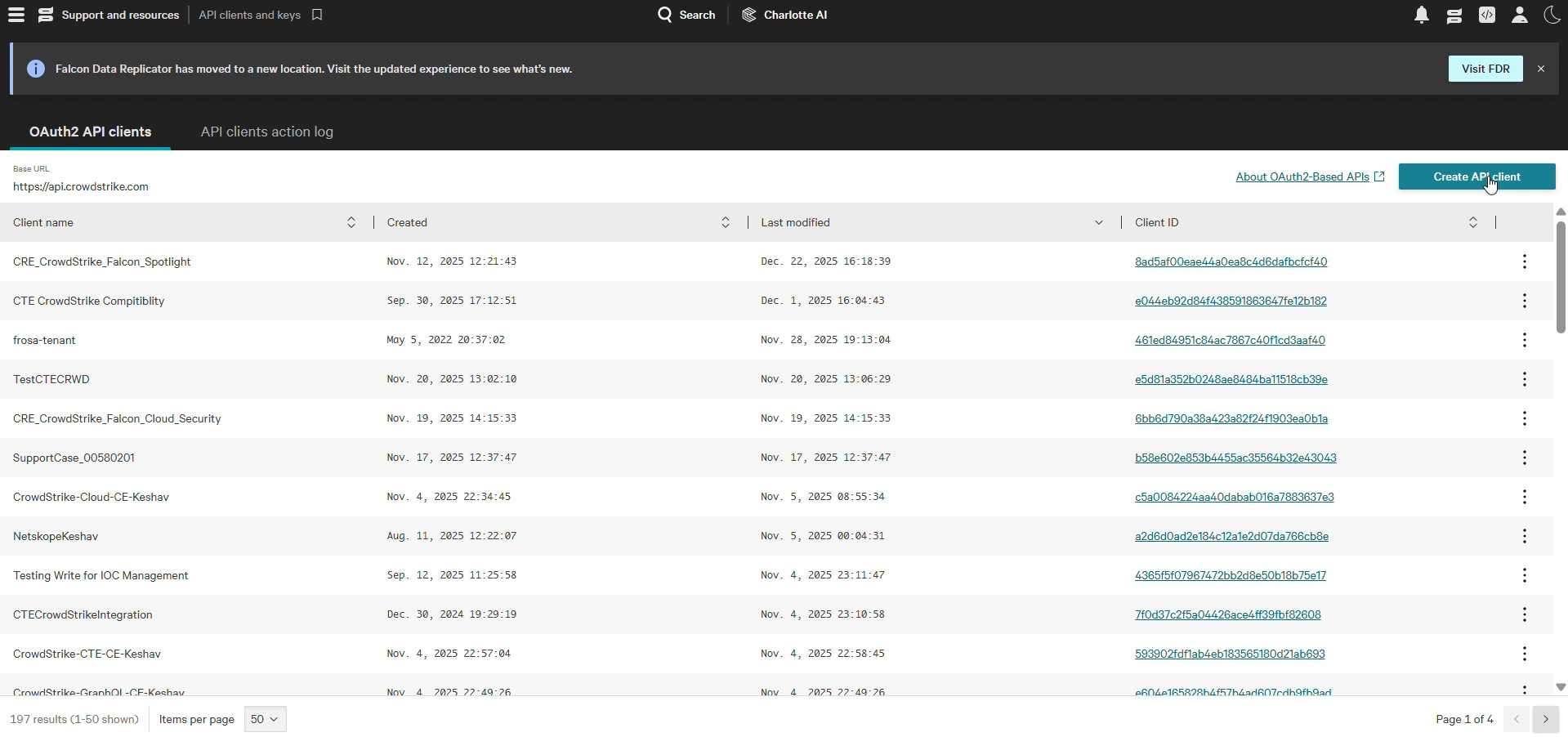
- Click Add new API Client.
- Add the following scopes for using the CrowdStrike plugin:
API Scopes Permissions
Scope
Read
Write
Vulnerabilities
Yes
–
Make a Note of the Client ID and Secret.
Configure the CrowdStrike Falcon Spotlight Plugin
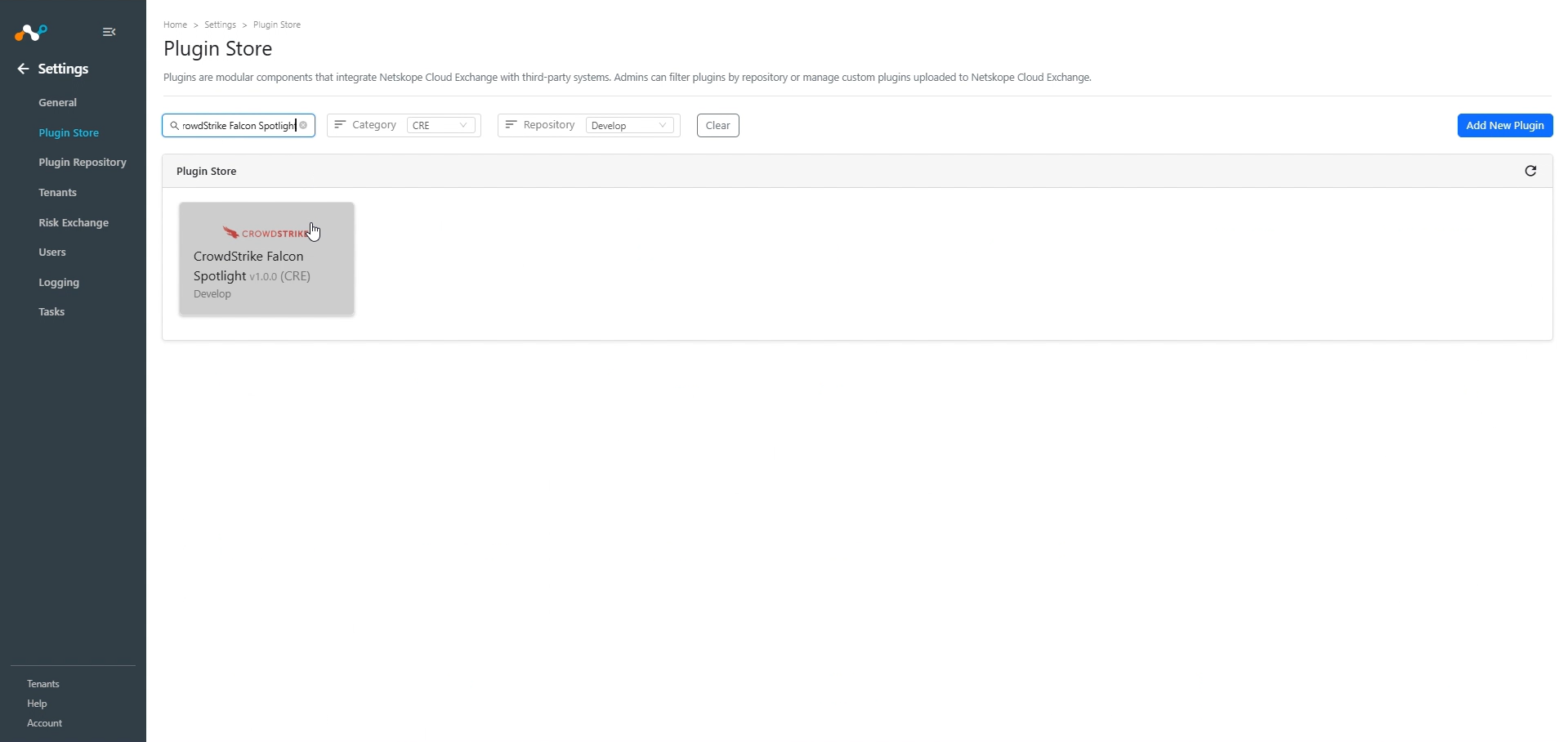
- In Cloud Exchange, go to Settings > Plugin Store. Search for and select the CrowdStrike Falcon Spotlight v1.0.0 (CRE) plugin box.
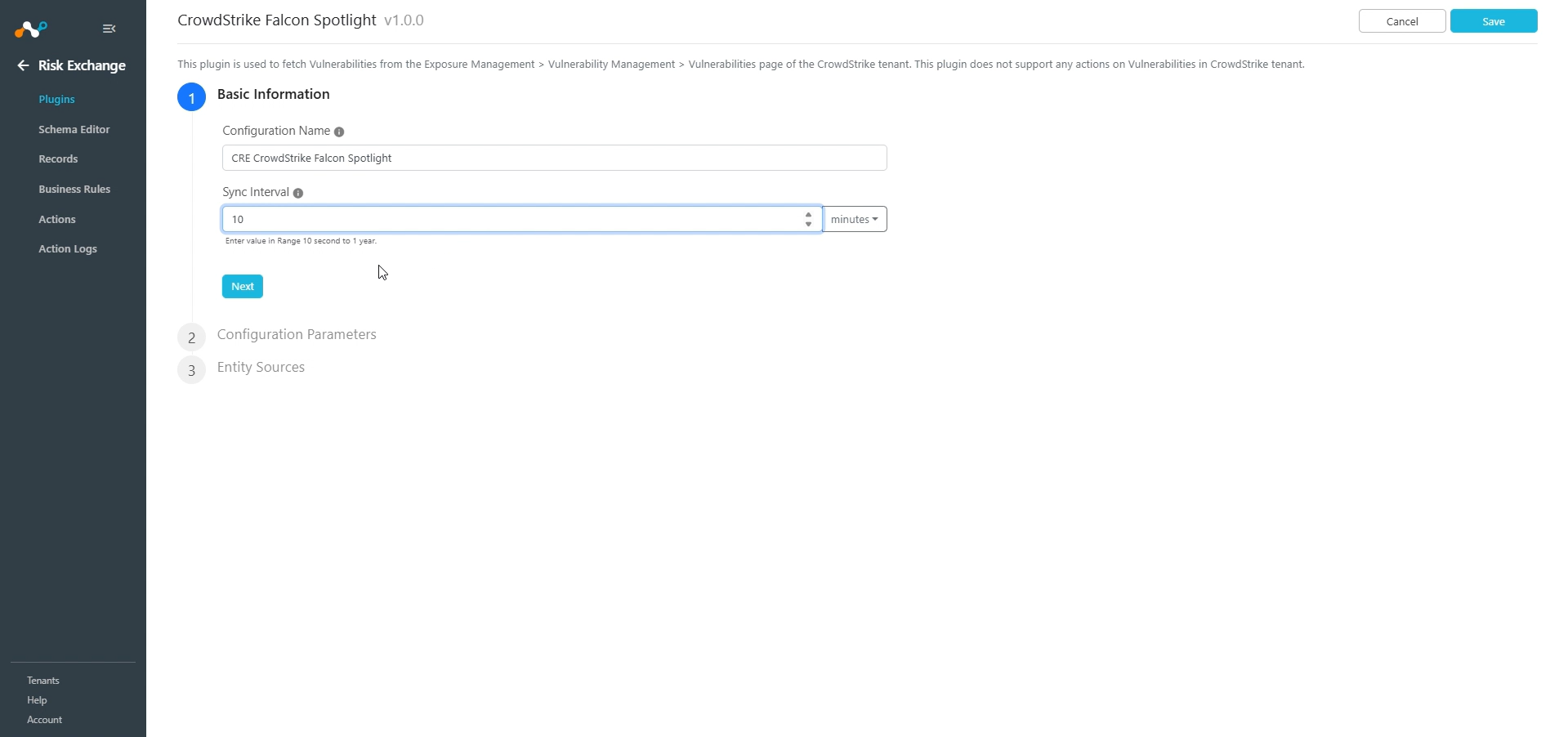
- Add a plugin configuration name and change sync interval if needed.
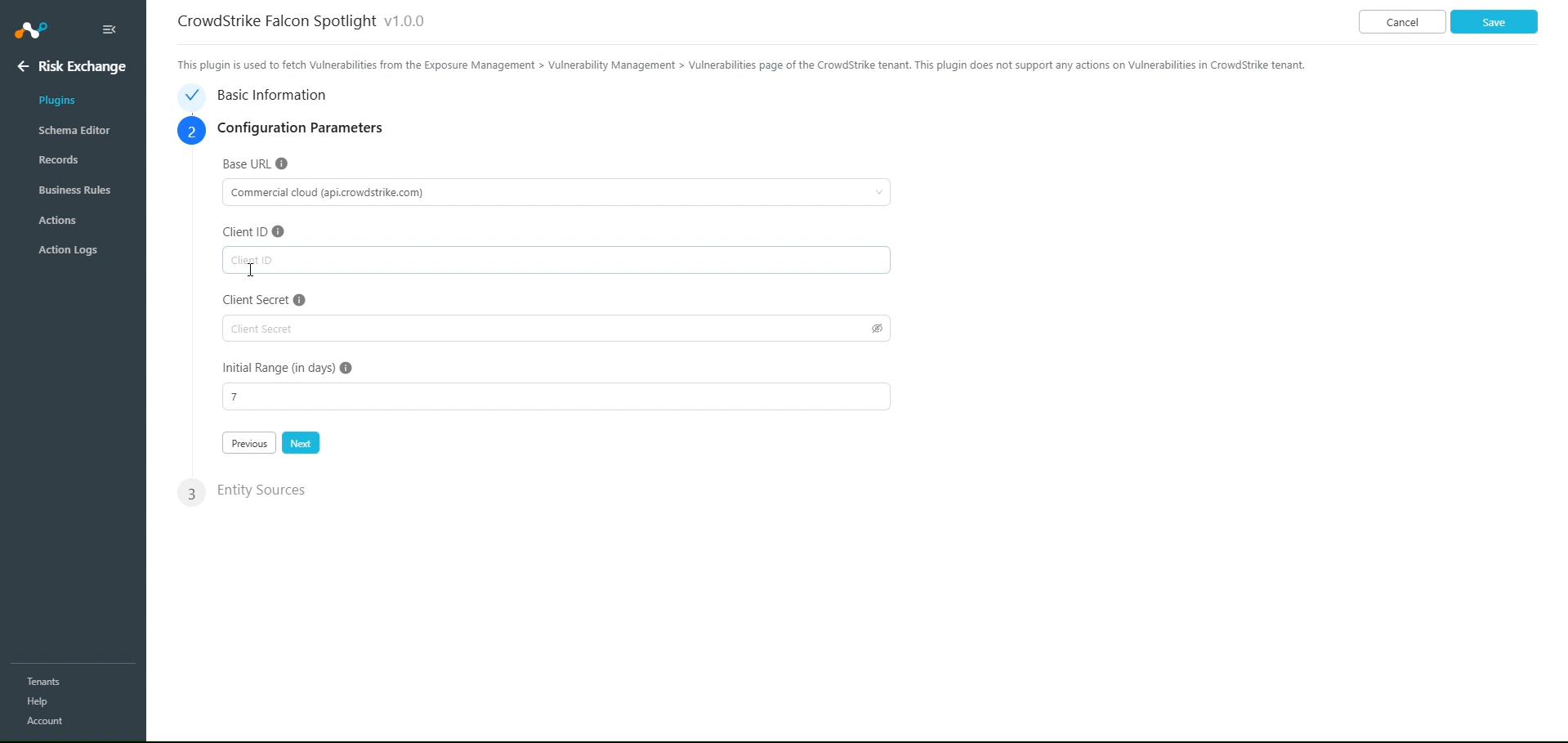
- Click Next and enter the Configuration Parameters:
- Base URL: Base URL of CrowdStrike instance (like https://api.crowdstrike.com).
- Client ID: Client ID generated in CrowdStrike.
- Client Secret: Client Secret generated in CrowdStrike.
- Initial Range (in days): Number of days to pull the data for the initial run. Value must be between 0 and 200.
- Click Next and select the Entity from the Entity dropdown. The Entity fields can be created from the Schema Editor page or using + Add Field from the field dropdown. Provide the field mappings. For the suggested mapping, refer to ‘Mapping’.
Note
The ID field is required to pull the Vulnerabilities.
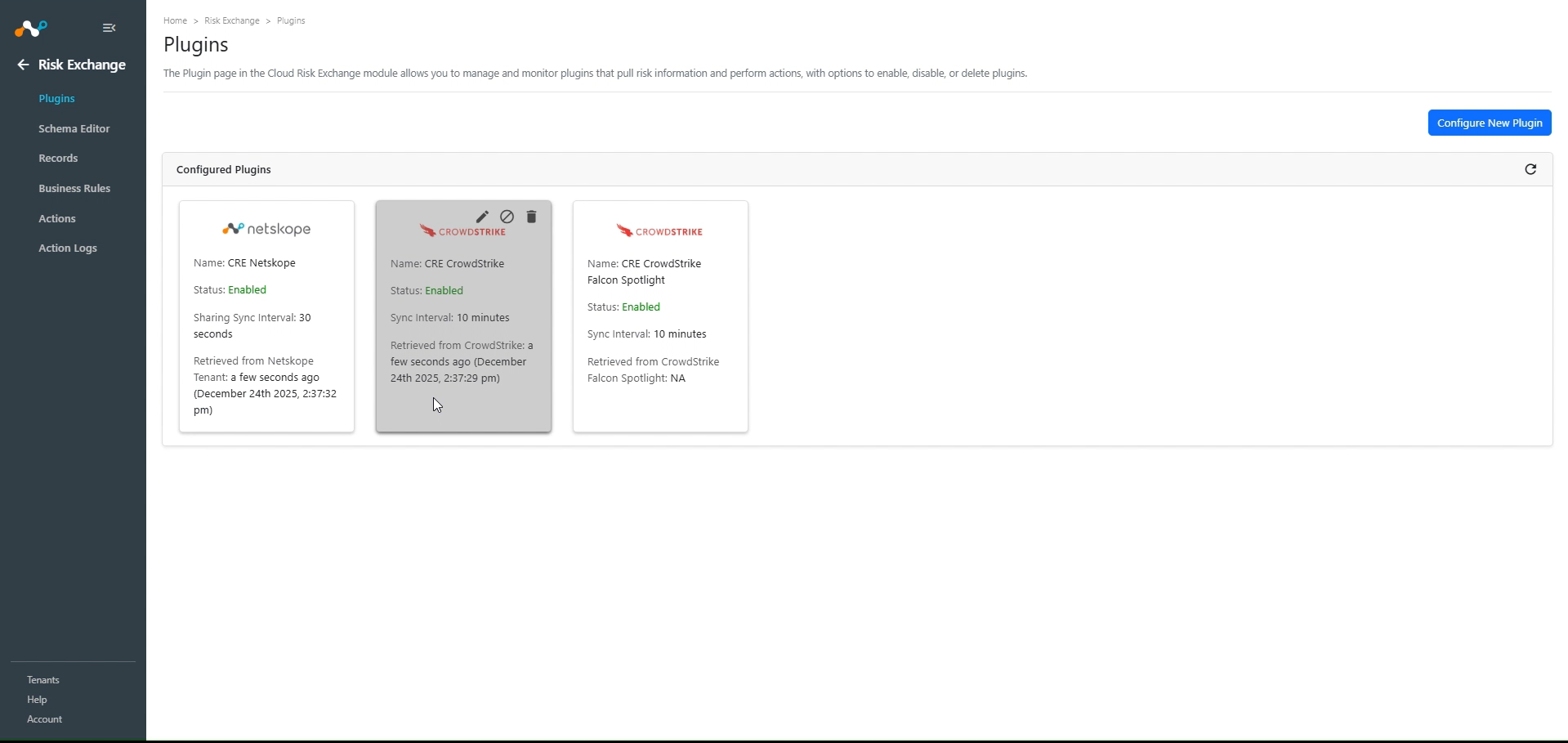
- Click Save.
Add a Risk Exchange Business Rule for CrowdStrike Falcon Spotlight
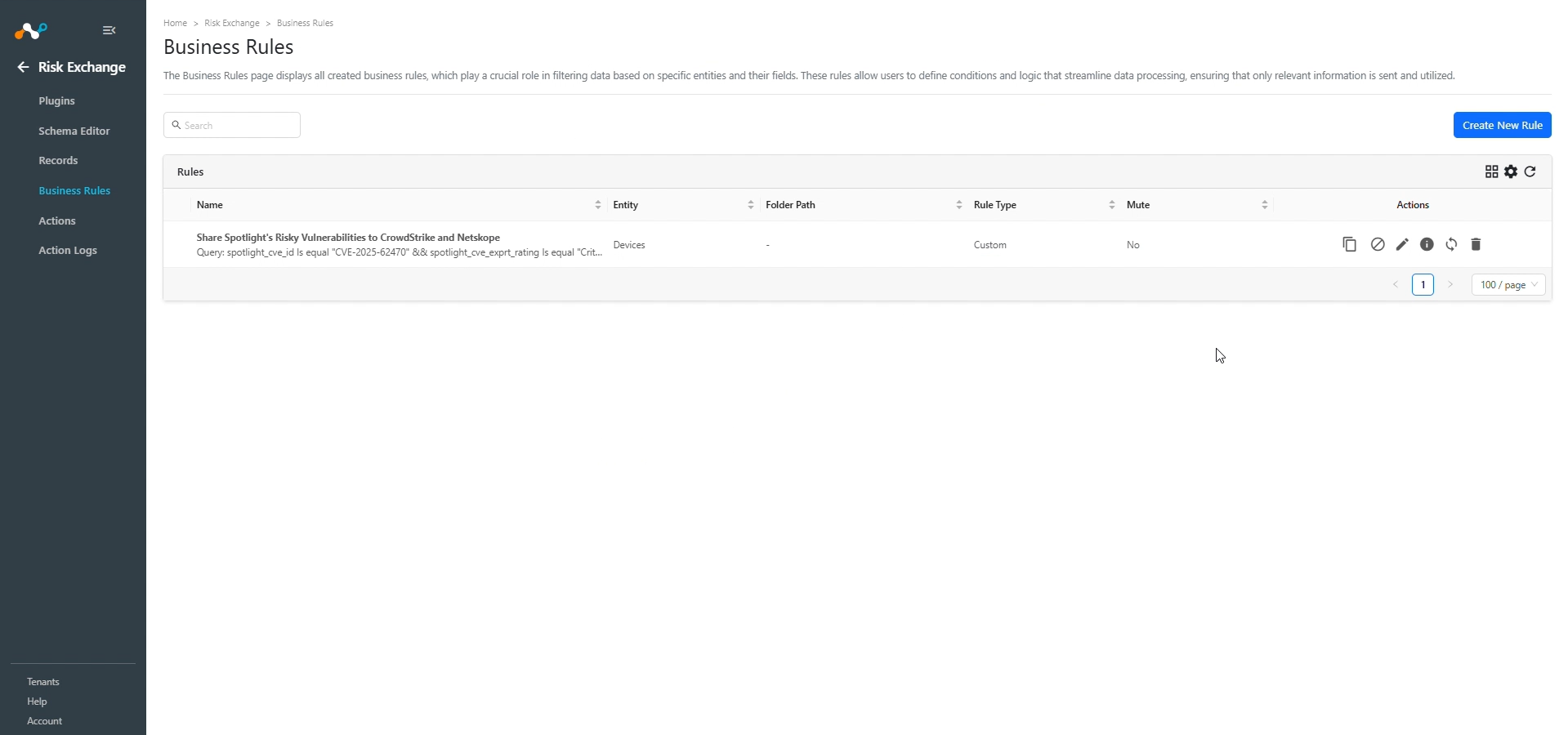
- In Risk Exchange, go to Business Rules and click Create New Rule.
- Enter a Rule Name and select the Entity in which the user records are stored, and configure the query based on your requirements.
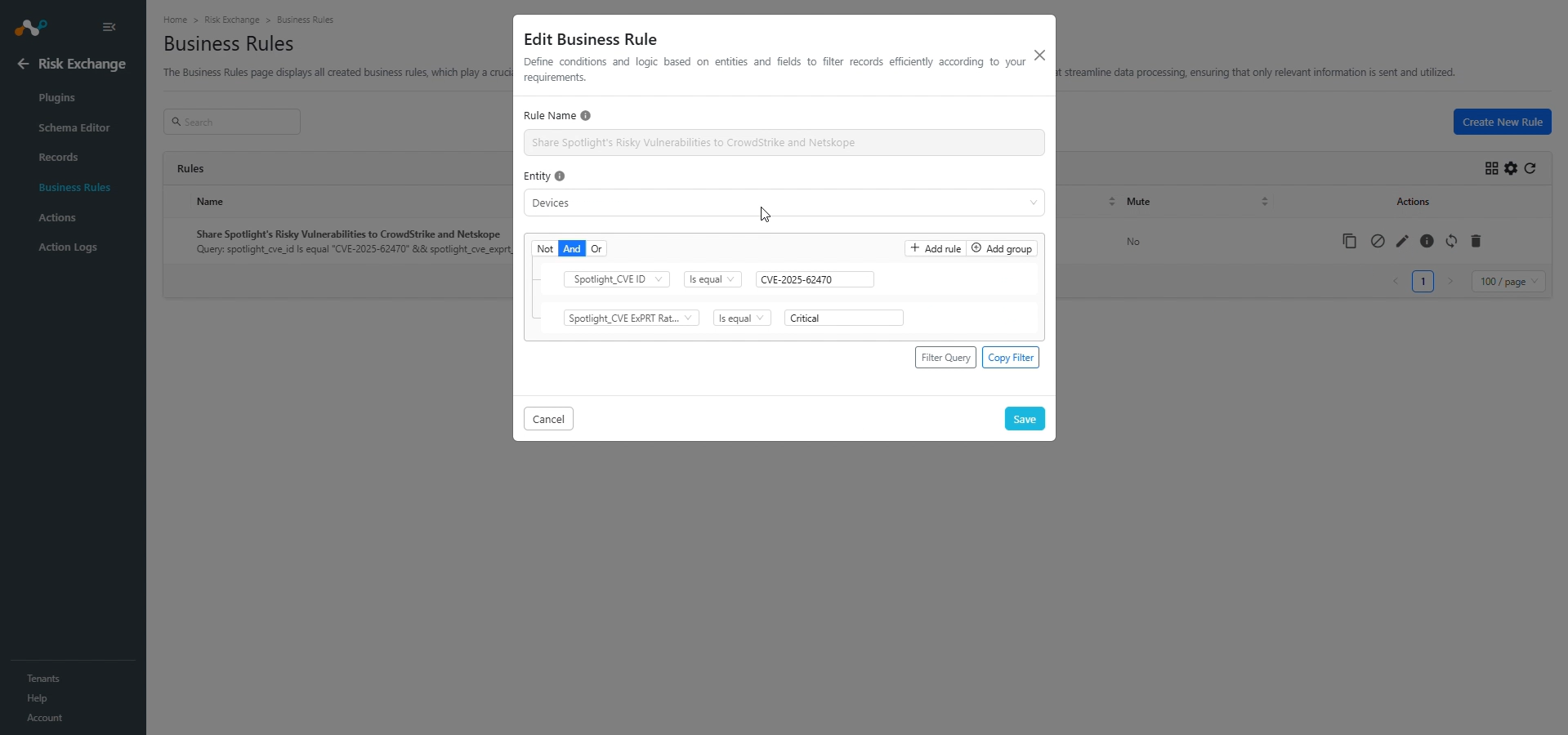
- Click Save.
Add a Risk Exchange Action for CrowdStrike Falcon Spotlight
CrowdStrike Falcon Spotlight supports the No Action action type.
No Action
No action will be performed for this action. You can generate UBA alerts in Ticket Orchestrator by using this action and enabling the Generate Alerts toggle.
Note
You can perform the actions on the users and vulnerabilities of hosts pulled from CrowdStrike Falcon Spotlight on the Netskope Tenant.
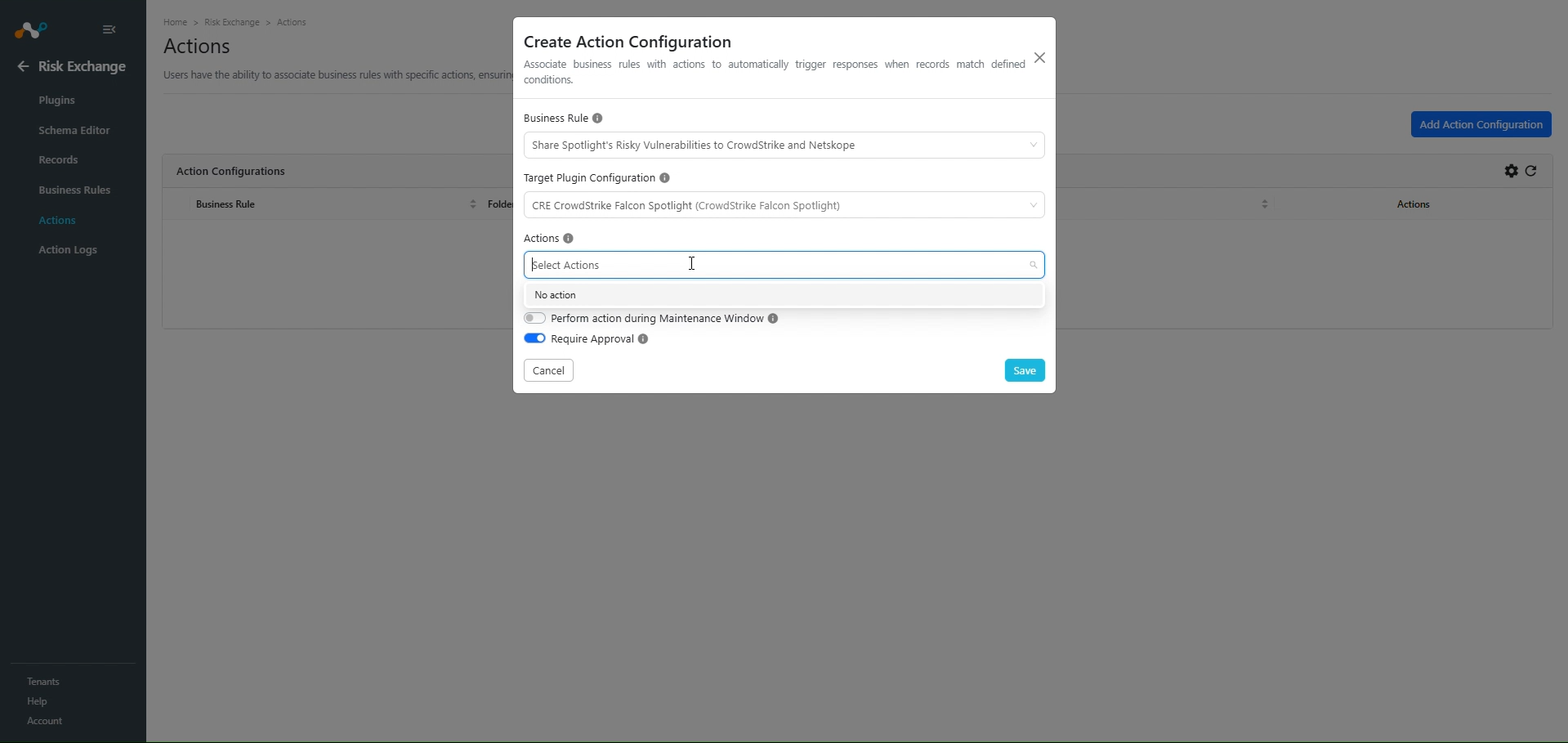
- In Risk Exchange, go to Actions and click Add Action Configuration.
- Select a Business rule, Configuration (name of your configured plugin).
- For Actions, select No actions and enable the Generate Alert toggle to generate alerts in the Ticket Orchestrator module.
- Enable the Require Approval toggle if Approval is needed before performing action on the Users.
- Click Save.
Validate the CrowdStrike Falcon Spotlight Plugin
Validate in Cloud Exchange
To validate the pulling:
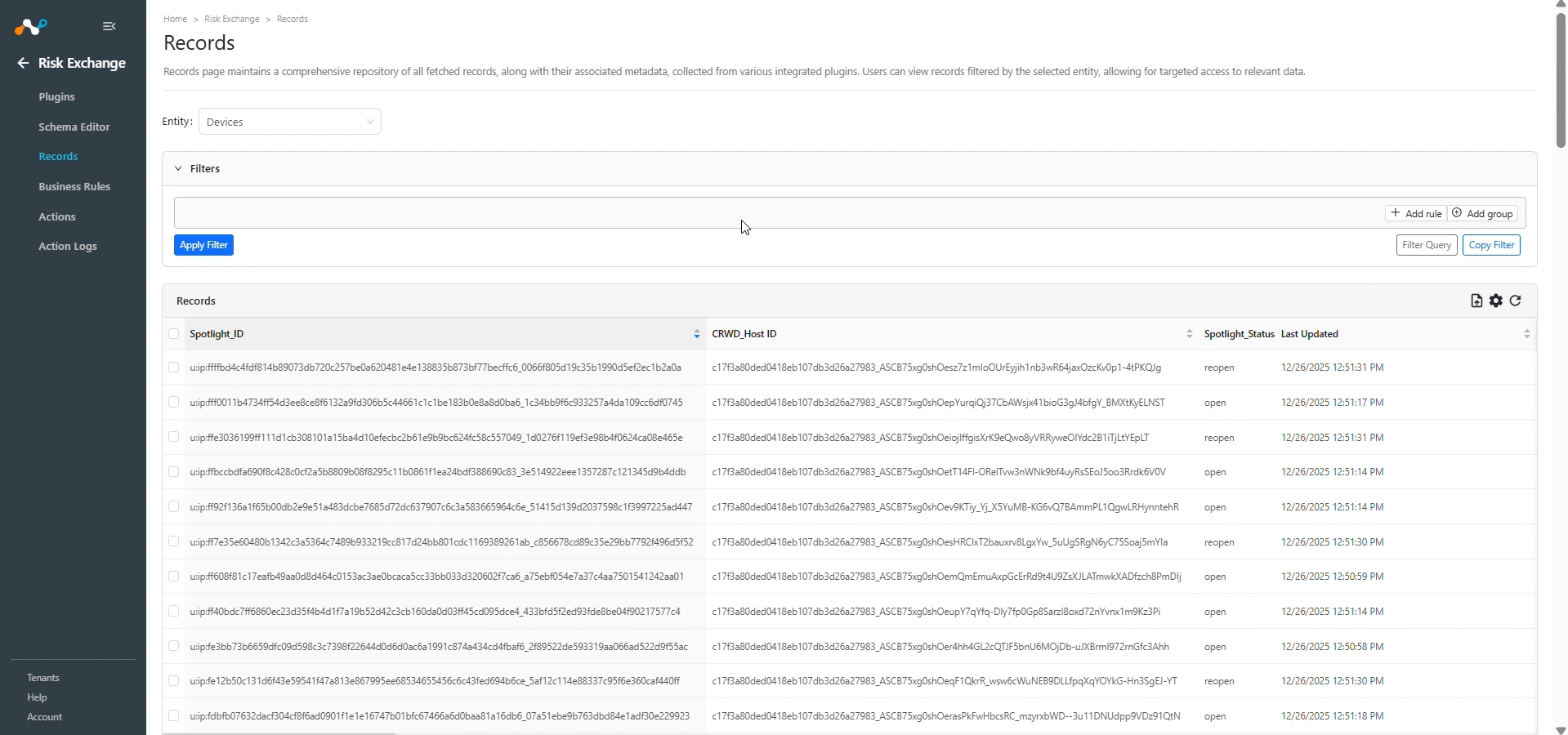
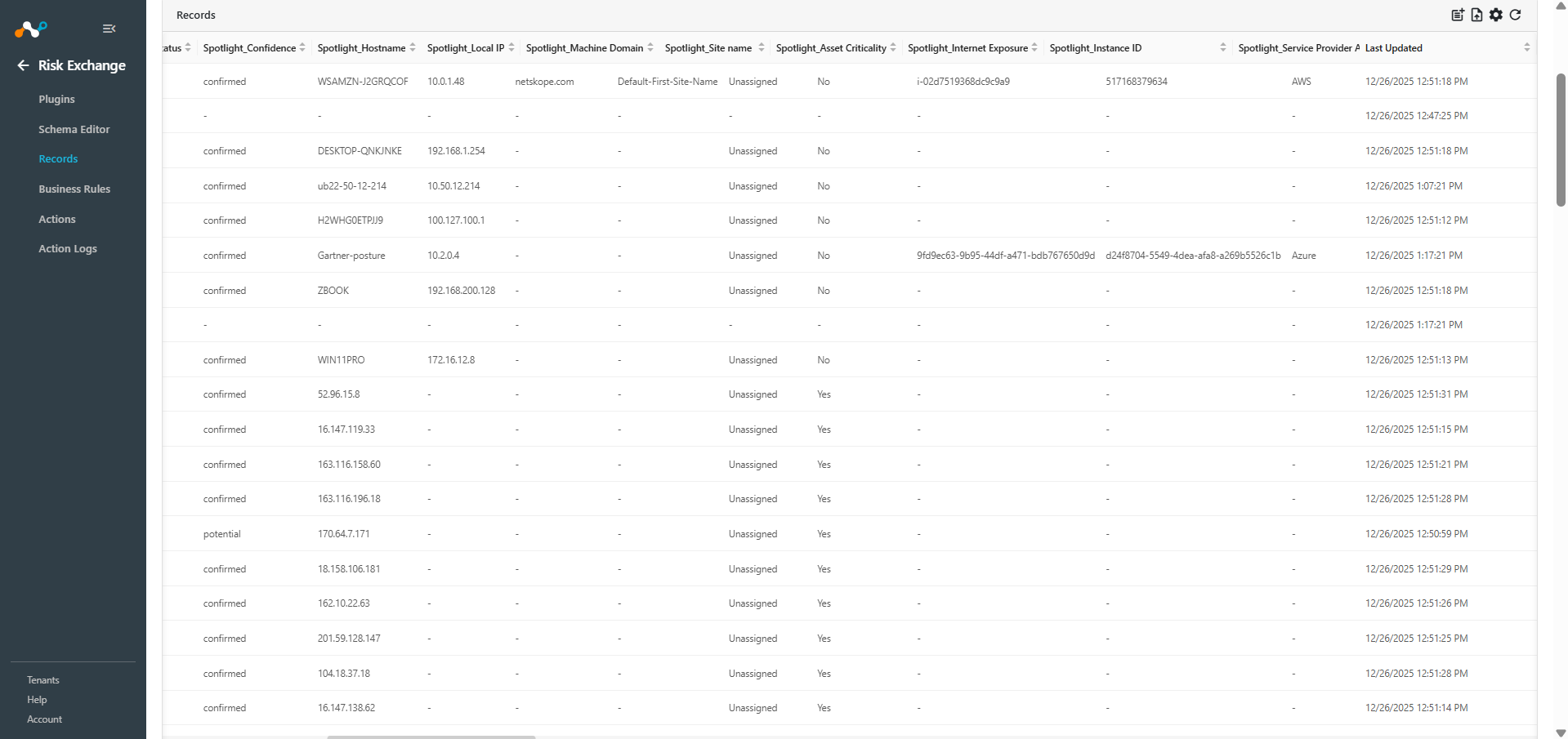
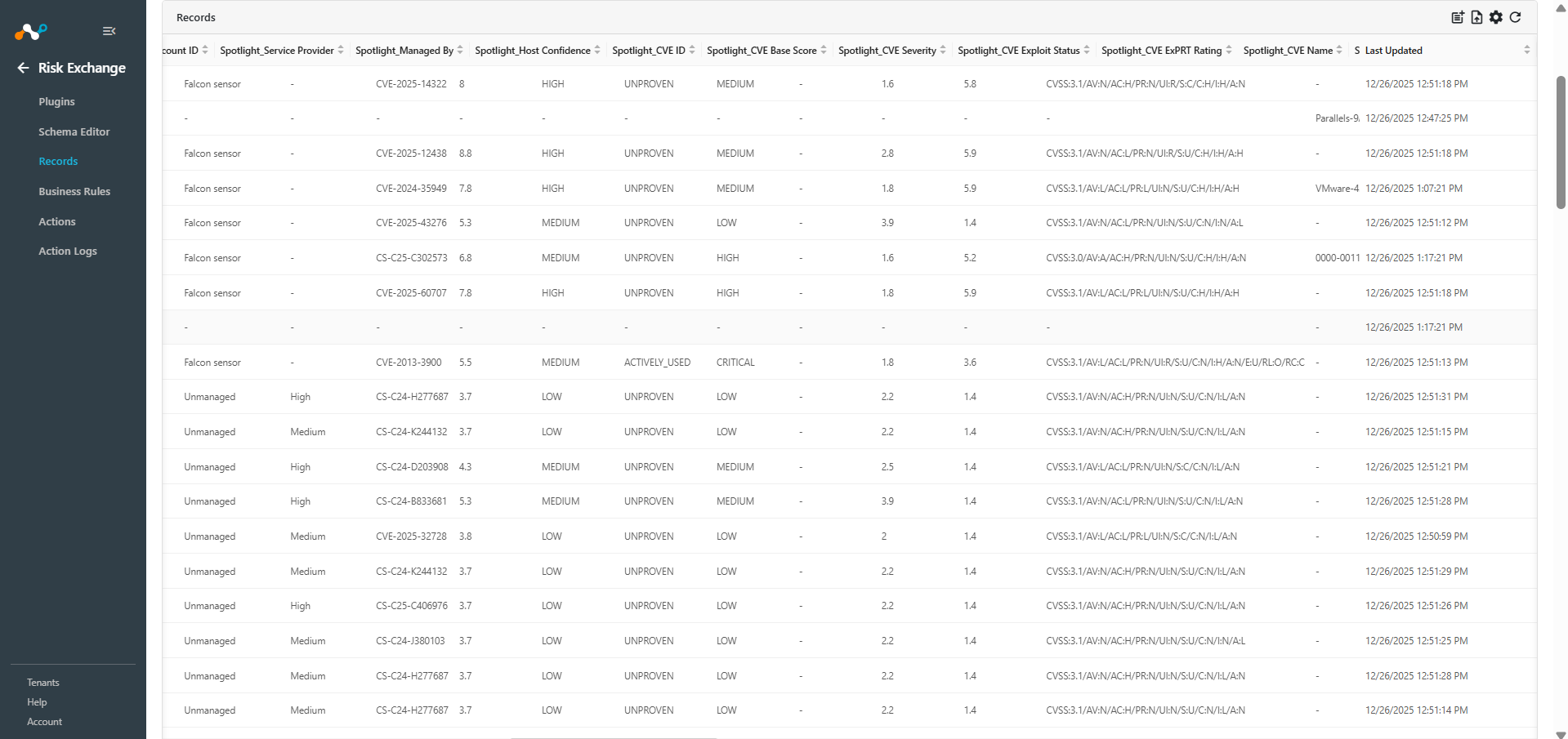
In Risk Exchange go to Records. Select the Entity that was used while configuring the field mapping for Vulnerabilities to view the pulled data from the plugin.
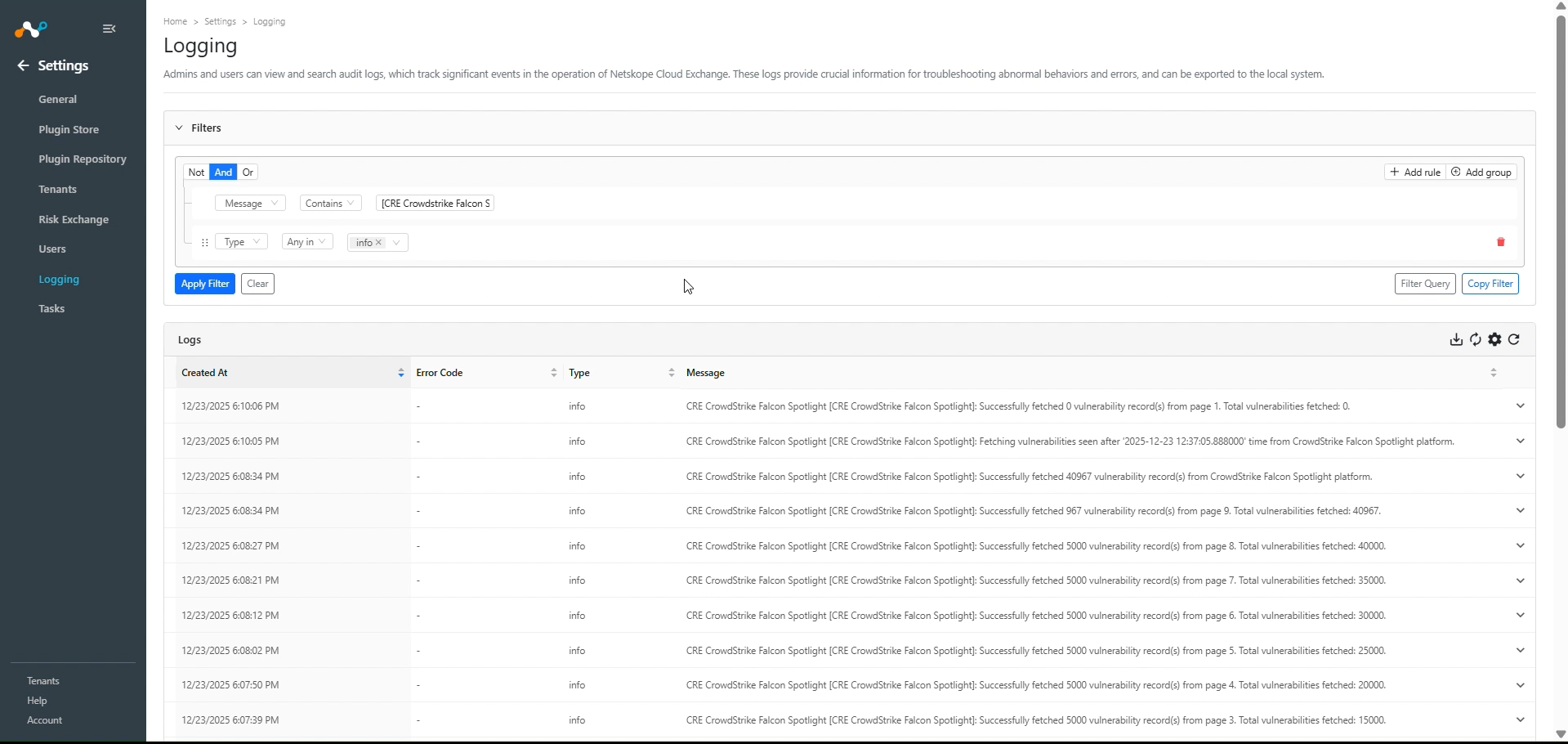
Go to Logging and search for the logs of the plugin.
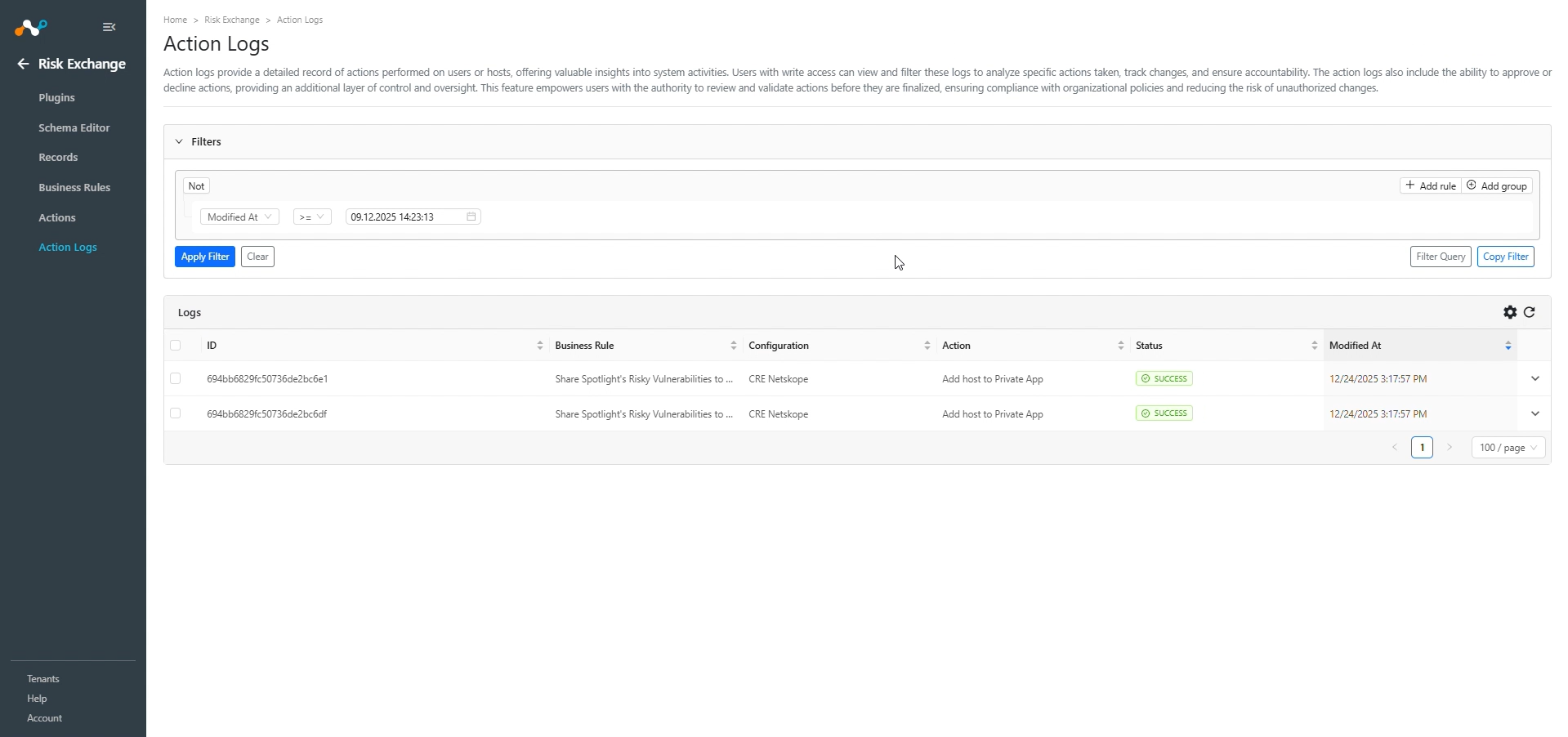
When a record matches one of the configured business rules, the configured action will be performed on the vulnerabilities of hosts. This can be seen in Action Logs.
Validate in CrowdStrike Falcon Spotlight
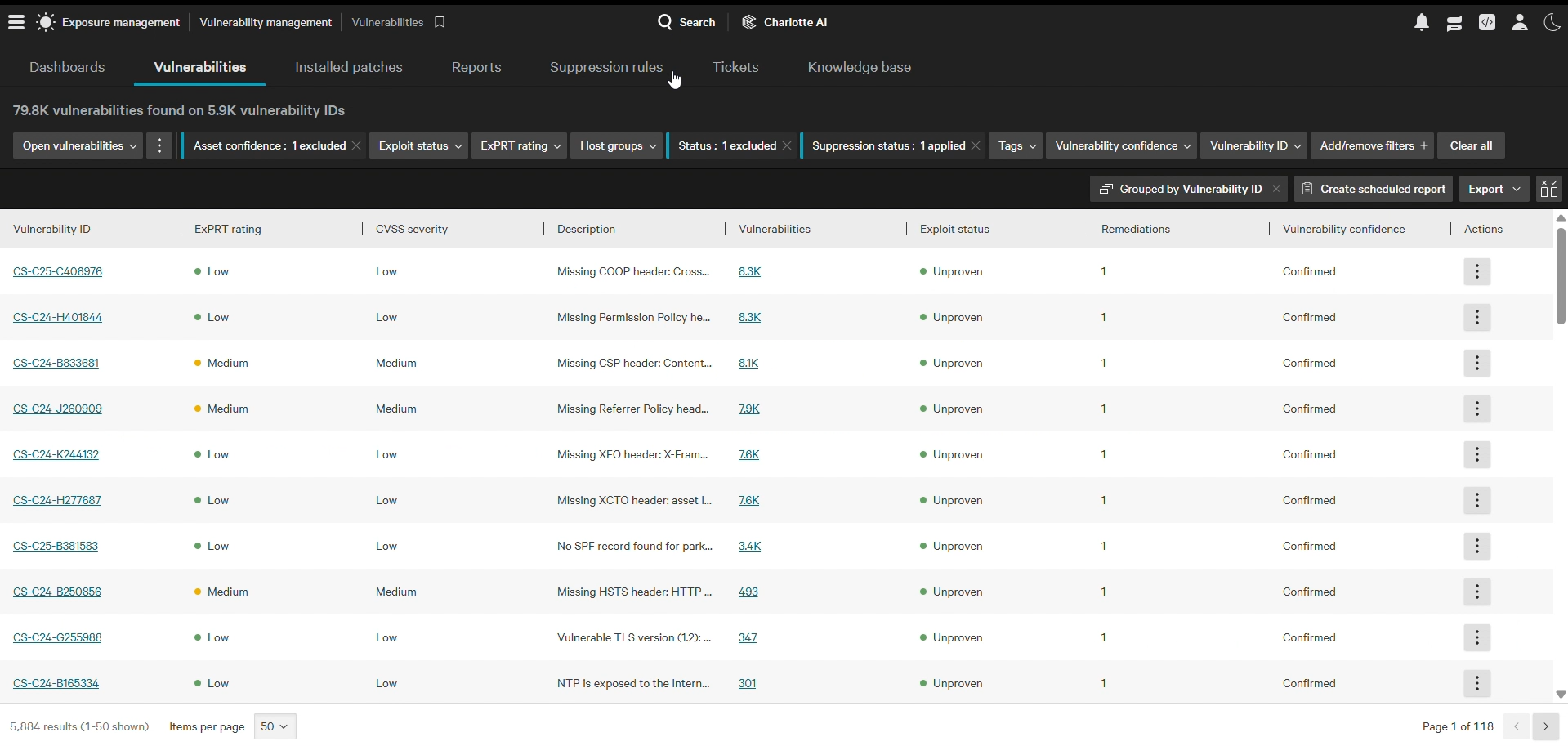
To verify the Users for pulling from CrowdStrike, note that vulnerability details are pulled from Exposure Management > Vulnerability Management > Vulnerabilities in the CrowdStrike tenant.
Troubleshooting the CrowdStrike Falcon Spotlight Plugin
Unable to configure the CrowdStrike Falcon Spotlight plugin.
If you are unable to configure the CrowdStrike Falcon Spotlight plugin, it could be due to one of these reasons:
- Provided the incorrect Client ID or Client Secret.
- Provided Credentials that don’t have sufficient permissions.
What to do:
- To get the Client ID and Client Secret, follow these steps.
- To provide proper permissions to the configuration parameter, refer to steps .
Receiving 403 forbidden error while configuring the plugin
If you are receiving a 403 error, it could be due to one of these reasons:
- Check if the provided Client ID and Client Secret values are correct.
- The API client has proper permissions.
- Check if you have proper permissions provided to the API Client.
- You have IP groups added in the IP Allowlist Management page.
To add your Cloud Exchange’s public IP to CrowdStrike’s IP allowlist:
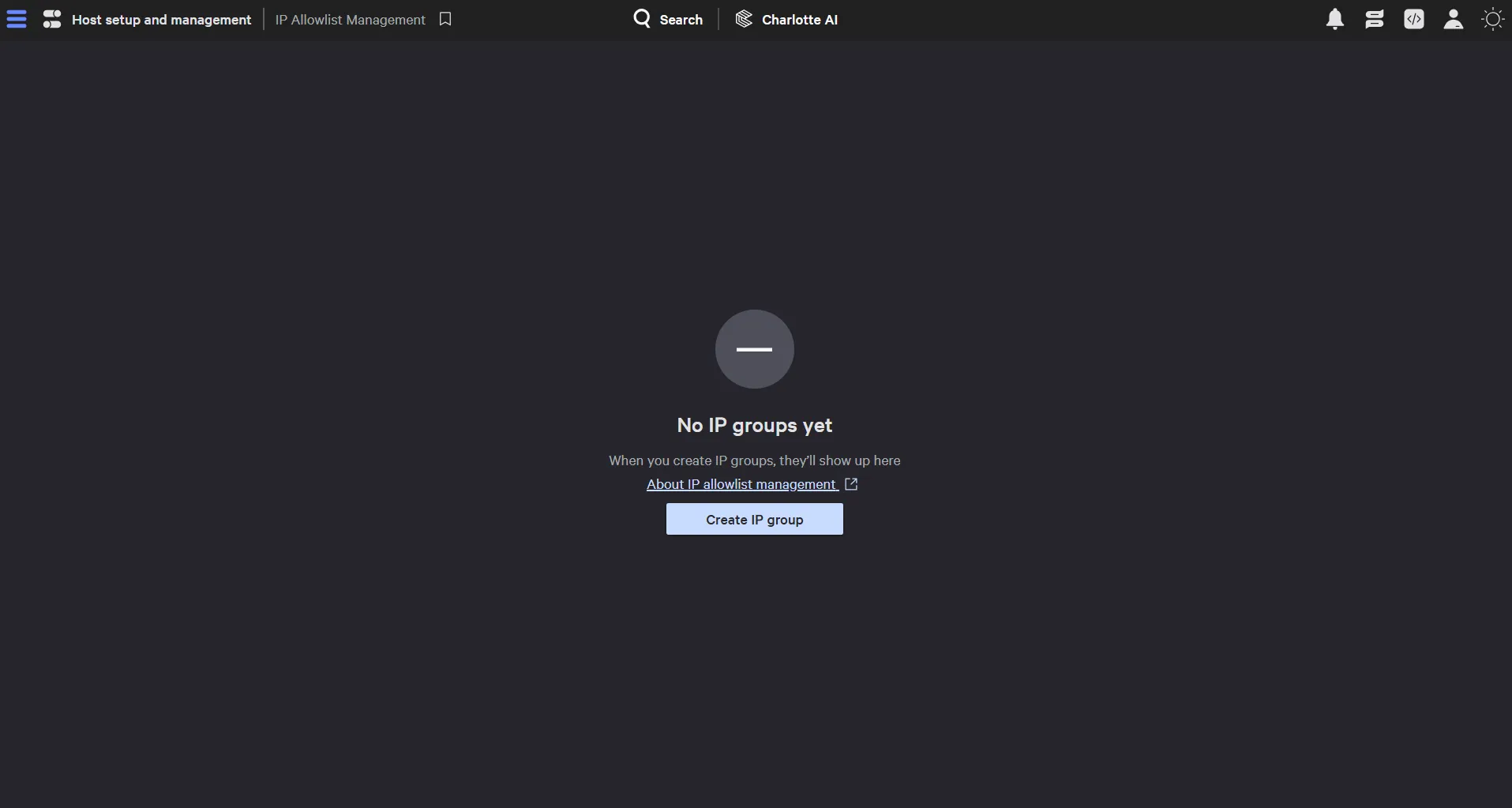
- On your CrowdStrike tenant, go to Host setup and management > Falcon users > IP Allowlist Management and check if any IP groups are added. If added, it will be listed on the page. If not, your screen will look as below. Follow these steps in case you have the IP groups added in the IP Allowlist Management page.
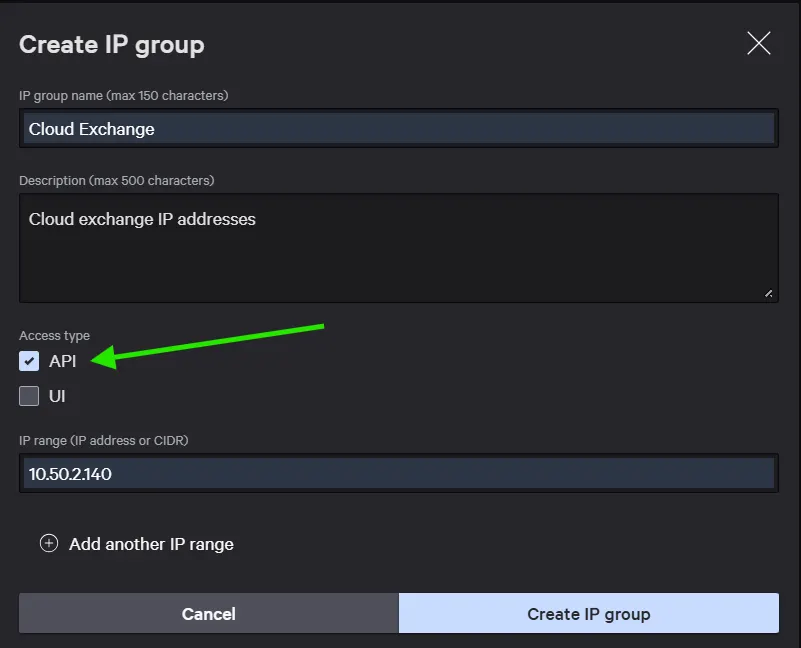
- If you have some IP allowlist groups configured on your CrowdStrike tenant, make sure to add the Public IP Address of the virtual machine where Cloud Exchange is running into an existing group, or you can create a new IP allowlist Group. While adding that, make sure you have the API Access Type selected.
Unable to pull Vulnerabilities
If you are unable to pull Vulnerabilities from the CrowdStrike Falcon Spotlight plugin, it could be due to one of these reasons:
- No Vulnerabilities are present on the CrowdStrike Falcon Spotlight platform.
- An error is received while pulling Vulnerabilities from the platform.
- Mapping is not added while configuring the plugin in the entity source page.
What to do:
- Check on the CrowdStrike Falcon Spotlight platform if Vulnerabilities exist or not.
- Receiving 500 error: The server might be down, wait for a while and check later.
- Receiving 403 error: The plugin configuration parameter does not have sufficient permissions or the credentials no longer exist. Verify the permission for the Client ID and Secret.
- If there is no error in the logs, it might be the case that the Vulnerabilities are not available on the Platform to pull. Check the Device available on CrowdStrike Falcon Spotlight and confirm the same.
- Make sure that the mapping is added and the Device ID field was mapped while configuring the plugin.
Unable to View Vulnerabilities details on the Records page
If you are unable to view Vulnerabilities details on the Records table, it could be due to the mapping for all the CrowdStrike Falcon Spotlight fields were not provided while configuring the CrowdStrike Falcon Spotlight plugin.
What to do:
- Check on the CrowdStrike Falcon Spotlight platform if Vulnerabilities exist or not.
- Receiving 500 error: The server might be down, wait for a while and check later.
- Receiving 403 error: The plugin configuration parameter does not have sufficient permissions or the credentials no longer exist. Verify the permission for the Client ID and Secret.
- If there is no error in the logs, it might be the case that the Vulnerabilities are not available on the Platform to pull. Check the Device available on CrowdStrike Falcon Spotlight and confirm the same.
- Make sure that the mapping is added and the Device ID field was mapped while configuring the plugin.