


Zero Trust Risk Framework: Building Adaptive Policy with CrowdStrike Context
A Strategic and Operational Integration Guide for Security Architects and Policy Administrators
1. Introduction
Zero trust is a strategy, not a switch. Granting or denying access in two states — allowed or blocked — leaves security teams with a blunt instrument in a nuanced threat environment. Real-world policy needs to match real-world risk: a user on a fully patched, healthy corporate laptop accessing a standard SaaS tool at 9 a.m. deserves a different experience than the same user on a device with a degraded security posture accessing a sensitive cloud workload from an unusual location.
Netskope’s Zero Trust Engine sits at the core of the Netskope One platform. It decodes and decrypts every transaction in real-time, continuously evaluating more than 50 contextual variables to build a granular risk profile, and then applies the precise policy that matches that profile. CrowdStrike extends that profile with high-fidelity signals from the endpoint, identity layer, and threat intelligence network that Netskope cannot see on its own.
This document covers the zero trust risk framework and the full integration map, including plugin versions, required API scopes, licensing prerequisites, a comparison of the two IOC-sharing methods, troubleshooting references, support escalation paths, the reverse-direction integrations that let a CrowdStrike-side console trigger a Netskope action directly (Section 4.11), the AI SecOps event pipeline to Falcon Next-Gen SIEM (Section 4.9.3), a field-built SOAR pattern using the Device Tags API (Section 4.11.3), and a note on marketplace listings that repackage existing capability under a different name (Section 4.12).
Intended Audience
Security architects, zero trust program leads, and policy administrators building or refining a joint Netskope + CrowdStrike deployment. The individual integration guides linked throughout this document remain the authoritative source for exact configuration steps and are the first place to check when a UI screen differs from what’s described here. Netskope’s Cloud Exchange plugin UI changes between releases.
1.1 Glossary of Terms
Acronyms are used throughout this document. Full forms are given at first use in body text; the complete list is below for reference.
| Term | Full Form/Definition |
|---|---|
| ZTA | Zero Trust Assessment — CrowdStrike’s continuous device health score |
| ZTNA | Zero Trust Network Access — per-application, identity-aware remote access (Netskope Private Access) |
| UEBA | User and Entity Behavior Analytics — Netskope’s behavioral risk-scoring engine |
| CCI | Cloud Confidence Index — Netskope’s risk rating for cloud applications |
| DLP | Data Loss Prevention |
| IOC | Indicator of Compromise (like malicious hash, domain, IP) |
| IOA | Indicator of Attack — behavioral evidence of an active attack technique |
| IOM | Indicator of Misconfiguration — a cloud resource configuration that increases attack surface |
| CVE | Common Vulnerabilities and Exposures — the public identifier for a known software vulnerability |
| SCIM | System for Cross-domain Identity Management — the protocol used to sync users/groups between tenants |
| XDR | Extended Detection and Response |
| SIEM | Security Information and Event Management |
| RTR | Real-Time Response — CrowdStrike’s remote host-access and scripting capability |
| CE | Cloud Exchange — Netskope’s low-code integration broker |
| CRE | Cloud Risk Exchange — Cloud Exchange’s unified risk module. Since Cloud Exchange v4.1.0+, CRE consolidates what were previously separate User Risk Exchange (URE) and Application Risk Exchange (ARE) sub-modules into one Risk Exchange module that ingests device, user/host, identity, and application risk scores together. Individual third-party plugin listings in the Netskope Knowledge Portal may still carry a legacy “(URE)” suffix in their name, but they all configure and run under this single current-generation Risk Exchange (CRE) module — see Section 3.2 for how this document groups them. |
| URE | User Risk Exchange — the legacy name for the user/host-risk sub-module, now merged into CRE (see CRE above). Retained in this document only where it appears in a specific plugin’s official name. |
| CSPM | Cloud Security Posture Management |
| NPA | Netskope Private Access |
| SSE | Security Service Edge |
| SASE | Secure Access Service Edge |
| MTTR | Mean Time to Respond/Resolve |
| RBAC | Role-Based Access Control |
| CASB | Cloud Access Security Broker |
| SOAR | Security Orchestration, Automation, and Response |
| ECS | Elastic Common Schema — the normalized field naming convention (event.action, event.severity, etc.) that CrowdStrike’s netskope-sse parser maps Netskope events into inside Falcon Next-Gen SIEM. |
| HEC | HTTP Event Collector — the Falcon Next-Gen SIEM connector type that receives webhook-delivered events over HTTP |
2. Netskope Zero Trust Risk Framework
2.1 The Zero Trust Engine
The Zero Trust Engine is Netskope’s inline policy-enforcement and risk-assessment fabric. It operates at what Netskope calls Layer 8, above the traditional network stack, to understand not just who is connecting and where, but what they are doing, with what data, in which application instance, and under what risk conditions. Every transaction is evaluated against this complete context before a policy outcome is applied.
The engine applies continuous adaptive trust. It does not make a single access decision at session establishment and then steps aside. Risk telemetry is gathered continuously, and policy can change mid-session if the risk profile changes.
2.2 Five Dimensions of Risk Context
Netskope policy evaluates risk across five dimensions simultaneously. Each dimension can be enriched with external signals, including signals from CrowdStrike.
| Dimension | What Netskope Evaluates |
|---|---|
| User | Who is the user? What is their behavioral risk score (UEBA — User and Entity Behavior Analytics)? Are they anomalous relative to their peer group? Have they been flagged in a risk group? |
| Device | Is the device managed or unmanaged? What is its security posture: agent installed, OS patched, disk encrypted, certificates valid? Has a threat been detected on it? |
| Application | What application is being accessed? What is its CCI (Cloud Confidence Index) risk score? Is the user accessing a personal instance or a corporate instance? Is this an approved application? |
| Data | What is the sensitivity of the data involved? Does it match a DLP (Data Loss Prevention) profile: PII, source code, financial data, regulated content? What activity is being performed: view, upload, share, download, print? |
| Network / Location | Where is the user connecting from? Is the source IP or location consistent with normal behavior? Is the destination a known malicious domain or IP? |
2.3 Policy Actions: A Spectrum of Outcomes
Because the Zero Trust Engine evaluates all five dimensions together, policy outcomes can be far more precise than a binary allow/block decision. The following outcomes are available and can be combined or triggered conditionally based on risk score thresholds:
| Action | When to use it |
|---|---|
| Allow | Full access with no restriction. Reserved for low-risk, high-trust transactions. |
| Alert | Access proceeds; a security event is logged and can trigger a SIEM (Security Information and Event Management) alert. |
| Coach/Justify | A warning is presented to the user. They must acknowledge or justify the action before proceeding. Effective for borderline-risk situations without disrupting workflow. |
| Restrict activity | Allow access to the application but block specific activities within it. For example: allow view and download, but block upload, share, and print. |
| Step-down access | Reduce the scope of access as risk increases. A user with a moderate device-risk score might get read-only access; a user with a high score might get no access. |
| Remote Browser Isolation | When users access high-risk destinations, route the session through a bounded intermediary, the remote browser, so no content executes locally. Effective for unverified or risky sites that should not be outright blocked. |
| Quarantine | Intercept a file upload or download and route it to a quarantine location for review. |
| Block | Deny access entirely. Applied when risk exceeds a defined threshold or the destination is known to be malicious. |
| Reclassify device | Change the device’s managed/unmanaged status in real-time, triggering a different policy tier automatically. |
| Move user to group | Automatically assign the user to a restricted-access group, which then matches a more restrictive policy set. |
| User notification | Trigger a notification to the user and their manager via ITSM, email, or Slack. |
3. Integration Strategy: How CrowdStrike Enriches Netskope Policy
CrowdStrike contributes four categories of signal that the Zero Trust Engine cannot derive from inline traffic inspection alone: device health, user identity risk, threat intelligence, and cloud workload posture. Each category feeds one or more of the five risk dimensions described in Section 2, enabling policy outcomes that would otherwise require manual intervention.
The integrations use two primary channels:
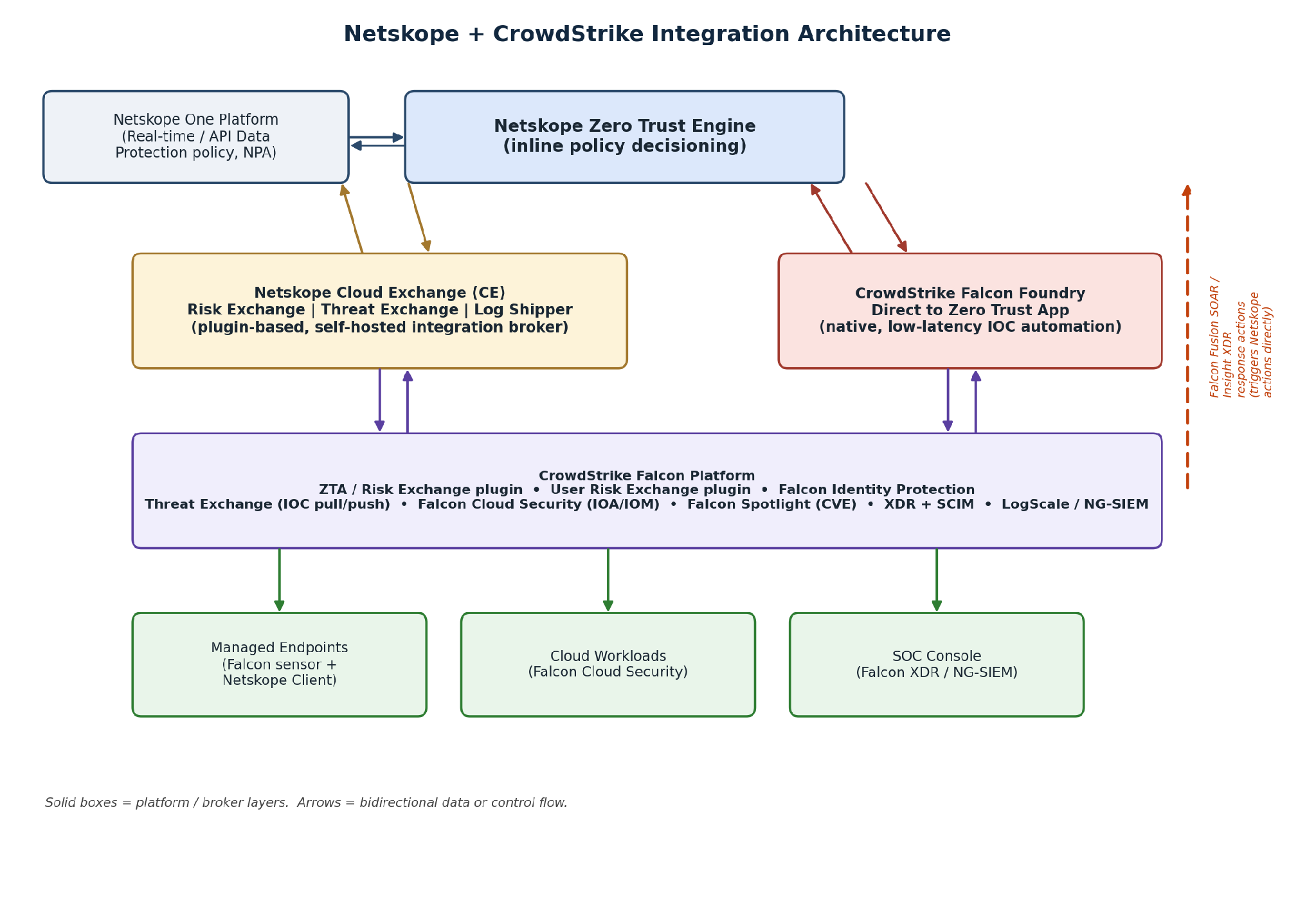
- Netskope Cloud Exchange (CE): A low-code, self-hosted integration platform that hosts plugins for Risk Exchange (CRE), Threat Exchange, Log Shipper, and ITSM workflows.
- CrowdStrike Falcon Foundry: A native application framework hosting the Direct to Zero Trust App, which normalizes and deduplicates IOCs (Indicators of Compromise) before pushing them to Netskope URL and File lists.
3.1 Architecture Overview
The diagram below shows how the two channels sit between the Netskope Zero Trust Engine and the CrowdStrike Falcon platform. Cloud Exchange is a customer-operated broker (a VM the customer sets up and maintains); Falcon Foundry’s Direct to Zero Trust App is a CrowdStrike-hosted native app requiring no separate infrastructure. Both ultimately write into the same Netskope policy surfaces (URL lists, File hash lists, device classification, user groups). Each bidirectional flow is drawn as a side-by-side arrow pair, and the reverse-direction SOAR/XDR flow (Section 4.11) has its own path along the right edge.
3.2 Integration-to-Outcome Map
A note on terminology before this table: current Cloud Exchange releases (v4.1.0 onward) use a single, unified Risk Exchange module called Cloud Risk Exchange, or CRE, that ingests device, user/host, identity, and application risk scores together into one risk engine. This replaced an earlier architecture where User Risk Exchange (URE) and Application Risk Exchange (ARE) were positioned as separate modules alongside a device-focused Risk Exchange. That older split is why some individual plugin listings in the Netskope Knowledge Portal still carry a legacy URE) suffix in their product name. The plugin’s name hasn’t been renamed even though it now configures and runs under the single current-generation Risk Exchange (CRE) module.
Practically, this means the rows below that feed Risk Exchange are not competing alternatives where you pick one. They are complementary plugins that each contribute a different score type (device health, host/user risk, identity risk) into the same CRE engine, and a typical deployment runs several of them at once, combining scores in a single Business Rule. The groupings below organize the table by the type of signal each integration contributes, rather than by which module name it happens to carry, so it’s clearer what each row actually does and that you are not choosing between separate systems.
| Integration | Score Type Contributed | Primary Policy Outcomes | Plugin/App Version | Module |
|---|---|---|---|---|
| Device Risk — Endpoint Health | ||||
| CrowdStrike ZTA Score | Device health | Managed → Unmanaged reclassification; step-down or block access based on score threshold | CRE v1.1.0+ | Risk Exchange (CRE) |
| User and Host Risk | ||||
| CrowdStrike Host Risk (User Risk Exchange) | User + host risk | Move user to restricted group; restrict uploads; reduce ZTNA (Zero Trust Network Access) session scope | Historically labeled URE v1.2.0; runs under CRE in current Cloud Exchange | Risk Exchange (CRE) |
| Falcon Identity Protection | Identity risk | Block or restrict access for users with compromised credentials or anomalous identity behavior | Historically labeled URE v1.0.0 (netskope-ce-4.1.0-ure-crowdstrike_identity_protect); runs under CRE in current Cloud Exchange | Risk Exchange (CRE) |
| Cloud Workload and Vulnerability Risk | ||||
| Falcon Cloud Security | Cloud workload risk (IOA/IOM) | Feed cloud workload IOAs (Indicators of Attack) and IOMs (Indicators of Misconfiguration) into Netskope risk posture for CSPM-aware policy | CRE (current GA — verify in Plugin Store) | Risk Exchange (CRE) |
| Falcon Spotlight | Device vulnerability (CVE) | Vulnerability score feeds device risk; high-CVE devices get more restrictive access | CRE v1.0.0 | Risk Exchange (CRE) |
| Threat Intelligence (IOC Sharing) | ||||
| Threat Exchange (IOC Sharing) | N/A — IOC data, not a risk score | Block access to known-malicious domains/IPs/URLs; quarantine or block malicious file transfers | CTE v2.3.0 | Threat Exchange |
| Direct to Zero Trust App (Falcon Foundry) | N/A — IOC data, not a risk score | Automated IOC ingestion from CrowdStrike detections into Netskope URL and File lists | Falcon Foundry native app (CrowdStrike-managed versioning) | Falcon Foundry (native) |
| Incident Response and Visibility | ||||
| XDR Integration (SCIM + Alert Sharing) | N/A — identity sync + alert correlation | Automatic group re-assignment on detection; bi-directional incident enrichment | N/A (native SCIM 2.0 + REST API v2/RBAC v3 token) | Native XDR + SCIM |
| LogScale/NG-SIEM (Log Shipper) | N/A — log data, not a risk score | Centralise Netskope web transaction logs in CrowdStrike for unified SOC investigation | Log Shipper plugin / native S3 streaming | Cloud Exchange or native |
| Netskope SOAR Actions (Falcon Fusion SOAR) | N/A — action trigger, reverse direction | Trigger Netskope actions — e.g., add/remove user from restricted group, enforce a cloud governance setting — directly from a Falcon Fusion SOAR playbook | CrowdStrike Marketplace listing (CrowdStrike-built connector) | Falcon Fusion SOAR (native) |
| Netskope Response Actions for Falcon Insight XDR | N/A — action trigger, reverse direction | Trigger a Netskope SSE response action directly from the Falcon Insight XDR console on a detection, without building a full Fusion workflow | CrowdStrike Marketplace listing (CrowdStrike-built connector) | Falcon Insight XDR (native) |
| Netskope AI SecOps Events to Falcon Next-Gen SIEM (Outbound Webhooks) | N/A — Cases, User Risk, and AI Risk event data, not a risk score | Near-real-time delivery of AI SecOps Cases, User Risk, and AI Risk events into Falcon Next-Gen SIEM (LogScale), pre-parsed to ECS fields for SOC correlation and search | Native Netskope Outbound Webhook + Falcon HEC/HTTP Event Connector; netskope-sse parser package | Native (webhook) + Falcon Next-Gen SIEM |
Plugin version numbers change frequently. Netskope ships incremental updates to each Cloud Exchange plugin independently. Always check Settings > Plugin Store inside your own Cloud Exchange tenant for the current version before deployment.
The last group’s two Falcon Fusion SOAR / Insight XDR rows flow in the opposite direction from every other row in this table: instead of a CrowdStrike signal feeding into Netskope policy, an analyst or automated CrowdStrike-side workflow directly invokes a Netskope action. See Section 4.11 for the detailed treatment.
4. Integration Deep Dives
Each section below explains what signal the integration provides, how it enters the Netskope policy engine, what it costs to set up (licensing and prerequisites), and what outcomes it enables. Each section closes with API scope requirements, a troubleshooting quick reference, and a pointer to the full implementation guide.
As noted in Section 3.2, Sections 4.1 through 4.3 below are not three separate systems to choose between. They are three plugins that all feed the single current-generation Risk Exchange (CRE) module with different score types. A typical production deployment runs all three concurrently and combines their scores in Business Rules; the sections are kept separate here only because each has distinct prerequisites, API scopes, and score-conversion behaviour worth understanding individually.
4.1 Device Risk: CrowdStrike ZTA Score via Risk Exchange (CRE)
The CrowdStrike Zero Trust Assessment (ZTA) score is a continuous, sensor-derived assessment of device health. It evaluates OS patch level, security agent health, disk encryption state, firewall status, and the presence of active threats. CrowdStrike’s native score runs 0–100 (100 = healthiest).
Score scale. Read this before configuring 4.1 and 4.2 together.
Section 4.1 (device health) and Section 4.2 (host/user risk) feed the same Risk Exchange (CRE) module but use different conversion logic even though both originate from CrowdStrike host data, and that difference matters.
- ZTA device score (4.1): Netskope Cloud Risk Exchange normalized score = CrowdStrike host assessment overall score × 10. A CrowdStrike ZTA of 76 becomes a Netskope score of 760. Both scales run in the same direction — higher is healthier/lower-risk in both systems.
- Host/user risk score, Falcon Identity Protection (4.2 / 4.3): CrowdStrike’s Identity Protection risk score runs 0–1, where 1 is minimum risk and 0 is maximum risk on some CrowdStrike surfaces, but the Netskope Cloud Exchange documentation defines the incoming CrowdStrike scale as 0 = minimum risk, 1 = maximum risk for this specific plugin, which is the inverse convention of the ZTA score. The conversion formula used in Risk Exchange is:
Netskope Cloud Risk Exchange score = |(1 − CrowdStrike Identity Protection risk score)| × 1000.
- Net effect: Do not assume the two plugins’ raw CrowdStrike-side scores move in the same direction just because they land in the same CRE module. Always check each plugin’s own conversion note in Cloud Exchange > Plugin Activity before writing a Business Rule threshold, and validate with a known test host before enabling automatic reclassification in production.
What this adds to Netskope policy
Without the ZTA score, Netskope can assess device management status (managed vs. unmanaged) and check for the presence of the Netskope client certificate. With the ZTA score, Netskope gains a continuous, numeric measure of device health that can be mapped directly to policy tiers.
- CRE can apply a device tag within Netskope based on boolean logic and the ZTA score that can be used in Device Classification matches in inline policy for a nuanced approach to device risk. This enables multiple factors, including ZTA score, to be used to define a match.
- Alternatively, a device whose ZTA score drops below a defined threshold can automatically be reclassified from Managed to Unmanaged in Netskope, shifting it to a more restrictive policy tier. When the score recovers, the device can be automatically reclassified back to Managed, restoring access without manual intervention.
- Score thresholds map to discrete policy tiers: full access above 800, read-only between 500–800, block below 500, configurable per organization.
Prerequisites and licensing
- A Netskope Cloud Exchange tenant with the Tenant plugin and Risk Exchange (CRE) plugin already configured.
- Netskope device classification policy configured to use a CRE created and applied device label(s).
- A Netskope RBAC v3 (or SCIM) token if the paired Business Rule also needs to write back to a Netskope Device Classification rule via the Netskope CRE plugin.
- CrowdStrike instance credentials (Client ID, Client Secret) generated from an API Client.
- If using the Put RTR Script, CrowdStrike Real-Time Response (RTR) Administrator role. Each targeted platform (Windows, Mac) needs a Response Policy with Real-Time Response (High-Risk Commands) enabled. However, we would recommend device tagging method instead of RTR Script.
API scopes/setup path
- CrowdStrike: Support and Resources > API Clients and Keys > Create API Client, with the Zero Trust Assessment (read) and Hosts (read) scopes at minimum; add Real Time Response (read/write) if using RTR actions.
- Cloud Exchange: Settings > Plugin Store > CrowdStrike v1.1.0 (CRE) or later > enter Client ID/Secret and Base URL.
- Netskope Service Account: Settings > Manage > Device Classification > New Device Classification Rule, matched against the file/tag written by the plugin. New Roles > NS Client > Devices, Device Classification
Troubleshooting quick reference
- 403 error configuring the plugin: verify Client ID/Secret are correct and carry the scopes above; confirm Cloud Exchange’s public IP is in CrowdStrike’s IP Allowlist Management page if one is configured.
- No hosts pulled: confirm hosts actually exist under Host Setup and Management on the CrowdStrike side, and that the Host ID field is mapped in the plugin’s entity configuration.
- Scores missing for some hosts: check the plugin’s Maximum Score configuration parameter — the plugin only pulls hosts whose score is ≤ that value — and confirm overallAssessmentScore is mapped.
- 500 error: transient CrowdStrike API issue; retry after a short wait.
→ Implementation guide (Risk Exchange plugin, v1.1.0): CrowdStrike Plugin for Risk Exchange
→ Implementation guide (v1.0.0, superseded): CrowdStrike Plugin for User Risk Exchange
→ Community walkthrough: Netskope Cloud Risk Exchange and CrowdStrike ZTA
A DIY alternative worth knowing about: the Risk Exchange (CRE) plugin above isn’t the only way to turn a ZTA score into a Netskope policy action. Section 4.11.3 documents a field-built pattern that skips Cloud Exchange entirely and drives the same outcome, device risk tiering, through a hand-built Falcon Fusion SOAR workflow calling Netskope’s Device Tags REST API directly.
4.2 User and Host Risk: CrowdStrike Host Risk via Risk Exchange (CRE)
This plugin collects host-level risk scores from the CrowdStrike platform and maps them to Netskope user risk scores under the same Risk Exchange (CRE) module as Section 4.1 (see the score-scale note there before configuring this plugin alongside the ZTA plugin). In the Netskope Knowledge Portal this plugin’s product listing still carries the legacy name ‘User Risk Exchange (URE)’ — a naming holdover from before Cloud Exchange consolidated User Risk Exchange and Application Risk Exchange into the single CRE module. It is not a separate system from 4.1; it is a different plugin feeding the same risk engine with a different score type (host/user risk rather than device health).
What this adds to Netskope policy
- Users with elevated host-risk scores are automatically moved into a restricted-access group in Netskope.
- Policies applying to that group can restrict uploads, block access to sensitive applications, or reduce ZTNA session scope.
- As the host risk score drops, the user can be moved back to the standard group automatically.
Prerequisites and licensing
- Netskope Cloud Exchange tenant with the Tenant plugin and Risk Exchange (CRE) plugin already configured.
- An Advanced UEBA (User and Entity Behavior Analytics) license is generally required on the Netskope tenant to generate the user risk scores that Risk Exchange retrieves and shares. Confirm current licensing scope with your Netskope account team, as packaging changes over time.
- CrowdStrike API Client credentials (Client ID/Secret).
API scopes/setup path
- CrowdStrike: API Client with Hosts (read) and Zero Trust Assessment (read) scopes (this plugin reuses the same host-assessment endpoint as the ZTA plugin in 4.1, converted differently as noted there).
- Cloud Exchange: Settings > Plugins > search for the CrowdStrike host-risk plugin (listed as v1.2.0, historically labeled ‘(URE)’) > enter credentials > configure Business Rules mapping score ranges to Netskope user groups.
Troubleshooting quick reference
- Score appears inverted relative to expectations: this is almost always the 4.1-vs-4.2 scale-direction issue. Re-check the plugin’s documented conversion formula rather than assuming parity with the ZTA plugin.
- Users not moving groups: confirm the SCIM (System for Cross-domain Identity Management) or REST API v2 token used by the Netskope CRE plugin has write access to Netskope groups, and that the Business Rule’s match condition is evaluated against the mapped score field.
→ Implementation guide: CrowdStrike Plugin for User Risk Exchange
4.3 Identity Risk: Falcon Identity Protection via Risk Exchange (CRE)
CrowdStrike Falcon Identity Protection detects credential-based attacks: password spray, golden ticket abuse, lateral movement, and anomalous authentication patterns. It assigns each user an identity risk score based on this detection data, distinct from the host-based score in 4.2, a third, complementary score type feeding the same Risk Exchange (CRE) module described in 4.1 and 4.2.
What this adds to Netskope policy
- A user with a high identity risk score but a healthy device can be routed through step-up authentication before accessing sensitive applications.
- A user with both high identity risk and high host risk can be blocked entirely from sensitive data access.
- Identity risk can be used to enforce just-in-time access policies for privileged cloud workloads.
Prerequisites and licensing
- CrowdStrike Falcon Identity Protection module license (separate from base Falcon endpoint licensing).
- Netskope Cloud Exchange tenant with the Tenant plugin and Risk Exchange (CRE) plugin already configured.
- CrowdStrike instance credentials: Base URI, Client ID, Client Secret. The correct Base URI depends on your CrowdStrike cloud region: commercial (api.crowdstrike.com), US-2 (api.us-2.crowdstrike.com), EU (api.eu-1.crowdstrike.com), or GovCloud (api.laggar.gcw.crowdstrike.com).
API scopes/setup path
- CrowdStrike: Support and Resources > API Clients and Keys > Add New API Client, with the Identity Protection scopes required by the plugin (confirm exact scope names in the linked guide, as CrowdStrike has renamed identity scopes across releases).
- Cloud Exchange: search the Plugin Store for the CrowdStrike Falcon Identity Protection plugin (historically packaged as netskope-ce-4.1.0-ure-crowdstrike_identity_protect-v1.0.0; runs under the current CRE module regardless of the package name).
Score conversion (see also 4.1)
Netskope Risk Score scale: 0–1000, where 0 = maximum risk and 1000 = minimum risk. CrowdStrike Identity Protection risk score scale: 0–1, where 0 = minimum risk and 1 = maximum risk for this plugin’s convention. Formula: Netskope score = |(1 − CrowdStrike score)| × 1000. The normalized score you see in Netskope Cloud Risk Exchange will not numerically match what’s shown in the CrowdStrike Identity Protection console. This is expected.
Troubleshooting quick reference
- No user scores pulled: confirm users exist and are Unarchived in CrowdStrike Identity Protection > Users; only unarchived users are pulled.
- Users silently skipped: check whether the API response’s emailAddresses field is empty or contains multiple addresses. Both cases are currently dropped by the plugin rather than mapped.
- Insufficient permissions: re-verify the API Client scopes match the plugin’s documented Permissions section exactly.
→ Implementation guide: CrowdStrike Falcon Identity Protection Plugin for User Risk Exchange
4.4 Threat Intelligence: CrowdStrike Plugin for Threat Exchange
The CrowdStrike Threat Exchange plugin enables bidirectional IOC sharing between the two platforms. CrowdStrike shares domain, IPv4, MD5, and SHA-256 indicators with Netskope; Netskope shares malsite and malware alert data back to CrowdStrike. Unlike Sections 4.1–4.3, this plugin does not feed Risk Exchange (CRE) at all — it belongs to a separate Cloud Exchange module, Threat Exchange, which shares indicator data rather than risk scores.
What this adds to Netskope policy
- CrowdStrike domain and IPv4 IOCs populate Netskope URL lists, which real-time protection policies immediately act on.
- CrowdStrike MD5 and SHA-256 file hashes populate Netskope File hash lists, enabling block or quarantine of known malicious file transfers.
- Netskope malsite and malware alerts feed back to CrowdStrike, giving the SOC (Security Operations Center) cloud-layer threat context alongside endpoint telemetry.
Prerequisites and licensing
- Netskope Cloud Exchange tenant with the Tenant plugin and Risk Exchange (CRE) plugin already configured.
- For full bidirectional functionality (pulling Netskope-generated IOCs and pushing external ones back for enforcement), API tokens for both Netskope REST API v1 and v2 are generally required. Confirm current requirements against the linked guide, since Netskope has been migrating API surfaces to v2/RBAC v3 over time.
- A Netskope Advanced Threat Protection license plus the Retrohunt API Query feature enabled by the Netskope Platform team, if using Retrohunt-based retroactive matching.
API scopes/setup path
- CrowdStrike: Support and Resources > API Client and Keys > Create API Client. As of plugin v2.3.0, CrowdStrike is transitioning from the Detect API to the Alerts API. Apply the Detections (read) scope before upgrading, then remove it once the upgrade to v2.3.0 completes, per CrowdStrike’s deprecation notice.
- If a CrowdStrike IP Allowlist is configured, add Cloud Exchange’s public IP under Host Setup and Management > Falcon Users > IP Allowlist Management.
Version and scale notes
- Current documented plugin version: CTE v2.3.0.
- CrowdStrike supports sharing only up to 1,000,000 IOCs to the IoC Management page; once that ceiling is reached, no further IOCs are shared until existing ones are cleared.
- Only file-hash IOCs actively trigger prevention in CrowdStrike; domain, IPv4, and IPv6 IOCs are stored for detection/investigation context but do not themselves block traffic on the CrowdStrike side.
Troubleshooting quick reference
- 403 error: confirm Client ID/Secret validity, confirm required scopes, and confirm the IP Allowlist entry above.
- Error upgrading from an older plugin version: update the Client ID/Secret permissions before upgrading (see the Detect-to-Alerts API note above), then remove the now-unneeded Detections scope.
- 401 error enabling Retrohunt: usually a missing tenant-level prerequisite, not a bad API scope. Confirm the Retrohunt API Query feature is enabled by Netskope, confirm an active Advanced Threat Protection license, and confirm the token in use is RBAC v3 with Malware permissions under the Threat Protection scope.
- IOCs missing type/value fields on the CrowdStrike side are silently skipped on pull. This is expected plugin behavior, not an error state.
→ Implementation guide: CrowdStrike Plugin for Threat Exchange
→ Cloud Exchange FAQs (Detect→Alerts API transition, Retrohunt, file hash 8MB limit): Cloud Exchange FAQs
4.5 Threat Intelligence: Netskope Direct to Zero Trust App (Falcon Foundry)
The Direct to Zero Trust App is a CrowdStrike Falcon Foundry native application that provides a more automated and scalable alternative to the Cloud Exchange Threat Exchange plugin for IOC management. It extracts IOCs from CrowdStrike detections, normalizes and deduplicates them, and pushes them directly to Netskope URL and File lists via the Netskope API.
What this adds to Netskope policy
- Domain and IPv4 IOCs from Falcon detections are extracted and pushed to the Netskope URL List automatically.
- MD5 and SHA-256 hashes from Falcon malware detections update the Netskope File hash list in near real time.
- Malsite and malware alerts from Netskope are ingested back into Falcon Foundry, completing the threat intelligence loop.
Prerequisites and licensing
- CrowdStrike Falcon Foundry entitlement (a distinct capability from standard Falcon endpoint licensing. Confirm with your CrowdStrike account team).
- Netskope API credentials with permission to write to URL Lists and File Hash Lists.
- No Cloud Exchange server is required for this path, since Falcon Foundry hosts the automation natively.
→ Implementation guide (Community): Netskope Direct to Zero Trust App
4.5.1 Choosing Between the Two IOC-Sharing Methods
| Consideration | Threat Exchange Plugin (4.4, Cloud Exchange) | Direct to Zero Trust App (4.5, Falcon Foundry) |
|---|---|---|
| Infrastructure | Requires a self-hosted Cloud Exchange server (VM) the customer operates and patches | Native CrowdStrike-hosted app; no separate infrastructure to run |
| Directionality | True bidirectional: pulls CrowdStrike IOCs into Netskope and pushes Netskope-detected malsite/malware alerts back to CrowdStrike | Primarily one-way automation: extracts CrowdStrike IOCs and pushes to Netskope; Netskope alerts are ingested back into Foundry but with less workflow flexibility than a Cloud Exchange Business Rule |
| Actions on hosts | Supports Isolate/Remediate host actions and IOC retraction (pull and push) as first-class plugin features | Focused on IOC normalization/dedup and list-push automation; not a general host-action framework |
| Latency | Governed by the plugin’s configured sync interval (scheduled polling) | Designed to push a newly detected IOC to Netskope within minutes of detection — lower latency by design |
| Customization | High — Cloud Exchange Business Rules allow arbitrary filtering, tagging, and multi-plugin correlation before an IOC is shared | Lower — logic lives inside the Foundry app; less exposed for custom filtering |
| Best fit | Organisations already operating Cloud Exchange for other plugins (Risk Exchange, Log Shipper), or that need retraction/isolate-remediate actions and granular business-rule control | Organisations that want the fastest, simplest automated IOC feed without standing up or maintaining Cloud Exchange infrastructure |
Running both against the same Netskope URL/File lists is supported but should be tested for duplicate-entry handling before production rollout.
4.6 Extended Detection and Response: CrowdStrike XDR Integration
The CrowdStrike XDR integration connects Netskope SSE (Security Service Edge) with the Falcon XDR platform to provide a single view of threats moving across endpoints, networks, and cloud. It combines two mechanisms: SCIM-based user and group synchronisation, and bidirectional threat alert sharing.
SCIM-based user and group management
- Add a user to a ‘restricted’ group in CrowdStrike → Netskope policies for that group apply immediately.
- Remove a user from the group when the incident is resolved → full access restores automatically.
- New users added to CrowdStrike are automatically provisioned in Netskope with the correct group membership.
Bidirectional alert sharing
CrowdStrike XDR ingests Netskope web transaction and alert data, combining it with endpoint telemetry to surface threats that span both layers. A user exfiltrating data through a cloud app on an endpoint that CrowdStrike sees as already compromised is a very different incident from either signal in isolation.
Prerequisites and licensing
- Netskope SCIM (System for Cross-domain Identity Management) integration configured and reachable. Note that the legacy Directory Tool + OAuth token method for Netskope SCIM has been deprecated. Current guidance is to use a Netskope RBAC v3 token generated via a Service Account (Settings > Tools > REST API v3), or a REST API v2 token, depending on which flow the specific integration guide calls for.
- CrowdStrike Falcon XDR module license.
- Administrative access to both tenants to configure the initial trust relationship.
Setup path (high level)
- Auth setup: generate the Netskope token (RBAC v3 via Service Account, or REST API v2 per the linked guide’s current instructions).
- Directory/SCIM setup: configure the channel mapping user and group attributes between CrowdStrike and Netskope.
- Alert sharing setup: connect Falcon XDR to Netskope SSE log/alert sources per the third-party integration guide.
Troubleshooting quick reference
- SCIM sync not reflecting group changes: confirm the token used has not expired and still carries the scopes granted at setup — RBAC v3 tokens and legacy OAuth tokens are not interchangeable, and mixing them is a common source of silent sync failures after a migration.
- Provisioning errors at scale (bulk user/group creation): the Netskope SCIM API paginates; when scripting bulk operations, page through with startIndex and count parameters rather than assuming a single call returns the full set.
→ Implementation guide — XDR integration: CrowdStrike XDR Integration
→ Third-party integration guide — Netskope SSE: CrowdStrike XDR Third Party Integration: Netskope SSE
→ Netskope SCIM / RBAC v3 provisioning guide: User Provisioning and Authentication
4.7 Cloud Workload Risk: Falcon Cloud Security Plugin for Risk Exchange (CRE)
The Falcon Cloud Security plugin retrieves two categories of CrowdStrike cloud data and feeds them into Netskope’s risk posture via the same Risk Exchange (CRE) module used in Sections 4.1–4.3: Cloud IOAs (Indicators of Attack), evidence of active attacker techniques on cloud workloads, and IOMs (Indicators of Misconfiguration) that flag cloud resource misconfigurations that increase attack surface.
What this adds to Netskope policy
- IOAs from actively compromised workloads can trigger increased inspection or block on Netskope traffic to those workloads.
- IOM data feeds a risk signal that can restrict access to misconfigured cloud resources until the configuration is remediated.
- NPA (Netskope Private Access) policy automation can move an at-risk workload’s application definition into a restricted-access object automatically.
Prerequisites and licensing
- CrowdStrike Falcon Cloud Security (CSPM — Cloud Security Posture Management) module license.
- Netskope Cloud Exchange tenant with the Tenant plugin and Risk Exchange (CRE) plugin already configured.
- CrowdStrike API Client credentials scoped for cloud security data (confirm exact scope names against the current plugin guide, since Falcon Cloud Security scope naming has changed across CrowdStrike platform releases).
Troubleshooting quick reference
- Follow the same 403/IP-allowlist pattern documented for the other Risk Exchange plugins in 4.1: verify Client ID/Secret scopes first, then check IP Allowlist Management if configured.
→ Implementation guide: CrowdStrike Cloud Security Plugin for Risk Exchange
4.8 Vulnerability Context: Falcon Spotlight Plugin for Risk Exchange (CRE)
Falcon Spotlight provides continuous vulnerability management at the endpoint layer. The Spotlight plugin feeds vulnerability scores for managed hosts into Netskope’s device risk context via Risk Exchange (CRE), enriching the device dimension of the Zero Trust Engine with real CVE (Common Vulnerabilities and Exposures) exposure data.
What this adds to Netskope policy
Devices with critical unpatched CVEs can be down-tiered automatically, restricting access to sensitive data until the vulnerability is remediated.
Prerequisites and licensing
- CrowdStrike Falcon Spotlight module license.
- Netskope Cloud Exchange tenant with the Tenant plugin and Risk Exchange (CRE) plugin already configured.
- CrowdStrike API Client with Vulnerabilities (read) scope. This is the specific permission needed to pull Users and Applications records for this plugin.
API scopes/setup path
- CrowdStrike: Support and Resources > API Clients and Keys > Add New API Client with the Vulnerabilities (read) scope.
- Cloud Exchange: CrowdStrike Falcon Spotlight v1.0.0 (CRE) plugin; Base URL is the region-specific CrowdStrike API host (like https://api.crowdstrike.com); Initial Range (in days) controls how much historical data the first sync pulls, and must be between 0 and 200 days.
Troubleshooting quick reference
- No vulnerabilities pulled: confirm vulnerabilities actually exist on the Falcon Spotlight side for the tenant, and confirm the entity-source mapping was completed during plugin configuration.
- 403 error: check Client ID/Secret validity and the Vulnerabilities (read) scope specifically, then check IP Allowlist Management if configured on the CrowdStrike side.
- 500 error: transient server-side issue; wait and retry.
→ Implementation guide: CrowdStrike Falcon Spotlight Plugin for Risk Exchange
4.9 Centralized Visibility: LogScale and NG-SIEM
Two integration paths exist for sending Netskope data to CrowdStrike’s SIEM layer: the CrowdStrike LogScale plugin for Netskope’s Cloud Exchange Log Shipper module, and the CrowdStrike NG-SIEM (Next-Generation SIEM) third-party integration using Netskope’s native log streaming to an AWS S3 bucket that Falcon ingests.
What this adds
These integrations do not directly drive inline Netskope policy decisions. Their value is in investigation speed and detection accuracy. When a CrowdStrike analyst investigates an endpoint incident, they can see the user’s full cloud application activity within the same Falcon console, which can surface earlier indicators that feed back into future policy tuning.
Prerequisites
- For LogScale via Cloud Exchange: Tenant and Log Shipper plugins configured, plus CrowdStrike LogScale ingest credentials.
- For native S3-based NG-SIEM streaming: an AWS S3 bucket accessible to both Netskope’s log streaming configuration and CrowdStrike’s NG-SIEM ingest, with the appropriate IAM permissions on both sides.
→ LogScale plugin guide: CrowdStrike LogScale Plugin for Log Shipper
→ NG-SIEM third-party integration guide: CrowdStrike Next-Gen SIEM Third-Party Integration
→ Log streaming setup: Stream Logs to Crowdstrike
Netskope AI SecOps Events to Falcon Next-Gen SIEM (Outbound Webhooks)
A distinct, newer path from the log-shipping integrations above. Rather than streaming general web transaction logs, this integration delivers Netskope AI SecOps Cases, User Risk, and AI Risk events directly into Falcon Next-Gen SIEM (LogScale) in near real-time, using a Netskope Outbound Webhook on one side, and a Falcon HEC (HTTP Event Collector) / HTTP Event Connector on the other. Events arrive already parsed. The netskope-sse parser package (the same package that normalizes Netskope’s other SSE alert and event streams) recognizes the AI SecOps envelope shape and promotes fields to ECS (Elastic Common Schema) automatically at ingest, so there’s no separate query-time parser to author.
Prerequisites
- A Netskope tenant with AI SecOps enabled and admin access to configure Outbound Webhooks (AI SecOps > Configuration > Integrations).
- A CrowdStrike Falcon Next-Gen SIEM tenant with permission to create Data Connectors.
- The netskope-sse parser package available in the Falcon NG-SIEM repository, installed from the CrowdStrike-Partners package registry.
Setup path (high level)
- In Falcon Next-Gen SIEM, create a new HEC/HTTP Event Connector (Vendor: Generic), select the netskope-sse parser, and optionally enable host/user enrichment against Falcon’s own asset and identity data.
- Generate the connector’s API key and copy its API URL. These become the webhook’s bearer token and destination URL (with /raw appended, like …/services/collector/raw) on the Netskope side.
- In Netskope AI SecOps, create a new Outbound Webhook: set the destination URL and bearer token from the previous step, select which event types to deliver (Cases, User Risk, and AI Risk can all share one webhook — 16 event types normalize to a consistent ECS field set), and choose Envelope (signed wrapper) as the wrapping mode.
- Send a real test event (like case.created) and confirm it lands in the Falcon repository with parsed fields — event.action, event.category[0], event.severity, organization.id, rule.id, url., user.name — alongside the full raw payload preserved under Vendor.data.
Data structure notes
- Severity maps critical/high/medium/low/informational to numeric scores 90/70/50/30/10 in event.severity.
- event.kind, event.category, and event.type vary by event type. Fields not present on a given event type are simply absent.
- The Payload tab controls which optional field groups (Case metadata, Investigation, Entities, File lineage, Risk detail) are included beyond Core. Some carry PII markers, so enable groups per your data-handling policy.
Troubleshooting quick reference
- 401 or 403 on ingestion: regenerate the API key on the Falcon connector and update the webhook’s Token field.
- Events land unparsed (only @rawstring): confirm the connector’s Parsers field is set to netskope-sse.
- @rawstring is empty: the Destination URL is missing its /raw suffix.
→ Implementation guide (Community): Sending Netskope AI SecOps Events to CrowdStrike Falcon Next-Gen SIEM
4.10 Endpoint Coexistence: Client-Level Interoperability
This is not a data-sharing integration but an operational one: both agents run on the same endpoint, and each can interfere with the other if not configured correctly.
- CrowdStrike injects DLLs into the Netskope Client process to monitor activity at the API level, which can occasionally cause instability.
- Recommended mitigation: add Netskope Client process exclusions on the CrowdStrike side, and add a Certificate Pinned Application exception in Netskope’s Steering Configuration (Settings > Security Cloud Platform > Steering Configuration > Default tenant config > Exception > New Exception > Certificate Pinned Applications) so CrowdStrike traffic bypasses Netskope inspection.
Troubleshooting/validation
To validate the CrowdStrike Falcon Sensor is functioning after applying exceptions, run a benign detection test (choice /M crowdstrike_sample_detection from a Windows command prompt) and confirm the detection appears in the Falcon console under Activity > Detections.
→ Coexistence best-practices guide: CrowdStrike
4.11 Reverse-Direction Automation: Triggering Netskope Actions from CrowdStrike
Every integration in Sections 4.1 through 4.9 flows in one direction: a CrowdStrike-derived signal (device health, identity risk, an IOC, a vulnerability score, a log) feeds into the Netskope Zero Trust Engine, which then decides the policy outcome. Two CrowdStrike Marketplace listings flow the other way; they let a CrowdStrike-side console or playbook directly invoke a Netskope action. This closes the loop for SOC teams who triage in Falcon and want to act in Netskope without switching consoles.
4.11.1 Netskope SOAR Actions (Falcon Fusion SOAR)
A CrowdStrike-built connector for Falcon Fusion, CrowdStrike’s no-code SOAR (Security Orchestration, Automation, and Response) workflow builder. It exposes Netskope actions — such as adding or removing a user from a restricted group, or enforcing a cloud governance setting — as steps inside a Fusion playbook, so a fully automated response workflow can span both platforms without a human touching the Netskope console.
- Automated user access management: control cloud access by automatically managing user roles and groups from within a Fusion workflow.
- Simplified cloud governance: enforce compliance policies and cloud security settings as a workflow step, not a manual task.
- Accelerated incident response: a Fusion workflow can monitor cloud activity signals and trigger a Netskope remediation action immediately, end to end, inside CrowdStrike.
Prerequisites and licensing
- CrowdStrike Falcon Next-Gen SIEM (Falcon Fusion SOAR is delivered as part of this module).
- Netskope-side API credentials with permission to modify user/group membership and the relevant governance settings the workflow will touch.
Setup path
- From the CrowdStrike Falcon console, go to the CrowdStrike Marketplace listing for Netskope SOAR Actions and select Get Started/Contact Partner to begin the connector setup, then build or extend a Falcon Fusion workflow using the exposed Netskope actions as workflow steps.
How this differs from Section 4.6’s SCIM Sync
Section 4.6 keeps Netskope group membership continuously synchronized with CrowdStrike via SCIM (System for Cross-domain Identity Management), a standing, always-on relationship. This integration is playbook-driven and conditional: it only acts when a Fusion workflow explicitly calls it, and it can perform a wider range of one-off actions beyond group membership, at the cost of needing a workflow author to design the trigger conditions rather than relying on continuous sync.
→ Marketplace listing: Netskope SOAR Actions
→ Solution guide (shared with other Netskope/CrowdStrike listings): This solution guide
4.11.2 Netskope Response Actions for Falcon Insight XDR
A narrower, XDR-specific sibling of the SOAR Actions connector above. Rather than requiring a Fusion workflow to be authored, Falcon Insight XDR customers can trigger a Netskope SSE (Security Service Edge) response action directly from the Insight XDR console. For example: in response to a specific detection or suspicious-activity alert, with less setup overhead than building a full playbook.
- Automate response and simplify operations: consistent, repeatable automated actions (like adding/removing a user from a restricted group) triggered from XDR detections.
- Faster cross-domain response: Falcon Insight XDR analysts can invoke a Netskope action in the moment, from the same console where they’re already triaging the detection, without context-switching to Netskope or authoring a Fusion workflow first.
Prerequisites and licensing
- CrowdStrike Falcon Insight XDR and Falcon Prevent modules.
- Netskope-side API credentials scoped to the specific response actions enabled (typically group/role membership changes).
Setup path
Configure directly from the CrowdStrike Falcon Store entry for this listing (accessible from within the Falcon console), which links the two platforms without a separate Cloud Exchange deployment.
Choosing between 4.11.1 and 4.11.2
If your SOC already builds Fusion SOAR playbooks and wants Netskope actions as one step among many in a broader automated response chain, use SOAR Actions (4.11.1). If your priority is a fast, low-setup way for XDR analysts to trigger a Netskope action directly from a detection during triage, use Response Actions for Falcon Insight XDR (4.11.2). The two are not mutually exclusive. Some organizations expose the same underlying Netskope actions through both surfaces for different personas (SOC engineers who build automations vs. analysts who triage in the moment).
→ Marketplace listing: Netskope Response Actions for Falcon Insight XDR
4.11.3 Field-Built Pattern: Fusion SOAR + Netskope Device Tags API (No Marketplace Connector Required)
An alternative to the Netskope SOAR Actions marketplace connector in Section 4.11.1: rather than installing a packaged connector, this pattern builds the integration directly using two native primitives — Falcon Fusion SOAR’s built-in Cloud HTTP Request action and Netskope’s Device Tags REST API — with the entire trigger-to-policy logic visible in a single visual workflow, no Foundry app or Cloud Exchange deployment required.
How it works
- The workflow triggers on CrowdStrike’s Zero Trust Assessment > Host assessment change > Overall assessment event, fired whenever a host’s aggregate ZTA score changes.
- Three chained conditions route the device into one of three tiers (Fusion SOAR has no native multi-way branch, so this is two nested binary conditions): 0–49 → crowdstrike-zta-high-risk, 50–75 → crowdstrike-zta-med-risk, 76–100 → crowdstrike-zta-low-risk. Each tag maps to its own Netskope Device Classification rule and Real-Time Protection policy.
- Because CrowdStrike and Netskope don’t share a device identifier, a Cloud HTTP Request queries Netskope’s client status search endpoint (GET /api/v2/events/datasearch/clientstatus) filtered server-side by hostname, sorted by orderbys=timestamp desc — sorting matters because a single hostname can have multiple historical client-status records, and without an explicit sort the API doesn’t guarantee returning the current one first.
- A small Python script action extracts the first array item (nsdeviceuid and userkey) because Fusion SOAR’s data-reference syntax can’t do array indexing directly.
- The final action POSTs to Netskope’s bulk tag-replace endpoint (/api/v2/devices/device/tags/bulkreplace) with the resolved device identity and the branch’s target tag. Because this endpoint replaces the full tag list rather than appending, moving a device between tiers automatically removes the old tier’s tag. No separate cleanup logic is needed.
Gotchas worth knowing before you build this yourself
- A manually-typed header named “Content-Type:” (with a trailing colon) caused a cryptic 400 “execution failed host” error. The colon is illegal in an HTTP header name, so the platform’s HTTP client failed before the request ever reached Netskope. If a Cloud HTTP Request fails with no useful detail, check the execution record’s fully-resolved request, headers included.
- userkey is not the same as the device UID. A commonly-referenced example sets them equal, but that’s wrong. userkey is a separate, opaque per-enrollment identifier, and passing a device UID into it silently creates a phantom tag association while the API still returns success, making the mistake easy to miss.
- Testing a single action in isolation waits for the next real occurrence of that trigger tenant-wide.It doesn’t target a specific device, and looks indistinguishable from a deliberate mock run in the UI. Test the full workflow with an explicit mock payload, run live end-to-end, instead.
Verification approach
Cycle one test device through all three score bands and confirm its tag, and only its tag, changes each time, checking actual device state in Netskope rather than relying on a green checkmark in the workflow canvas.
Generalizes beyond ZTA scores
The same resolve-identity → apply-tag → let-Device-Classification-decide pattern works for any system that can call an outbound webhook or fire a native SOAR trigger, not just CrowdStrike.
→ Implementation guide (Community): Turning CrowdStrike Zero Trust Scores Into Automatic Netskope Policy Response
4.12 Related Marketplace Listings (Same Capability, Different Packaging)
Two further CrowdStrike Marketplace entries surface capabilities already covered elsewhere in this document under different names, listed here so this reference is complete, without duplicating the technical detail:
- Netskope CASB (Cloud Access Security Broker) for Falcon LogScale: The CrowdStrike Marketplace packaging of the LogScale log-shipping path in Section 4.9, bundled with pre-built Falcon LogScale dashboards for CASB activity, alerts, and detections. No separate technical integration beyond what 4.9 describes. The dashboards are the added value.
- Netskope Data Connector (Data Ingestion for Falcon Insight XDR): The CrowdStrike Marketplace packaging of the same Netskope SSE-to-XDR log/alert ingestion described in Section 4.6’s bidirectional alert sharing, again bundled with pre-built dashboards for unified triage inside the Falcon console.
If you are counting distinct Netskope-related CrowdStrike Marketplace listings for procurement purposes, note that these two are alternate storefronts for capability already covered in 4.6 and 4.9, not additional integration mechanisms.
5. Example Policy Scenarios
The following scenarios illustrate how multiple CrowdStrike signals combine in Netskope policy to produce outcomes that would be impossible with any single signal or with binary allow/block logic alone.
Scenario 1: Device under active attack — restrict cloud data access
CrowdStrike detects malware on a managed laptop. The ZTA score drops to 200. The host-risk plugin (Section 4.2) updates the device classification in Netskope from Managed to Unmanaged within minutes. The user’s session immediately matches a policy that allows view-only access to standard SaaS applications, but blocks upload, download, and access to any application tagged Sensitive. The user receives a coach message explaining that their device has been flagged and directing them to IT support. No SOC analyst needs to touch a Netskope policy.
Scenario 2: Compromised credentials — step-up auth before cloud access
Falcon Identity Protection detects credential-stuffing activity against a user account. The identity risk score rises above a defined threshold. Netskope’s Risk Exchange (CRE) receives the updated score via the Falcon Identity Protection plugin and moves the user into a ‘high-identity-risk’ group. Policy for that group requires re-authentication via MFA before accessing any cloud application rated CCI < 70 or tagged as a file-sharing service. The user’s normal productivity tools remain accessible with no friction.
Scenario 3: New IOC detected on endpoint fleet — URL block deployed to entire user base
CrowdStrike detects a new command-and-control domain in a Falcon detection. The Direct to Zero Trust App extracts the domain as an IOC and pushes it to the Netskope URL list within minutes. Netskope’s real-time protection policy immediately blocks all users from accessing that domain across the entire fleet — web browsers, cloud apps, and managed devices alike — before the domain appears in any public threat feed.
Scenario 4: High vulnerability exposure — sensitive data access throttled
Falcon Spotlight identifies a device running an application with a critical unpatched CVE. The Spotlight plugin feeds the vulnerability score into Netskope’s device risk context via Risk Exchange (CRE). Netskope policy restricts the device from accessing data tagged with a PII or financial DLP profile and presents a coach message prompting the user to patch the application. When the patch is applied and Spotlight reports the CVE as resolved, normal access restores automatically.
Scenario 5: Combined device + identity risk — full block with SOC alert
A device’s ZTA score drops to 150 (active malware) while simultaneously Falcon Identity Protection flags the same user for anomalous credential use. Both signals feed the same Risk Exchange (CRE) module via their respective plugins. A business rule in Cloud Exchange evaluates both scores and determines the combined risk exceeds the threshold for full session termination. Netskope blocks the session entirely, moves the user to a quarantine group via SCIM, and sends a high-priority alert to the SIEM. The SOC opens a single Falcon XDR incident that surfaces both the endpoint detection and the Netskope session data.
Scenario 6: Risky cloud workload — reduce access to incident investigators
Falcon Cloud Security detects that a previously compliant cloud workload has accumulated critical configuration drift: open security-group rules, overly permissive IAM policies, and disabled logging surface as IOMs. The Falcon Cloud Security plugin feeds the elevated risk signal to Netskope via Risk Exchange (CRE). Netskope updates the NPA application definition, moving the workload out of the standard private-application group and into a dedicated ‘Under Investigation’ object. Policy for that object permits access only to named security engineers and cloud operations staff; all other users receive a block with a contextual message. When Falcon Cloud Security confirms the misconfigurations are resolved, the workload moves back to the standard application group automatically. No manual policy edits are required.
Scenario 7: Analyst-triggered containment from a Falcon Insight XDR detection
An Insight XDR detection flags a user’s endpoint for suspicious lateral-movement behavior, correlating a Falcon sensor alert with anomalous authentication attempts. Rather than switching to the Netskope console, the analyst triggers the Netskope Response Action for Falcon Insight XDR (Section 4.11.2) directly from the detection card, moving the user into a restricted Netskope group in one click. Netskope policy for that group immediately reduces the user’s ZTNA session scope and blocks upload/share activity, while the analyst continues the endpoint investigation in Falcon without losing focus on the incident.
Scenario 8: Fully automated cross-platform containment via Falcon Fusion SOAR
A Falcon Fusion SOAR playbook is configured to watch for a specific combination of detections: a critical-severity malware detection plus a login from a new, unrecognized geography within the same hour. When both conditions fire for the same user, the playbook automatically calls the Netskope SOAR Actions connector (Section 4.11.1) to add the user to a quarantine group, and in parallel opens a ticket in the SOC’s ITSM system. No analyst intervenes for the initial containment step. The SOC reviews the ticket and the linked Falcon and Netskope evidence together, and manually restores access once the investigation clears the user. This scenario illustrates the difference from Scenario 7; here the trigger and the action are both fully automated, with the analyst engaging only after containment has already happened.
Scenario 9: Combining reverse-direction actions with forward-feeding risk scores
A user’s CrowdStrike ZTA score (Section 4.1) drops into the read-only tier (500–800) after a moderate device health issue is detected, which is not severe enough to fully block access on its own. Shortly after, a SOC analyst reviewing unrelated Falcon telemetry manually triggers the Netskope Response Action for Falcon Insight XDR (Section 4.11.2) based on a judgment call about the user’s broader risk profile, moving them into a more restrictive group than the automatic ZTA-based tier would have applied. Because the manual group assignment and the automatic device-based classification can both be in effect at once, policy administrators should design Business Rules and group precedence so the more restrictive of the two always wins, and document which mechanism — automatic risk-score or manual analyst action — is authoritative when they disagree, before enabling both in production.
Scenario 10: Unified LogScale dashboard accelerates an existing investigation
A CrowdStrike analyst is investigating an endpoint detection and opens the pre-built Netskope CASB dashboard inside Falcon LogScale (Section 4.12) to check the same user’s recent cloud application activity without leaving the Falcon console. The dashboard surfaces that the user uploaded a large volume of files to an unsanctioned personal cloud storage app in the hour before the endpoint detection fired. That context, visible in minutes rather than requiring a separate Netskope login and manual log search, leads the analyst to escalate the incident from a routine malware cleanup to a suspected data-exfiltration case, and to request the Section 4.2 host risk score be checked immediately rather than waiting for the next scheduled sync.
6. Getting Started
Not all integrations need to be deployed at once. The recommended sequence builds capability progressively, starting with the highest-value signals and lowest implementation complexity.
Step 1 — Log streaming (immediate visibility)
Deploy the LogScale plugin or configure S3 log streaming to feed Netskope web transaction logs into CrowdStrike NG-SIEM. This delivers immediate investigation value with no policy changes required. Reference: Section 4.9.
Step 2 — Threat intelligence (high-impact, low-friction)
Deploy the Threat Exchange plugin or the Direct to Zero Trust App to begin bidirectional IOC sharing. See Section 4.5.1 to choose which fits your environment. This enriches Netskope URL and file-hash policies immediately. Reference: Sections 4.4 and 4.5.
Step 3 — Device posture via ZTA score
Deploy the Risk Exchange (CRE) plugin with the CrowdStrike ZTA score integration. Define score thresholds and the device reclassification logic. Start with alert-only mode to calibrate thresholds before enabling automatic reclassification. Reference: Section 4.1.
Step 4 — User and identity risk
Layer in the host-risk plugin (4.2) and Falcon Identity Protection (4.3) alongside the ZTA plugin already deployed in Step 3. All three feed the same Risk Exchange (CRE) module, so this step is additive, not a separate rollout. Define business rules that map risk score ranges to Netskope user groups and the policies that apply to each group. Double-check the score-direction note in Section 4.1 before setting thresholds.
Step 5 — XDR and SCIM
Connect CrowdStrike XDR to Netskope SSE and configure SCIM group synchronization, using the current RBAC v3 token method rather than the deprecated OAuth Directory Tool flow. This enables automated incident-response workflows across both platforms. Reference: Section 4.6.
Step 6 — Cloud workload and vulnerability context
Add the Falcon Cloud Security and Falcon Spotlight plugins — two more contributors to the same Risk Exchange (CRE) module — to enable additional risk pillar context for device risk and workload access. Either or both can be deployed at this stage. Reference: Sections 4.7 and 4.8.
7. Support, Escalation, and Ongoing Maintenance
This section gives general, vendor-documented escalation guidance; it intentionally does not state specific SLA hours or response-time commitments, since those vary by each organization’s Netskope and CrowdStrike support tier and should be confirmed directly with each vendor’s account team.
7.1 Where to get help
- Netskope Knowledge Portal: The authoritative, continuously updated source for every implementation guide linked in Section 4; check it first when a UI step in this document doesn’t match what you see, since Netskope updates plugin UIs between releases.
- Netskope Cloud Exchange community forum: Active community threads (cited throughout Section 4) often cover edge cases not yet in formal docs, including field-tested walkthroughs from other joint customers.
- Netskope Support portal and your Netskope Customer Success Manager (CSM) / Technical Account Manager (TAM): The right escalation path for licensing questions (like confirming whether Advanced UEBA or Advanced Threat Protection is included in your current contract) and for issues the documentation and community don’t resolve.
- CrowdStrike Support and your CrowdStrike account team for API Client scope questions, Falcon Foundry/Direct to Zero Trust App entitlement questions, and CrowdStrike-side error codes.
7.2 Maintenance cadence
- Cloud Exchange plugins update independently and fairly frequently; check Settings > Plugin Store > Check for Updates on a regular cadence (like monthly) rather than assuming versions in this document remain current.
- CrowdStrike API scopes have been renamed and split across releases (see the Detect→Alerts API transition noted in 4.4); re-validate API Client scopes whenever a plugin upgrade is planned before applying it.
- Re-test score thresholds (Section 4.1) after any plugin upgrade that touches the Risk Exchange (CRE) module. Scale or field-name changes have altered scoring behavior in past releases.
8. Integration Reference Index
All integration implementation guides are maintained in the Netskope Knowledge Portal. Community links are maintained by Netskope’s user community and are useful for field-tested detail but are not official documentation.
→ ZTA Score — Risk Exchange Plugin (v1.1.0): CrowdStrike Plugin for Risk Exchange
→ ZTA Score — Risk Exchange Plugin (v1.0.0, superseded): CrowdStrike Plugin for User Risk Exchange
→ Host Risk Plugin (v1.2.0, listed as User Risk Exchange): CrowdStrike Plugin for User Risk Exchange
→ Falcon Identity Protection Plugin (listed as User Risk Exchange): CrowdStrike Falcon Identity Protection Plugin for User Risk Exchange
→ Threat Exchange Plugin (v2.3.0): CrowdStrike Plugin for Threat Exchange
→ Direct to Zero Trust App (Falcon Foundry): Netskope Direct to Zero Trust App
→ XDR Integration — native guide: CrowdStrike XDR Integration
→ XDR Integration — Netskope SSE third-party guide: CrowdStrike XDR Third Party Integration: Netskope SSE
→ Falcon Cloud Security — Risk Exchange Plugin: CrowdStrike Cloud Security Plugin for Risk Exchange
→ Falcon Spotlight — Risk Exchange Plugin: CrowdStrike Falcon Spotlight Plugin for Risk Exchange
→ LogScale — Log Shipper Plugin: CrowdStrike LogScale Plugin for Log Shipper
→ NG-SIEM Third-Party Integration: CrowdStrike Next-Gen SIEM Third-Party Integration
→ Log streaming setup: Stream Logs to Crowdstrike
→ AI SecOps events to Falcon Next-Gen SIEM (Outbound Webhooks): Sending Netskope AI SecOps Events to CrowdStrike Falcon Next-Gen SIEM
→ Endpoint coexistence best practices: CrowdStrike
→ Netskope SOAR Actions (Falcon Fusion SOAR) — Marketplace listing: Netskope SOAR Actions
→ Netskope Response Actions for Falcon Insight XDR — Marketplace listing: Netskope Response Actions for Falcon Insight XDR
→ Netskope CASB for Falcon LogScale — Marketplace listing: Netskope Cloud Access Security Broker for Falcon LogScale
→ Netskope Data Connector (Data Ingestion for Falcon Insight XDR) — Marketplace listing: Netskope Data Ingestion for Falcon Insight XDR
→ Netskope Transaction Logs Data Connector — Marketplace listing: Netskope Transaction Logs Data Connector
→ EDR remediation integration (in-tenant, retiring Dec 1, 2025 — migrate to Threat Exchange): Integrating CrowdStrike for EDR
→ Field-built Fusion SOAR + Device Tags API pattern: Turning CrowdStrike Zero Trust Scores Into Automatic Netskope Policy Response
→ Netskope SCIM / RBAC v3 user provisioning guide: User Provisioning and Authentication
→ Cloud Exchange FAQs (licensing, Retrohunt, API transitions, troubleshooting, CRE consolidation): Cloud Exchange FAQs
→ Netskope Zero Trust Engine: Zero Trust Engine
→ Netskope + CrowdStrike Solution Brief: Netskope and CrowdStrike
URLs and version numbers reflect publicly available documentation as of this revision (July 2026); verify against the Netskope Knowledge Portal and your CrowdStrike account team for the latest versions, scopes, and licensing terms before deployment.