

This document explains how to configure the Darktrace v1.0.0 plugin with the Threat Exchange module of the Netskope Cloud Exchange platform. This plugin fetches IoCs of type Domains, FQDNs, Hostnames, IPv4 and IPv6 from the Watched Domains and IPs page in Darktrace. This plugin supports sharing Domains, FQDNs, Hostnames, IPv4 and IPv6 to Watched Domains and IPs page. This plugin supports pull and push retraction of IoCs from Darktrace.
Prerequisites
- A Netskope tenant (or multiple, for example, production and development/test instances)
- A Netskope Cloud Exchange tenant with the Tenant plugin and Threat Exchange plugin already configured
- Darktrace instance
- Connectivity to the following hosts: https://<region>.cloud.darktrace.com/
Darktrace Plugin Support
This plugin fetches IoCs of type Domains, FQDNs, Hostnames, IPv4 and IPv6 from the Watched Domains and IPs page in Darktrace. This plugin supports sharing Domains, FQDNs, Hostnames, IPv4 and IPv6 to Watched Domains and IPs page. This plugin supports pull and push retraction of IoCs from Darktrace.
| Fetched Indicator Types | Shared Indicator Types |
|---|---|
| Domains FQDNs Hostnames IPv4 IPv6 | Domains FQDNs Hostnames IPv4 IPv6 |
Mappings
Pull Mappings
| Cloud Exchange Fields | API Fields | Description |
|---|---|---|
| value | name | – |
| type | hostname | Darktrace provides type (hostname) only when the IOC is marked as hostname. For other types we will use regex to find the IOC type. If the IOC does not match any of the provided regex then it is marked with URL type. |
| Reputation | strength | – |
| Comments | description | description field value + strength field value |
Reputation Mappings for Pulled IoCs
| Input (Darktrace Strength) | Output (Cloud Exchange Reputation) |
|---|---|
| 1-10 | 1 |
| 11-20 | 2 |
| 21-30 | 3 |
| 31-40 | 4 |
| 41-50 | 5 |
| 51-60 | 6 |
| 61-70 | 7 |
| 71-80 | 8 |
| 81-90 | 9 |
| 91-100 | 10 |
Push Mappings
| API Field | Cloud Exchange Field/Default Values | Description |
|---|---|---|
| addlist | value | List of IOCs to be shared to Darktrace |
| strength | reputation | – |
| description | Netskope CE | <source_plugin_name> | Source label |
| hostname | true/false | Value selected in the Exact Hostname action parameter. |
| iagn | true/false | Value selected in Flag for Response action parameter. |
Reputation Mappings for Shared IoCs
| Input (Cloud Exchange Reputation) | Output (Darktrace Strength) |
|---|---|
| 1 | 10 |
| 2 | 20 |
| 3 | 30 |
| 4 | 40 |
| 5 | 50 |
| 6 | 60 |
| 7 | 70 |
| 8 | 80 |
| 9 | 90 |
| 10 | 100 |
IoC Retraction
- IoC Retraction (Pull): Indicators will be fetched from Darktrace and in the subsequent pull cycles if some indicators are deleted on Darktrace, then they will be marked as Retraced in Netskope Cloud Exchange.
- IoC Retraction (Push): Retracted indicators present on Cloud Exchange will be deleted from <third-party platform> during sharing.
Note
In the Darktrace plugin,
- IoCs will be retracted based on the source provided in plugin configuration.
- IoCs will be deleted from the source name that is used in action configuration.
| Retraction Type | Supported Retraction Type |
|---|---|
| IoC Retraction (Pull) | Yes |
| IoC Retraction (Push) | Yes |
Permissions
You need these permissions:
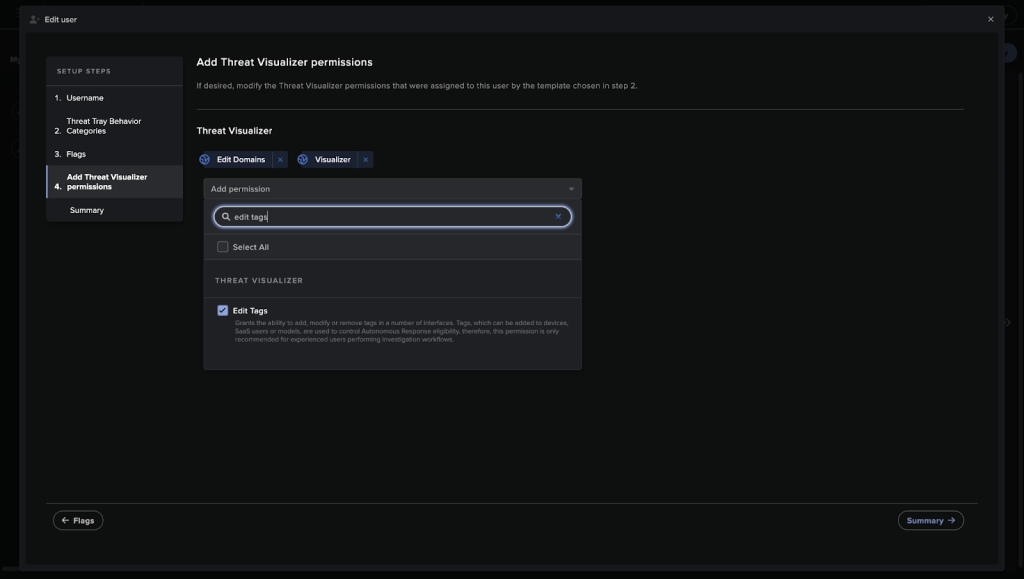
- Edit Domains
- Visualizer
- Edit Tags
API Details
List of APIs used
| Use Case | Method | Endpoint |
|---|---|---|
| Fetch Source names | GET | /intelfeed |
| Pull IoCs | GET | /intelfeed |
| Push IoCs | POST | /intelfeed |
| Delete IoCs | POST | /intelfeed |
Fetch Source Names
API Endpoint: /intelfeed
Method: GET
Headers
| Key | Value |
|---|---|
| User-Agent | netskope-ce-6.0.1-cte-darktrace-v1.0.0 |
Query Parameters
| Key | Value |
|---|---|
| sources | true |
Sample Response
[
    "Default",
    "threatintel",
    "external",
    "cloud-exchange",
    "netskope"
]
Pull IoCs
API Endpoint: /intelfeed
Method: GET
Headers
| Key | Value |
|---|---|
| User-Agent | netskope-ce-6.0.1-cte-darktrace-v1.0.0 |
| Authorization | Bearer <Bearer Token> |
Query Parameters
| Key | Value | Description |
|---|---|---|
| source | <source_name> | Name of source provided in the configuration parameter |
| fulldetails | true | – |
Sample API Response
[
    {
        "name": "101.44.42.56",
        "strength": "45",
        "description": "malicious IP",
        "source": "threat"
    },
    {
        "name": "db-08a3ed2f40.corp-internal.local",
        "hostname": true,
        "strength": "45",
        "description": "malicious hostname",
        "source": "threat"
    },
]
Push IoCs
Endpoint: /intelfeed
Method: POST
Headers
| Key | Value |
|---|---|
| User-Agent | netskope-ce-6.0.1-cte-darktrace-v1.0.0 |
Request Body
{
    "addlist": "malsite.malware.com,exploit.com,76.83.2.190",
    "description": "Netskope CE | <3rd party plugin name>",
    "strength": 50,
    "source": "external-source"
}
Sample API Response
{
    "response": "SUCCESS",
    "added": 3,
    "updated": 0,
    "addedList": [
        "malsite.malware.com",
        "exploit.com",
        "76.83.2.190"
    ]
}
Delete IoCs
API Endpoint: /intelfeed
Method: POST
Headers
| Key | Value |
|---|---|
| User-Agent | netskope-ce-6.0.1-cte-darktrace-v1.0.0 |
Request Body
{
    "removeentry": "db-08a3ed2f40.corp-internal.local",
    "source": "threatintel"
}
Sample API Response
{
    "response": "SUCCESS"
}
Performance Matrix
Here is the performance reading conducted by pulling and sharing 100K indicators from/to Darktrace on a Large Cloud Exchange stack with these specifications.
| Description | Specification |
|---|---|
| Stack details | Size: Large RAM: 32 GB CPU: 16 Cores |
| Indicator fetched from Darktrace | ~40k IoCs per minute |
| Indicators shared with Darktrace | ~40k IoCs per minute |
User Agent
netskope-ce-6.0.1-cte-darktrace-v1.0.0
Workflow
- Create a user on Darktrace.
- Get your Public Token and Private Token.
- Configure the Darktrace plugin.
- Configure a Business Rule.
- Configure Sharing.
- Validate the Darktrace plugin.
Watch a Video
Click play to watch a video:
Create a User on Darktrace
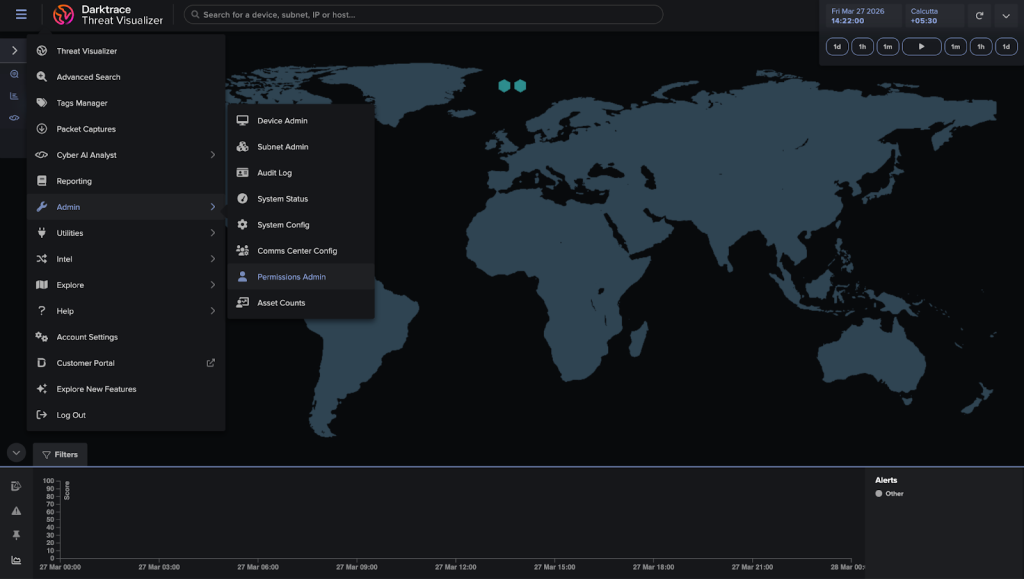
- Log in to your Darktrace instance and go to Admin > Permissions Admin.
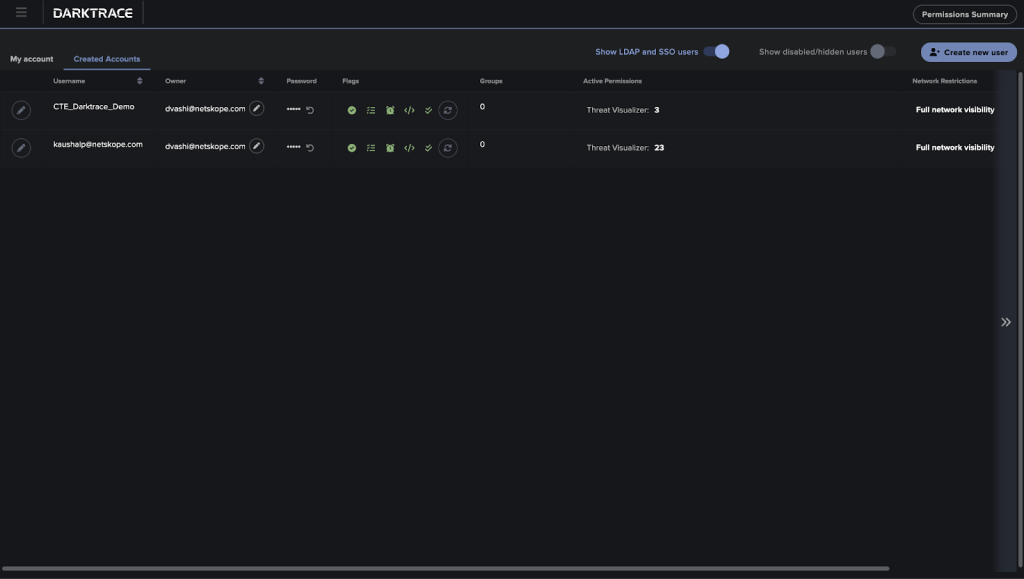
- Go to Created Accounts and click Create new user.
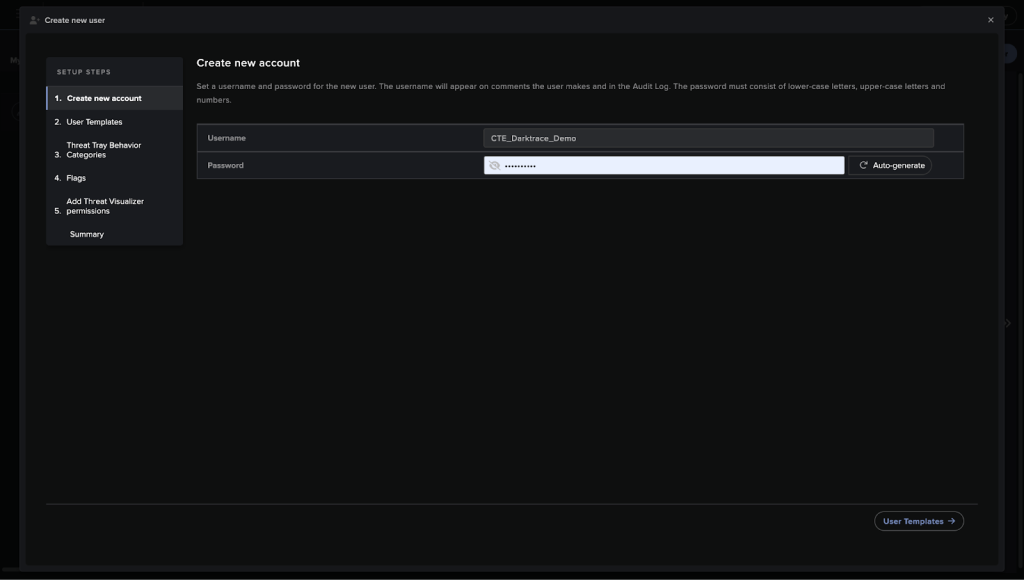
- Enter a username and password, and then click User Template.
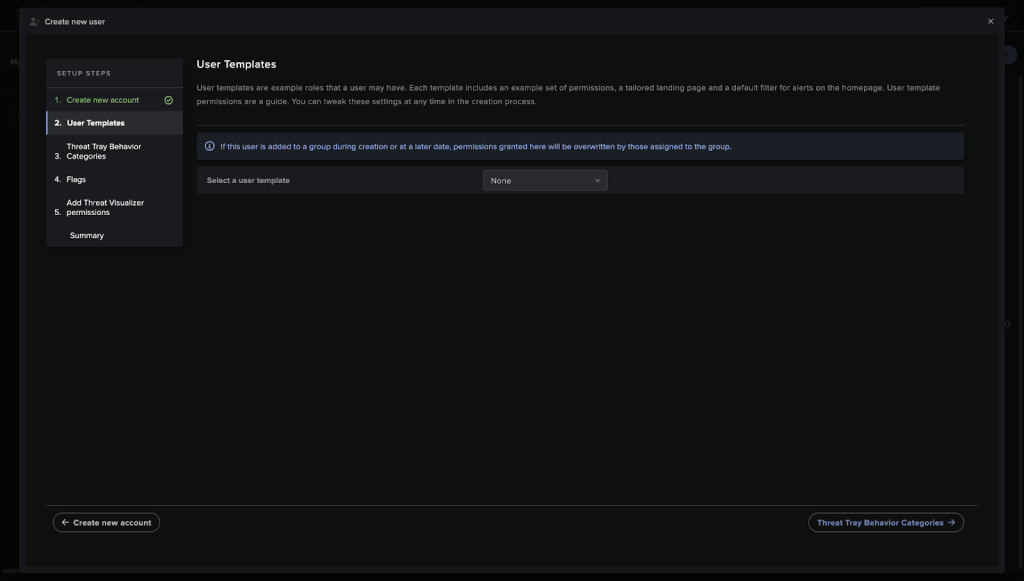
- For Select a user template, select None.
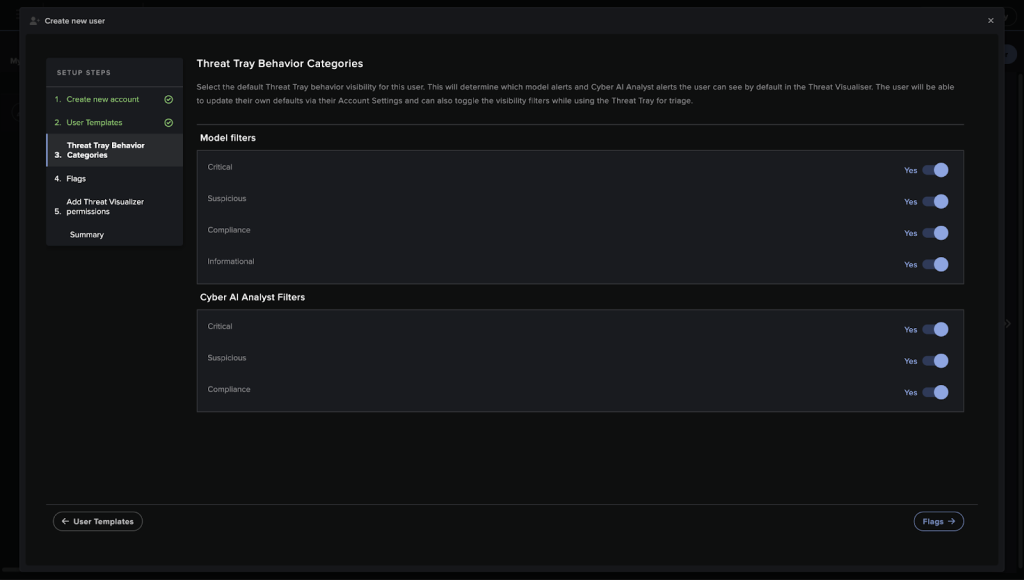
- Make sure all toggles are checked on the Threat Tray Behavior Categories page.
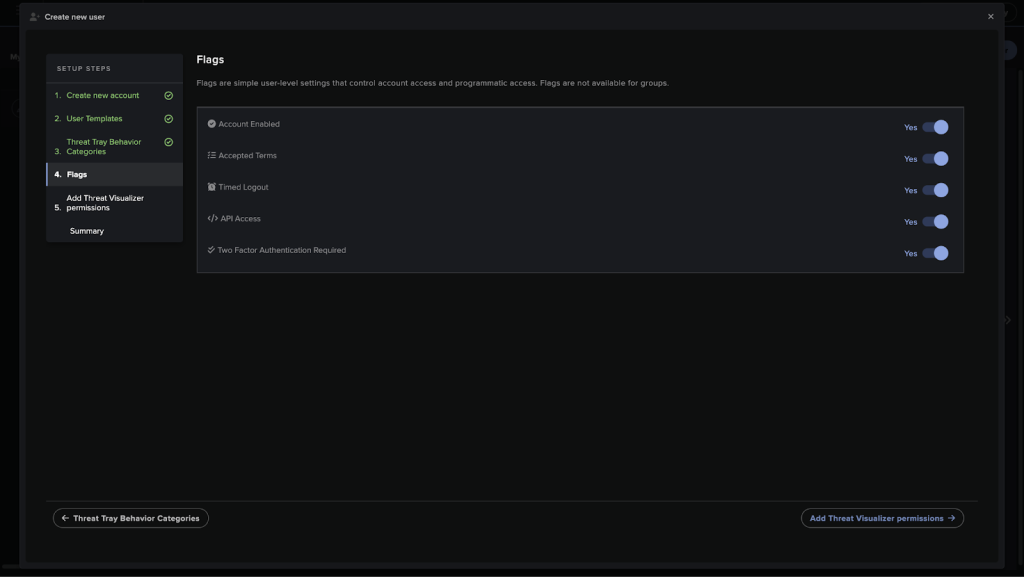
- Make sure all toggles are checked on the Flags page.
- Provide Edit Domains, Visualizer, and Edit Tags permissions, and then click Summary.
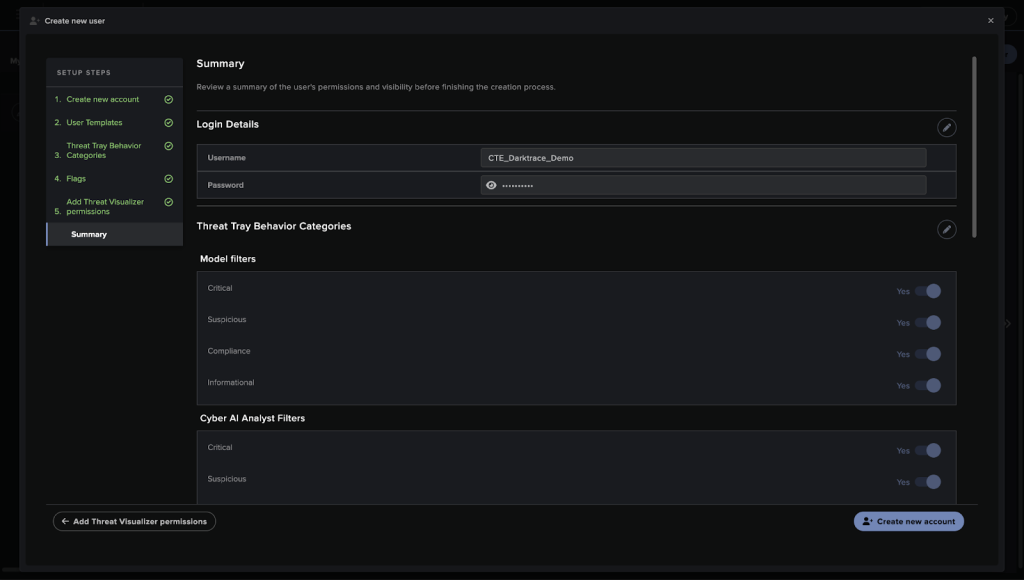
- Click Create new account.


Get your Public Token and Private Token
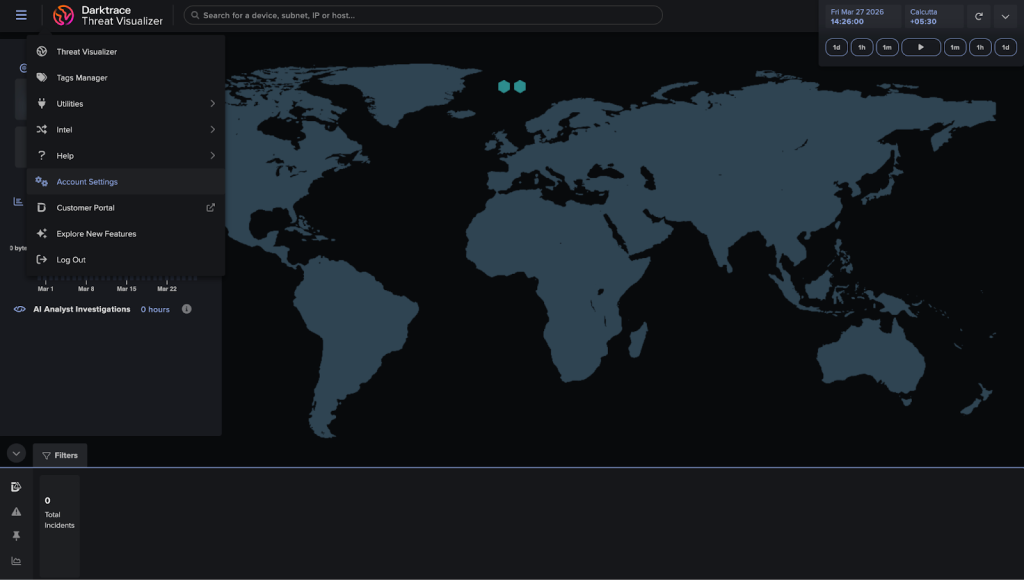
- Log in with the user account you just created and go to Account Settings.
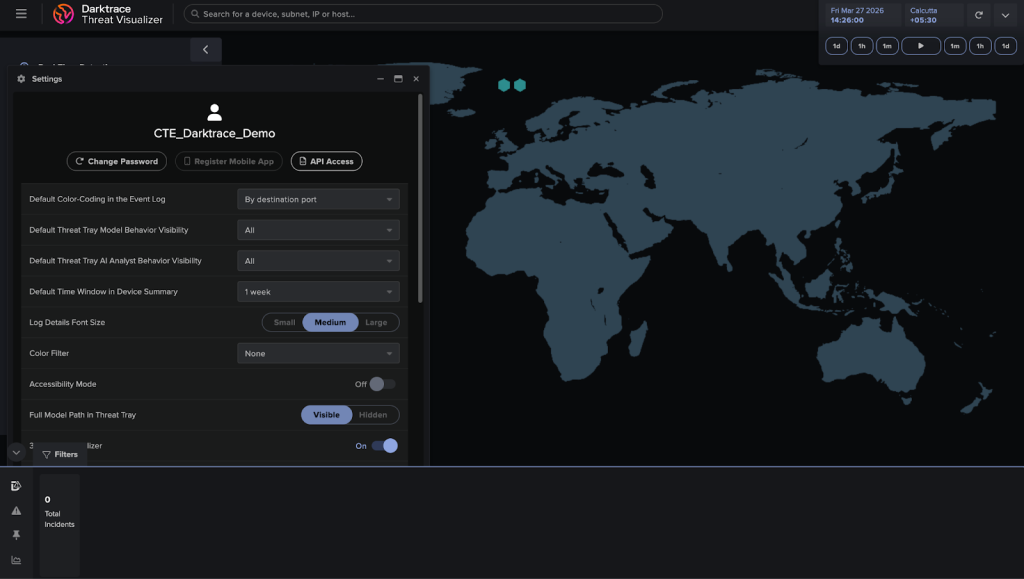
- Click API Access and copy the generated Public and Private tokens. These are needed for configuring the Darktrace plugin.


Configure the Darktrace Plugin
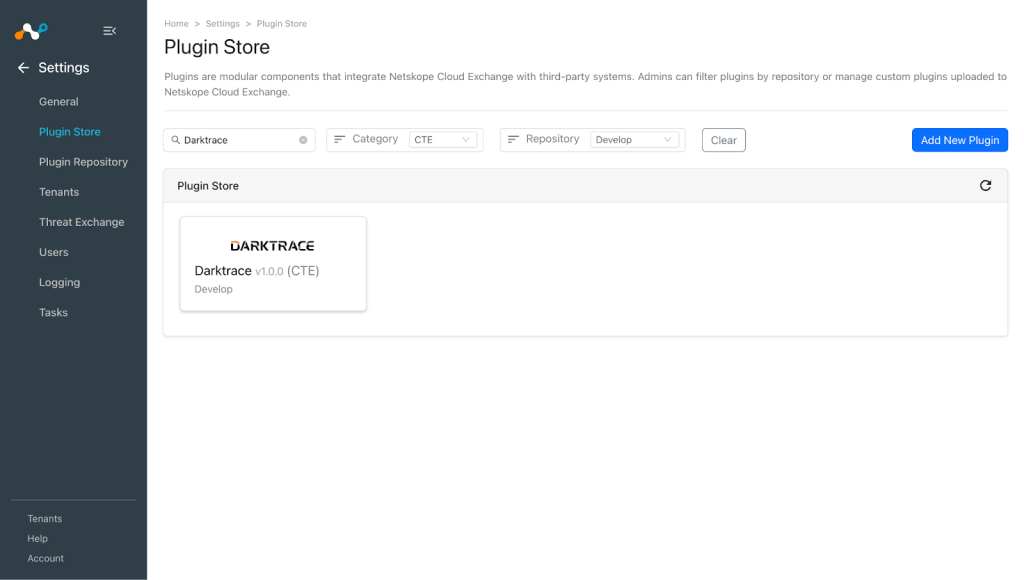
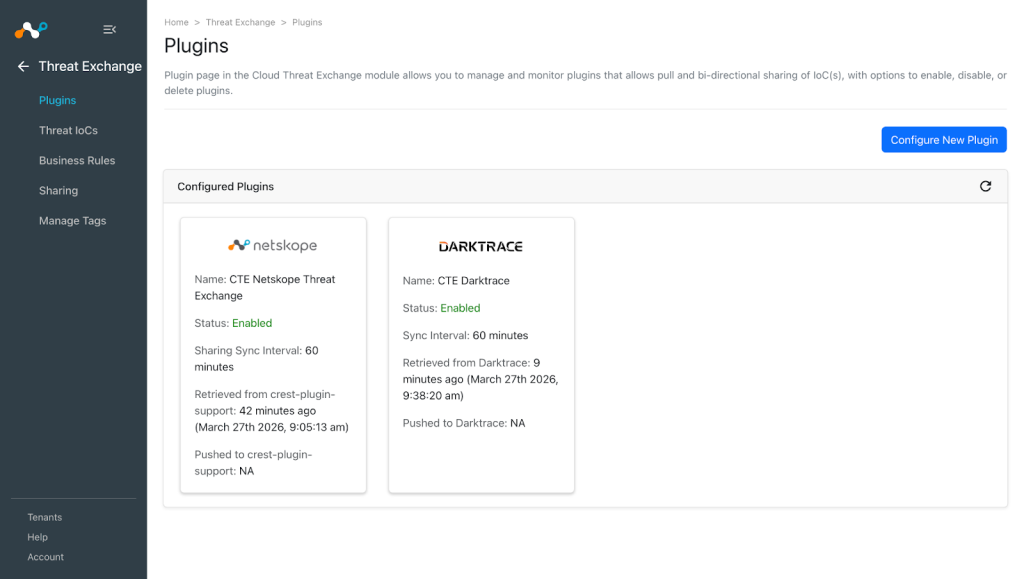
- In Cloud Exchange, go to Settings > Plugin Store. Search for and select the Darktrace v1.0.0 (CTE) plugin.

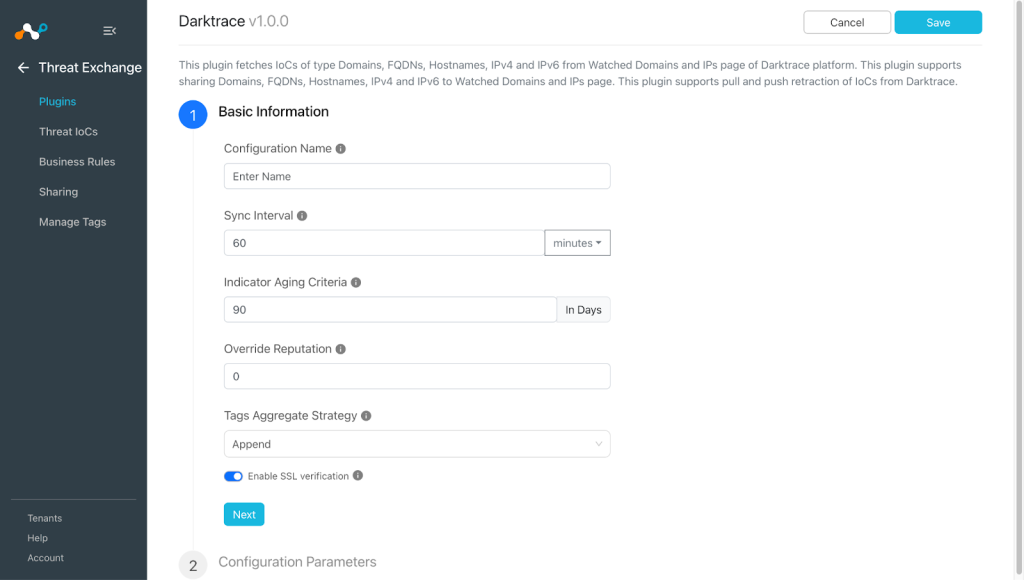
- Enter the Basic Information:
- Configuration Name: Plugin configuration name.
- Sync Interval: Interval to fetch data from this plugin source.
- Indicator Aging Criteria: Expire indicators after a specific time.
- Override Reputation: Set value to override reputation of indicators received from this configuration. Leave empty to keep default.
- Enable SSL Validation: Enable SSL Certificate validation.
- Tags Aggregate Strategy: Choose whether to append new tags to existing IoC(s) or overwrite them. This configuration parameters determine how tags are stored for indicators pulled for this configuration.
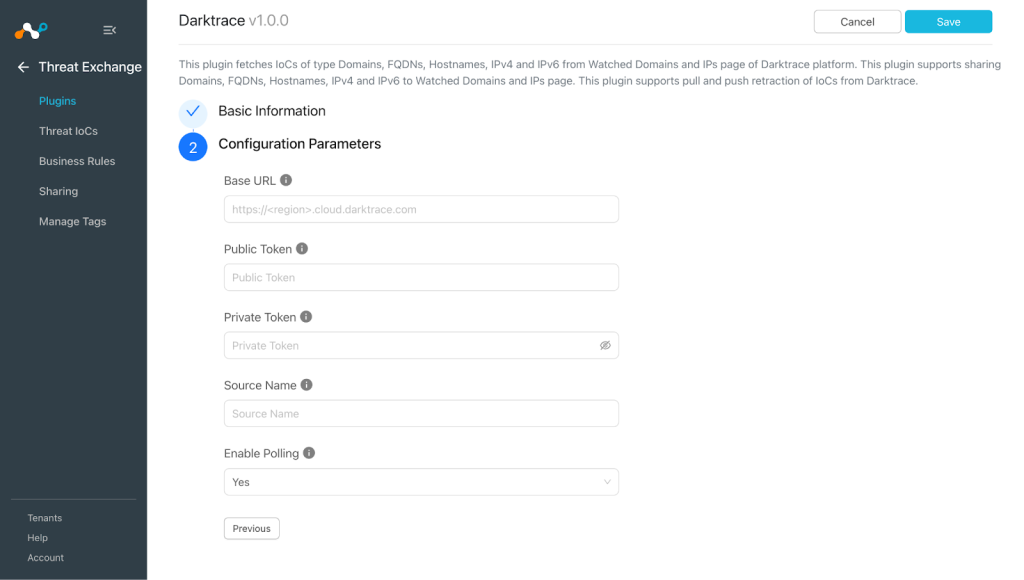
- Click Next and enter the Configuration Parameters:
- Base URL: Base URL of Darktrace instance.
- Public Token: Public token generated from the Darktrace platform.
- Private Token: Private token generated from the Darktrace platform.
- Source Name: Name of the Intel Feed source from where the IoCs are to be pulled. Enter only one source name for this parameter. Available sources can be found on the Intel > Watched Domains page.
- Enable Polling: Enable/Disable polling Threat IoCs from Darktrace. Disable if you only need to push Threat IoCs to Darktrace.
- Click Save.


Configure a Threat Exchange Business Rule for Darktrace
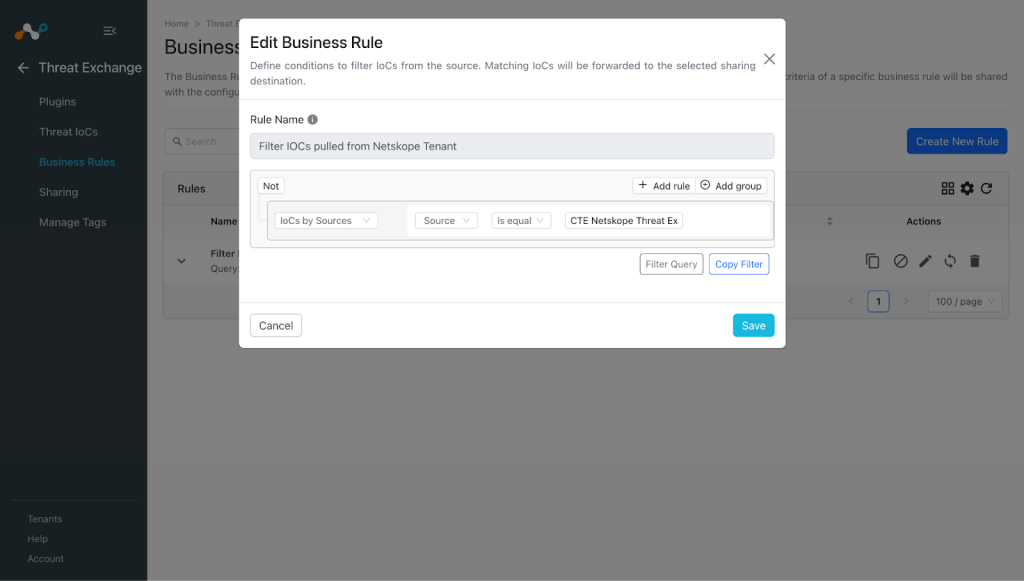
A Business Rule is used to filter out the indicators that are to be shared. In order to share IoCs with Darktrace, create a business rule:
- In Threat Exchange, go to Business Rules and click Create New Rule.
- Enter a Rule name and select the fields for which you want to filter the IoCs.
- Click Save.

Configure Threat Exchange Sharing for Darktrace
Add an IoC to the Intel Feed Source Action. To configure the Sharing:
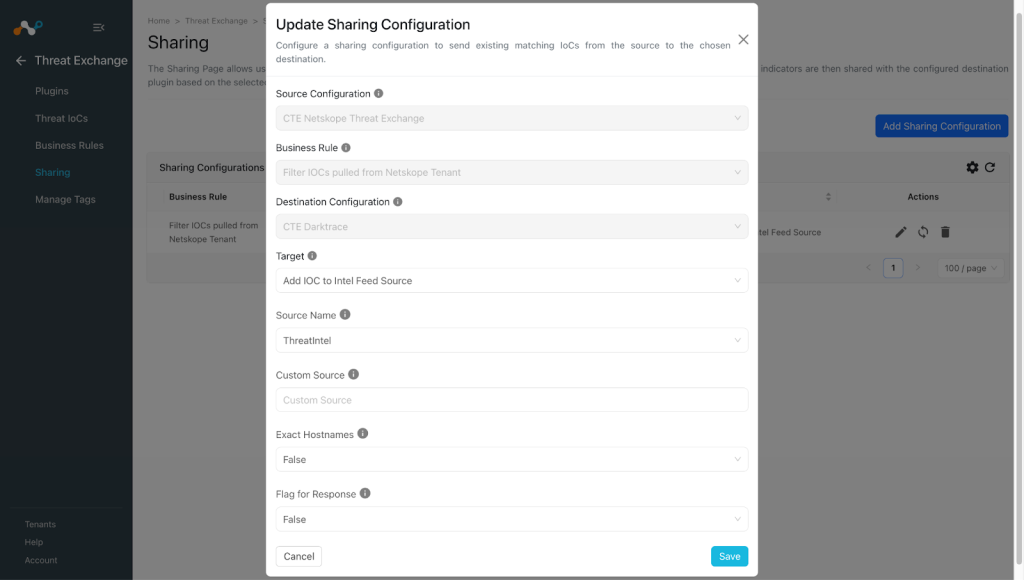
- In Threat Exchange, go to Sharing and click Add Sharing Configuration.
- Select a Source (Source from which you want to share data to Darktrace), a Business Rule, and a Destination.
- Select the Target value and set Action parameters per your requirements.
- Source Name: Intel feed source name where IoCs are to be added. Select Create new source to create a new source on Darktrace platform.
- Custom Source: Name of the custom source to create if it does not exist.
- Exact Hostnames: Set to true to treat the added items as hostnames rather than domains. Does not apply to IoC of type IP. Note that, for IoCs of type hostname, it will always be True even if the sharing is configured with Exact Hostnames as false.
- Flag for Response: Enable automatic triggering of a Darktrace Autonomous Response Action if the entry is seen.
- Click Save.

Validate the Darktrace Plugin
Validate the Pull
Indicators from Darktrace are pulled from the Watched Domains and IPs page.
Note
IoCs having descriptions except Netskope CE | Netskope Threat Exchange will be pulled from Darktrace.
Log in to your Darktrace instance.

Go to Intel > Watched Domains.


Indicators stored in Cloud Exchange can be verified at Threat Exchange > Threat IoCs. Search for the Darktrace IoCs by filtering indicators from Darktrace.
Example: Add a query like “sources.source Is equal “CTE Darktrace” && type IN (“<IOC_TYPE>”)”.


Note
IoCs with Exact host name as True on Darktrace will be stored with the same hostname on Cloud Exchange.
You can also verify the indicators pulled in Cloud Exchange from the logs available at Logging.

Validate the Push
Shared IoCs to Darktrace can be verified from logs available at Logging.

To validate shared IoCs on Darktrace, go to Intel > Watched Domains.


To verify the original source of indicator from which this was pulled in Cloud Exchange and shared to Darktrace, check the Description for that particular IoC.
For example, if an indicator is shared from Threat Exchange to Darktrace, then it will be shown as Netskope CE | Netskope Threat Exchange on Darktrace’s Description for that particular IoC.

When the IoCs shared from Darktrace to the Netskope Tenant or 3rd-party platform are retracted, then they will be marked as <plugin-config-name>: retracted in the Retraction Result. If they are not deleted from the 3rd-party platform, the Retraction Result will be pending.
Validate the Retraction
To verify the Retracted IoCs from Darktrace, check the logs for IoC Retraction. Example: “message Like CTE Darktrace [configuration_name] [Retraction]“.

Note
The IoCs that are deleted on Darktrace will be marked as Retracted in Cloud Exchange.
Example log for push retraction:

To check the retracted IoCs in Cloud Exchange, go to Threat IoCs and search for “sources.source Like “CTE Darktrace” && sources.retracted Is equal true”.


This plugin also supports push retraction, which means IoCs pulled from Netskope or 3rd-party platforms that were shared to the Darktrace platform, and were marked as retracted in Cloud Exchange, will also get deleted from the shared platform if that platform supports deletion of IoCs. You can verify the same through the Retraction result field.

Note
IoCs will be deleted on Darktrace based on the Source Name selected in the sharing configuration if there are multiple actions configured for one Darktrace.
Troubleshooting the Darktrace Plugin
Receiving an error while configuring the plugin
There’s an issue while configuring the Darktrace plugin.
What to do:
Make sure the correct credentials are provided. Follow these steps to generate credentials.
Unable to pull data from the Darktrace Platform
You are getting an error while pulling the data from the Darktrace plugin.
What to do:
- Go to the Logging page, verify if any error has occurred and try to fix it.
- Verify that the Public Token and Private Token are not expired.
Not able to share IoCs from Cloud Exchange to Darktrace
If you are not able to share IoCs from Netskope to Darktrace, that could be due to one of these reasons:
- The IoCs present for Netskope plugin are of invalid type.
- Public Token and Private Token are expired.
What to do:
- Make sure that valid types of IoCs are present. Darktrace supports sharing Domains, FQDNs, Hostnames, IPv4 and IPv6 to the Watched Domains and IPs page.
- Make sure that Public Token and Private Token are not expired.
Known Behaviors
- Darktrace plugin will pull all IoCs from the set source name in each sync interval, due to which the Hit count for all IoCs will increase by 1 after each sync interval.
- While deleting IoC from Darktrace (Push Retraction) source name is a required parameter.
Example:- Initial State:
- Action 1 (Source 1): Filters and pushes IoCs 1–5.
- Action 2 (Source 2): Filters and pushes IoCs 6–10.
- Retraction Event:
- IoCs 1, 2, 6, and 7 are marked as retracted.
- Current Core Behavior:
- The plugin receives the list of retracted indicators like [1, 2, 6, 7] and a list of configured actions [Action 1(Source 1), Action 2 (Source 2)]
- The Conflict: The plugin does not know that 1 and 2 belong to Source 1, while 6 and 7 belong to Source 2. It has no context to perform a targeted retraction.
- Current Implementation: The plugin will delete IoCs 1,2,6 and 7 from both Source 1 and Source 2.
- Initial State:
- Another issue related to the above case is that if no actions are configured (were initially configured and IoCs were pushed using them, but are now deleted), IoC retraction will not work because there an not any Source names to delete IoCs from.
- To prevent a scenario where an IoC is pushed and pulled repeatedly between systems, the plugin implements a specific safeguard:
If the IoC pushed from Cloud Exchange is pulled back in Cloud Exchange from Darktrace, it would be due to the description of the IoC being updated manually or via any 3rd-party entity source API. The plugin checks the IoC description and looks for the source label, like Netskope CE|<plugin_name>, when an IoC is pushed from Cloud Exchange. If this source label is not found in the IoC, it will be pulled in Cloud Exchange.