

Deploy AI Guardrails LLM on Google Cloud TPU for secure inference.
Prerequisites
Before beginning the deployment, ensure you have an active Google Cloud Project and have enabled the following APIs:
- Vertex AI API
- Cloud Run API
- API Gateway API
- Service Management API
- Artifact Registry API
Downloading the GPU/TPU base image
The AI Guardrails LLM image (aisecurityllm-${IMAGE_TAG}.tgz) comes from your Netskope tenant, not from Azure:
- Complete VM Onboarding for the AI VM in your tenant, if you haven’t already.
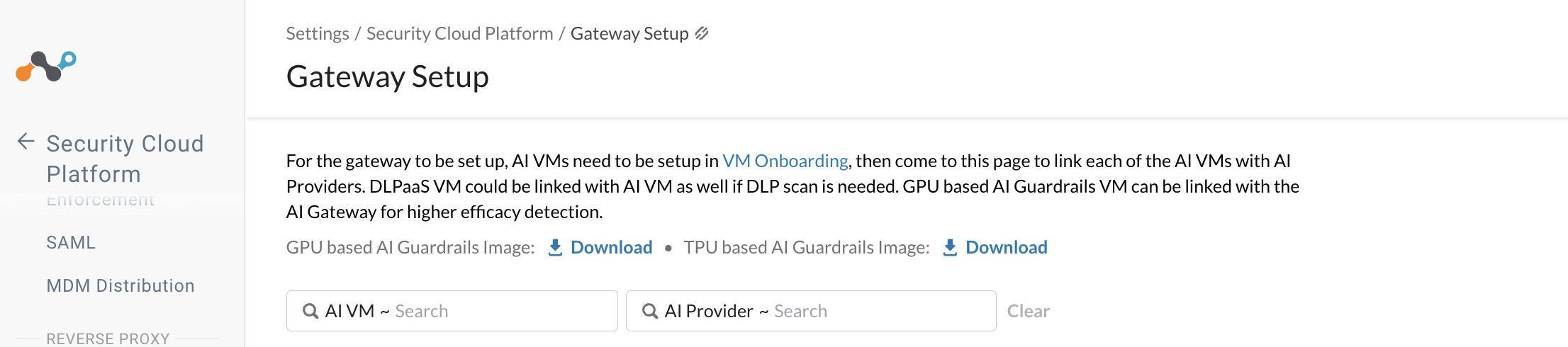
- Go to Settings > Security Cloud Platform > Gateway Setup, and link the AI VM to the appropriate AI Provider. Link a DLPaaS VM to the same AI VM if you also need DLP scanning.
- Download the GPU based AI Guardrails Image — the same image used for AWS SageMaker and self-hosted VM deployments. Use the TPU based AI Guardrails Image instead for the Google Cloud TPU path.
Phase 1: Model & Artifact Preparation
-
Create an artifact registry repository
Create a dedicated repository in the Artifact Registry to act as the central hub for storing and managing your versioned container images.
-
Build and push the model container
Next, build your custom model container to include all necessary dependencies and model weights. Push the finalized image to your new repository.
-
Register the model in Vertex AI registry
After the upload succeeds, register the container in the Vertex AI Model Registry. Define the specific inference and health check routes in the container configuration for Vertex AI to communicate effectively with your model.
gcloud ai models upload \
  --container-image-uri=[REGION]-docker.pkg.dev/[PROJECT_ID]/[YOUR_REPOSITORY_NAME]/llm-tpu:v1 \
  --display-name=aisecurity-llm \
  --container-predict-route="/predict" \
  --container-health-route="/health" \
  --region=[REGION]
Phase 2: TPU Infrastructure Deployment
-
Create the Vertex AI endpoint
Create a Vertex AI endpoint to establish a persistent entry point for your model and provide a stable interface for managing requests.
gcloud ai endpoints create --display-name=aisecurity-tpu-endpoint --region=[REGION]
-
Deploy the model to TPU
Deploy the model to a
ct5lp-hightpu-4tmachine type for sub-second latency.gcloud ai endpoints deploy-model [ENDPOINT_ID] \ --model=[MODEL_ID] \ --display-name="cloud projects add-iam-policy-binllm-tpu-v1-prod" \ --machine-type=ct5lp-hightpu-4t \ --region=[REGION]
Phase 3: Configure Security Proxy
-
The Cloud Run Security Proxy
The Cloud Run security proxy handles authentication and prevents header conflicts, such as Gzip decoding errors.
Sample Cloud Run script:
requirements .txt
flask
google-cloud-aiplatform
gunicorn
Dockerfile
# Use a lightweight Python image
FROM python:3.11-slim
# Allow statements and log messages to immediately appear in the Knative logs
ENV PYTHONUNBUFFERED True
# Copy local code to the container image.
ENV APP_HOME /app
WORKDIR $APP_HOME
COPY . ./
# Install production dependencies.
RUN pip install --no-cache-dir -r requirements.txt
# Run the web service on container startup.
# Using gunicorn for production-grade performance.
CMD exec gunicorn --bind :$PORT --workers 1 --threads 8 --timeout 0 main:app
The “One-Command” Build & Push
gcloud builds submit --tag [REGION]-docker.pkg.dev/[PROJECT_ID]/aisecurity-repo/proxy-image:v1
-
Create the proxy service account
Create a dedicated Proxy Service Account so the proxy can call Vertex AI. This identity provides the necessary permissions for the proxy to authenticate and interact with your model resources.
gcloud iam service-accounts create aisecurity-proxy-sa
gcloud projects add-iam-policy-binding [PROJECT_ID] \
  --member="serviceAccount:api-gateway-proxy@[PROJECT_ID].iam.gserviceaccount.com" \
  --role="roles/aiplatform.user"
-
Deploy Cloud Run in private mode
Configure the proxy service using the
--no-allow-unauthenticatedflag during deployment.This configuration ensures that the proxy remains inaccessible from the public internet, effectively restricting access to only authorized identities and internal traffic.
gcloud run deploy aisecurity-tpu-proxy \
  --image=[REGION]-docker.pkg.dev/[PROJECT_ID]/aisecurity-repo/proxy-image:v1 \
  --service-account=api-gateway-proxy@[PROJECT_ID].iam.gserviceaccount.com \
  --set-env-vars ENDPOINT_ID=[YOUR_ENDPOINT_ID],LOCATION=[REGION] \
  --no-allow-unauthenticated \
  --region=[REGION]
Phase 4: API Gateway and Hardening
-
Create the Gateway Identity
The Gateway Identity is a dedicated Service Account that functions as a secure credential for the gateway, enabling it to authenticate and “Sign in” to the private Cloud Run proxy.
The Gateway establishes a trusted connection that restricts access to the private Cloud Run proxy.
gcloud iam service-accounts create aisecurity-gateway-identity
-
Grant Invoker Permissions
Bind the Gateway Identity to the Cloud Run service, to grant invoker permissions.
gcloud run services add-iam-policy-binding aisecurity-tpu-proxy \
  --member="serviceAccount:aisecurity-gateway-identity@[PROJECT_ID].iam.gserviceaccount.com" \
  --role="roles/run.invoker" \
  --region=[REGION]
-
Deploy API Gateway and Config
Sample
openapi.yamlconfigEnsure your
openapi.yamlincludes thejwt_audiencematching your Cloud Run URL.swagger: "2.0" info: title: "AI Security TPU API" description: "Hardened entry point for LLM inference" version: "1.0.0" host: "<GATEWAY_URL>" schemes: - "https" paths: /predict: post: operationId: predict x-google-backend: address: "https://<CLOUD_RUN/predict" deadline: 90.0 jwt_audience: "https://<CLOUD_RUN_URL>" responses: 200: { description: "Successful inference" } 401: { description: "Unauthorized - Invalid JWT" } 403: { description: "Forbidden - Permission Denied" } security: - google_service_account: [] securityDefinitions: google_service_account: type: "oauth2" authorizationUrl: "" flow: "implicit" x-google-issuer: "<CLIENT_SERVICE_ACCOUNT_EMAIL>" x-google-jwks_uri: "https://www.googleapis.com/service_accounts/v1/jwk/<CLIENT_SERVICE_ACCOUNT_EMAIL>" x-google-audiences: "https://<GATEWAY_URL>"
Phase 5: Client-Side Configuration
-
Generate the Client Key
Generate a service account key to sign the RS256 JWT required for API access.
gcloud iam service-accounts keys create client-key.json \
  --iam-account=aisecurity-client@[PROJECT_ID].iam.gserviceaccount.com
Attribute Minimum TPU Architecture Google Cloud TPU v3 Network 1 Gbps TPU Memory 64 GB vCPU 2 RAM 8 GB Storage 25 GB Python >= 3.10 torch-xla >= 2.7.1 transformers >= 4.52.3 fastapi >= 0.116.1 uvicorn >= 0.35.0 -
Token authentication mode
Configure AI Security Service LLM JWT config for GCP mode token (Self-Signed JWT) or AWS style (OAuth 2.0).- When you provide the JWT URL, Client ID, and Client Secret (along with an optional Scope), the AI Guardrails LLM service on TPU automatically handles token acquisition.
- If the JWT URL is missing but the Client ID, Client Secret, and optional Scope are present, the AI Guardrails LLM service on TPU locally signs the token.
- Otherwise, the service does not generate or validate an authentication token.
| Field | Remote Mode(OAuth 2.0) | Local Mode(Self-Signed JWT) | No-Token Mode |
|---|---|---|---|
| host_url | Inference Endpoint URL | https:// | Inference Endpoint URL |
| jwt_url | OAuth token endpoint URL | Not present | Not present |
| client_id | OAuth client ID | CLIENT_SERVICE_ACCOUNT_EMAIL | Not present |
| client_secret | OAuth client secret | The client_secret requires an RSA private key in PEM format. Use the private_key from your client-key.json. Example: ”-----BEGIN RSA PRIVATE KEY----- …“ To configure the client_secret, you can: 1. Copy the private_key value from client-key.json and paste it directly into the AIG-CLI client_secret field. 2. Convert the private_key value to a valid PEM format and paste it into the AIG-CLI client_secret field. 3. Encode the valid PEM private key to Base64, and paste it into the AIG-CLI client_secret field. | Not present |
| scope | OAuth scopes (optional) | JWT audience (API endpoint URL) x-google-audiences in openapi.yaml config | Not present |