

Destination criteria identify the private applications and activities to which a policy applies. Configure them in the Destination section of the Real-time Protection policy editor, after selecting the policy’s source criteria.
For the complete workflow, see Private App Segments Policy Management.
Select Private App Segments
A private app segment defines the application hosts, protocols, and ports that NPA protects. Selecting a segment in a policy uses that existing definition; it does not create a new application or change its host and port configuration.
- In Destination, select Private App Segment.
- Click the Private App Segment selection field.
- Expand Private App Segment, then search for and select the required applications.
- Verify that the selected segments include the hosts, protocols, and ports used by your test application.
Use individual segments when a policy requires precise application scope. If an application is unavailable in the selection, check that it is configured in the tenant and supports the selected access method.
Select Private App Segment Tags
Tags let an access policy refer to a collection of private app segments. For example, a Finance tag can identify the applications covered by a Finance access policy.
- In the Private App Segment selection field, expand Private App Segment Tags.
- Select the required tags.
- Review the applications associated with each tag before saving the policy.
Adding or removing a tag from an application can change the scope of policies that reference that tag. Review tag membership as part of access validation.
Important
Private app tags are not supported for NPA Browser Access DLP policies in the documented scope. Use individual private app segments for those inspection policies. A tag-based access policy does not establish that tag-based inspection is supported.
Configure Activities
Activities limit an inspection policy to particular application operations. They are not required for a basic application access policy.
| Activity | Use to inspect |
|---|---|
| Download | Content transferred from the application to the user. |
| Upload | Content transferred from the user to the application. |
| FormPost | Content submitted to the application through a form. |
The available activities depend on the selected application and profile. NPA Data Loss Prevention and Threat Protection uses application activity detection; the application must use a supported HTTP or HTTPS workflow.
- Select the private app segments.
- In Profile & Action, add the required inspection profile. If a confirmation indicates that an activity is required, proceed to configure the activity.
- In Destination > Activities, select the operations to inspect.
- Verify that the inspection policy contains every activity required for your use case.
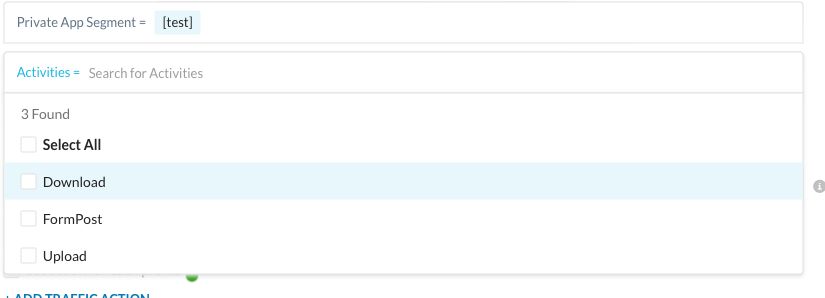
For HTTP and HTTPS Browser Access segments that share a hostname but use different ports, include all relevant segments in the DLP or Threat Protection policy. Omitting one can prevent the intended application from matching the inspection policy. See Enforce DLP for NPA Browser Access Private Apps.
Configure File Constraints
Use file constraints to narrow inspection to files that meet the selected conditions. The available constraints depend on the profile, activity, and policy configuration.
| Constraint | Purpose |
|---|---|
| File Name or Extension | Match the file names or extensions configured for the policy. |
| File Type | Match the selected file formats. |
| File Size | Match files according to the selected size condition. |
After configuring an inspection profile and activities, click Add Criteria & Constraints > File Constraints and select the required constraint. Configure its values, then review the complete destination conditions before saving.
A file constraint narrows which transfers match the policy. It does not increase the file-size limit or file-format coverage of the inspection service. Review Supported File Types for Content Inspection when planning DLP tests.
Access and Inspection Scope
Keep the access policy and inspection policy aligned on the users, access methods, and applications that require protection. An access policy determines whether the user can reach the application. An inspection policy applies the selected profile to supported matching traffic.
For example, an access policy can permit the Finance group to use a private web application, while a separate DLP policy blocks uploads that match the selected DLP profile. The DLP policy must cover that application and the Upload activity.
When application segments overlap, review each segment’s host, subnet, wildcard, protocol, and port definitions. More specific destination matches can affect policy selection. Test every relevant connection path instead of assuming that one successful test covers all overlapping segments.
Validate Destination Matching
- Test each application using its normal hostname or IP address and protocol/port combination.
- Confirm the selected access method is enabled for the application.
- For tag-based access policies, verify the application’s current tag membership.
- For inspection, test both content that should match and content that should not match the profile and constraints.
- Verify the selected activity. An upload test does not validate a download-only policy.