

x-netskope-generate-incidents to true & verdict as “forensics”, the response will not include forensics. However, the incidents posted to the management plane should contain forensics. This limitation will be addressed in later releases.You can send data to the REST API to start a DLP content inspection job for Unstructured Data or a Column Classification job for Structured Data. There are other calls as well.
You can get more information about these API calls from the DLP On Demand API page .
Below are some examples of sending Data to DLP On Demand.
Starting an asynchronous DLP Inspection Job from the appliance
-
Send a POST to the
/inspections/jobs/endpoint. The request returns a job_id that is used to get the results of the request. The API may respond with a result if the result is already cached.curl -X 'POST' \ 'https://10.0.0.1/inspections/jobs' \ -H 'accept: multipart/form-data' \ -H 'Content-Type: multipart/form-data' \ -F 'request={"profiles":["DLP-PCI","DLP-PII"],"content":{"id":"b1f793e4d4a26ac7b695bb1fd1fb0ce3cb5d729c401d8528f8bb92598006cf85","name":"SecretFile.txt","object_id":"AA-74GXZ","true_file_type":230},"modules":{"file_filter":{"skip":true},"drm":{"labels":[{"id":"c7d03ebd-804d-489c-94c6-8167224c3c1b","name":"chris_encryption_all_enabled","instance":"epdlpsjc1","vendor":"mip"}]}},"results":{"verdict":"summary"},"sender":{"app_name":"AWS_RDS"}}' \ -F 'content=@image.jpg;type=image/jpeg' -
You’ll receive a .json formatted job_id to retrieve the results at a later time.
{
  "job_id": "7e548ccf-c96e-4f5f-9f9e-4a468776972e"
}
Getting the results of an asynchronous DLP Inspection Job from the appliance
-
Send a GET to
/inspections/jobs/<job_id>endpoint using thejob_idobtained from the previous use-case.curl -X 'GET' \ 'https://10.0.0.1/inspections/jobs/7e548ccf-c96e-4f5f-9f9e-4a468776972e' \ -H 'accept: multipart/mixed'
-
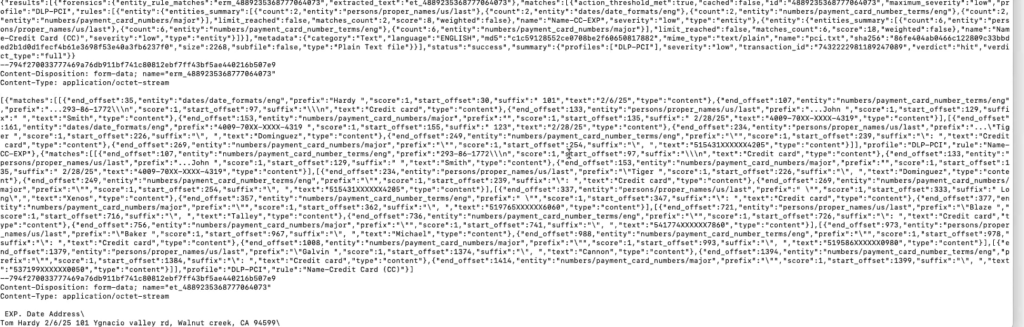
You will get the associated DLP Incident info provided as a multi-part response showing the entity match for the offending content, the extracted text, and other forensic details.

Checking Incidents in the UI

Under Incidents > DLP, use Advanced Filters like access_method like 'DLP On Demand'