

Use the Estimation page to see every available AI agent, understand its capabilities and estimate what usage will cost before any commitment. The tool that estimates how many capacity credits a given level of agent use will require.
This is helpful because security and network operations teams are each investigating deploying AI agents for different needs. They want an agent to manage data security workflows, one focused on AI usage risk, and a second to reduce user ticket volumes with intelligence on user experience across the network. Every request lands with procurement as its own item, with no shared view of what is available or of each cost commitment.
As security and network platforms add more AI agents, evaluating and committing to each one separately does not scale. When every team evaluates in a silo, adoption slows and each new agent request restarts the same blind, disconnected process the last one did.
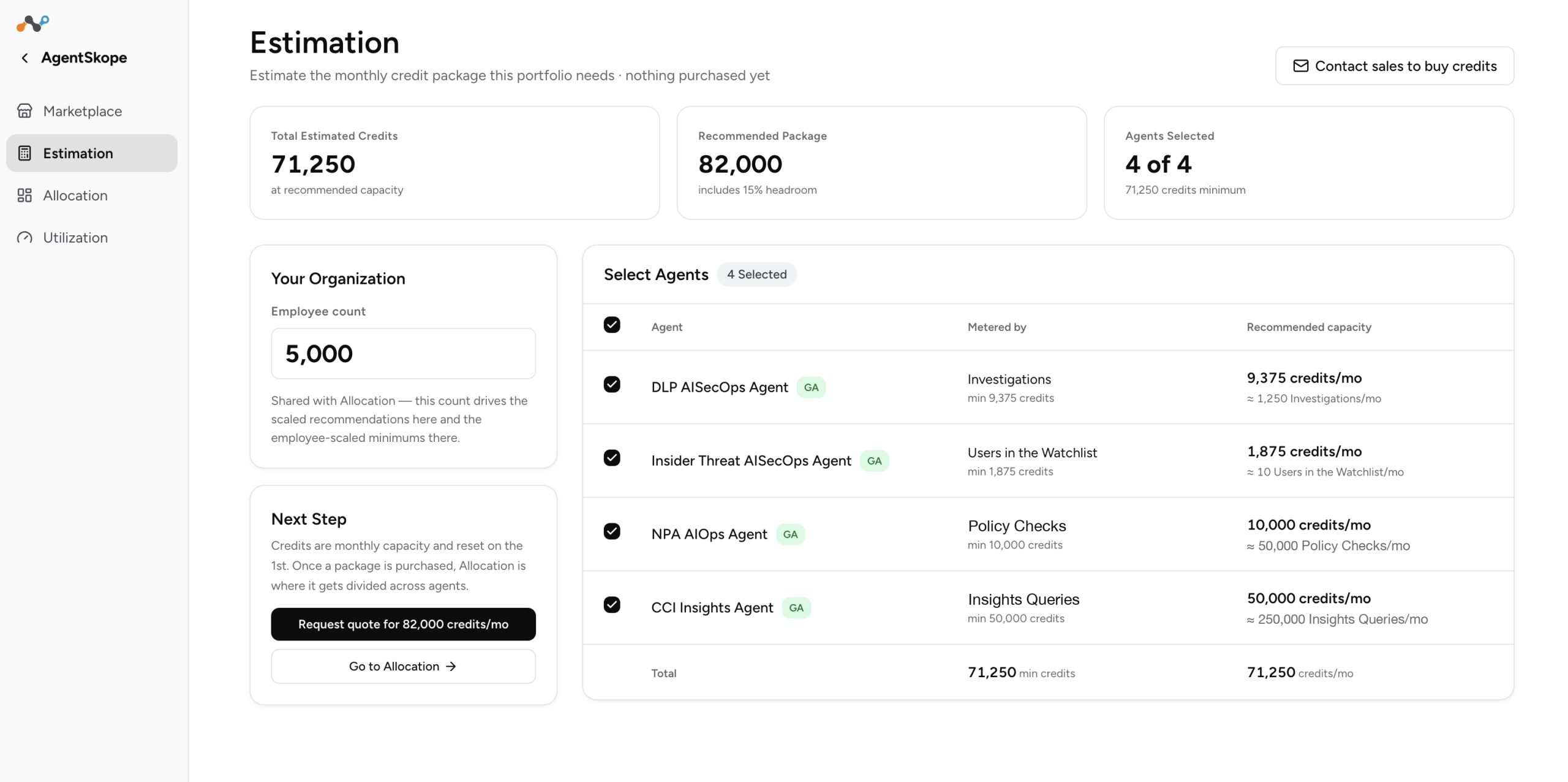
Estimation is a planning tool. This is a generic tool and you might still need to fine-tune the estimates to fit your business needs. Nothing here is purchased and nothing is allocated — you are working out what a set of agents would need so you can start a conversation with your Netskope account team. They will further guide you to size your purchase to your unique business needs.
What you can do. Select the agents you are considering and enter your employee count, which is typically the number of users protected by the Netskope platform. For each selected agent the page shows the meter it runs on and a recommended monthly capacity — expressed both in credits and in the agent’s own unit, so you can sanity-check it against volumes your team already tracks.
What you see. Three totals at the top: the estimated capacity for everything selected, a recommended package that adds headroom on top of that estimate, and how many agents are in the estimate. The recommended package is the number to use while talking to the account team — the headroom is there so a busier-than-expected month does not immediately need a top-up.
Where you go next. Engage your Netskope account team for quoting and procurement help, or move to Allocation if you have already purchased capacity.
To learn more: For current agent details, credit specifics for your tenant, and anything not covered here, see the Netskope support knowledge base or contact Netskope Support. For questions about capacity you hold or want to add, contact your Netskope account team.