

This document provides guidance on using Netskope Client in a network environment with no default route and no DNS resolution for public domains.
Overview
Here, the users cannot resolve and access public Internet resources. This is an approach similar to legacy explicit proxy, with the additional benefit of advanced controls and user coaching capabilities brought by the Netskope Client.
Supported Traffic Types
Next-Gen Secure Web Gateway (NG-SWG) – All Web Traffic
Prerequisites
-
Install Netskope Client on the endpoint.
-
goskope.com DNS zone is forwarded to a recursive DNS resolver.
-
Netskope Client can establish a direct DTLS/TLS tunnel to the Data Plane.
-
The local network has routes for 163.116.128.0/17 and 162.10.0.0/17.
-
Firewall is configured to allow TCP/UDP 443 to 163.116.128.0/17 and 162.10.0.0/17.
-
-
Add Exclusions in both the explicit proxy configuration (most likely in the PAC file) and the steering policy. The PAC file must have a statement for *.goskope.com to go direct.
-
A web server is required to host the EPoC PAC file. Use 163.116.128.80 or 163.116.128.81 on port 80 as the proxy destination in the PAC file.
– Port 8080 or 8081 can also be used as the proxy port; must be configured as a non-standard port for intercept in the steering configuration.
– EPoC must use a EPoC – PAC File. Do not use the operating system static proxy configuration, otherwise the Netskope Client mode changes to Proxy Interoperability Mode.
Recommendation
Netskope recommends using explicit proxy over Client because without a default route to the internet you must have a static route to a proxy in order to egress from the local network, and the same goes for public DNS resolutions.
In this approach, the Netskope Client installed in the endpoint is connected to the nearest Netskope NewEdge Data Plane. Netskope Client must be configured to intercept the proxy request in the configuration. Due to its operation mode (monitor network sessions at the OS level) an actual proxy is not required; the Netskope Client knows which IP is used so that it can intercept the traffic and send it through its tunnel.
Netskope NewEdge Data Plane steers all internet traffic sent from the endpoint to its configured explicit proxy and not explicitly bypassed. On the NewEdge Data Plane, the system inspects the traffic based on the real-time security policies defined and the corresponding action is taken.
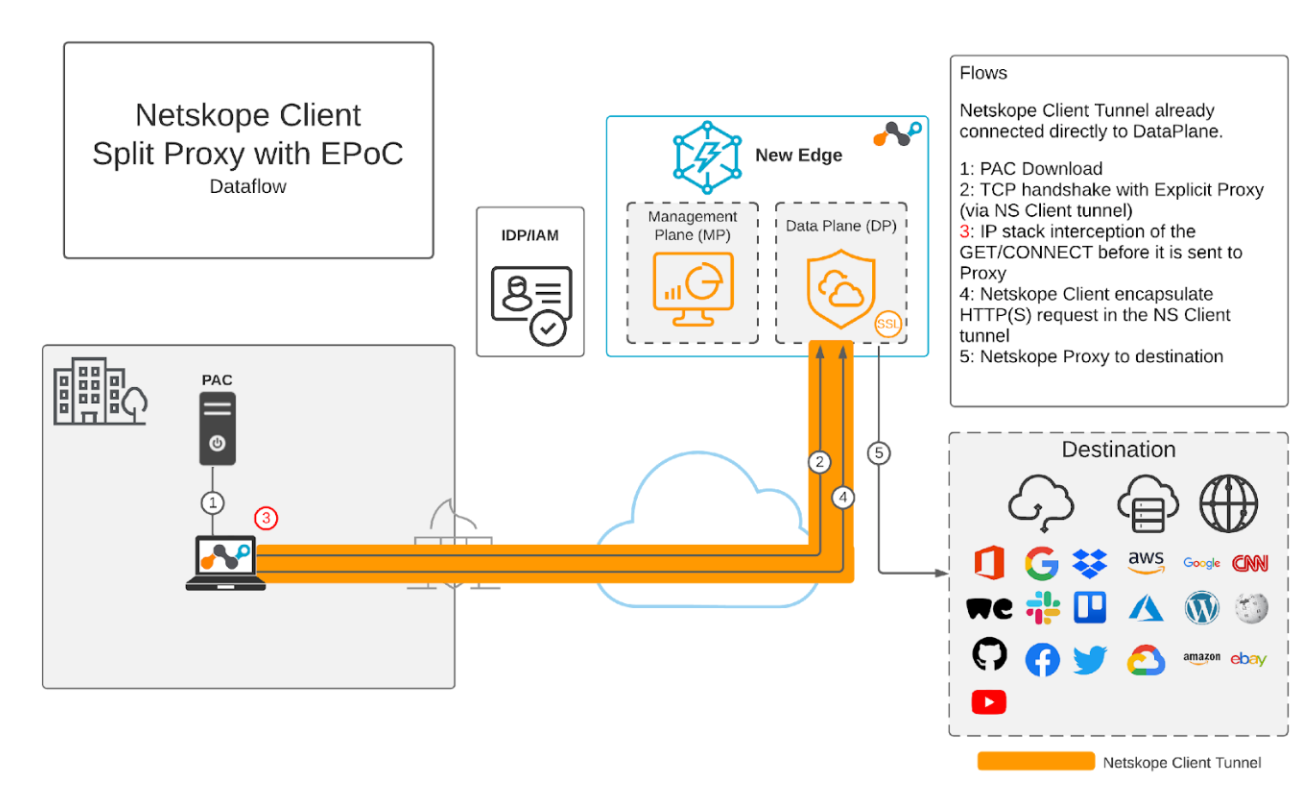
Advantages of Using EPoC
-
Consistent security posture regardless of the user location.
-
Comprehensive traffic inspection, encompassing both web and non-web, directed towards both Internet and Private Applications, originating from the endpoint.
-
Optimal Performance facilitated by the Netskope Client’s connection to the nearest Netskope NewEdge Data Plane.
-
Visibility into web traffic directed to the Internet.