

This document explains how to configure the ExtraHop Reveal(x) 360 v1.0.1 plugin with the Risk Exchange module of the Netskope Cloud Exchange platform. Use this plugin to fetch Cloud Workloads (Devices) from the Detections of the ExtraHop Reveal(x) 360 platform. It does not support performing any actions on Cloud Workloads (Devices) in ExtraHop Reveal(x) 360.
Netskope normalization score calculation = (100 – ExtraHop’s Current Detection Risk Score) x 10.
Prerequisites
To complete this configuration, you need:
- A Netskope tenant (or multiple, for example, production and development/test instances).
- A Netskope Cloud Exchange tenant with the Tenant plugin and Risk Exchange plugin already configured.
- Your Base URL, Client ID and Client Secret for ExtraHop.
- An ExtraHop license that has access to Detection and Devices services. Refer to this document for more details: License FAQ.
- Connectivity to the following host: https://extrahop-bd.api.cloud.extrahop.com
ExtraHop Reveal(x) 360 Plugin Support
This plugin is used to fetch Cloud Workloads (Devices) from the Detections of the ExtraHop Reveal(x) 360 platform. It does not support performing any actions on Cloud Workloads (Devices) in ExtraHop Reveal(x) 360.
| Type of Data Pulled | Actions |
|---|---|
| Devices | No actions |
Mappings
Mappings are used to view the pulled devices and their respective details. Fields mapped during plugin configuration are visible on the Records page after the data is pulled. Here are the suggested mappings that should be used while configuring the plugin.
Pull Mapping for Devices
| Plugin Field | Expected Datatype | Suggested Field Name | Suggested Aggregate Strategy |
|---|---|---|---|
| Detection ID | Number | Detection ID | Unique |
| Detection Title | String | Detection Title | Overwrite |
| Detection Risk Score | Number | Detection Risk Score | Overwrite |
| Netskope Normalized Score | Number | Netskope Normalized Score | Overwrite |
| Detection Type | String | Detection Type | Overwrite |
| Role | String | Role | Overwrite |
| Is External | String | Is External | Overwrite |
| User Names | List | User Names | Overwrite |
| Hostname | String | Hostname | Overwrite |
| Detection Status | String | Detection Status | Overwrite |
| URL | String | URL | Overwrite |
| Device ID | Number | Device ID | Unique |
| VPC ID | String | VPC ID | Overwrite |
| Default Name | String | Default Name | Overwrite |
| Subnet ID | String | Subnet ID | Overwrite |
| DHCP Name | String | DHCP Name | Overwrite |
| VLAN ID | Number | VLAN ID | Overwrite |
| Vendor | String | Vendor | Overwrite |
| MAC Address | String | MAC Address | Overwrite |
| DNS Name | String | DNS Name | Overwrite |
| IPv4 Address | String | IPv4 Address | Overwrite |
| IPv6 Address | String | IPv6 Address | Overwrite |
| Custom Type | String | Custom Type | Overwrite |
| Custom Name | String | Custom Name | Overwrite |
| Display Name | String | Display Name | Overwrite |
| Critical | String | Critical | Overwrite |
| Discovery ID | String | Discovery ID | Overwrite |
| ExtraHop ID | String | ExtraHop ID | Overwrite |
| Cloud Instance Name | String | Cloud Instance Name | Overwrite |
| Cloud Instance Type | String | Cloud Instance Type | Overwrite |
| Cloud Instance ID | String | Cloud Instance ID | Overwrite |
| Cloud Account | String | Cloud Account | Overwrite |
| NetBIOS Name | String | NetBIOS Name | Overwrite |
| Device Class | String | Device Class | Overwrite |
| Analysis | String | Analysis | Overwrite |
| Analysis Level | String | Analysis Level | Overwrite |
Normalized Score Calculation
Netskope normalization score calculation = (100 – ExtraHop’s Current Detection Risk Score) x 10.
Permissions
User should have these minimum permissions:
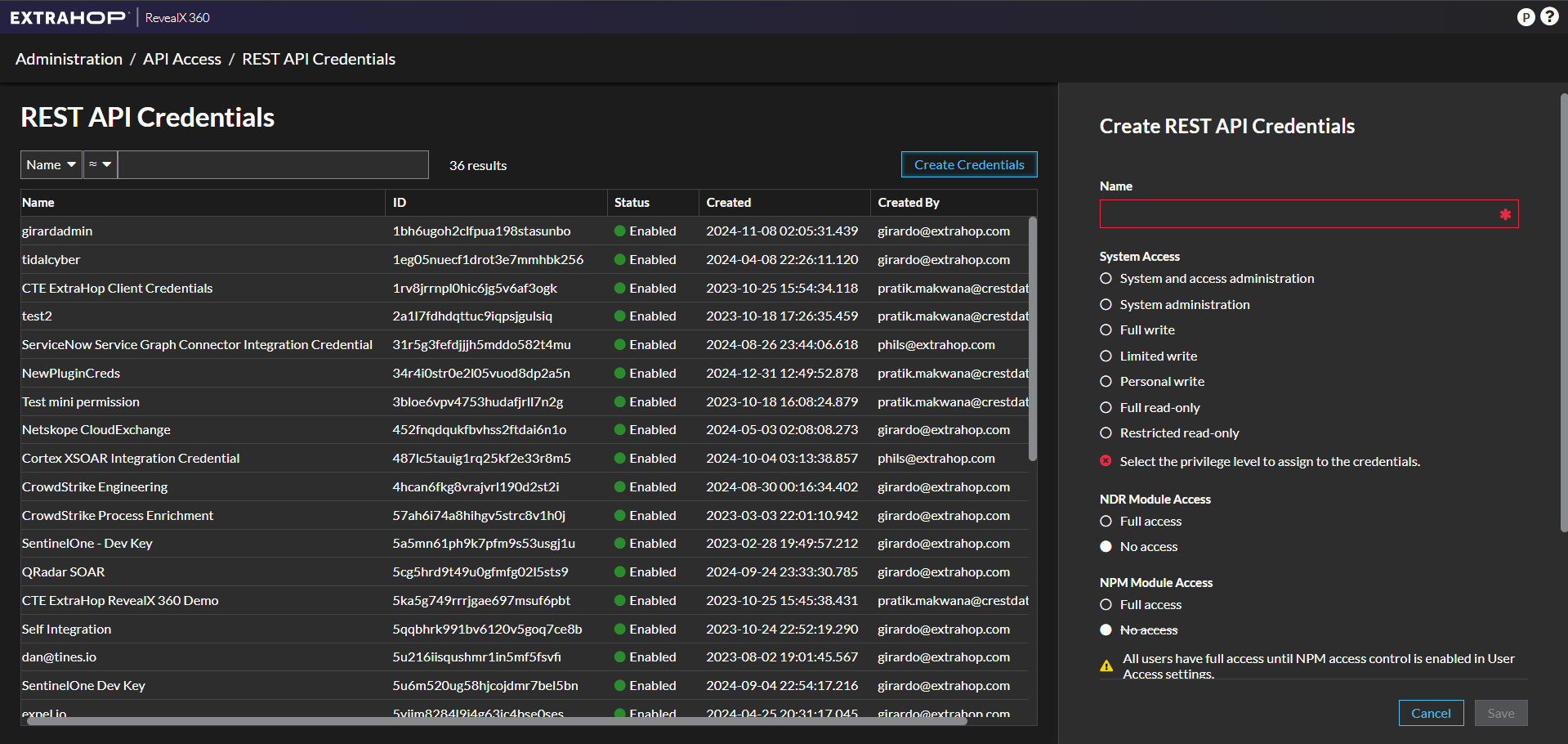
- System Access: Full read-only.
- NDR Module Access: No access.
- NPM Module Access: No access.
- Packet And Session Key Access: No access.
API Details
List of APIs Used
| API Endpoint | Method | Use Case |
|---|---|---|
| /oauth2/token | POST | Fetch auth token |
| /api/v1/detections/search | POST | Fetch detections |
| /api/v1/devices/search | POST | Fetch devices |
Fetch Auth Token
API Endpoint: /oauth2/token
Method: POST
Headers
| Key | Value |
|---|---|
| Authorization | Basic <Client ID>:{Client Secret> |
| Content-Type | application/x-www-form-urlencoded |
| User-Agent | netskope-ce-6.0.0-cre-extrahop-reveal(x)-360-v1.0.1 |
Params
| Key | Value |
|---|---|
| grant_type | client_credentials |
Sample API Response
{
    "access_token": "eyJraWQiOiJkbndoem42RUNpaW9mSDRSTWdVV0FlZ1lhRHMrVlRDeDhXN1dJZnpVYjZjPSIsImFsZyI6IlJTMjU2In0.eyJzdWIiOiIyYTFsN2ZkaGRxdHR1YzlpcXBzamd1bHNpcSIsInRva2VuX3VzZSI6ImFjY2VzcyIsInNjb3BlIjoiY2NwXC9kZXRlY3Rpb25fYWNjZXNzX2xldmVsLmZ1bGwgY2NwXC9ucG1fYWNjZXNzX2xldmVsLm5vbmUgY2NwXC9wYWNrZXRzX2xldmVsLm5vbmUgY2NwXC93cml0ZV9sZXZlbC5mdWxsX3JlYWRvbmx5IiwiYXV0aF90aW1lIjoxNjk3OTgzNzAxLCJpc3MiOiJodHRwczpcL1wvY29nbml0by1pZHAudXMtd2VzdC0yLmFtYXpvbmF3cy5jb21cL3VzLXdlc3QtMl85YU9FMWltMXIiLCJleHAiOjE2OTc5ODQzMDEsImlhdCI6MTY5Nzk4MzcwMSwidmVyc2lvbiI6MiwianRpIjoiNTllMjc0ZGItMTYxMS00MDRjLTk1NzgtZWJiNDQwZmE5ZTU3IiwiY2xpZW50X2lkIjoiMmExbDdmZGhkcXR0dWM5aXFwc2pndWxzaXEifQ.pw-cbQTSVC1HlRdl_v63s3wbHnqsDNfVJ1Ln9H0GsJvHENKG5borLHIPTsquhov6rEmmzzs6NxMhX5VFY0dH0XWgmrV5BFN4Q5vASQ2lZVY_1NjEqYsJAcVLrzmxy7TqMN_L7kuoX5ijN_mAezxwfnj4hQfrd1ojUVt7_wzSUIVpZy6dDARs1EdrrFAZw70zXW7vTUlzhkiqMthAwD2TaoxOcewHFlC3lgvIjz_DoEYUB09qsP0EJ4oQNaCxetJjPkddN2DqVXEnAi5Jvz6fILbT-wFWua-AEBvk-GXGMXBUKCYs4g-ZvnWnSpcfsMAJZTTOO-05qpbnYE-K3N7qOQ",
    "expires_in": 600,
    "token_type": "Bearer"
}
Fetch Detections
API endpoint: /api/v1/detections/search
Method: POST
Headers
| Key | Value |
|---|---|
| Authorization | Bearer <Bearer Token> |
| User-Agent | netskope-ce-6.0.0-cre-extrahop-reveal(x)-360-v1.0.1 |
Parameters
| Key | Value |
|---|---|
| limit | 10000 |
| offset | 0 |
| mod_time | 1725987480001 |
| sort | {“direction”: “asc”, “field”: “mod_time”} |
Sample API Response
[{
“id”: 12884903439,
“start_time”: 1725987480001,
“update_time”: 1725991200000,
“end_time”: 1725987570000,
“title”: “LDAP Invalid Credentials Error”,
“description”: “[jump\\.i\\.rx\\.tours](https://extrahop-bd.cloud.extrahop.com#/metrics/devices/fa60fb84b3594c9bb8262f88e90a2c8b.0ea3bf8493e10000/overview?from=1725987480&interval_type=DT&until=1725987570) received an unusually high number of LDAP errors for invalid credentials. This behavior indicates that the user is repeatedly trying to authenticate, or bind, with a wrong distinguished name (DN) or password, an expired password, or credentials for a locked account. Confirm if [jump\\.i\\.rx\\.tours](https://extrahop-bd.cloud.extrahop.com#/metrics/devices/fa60fb84b3594c9bb8262f88e90a2c8b.0ea3bf8493e10000/overview?from=1725987480&interval_type=DT&until=1725987570) is compromised and attempting a brute force attack.”,
“risk_score”: 60,
“type”: “ldap_invalid_credentials_error”,
“recommended_factors”: [
“critical_asset”,
“top_offender”
],
“recommended”: true,
“categories”: [
“sec.lateral”,
“perf.auth”,
“perf”,
“sec”,
“sec.attack”
],
“properties”: {},
“participants”: [
{
“role”: “offender”,
“scanner_service”: null,
“endpoint”: null,
“external”: false,
“object_id”: 12884901938,
“object_type”: “device”,
“id”: 6897
},
{
“role”: “victim”,
“scanner_service”: null,
“endpoint”: null,
“external”: false,
“object_id”: 12884901891,
“object_type”: “device”,
“object_value”: “10.1.1.10”,
“id”: 2258
}
],
“ticket_id”: null,
“assignee”: null,
“status”: null,
“resolution”: null,
“mitre_tactics”: [
{
“id”: “TA0006”,
“name”: “Credential Access”,
“url”: “https://attack.mitre.org/tactics/TA0006”
},
{
“id”: “TA0040”,
“name”: “Impact”,
“url”: “https://attack.mitre.org/tactics/TA0040”
}
],
“mitre_techniques”: [
{
“id”: “T1110”,
“name”: “Brute Force”,
“url”: “https://attack.mitre.org/techniques/T1110”,
“legacy_ids”: [
“T1110”
]
},
{
“id”: “T1531”,
“name”: “Account Access Removal”,
“url”: “https://attack.mitre.org/techniques/T1531”,
“legacy_ids”: [
“T1531”
]
}
],
“appliance_id”: 3,
“is_user_created”: false,
“mod_time”: 1725991298714,
“create_time”: 1725987562417,
“url”: “https://extrahop-bd.cloud.extrahop.com/extrahop/#/detections/detail/12884903439/?from=1725986580&until=1725988470&interval_type=DT”
}
]
Fetch Devices
API endpoint: /api/v1/devices/search
Method: POST
Headers
| Key | Value |
|---|---|
| Authorization | Bearer <Bearer Token> |
| User-Agent | netskope-ce-6.0.0-cre-extrahop-reveal(x)-360-v1.0.1 |
Payload
| Key | Value | |
|---|---|---|
| filter | field | id |
| operand | [12884901926] | |
| operator | in | |
| limit | 10000 | |
| offset | 0 | |
Sample API Response
[{
“vpc_id”: “vpc-0788ce1ab062ee642”,
“cdp_name”: “”,
“custom_model”: null,
“analysis_level”: 1,
“custom_make”: null,
“default_name”: “Device 0e257a0641670000”,
“mod_time”: 1726707648876,
“subnet_id”: “subnet-0aada065085d74814”,
“dhcp_name”: “ip-10-1-100-248”,
“custom_criticality”: null,
“vlanid”: 0,
“discover_time”: 1713979140000,
“vendor”: null,
“macaddr”: “0E:25:7A:06:41:67”,
“dns_name”: “”,
“user_mod_time”: 1713979265453,
“ipaddr4”: null,
“ipaddr6”: null,
“custom_type”: “file_server”,
“custom_name”: “ftp1.i.rx.tours”,
“cloud_account”: “423411706765”,
“auto_role”: “other”,
“role”: “file_server”,
“display_name”: “ftp1.i.rx.tours”,
“last_seen_time”: 1724960970000,
“on_watchlist”: false,
“critical”: false,
“discovery_id”: “0e257a0641670000”,
“node_id”: 3,
“extrahop_id”: “0e257a0641670000”,
“cloud_instance_name”: null,
“cloud_instance_description”: null,
“cloud_instance_type”: null,
“cloud_instance_id”: “i-099c43de3a51df856”,
“model_override”: null,
“model”: null,
“netbios_name”: “”,
“device_class”: “node”,
“is_l3”: false,
“parent_id”: null,
“description”: “FTP Service”,
“id”: 12884901926,
“analysis”: “advanced”
}
]
Performance Matrix
These performance readings are conducted on a Large CE Stack with these VM specifications by pulling 500k Devices records from ExtraHop plugin.
| Description | Specifications |
|---|---|
| Stack details |
Size: Large |
| Time take to store the pulled Device records with the Risk Scores | ~ 19 minutes |
User Agent
netskope-ce-6.0.0-cre-extrahop-reveal(x)-360-v1.0.1
Workflow
- Get your Base URL, Client ID and Client Secret on ExtraHop.
- Configure the ExtraHop plugin.
- Add a Business Rule for ExtraHop.
- Add an Action for ExtraHop.
- Validate the ExtraHop plugin.
Watch a Video
Click play to watch a video.
Get your Base URL, Client ID, and Client Secret
- Log in to your ExtraHop platform.
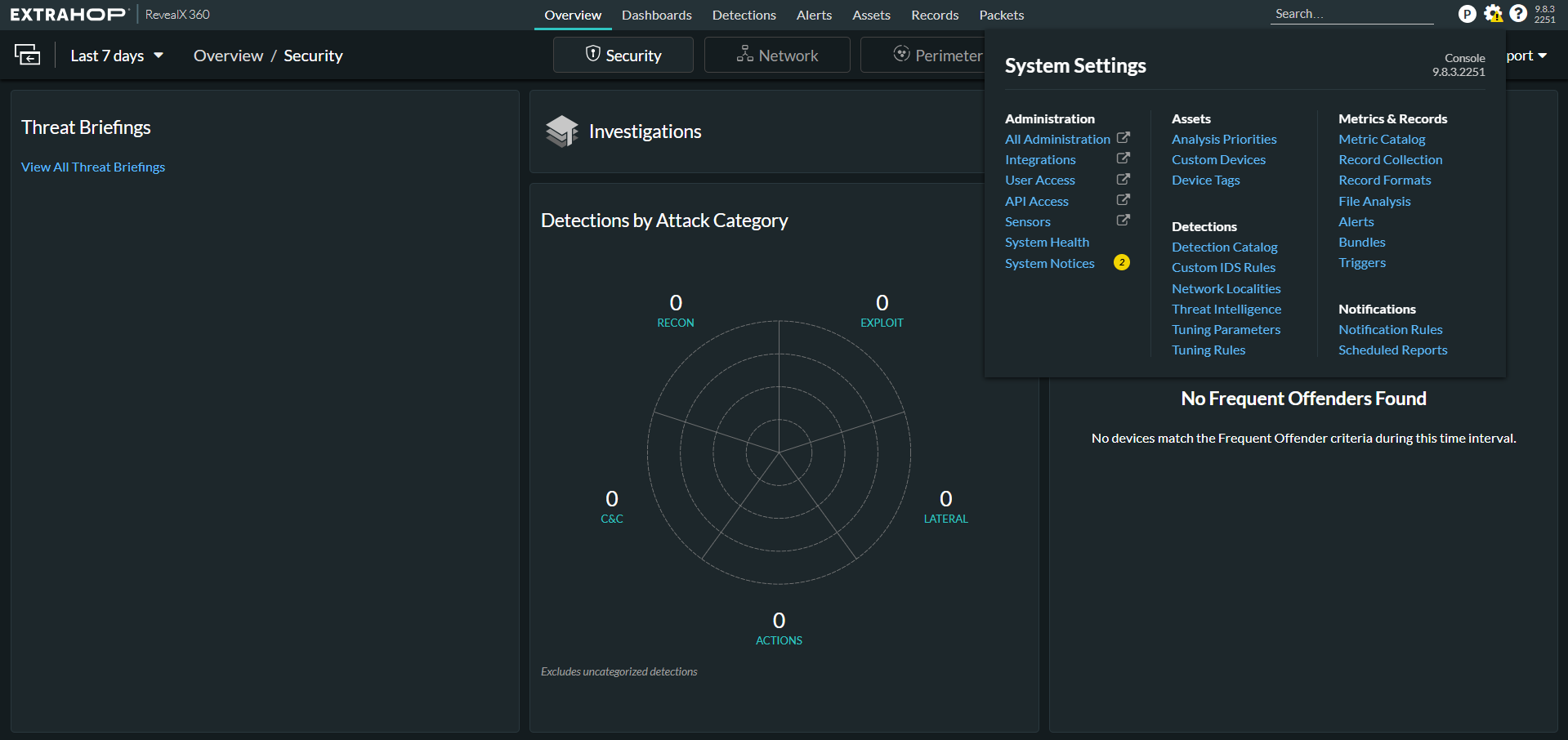
- Go to System Settings > Administration > API Access.
- Click Create Credentials, enter a name, and select the minimum permissions for the credentials.
- Click Save and copy the API Endpoint and remove the oath2/token from it. This will be the Base URL for the plugin. Also copy the ID and Secret. The Secret cannot be viewed or retrieved later. These are needed to configure the plugin.
Configure the ExtraHop Plugin
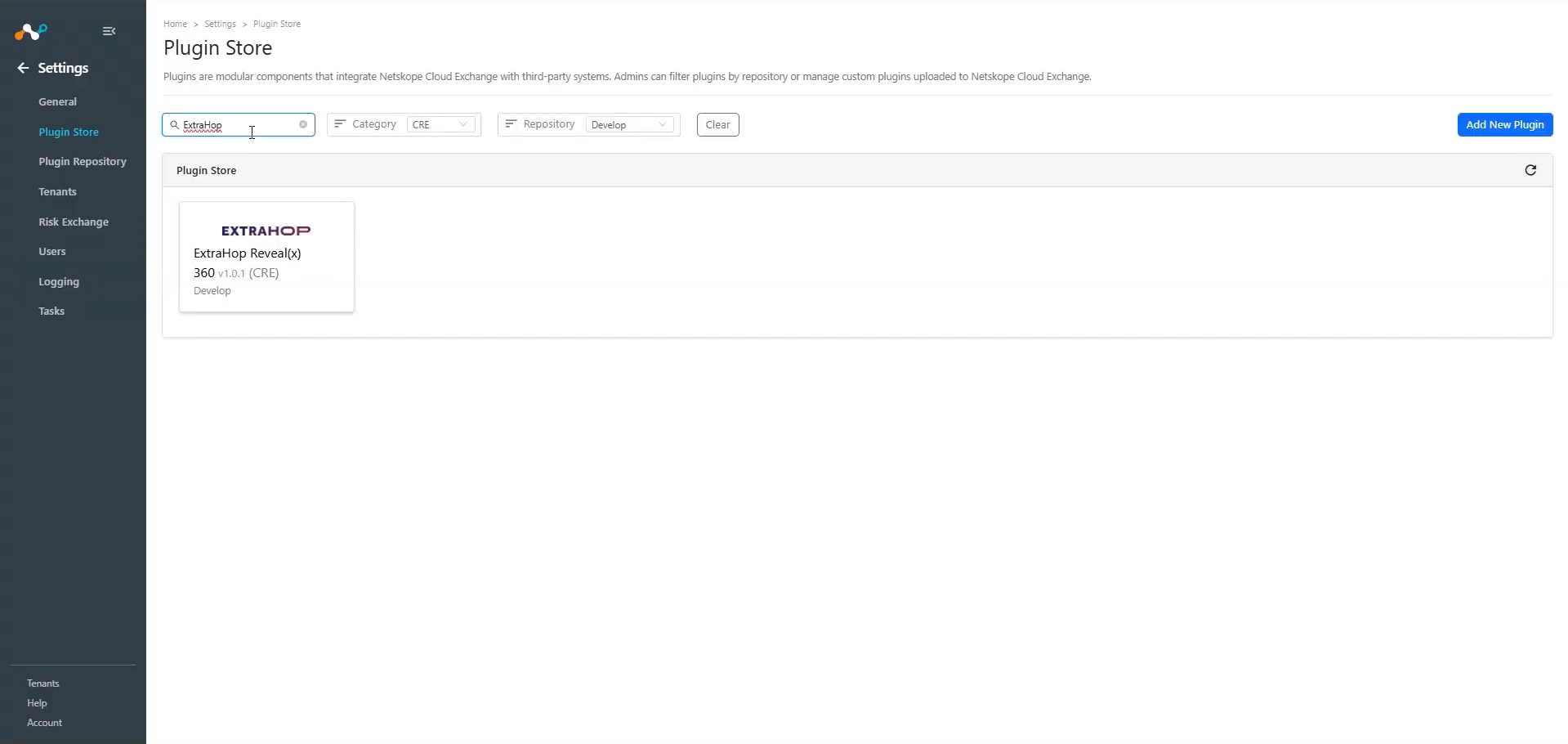
- In Cloud Exchange, go to Settings > Plugin Store. Search for and select the ExtraHop v1.0.1 (CRE) plugin box.
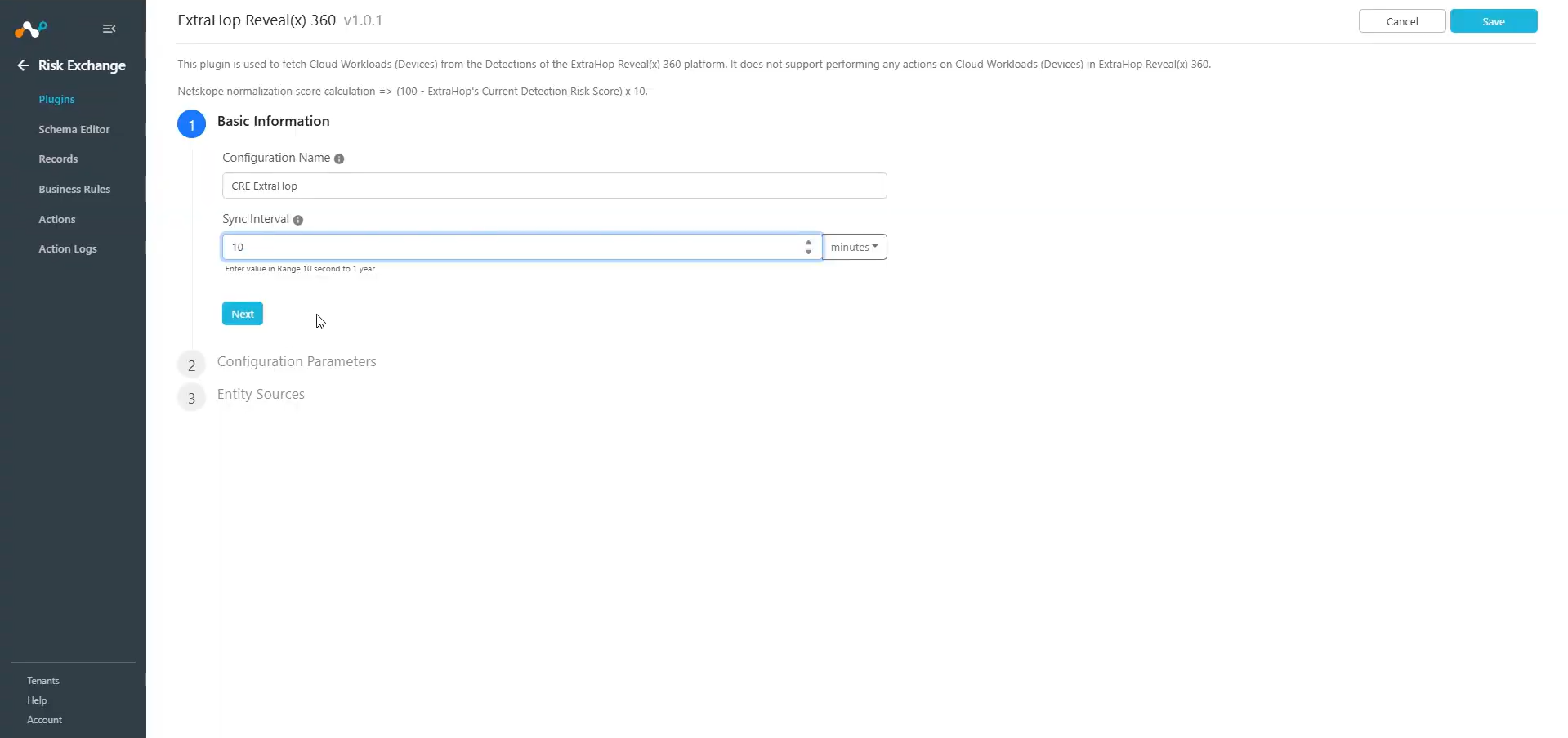
- Enter the Basic Information:
- Configuration Name: Enter a name for the configuration.
- Sync Interval: Interval to fetch data from this plugin source.
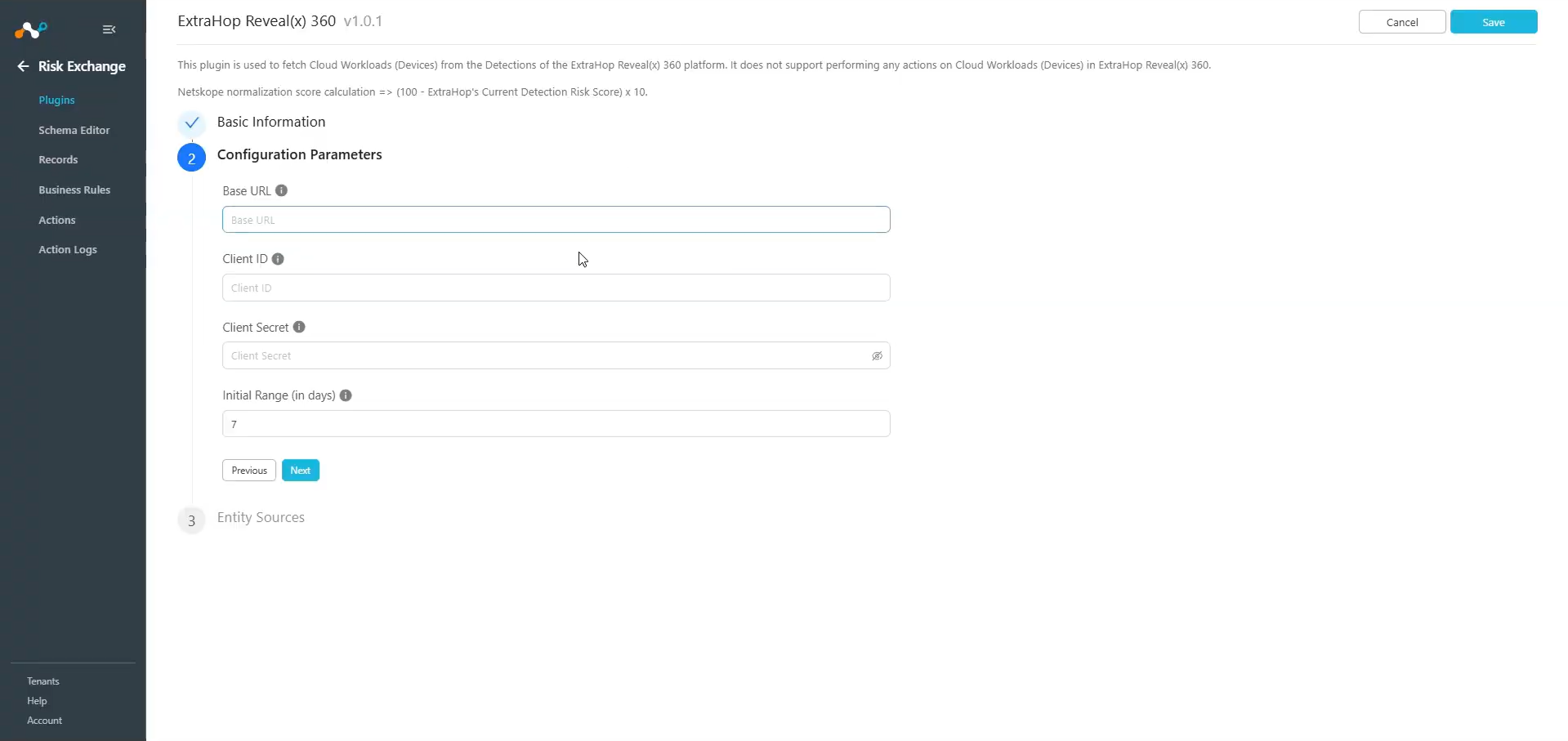
- Click Next and enter the Configuration Parameters:
- Base URL: ExtraHop Reveal(x) 360 API Base URL. The Base URL should not include the /oauth/token.
- Client ID: ExtraHop Reveal(x) 360 API Client ID.
- Client Secret: ExtraHop Reveal(x) 360 API Client Secret.
- Initial Range (in days): Number of days to pull the data for the initial run.
- Click Next and select the Entity from the Entity dropdown.
The Entity fields can be created from the Schema Editor page or clicking the + Add Field option from the field dropdown.
Provide the field mapping. For the suggested mappings, refer to the Mappings section.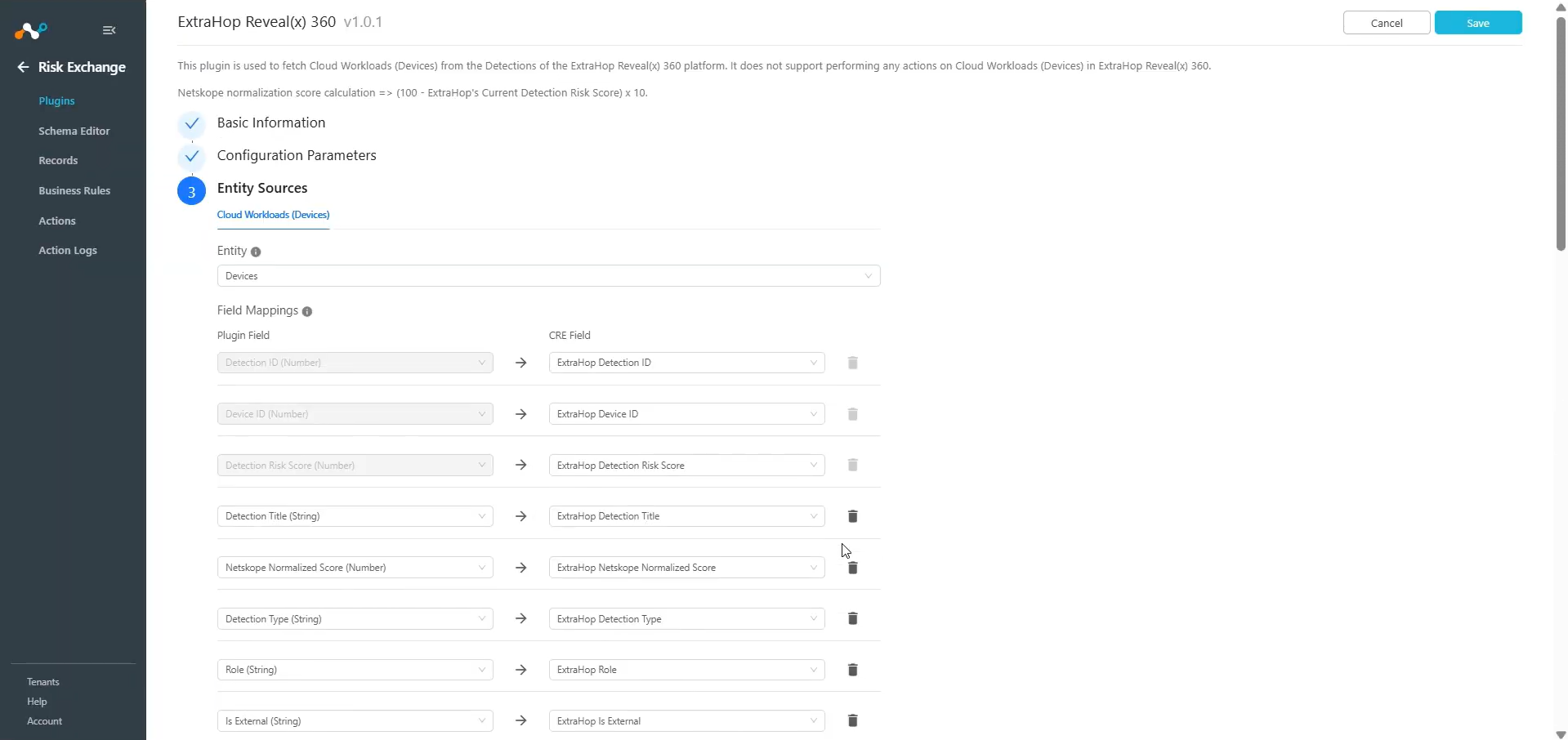
- Click Save.
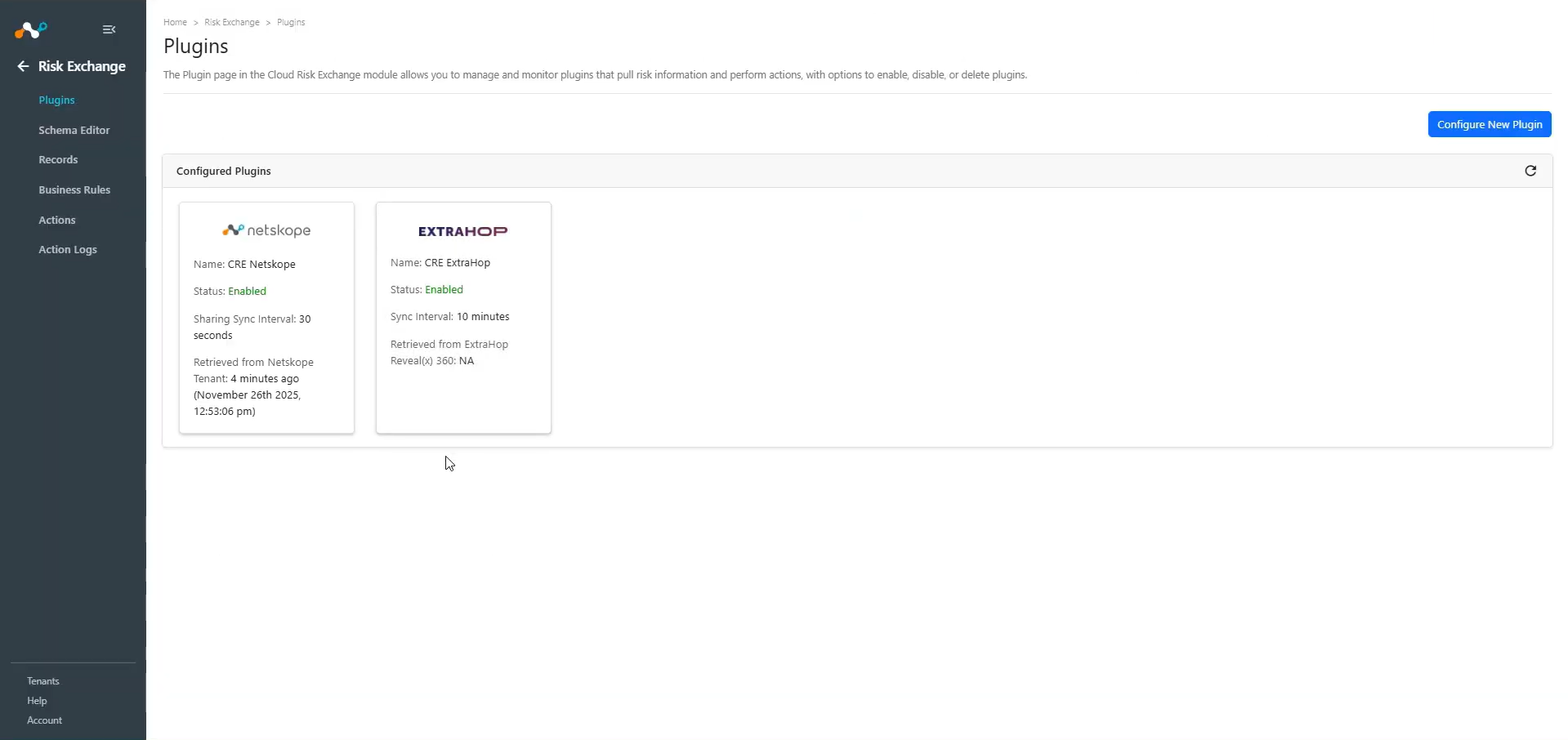
Add a Risk Exchange Business Rule for ExtraHop
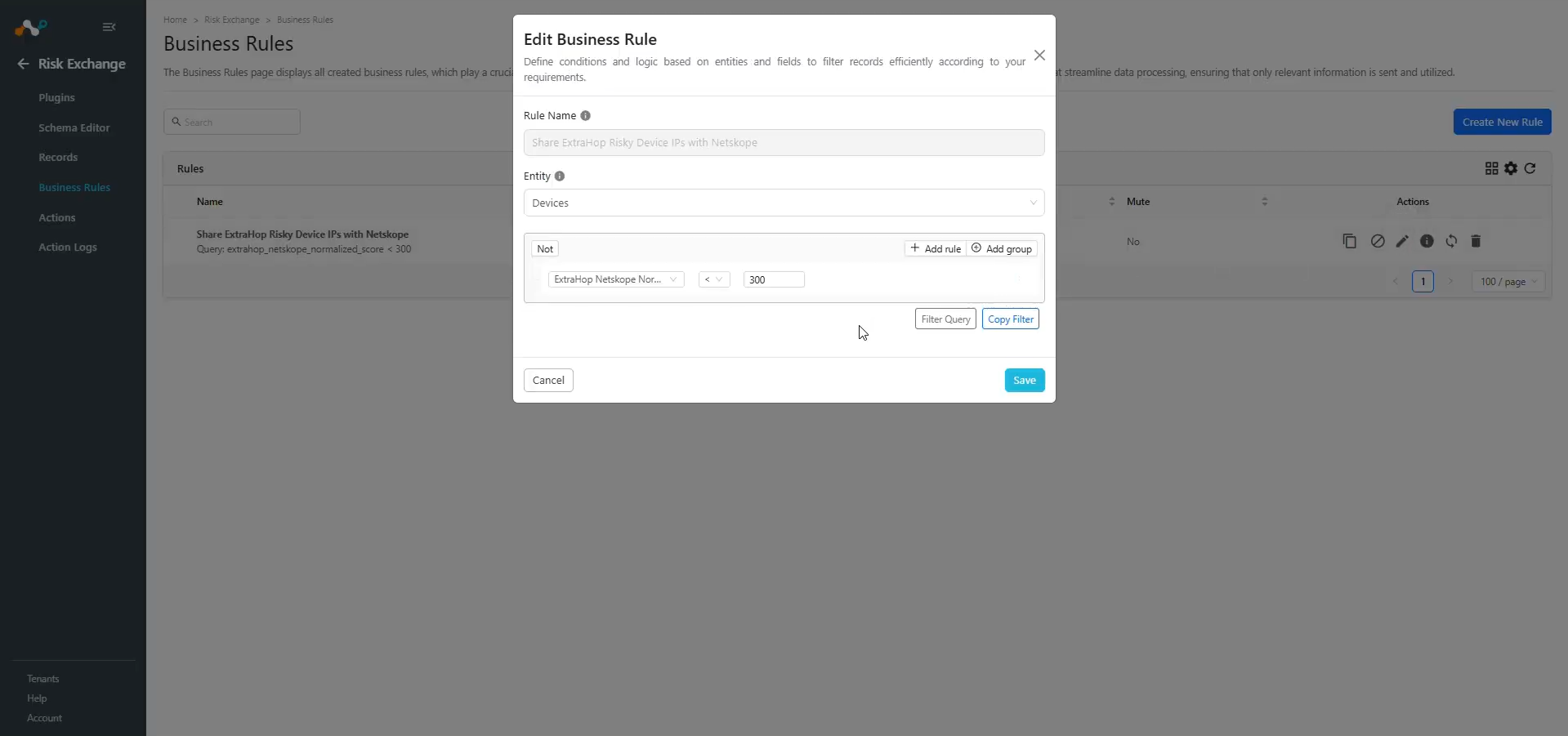
Use Business Rule to filter out the devices.
- In Risk Exchange, go to Business Rules and click Create New Rule.
- Enter a rule name, select an Entity, and provide the filter as per your requirement to perform Actions. When finished, click Save.
Add a Risk Exchange Action for ExtraHop
ExtraHop only supports the No Action action.
No Action
This action will not perform any kind of action. You can use this action to generate UBA alerts in Ticket Orchestrator.
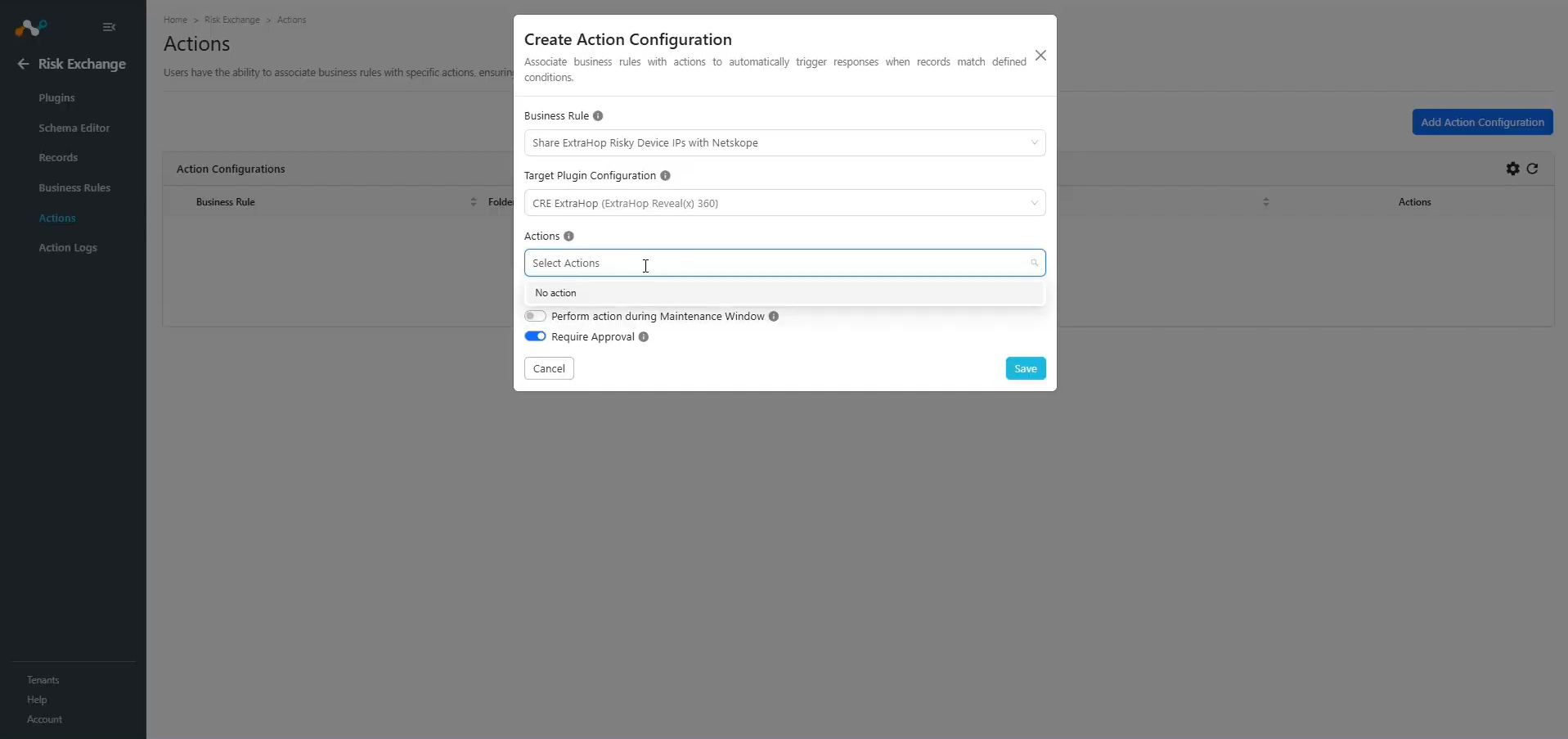
- In Risk Exchange, go to Actions and click Add Action Configuration.
- Select a Business Rule, Configuration, and Action (No action).
- Click Save.
Notes
- You can perform other actions on the devices pulled from ExtraHop on the Netskope Tenant, for performing the Devices related actions on Netskope.
- If the Require Approval toggle is enabled while configuring the action, make sure to provide the approval from the Action Log page shown above by selecting the pending approval entries and selecting the approval tick mark button.
- Generate Alert must be enabled while creating Action to generate Alerts in Ticket Orchestrator > Alerts, and Ticket Orchestrator module must be enabled.
Validate the ExtraHop Plugin
Validate in Cloud Exchange
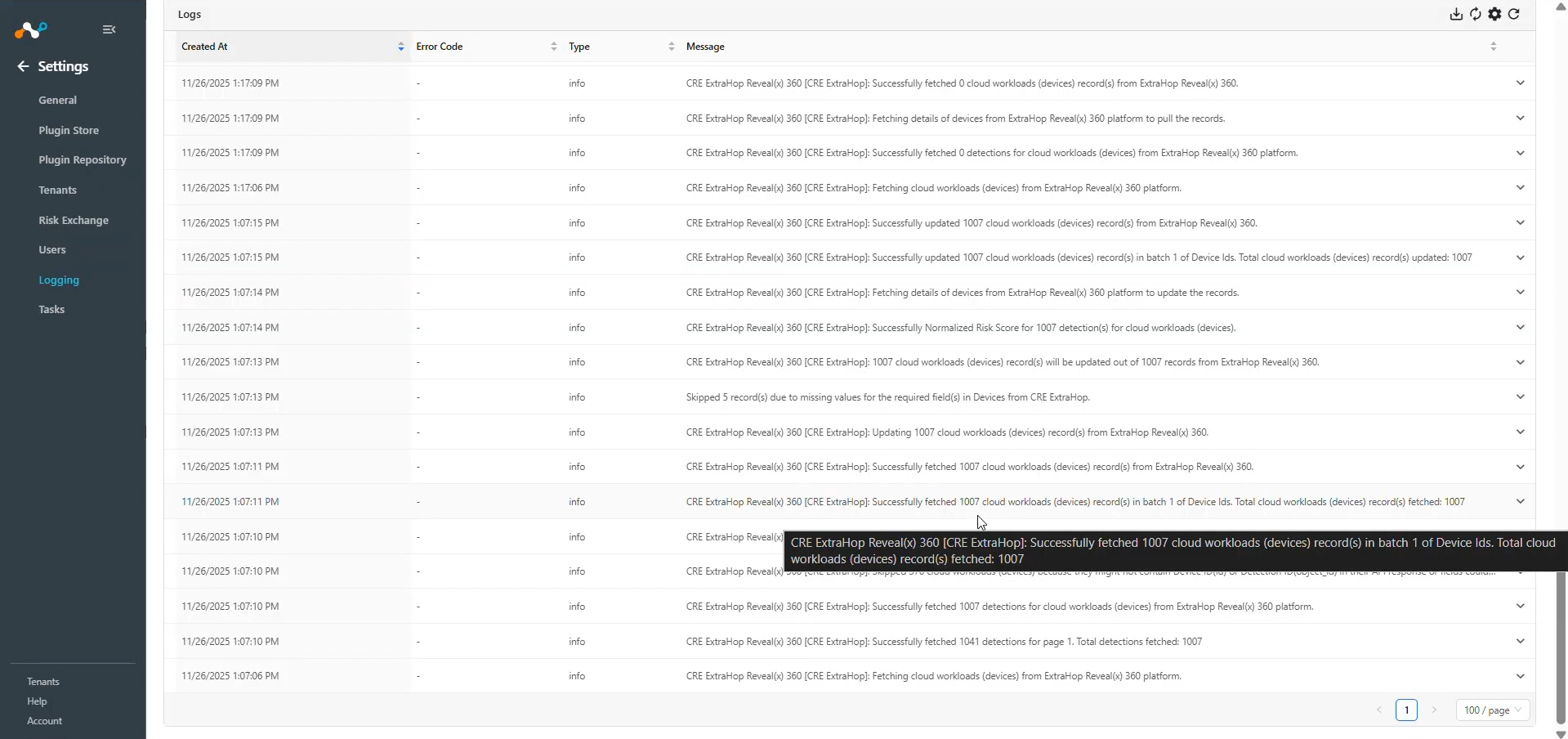
To validate the Device records pulled from ExtraHop, go to Logging and search for logs pulled from the Risk Exchange ExtraHop plugin.
Example: message Like “[CRE ExtraHop]”
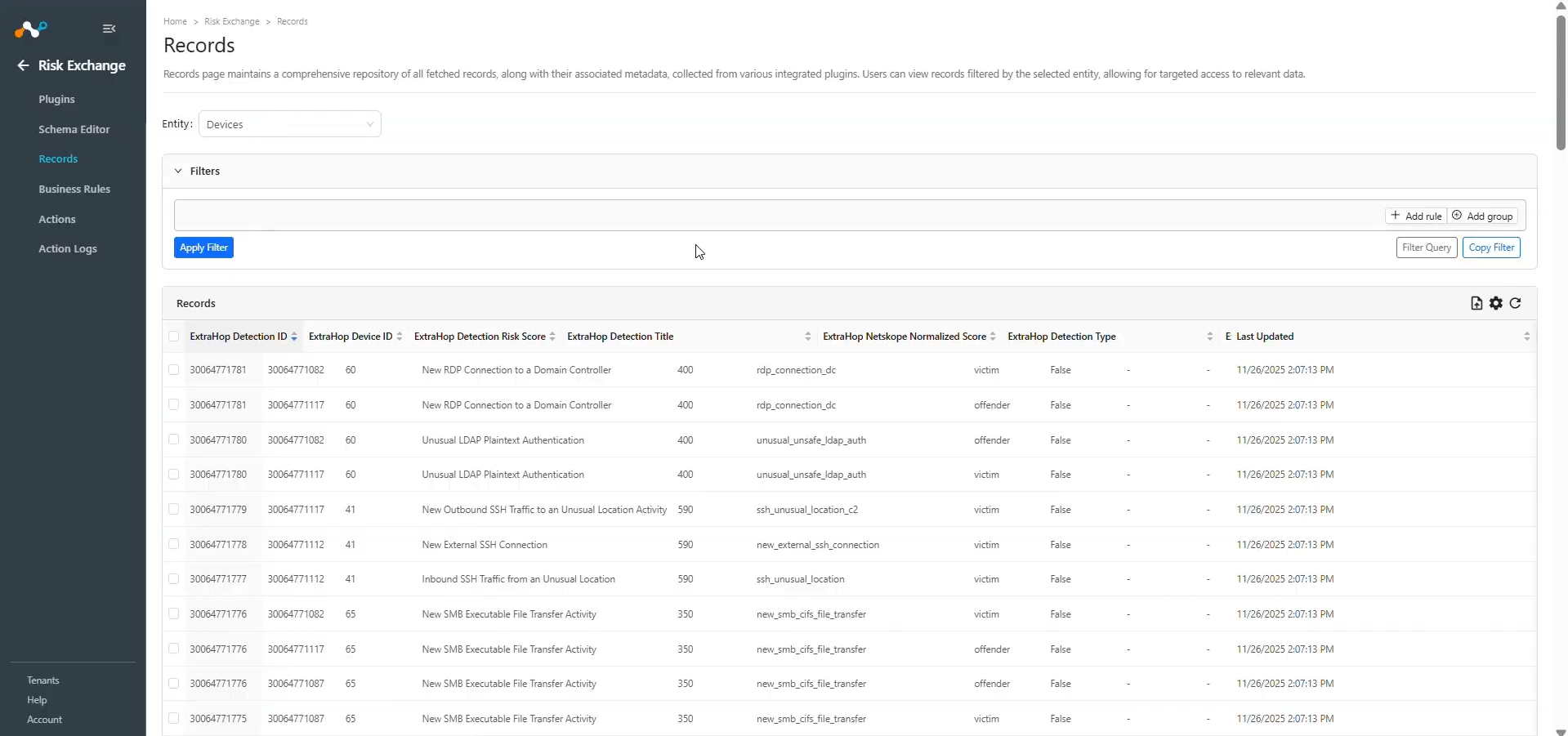
To check the pulled data, go to Records, select the type of Entity you used while configuring the ExtraHop plugin. Check the pulled records.
Validate in ExtraHop
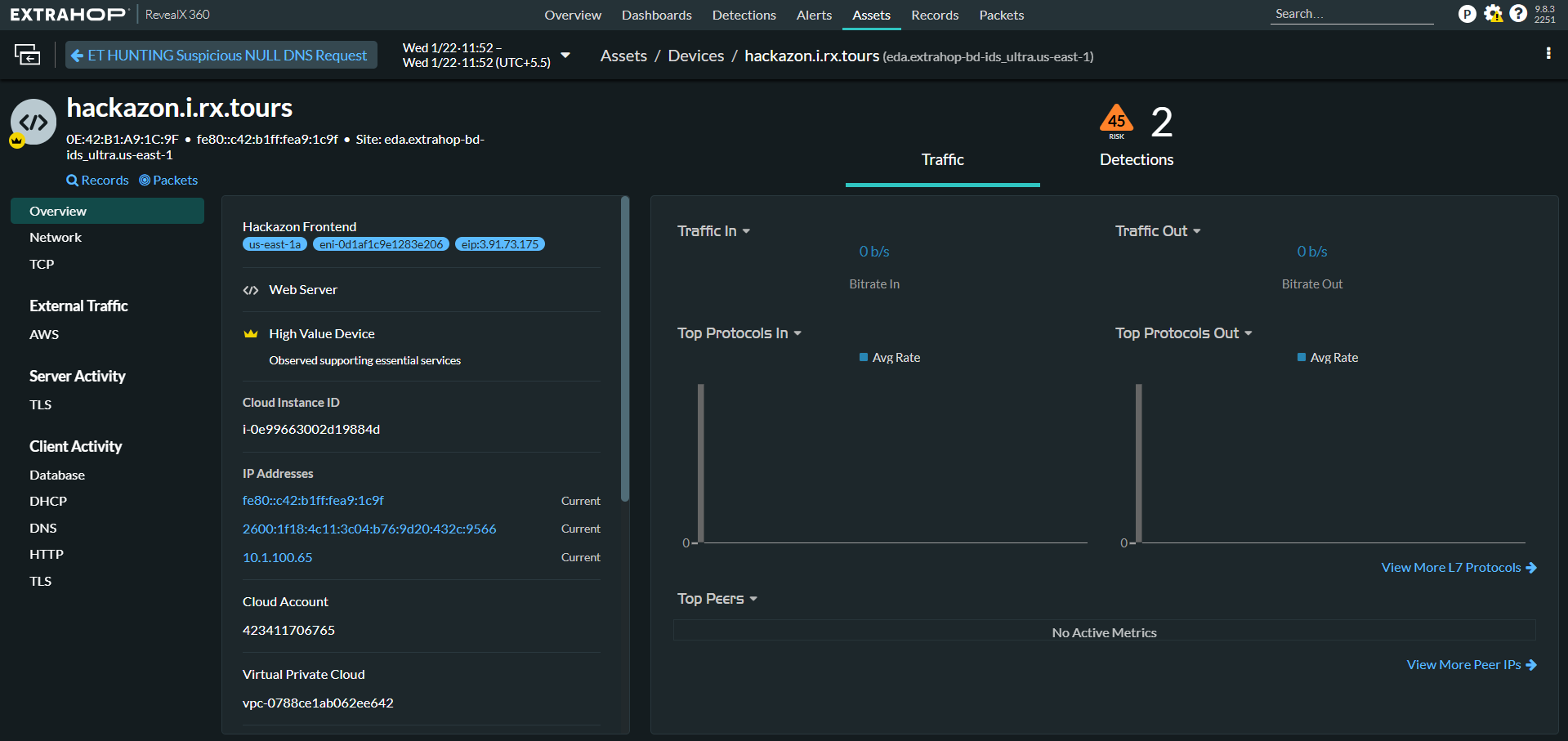
We pull Cloud Workloads (Devices) from the Detections page of the ExtraHop Reveal(x) 360 platform.
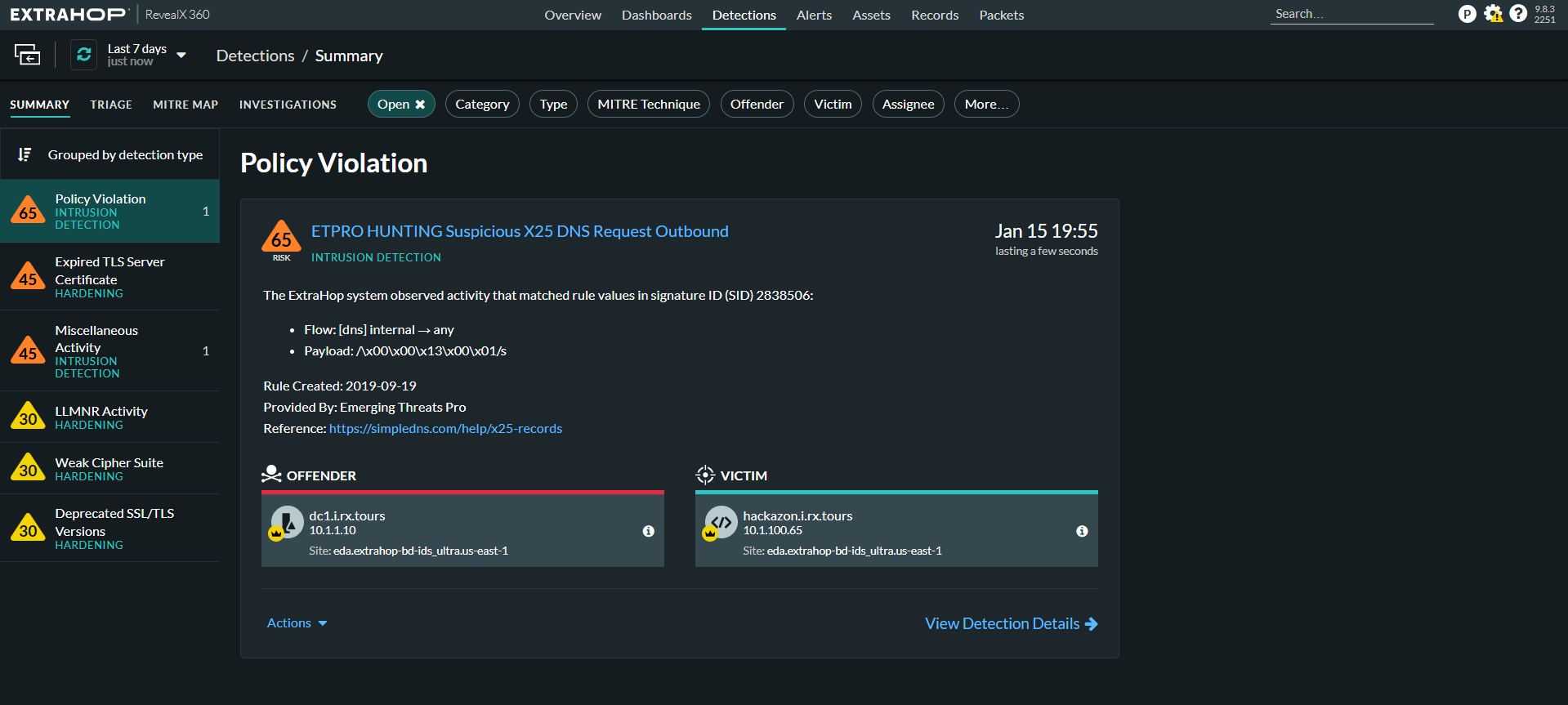
We can validate the details of any device by clicking on any of the devices, and then clicking Go to Device Overview.
Troubleshooting the ExtraHop Plugin
Receiving error in the plugin workflow
CRE ExtraHop Reveal(x) 360 [configuration_name]: Invalid client error occurred, Verify the Client ID and Secret provided in the configuration parameters while generating auth token for authenticating credentials.
What to do: Verify the Client ID and Secret for ExtraHop, for reference you can refer to Configuration on ExtraHop
Devices are not pulled from ExtraHop
If no data for the Device is pulled, it might be due to either:
- No device is available on the platform to pull
- Mapping is not added in the plugin
What to do:
- Go to ExtraHop and check if the devices are available to pull from the Detections page.
- Edit the plugin configuration and check the Entity Source page, there should be some fields mapped in order to pull the same.