

AI Command Center (AICC) provides visibility into AI application usage, services, and assets across your environment. Before you begin, ensure your environment meets the product and role prerequisites.
Product Prerequisites
AICC relies on the following Netskope components. Enable each component based on your intended use cases.
| Use Case | Required Component |
|---|---|
| Visibility into Generative AI application usage across traffic steered via Netskope | Next-Gen Secure Web Gateway (NG-SWG) must be enabled and fully operational |
| Visibility into MCP server access across traffic steered via Netskope | Agentic Broker must be available and operationalized |
| Visibility into alerts | Data Loss Prevention or Thread Protection must be configured |
| Visibility to Guardrail alerts | AI Guardrails must be available and functional |
| Visibility into AI models and AI application footprints on managed endpoints | Netskope Client (NS Client) version R137.1 or later must be deployed on managed endpoints, with Endpoint AI Discovery enabled. See NS Client AI Discovery article to learn more. |
Ensuring these prerequisites are met allows AICC to accurately discover AI assets and provide meaningful insights into AI usage.
Role Prerequisites
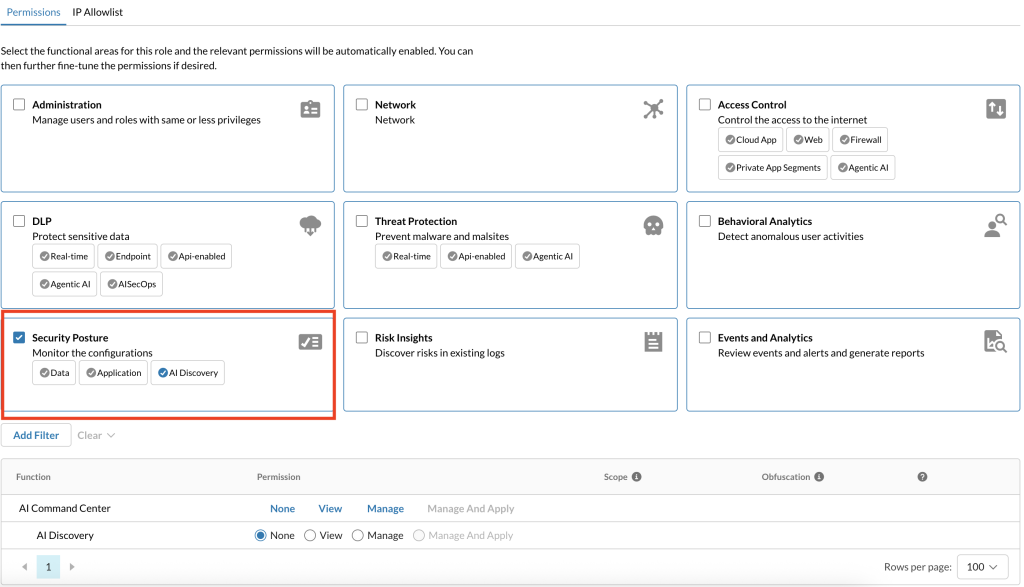
To access the AICC dashboard, your role must include the Security Posture > AI Visibility permission.
If you can’t see the AICC dashboard, create a role with the correct permissions.
To create a role with AI Visibility permissions:
-
Log in to your tenant.
-
Go to Settings > Administration > Administrators & Roles.
-
Click the Roles tab.
-
Click New.
-
In the New Role panel, enter a Role Name and an optional Role Short Description.
-
In the Permissions tab, select Security Posture.
-
Under Security Posture, ensure AI Discovery is selected.
-
Click Save.

