

This topic provides an overview of how administrators can use the Skope IT application to monitor Model Context Protocol (MCP) communications in real-time. You will learn how to gain granular visibility into the interaction lifecycle—from initial handshakes to specific tool invocations and resource requests—to ensure compliance and detect potential threats. Furthermore, it explains how to analyze detailed event logs and initialization data to verify successful executions while ensuring sensitive data remains protected.
Administrators can apply access controls to specific tool events and enforce DLP profiles to prevent the leakage of sensitive data.
Blocking Specific Events
Policies can be configured to block specific activity types, such as a “tool call request.” If a user attempts to utilize a restricted tool, the event is blocked, and the action is logged.
Applying DLP Profiles
You can apply standard DLP profiles (such as PII or PCI) to MCP traffic to inspect the content of tool requests and prevent sensitive data exposure.
-
Compliant Action: If the tool request content contains standard, non-sensitive data, the tool executes successfully.
-
Non-Compliant Action: If a user includes sensitive data (e.g., names, employee IDs, roles, or credit card numbers) in a request, the policy blocks the action and alerts the user.
Create a DLP Policy for MCP Traffic
-
Navigate to Policies > Real-time Protection and click New Policy.
-
In the Destination section:
-
Select Remote MCP Server.
-
Select the specific server (e.g., Notion MCP).
-
Select the relevant MCP activities to inspect.
Supported activities for DLP on MCP traffic include:CallToolRequest, CallToolResult, CreateMessageResult, ElicitResult, GetPromptRequest, GetPromptResult, ReadResourceRequest, and ReadResourceResult.
Do not select standard cloud application activities such as Download, Form Post, or Upload, as these apply to standard web traffic and not MCP communications.
-
-
In the Profile & Action section:
-
Select your desired DLP Profile (e.g., DLP-PII or DLP-PCI).
-
Set the Action to Block.
-
-
(Optional) Configure user notifications to alert users when a non-compliant action occurs.
-
Enter a Policy Name and click Save.
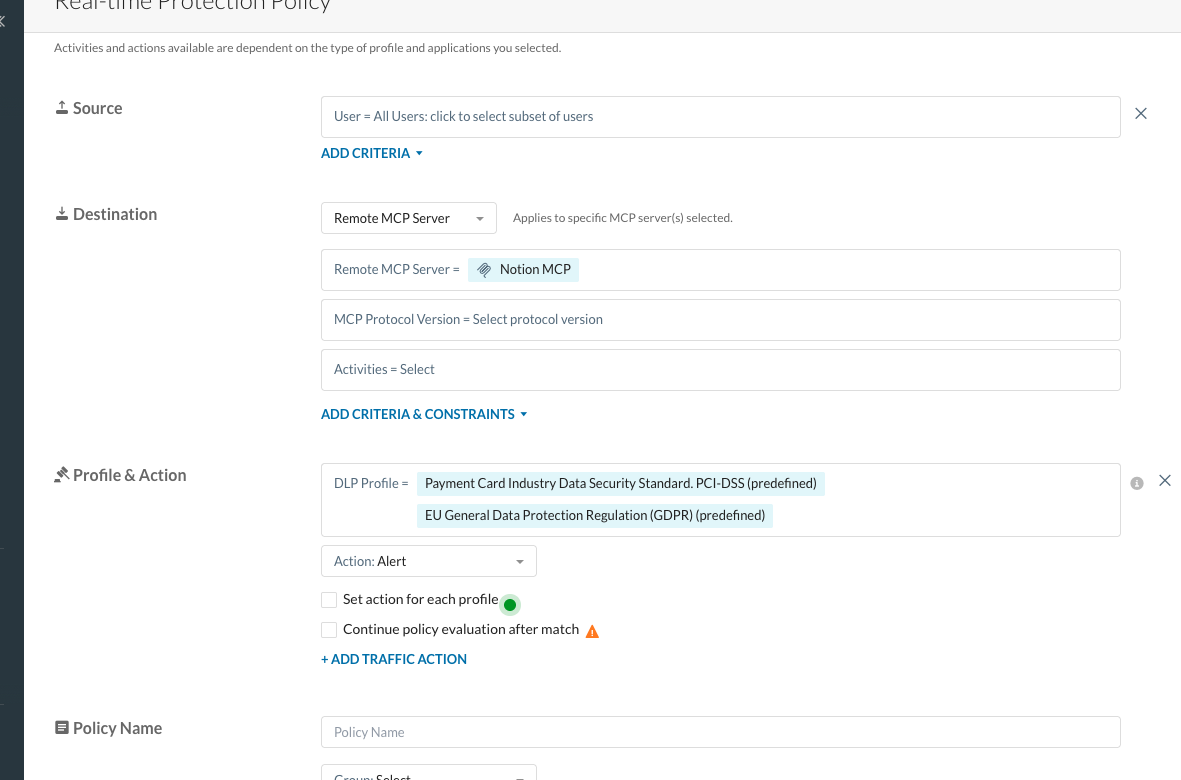
Policy Configuration Interface: The “Create Policy” screen. The “Category” dropdown is set to “MCP Server,” all activities are selected and the “Profile & Action” field is set to a DLP Profile to detect PII and PCI data. The Action is set to Block for a DLP policy with a user notification.
Run a tool in the notion MCP Server to create a page. Provide the title and content without any sensitive data.

VS Code: Run the notion-create-pages tool without any sensitive data.
None of the tools are or tool calls are blocked.

Application Events Details Pane: No alerts or block policies are enforced
Next run this same tool again to create another page called Employee Details.

VS Code: Create a new page “Employee Details”
This time, for the content, provide some sensitive data such as name, ID, role, department, email, location, etc. of each employee in the content of that page.

VS Code: Add personally identifiable information into the content of the page
When the tool call request is made to create the page, we get a user alert that says “This is a non-compliant action”.

User Block Notification: A system pop-up alert stating “Non-compliant action,” triggered by the attempted upload of sensitive PII data.
Reviewing the application events we see why. This tool call request is blocked because of the DLP policy created earlier.

DLP Block: Application Event showing the CallToolrequest blocked due to the Block Notion DLP policy.

DLP Block: Application Event Details showing theCallToolrequest blocked due to the Block Notion DLP policy.
We can also see this in the list of alerts showing the action taken, the MCP server and the policy applied.

DLP Block Alert:Alert showing the CallToolrequest blocked due to the Block Notion DLP policy.
DLP Add-on Features
The following features are available for the DLP add-on licenses, DLP Standard (L2) and DLP Advanced (L3).
DLP Standard (L2):
- Regulatory compliance templates including GDPR, PII, PCI, PHI, source code and many more.
- Predefined data identifiers for a diverse set of file types, as well as options for custom Regular Expressions and dictionaries
- Two AI/ML standard document classifiers (resumes, source code)
- Read classification labels using DRM service
- Incident management and remediation
DLP Advanced (L3):
- Regulatory compliance templates including GDPR, PII, PCI, PHI, source code and many more.
- Predefined data identifiers for a diverse set of file types, as well as options for custom Regular Expressions and dictionaries
- File fingerprinting with degree of similarity, exact data matching and optical character recognition (OCR)
- AI/ML classification for documents (tax forms, patents, source code, etc.) and images (desktop screenshots, whiteboards, passports, IDs, etc.)
- Read and write classification labels using DRM service
- Incident management and remediation