

GitHub onboarding is now available in Next-Gen SaaS Security Posture Management (SSPM). As part of this change, new GitHub instances can no longer be onboarded from Classic SSPM.
Existing GitHub instances continue to function in Classic SSPM, but must be migrated to Next-Gen SSPM.
Why do I need to migrate my GitHub instance?
Netskope is moving GitHub support to Next-Gen SSPM. Classic SSPM support for GitHub will be phased out, and existing instances must migrate to continue functioning without interruption.
How do I migrate my GitHub instance?
1. Log in to the Netskope tenant UI and go to Settings > Configure App Access >Next Gen > Security Posture.
2. Select the GitHub icon.
3. A list of GitHub instances eligible for migration appears. This list includes Next-Gen instances corresponding your existing Classic GitHub instances for the same organization account. For the GitHub instance you want to migrate, install Netskope SSPM GitHub App in GitHub.
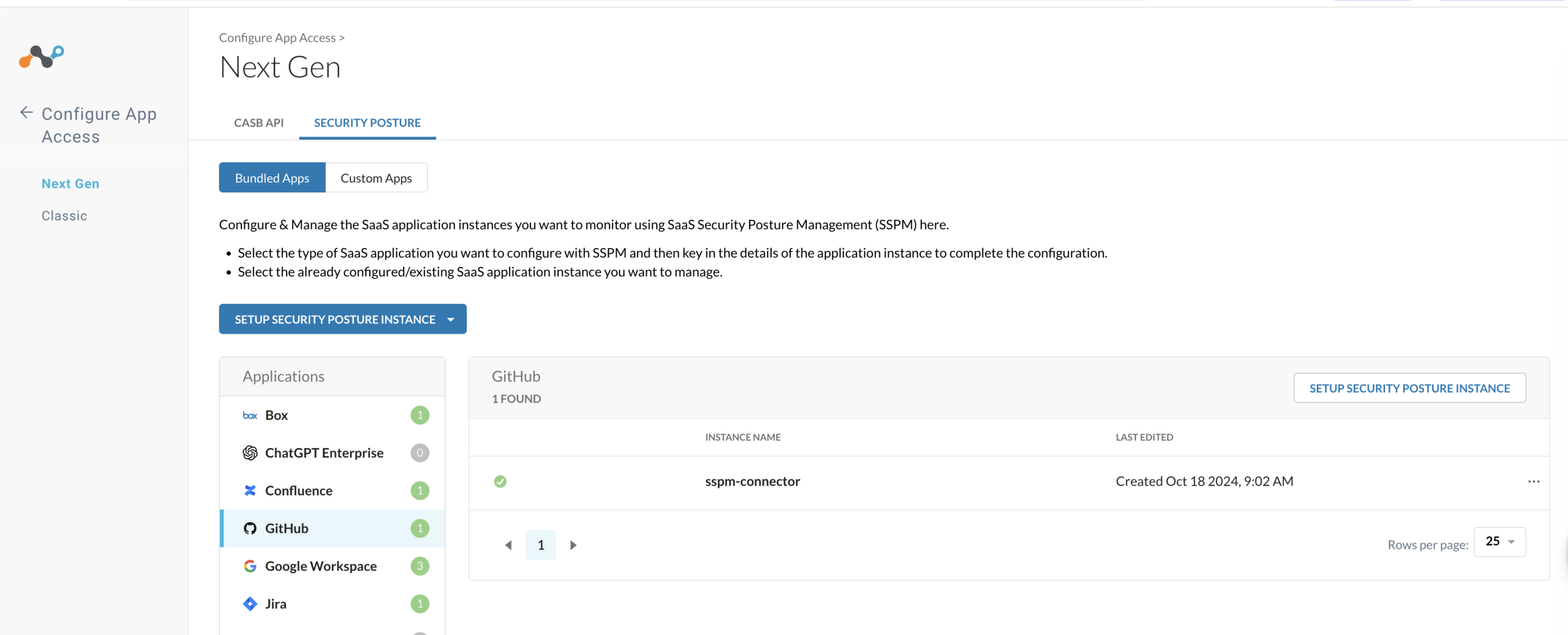
4. Click the three dots to the right of the instance name.
5. Select Regrant.
6. Authenticate the regrant when prompted.
Migration starts automatically after you authenticate. The Classic instance remains active during migration and is removed automatically once migration completes.
What happens to my Classic instance during migration?
The Classic instance remains active and continues to function while migration is in progress. Once migration completes, the Classic instance is removed automatically. You don’t need to manually delete it.
When can I uninstall the old Classic GitHub App?
Wait until migration is fully complete before you uninstall the old Classic GitHub App from your GitHub organization. Do not uninstall it right after you install or authorize the Next-Gen GitHub App. To confirm migration is complete, check both of the following:
- The Classic instance for the migrated GitHub organization has been removed automatically from the Netskope tenant Classic Instance Onboarding UI.
- The Next-Gen instance is collecting data with no connectivity issues, see SSPM connectivity to SaaS app article for possible GitHub connectivity errors.
Once both are true, it is safe to uninstall the old Classic GitHub App.
What happens if I delete and recreate my Next-Gen GitHub instance?
Netskope creates a placeholder instance in Next-Gen SSPM for every Classic GitHub instance. Do not delete this placeholder instance, so you retain your finding history. If it is deleted, all finding history associated with the Classic GitHub instance is lost, even if you create a new Next-Gen instance with the same name.
Do I need to onboard GitHub on Classic first if I’m a new user?
No. If you haven’t onboarded GitHub yet, onboard it directly in Next-Gen SSPM. See Onboard GitHub for instructions. This migration process doesn’t apply to you.