

Introduction
Clients and Publishers will build outbound tunnels to gateways on Local Brokers (LBRs), similar to Cloud Brokers. This guide explains the two selection methods and their fallback behavior so you can configure them with confidence.
Comparing Selection Methods
DNS Hostname-based Selection (including steering-level dedicated hostnames):
- Simpler to configure
- Works well with existing network routing policies, SD-WAN integrations, and manual load-balancing designs
- Requires administrators to manage multiple DNS records and configure routing rules per user group
- Suitable when network infrastructure drives broker selection
Latency-based (GSLB) Broker Selection:
- Netskope’s recommended approach for large deployments
- Provides automatic failover and optimal gateway selection based on real-time latency measurements
- Reduces the need to manually create and manage complex DNS configurations
- Requires GSLB-aware client versions and tenant entitlement
- Suitable when performance and automatic optimization are priorities
Hybrid Approach (Recommended):
You can use both methods together: Deploy GSLB as the primary path for general users, and use a dedicated DNS hostname as a fallback for specific populations (e.g., compliance-sensitive users who must stay on a dedicated Local Broker cluster). This hybrid approach provides flexibility during testing and gradual rollouts.
DNS Hostname-based Selection
This method uses a configured DNS Hostname in the Local Broker settings to direct clients/publishers to an LBR. Administrators can configure a tenant-wide default hostname, or assign a dedicated hostname to specific Traffic Steering configurations to route different users/user groups/OUs to connect to different Local Brokers.
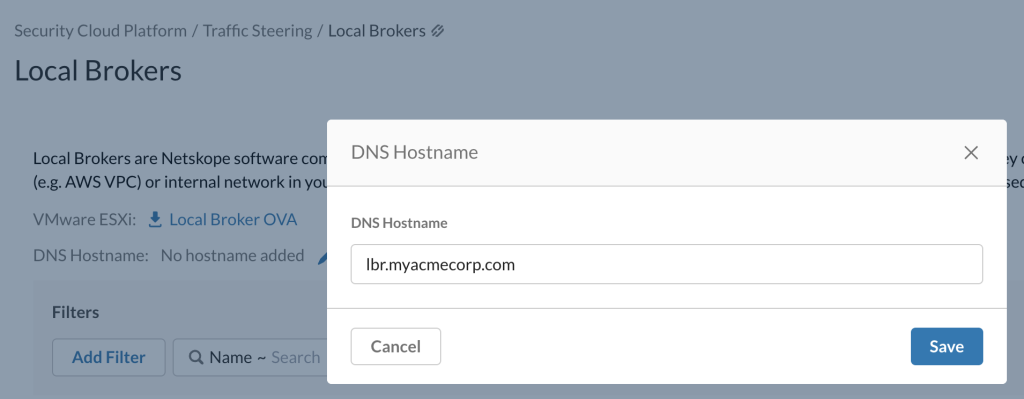
Note – Tenant-wide default hostname can be configured under Settings > Security Cloud Platform > Traffic Steering > Local Brokers
Understand How Client Gateway Selection Works (DNS Hostname-based)
- Clients try the Local Broker (LBR) first.
- If the Local Broker hostname resolves to multiple IPs, the Client validates reachability to each and then selects one at random.
- If multiple LBRs are resolvable/reachable, the Client fails over to the next LBR when the active one fails.
- If no LBR is available, the Client falls back to a Cloud Broker.
- If a dedicated Local Broker hostname is configured in a steering configuration that matches the Client, the Client uses that hostname instead of the tenant-wide default. This allows different users/user groups/OUs to connect to different Local Brokers without deploying separate tenants.
- Deploy at least two LBR instances. With only one LBR, failures force a fallback to Cloud. After the LBR recovers, the Client won’t return to it until the tunnel is re‑established.
- For Dynamic Steering (on-premises and off-premises), Clients can use separate dedicated hostnames for each network location.
Understand How Publisher Gateway Selection Works (DNS Hostname-based)
- Deploy one or more dedicated Publishers for each Local Broker (LBR).
- If the LBR hostname resolves to multiple IPs, the Publisher validates reachability to each and then selects one at random.
- If multiple LBRs are resolvable/reachable, the Publisher fails over to the next LBR when the active one fails.
- Unlike Clients, Publishers do not fall back to Cloud Brokers if no other LBR is available.
Dedicated Local Broker Hostname per Steering Configuration
Important: This feature applies to Clients only. Publishers always use the tenant-wide default Local Broker hostname.
What is it?
This feature allows administrators to assign a dedicated Local Broker DNS hostname to specific Traffic Steering configurations. Clients matching that steering rule resolve the dedicated hostname instead of the tenant-wide default, enabling network routing policies and segmentation based on distinct FQDNs. This is especially useful for environments that rely on customer-side routing, SD-WAN, GTM, or LTM policies where different user groups need different FQDNs.
When to Use This Feature:
- You need different user groups (branch offices, PCI-compliant users, contractors, etc.) to route to different Local Brokers or cluster instances
- Your network design (SD-WAN, GTM, LTM, or load balancer policies) depends on specific hostnames for traffic steering and segmentation
- You use Dynamic Steering and want separate on-premises and off-premises hostnames to align with your network topology
- You want to preserve network segmentation for compliance without deploying separate tenants
How to Enable This Feature:
This feature can be enabled within Client Configuration (Settings > Security Cloud Platform > Netskope Client > Client Configuration > Global Attributes > Private App Segments)

How It Works:
When the NPA client attempts to establish a tunnel to a Local Broker, it determines which DNS name to resolve based on layers of configuration:
- Steering rule match first: If a steering rule matches the client and has a dedicated Local Broker hostname configured, the client uses that hostname
- Tenant-wide default as fallback: If no dedicated hostname is configured on the matched rule, the client uses the tenant-wide Local Broker DNS hostname
- Gateway Selection (GSLB) interaction: If GSLB is enabled along with Gateway Selection configured, GSLB remains the primary path, with the dedicated hostname serving as a fallback when GSLB is unavailable
Configuration Steps
- Go to Settings > Security Cloud Platform > Traffic Steering > Steering Configuration
- Create a new steering configuration or edit an existing one
- Select the target user group, OU, or operating system criteria that will match your population
- Scroll to the Dedicated Local Broker Hostname field (appears when the feature is enabled)
- Enter the FQDN to use for the matched users (e.g., lbr-branch.acme.com, lbr-pci.acme.com)
- Save the configuration
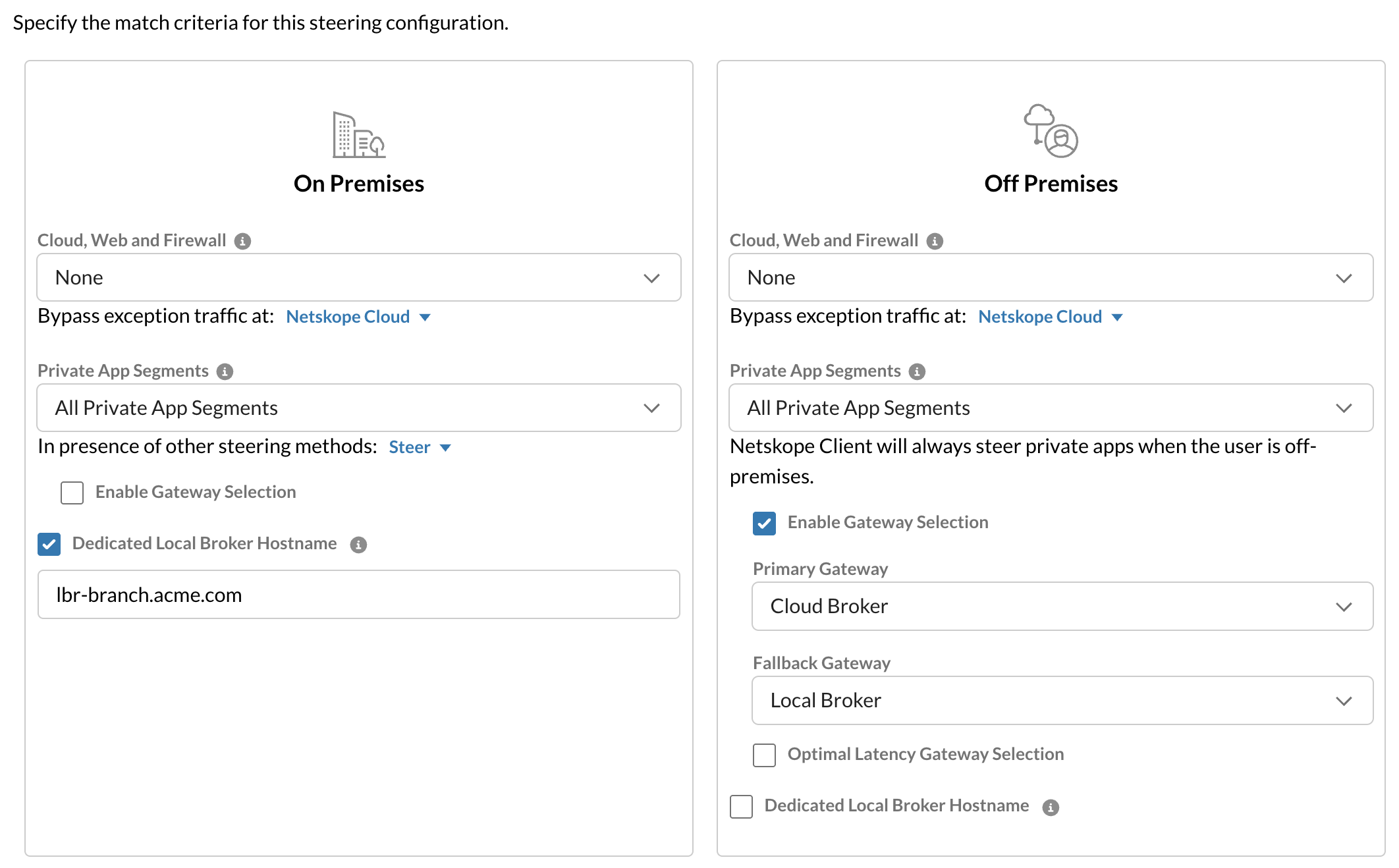
For Dynamic Steering: If Dynamic Steering is enabled, the field is split into ON-PREMISES and OFF-PREMISES hostname fields. Configure each independently; leave either blank if that location should use the tenant-wide default.
Validation: The UI validates FQDN format when you save. It does not perform a live DNS lookup. Invalid values are blocked with: “Invalid hostname. Please enter a valid FQDN.”
An example Configuration:
Branch Office Steering Rule:
├─ User Match: Location = Branch Office OR OU = Branch
├─ Dedicated Hostname: lbr-branch.acme.com (On-Premises)
Important Notes
- Leave the field blank if the population should use the tenant-wide default hostname
- Client only feature: Dedicated Local Broker Hostname applies to Clients only. Publishers connecting to Local Brokers use the tenant-wide default hostname; this feature does not override Publisher hostname selection
- GSLB interaction: If GSLB (Gateway Selection) is enabled on the steering configuration, the dedicated hostname is used only as a fallback when GSLB is unavailable. If Gateway Selection is not configured and you add a dedicated hostname, it restores Local Broker DNS resolution for matched users
- DNS requirements: DNS records for the dedicated hostname must already exist and resolve to the intended Local Broker IP or customer-side VIP
Verification Steps
After you save the configuration, verify the dedicated hostname is applied on matched clients.
Step 1: Check the client received the configuration
Inspect the client policy file to confirm the dedicated hostname was pushed:
File: stagent/data/nssteering.json

Look for:
"npa_dedicated_lbr_dns_host": "lbr-branch.acme.com"
If present, the configuration was successfully applied.
Step 2: Verify DNS resolution works
On the client device, resolve the dedicated hostname to confirm it points to your Local Broker:
nslookup lbr-branch.acme.com
# Should return the IP of your Local Broker instance
Step 3: Verify client connects to the correct broker
Check client logs to confirm it’s using the dedicated hostname:
Client attempting to connect to: lbr-branch.acme.com
Connection established to: [Local Broker IP]:443
If all three steps succeed, the dedicated hostname configuration is working correctly.
Latency-based (GSLB) Broker Selection
Latency-based Broker selection extends GSLB selection to Local Brokers and is Netskope’s recommended approach. Enabling this feature for a tenant with Local Broker entitlement provides several benefits:
- Improves performance and user experience by connecting users to the optimal Local Broker based on latency (GSLB).
- Reduces the need to create and manage complex DNS configurations for hostname-based connectivity, simplifying network operations.
- Offers flexibility with preference ordering (Cloud vs. Local), allowing limited Local Broker enablement during testing and gradual rollout.
- Ensures a consistent experience across Cloud and Local Brokers.
Latency-based Broker Selection decides how Netskope Private Access routes traffic either between:
- Local Brokers (LBRs) – Netskope software that delivers ZTNA in your environment; or
- Cloud Brokers in the Netskope cloud.
This setting applies to:
- Clients – which gateway/broker they connect to
- Publishers – which gateway/broker they stitch to
Broker selection is latency-aware, so traffic uses the closest, fastest broker while honoring your policy preferences.
Before You Begin
Make sure you:
- Enable the feature flag for Latency-based Local Broker Selection (Client and Publisher) for your tenant. This feature is Generally Available from release R136 and will be a tenant configuration option in an upcoming release. Meanwhile, contact your Netskope SE or Netskope Support to enable it if needed.
- Enable Latency-Based Local Broker Selection for your tenant. This feature is Generally Available from release R136 and can be enabled directly from the Netskope UI:
For Clients: Navigate to Settings -> Security Cloud Platform -> Netskope Client → Client Configuration → Global Attributes → Private App tab and enable Enable Latency-Based Local Broker Selection for Clients.
For Publishers: Navigate to Settings -> Security Cloud Platform -> Traffic Steering → Publishers → Publisher Global Attributes and enable Enable Latency-Based Local Broker Selection for Publishers. - Deploy at least one Local Broker.
- Determine whether each Local Broker should serve on‑prem, off‑prem, or both user types.
- Have existing Steering Configurations with Dynamic Steering enabled for Netskope Client.
- Configure at least one Publisher for Netskope Private Access.
Client to Local Broker Selection and Fallback
Prerequisites
Configure Local Broker locations, IPs and public IP restrictions as per steps outlined here.
- Enable gateway selection and latency‑based selection for clients as per steps outlined here.
Understand How Client Gateway Selection Works (latency-based)
Client gateway selection:
- Evaluates the user’s location (on‑premises vs off‑premises).
- Applies your Primary/Fallback choices for that location.
- Considers all eligible Local and Cloud brokers.
- Ranks brokers using latency measurements. The client measures round-trip latency (RTT) to each broker’s RTT endpoints, including LBR RTT on TCP port 2443.
- Connects the client to the best available broker and maintains a single active tunnel.
Configuration options per user type (on‑premises and off‑premises):
- Primary gateway type
- Local Broker
- Cloud Broker
- Fallback gateway type (optional)
- Local Broker
- Cloud Broker
- None
- Optimal Latency Gateway Selection (optional)
- Allows a clearly faster alternative gateway type to be used instead of the primary.
Important to note – When latency-based broker selection for clients is enabled, and Gateway Selection is configured for a Steering config, clients attempt connectivity to Local Brokers based on primary versus fallback settings. Without Gateway selection in a steering configuration, clients prefer connectivity to Cloud Brokers by default, with no fallback to Local Brokers.
This lets you enable the feature, validate the configuration, and gradually move users to Local Brokers without unexpected routing changes.
When latency-based broker selection for clients is not enabled, clients use the DNS hostname-based method, which prefers Local Brokers first and falls back to Cloud if no Local Broker is available, as described in the DNS hostname-based selection section above.
Understand Client Fallback Behavior
Client fallback behavior is controlled by your Steering Configuration:
- Fallback within the same type
- If one Local Broker is unavailable, the client can try other Local Brokers that match your policy.
- Fallback to another type
- If you configure a fallback type, the client can fall back from:
- Local Broker → Cloud Broker, or
- Cloud Broker → Local Broker.
- If you configure a fallback type, the client can fall back from:
- No fallback
- If you set Fallback = None, the client only uses the primary gateway type.
This lets you control whether clients can ever move to Cloud Brokers when Local Brokers are unavailable, or must remain local.
Understand Optimal Latency Selection for Clients
Optimal latency selection:
- Normally, gateway selection:
- Prioritizes the Primary type (Local or Cloud).
- Sorts brokers by latency within that type.
- When Optimal Latency Gateway Selection is enabled:
- If a broker of the non‑primary type is significantly faster, the system can choose it.
- Example:
- Primary = Local Broker
- A Cloud Broker is much closer and faster
- The client may use the Cloud Broker for better user experience.
Use this option when you want to prefer local gateways, but still allow the GSLB service to correct clearly sub‑optimal performance.
Understand Client Behavior when GSLB is Unavailable
If the global broker selection service (GSLB) is temporarily unavailable:
- The client falls back to DNS‑based resolution:
- Uses the configured Local Broker hostname for Local Broker connections.
- Uses standard cloud gateway DNS for Cloud connections.
- When GSLB becomes available again:
- The client returns to latency‑based selection.
This keeps Private App Segment Access usable even if GSLB selection is temporarily unavailable.
Understand Client Primary–fallback Flow
When establishing a connection:
- The client uses gateway selection to retrieve and order candidate brokers (respecting your Primary setting and, if enabled, optimal latency rules).
- The client attempts to connect to those brokers in order.
- If all candidates from the primary type fail and a Fallback type is configured:
- The client attempts gateways of the fallback type.
- If Fallback = None, the client retries only the primary type.
This flow helps you predict and troubleshoot how a client moves between Local Brokers and Cloud Brokers.
Choosing Your Primary/Fallback/Optimal Latency Configuration
Three settings work together to control how Clients select brokers. This section shows real-world scenarios to help you choose the right combination for your use case.
The Settings:
- Primary: Your preferred broker type (Local Broker or Cloud Broker)
- Fallback: What to use if Primary is unavailable (Local Broker, Cloud Broker, or None)
- Optimal Latency: Allow deviation from Primary if non-primary is much faster
Scenario 1: Prefer Local, Fall Back to Cloud (Recommended for Most)
| Setting | Value |
|---|---|
| Primary: | Local Broker |
| Fallback: | Cloud Broker |
| Optimal Latency: | DISABLED |
What Happens:
- Normal operation: Clients connect to Local Broker
- Local Broker down: Clients automatically switch to Cloud Broker
- Both available: Clients use Local Broker (consistent routing)
- Routing behavior: Predictable and consistent
Best For: Most deployments (balances performance with resilience), Default recommendation
Scenario 2: Smart Selection (Local Primary, But Override for Better Performance)
| Setting | Value |
|---|---|
| Primary: | Local Broker |
| Fallback: | Cloud Broker |
| Optimal Latency: | ENABLED |
What Happens:
- Normal operation: Clients connect to Local Broker (Primary)
- Cloud Broker much faster: Clients may switch to Cloud Broker automatically
- Local Broker down: Clients switch to Cloud Broker
Best For: User experience is more important than predictability, Network conditions change frequently
Scenario 3: Strict Local Only (Compliance / Regulatory)
| Setting | Value |
|---|---|
| Primary: | Local Broker |
| Fallback: | None |
| Optimal Latency: | DISABLED |
What Happens:
- Normal operation: Clients connect to Local Broker
- Local Broker down: Clients CANNOT connect (connection fails)
- Routing behavior: Always on-premises or offline
Best For: Compliance requirements, Security-critical applications, HIPAA, PCI-DSS requirements
Scenario 4: Cloud Primary with Local Fallback (Disaster Recovery)
| Setting | Value |
|---|---|
| Primary: | Cloud Broker |
| Fallback: | Local Broker |
| Optimal Latency: | DISABLED (or ENABLED if Local Broker is closer) |
What Happens:
- Normal operation: Clients connect to Cloud Broker
- Cloud Broker down or cloud connectivity lost: Clients switch to Local Broker
- Both available: Clients use Cloud Broker (Primary)
Best For: Disaster Recovery (BCP) scenarios, Internet reliability uncertain
Quick Decision Guide
| Use Case | Primary | Fallback | Optimal Latency | Scenario |
|---|---|---|---|---|
| Standard (most common) | Local | Cloud | DISABLED | Scenario 1 |
| Performance over predictability | Local | Cloud | ENABLED | Scenario 2 |
| Compliance / Security strict | Local | None | DISABLED | Scenario 3 |
| Disaster Recovery | Cloud | Local | DISABLED | Scenario 4 |
Understanding Steering Configurations for Local Broker
A Steering Configuration is a rule that determines what traffic gets steered through Netskope based on characteristics like user location, group, or device OS. For Local Brokers, Steering Configurations control which broker (Local or Cloud) different users route through.
Without vs. With Steering Configurations
Without Steering Configuration (Single Default Path):
- All users → One default broker (Local or Cloud)
- All users → Same Primary/Fallback behavior
- All users → Same DNS hostname (if DNS-based)
With Steering Configurations (Location-Based Example):
- On-Premises User → Primary=Local, Fallback=Cloud
- Off-Premises User → Primary=Cloud, Fallback=None
Steering Configuration + DNS Hostname-Based Selection
When using DNS-based selection, Steering Configurations determine which DNS hostname each user gets:
- User sends traffic
- Steering Configuration matches user
- Configuration specifies hostname (e.g., “lbr-onprem.acme.com”)
- Client resolves hostname to IP
- Client connects to that Local Broker
Steering Configuration + GSLB Broker Selection
When using GSLB-based selection, Steering Configurations determine which Primary/Fallback settings each user gets:
- User sends traffic
- Steering Configuration matches user
- Configuration specifies Primary=Local, Fallback=Cloud
- GSLB service measures latency to available brokers
- GSLB selects best broker respecting Primary/Fallback
- Client connects to selected broker
Dedicated Hostname per Steering Configuration (When Dynamic Steering Enabled)
When Dynamic Steering is enabled, you can optionally assign a dedicated Local Broker DNS hostname to each steering rule.
Without Dedicated Hostname:
- Steering Rule “On-Premises” → Uses single default hostname
- All on-premises users → Same Local Broker instance
With Dedicated Hostname (Dynamic Steering Enabled):
- Steering Rule “On-Premises + Finance” → lbr-secure.acme.com → Dedicated LBR
- Steering Rule “On-Premises + Engineering” → lbr-standard.acme.com → Shared LBR
- Steering Rule “On-Premises + HR” → lbr-standard.acme.com → Shared LBR
When This is Useful:
- Compliance: Finance needs dedicated LBR for data isolation
- Performance: Different teams have different traffic profiles
- Security: Sensitive departments need separate instances
- Scaling: Gradually move users between brokers
Do You NEED Custom Steering Configurations?
No, not required. The default Steering Configuration applies to all users not matched by custom rules.
However, custom Steering Configurations are recommended if:
- You have on-premises and off-premises users with different needs
- You have multiple Local Brokers in different geographic locations
- You want certain user groups to have stricter policies
- You’re implementing Disaster Recovery
- You want to assign dedicated brokers to specific departments
Summary Table: Selection Methods and Fallback Behavior for Clients
| Scenario | Selection Method | Primary Behavior | Fallback Behavior |
|---|---|---|---|
| No GSLB, tenant-wide hostname | DNS-based | All clients use tenant hostname | Fall back to Cloud Broker |
| No GSLB, steering-specific hostname | DNS-based (with dedicated hostname configured) | Matched clients use dedicated hostname; others use tenant default | Fall back to Cloud Broker |
| Dynamic Steering, no GSLB | DNS-based (with dedicated hostname configured) | On-prem and off-prem clients use their configured hostnames | Use tenant default if pane is blank; fall back to Cloud |
| GSLB enabled, Gateway Selection configured | Latency-based (GSLB) | GSLB selects optimal broker (Local or Cloud) | Dedicated DNS hostname (if configured) or tenant default |
| GSLB enabled, no Gateway Selection, no dedicated hostname | Latency-based (GSLB) | Cloud-only (Local Brokers skipped) | Remains cloud-only |
| GSLB enabled, no Gateway Selection, dedicated hostname configured | Latency-based (GSLB) + DNS-based | Uses dedicated hostname to restore Local Broker resolution | Falls back to tenant default |
Publisher to Local Broker Selection and Fallback
Prerequisites
- Enable Publisher connectivity to a Local Broker as outlined here.
- When Connect to Local Broker is On, the Publisher uses Local Brokers only and never falls back to Cloud Brokers.
Understand how Publisher gateway selection works (GSLB/Latency-based)
When Connect to Local Broker is enabled:
- Publisher finds suitable local brokers using the GSLB service.
- GSLB service selects the best local broker based on latency. The publisher measures round-trip latency (RTT) to each broker’s RTT endpoint on TCP port 2443.
- The Publisher establishes a single active connection to that Local Broker.
- Over time, if latency to another Local Broker is better, the Publisher can auto-reconnect to that broker based on pre-defined criteria.
Configuration options:
- At the Publisher:
- Connect to Local Broker: On (Local only) or Off (Cloud only).
- At the Local Broker:
- (Optional) DNS Hostname for fallback when GSLB is unavailable.
This keeps the decision per Publisher simple, local‑only or cloud‑only, while the GSLB service chooses the specific instance.
Understand Publisher fallback behavior when GSLB is unavailable
When Latency based Local Broker selection for Publishers is enabled:
- If the GSLB service is temporarily unavailable or cannot find a usable Local Broker:
- If a Local Broker DNS hostname is configured, the Publisher can use DNS to connect.
- If no hostname is configured, the Publisher continually retries selection until it succeeds.
- There is no automatic fallback to Cloud when Connect to Local Broker = On.
This preserves a clear separation between Publishers that must stay local and those that may use cloud.
Understand optimal selection for Publishers
For Publishers, “optimal” means selecting the best available Local Broker:
- The GSLB service considers:
- Publisher location, Local Broker locations and latency between them
- The Publisher:
- Connects to the best Local Broker and can auto re-connect to a better Local Broker when there is a clear improvement.
You only decide whether the Publisher should use Local Brokers; the GSLB service manages which specific Local Broker is used.
Summarizing Client v/s Publisher Fallback Behavior (Key Differences)
Clients and Publishers have fundamentally different fallback behavior when brokers are unavailable. This section clarifies these differences to help you predict what happens during broker failures or degradation.
Key Difference: Clients can fall back to Cloud Brokers. Publishers cannot fall back to Cloud Brokers under any circumstances.
Fallback Behavior by Broker Selection Method
| Selection Method | Component | Primary Broker Unavailable | All Preferred Brokers Down |
|---|---|---|---|
| DNS Hostname-Based (No GSLB) | Client | Try next LBR from DNS records (if multiple resolved) | Fall back to Cloud Broker ✓ |
| Publisher | Try next LBR from DNS records (if multiple resolved) | FAILS – No Cloud fallback ✗ | |
| GSLB + Primary=Local, Fallback=Cloud | Client | GSLB selects different LBR (if available) | Fall back to Cloud Broker ✓ |
| Publisher | GSLB selects different LBR (if available) | FAILS – No Cloud fallback ✗ | |
| GSLB + Primary=Local, Fallback=None | Client | GSLB selects different LBR (if available) | FAILS – No fallback ✗ |
| Publisher | GSLB selects different LBR (if available) | FAILS – No fallback ✗ | |
| GSLB + Primary=Cloud, Fallback=Local | Client | GSLB selects different Cloud Broker (if available) | Fall back to Local Broker ✓ |
| Publisher | Publisher connects to Local Broker only | FAILS – No Cloud fallback ✗ |
Key Takeaways
- Publishers cannot fall back to Cloud. They must have a viable Local Broker available or they fail.
- Always deploy at least 2 Local Brokers if Publishers depend on them (to avoid single point of failure).
- Primary/Fallback settings apply to Clients only. Publishers use “Connect to Local Broker = On/Off” setting.
- Fallback behavior differs between DNS and GSLB. Understand which method you’re using before deploying.