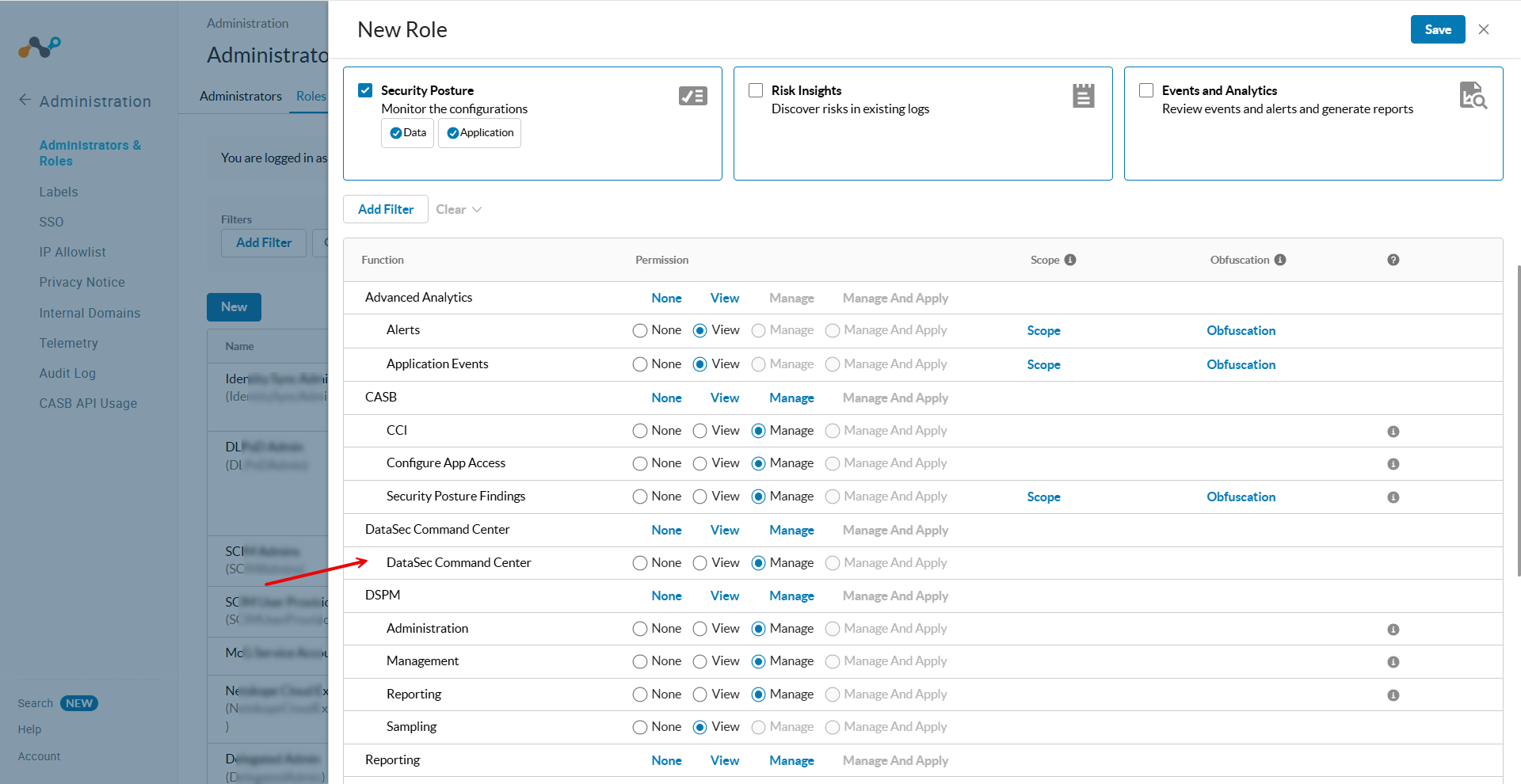
Netskope Role-Based Access Control (RBAC) allows you to manage administrator access to DataSec Command Center (DCC) features and screens in the Netskope tenant. You can assign default pre-defined roles or configure custom roles to grant administrators the appropriate level of visibility and management capabilities.
DataSec Command Center Functional Area and Permissions
The Netskope tenant UI provides the following functional area and permissions under Role-Based Access Control:
- Functional Area: DataSec Command Center
- Available Permissions:
- None: Disables access to DataSec Command Center. Administrators cannot view or access DCC screens, dashboards, or assets.
- View: Grants read-only visibility into DataSec Command Center screens, including Overview, Data Stores and Destinations, Identities, Risk Policies and Remediation, and Global Search.
- Manage: Grants full administrative access to view all DCC screens, manage risk policies, execute remediation actions, and retrieve file snippets for SaaS applications.
Permissions for Pre-Defined Roles
The following table outlines the default DataSec Command Center permissions for standard, pre-defined RBAC roles:
- Manage: The administrator has full access to view, manage, and perform actions in DataSec Command Center.
- View: The administrator has read-only access to DataSec Command Center.
- None: The administrator has no access to DataSec Command Center.
| Pre-Defined Role Name | DataSec Command Center Permission |
|---|---|
| Tenant Admin | Manage |
| Delegated Admin | Manage |
| Security Admin | Manage |
| InfoSec Operations Admin | Manage |
| Restricted Admin | View |
| Compliance Officer | View |
| NS Technical Success | View |
| NS Technical Support | View |
| Cloud Intelligence Analyst | None |
| Application Risk Analyst | None |
| Enterprise Applications Admin | None |
| Directory Admin | None |
| Security Analyst | None |
| IaaS and PaaS Admin | None |
| Netskope Cloud Exchange | None |
Additional Permissions for Integrated Features
DataSec Command Center integrates data and actions from other Netskope platform modules. To view specific tags, scores, or execute risk remediation actions across DCC screens, administrators require additional functional permissions:
| Integrated Feature / Action | Required Module & Permission | Impact if Missing |
|---|---|---|
| App Tags | Cloud Confidence Index (CCI): View | DCC displays an error when loading application tags. |
| UCI Score in Identity Drawer | User Confidence Index (UCI): View | The UCI score does not appear in the user Identity drawer. |
| Unmanaged Instance Tags | Skope IT (Any): View / Read | Unmanaged instance tags do not appear in the inventory UI. |
| DSPM Data Store Snippets | Security Posture > Data > Sampling: View | Administrators cannot fetch content snippets for DSPM data stores. |
| SaaS Application Snippets | DataSec Command Center: Manage | Administrators cannot retrieve content snippets for SaaS applications. |
| Create Risk Policies | API Data Protection > Policy: Manage | Administrators cannot create new policies directly from the Risk UI. |
| Apply Risk Policies | API Data Protection > Policy: Manage and Apply | Administrators cannot apply policies from the Risk UI. |
| Manual Remediation Actions | API Data Protection > Policy: Manage | Administrators cannot trigger manual remediation actions on the Risk UI. |
To learn more about related permissions:
Configuring a Custom Role for DataSec Command Center
To create or update a custom administrator role for DataSec Command Center:
- In the Netskope tenant UI, go to Settings > Administration > Administrator & Roles.
- Click New Role, or click the name of an existing custom role to edit it.
- Enter a Role Name and an optional description.
- Under Permissions, select one or more functional areas to display the permissions table.
- In the Function column, locate DataSec Command Center.
- Under the Permission column, select View or Manage depending on the desired level of access.
- (Optional) Configure any additional permissions listed in the Additional Permissions for Integrated Features table if the administrator requires policy management, remediation, or snippet retrieval.
- Click Save.