

Overview
When multiple employees use a Business Intelligence (BI) platform that connects to a data warehouse via a single shared database user account, query logs typically attribute all activity to that single shared user. This creates a visibility gap regarding individual actions.
You can resolve this by linking these un-linked (or “ghost”) usernames to a Service Account Application. This configuration allows Netskope DSPM to parse query metadata (headers), extract the actual employee identity, and attribute the activity correctly.
Once configured, these linked usernames can be identified across the following screens:
- Employee Management
- User Assessment
- Policy Management
- Alerts
Supported Platforms and Identifiers
Netskope DSPM supports standard BI platforms and custom implementations. To attribute activity correctly, the system searches the query header for a unique identifier based on the platform type.
| BI Platform | Identifier Logic | Example Format |
|---|---|---|
| Looker | Netskope DSPM uses the user_id value and prepends it with lookeruser. | If Netskope DSPM would use the string “looker_user_70”:-- Query Context '{"user_id":70,"history_id":119108,"instance_slug":"35234234235234234234234"}' |
| Mode | Netskope DSPM uses the email value with no changes: | SELECT * FROM USERS |
| Periscope | Netskope DSPM uses the email_address value with no changes: | {"chart_name":"User Data", |
| Other | Can be used if the query header includes a unique employee identifier within a key named email. |
Link a Service Account to a Username
Unlinked usernames in Netskope DSPM often correspond to Service Account Applications. You can verify these accounts and link them by following the steps below.
-
Go to User Identity > Employee Management.
-
Click the Un-Linked Users tab.
-
To verify the account, click on a Username that you suspect is a Service Account> Review its Queries.
- Indicator: If you see a high volume of queries generated by the same application structure, it is likely a Service Account.
-
Return to the Un-linked Users tab and click the LINK button next to the Username.
-
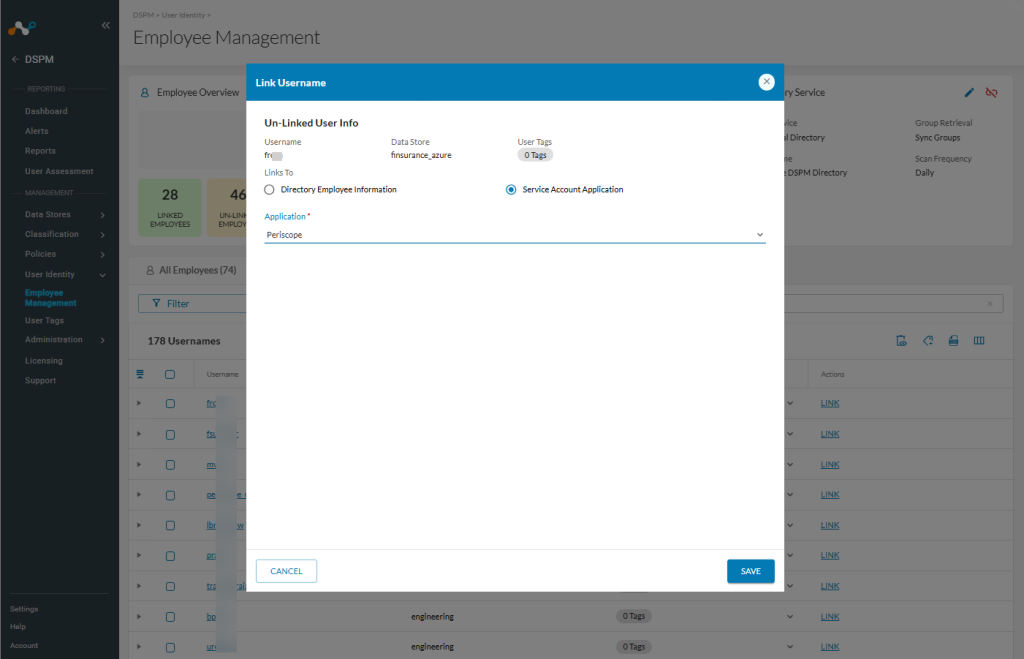
Select Service Account Application.
-
Use the Application dropdown to select the corresponding platform:
- Looker
- Mode
- Periscope
- Other
-
Click Save.

This creates a new Service Account visible on the Service Account tab. Netskope DSPM automatically attributes future queries from this account to specific employees, enabling better risk assessment.
Delete a Service Account
If a Service Account is no longer in use or was configured incorrectly, you can remove it.
- Go to User Identity > Service Account.
- Locate the row of the Service Account you wish to remove.
- Click the delete icon (red trash bin).
- Click Yes to confirm the removal.