

This document explains how to configure the Manage Engine Service Desk Plus v1.1.0 plugin with the Ticket Orchestrator module of the Netskope Cloud Exchange platform. This plugin is used to create tasks for selected Service Desk Plus projects on the Service Desk Plus Platform. It also supports updating tasks and syncing their status. This plugin supports both Cloud and On-Premises deployment types.
Prerequisites
To complete this configuration, you need:
- A Netskope tenant (or multiple, for example, production and development/test instances).
- A Netskope Cloud Exchange tenant with the the Tenant plugin and Ticket Orchestrator plugin already configured.
- Connectivity to Manage Engine Service Desk Plus instance (Cloud or On-premises)
- Self-signed CA.crt file for the On-premises instance
- Connectivity to the following hosts as per your instance type
- For cloud instance
- For on-premises instance: Example: https://<your-domain>:<port>
Manage Engine Service Desk Plus Plugin Support
This plugin is used to create tasks for selected Service Desk Plus projects on the Service Desk Plus Platform. It also supports updating tasks and syncing their status. This plugin supports both Cloud and On-Premises deployment types.
| Data Type | Support |
|---|---|
| Supported Alert types for Incident | Compromised Credentials, Policy, Malsite, Malware, DLP, Security Assessment, Watchlist, Quarantine, Remediation, UBA, CTEP, Device, Content |
| Supported Event types for Incident | Endpoint, Incident |
| Supported Alerts types from Cloud Exchange plugin | Information, Warning, Error |
Mappings
Queue Mappings
| Target Fields | Values |
|---|---|
| Default mapped field for custom message of Title | Netskope $appCategory alert name: $alertName, Event Name: $alert_name |
| Default mapped field for custom message of Description | Alert/Event ID: $idAlert/Event App: $appAlert/Event User: $user Alert Name: $alertNameAlert Type: $alertTypeAlert App Category: $appCategory Event Name: $alert_nameEvent Type: $eventType |
Status Mappings
Here are the default mappings added in the plugin configuration. You can adjust the mappings in Cloud Exchange based on the mappings available on the Service Desk platform.
| Netskope CE Fields | Manage Engine Service Desk Plus Status |
|---|---|
| New | New |
| In Progress | In Progress |
| On Hold | On Hold |
| Closed | Closed |
| Deleted | (Default will be blank User can create custom status on Manage Engine project to map) |
| Other | (Default will be blank User can create custom status on Manage Engine project to map) |
Note
Default status in the Manage Engine plugin may vary, as these fields can be customized within the platform. Any status which is not mapped with corresponding Netskope CE fields will be marked as other.
Permissions
- For Cloud Instance:
| Module | Permission | Scope |
|---|---|---|
| Project | CREATE, READ, UPDATE | SDPOnDemand.projects.CREATE, SDPOnDemand.projects.READ, SDPOnDemand.projects.UPDATE |
| Setup | READ | SDPOnDemand.setup.READ |
| User | READ | SDPOnDemand.users.READ |
| General | READ | SDPOnDemand.general.READ |
- For On-premises Instance: Generate Auth token with ‘SDAdmin’ role (i.e. the role given to the administrator).
API Details
List of APIs used
| API Endpoint | Method | Use Case |
|---|---|---|
| {region_url}/oauth/v2/token | POST | Generate and regenerate access token |
| /api/v3/portals | GET | Fetch all the portals from Service Desk Plus (Used for validation) |
| /api/v3/projects | GET | Fetch all projects from Service Desk Plus (For queue) |
| /api/v3/projects/{project_id}/tasks | POST | Create task on Service Desk Plus |
| /api/v3/users | GET | Fetch all users on Service Desk Plus |
| /api/v3/tasks | GET | Fetch tasks created on Service Desk Plus |
| /api/v3/projects/{project_id}/tasks/{task_id}/comments | POST | Add comment in task (Deduplication workflow) |
| /api/v3/projects/{project_id}/tasks/{task_id} | PUT | Update task |
Generate and Regenerate Access Token
API Endpoint: {region_url}/oauth/v2/token
Method: POST
Headers:
| Key | Value |
|---|---|
| Content-Type | application/x-www-form-urlencoded |
Body Parameters (For Generating access and refresh token)
| Key | Value |
|---|---|
| code | <auth_code> |
| grant_type | authorization_code |
| client_id | <client_id> |
| client_secret | <client_secret> |
Body Parameters (For Regenerating access token)
| Key | Value |
|---|---|
| refresh_token | <refresh_token> |
| grant_type | refresh_token |
| client_id | <client_id> |
| client_secret | <client_secret> |
Sample Response:
Generating Access Token
{
    "access_token": "1000.XXXX02a3d3152753a9626ef066ddXXXX.XXXX55ff6d4c4d42642342fb77c1XXXX",
    "refresh_token": "1000.XXXX05dafbe43b0c6fcf3cde3a1fXXXX.XXXXeae4f4b8d4f3495bc834f7aeXXXX",
    "scope": "SDPOnDemand.projects.CREATE, SDPOnDemand.projects.READ, SDPOnDemand.projects.UPDATE, SDPOnDemand.setup.READ, SDPOnDemand.users.READ, SDPOnDemand.general.READ",
    "api_domain": "https://www.zohoapis.in",
    "token_type": "Bearer",
    "expires_in": 3600
}
Regenerating Access Token
{
    "access_token": "1000.XXXX93dc236b0867dad58ecb1b51XXXX.XXXX5b790d283c0ce71b6e12811bXXXX",
    "scope": "SDPOnDemand.projects.CREATE, SDPOnDemand.projects.READ, SDPOnDemand.projects.UPDATE, SDPOnDemand.setup.READ, SDPOnDemand.users.READ, SDPOnDemand.general.READ",
    "api_domain": "https://www.zohoapis.in",
    "token_type": "Bearer",
    "expires_in": 3600
}
Fetch All Portals
API Endpoint: /api/v3/portals
Method: GET
Headers:
For Cloud:
| Key | Value |
|---|---|
| Accept | application/vnd.manageengine.sdp.v3+json |
| Authorization | Zoho-oauthtoken <access_token> |
| Content-Type | application/x-www-form-urlencoded |
For On-Premises:
| Key | Value |
|---|---|
| Accept | application/vnd.manageengine.sdp.v3+json |
| authtoken | <auth_token> |
| Content-Type | application/x-www-form-urlencoded |
Query Parameter
| Key | Value |
|---|---|
| input_data | { “list_info”: { “row_count”: “1000”, “start_index”: “1”, “page”: 1, “sort_field”: “created_time”, “sort_order”: “desc” } } |
Sample Response:
For Cloud:
{
    "response_status": [
        {
            "status_code": 2000,
            "status": "success"
        }
    ],
    "portals": [
        {
            "owner": {
                "owner_name": "XYZ",
                "email": "xyz@example.com"
            },
            "is_payload_encryption_enabled": false,
            "start_day_of_week": "SUNDAY",
            "department_type": "ITDESK",
            "logo_url": "https://static.zohocdn.com/sdpondemand/images/it-helpdesk-icon.39a0efae98258a4dea4060897fb71fa6.png",
            "timezone": "Asia/Kolkata",
            "description": "",
            "view_type": "SDP",
            "display_name": "TestPortal",
            "portal_type": "LIVE",
            "is_default": true,
            "is_global_config_mobile": false,
            "app_context": "itdesk",
            "scope": "CLOSED",
            "name": "itdesk",
            "zaid": "60042069058",
            "id": "60042069257",
            "is_msp": false,
            "is_custom_url_default": true,
            "status": "PUBLISHED"
        },
        {
            "owner": {
                "owner_name": "XYZ",
                "email": "xyz@example.com"
            },
            "is_payload_encryption_enabled": false,
            "start_day_of_week": "SUNDAY",
            "department_type": "FACILITY",
            "logo_url": "https://static.zohocdn.com/sdpondemand/images/facilities-desk-icon.2018442fc13879bd1994143dc5a3f6d9.png",
            "timezone": "Asia/Kolkata",
            "description": "",
            "view_type": "SDP",
            "display_name": "NetskopeCloudExchange",
            "portal_type": "LIVE",
            "is_default": false,
            "is_global_config_mobile": false,
            "app_context": "netskopece",
            "scope": "PUBLIC",
            "name": "netskopece",
            "zaid": "60042069058",
            "id": "60042208344",
            "is_msp": false,
            "is_custom_url_default": true,
            "status": "PUBLISHED"
        }
    ],
    "list_info": {
        "has_more_rows": false,
        "row_count": 2
    }
}
For On-Premises:
{
    "response_status": [
        {
            "status_code": 2000,
            "status": "success"
        }
    ],
    "portals": [
        {
            "alias_url": "itdesk",
            "logo_url": {
                "content-url": "/api/v3/portals/1/images/172",
                "id": "172"
            },
            "description": "Helpdesk to manage all IT support",
            "owners": [
                {
                    "name": "administrator",
                    "id": 5
                }
            ],
            "type": {
                "internal_name": "IT",
                "name": "IT",
                "id": "1"
            },
            "is_default": false,
            "internalname": "IT Helpdesk",
            "license_details": {
                "name": "ServiceDesk",
                "edition": "Standard",
                "no_of_techs": "5"
            },
            "image_token": "535088e1e5cf9860e5305ad154949d3ee448e132655cf55ecc1d77bb3dbb7296b14501be7a0f570d654110fcd1efa18cff6ea60a",
            "name": "IT Helpdesk",
            "id": "1",
            "status": {
                "internal_name": "Production",
                "name": "Production",
                "id": "1"
            }
        },
        {
            "alias_url": "netskopece",
            "logo_url": {
                "content-url": "/api/v3/portals/2/images/100000057",
                "id": "100000057"
            },
            "description": "",
            "owners": [
                {
                    "name": "administrator",
                    "id": 5
                }
            ],
            "type": {
                "internal_name": "Blank",
                "name": "Blank",
                "id": "4"
            },
            "is_default": false,
            "internalname": "NetskopeCEPlugins",
            "license_details": {
                "name": "ServiceDesk_2",
                "edition": "Enterprise",
                "no_of_techs": "2"
            },
            "image_token": "d6ece5c0003c55b8d5ea260545a6ab94dd7d5f35014ad05d794fcfd8c98e2d3abe01e37ddbd6c37f0a0fb9fb27e78683b82dbca6",
            "name": "NetskopeCEPlugins",
            "id": "2",
            "status": {
                "internal_name": "Pre-Production",
                "name": "Pre-Production",
                "id": "2"
            }
        },
        {
            "alias_url": "third",
            "logo_url": {
                "content-url": "/api/v3/portals/3/images/200000229",
                "id": "200000229"
            },
            "description": "",
            "owners": [
                {
                    "name": "administrator",
                    "id": 5
                }
            ],
            "type": {
                "internal_name": "Facilities",
                "name": "Facilities",
                "id": "3"
            },
            "is_default": false,
            "internalname": "Thirdinstance",
            "license_details": {
                "name": "ServiceDesk_1",
                "edition": "Enterprise",
                "no_of_techs": "2"
            },
            "image_token": "1367b3fdfcfa53b4834bf13b9a4633c02178185740ecf98a6c38101b24940cdea252e2a43f60de479b9fc9b87c8c78872f775172",
            "name": "Thirdinstance",
            "id": "3",
            "status": {
                "internal_name": "New",
                "name": "New",
                "id": "4"
            }
        }
    ],
    "list_info": {
        "has_more_rows": false,
        "start_index": 1,
        "row_count": 3
    }
}
Fetch All Projects
API Endpoints:
- Cloud: /app/<portal>/api/v3/projects
- On-Premises: /api/v3/projects
Method: GET
Headers:
For Cloud:
| Key | Value |
|---|---|
| Accept | application/vnd.manageengine.sdp.v3+json |
| Authorization | Zoho-oauthtoken <access_token> |
| Content-Type | application/x-www-form-urlencoded |
For On-Premises:
| Key | Value |
|---|---|
| Accept | application/vnd.manageengine.sdp.v3+json |
| authtoken | <auth_token> |
| Content-Type | application/x-www-form-urlencoded |
Path Parameters:
| Key | Value | Deployment Type | Description |
|---|---|---|---|
| portal | <portal_url> | Cloud | Portal’s URL name provided in the configuration parameter for cloud deployment type. |
Query Parameters:
| Key | Value | Deployment Type | Description |
|---|---|---|---|
| input_data | { “list_info”: { “row_count”: “1000”, “start_index”: “1”, “page”: 1, “sort_field”: “created_time”, “sort_order”: “desc”, } } | Cloud and On-Premises | – |
| PORTALID | <portal_id> | On-Premises | ID of portal provided in configuration |
Sample Response
For Cloud:
{
    "projects": [
        {
            "template": {
                "inactive": false,
                "name": "Default Project Template",
                "id": "20901000000103039"
            },
            "percentage_completion": null,
            "display_id": {
                "display_value": "PJT-6",
                "value": "6"
            },
            "description": "Sample Project",
            "title": "Sample Project",
            "actual_hours": null,
            "actual_end_time": null,
            "id": "20901000000296001",
            "actual_start_time": null,
            "department": null,
            "owner": null,
            "project_type": null,
            "created_time": {
                "display_value": "Jun 10, 2025 04:20 PM",
                "value": "1749552614654"
            },
            "project_code": null,
            "priority": null,
            "created_by": {
                "email_id": "xyz@example.com",
                "is_technician": true,
                "sms_mail": null,
                "mobile": null,
                "last_name": "Xyz",
                "user_scope": "internal_user",
                "sms_mail_id": null,
                "cost_per_hour": "0",
                "site": {
                    "deleted": false,
                    "name": "Base Site",
                    "id": "20901000000153001",
                    "is_default": true
                },
                "phone": "1234567890",
                "employee_id": null,
                "name": "Xyz Xyz",
                "id": "20901000000272327",
                "photo_url": "https://profile.zoho.in/file?exp=10&ID=60042069059&t=user&height=60&width=60",
                "is_vip_user": true,
                "department": null,
                "first_name": "Xyz",
                "job_title": null
            },
            "scheduled_end_time": null,
            "site": {
                "deleted": false,
                "name": "Base Site",
                "id": "20901000000153001",
                "is_default": true
            },
            "actual_cost": null,
            "project_requester": null,
            "estimated_cost": null,
            "estimated_hours": null,
            "projected_end": null,
            "status": {
                "in_progress": true,
                "internal_name": "Open",
                "color": "#0066ff",
                "name": "Open",
                "id": "20901000000005146"
            },
            "scheduled_start_time": null
        }
    ],
    "response_status": [
        {
            "status_code": 2000,
            "status": "success"
        }
    ],
    "list_info": {
        "has_more_rows": true,
        "start_index": 1,
        "sort_field": "created_time",
        "page": 1,
        "sort_order": "desc",
        "row_count": 1
    }
}
For On-Premises:
{
    "projects": [
        {
            "requester": null,
            "owner": null,
            "template": null,
            "created_time": {
                "display_value": "Jun 10, 2025 05:33 PM",
                "value": "1749557021886"
            },
            "code": null,
            "has_attachments": false,
            "title": "New project",
            "priority": null,
            "type": null,
            "created_by": {
                "email_id": null,
                "phone": "1234455",
                "name": "administrator",
                "mobile": "1234567890",
                "profile_pic": {
                    "content-url": "/images/default-profile-pic2.svg"
                },
                "is_vipuser": false,
                "id": "5",
                "department": null
            },
            "scheduled_end_time": null,
            "site": null,
            "actual_hours": null,
            "actual_cost": "0.00",
            "estimated_cost": "0.00",
            "actual_end_time": null,
            "estimated_hours": null,
            "id": "1",
            "actual_start_time": null,
            "department": null,
            "projected_end_time": null,
            "status": {
                "color": "#0066ff",
                "name": "Open",
                "id": "1"
            },
            "scheduled_start_time": null
        }
    ],
    "response_status": [
        {
            "status_code": 2000,
            "status": "success"
        }
    ],
    "list_info": {
        "has_more_rows": false,
        "start_index": 1,
        "sort_field": "created_time",
        "page": 1,
        "sort_order": "desc",
        "row_count": 1
    }
}
Create a Task
API Endpoint:
- Cloud: /app/<portal>/api/v3/projects/{project_id}/tasks
- On-Premises: /api/v3/projects/{project_id}/tasks
Method: POST
Headers:
For Cloud:
| Key | Value |
|---|---|
| Accept | application/vnd.manageengine.sdp.v3+json |
| Authorization | Zoho-oauthtoken <access_token> |
| Content-Type | application/x-www-form-urlencoded |
For On-Premises
| Key | Value |
|---|---|
| Accept | application/vnd.manageengine.sdp.v3+json |
| authtoken | <auth_token> |
| Content-Type | application/x-www-form-urlencoded |
Path Parameters:
| Key | Value | Deployment Type | Description |
|---|---|---|---|
| portal | <portal_url> | Cloud | Portal’s URL name provided in the configuration parameter for cloud deployment type. |
Query Parameters:
| Key | Value | Deployment Type | Description |
|---|---|---|---|
| PORTALID | <portal_id> | On-Premises | ID of the portal provided in the configuration. |
Request Body:
| Key | Deployment Type | Value |
|---|---|---|
| input_data | Cloud | { “task”: { “percentage_completion”: “30”, “estimated_effort_hours”: “20”, “email_before”: “3600000”, “description”: “The SRS must contain all the requirements for the feature”, “title”: “Create SRS”, “additional_cost”: “100”, “actual_end_time”: { “value”: “1512974940000” }, “actual_start_time”: { “value”: “1421988300000” }, “owner”: { “name”: “Lincoln” }, “priority”: { “name”: “High” }, “scheduled_end_time”: { “value”: “1512974940000” }, “estimated_effort_minutes”: “45”, “estimated_effort_days”: “15”, “task_type”: { “name”: “Implementation” }, “scheduled_start_time”: { “value”: “1421988300000” }, “status”: { “name”: “Open” } } } |
| input_data | On-Premises | { “task”: { “percentage_completion”: “30”, “email_before”: “3600000”, “description”: “The SRS must contain all the requirements for the feature”, “title”: “Create SRS”, “additional_cost”: “100”, “actual_end_time”: { “value”: “1512974940000” }, “actual_start_time”: { “value”: “1421988300000” }, “owner”: { “name”: “Lincoln” }, “priority”: { “name”: “High” }, “scheduled_end_time”: { “value”: “1512974940000” }, “estimated_effort”: { “days”: “15”, “hours”: “16”, “minutes”: “45” }, “task_type”: { “name”: “Implementation” }, “scheduled_start_time”: { “value”: “1421988300000” }, “status”: { “name”: “Open” } } } |
Sample Response:
For Cloud:
{
    "task": {
        "template": {
            "inactive": false,
            "name": "Default Task",
            "id": "20901000000237005"
        },
        "percentage_completion": null,
        "estimated_effort_hours": null,
        "attachments": [],
        "email_before": "0",
        "description": "Postman 1 PJT 6",
        "project": {
            "template": {
                "inactive": false,
                "name": "Default Project Template",
                "id": "20901000000103039"
            },
            "percentage_completion": null,
            "attachments": [],
            "display_id": {
                "display_value": "PJT-6",
                "value": "6"
            },
            "description": "The SRS must contain all the requirements for the feature",
            "title": "Create SRS",
            "actual_hours": null,
            "actual_end_time": null,
            "id": "20901000000296001",
            "actual_start_time": null,
            "department": null,
            "owner": null,
            "project_type": null,
            "created_time": {
                "display_value": "Jun 10, 2025 04:20 PM",
                "value": "1749552614654"
            },
            "project_code": null,
            "priority": null,
            "created_by": {
                "email_id": "XYZ@example.com",
                "is_technician": true,
                "sms_mail": null,
                "mobile": null,
                "last_name": "XYZ",
                "user_scope": "internal_user",
                "sms_mail_id": null,
                "cost_per_hour": "0",
                "site": {
                    "deleted": false,
                    "name": "Base Site",
                    "id": "20901000000153001",
                    "is_default": true
                },
                "phone": "1234567890",
                "employee_id": null,
                "name": "XYZ XYZ",
                "id": "20901000000272327",
                "photo_url": "https://profile.zoho.in/file?exp=10&ID=60042069059&t=user&height=60&width=60",
                "is_vip_user": true,
                "department": null,
                "first_name": "XYZ",
                "job_title": null
            },
            "scheduled_end_time": null,
            "site": {
                "deleted": false,
                "name": "Base Site",
                "id": "20901000000153001",
                "is_default": true
            },
            "actual_cost": null,
            "project_requester": null,
            "estimated_cost": null,
            "estimated_hours": null,
            "projected_end": null,
            "deleted_time": null,
            "status": {
                "in_progress": true,
                "internal_name": "Open",
                "color": "#0066ff",
                "name": "Open",
                "id": "20901000000005146"
            },
            "scheduled_start_time": null
        },
        "title": "SRS Project",
        "marked_technician": null,
        "overdue": false,
        "additional_cost": null,
        "actual_end_time": null,
        "id": "20901000000301015",
        "actual_start_time": null,
        "owner": null,
        "associated_entity": "project",
        "module": "Project",
        "index": 5,
        "priority": null,
        "created_by": {
            "email_id": "XYZ@example.com",
            "is_technician": true,
            "sms_mail": null,
            "mobile": null,
            "last_name": "XYZ",
            "user_scope": "internal_user",
            "sms_mail_id": null,
            "cost_per_hour": "0",
            "site": {
                "deleted": false,
                "name": "Base Site",
                "id": "20901000000153001",
                "is_default": true
            },
            "phone": "1234567890",
            "employee_id": null,
            "name": "XYZ XYZ",
            "id": "20901000000272327",
            "photo_url": "https://profile.zoho.in/file?exp=10&ID=60042069059&t=user&height=60&width=60",
            "is_vip_user": true,
            "department": null,
            "first_name": "XYZ",
            "job_title": null
        },
        "scheduled_end_time": null,
        "site": {
            "deleted": false,
            "name": "Base Site",
            "id": "20901000000153001",
            "is_default": true
        },
        "estimated_effort_minutes": null,
        "deleted": false,
        "estimated_effort": null,
        "created_date": {
            "display_value": "Jun 11, 2025 05:19 PM",
            "value": "1749642541951"
        },
        "estimated_effort_days": null,
        "task_type": null,
        "scheduled_start_time": null,
        "status": {
            "in_progress": true,
            "internal_name": "Open",
            "stop_timer": false,
            "color": "#0066ff",
            "name": "Open",
            "id": "20901000000004865"
        }
    },
    "response_status": {
        "status_code": 2000,
        "status": "success"
    }
}
For On-Premises:
{
    "task": {
        "template": null,
        "percentage_completion": 0,
        "attachments": [],
        "email_before": "0",
        "project": {
            "id": "1",
            "title": "SRS Project"
        },
        "description": "The SRS must contain all the requirements for the feature",
        "title": "Create SRS",
        "type": null,
        "overdue": false,
        "additional_cost": "0.00",
        "actual_end_time": null,
        "id": "5",
        "actual_start_time": null,
        "owner": null,
        "created_time": {
            "display_value": "Jun 11, 2025 04:36 PM",
            "value": "1749639970914"
        },
        "has_attachments": false,
        "associated_entity": "project",
        "index": "-1",
        "priority": null,
        "created_by": {
            "email_id": null,
            "phone": "1234455",
            "name": "administrator",
            "mobile": "1234567890",
            "profile_pic": {
                "content-url": "/images/default-profile-pic2.svg"
            },
            "is_vipuser": false,
            "id": "5",
            "department": null
        },
        "due_by_time": null,
        "scheduled_end_time": null,
        "tags": [],
        "marked_owner": null,
        "site": null,
        "estimated_effort": {
            "display_value": "-",
            "hours": "0",
            "minutes": "0",
            "days": "0"
        },
        "image_token": "3487225cf0ece41728a3cbdd0dd87928df2228254fd920e0aec96205d264afa9ce8155f37358a5b29359d3cc008a0f51223a680c",
        "scheduled_start_time": null,
        "status": {
            "color": "#0066ff",
            "name": "Open",
            "id": "2"
        }
    },
    "response_status": {
        "status_code": 2000,
        "status": "success"
    }
}
Fetch All Users
API Endpoints:
- Cloud: /app/<portal>/api/v3/users
- On-Premises: /api/v3/users
Method: POST
Headers:
For Cloud:
| Key | Value |
|---|---|
| Accept | application/vnd.manageengine.sdp.v3+json |
| Authorization | Zoho-oauthtoken <access_token> |
| Content-Type | application/x-www-form-urlencoded |
For On-Premises:
| Key | Value |
|---|---|
| Accept | application/vnd.manageengine.sdp.v3+json |
| authtoken | <auth_token> |
| Content-Type | application/x-www-form-urlencoded |
Path Parameters:
| Key | Value | Deployment Type | Description |
|---|---|---|---|
| portal | <portal_url> | Cloud | Portal’s URL name provided in the configuration parameter for cloud deployment type. |
Query Parameters:
| Key | Value | Deployment Type | Description |
|---|---|---|---|
| input_data | { “list_info”: { “row_count”: “1000”, “start_index”: “1”, “sort_field”: “created_time”, “sort_order”: “desc” } } | Cloud and On-Premises | – |
| PORTALID | <portal_id> | On-Premises | ID of portal provided in configuration |
Sample response
For Cloud:
{
    "response_status": [
        {
            "status_code": 2000,
            "status": "success"
        }
    ],
    "list_info": {
        "has_more_rows": false,
        "start_index": 1,
        "sort_field": "created_time",
        "page": 1,
        "sort_order": "desc",
        "row_count": 1
    },
    "users": [
        {
            "email_id": "abc.xyz@example.com",
            "sms_mail": null,
            "reporting_to": null,
            "cost_per_hour": "0",
            "id": "20901000000302003",
            "photo_url": "https://profile.zoho.in/file?exp=10&ID=-1&t=user&height=60&width=60",
            "is_vip_user": false,
            "department": null,
            "first_name": "abc",
            "job_title": null,
            "is_technician": true,
            "created_time": {
                "display_value": "Jun 10, 2025 08:24 PM",
                "value": "1749567294459"
            },
            "mobile": null,
            "last_name": null,
            "user_scope": "internal_user",
            "sms_mail_id": null,
            "site": {
                "deleted": false,
                "name": "Base Site",
                "id": "20901000000153001",
                "is_default": true
            },
            "phone": null,
            "employee_id": null,
            "name": "abc"
        }
    ]
}
For On-Premises:
{
    "response_status": [
        {
            "status_code": 2000,
            "status": "success"
        }
    ],
    "list_info": {
        "has_more_rows": true,
        "start_index": 1,
        "sort_field": "created_time",
        "page": 1,
        "sort_order": "desc",
        "row_count": 1
    },
    "users": [
        {
            "email_id": "abc.xyz@example.com",
            "extension": null,
            "description": "-",
            "is_vipuser": true,
            "reporting_to": null,
            "type": "User",
            "citype": {
                "name": "User",
                "id": 3
            },
            "cost_per_hour": "0.00",
            "can_generate_authtoken": true,
            "org_user_status": "ACTIVE",
            "id": "14",
            "department": null,
            "first_name": "ABC",
            "created_time": {
                "display_value": "Jun 11, 2025 10:45 AM",
                "value": "1749618957092"
            },
            "is_technician": false,
            "jobtitle": null,
            "mobile": null,
            "profile_pic": {
                "content-url": "/images/default-profile-pic2.svg"
            },
            "project_roles": null,
            "last_name": "XYZ",
            "sms_mail_id": null,
            "middle_name": null,
            "created_by": {
                "email_id": null,
                "phone": "1234455",
                "name": "administrator",
                "mobile": "1234567890",
                "profile_pic": {
                    "content-url": "/images/default-profile-pic2.svg"
                },
                "is_vipuser": false,
                "id": "5",
                "department": null
            },
            "ciid": "24",
            "login_name": "abcxyz",
            "requester_allowed_to_view": 4,
            "phone": null,
            "sip_user": null,
            "employee_id": null,
            "domain": null,
            "name": "ABC XYZ",
            "enable_telephony": false,
            "status": "ACTIVE"
        }
    ]
}
Fetch Tasks
API Endpoints:
- Cloud: /app/<portal>/api/v3/users
- On-Premises: /api/v3/users
Method: POST
Headers:
For Cloud
| Key | Value |
|---|---|
| Accept | application/vnd.manageengine.sdp.v3+json |
| Authorization | Zoho-oauthtoken <access_token> |
| Content-Type | application/x-www-form-urlencoded |
For On-Premises
| Key | Value |
|---|---|
| Accept | application/vnd.manageengine.sdp.v3+json |
| authtoken | <auth_token> |
| Content-Type | application/x-www-form-urlencoded |
Path Parameters:
| Key | Value | Deployment Type | Description |
|---|---|---|---|
| portal | <portal_url> | Cloud | Portal’s URL name provided in the configuration parameter for cloud deployment type. |
Query Parameters:
| Key | Value | Deployment Type | Description |
|---|---|---|---|
| input_data | { “list_info”: { “row_count”: “100”, “search_criteria”: [ { “field”: “id”, “values”: [ “3”, “6” ], “condition”: “is” } ], “page”: 1, “start_index”: “1”, “sort_field”: “created_time”, “sort_order”: “desc” } } | Cloud and On-Premises | – |
| PORTALID | <portal_id> | On-Premises | ID of portal provided in configuration |
Sample response
For Cloud:
{
    "response_status": [
        {
            "status_code": 2000,
            "status": "success"
        }
    ],
    "list_info": {
        "has_more_rows": false,
        "start_index": 1,
        "sort_field": "created_time",
        "page": 1,
        "sort_order": "desc",
        "search_criteria": [
            {
                "condition": "is",
                "field": "id",
                "values": [
                    "20901000000301015",
                    "20901000000299001"
                ]
            }
        ],
        "row_count": 1
    },
    "tasks": [
        {
            "template": {
                "inactive": false,
                "name": "Default Task",
                "id": "20901000000237005"
            },
            "percentage_completion": null,
            "estimated_effort_hours": null,
            "email_before": "0",
            "description": "task 1",
            "project": {
                "display_id": {
                    "display_value": "PJT-6",
                    "value": "6"
                },
                "project_code": null,
                "id": "20901000000296001",
                "title": "project created via API"
            },
            "title": "Task 1",
            "marked_technician": null,
            "overdue": false,
            "additional_cost": null,
            "actual_end_time": null,
            "id": "20901000000299001",
            "actual_start_time": null,
            "owner": null,
            "associated_entity": "project",
            "module": "Project",
            "index": 4,
            "priority": null,
            "created_by": {
                "email_id": "XYZ.ABC@crestdata.ai",
                "is_technician": true,
                "sms_mail": null,
                "mobile": null,
                "last_name": "ABC",
                "user_scope": "internal_user",
                "sms_mail_id": null,
                "cost_per_hour": "0",
                "site": {
                    "deleted": false,
                    "name": "Base Site",
                    "id": "20901000000153001",
                    "is_default": true
                },
                "phone": "1234567890",
                "employee_id": null,
                "name": "ABC XYZ",
                "id": "20901000000272327",
                "photo_url": "https://profile.zoho.in/file?exp=10&ID=60042069059&t=user&height=60&width=60",
                "is_vip_user": true,
                "department": null,
                "first_name": "ABC",
                "job_title": null
            },
            "scheduled_end_time": null,
            "site": {
                "deleted": false,
                "name": "Base Site",
                "id": "20901000000153001",
                "is_default": true
            },
            "estimated_effort_minutes": null,
            "deleted": false,
            "estimated_effort": null,
            "created_date": {
                "display_value": "Jun 10, 2025 06:13 PM",
                "value": "1749559419951"
            },
            "estimated_effort_days": null,
            "task_type": null,
            "scheduled_start_time": null,
            "status": {
                "in_progress": true,
                "internal_name": "Open",
                "stop_timer": false,
                "color": "#0066ff",
                "name": "Open",
                "id": "20901000000004865"
            }
        }
    ]
}
For On-Premises:
{
    "response_status": [
        {
            "status_code": 2000,
            "status": "success"
        }
    ],
    "list_info": {
        "has_more_rows": false,
        "start_index": 1,
        "sort_field": "created_time",
        "page": 1,
        "start_count": 1,
        "sort_order": "desc",
        "search_criteria": [
            {
                "condition": "is",
                "field": "id",
                "values": [
                    "3"
                ]
            }
        ],
        "row_count": 1
    },
    "tasks": [
        {
            "template": null,
            "percentage_completion": 0,
            "email_before": "0",
            "project": {
                "id": "1",
                "title": "New project"
            },
            "title": "task 1",
            "type": null,
            "overdue": false,
            "additional_cost": "0.00",
            "actual_end_time": null,
            "id": "6",
            "actual_start_time": null,
            "group": null,
            "owner": null,
            "created_time": {
                "display_value": "Jun 11, 2025 06:13 PM",
                "value": "1749645804615"
            },
            "has_attachments": false,
            "associated_entity": "project",
            "priority": null,
            "created_by": {
                "email_id": null,
                "phone": "1234455",
                "name": "administrator",
                "mobile": "1234567890",
                "profile_pic": {
                    "content-url": "/images/default-profile-pic2.svg"
                },
                "is_vipuser": false,
                "id": "5",
                "department": null
            },
            "due_by_time": null,
            "scheduled_end_time": null,
            "marked_owner": null,
            "marked_group": null,
            "site": null,
            "estimated_effort": {
                "display_value": "-",
                "hours": "0",
                "minutes": "0",
                "days": "0"
            },
            "scheduled_start_time": null,
            "status": {
                "color": "#0066ff",
                "name": "Open",
                "id": "2"
            }
        }
    ]
}
Add a Comment in a Task
API Endpoints:
- Cloud: /app/<portal>/api/v3/projects/{project_id}/tasks/{task_id}/comments
- On-Premises: /api/v3/projects/{project_id}/tasks/{task_id}/comments
Method: POST
Headers:
For Cloud:
| Key | Value |
|---|---|
| Accept | application/vnd.manageengine.sdp.v3+json |
| Authorization | Zoho-oauthtoken <access_token> |
| Content-Type | application/x-www-form-urlencoded |
For On-Premises:
| Key | Value |
|---|---|
| Accept | application/vnd.manageengine.sdp.v3+json |
| authtoken | <auth_token> |
| Content-Type | application/x-www-form-urlencoded |
Path Parameters:
| Key | Value | Deployment Type | Description |
|---|---|---|---|
| portal | <portal_url> | Cloud | Portal’s URL name provided in the configuration parameter for cloud deployment type. |
Query Parameters:
| Key | Value | Deployment Type | Description |
|---|---|---|---|
| PORTALID | <portal_id> | On-Premises | ID of the portal provided in the configuration. |
Request Body:
| Key | Deployment Type | Value |
|---|---|---|
| input_data | Cloud | { “task_comment”: { “comment”: “Comment in task” } } |
| input_data | On-Premises | { “comment”: { “content”: “Comment in task” } } |
Sample Response
For Cloud:
{
    "task_comment": {
        "parent_comment": null,
        "created_time": {
            "display_value": "Jun 11, 2025 05:20 PM",
            "value": "1749642604093"
        },
        "task": {
            "id": "20901000000301015",
            "created_date": {
                "display_value": "Jun 11, 2025 05:19 PM",
                "value": "1749642541951"
            },
            "title": "Postman 1 PJT 6"
        },
        "last_updated_time": null,
        "comment": "Comment in task",
        "id": "20901000000301027",
        "created_by": {
            "email_id": "XYZ@example.com",
            "is_technician": true,
            "sms_mail": null,
            "mobile": null,
            "last_name": "XYZ",
            "user_scope": "internal_user",
            "sms_mail_id": null,
            "cost_per_hour": "0",
            "site": {
                "deleted": false,
                "name": "Base Site",
                "id": "20901000000153001",
                "is_default": true
            },
            "phone": "1234567890",
            "employee_id": null,
            "name": "XYZ",
            "id": "20901000000272327",
            "photo_url": "https://profile.zoho.in/file?exp=10&ID=60042069059&t=user&height=60&width=60",
            "is_vip_user": true,
            "department": null,
            "first_name": "XYZ",
            "job_title": null
        }
    },
    "response_status": {
        "status_code": 2000,
        "status": "success"
    }
}
For On-Premises:
{
    "response_status": {
        "status_code": 2000,
        "status": "success"
    },
    "comment": {
        "parent": null,
        "created_time": {
            "display_value": "Jun 11, 2025 04:34 PM",
            "value": "1749639889902"
        },
        "image_token": "e192a23d446d29cbff9a643d59576143b828dc406cc30c6452f9ac3f428b815a08c3ced67c3e27f34d43c79f729dd650238ced46",
        "id": "4",
        "reply_count": 0,
        "created_by": {
            "email_id": null,
            "phone": "1234455",
            "name": "administrator",
            "mobile": "1234567890",
            "profile_pic": {
                "content-url": "/images/default-profile-pic2.svg"
            },
            "is_vipuser": false,
            "id": "5",
            "department": null
        },
        "content": "Comment in task"
    }
}
Update a Task
API Endpoints:
- Cloud: /app/<portal>/api/v3/projects/{project_id}/tasks/{task_id}
- On-Premises: /api/v3/projects/{project_id}/tasks/{task_id}
Method: PUT
Headers:
For Cloud:
| Key | Value |
|---|---|
| Accept | application/vnd.manageengine.sdp.v3+json |
| Authorization | Zoho-oauthtoken <access_token> |
| Content-Type | application/x-www-form-urlencoded |
For On-Premises:
| Key | Value |
|---|---|
| Accept | application/vnd.manageengine.sdp.v3+json |
| authtoken | <auth_token> |
| Content-Type | application/x-www-form-urlencoded |
Path Parameters:
| Key | Value | Deployment Type | Description |
|---|---|---|---|
| portal | <portal_url> | Cloud | Portal’s URL name provided in the configuration parameter for cloud deployment type. |
Query Parameters:
| Key | Value | Deployment Type | Description |
|---|---|---|---|
| PORTALID | <portal_id> | On-Premises | ID of the portal provided in the configuration. |
Request Body:
| Key | Deployment Type | Value |
|---|---|---|
| input_data | Cloud | { “task”: { “percentage_completion”: “30”, “estimated_effort_hours”: “20”, “email_before”: “3600000”, “description”: “The SRS must contain all the requirements for the feature”, “title”: “Create SRS”, “additional_cost”: “100”, “actual_end_time”: { “value”: “1512974940000” }, “actual_start_time”: { “value”: “1421988300000” }, “owner”: { “name”: “Lincoln” }, “priority”: { “name”: “High” }, “scheduled_end_time”: { “value”: “1512974940000” }, “estimated_effort_minutes”: “45”, “estimated_effort_days”: “15”, “task_type”: { “name”: “Implementation” }, “scheduled_start_time”: { “value”: “1421988300000” }, “status”: { “name”: “Open” } } } |
| input_data | On-Premises | { “task”: { “percentage_completion”: “30”, “email_before”: “3600000”, “description”: “The SRS must contain all the requirements for the feature”, “title”: “Create SRS”, “additional_cost”: “100”, “actual_end_time”: { “value”: “1512974940000” }, “actual_start_time”: { “value”: “1421988300000” }, “owner”: { “name”: “Lincoln” }, “priority”: { “name”: “High” }, “scheduled_end_time”: { “value”: “1512974940000” }, “estimated_effort”: { “days”: “15”, “hours”: “16”, “minutes”: “45” }, “task_type”: { “name”: “Implementation” }, “scheduled_start_time”: { “value”: “1421988300000” }, “status”: { “name”: “Open” } } } |
Sample Response
For Cloud:
{
    "task": {
        "template": {
            "inactive": false,
            "name": "Default Task",
            "id": "20901000000237005"
        },
        "percentage_completion": null,
        "estimated_effort_hours": null,
        "attachments": [],
        "email_before": "0",
        "description": "",
        "project": {
            "template": {
                "inactive": false,
                "name": "Default Project Template",
                "id": "20901000000103039"
            },
            "percentage_completion": null,
            "attachments": [],
            "display_id": {
                "display_value": "PJT-16",
                "value": "16"
            },
            "description": "This Project is created from the Default Project Template.",
            "title": "Test Rate Limit",
            "actual_hours": null,
            "actual_end_time": null,
            "id": "20901000000371009",
            "actual_start_time": null,
            "department": null,
            "owner": null,
            "project_type": null,
            "created_time": {
                "display_value": "Jun 30, 2025 11:30 AM",
                "value": "1751263215568"
            },
            "project_code": "XYZ",
            "priority": null,
            "created_by": {
                "email_id": "XYZ.ABC@example.com",
                "is_technician": true,
                "sms_mail": null,
                "mobile": null,
                "last_name": "ABC",
                "user_scope": "internal_user",
                "sms_mail_id": null,
                "cost_per_hour": "0",
                "site": {
                    "deleted": false,
                    "name": "Base Site",
                    "id": "20901000000153001",
                    "is_default": true
                },
                "phone": "1234567890",
                "employee_id": null,
                "name": "XYZ ABC",
                "id": "20901000000272327",
                "photo_url": "https://profile.zoho.in/file?exp=10&ID=60042069059&t=user&height=60&width=60",
                "is_vip_user": true,
                "department": null,
                "first_name": "XYZ",
                "job_title": null
            },
            "scheduled_end_time": null,
            "site": {
                "deleted": false,
                "name": "Base Site",
                "id": "20901000000153001",
                "is_default": true
            },
            "actual_cost": null,
            "project_requester": null,
            "estimated_cost": null,
            "estimated_hours": null,
            "projected_end": null,
            "deleted_time": null,
            "status": {
                "in_progress": true,
                "internal_name": "Open",
                "color": "#0066ff",
                "name": "Open",
                "id": "20901000000005146"
            },
            "scheduled_start_time": null
        },
        "title": "Renamed task",
        "marked_technician": null,
        "overdue": false,
        "additional_cost": null,
        "actual_end_time": null,
        "id": "20901000000374053",
        "actual_start_time": null,
        "owner": null,
        "associated_entity": "project",
        "module": "Project",
        "index": 5,
        "priority": null,
        "created_by": {
            "email_id": "XYZ.ABC@example.com",
            "is_technician": true,
            "sms_mail": null,
            "mobile": null,
            "last_name": "ABC",
            "user_scope": "internal_user",
            "sms_mail_id": null,
            "cost_per_hour": "0",
            "site": {
                "deleted": false,
                "name": "Base Site",
                "id": "20901000000153001",
                "is_default": true
            },
            "phone": "1234567890",
            "employee_id": null,
            "name": "XYZ ABC",
            "id": "20901000000272327",
            "photo_url": "https://profile.zoho.in/file?exp=10&ID=60042069059&t=user&height=60&width=60",
            "is_vip_user": true,
            "department": null,
            "first_name": "XYZ",
            "job_title": null
        },
        "scheduled_end_time": null,
        "site": {
            "deleted": false,
            "name": "Base Site",
            "id": "20901000000153001",
            "is_default": true
        },
        "estimated_effort_minutes": null,
        "deleted": false,
        "estimated_effort": null,
        "udf_fields": {
            "udf_double1": null,
            "udf_char2": null
        },
        "created_date": {
            "display_value": "Jun 30, 2025 02:46 PM",
            "value": "1751274978109"
        },
        "estimated_effort_days": null,
        "task_type": null,
        "scheduled_start_time": null,
        "status": {
            "in_progress": true,
            "internal_name": "Open",
            "stop_timer": false,
            "color": "#0066ff",
            "name": "Open",
            "id": "20901000000004865"
        }
    },
    "response_status": {
        "status_code": 2000,
        "status": "success"
    }
}
For On-Premises:
{
    "task": {
        "template": null,
        "percentage_completion": 0,
        "attachments": [],
        "email_before": "0",
        "project": {
            "id": "12",
            "title": "Edit Task project"
        },
        "description": "not using query params",
        "title": "Editing task12323",
        "type": null,
        "overdue": false,
        "additional_cost": "0.00",
        "actual_end_time": null,
        "id": "1571",
        "actual_start_time": null,
        "owner": null,
        "created_time": {
            "display_value": "Jun 30, 2025 09:35 PM",
            "value": "1751299555035"
        },
        "has_attachments": false,
        "associated_entity": "project",
        "index": "-1",
        "priority": null,
        "created_by": {
            "email_id": null,
            "phone": "1234455",
            "name": "administrator",
            "mobile": "1234567890",
            "profile_pic": {
                "content-url": "/images/default-profile-pic2.svg"
            },
            "is_vipuser": false,
            "id": "5",
            "department": null
        },
        "due_by_time": null,
        "scheduled_end_time": null,
        "tags": [],
        "marked_owner": null,
        "site": null,
        "estimated_effort": {
            "display_value": "-",
            "hours": "0",
            "minutes": "0",
            "days": "0"
        },
        "image_token": "4264c7d64a47e4cc4c69f206df85f04f14114ca78e65b6319115b70c449744dea69b0d6716c93556820995ae4961d7167945298cc7a42f36e818654df294df9525b1b598",
        "scheduled_start_time": null,
        "status": {
            "color": "#0066ff",
            "name": "Open",
            "id": "2"
        }
    },
    "response_status": {
        "status_code": 2000,
        "status": "success"
    }
}
Performance Matrix
Here are the readings collected on a Large CE Stack with these specifications.
| Description | Specification |
|---|---|
| Stack details | Size: Large RAM: 32 GB CPU: 16 Cores |
| Tasks Created on Cloud instance | ~ 68 Tickets/min |
| Tasks Created on the On-premises instance | ~ 60 Tickets/min |
User Agent
netskope-ce-5.1.2-cto-manage-engine-service-desk-plus-v1.0.0
Workflow
- Get your Authentication credentials.
- Configure the Manage Engine Service Desk Plus Plugin.
- Add a Business Rule.
- Add Queue Configuration.
- Validate the Manage Engine Service Desk Plus Plugin
Watch a Video
Click play to watch a video:
Get your Authentication Credentials from Manage Engine Service Desk Plus
For a Cloud Instance
Note
You need to have the access for the ZOHO Developer console to generate Authentication credentials. Refer this document for the Developer console and get access to the Developer console based on your region (Data center).
Get your Client ID, Client Secret, and Auth Code
- Log in to your Developer console.

- Click Create Now for Self Client, and then click Create.

- Copy the Client ID and Client Secret.

- Go to the Generate Code section under Self Client.

- Provide the scope, Time Duration, and Scope Description, and then click Create.
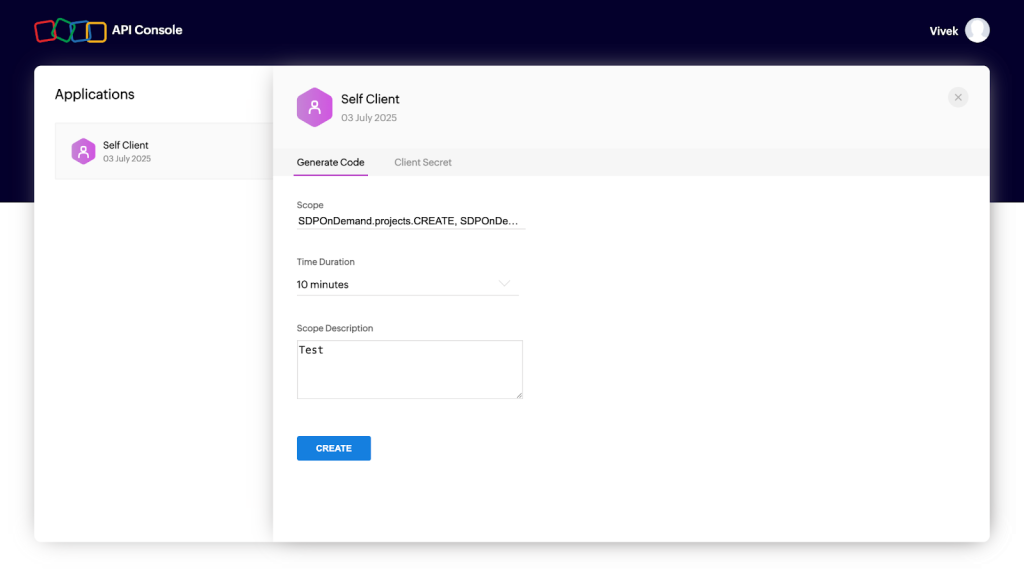

Minimum Scope:
- SDPOnDemand.projects.CREATE, SDPOnDemand.projects.READ, SDPOnDemand.projects.UPDATE, SDPOnDemand.setup.READ,SDPOnDemand.users.READ, SDPOnDemand.general.READ
- Also, you can refer to the Permissions section.
- Copy the Generated code; it will be used as Auth code under Authentication parameters while configuring the plugin on Cloud Exchange.
Note
You need to configure the plugin on Cloud Exchange within the selected Time Duration while generating the Auth code, otherwise you will encounter the error shown below, in which case you will need to regenerate the Auth code from the platform.

Get a URL Name
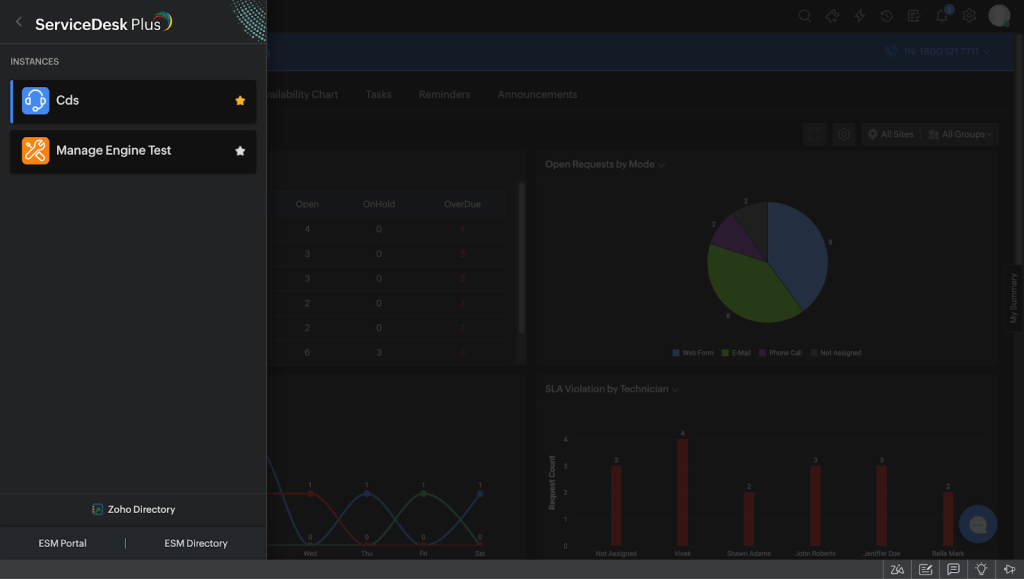
- Log in to your Manage Engine Service Desk Plus instance and go to ESM Directory.

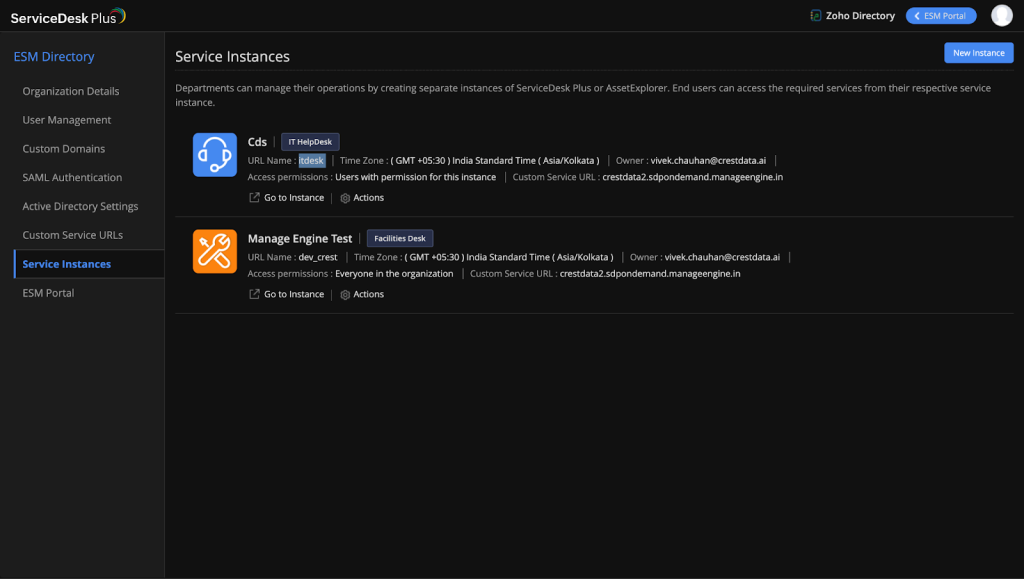
- Click Service Instances, and then copy the URL Name for the required instance.

For an On-premises Instance
Get Auth Token
- Log in to your on-premises instance and go to your User Profile from the top-right corner.
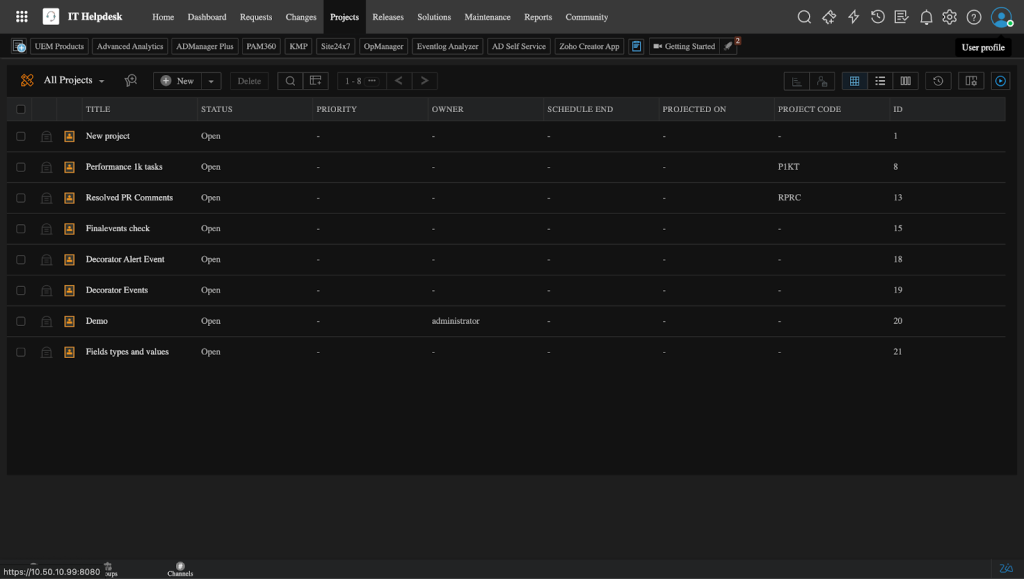

- Click Generate Authtoken.
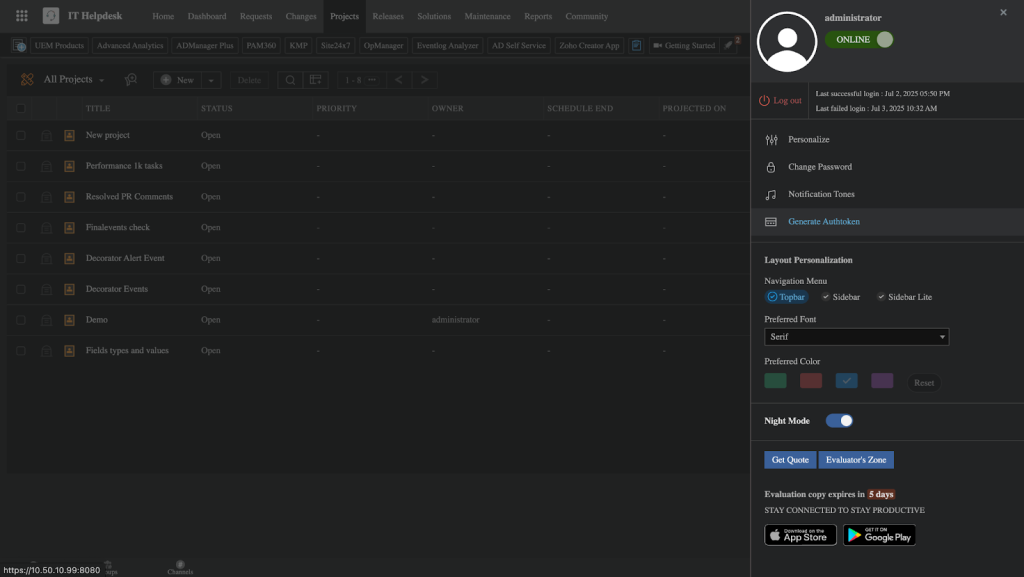

- Provide an expiration time per your need, and then click Generate.
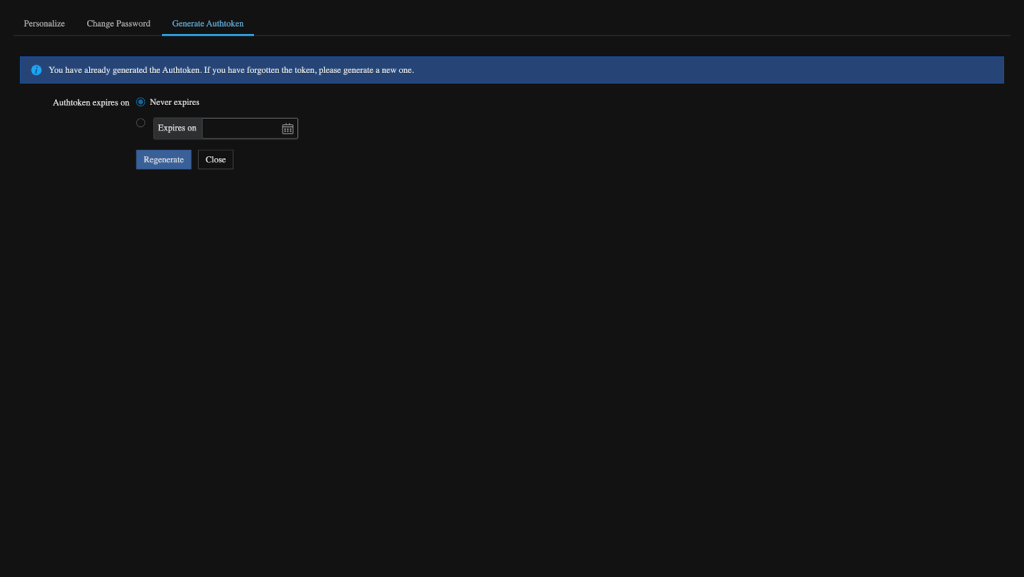

- Copy the generated Authtoken.
Get the Alias URL
- Log in to your Manage Engine Service Desk Plus instance and go to ESM Directory.
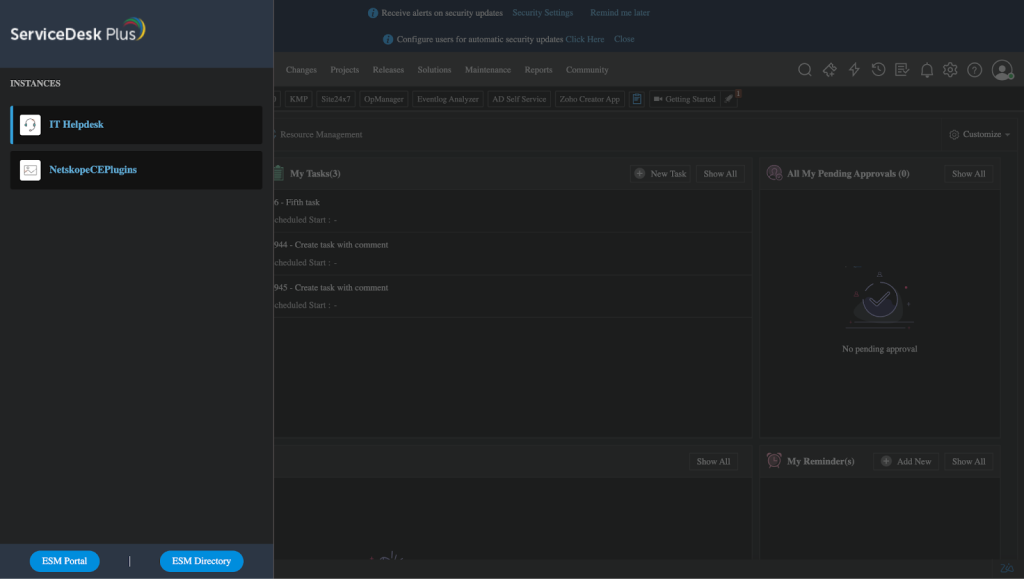

- Click Service Instances, and then copy the Alias URL Name for the required instance.
Note
Don’t copy the actual URL. For example: If your Service Desk Instance is IT Helpdesk then your Alias URL is “itdesk”.

Configure the Manage Engine Service Desk Plus Plugin
- In Cloud Exchange, go to Settings > Plugins. Search for and select the Manage Engine Service Desk Plus v1.0.0 (CTO) plugin box.
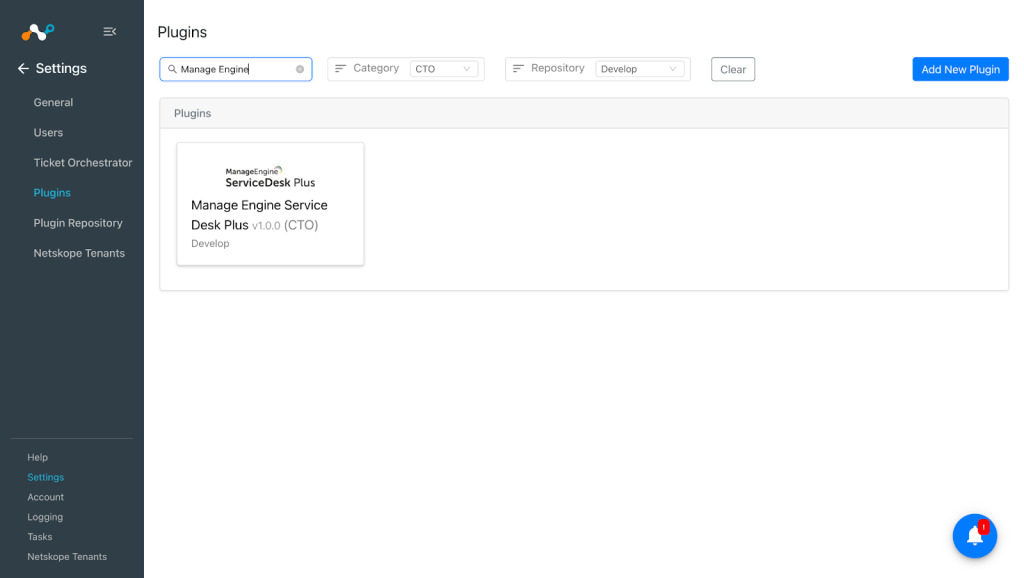

- Provide a Configuration Name and the Sync Interval as per your requirement.
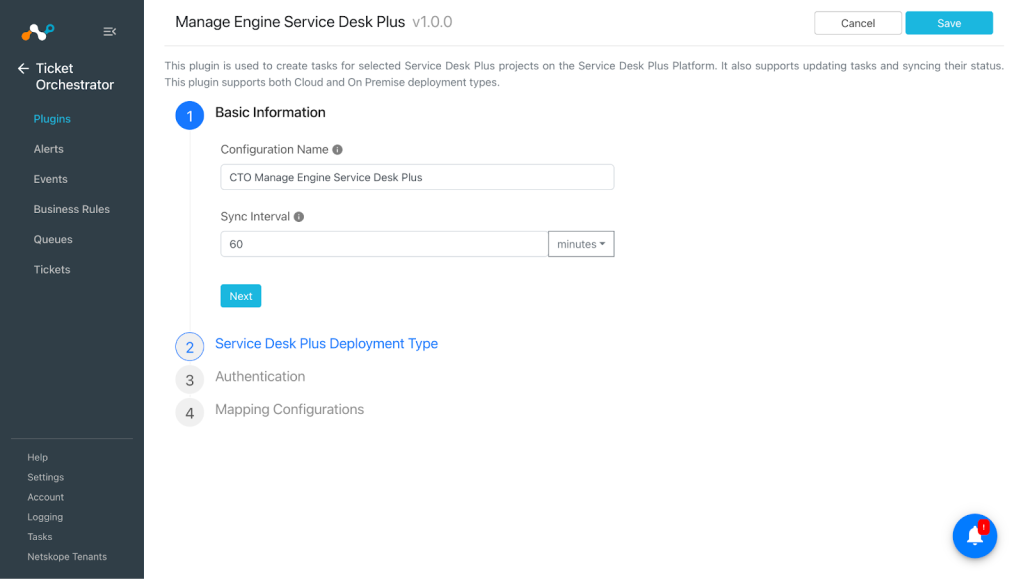

- Click Next and select the deployment type for your Manage Engine Service Desk Plus instance.
Note
If you are using On-premises instance, then you need to select On-premises as the Deployment Type.
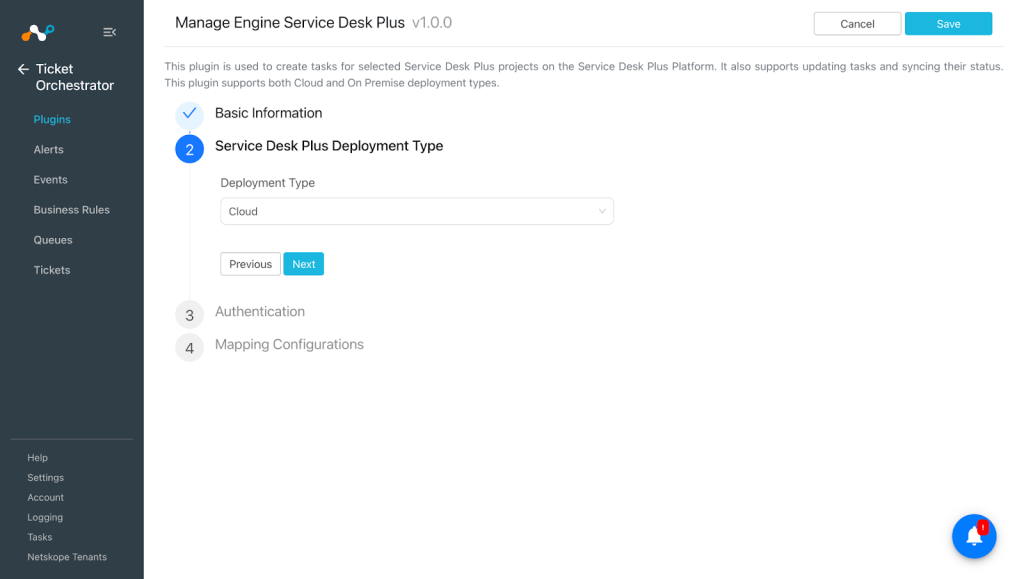

- Click Next and enter the Authentication parameters for your instance. To get your credentials, refer to the Get your Authentication credentials from Manage Engine Service Desk Plus section.
- For a cloud instance:
- API Domain URL: Manage Engine Service Desk Plus Cloud instance URL.
- Client ID: Client ID for your Service Desk Plus Cloud account.
- Client Secret: Client Secret for your Service Desk Plus Cloud account.
- Auth Code: Auth Code for your Service Desk Plus Cloud account.
- URL Name: Service Desk Plus Portal URL Name.
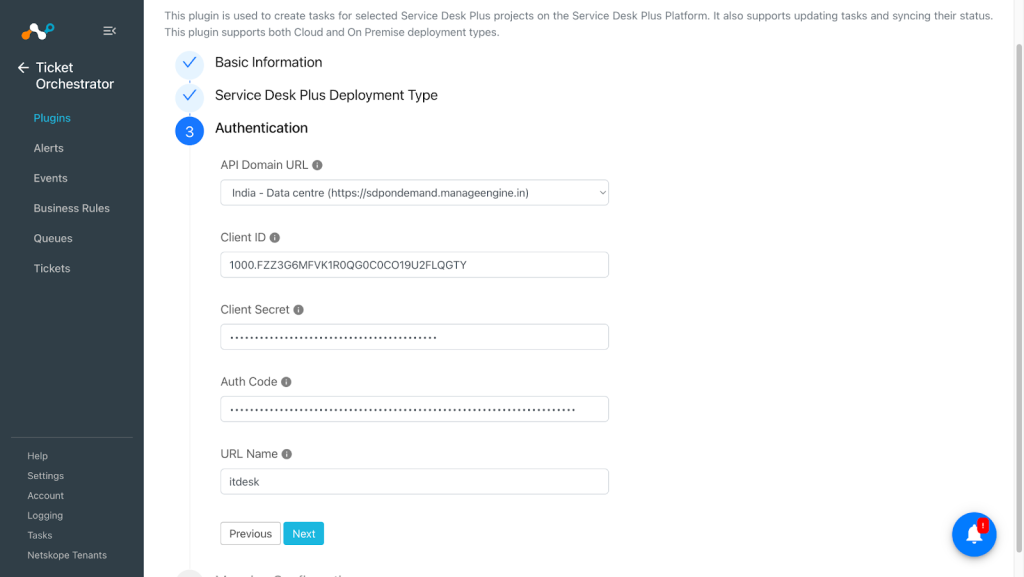
- For a cloud instance:

- For an On-Premises instance:
- Service Desk Plus On-Premises Instance URL: Manage Engine Service Desk Plus On-Premises instance URL.
- Auth Token: Auth Token for your Manage Engine Service Desk Plus On-Premises account.
- Alias URL: Service Desk Plus Portal Alias URL. Only provide the Alias URL name, and not the actual URL.
- SSL Certificate: Enter the contents of your self-signed certificate for the Service Desk Plus On-Premises instance.
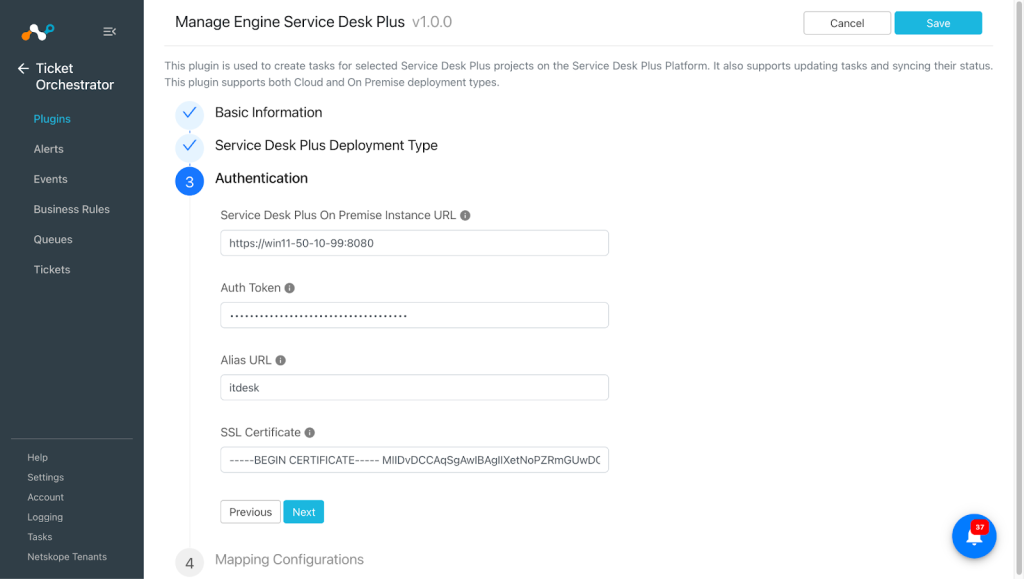

- Provide the mapping configuration for the following fields as per your requirement.
Here is the default mapping for status mapping: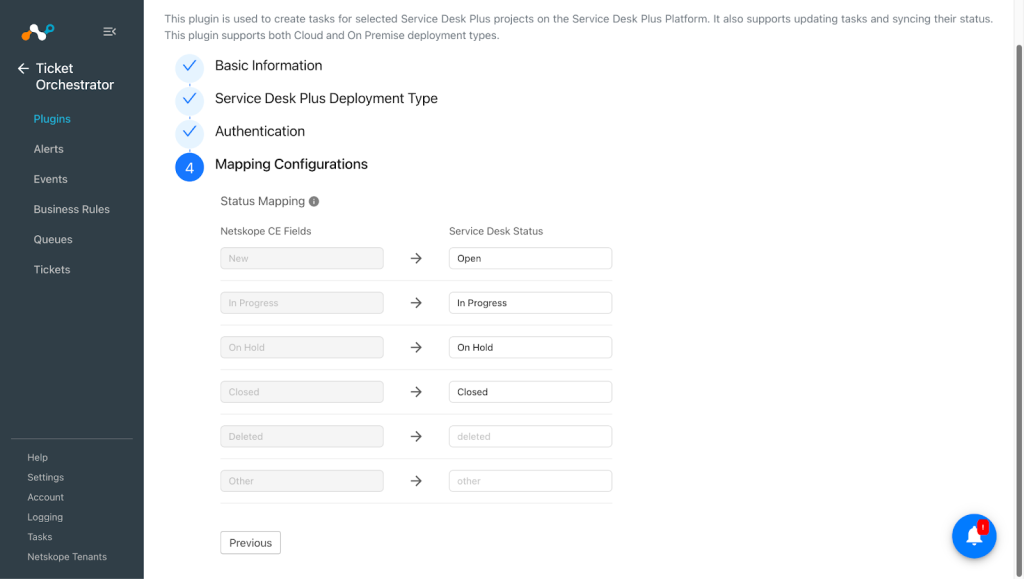
- Click Save.
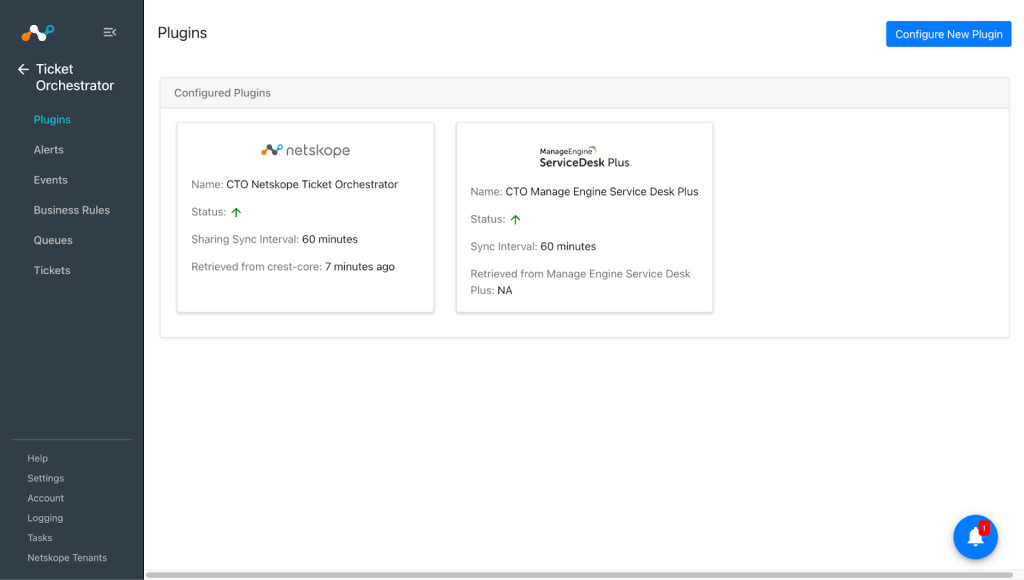


Add a Ticket Orchestrator Business Rule for Manage Engine Service Desk Plus
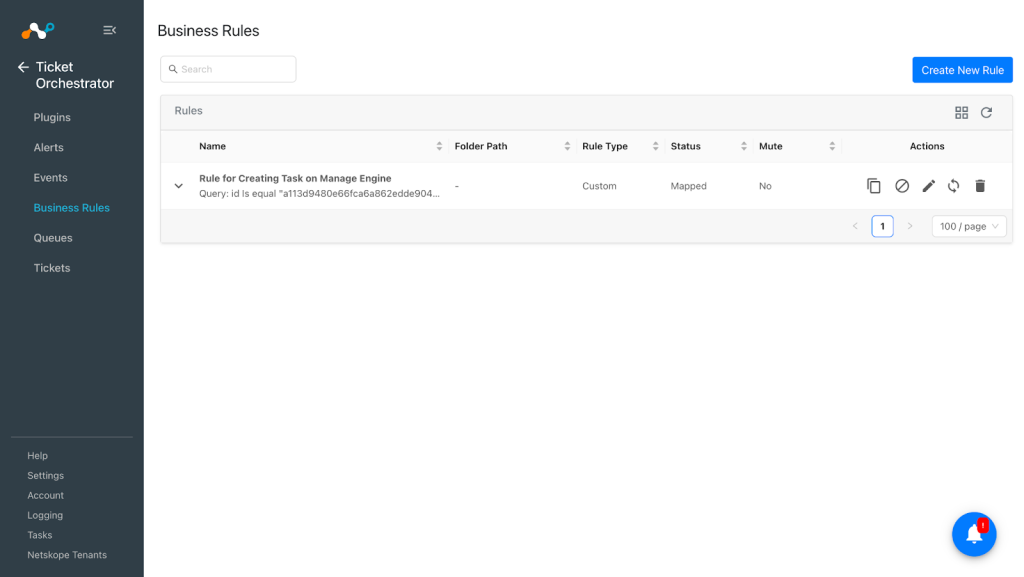
Create a business rule based on the filters you need to create tasks in the Manage Engine Service Desk Plus platform.
- In Ticket Orchestrator, go to Business Rules.
- Click Create new rule.
- Enter an appropriate Rule Name in the text box, and build the appropriate filter query condition on the field(s) for the business rule. You can also enter the query manually by pressing Filter Query.
- Click Save.

Add a Ticket Orchestrator Queue for Manage Engine Service Desk Plus
- In Ticket Orchestrator, go to Queues.
- Click Add Queue Configuration and select the Business Rule, Plugin Configuration and Queue from the dropdown.
Add/Map appropriate values between alerts and incidents under the Map Field section. Alert’s attributes can be accessed via $ in the custom message field. Click Add to add more field mappings.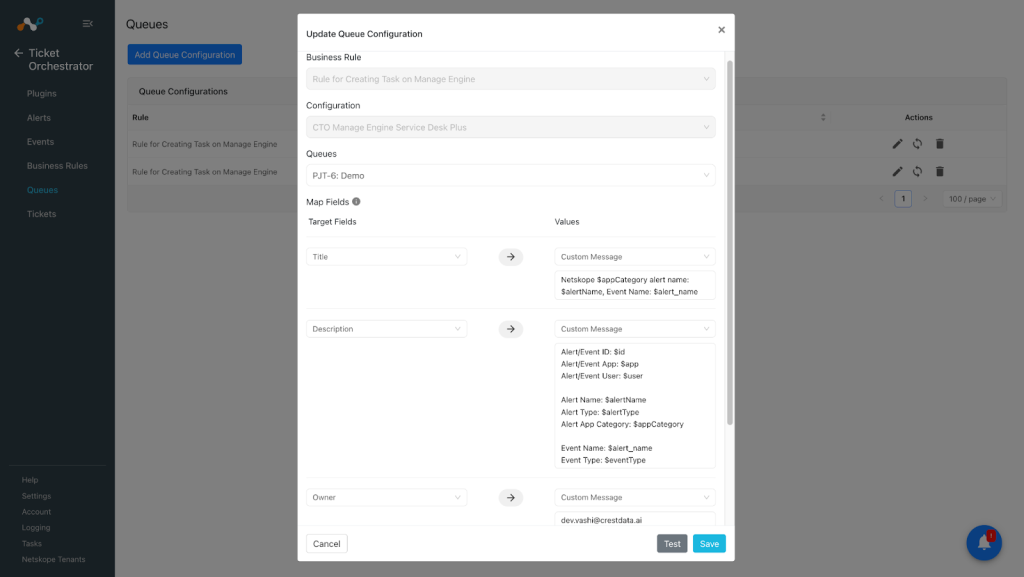
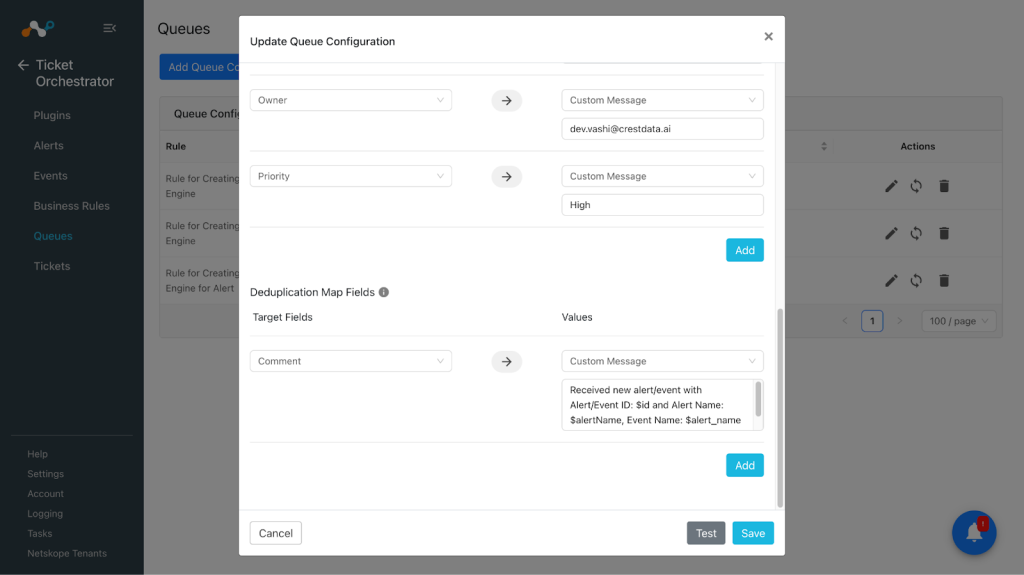


- Click Save and sync the queue if you already have the alerts/events pulled.
Note
- You must provide the value of the field in its respective schema.
- For status field mapping, provide value in Manage Engine Service Desk Plus status format.
- To update the incident status on Netskope, refer to the Netskope plugin guide for CTO.

- While creating tasks the fields like status, priority and task type are case sensitive.
- Time related fields expect epoch time format (millisecond) while creating tasks.
- User related fields like owner expect the user email and it should be associated with the project. To check the users associated with the project navigate to Projects > Members. Here you will find the list of the users associated with that project.
- Fields related to estimation expect non-decimal integer input.
- Comment will be added with the user name of the user associated with the credentials used while creating the plugin configuration.
Validate the Manage Engine Service Desk Plus Plugin
Validate in Cloud Exchange
In order to validate the workflow, you must have Netskope Alerts/Events.
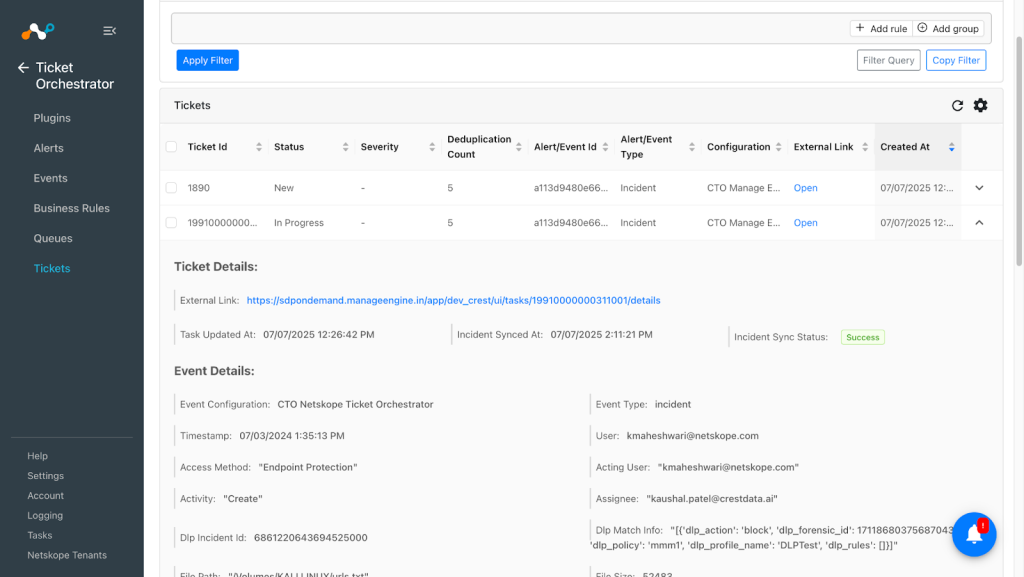
- To view the list of tickets created on Manage Engine Service Desk Plus, go to Tickets in Ticket Orchestrator.

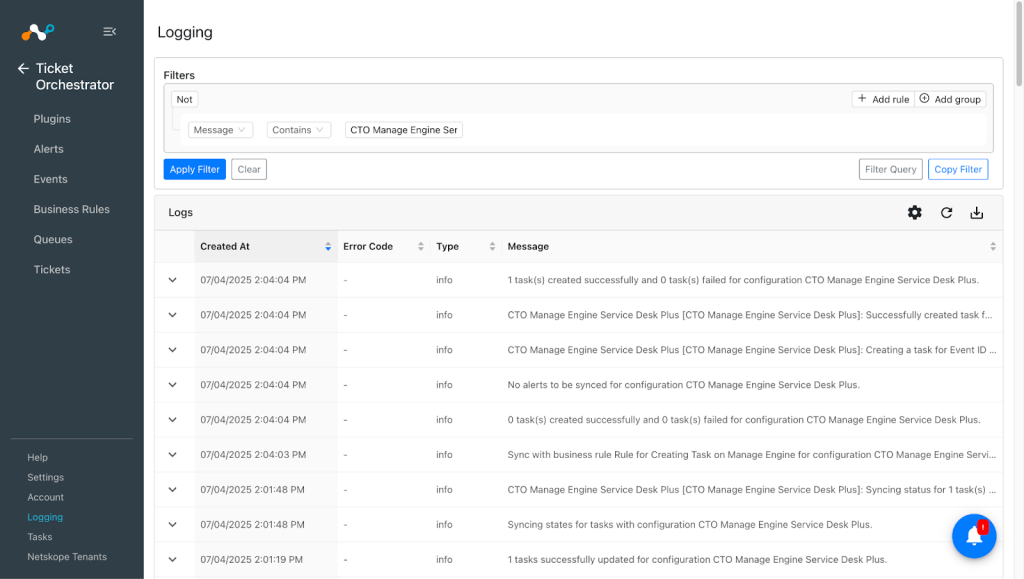
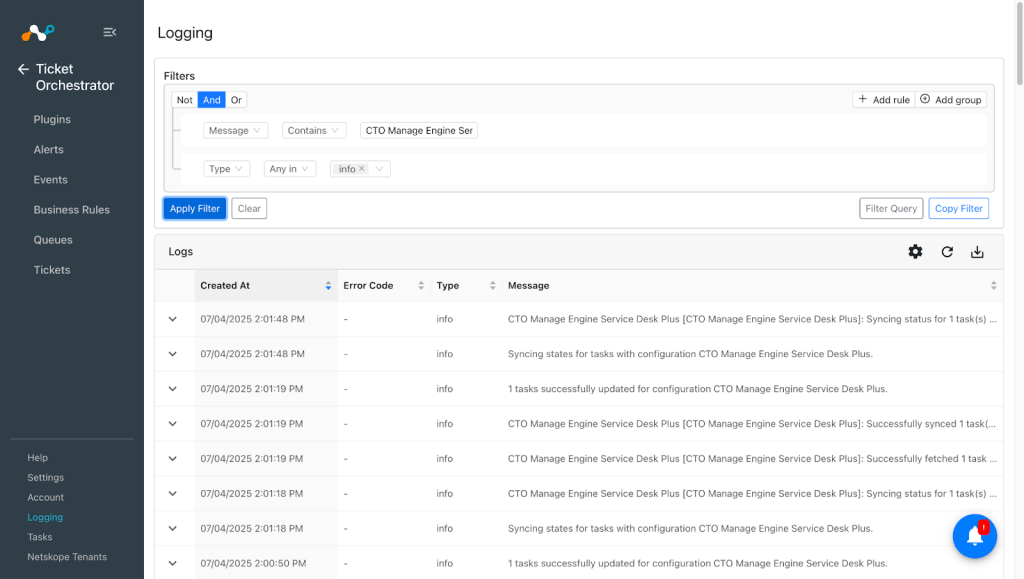
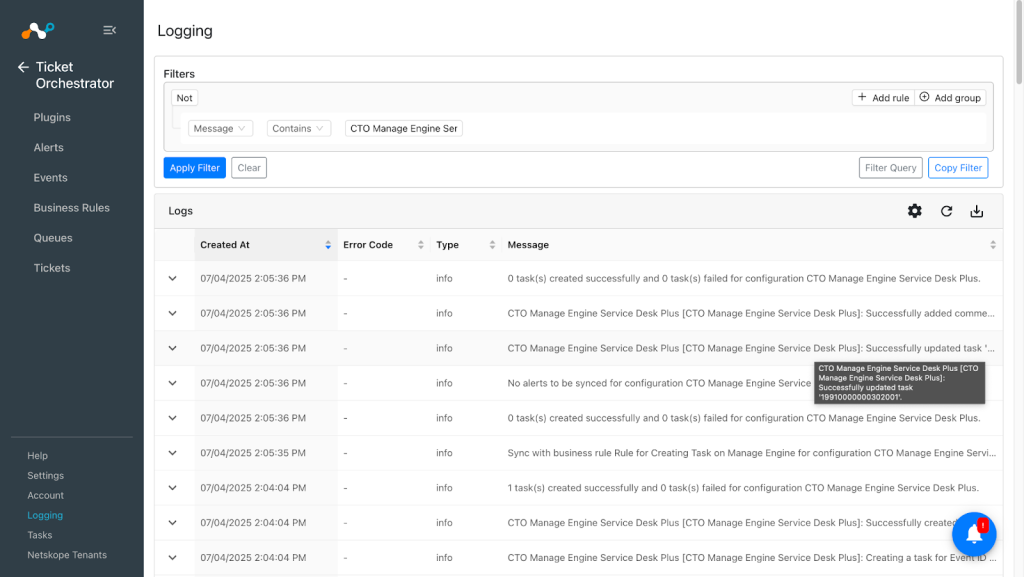
- Verify Ticket creation from Logging by applying the filter with plugin name.


Validation in Manage Engine Service Desk Plus
For a Cloud Instance:
To validate the incident creation:
- Log in to your Manage Engine instance, select your service desk, and go to the Projects page.
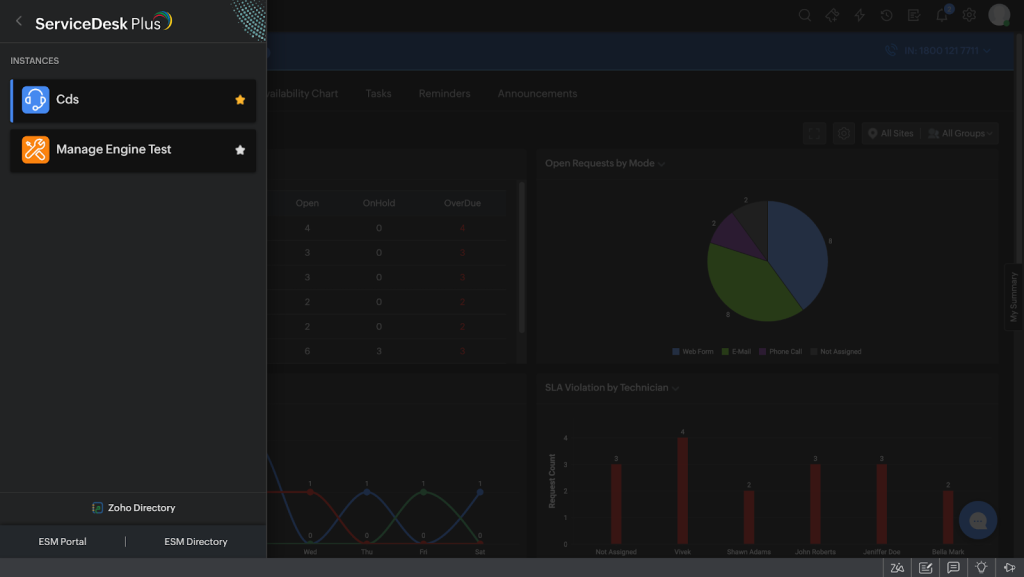
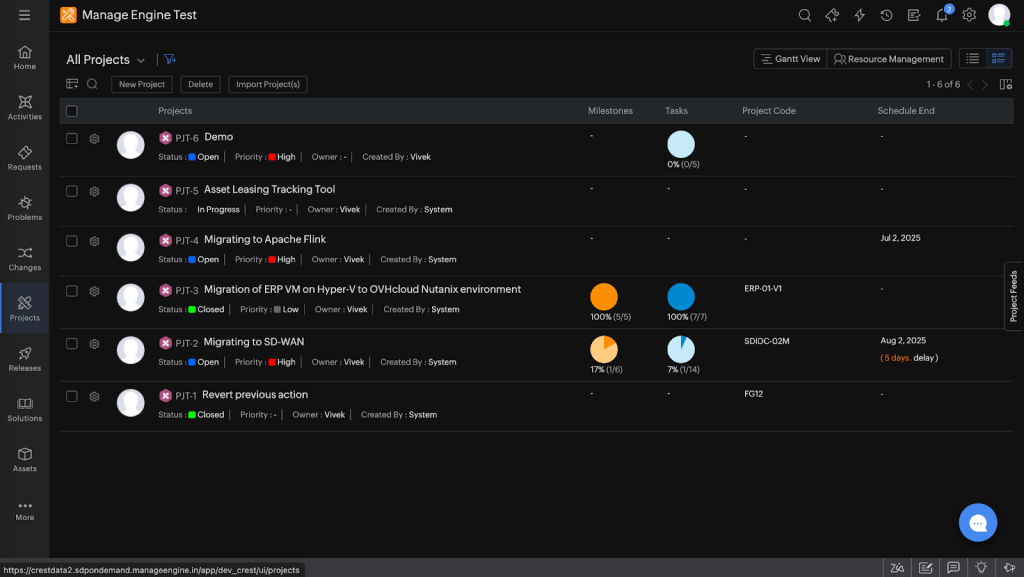


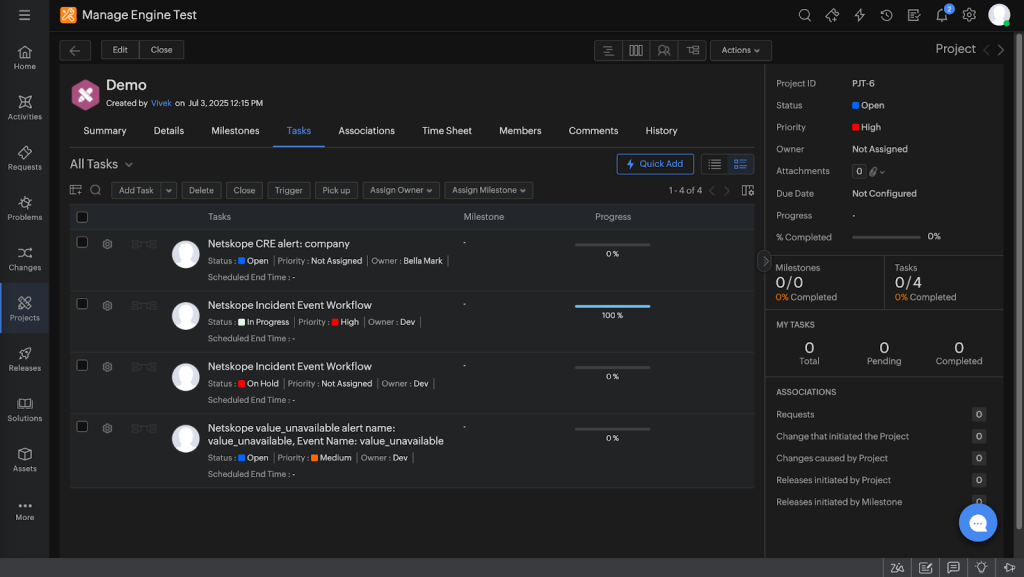
- Click on the project you selected while configuring the Queue on Netskope Cloud Exchange, and then go to the Tasks page. Here you can see all the created Tasks for the particular project.

For an On-Premises Instance:
To validate the incident creation:
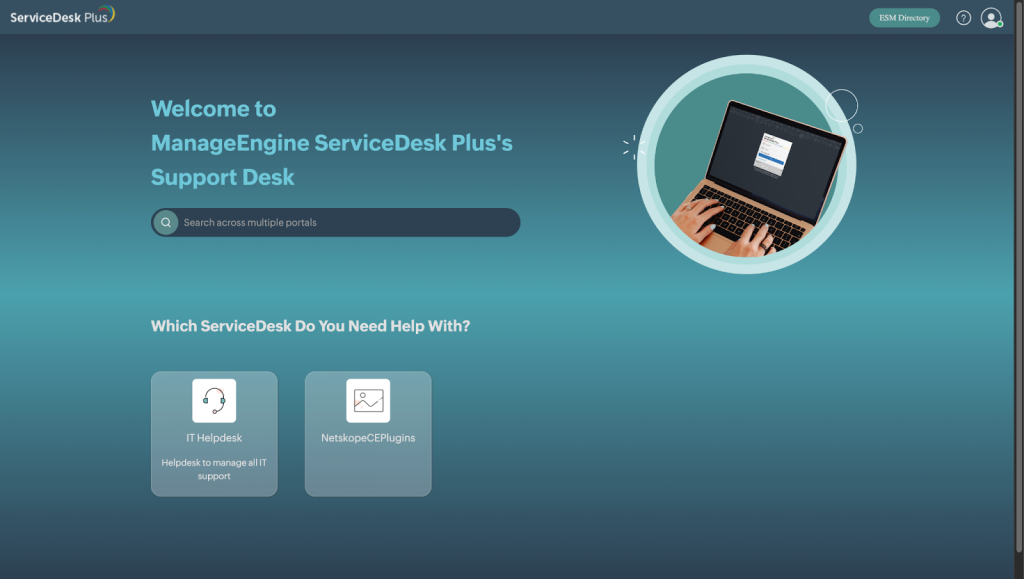
- Log in to your Manage Engine instance and go to your service desk page.

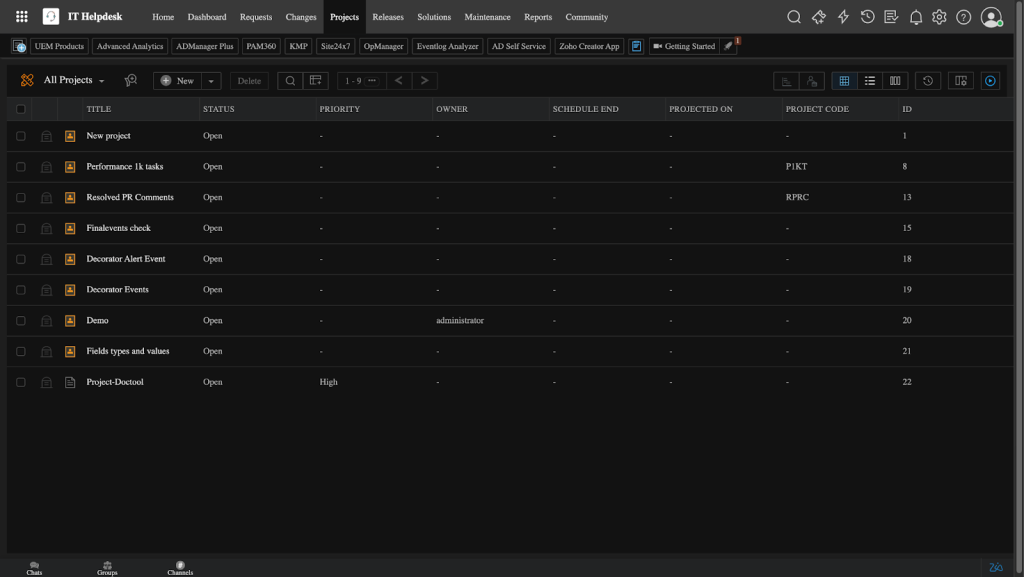
- Go to the Projects page.

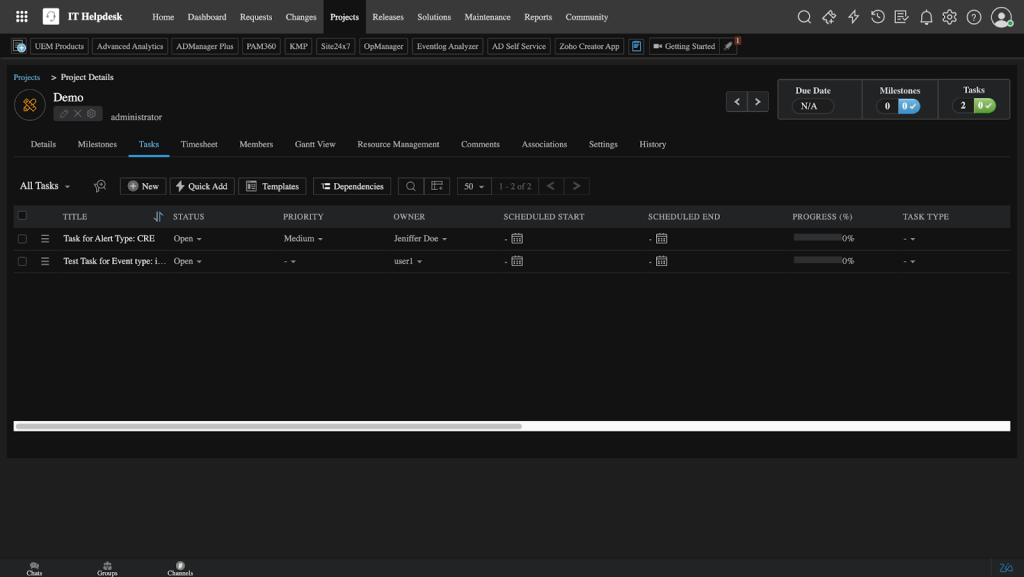
- Click on the project you selected while configuring the Queue on Netskope Cloud Exchange, and then go to Tasks. Here you can see all the created Tasks for the particular project.

Troubleshooting the Manage Engine Service Desk Plus Plugin
Unable to configure the CTO Manage Engine Service Desk Plus plugin
If user is unable to configure the CTO Manage Engine Service Desk Plus plugin, it could be due to one of the following reason:
- Incorrect credentials provided.
- The user does not have required permissions.
- Incorrect instance URL provided.
- Incorrect SSL Certificate for On-Premises Manage Engine Service Desk Plus instance.
What to do: To solve these issues, follow the options below:
- Make sure to provide correct credentials. To get the credentials, you can refer to the Get your Authentication credentials from Manage Engine Service Desk Plus section.
- Make sure that the user has the required permissions. Refer to the Permissions section.
- Make sure that the correct instance URL is provided.
- If you are using an On-Premises Manage Engine Service Desk Plus instance, then while configuring the plugin, you need to provide a self-signed certificate for the Service Desk Plus On-Premises instance. Provide the content of the
.crtfile.
Unable to create task using plugin
If you are unable to create a task using the plugin, it could be due to one of these reasons:
- No alerts or events are available in Cloud Exchange or no new alerts or events are pulled.
- Business Rule has no alerts/events filtered
- The user does not have the required permissions for creating incidents.
- Title field is not mapped in queue configuration.
- The owner(assignee) mapped in queue configuration is not a member of the project where you are creating the task.
- Rate limit exceded
What to do: Find the root cause from above and select the best fit resolution.
- Check if the alerts/events are available in the Alerts/Events page, if no alerts/events are available the task won’t be created. Configure Netskope Tenant or other required configuration to create alerts/events in CTO.
- Check the business rule and test it to confirm if it has any alerts filtered, if no alerts are available in the filtering, update the business rule.
- Ensure users have required permissions. Refer to the Permissions section.
- Make sure to map Title with values to create a ticket. Title is required while creating a task.
- Make sure that the owner(assignee) is a member of the project where you are creating the task.
- To check the default rate limit for your instance contact your Manage Engine Service Desk Plus support representative.
Temporary failure in name resolution error
If you are getting temporary failure in name resolution error as shown below while configuring the plugin with the On-Premises instance:
requests.exceptions.ConnectionError: HTTPSConnectionPool(host='win11-50-10-99', port=443): Max retries exceeded with url: /api/v3/portals?input_data=%7B%22list_info%22%3A+%7B%22row_count%22%3A+1000%2C+%22start_index%22%3A+1%2C+%22page%22%3A+1%2C+%22sort_field%22%3A+%22created_time%22%2C+%22sort_order%22%3A+%22desc%22%7D%7D (Caused by NewConnectionError('<urllib3.connection.HTTPSConnection object at 0x7fd5685bfb50>: Failed to establish a new connection: [Errno -3] Temporary failure in name resolution'))
What to do:
- SSH to the VM where your Cloud Exchange is installed and stop all the containers using
sudo ./stopscript. - Edit your docker-compose file using command
vi docker-compose.yml. - Add extra hosts under the core section.
- Format:
extra_hosts:
– “<your domain>:<your ip>”
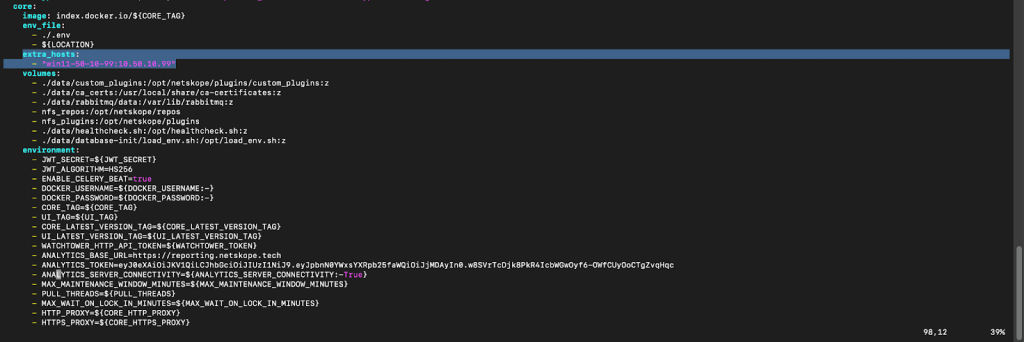
Note:
Use domain and IP of the server where your On-Premises Manage Engine Service Desk Plus instance is hosted.
- Format:

- Save the file.
- Start the Netskope Cloud Exchange using command
sudo ./start. - Configure the plugin with your valid credentials for an On-premises setup.
Getting error while configuring plugin for an On-premises instance with a proxy
If you are not able to configure the plugin for an On-premises instance with a proxy and encounter this error:
CTO Manage Engine Service Desk Plus [CTO Manageengine onprem]: Proxy error occurred. Verify the proxy configuration provided. Error: HTTPSConnectionPool(host='win11-50-10-99', port=10026): Max retries exceeded with url: /api/v3/portals?input_data=%7B%22list_info%22%3A+%7B%22row_count%22%3A+1000%2C+%22start_index%22%3A+1%2C+%22page%22%3A+1%2C+%22sort_field%22%3A+%22created_time%22%2C+%22sort_order%22%3A+%22desc%22%7D%7D (Caused by ProxyError('Cannot connect to proxy.', OSError('Tunnel connection failed: 503 Service Unavailable')))
What to do: Perform the below mentioned steps on your proxy VM (where your proxy is setup, not the VM where Cloud Exchange is installed):
- Copy your certificate to the trusted directory.
For Ubuntu OS:sudo cp your-cert.crt /usr/local/share/ca-certificates/
For CentOS:sudo cp your-cert.crt /etc/pki/ca-trust/source/anchors/ - Update the trust store.
For Ubuntu OS:sudo update-ca-certificates
For CentOS:sudo update-ca-trust extract - Restart your proxy.
- Configure the plugin for On-Premises instances.
Limitation
We have observed that the free version for cloud instances has a limit of 300 tasks per project and the On-Premises version has a rate limit of 60 calls per minute.