

Rotating Your API Key
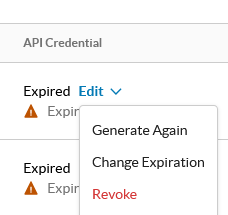
- Navigate to Settings > Administration > Administrators & Roles > Administrators.
- Find the service account.
- Under the API Credential column, click Edit.
- Click Generate Again. Copy and store the new key securely.
Regenerating a key immediately invalidates the previous one — update your integration with the new key before rotating in a production environment to avoid an outage.
Netskope recommends rotating your API key on a fixed schedule as part of your organization’s standard security hygiene practices.
Validating Your Connection
Use a GET call to /inspections/jobs/pending as a health check. After generating your API key, make a simple test call to confirm your key and region are both configured correctly before integrating further.