

AI Gateway recognizes and governs LLM API traffic by matching the request’s URL path against each provider’s known paths. If a client—a legacy agent, custom proxy, or new provider variant—sends requests to a nonstandard path (for example /openai/chat or /custom/path), AI Gateway treats that traffic as unknown: it logs it under the generic “Other” category and performs no content inspection, policy enforcement, or activity logging.
Path Mapping fixes this. It lets you define path aliases per gateway so traffic sent to an alternate path is identified as a supported LLM API and receives full AI Gateway governance—no client changes and no wait for a Netskope release to support a new path.
What Path Mapping does
A mapping rule does one or both of the following:
- Classifies the custom or legacy path your client sends (the source path) as a supported API path so AI Gateway can inspect, apply policy, and log that traffic.
- Optionally rewrites the path forwarded upstream (the target path) — use this only when the upstream provider requires a different path than the client sends.
Pass-through is the default and most common case: the original client path is forwarded upstream unchanged, and the mapping exists solely to classify and govern the traffic.
Common scenarios
| Scenario | Example | What mapping does |
|---|---|---|
| A provider “compatible” variant uses its own base path | A new OpenAI-compatible provider serves at /cool-ai/v2/chat | Classifies the traffic as a supported API and forwards it unchanged |
| Your proxy runs behind AI Gateway | Your app calls /myproxy/complete, and your proxy already handles that path | Classifies the traffic; it doesn’t rewrite the request |
| A legacy client is hardcoded to an old or different path | An older agent calls /custom-gateway/v1/models/predictions, while the service behind AI Gateway expects a different upstream path | Classifies the traffic as the matching API and rewrites the outgoing path to what the upstream service expects — the rewritten path can differ from the original |
| Paths include a model name or deployment ID | Requests follow patterns like /bedrock/<model> or /openai/deployments/<deployment-name>/chat/completions | One wildcard mapping covers every model or deployment name instead of a row per value |
How it works
Each gateway has its own mapping table, configured per provider in the AI Gateway admin UI. Add a row for every custom or legacy path you want AI Gateway to recognize.
| Field | Required | Description |
|---|---|---|
| Source path | Yes | The path your client sends, for example /openai/chat. |
| API path | Yes | The standard API path AI Gateway should treat this traffic as, for example /v1/chat/completions. This must match one of the provider’s supported APIs — AI Gateway validates it and shows the valid choices if it doesn’t. |
| Target path | No | The path forwarded upstream to the provider. Defaults to the source path (no rewrite). Set this only when the upstream provider expects a different path — the target path can differ from the source and API paths. |
| Method | No | POST (default) or GET. |
Using wildcards for paths with model names or IDs
Providers sometimes embed a model name, deployment name, or ID in the path. To cover every value without adding a row per model, use a single * in both the source path and the API path:
| Source path | API path | Notes |
|---|---|---|
/gen/* | /v1beta/models/*:generateContent | One row covers every model behind /gen/ |
/openai/deployments/*/chat/completions | /v1/chat/completions | One row covers every custom Azure OpenAI deployment name |
/bedrock/* | /model/*/invoke | One row covers every Bedrock model |
A few rules apply:
- Only one
*is allowed per path. - If the source path has a
*, the API path must have one too (and vice versa). - The value matched by
*carries through unchanged to the API path (for classification) and the outgoing request. - Rows without a
*are treated as exact matches; exact matches are always checked before wildcard rules. - Query strings on the original request are never part of the match — they are preserved and forwarded unchanged.
Adding mappings
To add a path mapping for an AI provider, follow the steps below.
-
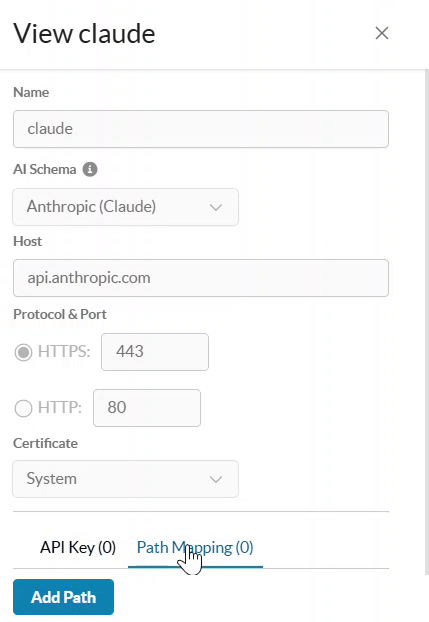
Log in to the Netskope tenant UI and go to Settings > Security Cloud Platform > AI Gateway > AI Provider.
-
Find the provider you want to add a mapping for, click its … (options) menu, and select View.

-
In the provider panel, select the Path Mapping tab.
-
Click Add Path if the provider has no existing mappings, or Edit Path if it already has one or more.
-
Under Path #1, enter the values for the following parameters:
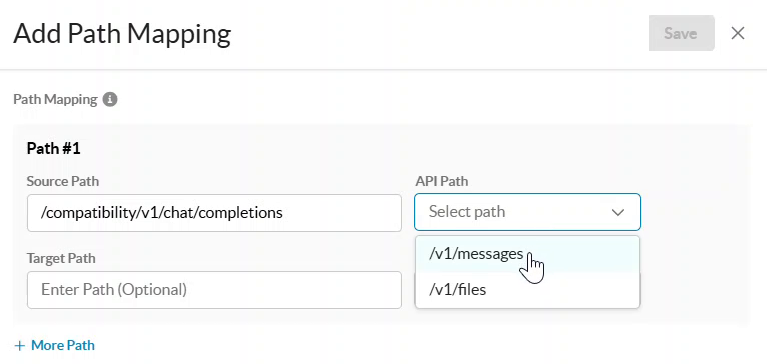
- Source Path: The path your client actually sends. For example:
/compatibility/v1/chat/completions. - API Path: Select the standard API path for this provider’s schema from the dropdown. Only paths already supported by that schema are listed.
- Target Path (optional): Enter an upstream path only if the provider needs a path different from the source path. Leave this blank for pass-through (the default).
- Methods: Select POST (default) or GET.
- Source Path: The path your client actually sends. For example:
-
To map additional paths for the same provider, click + More Path and repeat step 5 for each one.
-
Click Save.
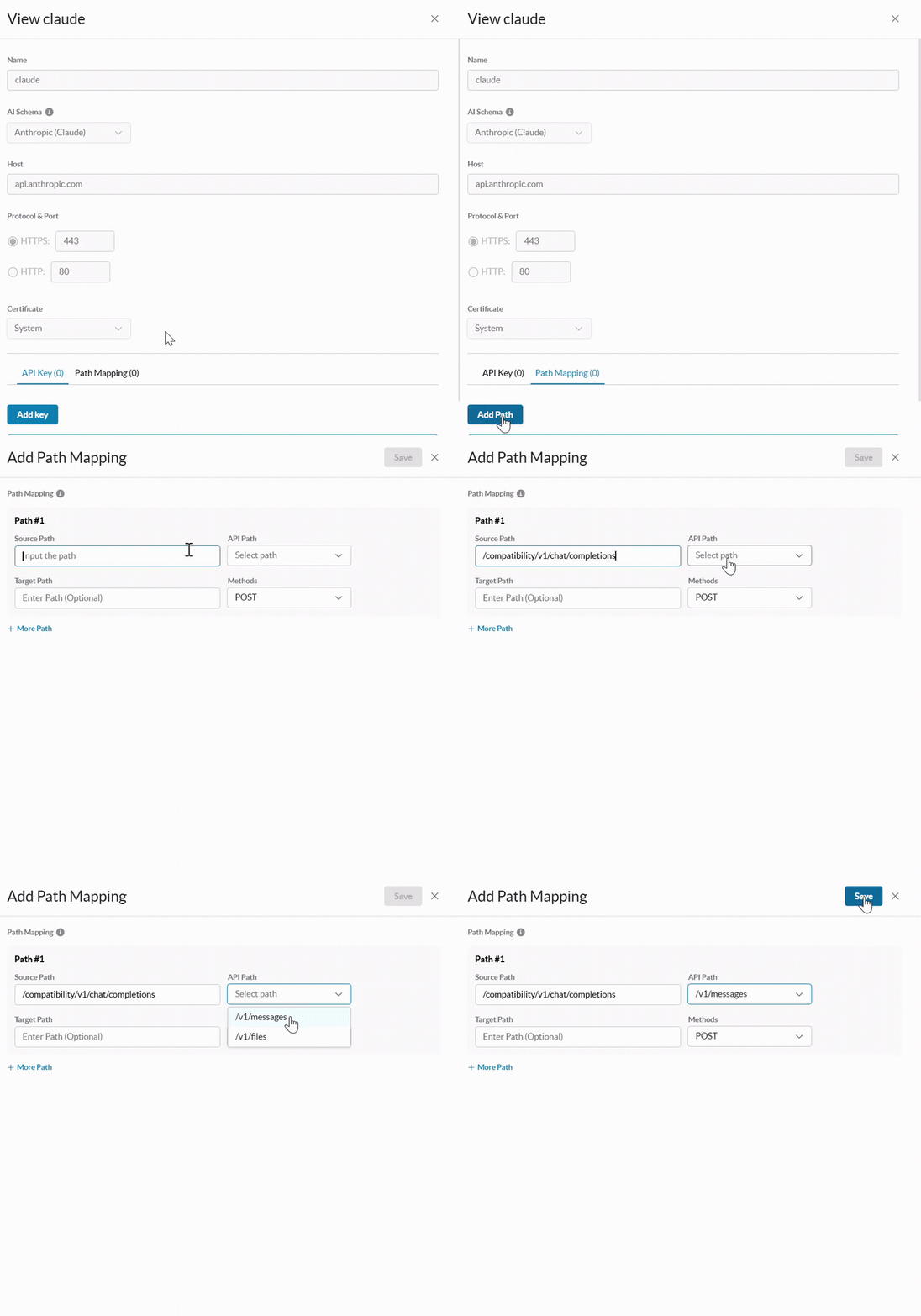

The new mapping is added to the provider’s path mapping list, and the Path Mapping count updates on the AI Provider page.
What doesn’t change
- Any unmapped path is still logged under “Other” and receives no inspection, policy enforcement, or activity logging—mapping adds coverage; it does not remove it.
- Mapping a path does not translate the request or response body between providers. The payload must already match the schema of the API you map to.
- Query strings on the original request are always preserved.