

Release Notes
1.0.0
Added
- Initial Release.
- Fetch Indicators of type URL (Hostnames and IP Addresses) from the Threat Intelligence Profile along with their reputation. This plugin does not support pushing indicators to Microsoft Defender Threat Intelligence platform.
This document explains how to configure the Microsoft Defender Threat Intelligence v1.0.0 plugin for the Threat Exchange module of the Netskope Cloud Exchange platform. This plugin is used to pull indicators of type URLs (Hostnames and IP Addresses) from Microsoft Defender Threat Intelligence platform from the Intelligence Profiles. The Plugin does not support sharing indicators to Microsoft Defender Threat Intelligence platform.
Prerequisites
To complete this configuration, you need:
- A Netskope Tenant (or multiple, for example, production and development/test instances).
- A Netskope Cloud Exchange tenant with the Tenant plugin and Threat Exchange plugin already configured.
- An Application created on the Microsoft Identity platform, and it’s Tenant ID, Client ID, and Client Secret.
- Connectivity to Microsoft Identity platform.
Microsoft Defender Threat Intelligence Plugin Support
This plugin is used to pull indicators of type URLs (Hostnames and IP Addresses) from the Microsoft Defender Threat Intelligence platform from the Intelligence Profiles. The Plugin does not support sharing indicators to the Microsoft Defender Threat Intelligence platform.
| Fetched Indicator Types | Shared Indicator Types |
|---|---|
| URL (Hostnames, IP Address) | Not Supported |
Note
- Only those Intelligence profiles will be fetched whose kind is actor.
- Kind: A categorization of the type of this intelligenceProfile. The possible values are: actor, tool, unknownFutureValue.
Mappings
Pull Mapping
| Cloud Exchange Fields | Microsoft Defender Threat Intelligence Fields |
|---|---|
| value | artifact.id from List indicators response |
| type | URL (static) |
| firstSeen | firstSeenDateTime |
| lastSeen | lastSeenDateTime |
| reputation | score from Get hostReputation response |
| tags | classification from Get hostReputation response |
| comments | tradecraft.content from List Intelligence Profile |
The fields selected based on the description of the fields available in the platform are:
- Tradecraft: Formatted information featuring a description of the distinctive tactics, techniques, and procedures (TTP) of the group, followed by a list of all known custom, commodity, and publicly available implants used by the group.
- Reputation is mapped with score: The score can range from 1-100, so the mapping of the score provided is using the following: normalized_score = round (score / 10). iIf the score is between 0-100, it will be considered as 1.
Permissions
ThreatIntelligence.Read.All (*attached to the Application whose Client Credentials are used).*
API Details
List of APIs used
| API Endpoint | Method | Use case |
|---|---|---|
| <TENANT_ID>/oauth2/token | POST | Generate Auth Token |
| /security/threatIntelligence/intelProfiles | GET | Fetch Intelligence Profiles |
| /security/threatIntelligence/intelProfiles/<INTEL_PROFILE_ID>/indicators | GET | Fetch Indicator from a single Intelligence Profile |
| /security/threatIntelligence/hosts/<HOST_ID>/reputation | GET | Fetching Reputation for a single indicator |
Note
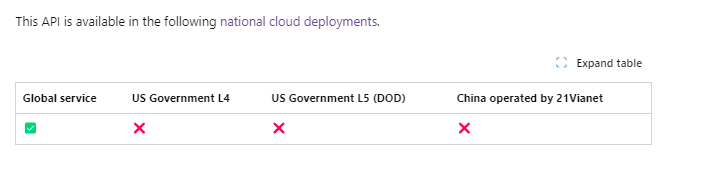
- The List intelProfiles used in the plugin only supports Global Service as the National Cloud Deployments, and the plugin supports only the below Base Endpoint: https://login.microsoftonline.com. This is used for Generating the Authorization Token.
- Microsoft Graph APIs Base URL for v1.0: https://graph.microsoft.com/v1.0
Get Auth Token
Endpoint: <TENANT_ID>/oauth2/token
Method: POST
Data
| Key | Value |
|---|---|
| scope | https://graph.microsoft.com/.default |
| client_id | <CLIENT_ID> |
| client_secret | <CLIENT_SECRET> |
| grant_type | client_credentials |
Headers
| Key | Value |
|---|---|
| User-Agent | netskope-ce-5.0.0-cte-microsoft-defender-threat-intelligence-v1.0.0 |
| Content-Type | application/x-www-form-urlencoded |
| Accept | application/json |
Sample Response
{
  "token_type": "Bearer",
  "expires_in": 3599,
  "ext_expires_in": 3599,
  "access_token": "eyJ0eXAiOiJKV1QiLCJhbGciOiJSUzI1NiIsIng1dCI6Ik1uQ19WWmNBVGZNNXBP..."
}
Fetching Intelligence Profile
Endpoint: /security/threatIntelligence/intelProfiles
Method: GET
Parameters
| Key | Value |
|---|---|
| $filter | firstActiveDateTime ge <checkpoint> |
| $select | id,tradecraft,kind |
| $top | 100 |
Headers
| Key | Value |
|---|---|
| User-Agent | netskope-ce-5.0.0-cte-microsoft-defender-threat-intelligence-v1.0.0 |
| Authorization | Bearer <ACCESS_TOKEN> |
| Content-Type | application/json |
Sample Response
HTTP/1.1 200 OK
Content-Type: application/json

{
  "value": [
    {
      "@odata.type": "#microsoft.graph.security.intelligenceProfile",
      "id": "9b01de37bf66d1760954a16dc2b52fed2a7bd4e093dfc8a4905e108e4843da80",
      "kind": "actor",
      "title": "Aqua Blizzard",
      "firstActiveDateTime": "2020-02-24T00:00:00Z",
      "aliases": [
          "Primitive Bear",
          "ACTINIUM",
          "SectorC08",
          "shuckworm",
          "Gamaredon",
          "UNC530",
          "Armageddon"
      ],
      "targets": [
          "Government Agencies & Services: Defense",
          "Government Agencies & Services: Law Enforcement",
          "Non-Government Organization: Human Rights Organization"
      ],
      "countriesOrRegionsOfOrigin": [
        {
          "@odata.type": "microsoft.graph.security.intelligenceProfileCountryOrRegionOfOrigin",
          "label": "Country/Region",
          "code": "Country/Region code"
        }
      ],
      "summary": {
        "@odata.type":"microsoft.graph.security.formattedContent",
        "content": "The actor that Microsoft tracks as Aqua Blizzard (ACTINIUM) is
a nation-state activity group based out of ...",
        "format": "text"
      },
      "description": {
        "@odata.type": "microsoft.graph.security.formattedContent",
        "content": "## Snapshot\r\nThe actor that Microsoft tracks as Aqua Blizzard (ACTINIUM) is a nation-state activity group based out of ...",
        "format": "markdown"
      },
      "tradecraft": {
        "@odata.type": "microsoft.graph.security.formattedContent",
        "content": "Aqua Blizzard (ACTINIUM) primarily uses spear phishing emails
to infect targets. These emails harness remote template injection to
load malicious code or content. Typically, ...",
        "format": "markdown"
      }
    }
  ]
}
Fetch Indicator from a single Intelligence Profile
Endpoint: /security/threatIntelligence/intelProfiles/<INTEL_PROFILE_ID>/indicators
Method: GET
Data: NA
Headers
| Key | Value |
|---|---|
| User-Agent | netskope-ce-5.0.0-cte-microsoft-defender-threat-intelligence-v1.0.0 |
| Authorization | Bearer <ACCESS_TOKEN> |
| Content-Type | application/json |
Sample Response
HTTP/1.1 200 OK
Content-Type: application/json

{
  "value": [
    {
      "@odata.type": "#microsoft.graph.security.intelligenceProfileIndicator",
      "id": "ff3eecd2-a2be-27c2-8dc0-40d1c0eada55",
      "source": "microsoft",
      "firstSeenDateTime": "2022-05-02T23:09:20.000Z",
      "lastSeenDateTime": null,
      "artifact": {
          "@odata.type": "#microsoft.graph.security.hostname",
          "id": "fake-malicious.site"
      }
    }
  ]
}
Fetching Reputation for a Single Indicator
Endpoint: /security/threatIntelligence/hosts/<HOST_ID>/reputation
Method: GET
Data: NA
Headers:
| Key | Value |
|---|---|
| User-Agent | netskope-ce-5.0.0-cte-microsoft-defender-threat-intelligence-v1.0.0 |
| Content-Type | application/x-www-form-urlencoded |
| Accept | application/json |
Sample Response
HTTP/1.1 200 OK
Content-Type: application/json

{
    "@odata.type": "#microsoft.graph.security.hostReputation",
    "id": "1e3b9ded-abb6-1828-c4ef-a5ca48b287a0",
    "classification": "malicious",
    "score": 100,
    "rules": [
      {
        "name": "Microsoft Defender Threat Intelligence Intel Article",
        "description": "Activity Snapshot: DPRK Actors Target Maritime Sector",
        "severity": "high",
        "relatedDetailsUrl": "https://ti.defender.microsoft.com/article/831b70a4"
      },
      {
        "name": "Name server",
        "description": "Domain is using a name server that has been associated with suspicious behavior",
        "severity": "medium",
        "relatedDetailsUrl": null
      },
      {
        "name": "Registrar",
        "description": "Domains registered using this registrar are frequently associated with suspicious behavior",
        "severity": "medium",
        "relatedDetailsUrl": null
      },
      {
        "name": "Resolving IP Address",
        "description": "192.168.1.1",
        "severity": "low",
        "relatedDetailsUrl": "https://ti.defender.microsoft.com/search?query=192.168.1.1"
      }
  ]
}
User Agent
netskope-ce-5.0.0-cte-microsoft-defender-threat-intelligence-v1.0.0
Workflow
- Generate configuration parameter.
- Configure the Netskope Tenant
- Configure the Netskope CTE plugin
- Configure the Microsoft Defender Threat Intelligence plugin
- Add Business Rule
- Add Sharing
Generate the Configuration Parameter on the Microsoft Identity Platform
Follow the steps provided in the links to generate the necessary plugin credentials.
- Register the Application:
- Add Client Secret: https://learn.microsoft.com/en-us/graph/auth-register-app-v2#option-2-add-a-client-secret
- Configure Permissions for Microsoft Graph: https://learn.microsoft.com/en-us/graph/auth-v2-service?tabs=http#2-configure-permissions-for-microsoft-graph
- Permission needed: ThreatIntelligence.Read.All
- Request administrator consent: https://learn.microsoft.com/en-us/graph/auth-v2-service?tabs=http#3-request-administrator-consent
Configure the Microsoft Defender Threat Intelligence Plugin
-
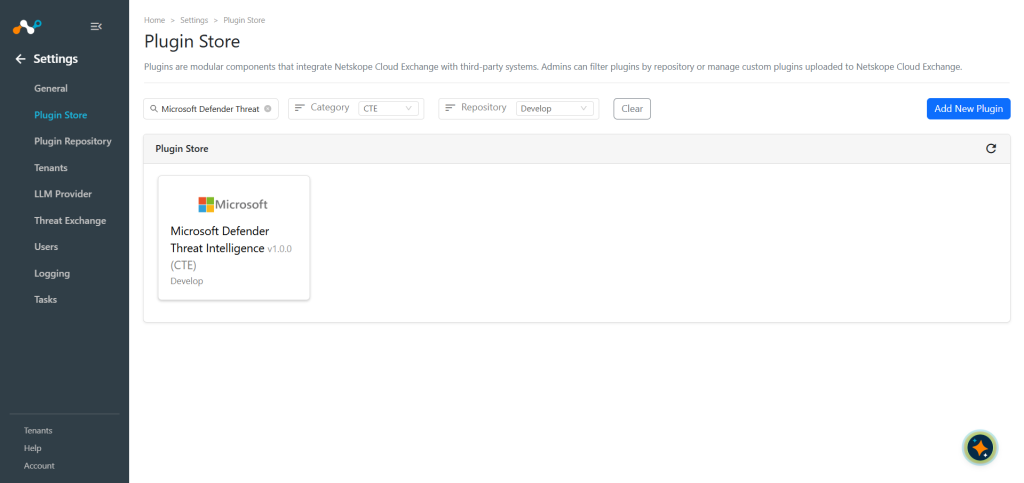
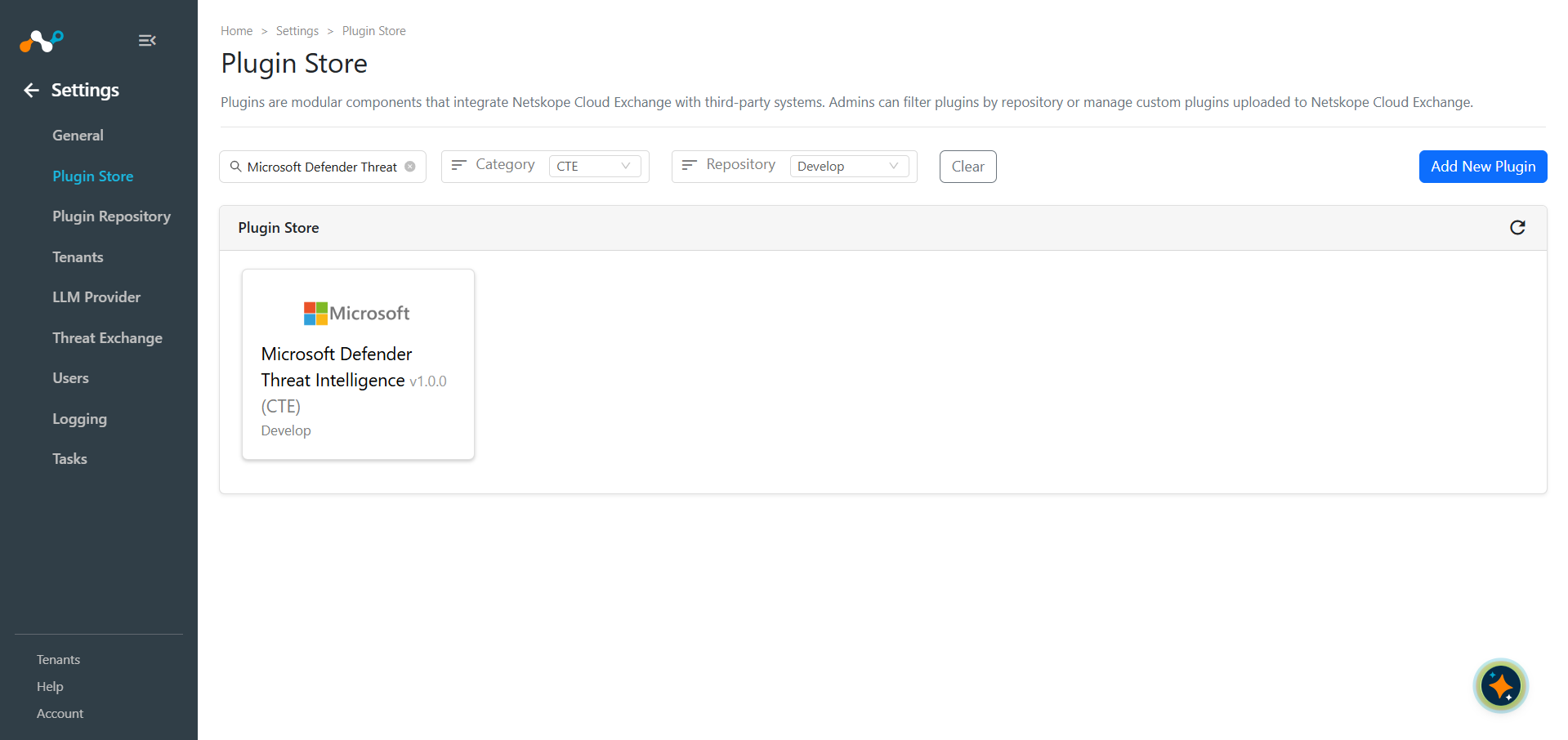
In Cloud Exchange, go to Settings > Plugin Store.
-
Search for and select the Microsoft Defender Threat Intelligence v1.0.0 (CTE) plugin.
-
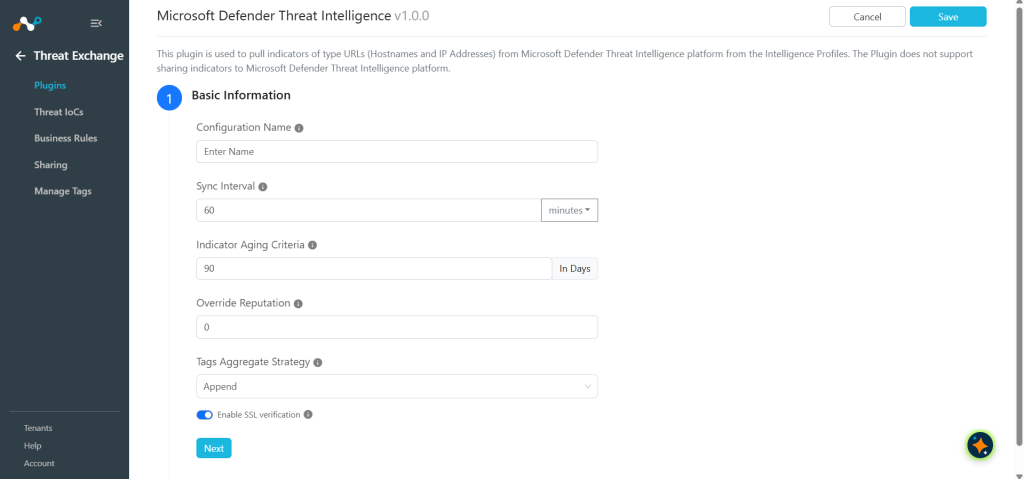
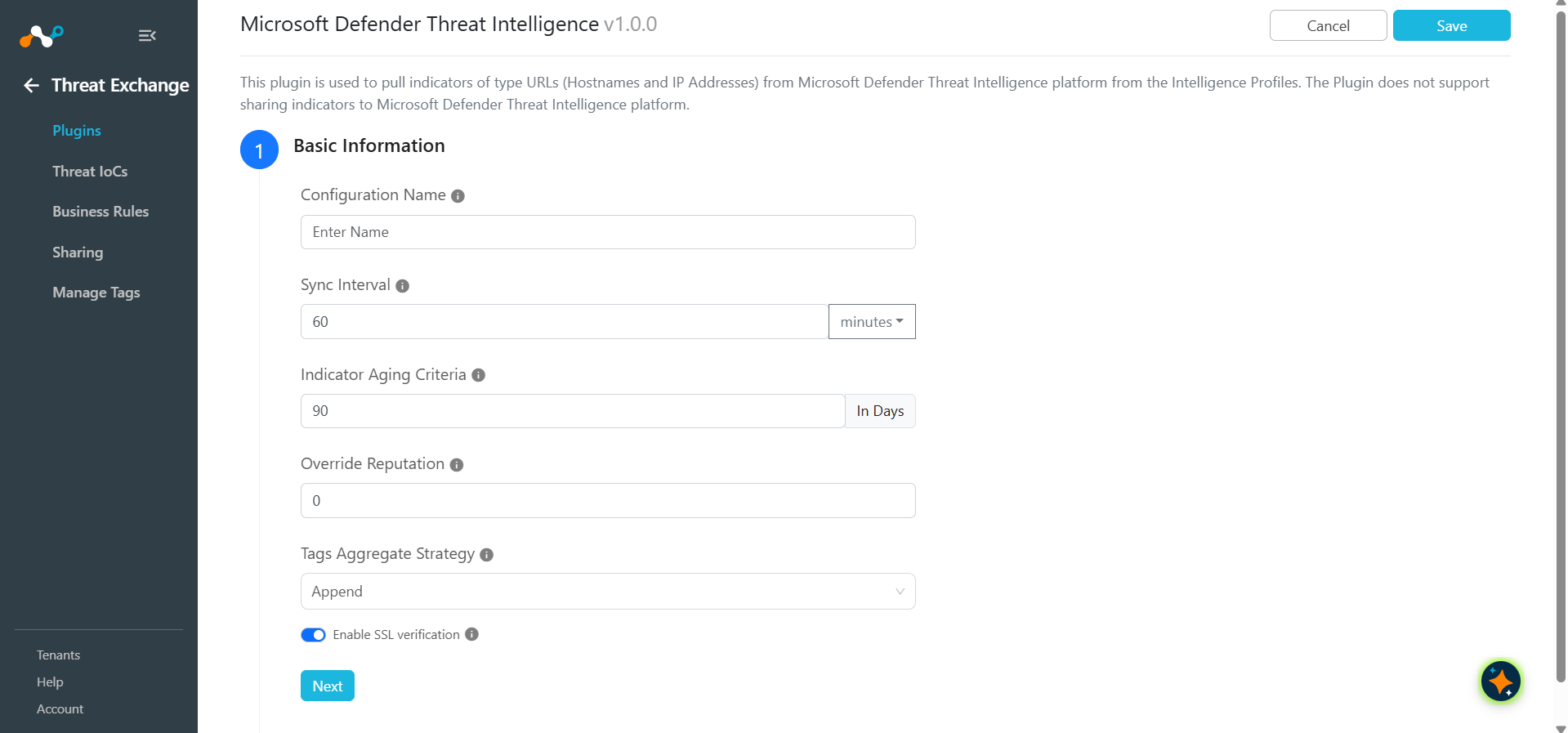
Enter the Basic Information:
- Configuration Name: Unique name for the configuration.
- Sync Interval: Leave the default.
- Aging Criteria: Expiry time of the plugin in days (Default: 90).
- Override Reputation: Set a value to override the reputation of indicators received from this configuration.
- Enable SSL Validation: Enable for SSL Certificate validation.
- Use System Proxy: Enable if the proxy is required for communication.
-
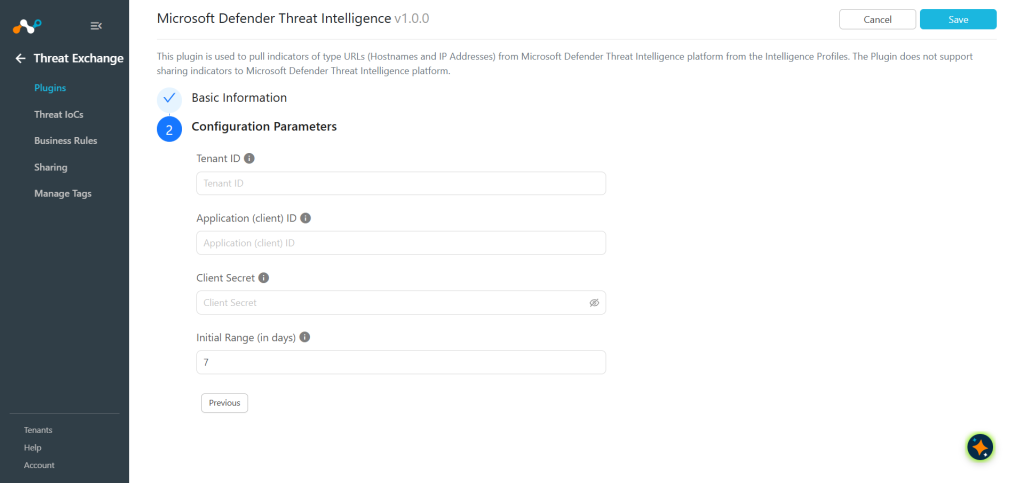
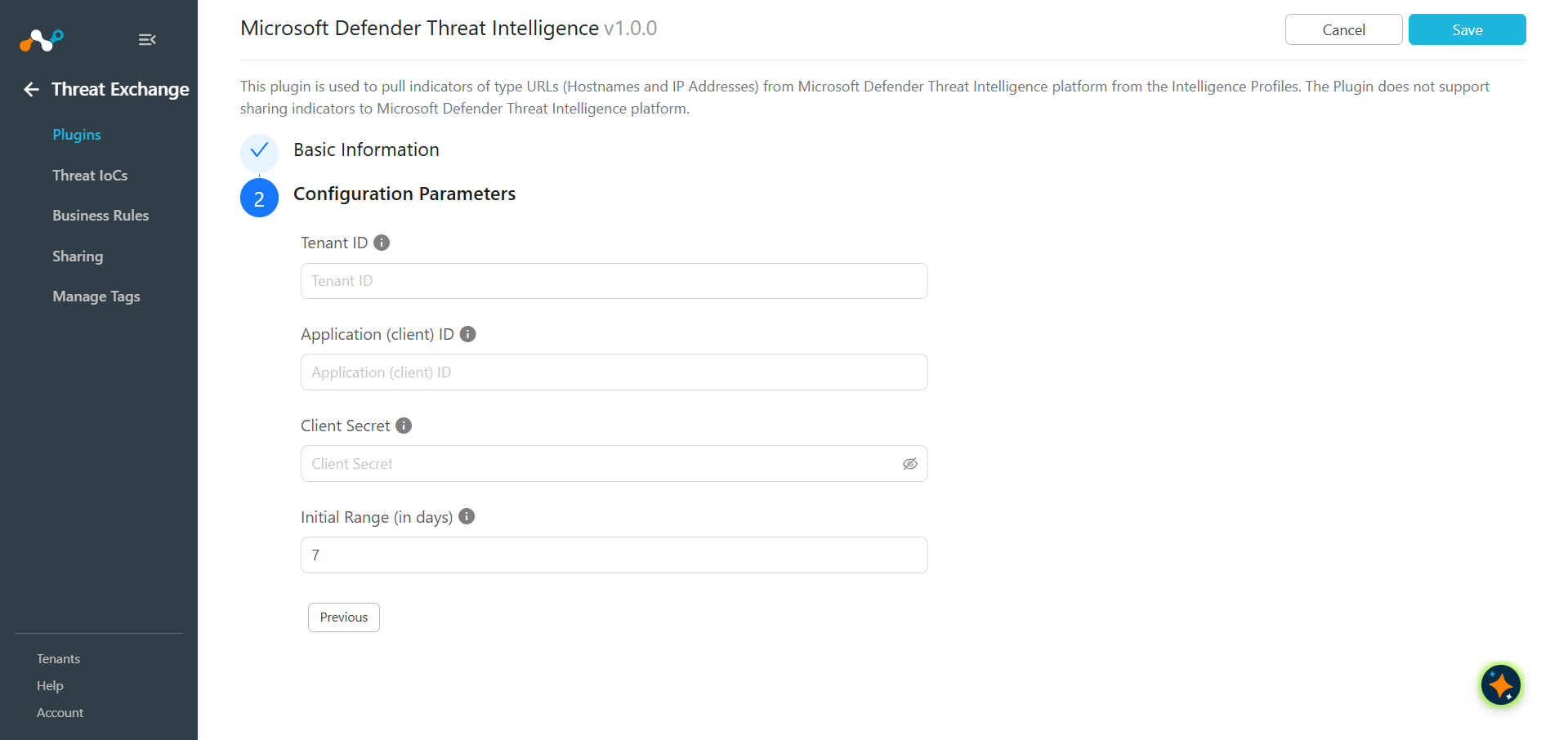
Click Next and enter the Configuration Parameters:
- Tenant ID: Tenant ID of your Azure application.
- Application (client) ID: Application (client) ID of your Azure application.
- Client Secret: Client Secret of your Azure application.
- Initial Range: Number of days Threat IoCs to pull in the initial run.
-
Click Save.
Configure a Threat Exchange Business Rule for Microsoft Defender Threat Intelligence
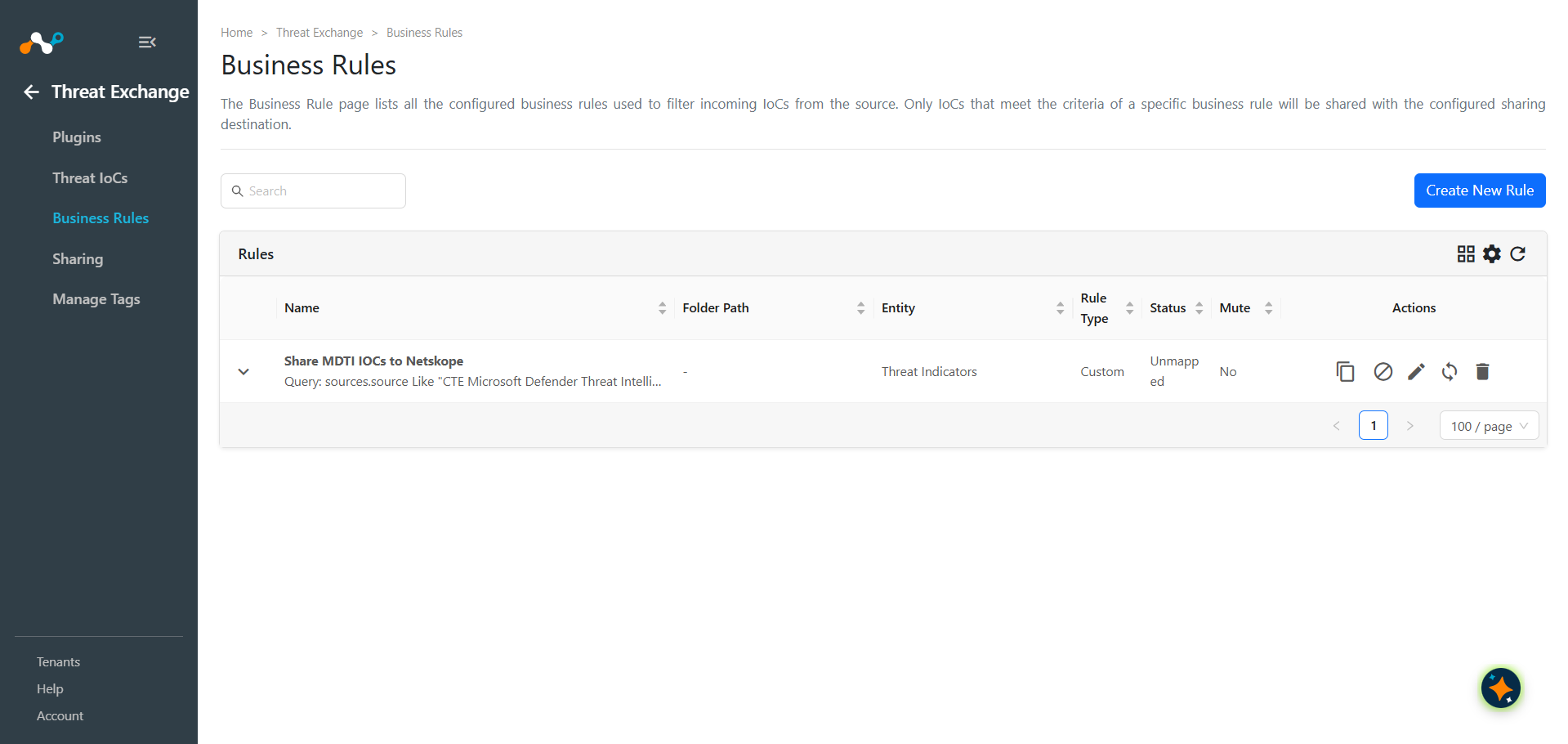
To share indicators fetched from Microsoft Defender Threat Intelligence to Netskope and vice versa, you need to have a business rule that will filter out the indicators that you want to share. To configure a business rule:
- In Threat Exchange, go to Business Rules and click Create New Rule.
- Add the filter(s) according to your requirements in the rule and click Save.
Configure Threat Exchange Sharing for Microsoft Defender Threat Intelligence
To share IoCs pulled from Microsoft Defender Threat Intelligence to Cloud Exchange:
- In Threat Exchange, go to Sharing and click Add Sharing Configuration.
- Select your Source Configuration (Microsoft Defender Threat Intelligence), Business Rule, Destination Configuration (CTE Netskope), and Target. When finished, click Save.