To simplify proxy processing, Netskope is decoupling Steering Configuration from proxy processing.
Netskope enabled this behavior for new tenants in 2025 and is now rolling out a migration so that existing tenants can take advantage of this new feature.
This change affects two areas:
- Proxy bypasses from Steering Exceptions
- Non-standard port management by the Netskope Proxy
Terminology
This guide uses the following terms.
| Term | Definition |
|---|---|
| Netskope Client | Netskope Client, installed on the endpoint. |
| Netskope Proxy | The inline proxy processing of web traffic steered to Netskope Cloud. |
| RTP | Real-time Protection. |
| Steering Configuration | The configuration that tells Netskope Client which traffic to steer to the Netskope Security Cloud and which to bypass. |
| Steering Exception | An entry in a Steering Configuration that excludes traffic from steering. Only five of the exception types are relevant to this migration: Domain, Category, Destination Location, Source Location, and Source Country. |
| Steering bypass | The request bypasses the Netskope Security Cloud; the device reaches the destination directly. |
| Proxy bypass | The Netskope Proxy receives the request but skips SSL interception and access control, then forwards it to the destination. |
| Coupled Proxy | Current behavior: a Steering Exception acts as both a steering bypass and a proxy bypass. |
| Decoupled Proxy | Target behavior: a Steering Exception acts only as a steering bypass. The Netskope Proxy evaluates SSL and RTP policies independently. |
| Non-standard port | Any TCP port other than 80 and 443. |
Why Netskope Is Decoupling Steering Configuration from Proxy Processing
Coupled Proxy behavior often causes confusion:
- It overlaps with SSL Decryption and Real-time Protection policies, which provide greater flexibility
- The Netskope Proxy only partially supports Steering Exceptions: it doesn’t support Dynamic Steering, and it evaluates only five exception types (see below)
- Source Location and Source Country don’t affect steering: only the Netskope Proxy evaluates them
- Proxy bypasses from Steering Exceptions may shadow custom SSL Decryption policies
- Proxy bypasses from Steering Exceptions appear only in events, which makes them harder for you to interpret
- Two different configurations affect non-standard port access control: Steering Configuration and RTP policies
With Decoupled Proxy:
- Netskope Client and Netskope Proxy use independent configurations
- No more proxy bypasses from Steering Exceptions
- You retain full control of steering and proxy bypasses
- The platform is simpler to operate
Proxy Bypass Due to Steering Exceptions
This section explains how a Steering Exception affects the Netskope Proxy today, how to identify the resulting proxy bypasses, and what changes after migration.
Steering Bypass Versus Proxy Bypass
Reminder of the two bypass cases:
- Steering bypass: the request bypasses the Netskope Security Cloud and the device reaches the destination directly.
- Proxy bypass: the Netskope Proxy receives the request but skips SSL interception and access control, then forwards the request to the remote destination.
Coupled Proxy Behavior
With Coupled Proxy, a Steering Exception acts as both a steering bypass and a proxy bypass.
Netskope Proxy evaluates Steering Exceptions before SSL and RTP policies. Traffic matching one of the supported Steering Exceptions bypasses inspection: the proxy doesn’t intercept SSL and doesn’t evaluate RTP policy.
Netskope Proxy evaluates only five bypass exception types:
- Domain
- Category
- Destination Location
- Source Location
- Source Country
If your Steering Configuration uses Dynamic Steering, both on-premises and off-premises bypass exceptions apply, in all locations and all access methods.
This affects all traffic types:
- If Netskope Client partially steers traffic with Dynamic Steering, the proxy doesn’t inspect the steered traffic matching Steering Exceptions
- If Netskope Client steers traffic because it can’t identify the destination domain, the proxy doesn’t inspect the steered traffic matching Steering Exceptions
- If Netskope Client steers traffic because it can’t yet resolve the category, the proxy doesn’t inspect the steered traffic matching Steering Exceptions
- For other access methods, the proxy doesn’t inspect steered traffic matching Steering Exceptions
Proxy-bypass-only Steering Exceptions
Source Location and Source Country Steering Exceptions are proxy bypass only today; Netskope Client doesn’t evaluate them.
Unaffected behavior
Netskope Proxy doesn’t evaluate the other bypass exception types, so they require no migration. These include Certificate Pinned Applications, Applications, and Service & Destination Profile.
Tunnel + Bypass (Certificate Pinned Application) is also unaffected: proxy bypass still applies to this traffic after the migration.
Identifying Proxy Bypasses
When the Netskope Proxy applies a bypass because of Steering Exceptions, it generates two event types:
- Transaction Events (exhaustive):
x-ssl-bypass/SSL Bypass=yes,x-ssl-bypass-reason/SSL Bypass Reason=Steering Exception - [Configuration Name] - Page Events (partial): Bypass=
Yes, Bypass reason=Steering Exception - [Configuration Name]
Example of Skope IT Transaction Event with filter to find the proxy bypass:
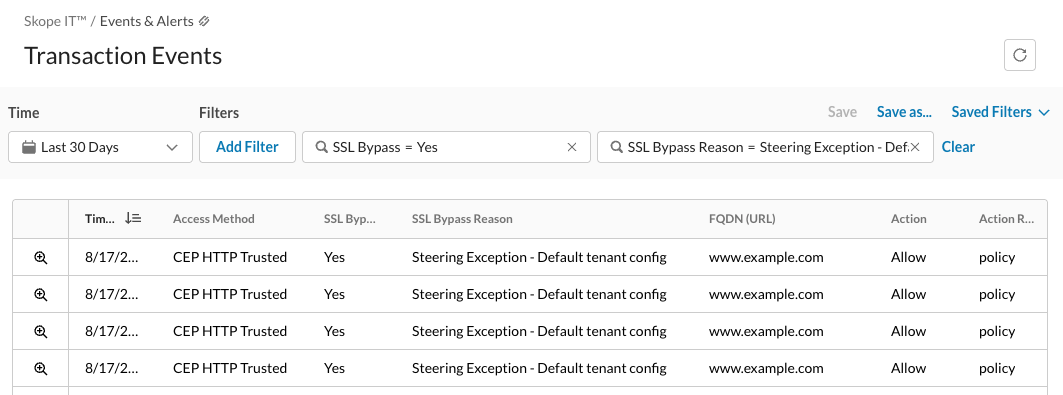
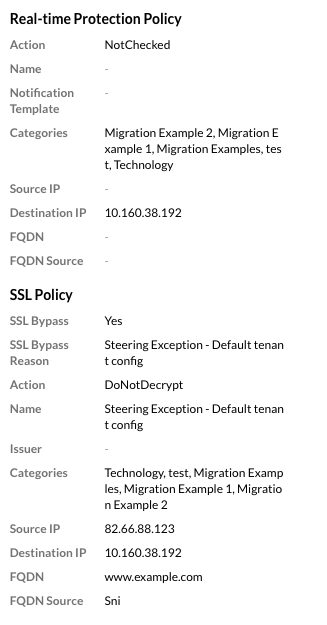
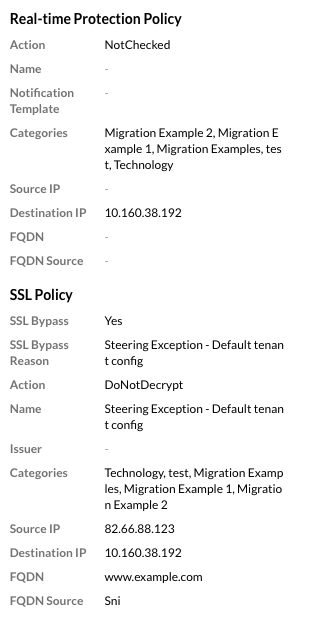
Opening the event shows RTP Action: NotChecked and SSL Bypass Reason: Steering Exception – Default tenant config.
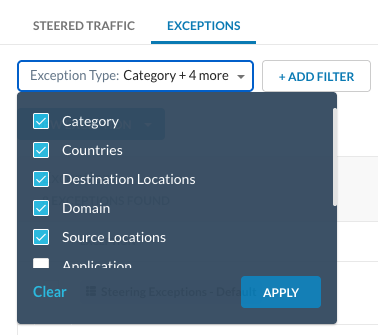
To review Steering Exceptions classified as proxy bypasses, apply this filter to Steering Exceptions:
Decoupled Proxy Behavior
With Decoupled Proxy, a Steering Exception functions only as a steering bypass.
After decoupling, Netskope Proxy evaluates SSL and RTP policies independently of Steering Configurations.
Netskope Client Tunnel + Bypass mode with certificate-pinned applications still applies.
After decoupling, Steering Exceptions no longer offer the Source Location and Source Country options, because steering bypass doesn’t support them.
Non-Standard Port Management
Decoupling also changes how the Netskope Proxy handles traffic on non-standard ports. A non-standard port is any TCP port other than 80 and 443.
Coupled Proxy Behavior
With Coupled Proxy, Netskope Proxy restricts non-standard ports by default.
In the initial behavior, Netskope Proxy rejects non-standard ports unless you add a non-standard port configuration inside the Steering Configuration.
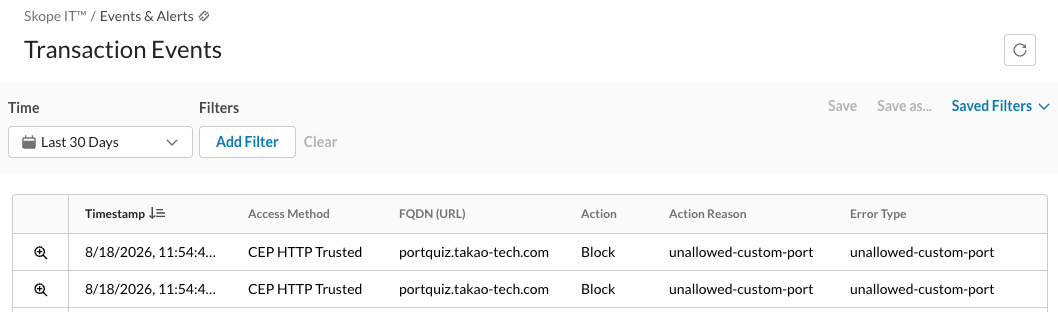
When this occurs, Netskope Proxy generates a Transaction Event with x-action-reason “unallowed-custom-port”.
Decoupled Proxy Behavior
With Decoupled Proxy, Netskope Proxy allows all ports by default.
After migration, the Netskope Proxy doesn’t reject non-standard ports by default and processes all requests according to the configured RTP policies.
You can now define access control per port with a Service profile.
Restricting Non-Standard Ports to Specific Domains
You can restrict non-standard ports to a specific list of domains with a single RTP policy. The following example shows one way to build it.

The policy uses two negative conditions, so it blocks any request that arrives on a port outside the allowed-port Service and that doesn’t match the allowed-domain Destination Profile. This example names them Allowed Destination Ports and Domains with non standard ports.
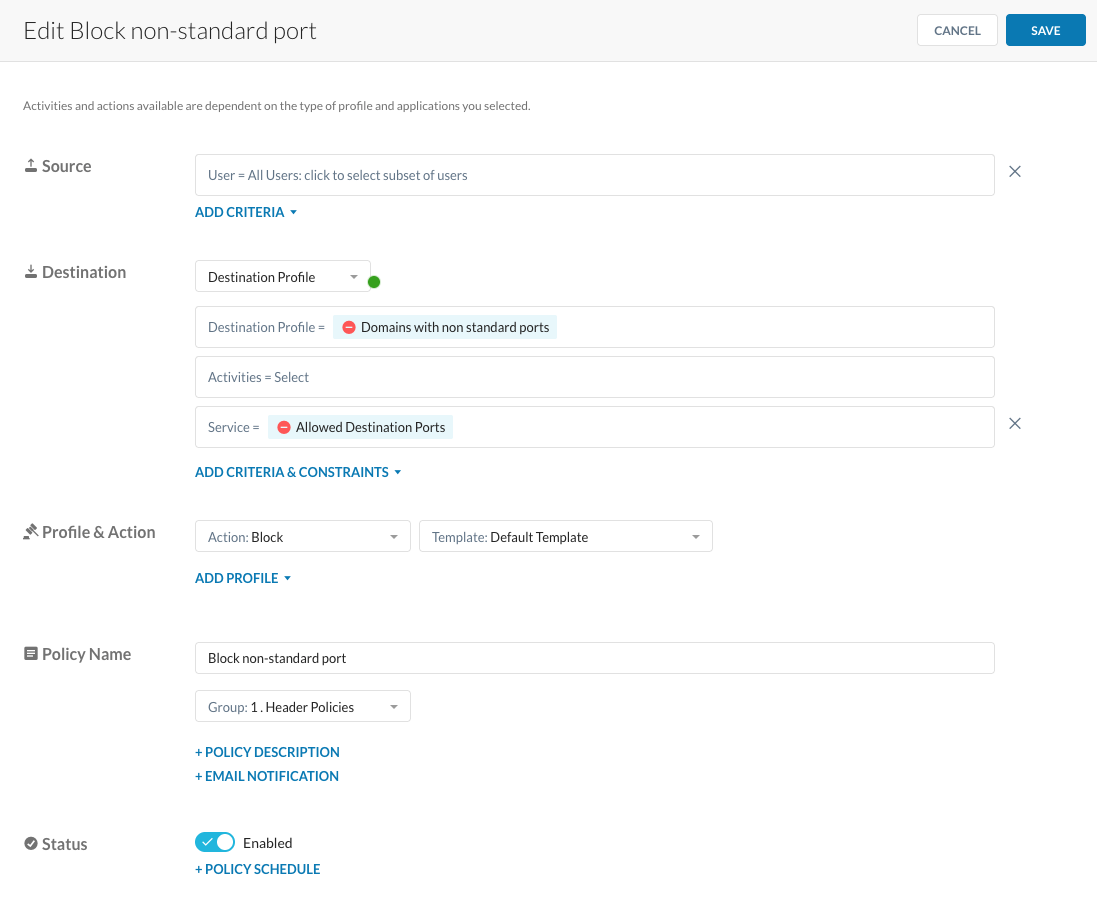
Here the Service lists only ports 80 and 443, so every other port is blocked on all domains.
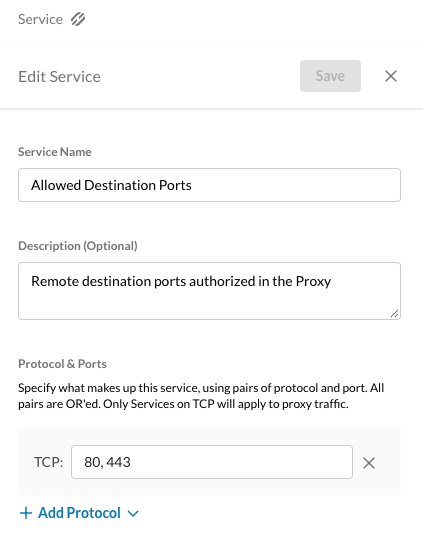
To allow specific domains on non-standard ports, add those domains to the Destination Profile.
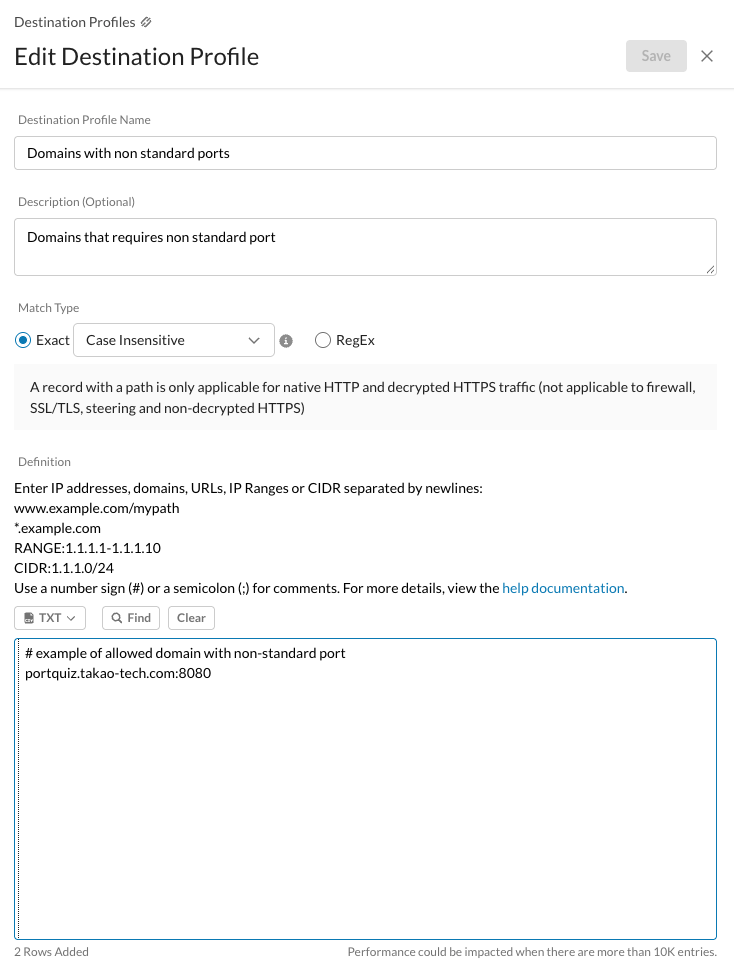
Transaction Events example with this policy:
- www.google.com is allowed on port 443 and blocked on port 8080
- portquiz.takao-tech.com, listed in the Destination Profile, is allowed on port 8080 and blocked on port 8081
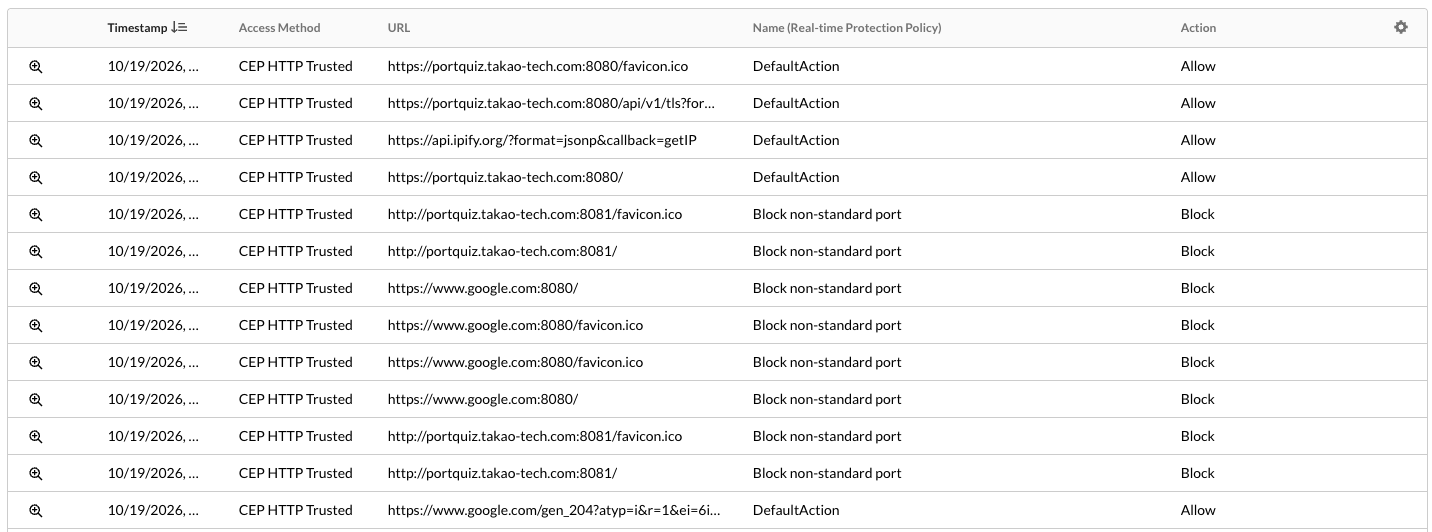
Migration Process
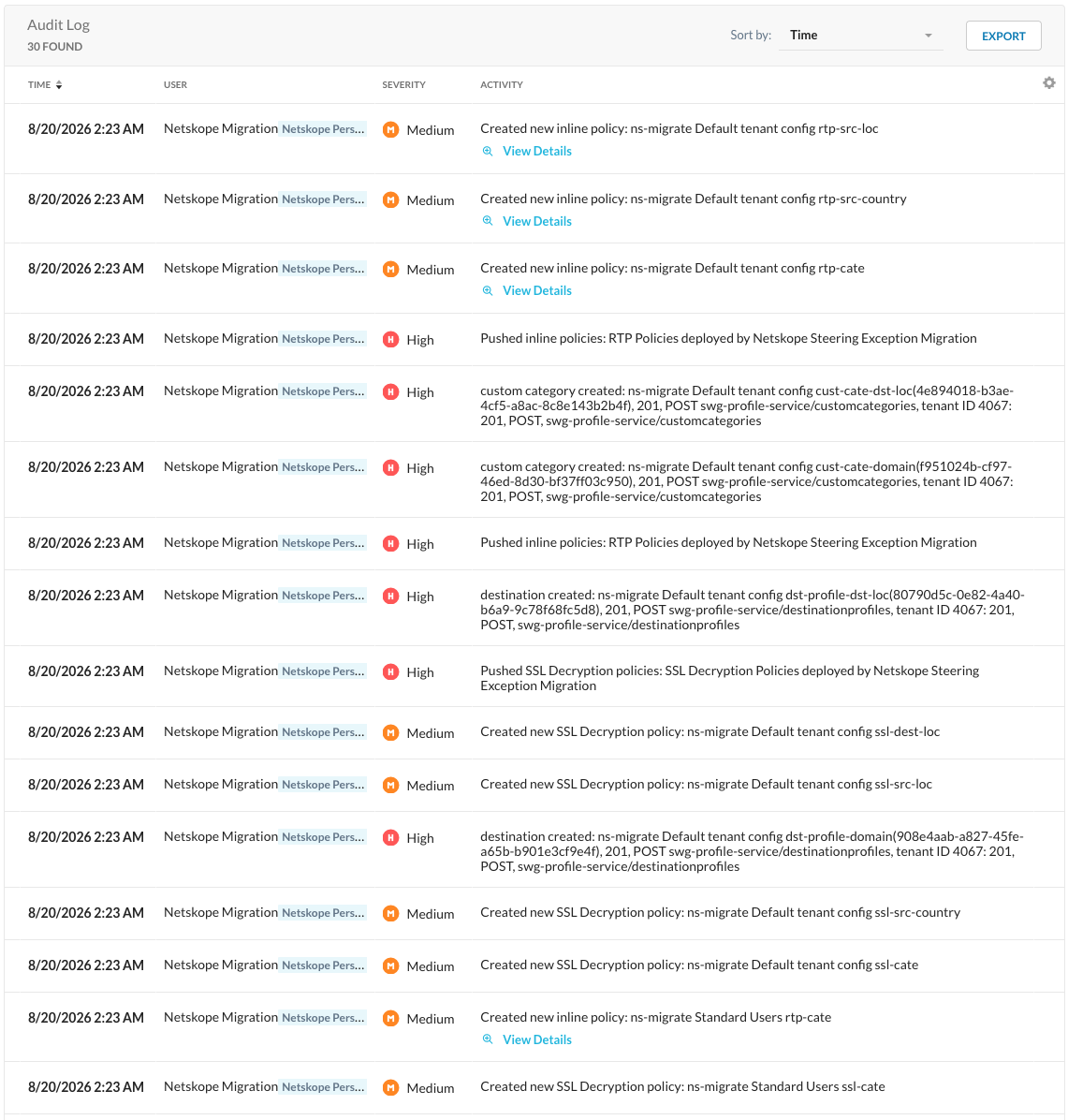
To migrate existing configuration, Netskope runs a migration process that reproduces the Coupled Proxy behavior in Decoupled Proxy mode:
- Netskope duplicates the steering bypasses as SSL Do Not Decrypt policies
- Netskope duplicates the steering bypasses as RTP Allow policies
- Netskope applies the configuration
- Netskope enables the Decoupled Proxy mode
You roll back by re-enabling the Coupled Proxy mode.
Netskope executes the migration in phases.
Prerequisites
Ensure that there are no pending configuration on the tenant.
Changes Applied at Migration
The migration creates Destination Profiles, Custom Categories, SSL Decryption policies, and RTP policies that reproduce your existing steering bypasses.
Replicating Steering Configuration Evaluation
It’s important to understand how Netskope Client evaluates and applies Steering Configurations:
- Netskope Client evaluates Steering Configurations top to bottom
- The first matching group/OU selects the Steering Configuration and the included Steering Exceptions
- The Default Steering Configuration applies only if no group/OU matches
As a consequence, an end user only has the steering bypasses of one specific Steering Configuration, even if they belong to other groups/OUs. In addition, Default Steering Exceptions don’t apply to all users, only the users without specific Steering Configuration.
To reproduce the same behavior in SSL Decryption and RTP policies, the migration adds negative group/OU conditions.
Exception Type Mapping
| Exception Type | Destination profile + Custom Category | SSL Decryption Policy | RTP Policy |
|---|---|---|---|
| Domain | ns-migrate <Steering Name> dst-profile-domainns-migrate <Steering Name> cust-cate-domain | ns-migrate <Steering Name> ssl-cate | ns-migrate <Steering Name> rtp-cate |
| Category | None | ns-migrate <Steering Name> ssl-cate | ns-migrate <Steering Name> rtp-cate |
| Destination Location | ns-migrate <Steering Name> dst-profile-dst-locns-migrate <Steering Name> cust-cate-dst-loc | ns-migrate <Steering Name> ssl-dest-loc | ns-migrate <Steering Name> rtp-cate |
| Source Location | None | ns-migrate <Steering Name> ssl-src-loc | ns-migrate <Steering Name> rtp-src-loc |
| Source Country | None | ns-migrate <Steering Name> ssl-src-country | ns-migrate <Steering Name> rtp-src-country |

Destination Profiles
The migration duplicates two Steering Exception types into Destination Profiles:
- Domains Steering Exceptions → Destination Profile “ns-migrate <Steering Name> dst-profile-domain”
- Network Locations attached to Destination Locations → Destination Profile “ns-migrate <Steering Name> dst-profile-dst-loc”
Custom Categories
For each Destination Profile it creates, the migration also creates a Custom Category:
- Destination Profile “ns-migrate <Steering Name> dst-profile-domain” → Custom Category “ns-migrate <Steering Name> cust-cate-domain”
- Destination Profile “ns-migrate <Steering Name> dst-profile-dst-loc” → Custom Category “ns-migrate <Steering Name> cust-cate-dst-loc”
SSL Decryption Policies
For each Steering Configuration, the migration creates up to four policies at the top of the existing SSL Decryption policies:
| SSL Decryption Policy | Criteria | Action |
|---|---|---|
| ns-migrate <Steering Name> ssl-cate | Groups/OU to match the Steering Configuration groups/OUCategory: Steering Exception categoriesns-migrate <Steering Name> cust-cate-domain | Do Not Decrypt |
| ns-migrate <Steering Name> ssl-dest-loc | Groups/OU to match the Steering Configuration groups/OUDestination Location: Network Locations attached to Steering Exception Destination Locations | Do Not Decrypt |
| ns-migrate <Steering Name> ssl-src-loc | Groups/OU to match the Steering Configuration groups/OUSource Location: Network Locations attached to Steering Exception Source Locations | Do Not Decrypt |
| ns-migrate <Steering Name> ssl-src-country | Groups/OU to match the Steering Configuration groups/OUSource Country: Source Countries from the Steering Exception | Do Not Decrypt |
RTP Policies
For each Steering Configuration, the migration creates up to three policies at the top of the RTP Header Policies:
| RTP Policy | Criteria | Action |
|---|---|---|
| ns-migrate <Steering Name> rtp-cate | Groups/OU to match the Steering Configuration groups/OUCategory: Steering Exception categories“ns-migrate <Steering Name> cust-cate-domain”“ns-migrate <Steering Name> cust-cate-dst-loc” | Allow |
| ns-migrate <Steering Name> rtp-src-loc | Groups/OU to match the Steering Configuration groups/OUSource Location: Network Locations attached to Steering Exception Source Locations | Allow |
| ns-migrate <Steering Name> rtp-src-country | Groups/OU to match the Steering Configuration groups/OUSource Country: Source Countries from the Steering Exception | Allow |
Rolling Back the Migration
If you run into an issue after migration, Netskope can re-enable proxy bypass from Steering Exceptions on your tenant:
- Contact Netskope Support to revert your tenant to Coupled Proxy mode.
- After Netskope reverts the behavior, disable the auto-created SSL Decryption and RTP policies.
Follow-Ups After Migration
After migration, Netskope recommends:
- Review auto-migrated configuration
- Review Transaction Events that match the new policies
- For obsolete or unwanted policies, disable them for several days or weeks before deleting
Migration Example
This section provides a migration example for reference.
This example uses a tenant with four Steering Configurations and Dynamic Steering enabled.
Before Migration
The following screenshots show the tenant configuration before the migration.
Steering Configuration Before Migration
The four Steering Configurations, evaluated top to bottom:
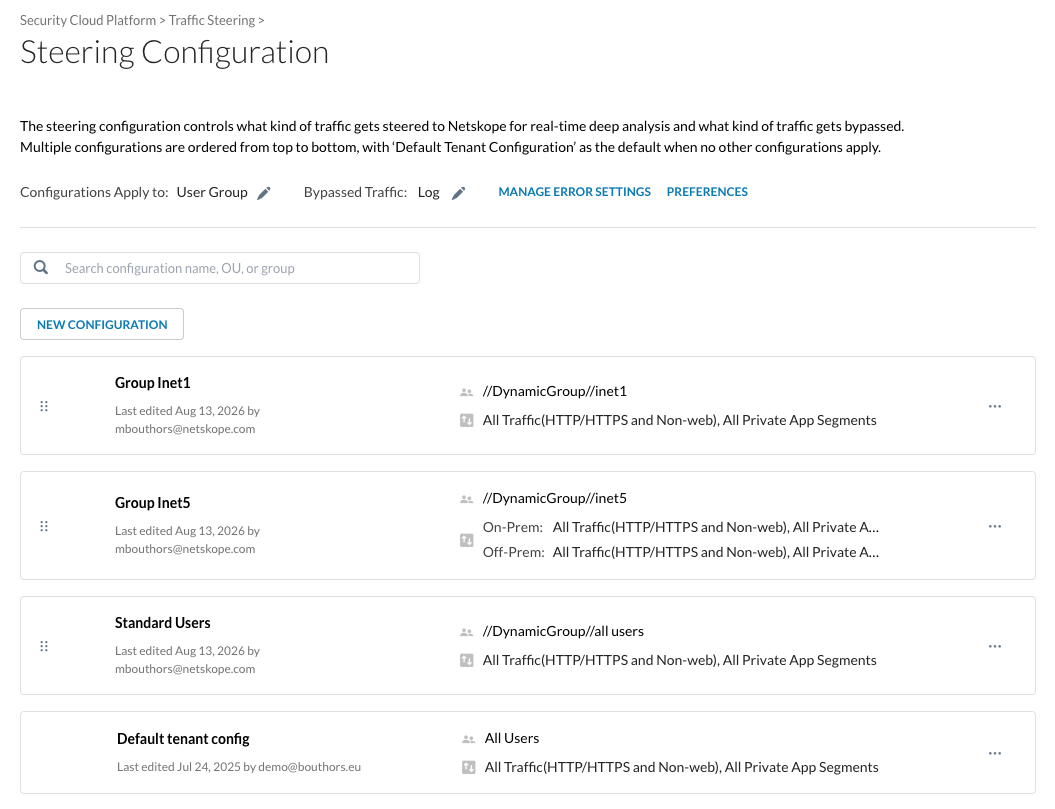
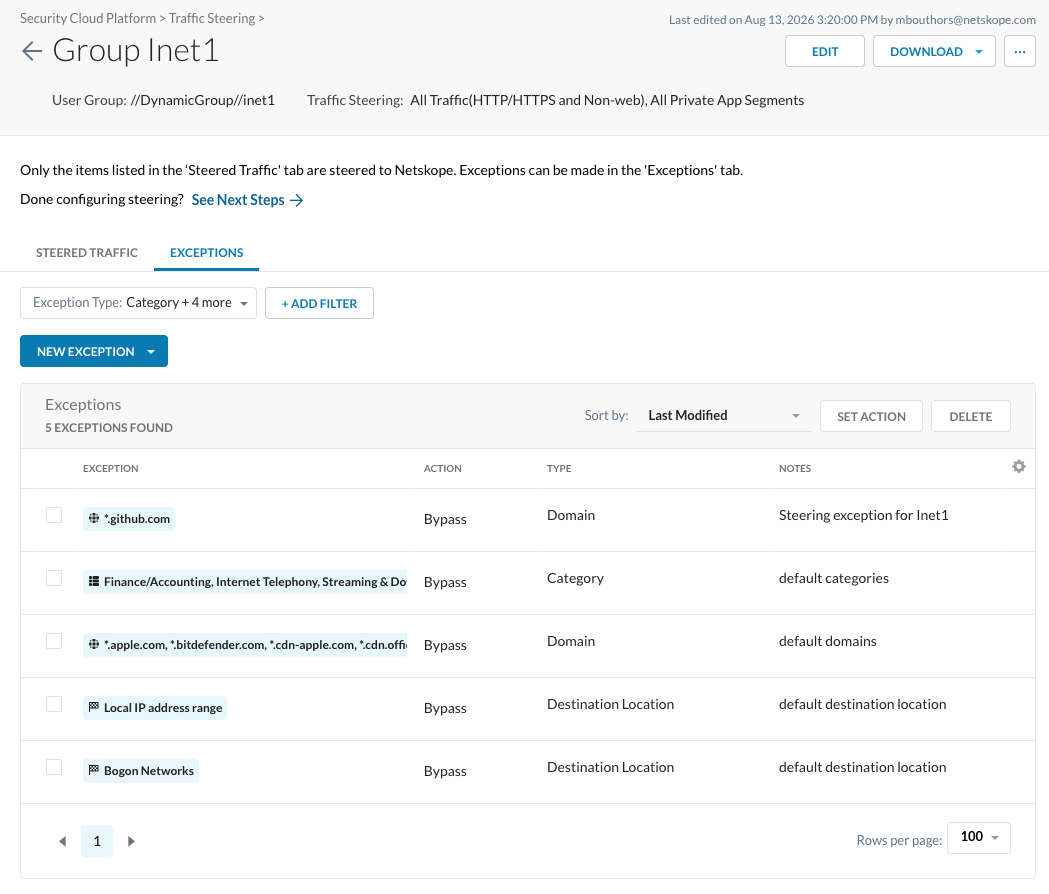
Group Inet1 — five exceptions:
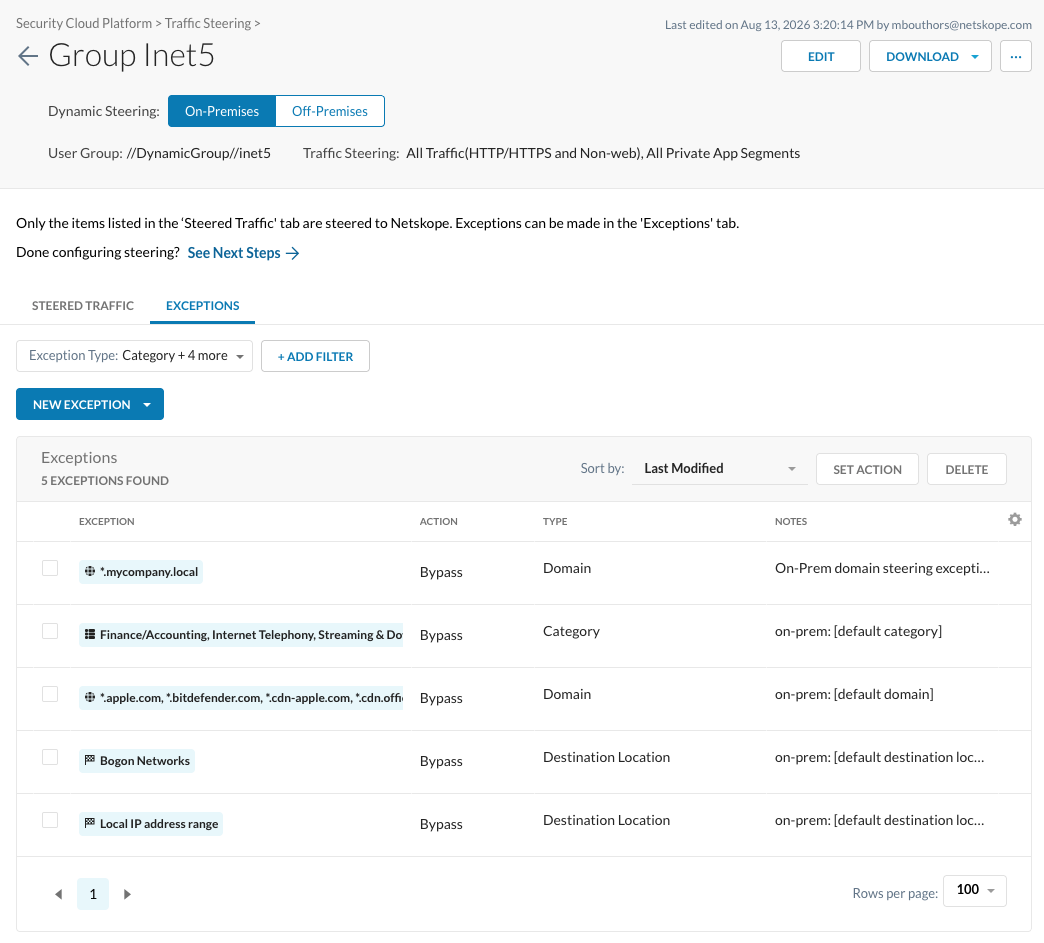
Group Inet5, On-Premises — five exceptions:
Group Inet5, Off-Premises — five exceptions:
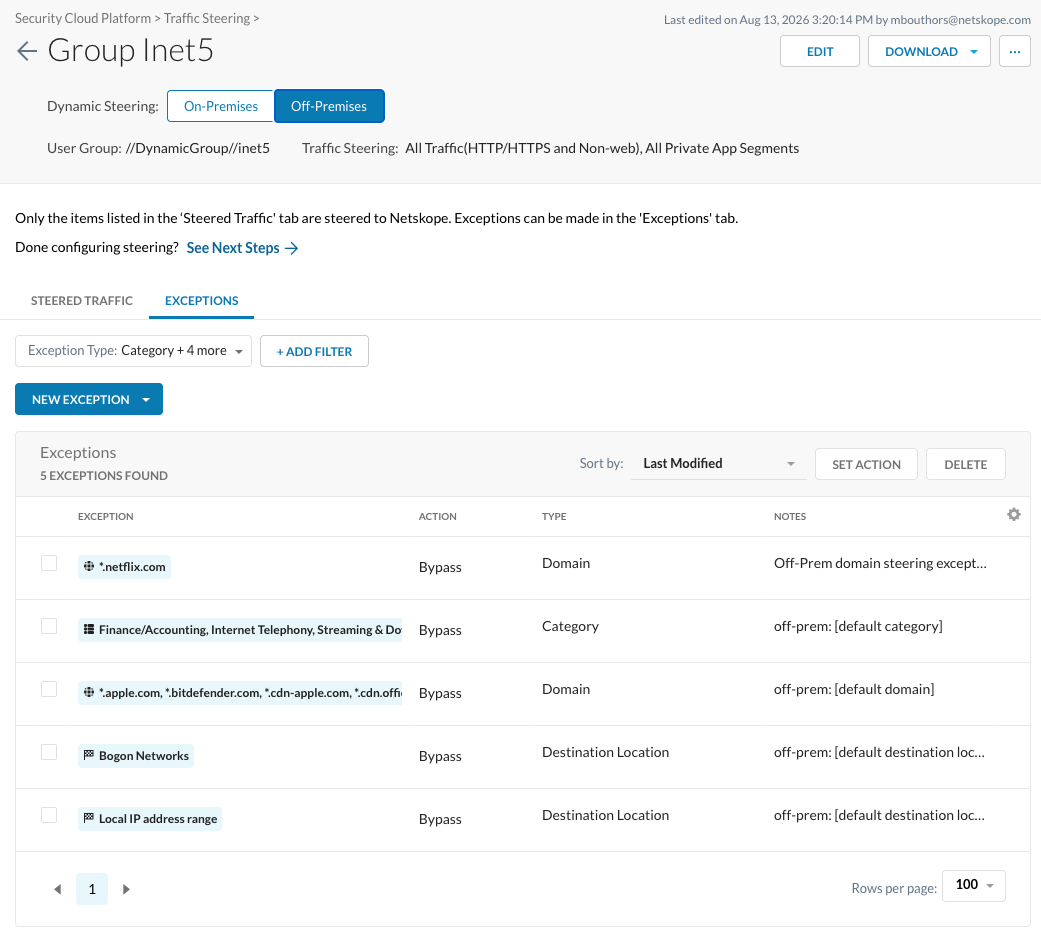
Standard Users — four exceptions:
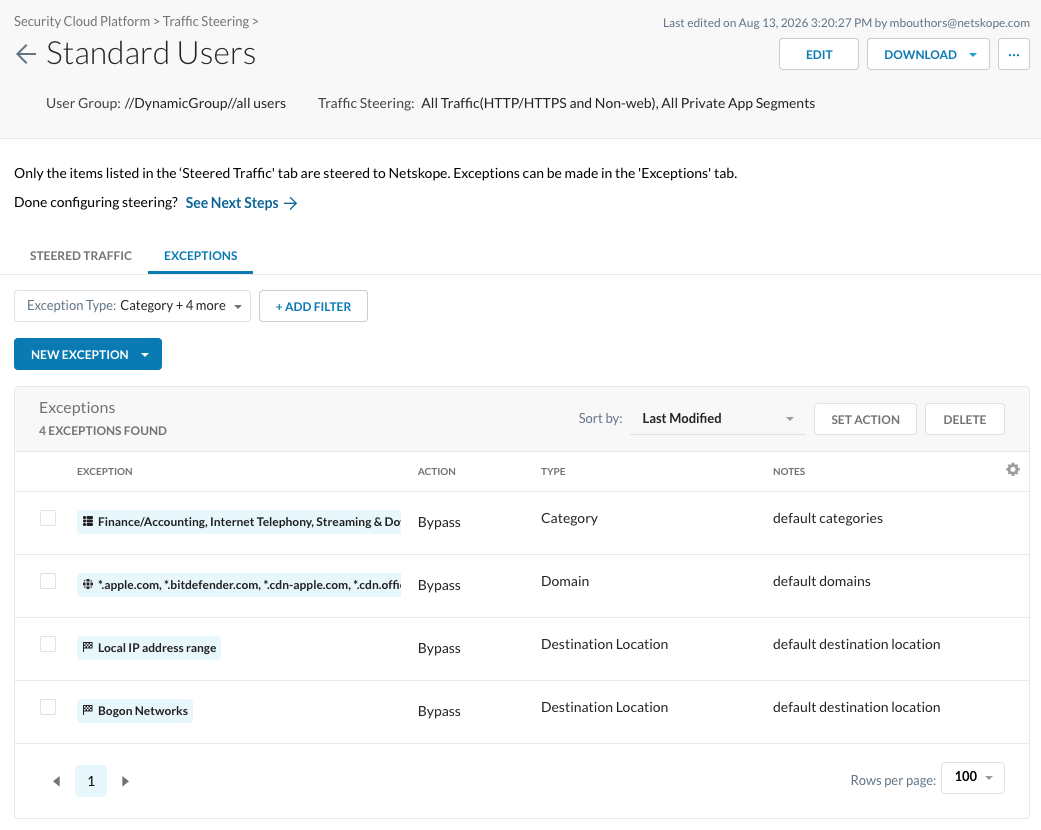
Default tenant config — eight exceptions, covering all five migrated types:
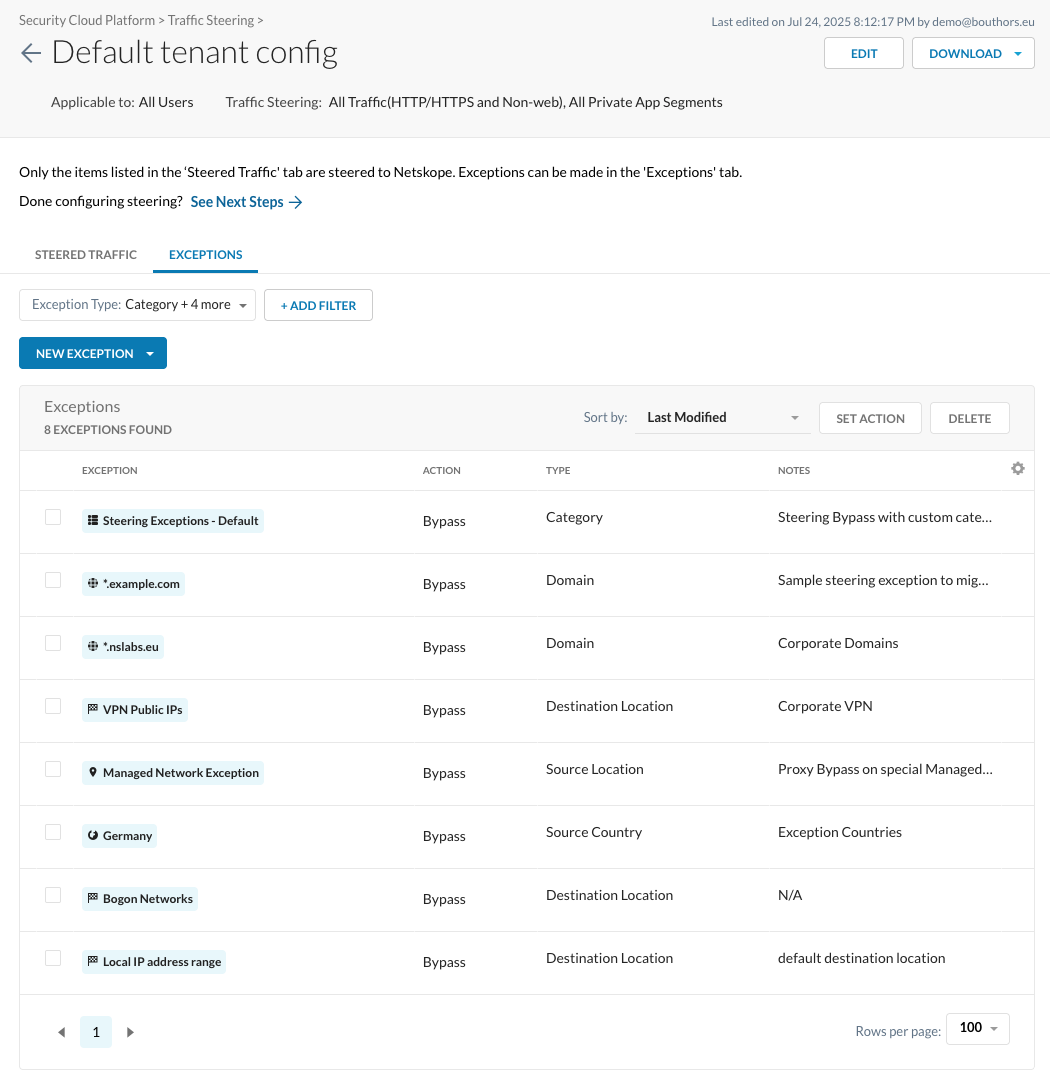
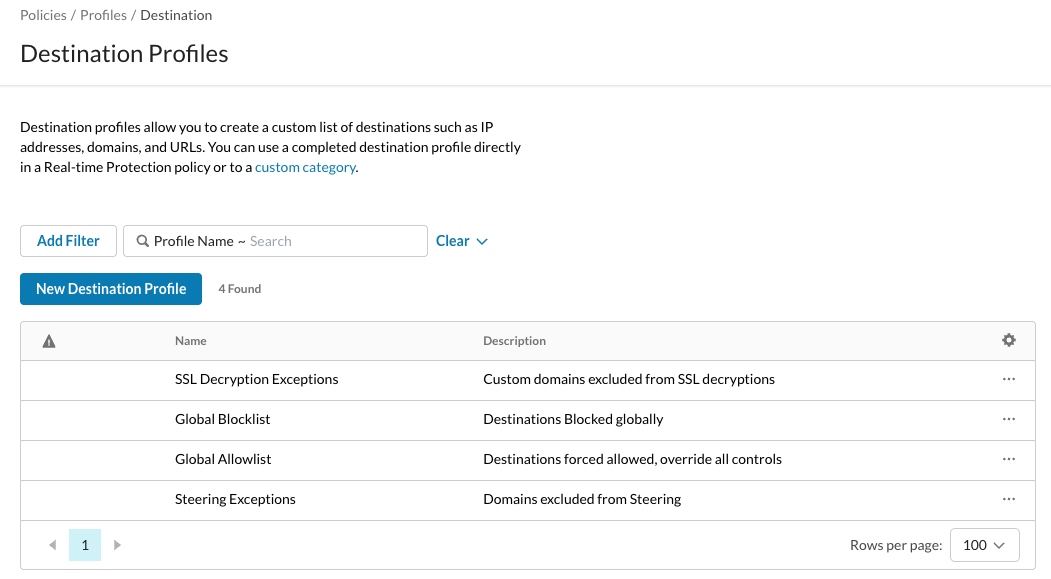
Destination Profiles Before Migration
Four Destination Profiles exist:
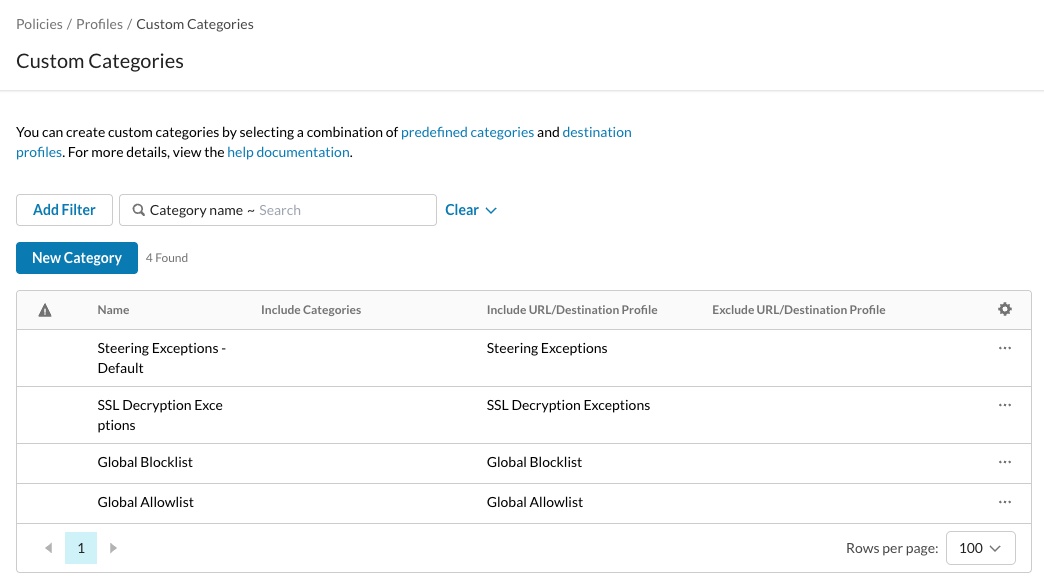
Custom Categories Before Migration
Four Custom Categories exist:
SSL Decryption Policies Before Migration
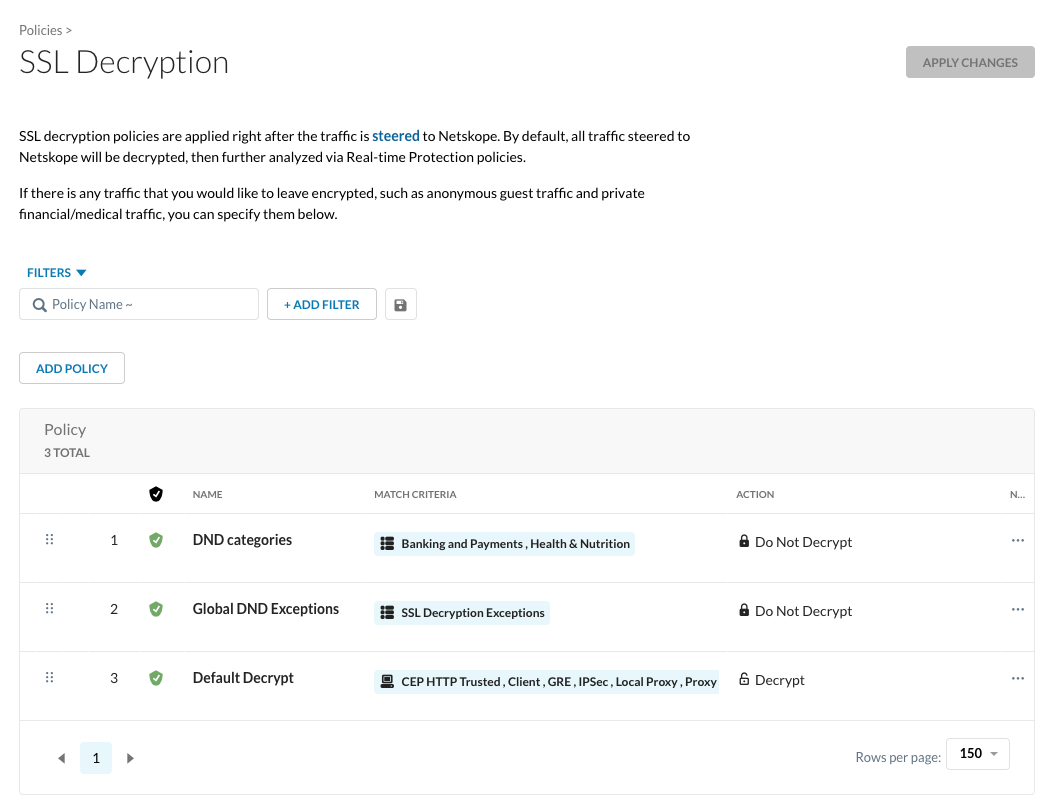
Three SSL Decryption policies exist:
RTP Policies Before Migration
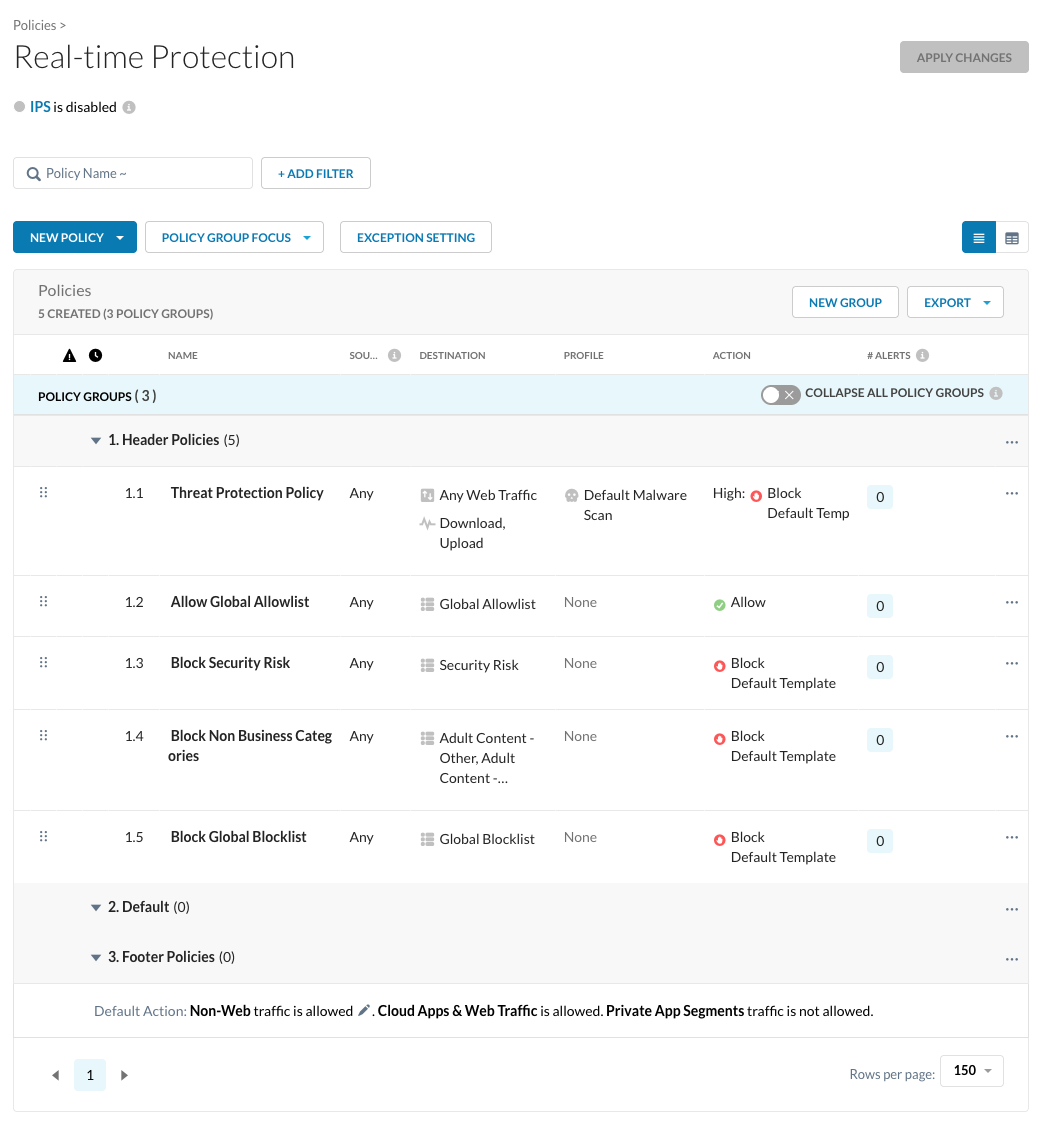
Five policies in the Header Policies group exist:
Transaction Event Before Migration
Netskope Proxy attributes the bypass to the Steering Exception and doesn’t evaluate RTP:
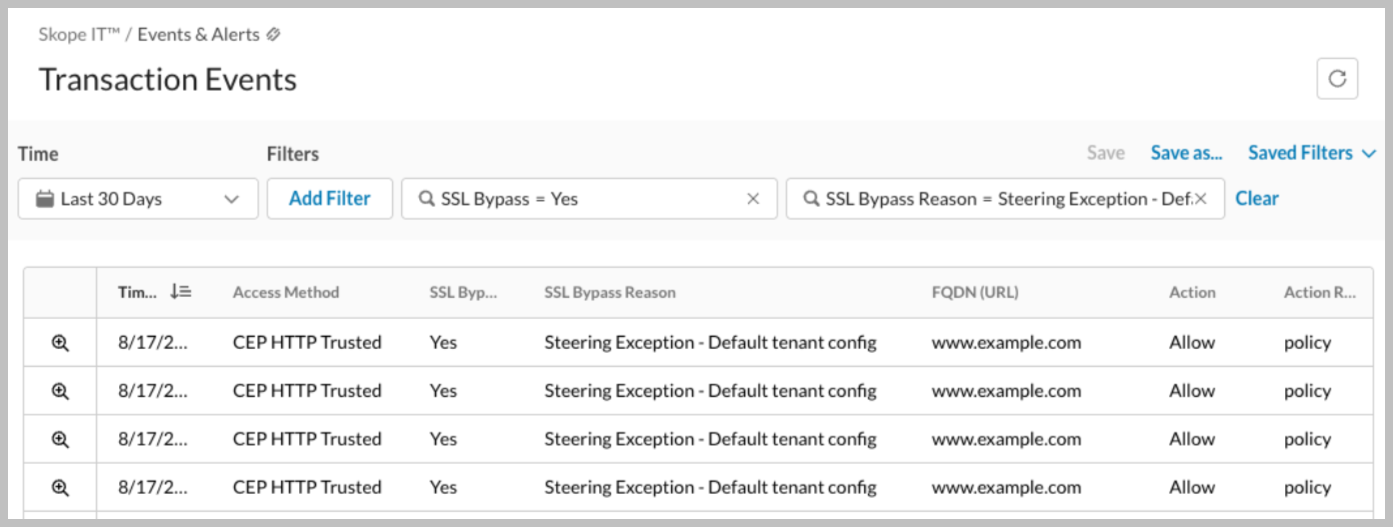
Opening the event shows RTP Action: NotChecked and SSL Bypass Reason: Steering Exception – Default tenant config.
After Migration
All generated configuration names start with the “ns-migrate” prefix.
Audit Logs After Migration
Audit Logs show all the actions the migration performed:
Destination Profiles After Migration
The migration added five Destination Profiles:
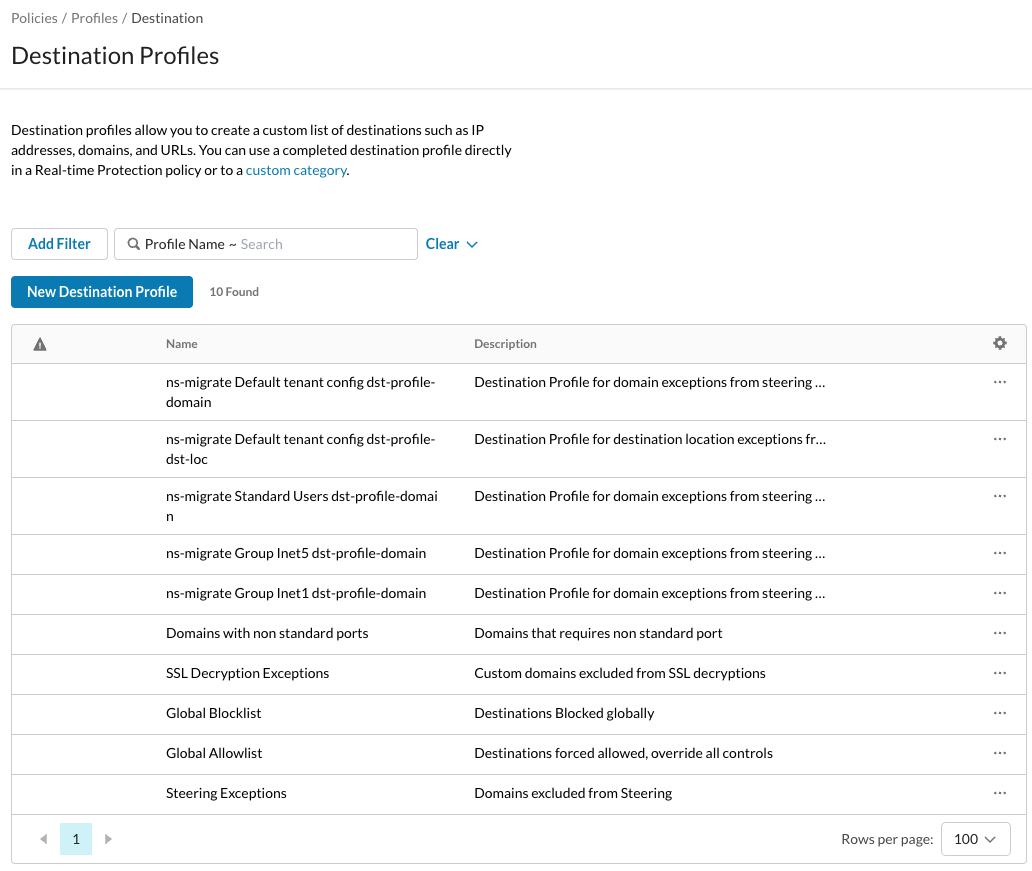
Details of each Destination Profile:
| Destination Profile Name | Description | Content |
|---|---|---|
| ns-migrate Default tenant config dst-profile-domain | Destination Profile for domain exceptions from steering config: Default tenant config | # Corporate Domains *.nslabs.eu # Sample steering exception to migrate *.example.com |
| ns-migrate Default tenant config dst-profile-dst-loc | Destination Profile for destination location exceptions from steering config: Default tenant config | # Corporate VPN #Network Location: VPN Public IPs 1.2.3.4 |
| ns-migrate Standard Users dst-profile-domain | Destination Profile for domain exceptions from steering config: Standard Users | # default domains *.apple.com *.bitdefender.com *.cdn-apple.com ... |
| ns-migrate Group Inet5 dst-profile-domain | Destination Profile for domain exceptions from steering config: Group Inet5 | # off-prem: [default domain] *.apple.com *.bitdefender.com *.cdn-apple.com ... # on-prem: [default domain] *.apple.com *.bitdefender.com *.cdn-apple.com ... # On-Prem domain steering exception *.mycompany.local # Off-Prem domain steering exception *.netflix.com |
| ns-migrate Group Inet1 dst-profile-domain | Destination Profile for domain exceptions from steering config: Group Inet1 | # default domains *.apple.com *.bitdefender.com *.cdn-apple.com ... # Steering exception for Inet1 *.github.com |
Custom Categories After Migration
The generated Custom Categories alongside the pre-existing ones:
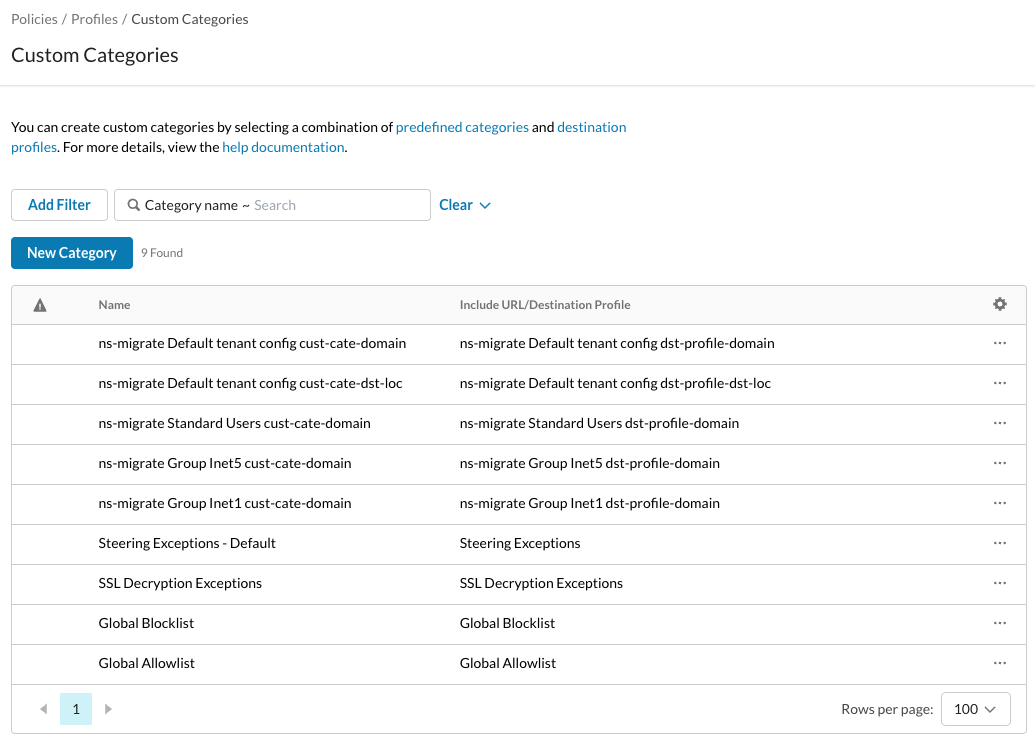
Custom Categories map 1:1 to Destination Profiles.
| Category Name | Include Destination Profile |
|---|---|
| ns-migrate Default tenant config cust-cate-domain | ns-migrate Default tenant config dst-profile-domain |
| ns-migrate Default tenant config cust-cate-dst-loc | ns-migrate Default tenant config dst-profile-dst-loc |
| ns-migrate Standard Users cust-cate-domain | ns-migrate Standard Users dst-profile-domain |
| ns-migrate Group Inet5 cust-cate-domain | ns-migrate Group Inet5 dst-profile-domain |
| ns-migrate Group Inet1 cust-cate-domain | ns-migrate Group Inet1 dst-profile-domain |
SSL Decryption Policies After Migration
The seven generated policies sit at the top of the list, all with Do Not Decrypt:
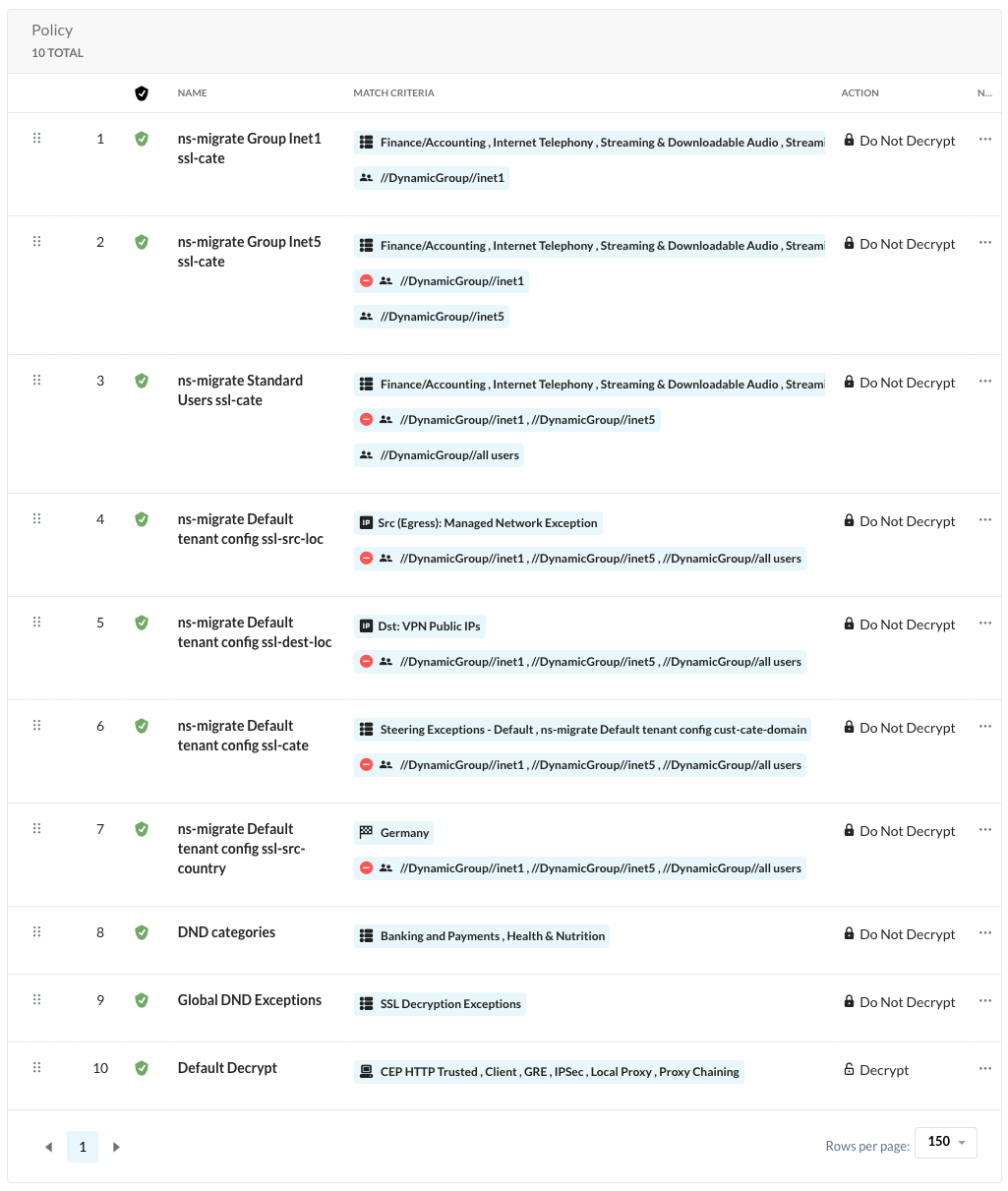
Details of the policies added:
| Policy ID | Name | Description | Group Criteria | Other Criteria | Action |
|---|---|---|---|---|---|
| 1 | ns-migrate Group Inet1 ssl-cate | Migrated from steering exception config: Group Inet1 | Group inet1 | Category:Finance/AccountingInternet TelephonyStreaming & Downloadable AudioStreaming & Downloadable VideoTelecom and Call CenterWeb Conferencingns-migrate Group Inet1 cust-cate-domain | Do Not Decrypt |
| 2 | ns-migrate Group Inet5 ssl-cate | Migrated from steering exception config: Group Inet5 | Group inet5NOT:Group inet1 | Category: Finance/AccountingInternet TelephonyStreaming & Downloadable AudioStreaming & Downloadable VideoTelecom and Call CenterWeb Conferencingns-migrate Group Inet5 cust-cate-domain | Do Not Decrypt |
| 3 | ns-migrate Standard Users ssl-cate | Migrated from steering exception config: Standard Users | Group all usersNOT:Group inet1Group inet5 | Category: Finance/AccountingInternet TelephonyStreaming & Downloadable AudioStreaming & Downloadable VideoTelecom and Call CenterWeb Conferencingns-migrate Standard Users cust-cate-domain | Do Not Decrypt |
| 4 | ns-migrate Default tenant config ssl-src-loc | Migrated from steering exception config: Default tenant config | NOT:Group inet1Group inet5Group all users | Source IP (Egress): Managed Network Exception | Do Not Decrypt |
| 5 | ns-migrate Default tenant config ssl-dest-loc | Migrated from steering exception config: Default tenant config | NOT:Group inet1Group inet5Group all users | Destination IP: VPN Public IPs | Do Not Decrypt |
| 6 | ns-migrate Default tenant config ssl-cate | Migrated from steering exception config: Default tenant config | NOT:Group inet1Group inet5Group all users | Category: Steering Exceptions – Defaultns-migrate Default tenant config cust-cate-domain | Do Not Decrypt |
| 7 | ns-migrate Default tenant config ssl-src-country | Migrated from steering exception config: Default tenant config | NOT:Group inet1Group inet5Group all users | Source Country: Germany | Do Not Decrypt |
RTP Policies After Migration
The migration places the six generated policies at the top of the Header Policies group, ahead of the existing Threat Protection policy:
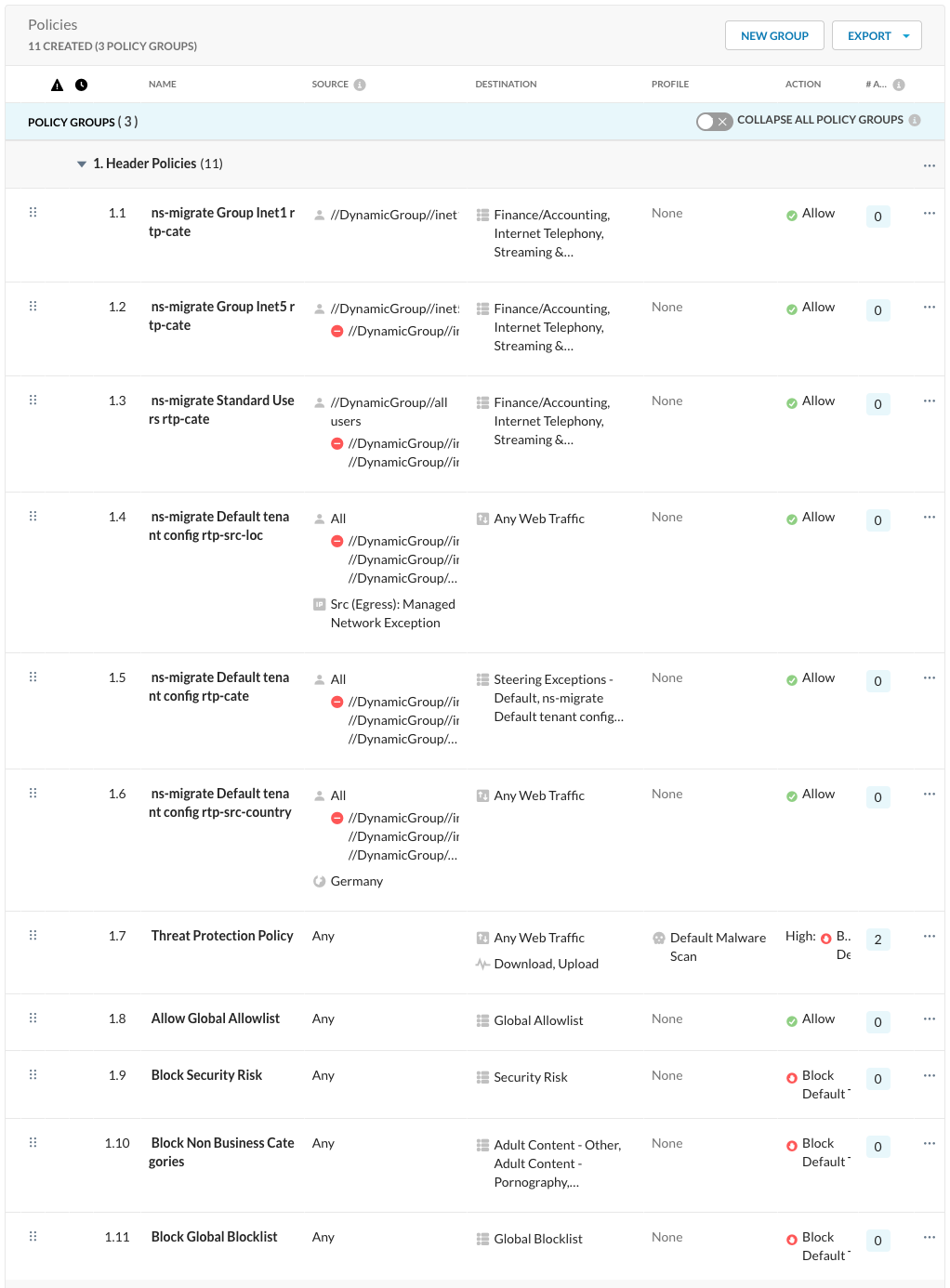
Details of the policies added:
| Policy ID | Name | Description | Group Criteria | Other Criteria | Action |
|---|---|---|---|---|---|
| 1.1 | ns-migrate Group Inet1 rtp-cate | Group inet1 | Category:Finance/AccountingInternet TelephonyStreaming & Downloadable AudioStreaming & Downloadable VideoTelecom and Call CenterWeb Conferencingns-migrate Group Inet1 cust-cate-domain | Allow | |
| 1.2 | ns-migrate Group Inet5 rtp-cate | Group inet5NOT:Group inet1 | Category:Finance/AccountingInternet TelephonyStreaming & Downloadable AudioStreaming & Downloadable VideoTelecom and Call CenterWeb Conferencingns-migrate Group Inet5 cust-cate-domain | Allow | |
| 1.3 | ns-migrate Standard Users rtp-cate | Group all usersNOT:Group inet1Group inet5 | Category:Finance/AccountingInternet TelephonyStreaming & Downloadable AudioStreaming & Downloadable VideoTelecom and Call CenterWeb Conferencingns-migrate Standard Users cust-cate-domain | Allow | |
| 1.4 | ns-migrate Default tenant config rtp-src-loc | NOT:Group inet1Group inet5Group all users | Source IP (Egress): Managed Network Exception | Allow | |
| 1.5 | ns-migrate Default tenant config rtp-cate | NOT:Group inet1Group inet5Group all users | Category:Steering Exceptions – Defaultns-migrate Default tenant config cust-cate-domainns-migrate Default tenant config cust-cate-dst-loc | Allow | |
| 1.6 | ns-migrate Default tenant config rtp-src-country | NOT:Group inet1Group inet5Group all users | Source Country: Germany | Allow |
Steering Configuration After Migration
After migration, Steering Exceptions no longer offer Source Location and Source Country; all other exceptions remain visible:
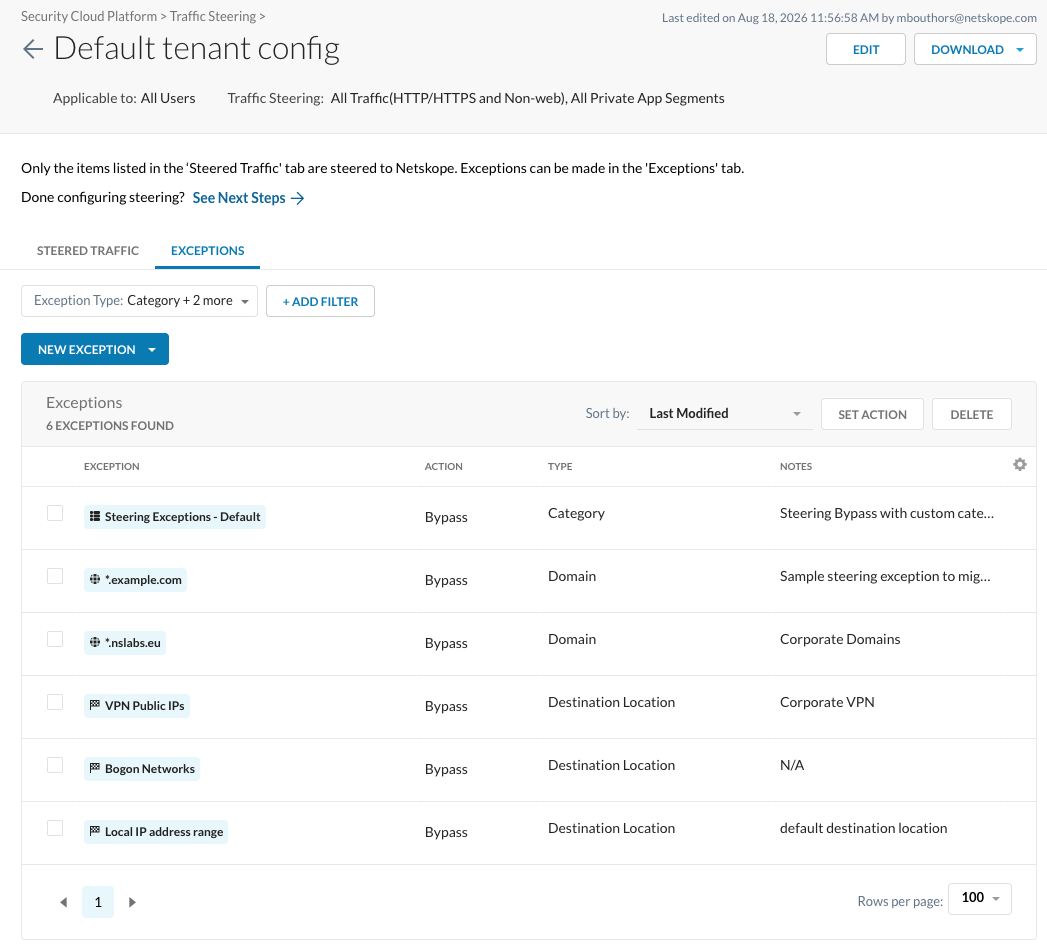
Transaction Event After Migration
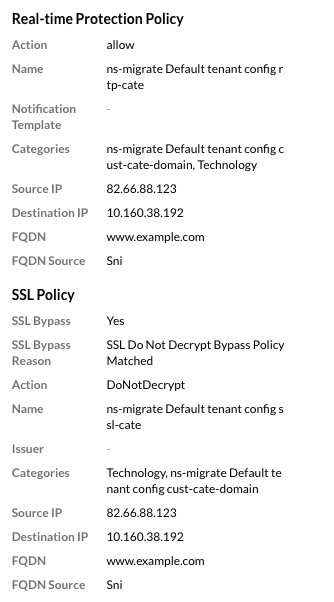
After migration, the new policies replace the Steering Exception bypass:

The bypass reason is now SSL Do Not Decrypt Bypass Policy Matched, naming the generated policies in SSL Policy and Real-time Protection Policy. The Real-time Protection Policy is now Allow instead of NotChecked: