

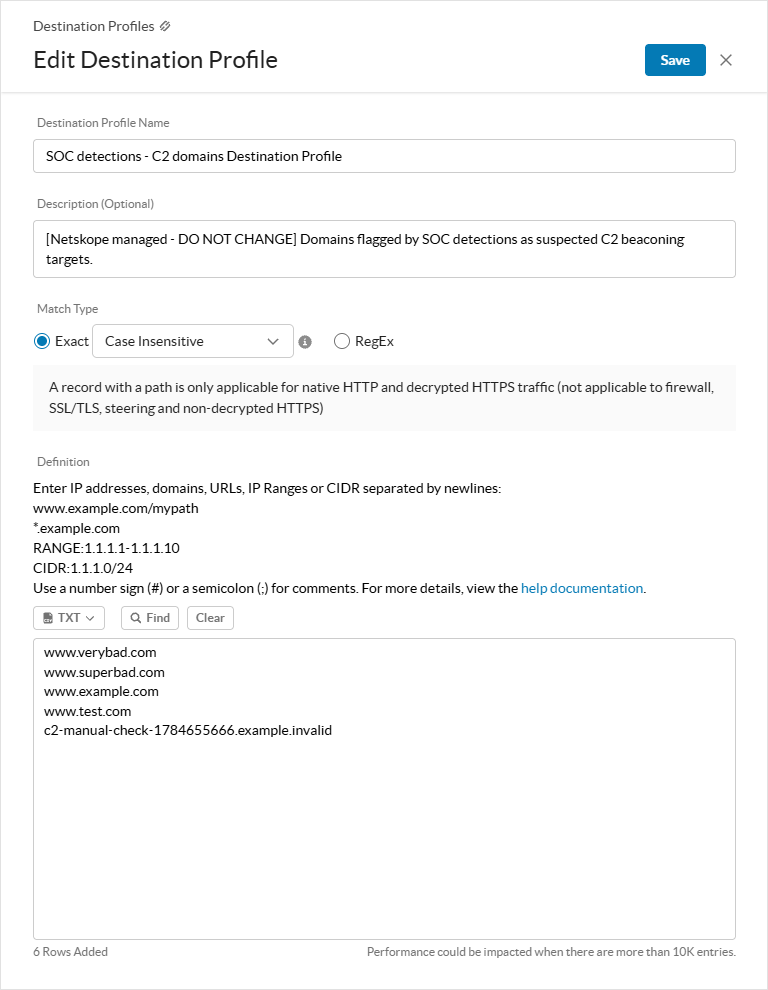
When policies in the SOC detection pack identify a suspicious domain, Netskope automatically adds it to a predefined destination profile called SOC detections – C2 domains Destination Profile.
You can:
-
(Recommended) Copy or clone the predefined destination profile to edit and curate the domains as needed for your inline policies and block them.
-
Add the predefined destination profile to your inline security policies to block these suspicious domains.
Netskope automatically populates the predefined destination profile based on the detections seen in your Netskope tenant.
To edit the predefined destination profile:
-
Go to Policies > Destination.
-
Click SOC detections – C2 domains Destination Profile.

-
In the Edit Destination Profile window, under Definition, you can see the suspicious C2-related IP addresses, domains, URLs, IP Ranges, and CIDR that were discovered based on your organization’s traffic and automatically added for your tenant. You can modify this list accordingly.
-
Click Save.
You can reference this profile in your Real-time Protection Policies.