

This guide explains the network and system configuration for the Versa Operating System (VOS) using Versa Director and the Netskope Security Cloud Platform using Secure Web Gateway (NG-SWG).
This document is for experienced network and system administrators who are responsible for configuring and managing public and private cloud infrastructure. It is presumed that admins are aware of virtualization concepts, technologies, and setup of network devices.
Supported Software Versions
- Versa Director: 20.2.1
- Versa Analytics: 20.2.1
- Versa VOS: 20.2.1
- Netskope R73+
Description
Versa SD-WAN Implementation where internet traffic needs to be sent to Netskope’s Next Generation Secure Web Gateway, this guide captures the configuration of the Versa Operating System (VOS) using Versa Director (Orchestrator), and the required Netskope configurations.
Netskope interoperability with Versa branches can be achieved using Site-to-Site IPSec VPN or GRE from the Versa WAN-Edge device to a Netskope Next Generation Secure Web Gateway (NG-SWG) based on parameters provided by Netskope.
Netskope and Versa support both IKEv2/IPSec and GRE-based tunnels.
Topology
 |
Configuration Information
To establish an IPSec Tunnel, this information is required.
| SWG Parameters | Versa Parameters | Description |
|---|---|---|
| Source Identity | IKE – Peer IP | Peer IP to establish IPsec |
| Primary POP/Secondary POP | Local ID – IP | IKE |
| Primary POP/Secondary POP | Remoted ID – IP Address | |
| PSK | PSK | Pre-shared Key |
| Policy Example: Match HTTP and HTTPS | Match policy for Policy based tunnel | |
| IKE Version V2 | IKE Version V2 |
Creating IPSec Tunnels in Versa Director
- In Versa Director, go to Workflows.
- Expand Template then click Templates.
- Click
 to add a new workflow template.
- In the General, Interfaces, and Routing tabs, configure your basic information.

- Click the Tunnels tab.
- Under Split Tunnels, configure the DIA tunnel from your LAN VR for DNS queries.

- In the Site to Site Tunnels section:
- Enter an appropriate name for the tunnel.
- For the Peer Type, select Unmanaged.
- Select a WAN network.
- Select customer LAN VRF.
- Select + Add New from the Vpn Profile dropdown to configure a new VPN profile.

- In the Create Authentication Profile window:
- Configure appropriate VPN Profile Name.
- Select IKE Version v2.
- Select IKE Transform aes128-sha512.
- Select IPSec Transform esp-aes128-sha512.
- Select No. of tunnels as 2.
- Configure a Peer Auth PSK Key.
- Configure Netskope WAN IP as Peer Auth IP Identifier Identity.
- Select Tunnel Config as Policy Based.

- In Policy Configuration, click to add two new policies:
- Add a policy to accept HTTP traffic, and click OK.

- Add a another policy to accept HTTPS traffic, and click OK.

- Add a policy to accept HTTP traffic, and click OK.
- Click OK.

- Click the green for the tunnel configuration to add the tunnel.

- Configure the Inbound NAT, Services, and Management Servers tabs per your requirements, and clickRecreate to create workflow template.

- Go to Configuration > Templates > Device Templates, and select the template you created in the previous step to enter the template configuration view.

- Go to Services > IPSec > VPN Profiles. Because 2 tunnels were selected, two separate VPN profiles have been created:
Netskope-gw1andNetskope gw2. - Click
Netskope-gw1to edit, and click the IKE tab. - Change the DH group to Diffie-Hellman-Group 14 2048.

- Click the IPSec tab, and change the DH group to Diffie-Hellman-Group 14 2048, and then click OK.

- Click
Netskope-gw2, and modify the Peer IP to that of the backup tunnel endpoint.
- Click the IKE tab, and change the DH group to Diffie-Hellman-Group 14 2048, and Peer Auth Identity to the backup tunnel endpoint.

- Click the IPsec tab, and change the DH group to Diffie-Hellman-Group 14 2048, and then click OK.

- Go to Workflows > Devices > Devices, and click OK to add a device template based on the workflow template created in previous step. Enter the basic information under Basic > Device Service template and tabs.
- Click the Tunnel Information tab, and verify that tunnel information is auto-populated. If some information has to be provided by the user, update the information.

- In the Bind Data section, enter your bind data information, and click OK:
netskope-gw-1_Local_auth_ip_identifier__IKELIdentifieris the Versa source WAN IP for the primary tunnel. Copy the local auth identifier to add it in the Netskope UI.netskope-gw-1_Local_auth_key__IKELKeyis the pre-shared key for the primary tunnel. Copy the auth key to add it in the Netskope UI.netskope-gw-2_Local_auth_ip_identifier__IKELIdentifieris the Versa source WAN IP for backup tunnel. Copy the local auth identifier to add it in the Netskope UI.netskope-gw-2_Local_auth_key__IKELKeyis the pre-shared key for the backup tunnel. Copy the auth key to add it in the Netskope UI.

- Deploy the device workflow configuration and onboard the device.
Verification
- Go to the Monitor tab, select Organization > Devices, and select a device.
- Click Services > IPSEC > IPSEC Security Association, and select
netskope-gw1from the drop-down list to verify the primary tunnel status.
- Select
netskope-gw-2to verify backup tunnel status.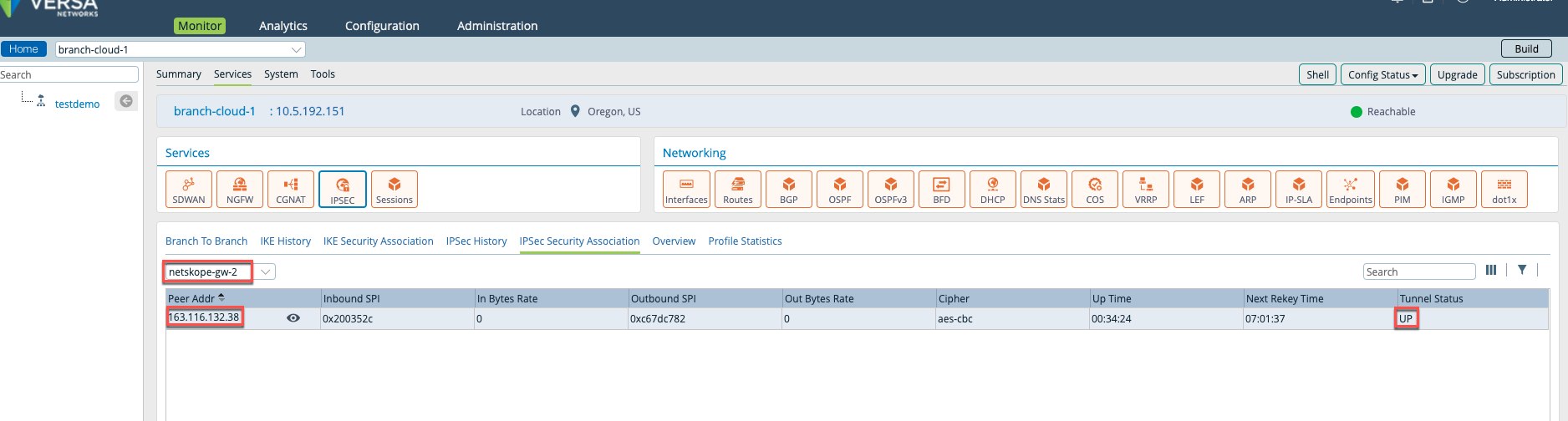
Creating IPSec Tunnels in Netskope
To create the IPSec VPN tunnels for Versa Director in the Netskope UI, see Creating an IPSec Site.
To view the IPSec tunnel information, click the tunnel name. If the IPSec tunnel configuration is successful, the Status will be Up.

Sample CLI Configuration
Below is a sample CLI IPSec tunnel configuration for Versa Director:
admin@branch-cloud-1-cli> show configuration orgs org-services testdemo ipsec vpn-profile netskope-gw-1
vpn-type                site-to-site;
local-auth-info {
    auth-type psk;
    id-type   ip;
    key       1234;
    id-string 54.189.122.221;
}
local {
    interface-name vni-0/0.0;
}
routing-instance        AWS-INTERNET-Transport-VR;
tunnel-routing-instance testdemo-LAN-VR;
tunnel-initiate         automatic;
ipsec {
    fragmentation pre-fragmentation;
    force-nat-t   disable;
    transform     esp-aes128-sha512;
    mode          tunnel;
    pfs-group     mod14;
    anti-replay   enable;
    life {
        duration 28800;
    }
}
ike {
    version     v2;
    group       mod14;
    transform   aes128-sha512;
    lifetime    28800;
    dpd-timeout 30;
}
peer-auth-info {
    auth-type psk;
    id-type   ip;
    key       1234;
    id-string 8.36.116.114;
}
peer {
    address [ 8.36.116.114 ];
}
rule http {
    protocol any;
    src {
        inet 0.0.0.0/0;
        port 0;
        }
        dst {
            inet 0.0.0.0/0;
            port 80;
        }
    }
    rule https {
        protocol any;
        src {
            inet 0.0.0.0/0;
            port 0;
        }
        dst {
            inet 0.0.0.0/0;
            port 443;
        }
    }
    [ok][2020-05-15 11:58:36]
    admin@branch-cloud-1-cli>
admin@branch-cloud-1-cli> show configuration orgs org-services testdemo ipsec vpn-profile netskope-gw-2
vpn-type                site-to-site;
local-auth-info {
    auth-type psk;
    id-type   ip;
    key       1234;
    id-string 54.189.122.221;
}
local {
    interface-name vni-0/0.0;
}
routing-instance        AWS-INTERNET-Transport-VR;
tunnel-routing-instance testdemo-LAN-VR;
tunnel-initiate         automatic;
ipsec {
    fragmentation pre-fragmentation;
    force-nat-t   disable;
    transform     esp-aes128-sha512;
    mode          tunnel;
    pfs-group     mod14;
    anti-replay   enable;
    life {
        duration 28800;
    }
}
ike {
    version     v2;
    group       mod14;
    transform   aes128-sha512;
    lifetime    28800;
    dpd-timeout 30;
    }
    peer-auth-info {
        auth-type psk;
        id-type   ip;
        key       1234;
        id-string 163.116.132.38;
    }
    peer {
        address [ 163.116.132.38 ];
    }
    rule http {
        protocol any;
        src {
            inet 0.0.0.0/0;
            port 0;
        }
        dst {
            inet 0.0.0.0/0;
            port 80;
        }
    }
    [ok][2020-05-15 11:59:09]
    admin@branch-cloud-1-cli>
Display SET View
admin@branch-cloud-1-cli> show configuration orgs org-services testdemo ipsec vpn-profile netskope-gw-1 | display set

set orgs org-services testdemo ipsec vpn-profile netskope-gw-1 vpn-type site-to-site

set orgs org-services testdemo ipsec vpn-profile netskope-gw-1 local-auth-info

set orgs org-services testdemo ipsec vpn-profile netskope-gw-1 local-auth-info auth-type psk

set orgs org-services testdemo ipsec vpn-profile netskope-gw-1 local-auth-info id-type ip

set orgs org-services testdemo ipsec vpn-profile netskope-gw-1 local-auth-info key 1234

set orgs org-services testdemo ipsec vpn-profile netskope-gw-1 local-auth-info id-string 54.189.122.221

set orgs org-services testdemo ipsec vpn-profile netskope-gw-1 local

set orgs org-services testdemo ipsec vpn-profile netskope-gw-1 local interface-name vni-0/0.0

set orgs org-services testdemo ipsec vpn-profile netskope-gw-1 routing-instance AWS-INTERNET-Transport-VR

set orgs org-services testdemo ipsec vpn-profile netskope-gw-1 tunnel-routing-instance testdemo-LAN-VR

set orgs org-services testdemo ipsec vpn-profile netskope-gw-1 tunnel-initiate automatic

set orgs org-services testdemo ipsec vpn-profile netskope-gw-1 ipsec fragmentation pre-fragmentation

set orgs org-services testdemo ipsec vpn-profile netskope-gw-1 ipsec force-nat-t disable

set orgs org-services testdemo ipsec vpn-profile netskope-gw-1 ipsec transform esp-aes128-sha512

set orgs org-services testdemo ipsec vpn-profile netskope-gw-1 ipsec mode tunnel

set orgs org-services testdemo ipsec vpn-profile netskope-gw-1 ipsec pfs-group mod14

set orgs org-services testdemo ipsec vpn-profile netskope-gw-1 ipsec anti-replay enable

set orgs org-services testdemo ipsec vpn-profile netskope-gw-1 ipsec life duration 28800

set orgs org-services testdemo ipsec vpn-profile netskope-gw-1 ike version v2

set orgs org-services testdemo ipsec vpn-profile netskope-gw-1 ike group mod14

set orgs org-services testdemo ipsec vpn-profile netskope-gw-1 ike transform aes128-sha512

set orgs org-services testdemo ipsec vpn-profile netskope-gw-1 ike lifetime 28800

set orgs org-services testdemo ipsec vpn-profile netskope-gw-1 ike dpd-timeout 30

set orgs org-services testdemo ipsec vpn-profile netskope-gw-1 peer-auth-info

set orgs org-services testdemo ipsec vpn-profile netskope-gw-1 peer-auth-info auth-type psk

set orgs org-services testdemo ipsec vpn-profile netskope-gw-1 peer-auth-info id-type ip

set orgs org-services testdemo ipsec vpn-profile netskope-gw-1 peer-auth-info key 1234

set orgs org-services testdemo ipsec vpn-profile netskope-gw-1 peer-auth-info id-string 8.36.116.114

set orgs org-services testdemo ipsec vpn-profile netskope-gw-1 peer

set orgs org-services testdemo ipsec vpn-profile netskope-gw-1 peer address [ 8.36.116.114 ]

set orgs org-services testdemo ipsec vpn-profile netskope-gw-1 rule http protocol any

set orgs org-services testdemo ipsec vpn-profile netskope-gw-1 rule http src inet 0.0.0.0/0

set orgs org-services testdemo ipsec vpn-profile netskope-gw-1 rule http src port 0

set orgs org-services testdemo ipsec vpn-profile netskope-gw-1 rule http dst inet 0.0.0.0/0

set orgs org-services testdemo ipsec vpn-profile netskope-gw-1 rule http dst port 80

set orgs org-services testdemo ipsec vpn-profile netskope-gw-1 rule https protocol any

set orgs org-services testdemo ipsec vpn-profile netskope-gw-1 rule https src inet 0.0.0.0/0

set orgs org-services testdemo ipsec vpn-profile netskope-gw-1 rule https src port 0

set orgs org-services testdemo ipsec vpn-profile netskope-gw-1 rule https dst inet 0.0.0.0/0

set orgs org-services testdemo ipsec vpn-profile netskope-gw-1 rule https dst port 443

[ok][2020-05-15 11:59:45]
admin@branch-cloud-1-cli> show configuration orgs org-services testdemo ipsec vpn-profile netskope-gw-2 | display set

set orgs org-services testdemo ipsec vpn-profile netskope-gw-2 vpn-type site-to-site

set orgs org-services testdemo ipsec vpn-profile netskope-gw-2 local-auth-info

set orgs org-services testdemo ipsec vpn-profile netskope-gw-2 local-auth-info auth-type psk

set orgs org-services testdemo ipsec vpn-profile netskope-gw-2 local-auth-info id-type ip

set orgs org-services testdemo ipsec vpn-profile netskope-gw-2 local-auth-info key 1234

set orgs org-services testdemo ipsec vpn-profile netskope-gw-2 local-auth-info id-string 54.189.122.221

set orgs org-services testdemo ipsec vpn-profile netskope-gw-2 local

set orgs org-services testdemo ipsec vpn-profile netskope-gw-2 local interface-name vni-0/0.0

set orgs org-services testdemo ipsec vpn-profile netskope-gw-2 routing-instance AWS-INTERNET-Transport-VR

set orgs org-services testdemo ipsec vpn-profile netskope-gw-2 tunnel-routing-instance testdemo-LAN-VR

set orgs org-services testdemo ipsec vpn-profile netskope-gw-2 tunnel-initiate automatic

set orgs org-services testdemo ipsec vpn-profile netskope-gw-2 ipsec fragmentation pre-fragmentation

set orgs org-services testdemo ipsec vpn-profile netskope-gw-2 ipsec force-nat-t disable

set orgs org-services testdemo ipsec vpn-profile netskope-gw-2 ipsec transform esp-aes128-sha512

set orgs org-services testdemo ipsec vpn-profile netskope-gw-2 ipsec mode tunnel

set orgs org-services testdemo ipsec vpn-profile netskope-gw-2 ipsec pfs-group mod14

set orgs org-services testdemo ipsec vpn-profile netskope-gw-2 ipsec anti-replay enable

set orgs org-services testdemo ipsec vpn-profile netskope-gw-2 ipsec life duration 28800

set orgs org-services testdemo ipsec vpn-profile netskope-gw-2 ike version v2

set orgs org-services testdemo ipsec vpn-profile netskope-gw-2 ike group mod14

set orgs org-services testdemo ipsec vpn-profile netskope-gw-2 ike transform aes128-sha512

set orgs org-services testdemo ipsec vpn-profile netskope-gw-2 ike lifetime 28800

set orgs org-services testdemo ipsec vpn-profile netskope-gw-2 ike dpd-timeout 30

set orgs org-services testdemo ipsec vpn-profile netskope-gw-2 peer-auth-info

set orgs org-services testdemo ipsec vpn-profile netskope-gw-2 peer-auth-info auth-type psk

set orgs org-services testdemo ipsec vpn-profile netskope-gw-2 peer-auth-info id-type ip

set orgs org-services testdemo ipsec vpn-profile netskope-gw-2 peer-auth-info key 1234

set orgs org-services testdemo ipsec vpn-profile netskope-gw-2 peer-auth-info id-string 163.116.132.38

set orgs org-services testdemo ipsec vpn-profile netskope-gw-2 peer

set orgs org-services testdemo ipsec vpn-profile netskope-gw-2 peer address [ 163.116.132.38 ]

set orgs org-services testdemo ipsec vpn-profile netskope-gw-2 rule http protocol any

set orgs org-services testdemo ipsec vpn-profile netskope-gw-2 rule http src inet 0.0.0.0/0

set orgs org-services testdemo ipsec vpn-profile netskope-gw-2 rule http src port 0

set orgs org-services testdemo ipsec vpn-profile netskope-gw-2 rule http dst inet 0.0.0.0/0

set orgs org-services testdemo ipsec vpn-profile netskope-gw-2 rule http dst port 80

[ok][2020-05-15 11:59:51]

admin@branch-cloud-1-cli>