

The Access Findings page is the central location for monitoring and managing access reviews across your connected Microsoft 365 SharePoint environment. It provides administrators with a real-time view of every site that has triggered an access review policy — whether currently open, resolved by the site owner, or remediated automatically by Netskope.
Each entry on the Access Findings page represents an access review for a SharePoint site whose exposure matched a configured policy. Administrators use this page to track remediation progress, intervene when a site owner has not acted, close reviews with a business justification, and maintain an audit trail of all resolved reviews.
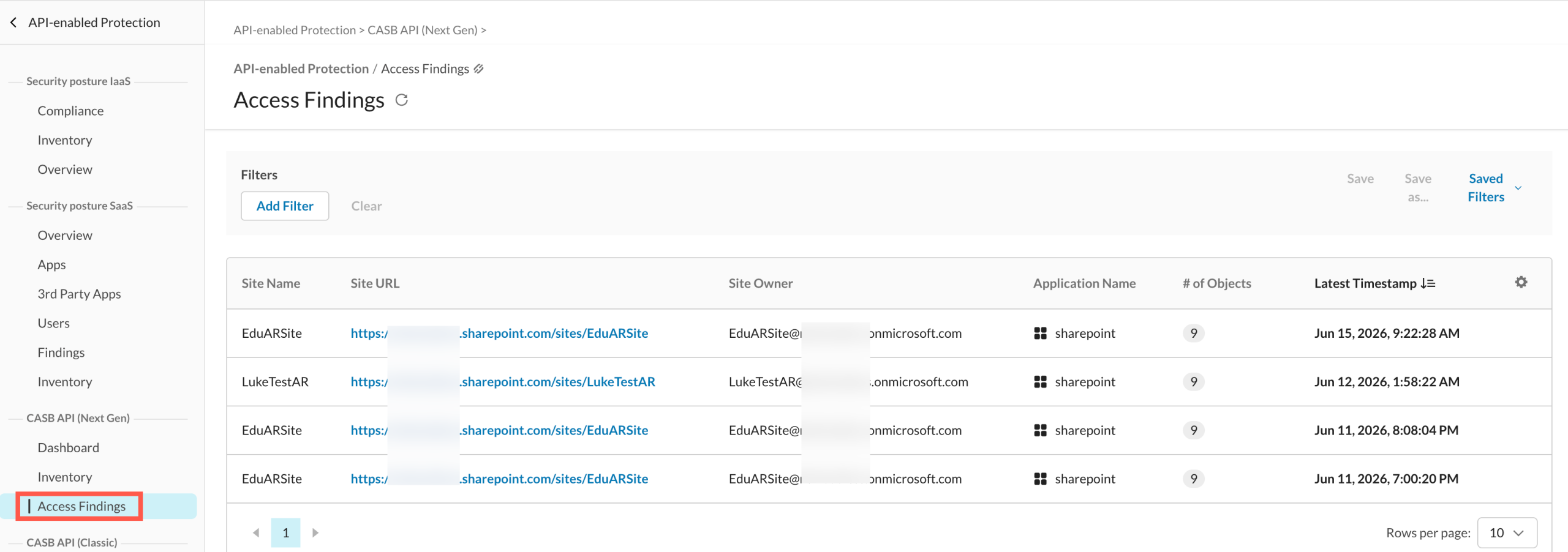
Navigate to API-enabled Protection > CASB API (Next Gen) > Access Findings.
The page displays the following information for each access review:
| Field | Description |
|---|---|
| Site Name | Name of the top-level SharePoint site. |
| Site URL | URL of the top-level SharePoint site. |
| Site Owner | Name of the top-level SharePoint site owner. |
| Application Name | Name of the SaaS app name. |
| # of Objects | Number of files and directories in the site. Click to open Inventory pre-filtered to that site. |
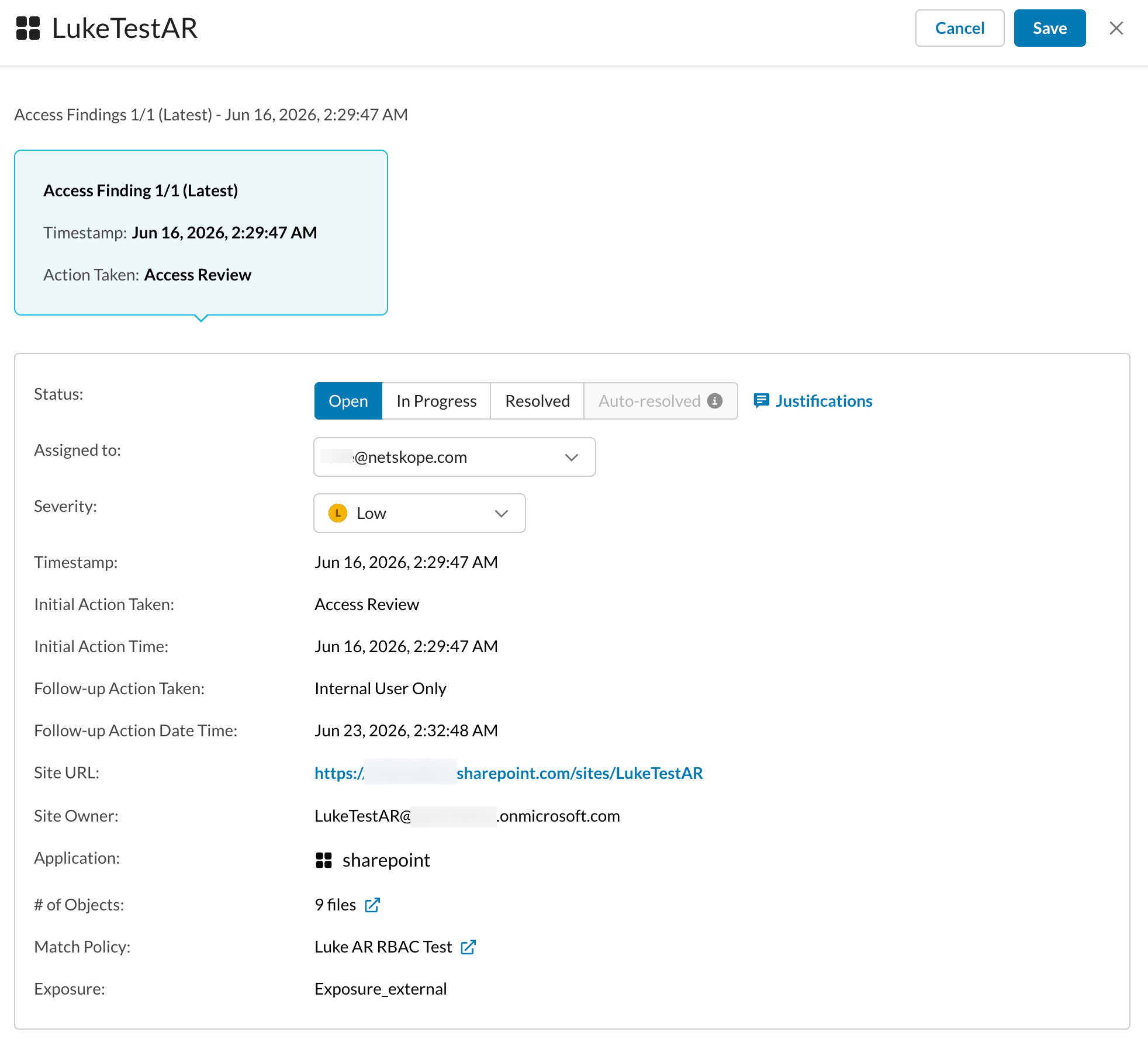
| Exposure | The currently calculated exposure of the Sharepoint site. |
| Latest Timestamp | Date and time of reporting the access review. |
| Status | The lifecycle status of the access review. |
| Severity | The severity level of the access review. |
| Match Policy | The matching policy that triggered the creation of the access review. |
| Assignee | The email of the user currently assigned the access review. |
Where a site has both an open review and a history of closed reviews, the open review is displayed by default. Expand the entry to view the full review history for that site.
Monitor Access Reviews
Use the Access Findings page to track the status of open access reviews and review the history of resolved ones.
-
Navigate to API-enabled Protection > CASB API (Next Gen) > Access Findings.
-
Use the available filters to narrow results — for example, by site name, site URL, site owner, or application.
-
Click an access review to view its details.
Close Access Reviews
Administrators can close an open access review manually — with or without a justification.
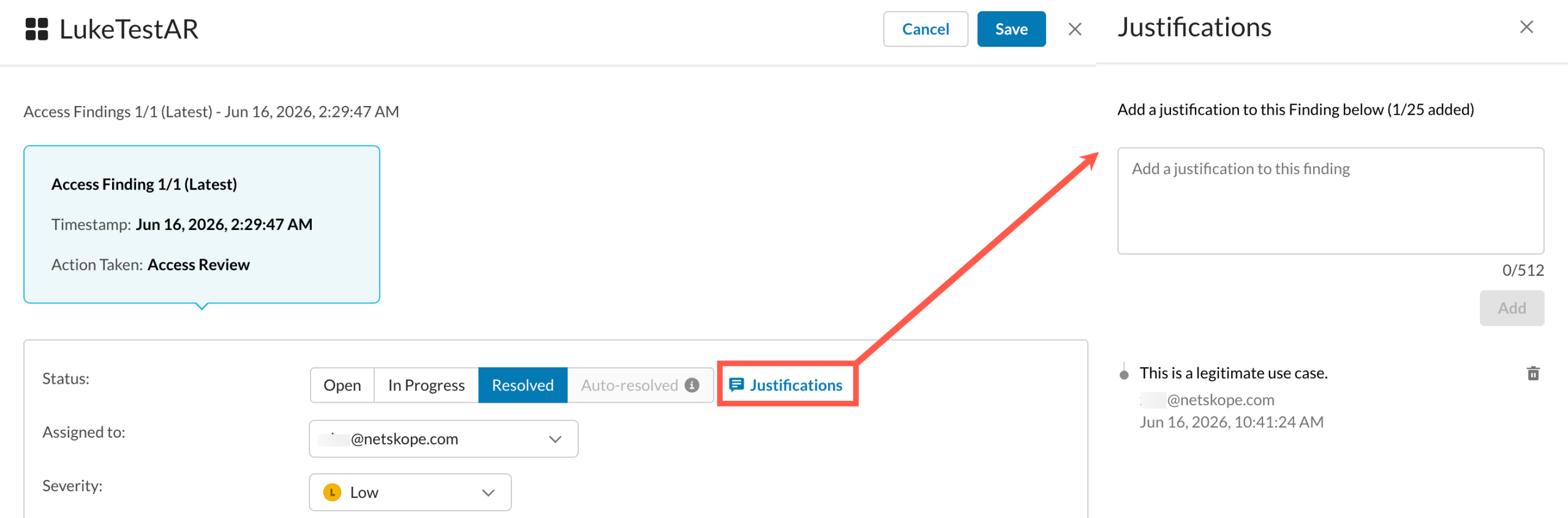
Closing with a justification is appropriate when the site’s exposure is intentional and acceptable — for example, a site shared externally with a customer under an NDA. Netskope stores the justification in the review record for audit purposes and excludes the site from future access reviews for that policy.
Closing without a justification marks the review as resolved but does not create an exclusion. If the site’s exposure still matches the policy at the next evaluation, a new access review may be opened.
To close an access review:
-
Navigate to API-enabled Protection > CASB API (Next Gen) > Access Findings.
-
Click the access review you want to close.
-
(Optional) Enter a justification.
-
Click Resolve and Save.
Closed access reviews cannot be reopened. If a site’s exposure changes again after closure and matches the policy, a new access review is created — unless a justification-based exclusion is in effect.
Understand Resolution States
Access reviews are closed in one of two states.
Resolved applies when:
-
The site owner fixed the exposure directly in SharePoint and Netskope detected the change.
-
An administrator closed the review manually (with or without a justification).
Auto-Resolved applies when:
-
The configured follow-up action ran and changed the site’s exposure so that it no longer matches the policy.
The Resolved Outside Netskope field in a closed review indicates whether remediation was performed outside of Netskope (by the site owner) or by a Netskope follow-up action.
Important Points to Note
-
For Microsoft SharePoint connectors provisioned before January 2025, support for
revoke organization-wide sharing&revoke public sharingdeferred remediation actions requires regranting the SharePoint connector so that it receives the required MicrosoftSites.FullControl.Allpermission. Regranting the connector does not trigger a full relist or rescan of SharePoint content. -
One open review per site and policy combination. Only one access review can be open for a given site and policy combination at a time. Policies will not create a duplicate review for a site if one is already open. If there are two access review policies, two access reviews can be opened per site.
-
Closed reviews cannot be reopened. Once an access review is closed, it cannot be reopened. If the site’s exposure changes again and matches the policy, a new review is opened — except where a justification-based exclusion is in effect.
-
Alert follow-up action does not close reviews. If the follow-up action is set to Alert, Netskope sends a notification but the access review remains open. Manual closure or customer action to modify the site exposure is required.
-
Follow-up action and policy alignment. The follow-up action auto-closes an access review only if it changes the site’s exposure so that it no longer matches the policy. If the follow-up action does not resolve the policy match, the access review remains open.
-
Policy deletion does not close reviews. Deleting an Access Review policy does not automatically close any open reviews created by that policy. Administrators must close orphaned reviews manually.