

This document explains how to configure the OpenCTI v1.0.0 plugin for the Threat Exchange module of the Netskope Cloud Exchange platform. This plugin fetches the indicators of type URL, IPv4, Domain, IPv6, SHA256 and MD5 from the Observables on OpenCTI. This plugin supports sharing MD5, SHA256, URL, Domain, IPv4 and IPv6 to Observables on the OpenCTI platform using the Add Indicators action.
Prerequisites
To complete this configuration, you need:
- A Netskope tenant (or multiple, for example, production and development/test instances).
- A Netskope Cloud Exchange tenant with the Tenant plugin and Threat Exchange plugin already configured.
- OpenCTI platform credentials (Base URL and API Key).
- Connectivity to the following host: OpenCTI Base URL.
Plugin Scope
The OpenCTI plugin fetches IoCs of the type URL, IPv4, Domain, IPv6, SHA256 and MD5 from the Observables on OpenCTI. This plugin supports sharing MD5, SHA256, URL, Domain, IPv4 and IPv6 to Observables on the OpenCTI platform using the Add Indicators action.
Type of data supported
| Fetched Indicator Types | Shared Indicator Types |
|---|---|
| URL, IPv4, Domain, IPv6, SHA256 and MD5 | URL, IPv4, Domain, IPv6, SHA256 and MD5 |
Mappings
Pull Mappings
| Netskope CE Fields | OpenCTI Fields |
|---|---|
| value | pattern |
| type | extract from stix pattern |
| expiresAt | valid_until |
| firstSeen | created |
| lastSeen | modified |
| reputation | confidence |
| tags | objectLabel |
| comments | description,decay score,valid_until |
| extendedInformation | indicator url |
Push Mappings
| Netskope CE Fields | OpenCTI Fields |
|---|---|
| Name | Name parameter from add indicators actions |
| Score | Input parameter from add indicators actions |
| value | pattern |
| type | x_opencti_main_observable_type |
| reputation | confidence |
| Tag | netskope-ce Netskope CE | <Source Plugin Name> |
Permissions
In OpenCTI, in order for a user to effectively manage indicators, such as pushing, pulling, and deleting indicators, they must be assigned to a specific user group with the necessary roles and capabilities. These roles ensure the user has the required access and permissions to perform these tasks.
The key roles and capabilities required for indicator management are:
- Create / Update Knowledge: This role enables the user to create and update knowledge articles and objects, ensuring they can modify indicators as necessary.
- Delete Knowledge: The user must have the capability to delete knowledge or indicators, which is necessary when removing outdated or incorrect data.
- Manage Taxonomies: The ability to manage and organize taxonomies is important for the user to effectively categorize and maintain indicators.
By assigning these roles to a user, they will have full capability to manage indicators within OpenCTI, including pushing, pulling, and deleting, while also ensuring proper governance and organization of knowledge and taxonomies.
API Details
List of APIs Used
| API Endpoint | Method | Use Case |
|---|---|---|
| https://<opencti_baseurl>/graphql | POST | Validate Credentials |
| https://<opencti_baseurl>/graphql | POST | Pull Indicators |
| https://<opencti_baseurl>/graphql | POST | Push Indicators |
| https://<opencti_baseurl>/graphql | POST | Delete Indicators |
Get Bearer Token
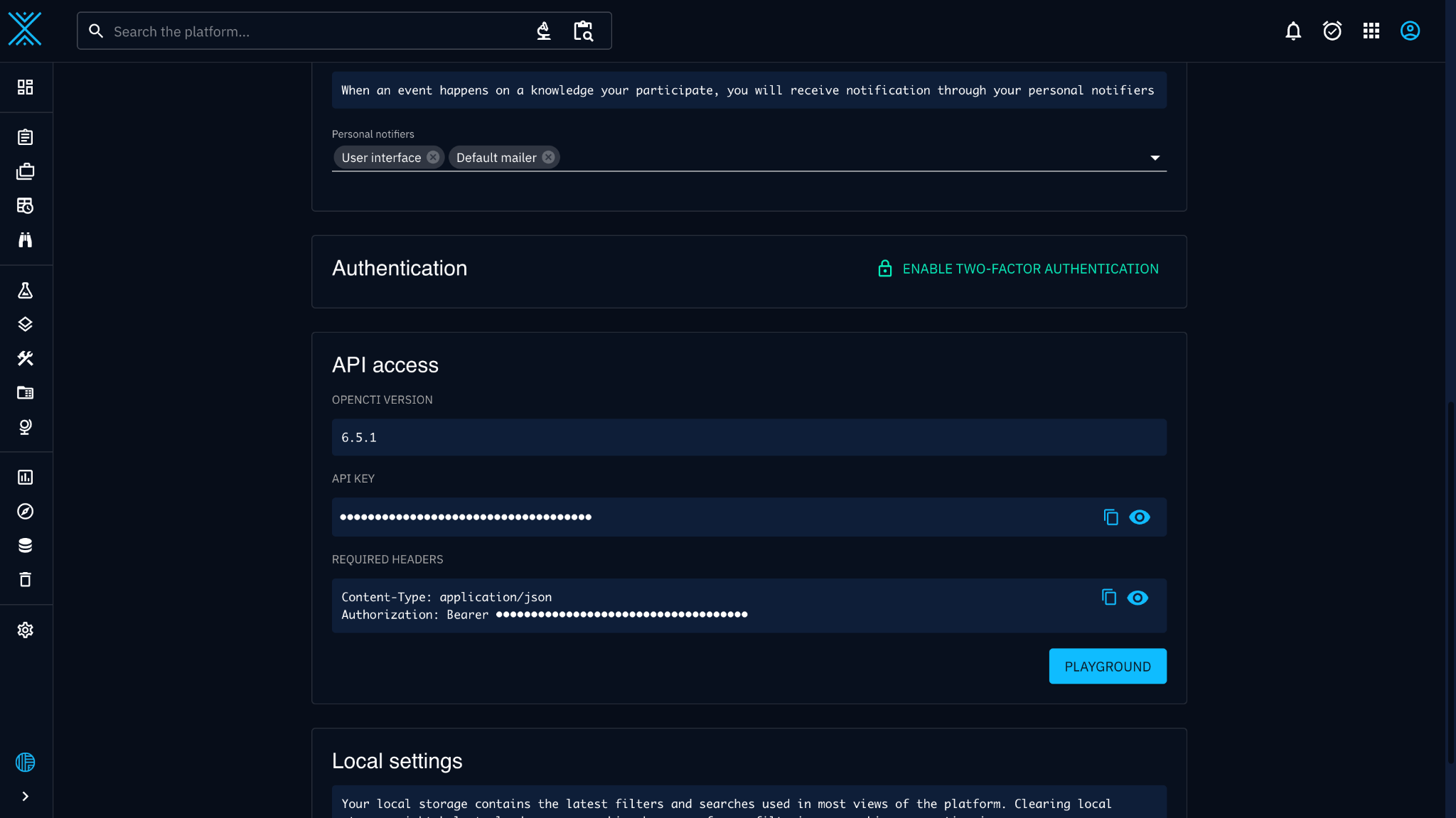
API Key – Api key is available on the Profile page of OpenCTI UI.
Validate Credentials
API Endpoint: https://<base_url>/graphql
Method: POST
Request Headers
| Key | Value |
|---|---|
| Authorization | Bearer <API Key> |
| User-Agent | netskope-ce-5.1.1-cte-opencti-v1.0.0 |
Sample API Response
{
  "data": {
    "indicators": {
      "edges": [
        {
          "node": {
            "id": "08a0e35b-5749-4d08-80a9-9f9e8abf1cd4",
            "entity_type": "Indicator",
            "name": "testing 4",
            "pattern_type": "stix",
            "pattern": "[file:hashes.'MD5' = '932e07750da28e9d40350ffc840ffb8a']",
            "valid_from": "2025-03-13T07:10:55.521Z",
            "valid_until": "2026-03-15T04:22:42.820Z",
            "revoked": false,
            "x_opencti_score": 90,
            "description": null,
            "x_opencti_main_observable_type": "StixFile",
            "created": "2025-03-06T05:17:37.578Z",
            "modified": "2025-03-13T07:12:35.933Z",
            "confidence": 40,
            "draftVersion": null,
            "createdBy": null,
            "objectMarking": [],
            "objectLabel": [
              {
                "id": "1226a53e-962a-4c11-a0d1-c4cdfc9d0729",
                "value": "performance",
                "color": "#b8e986"
              }
            ],
            "creators": [
              {
                "id": "88ec0c6a-13ce-5e39-b486-354fe4a7084f",
                "name": "admin"
              }
            ],
            "__typename": "Indicator"
          },
          "cursor": "WzAuMDAwMDAzMjY0MjAyOSwiaW5kaWNhdG9yLS0wMDAxNWU0OC05YWRmLTU1YjItODlhZi05OTQzZGE5YjBkZDYiXQ=="
        }
      ],
      "pageInfo": {
        "endCursor": "WzAuMDAwMDAzMjY0MjAyOSwiaW5kaWNhdG9yLS0wMDAxNWU0OC05YWRmLTU1YjItODlhZi05OTQzZGE5YjBkZDYiXQ==",
        "hasNextPage": true,
        "globalCount": 123134
      }
    }
  }
}
Pull Indicators :
API Endpoint: https://<base_url>/graphql
Method: POST
Request Headers
| Key | Value |
|---|---|
| Authorization | Bearer <API Key> |
| User-Agent | netskope-ce-5.1.1-cte-opencti-v1.0.0 |
Graphql Query
query Indicators(
      $filters: FilterGroup,
      $search: String,
      $first: Int,
      $after: ID,
      $orderBy: IndicatorsOrdering,
      $orderMode: OrderingMode
    ) {
      indicators(
        filters: $filters,
        search: $search,
        first: $first,
        after: $after,
        orderBy: $orderBy,
        orderMode: $orderMode
      ) {
        edges {
          node {
            id
            objectLabel {
              id
              value
              color
            }
            revoked
            confidence
            created
            modified
            pattern_type
            pattern
            description
            indicator_types
            valid_from
            valid_until
            x_opencti_score
            x_opencti_main_observable_type
          }
        }
        pageInfo {
          startCursor
          endCursor
          hasNextPage
          hasPreviousPage
          globalCount
        }
      }
    }
Graphql Variable
 {
    "first": 1000,
    "after": None,
    "orderBy": "modified",
    "orderMode": "desc",
    "filters": {
        "mode": "and",
        "filters": [
            {
                "key": "entity_type",
                "values": ["Indicator"],
                "operator": "eq",
                "mode": "or",
            },
            {
                "key": "pattern_type",
                "values": ["stix"],
                "operator": "eq",
                "mode": "or",
            },
        ],
        "filterGroups": [{"mode": "and", "filters": [], "filterGroups": []}],
    },
}
Sample API Response:
{
  "data": {
    "indicators": {
      "edges": [
        {
          "node": {
            "id": "08a0e35b-5749-4d08-80a9-9f9e8abf1cd4",
            "entity_type": "Indicator",
            "name": "testing 4",
            "pattern_type": "stix",
            "pattern": "[file:hashes.'MD5' = '932e07750da28e9d40350ffc840ffb8a']",
            "valid_from": "2025-03-13T07:10:55.521Z",
            "valid_until": "2026-03-15T04:22:42.820Z",
            "revoked": false,
            "x_opencti_score": 90,
            "description": null,
            "x_opencti_main_observable_type": "StixFile",
            "created": "2025-03-06T05:17:37.578Z",
            "modified": "2025-03-13T07:12:35.933Z",
            "confidence": 40,
            "draftVersion": null,
            "createdBy": null,
            "objectMarking": [],
            "objectLabel": [
              {
                "id": "1226a53e-962a-4c11-a0d1-c4cdfc9d0729",
                "value": "performance",
                "color": "#b8e986"
              }
            ],
            "creators": [
              {
                "id": "88ec0c6a-13ce-5e39-b486-354fe4a7084f",
                "name": "admin"
              }
            ],
            "__typename": "Indicator"
          },
          "cursor": "WzAuMDAwMDAzMjY0MjAyOSwiaW5kaWNhdG9yLS0wMDAxNWU0OC05YWRmLTU1YjItODlhZi05OTQzZGE5YjBkZDYiXQ=="
        }
      ],
      "pageInfo": {
        "endCursor": "WzAuMDAwMDAzMjY0MjAyOSwiaW5kaWNhdG9yLS0wMDAxNWU0OC05YWRmLTU1YjItODlhZi05OTQzZGE5YjBkZDYiXQ==",
        "hasNextPage": true,
        "globalCount": 123134
      }
    }
  }
}
Push Indicators:
API Endpoint: https://<base_url>/graphql
Method: POST
Request Headers
| Key | Value |
|---|---|
| Authorization | Bearer <API Key> |
| User-Agent | netskope-ce-5.1.1-cte-opencti-v1.0.0 |
Graphql Mutation
mutation IndicatorCreationMutation($input: IndicatorAddInput!) {
      indicatorAdd(input: $input) {
        id
        standard_id
        name
        description
        entity_type
        parent_types
        pattern_type
        valid_from
        valid_until
        x_opencti_score
        x_opencti_main_observable_type
        created
        confidence
        x_opencti_detection
        createdBy {
          id
          name
          entity_type
        }
        objectMarking {
          id
          definition_type
          definition
          x_opencti_order
          x_opencti_color
        }
        objectLabel {
          id
          value
          color
        }
        creators {
          id
          name
        }
      }
    }
Graphql Variable
{
    "input": {
        "name": "Testing 5",
        "description": "",
        "indicator_types": [],
        "pattern": "[file:hashes.'MD5' = '932e07750da28e9d40350ffc840ffb8a']",
        "pattern_type": "stix",
        "createObservables": false,
        "x_opencti_main_observable_type": "StixFile",
        "x_mitre_platforms": [],
        "confidence": 100,
        "x_opencti_score": 9,
        "x_opencti_detection": false,
        "valid_from": null,
        "valid_until": null,
        "killChainPhases": [],
        "objectMarking": [],
        "objectLabel": [],
        "externalReferences": []
    }
}
Sample API Response
{
    "data": {
        "indicatorAdd": {
            "id": "08a0e35b-5749-4d08-80a9-9f9e8abf1cd4",
            "standard_id": "indicator--00015e48-9adf-55b2-89af-9943da9b0dd6",
            "name": "Testing 5",
            "representative": {
                "main": "Testing 5"
            },
            "description": null,
            "entity_type": "Indicator",
            "parent_types": [
                "Basic-Object",
                "Stix-Object",
                "Stix-Core-Object",
                "Stix-Domain-Object"
            ],
            "pattern_type": "stix",
            "valid_from": "2025-03-17T05:28:52.077Z",
            "valid_until": "2025-03-17T05:28:52.077Z",
            "x_opencti_score": 9,
            "x_opencti_main_observable_type": "StixFile",
            "created": "2025-03-06T05:17:37.578Z",
            "confidence": 100,
            "draftVersion": null,
            "createdBy": null,
            "objectMarking": [],
            "objectLabel": [
                {
                    "id": "1226a53e-962a-4c11-a0d1-c4cdfc9d0729",
                    "value": "performance",
                    "color": "#b8e986"
                }
            ],
            "creators": [
                {
                    "id": "88ec0c6a-13ce-5e39-b486-354fe4a7084f",
                    "name": "admin"
                }
            ]
        }
    }
}
Delete Indicators:
API Endpoint: https://<base_url>/graphql
Method: POST
Request Headers
| Key | Value |
|---|---|
| Authorization | Bearer <API Key> |
| User-Agent | netskope-ce-5.1.1-cte-opencti-v1.0.0 |
Graphql Mutation
mutation DataTableToolBarListTaskAddMutation(
  $input: ListTaskAddInput!
) {
  listTaskAdd(input: $input) {
    __typename
    id
    type
  }
}
Graphql Variable
{
    "input": {
        "ids": [
            "08a0e35b-5749-4d08-80a9-9f9e8abf1cd4",
            "e816325c-cf42-4174-9f52-af0ccfe807f4",
            "140d2dbc-fff0-424d-ab4d-ee7ce2c2bbf6"
        ],
        "actions": [
            {
                "type": "DELETE",
                "context": null,
                "containerId": null
            }
        ],
        "scope": "KNOWLEDGE"
    }
}
Sample API Response
{
    "data": {
        "listTaskAdd": {
            "__typename": "ListTask",
            "id": "2227261e-e342-44d7-a3b6-4a0dcb8ec92e",
            "type": "LIST"
        }
    }
}
Performance Matrix
Below is the performance reading conducted for fetching and pushing 100K IOCs in each plugin lifecycle on a Large CE instance with the below specifications.
| Description | Specification |
|---|---|
| Stack details | Size: Large RAM: 32 GB CPU: 16 Cores |
| Indicators fetched from OpenCTI | ~15K per minute |
| Indicators shared to OpenCTI | ~100 per minute |
User Agent
netskope-ce-5.1.1-cte-opencti-v1.0.0
Workflow
- Get your OpenCTI API Key.
- Configure the OpenCTI plugin.
- Add a Business Rule for OpenCTI.
- Add Sharing for OpenCTI.
- Validate the plugin.
Click play to watch a video:
Get your OpenCTI API Key
To configure the OpenCTI plugin, we will need your API key. Follow these steps to get your API Key.
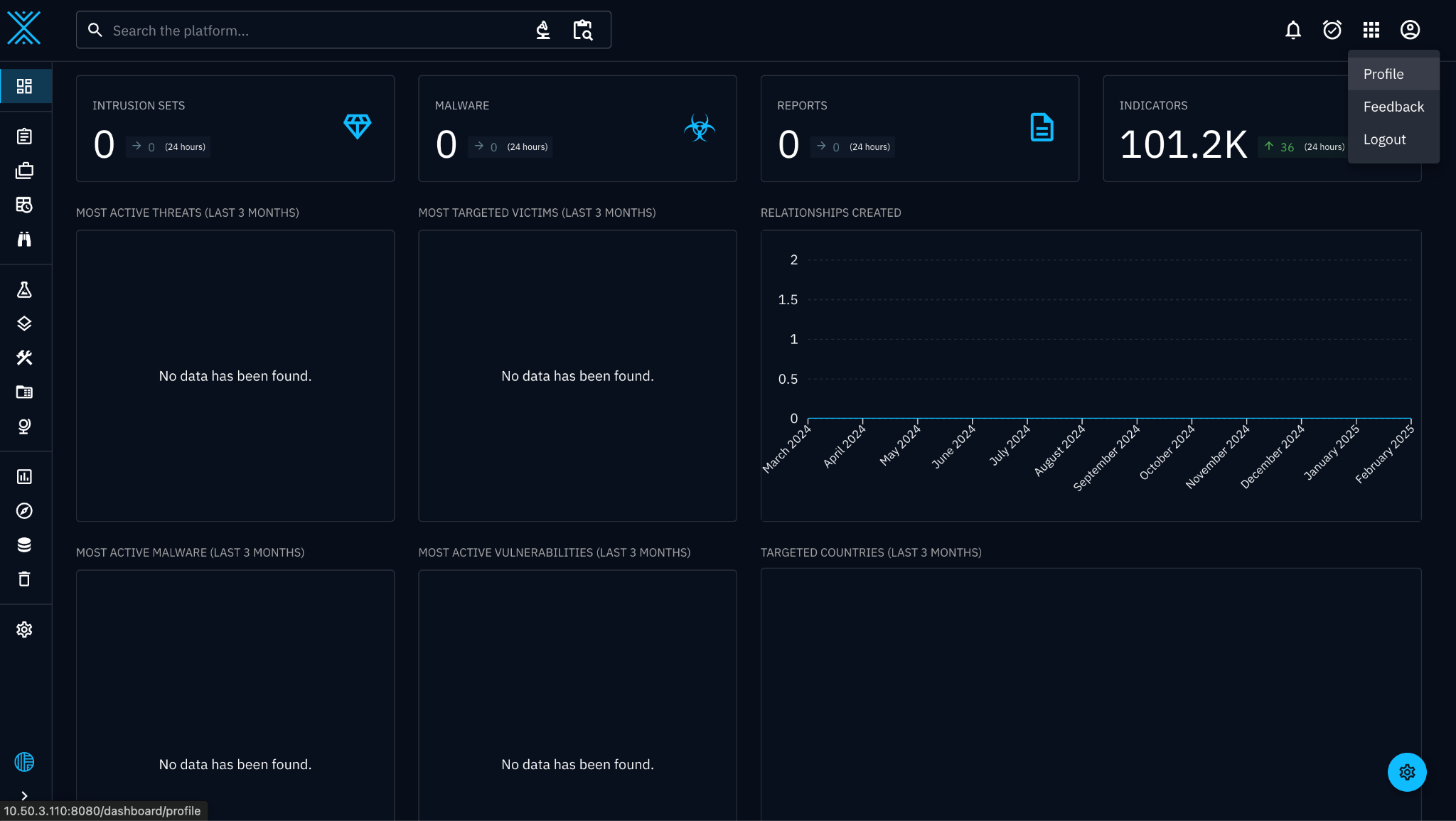
- Log in to your OpenCTI instance and select Profile from the top right corner menu.
- Scroll down to the API access section and copy the API key.
Configure the OpenCTI Plugin
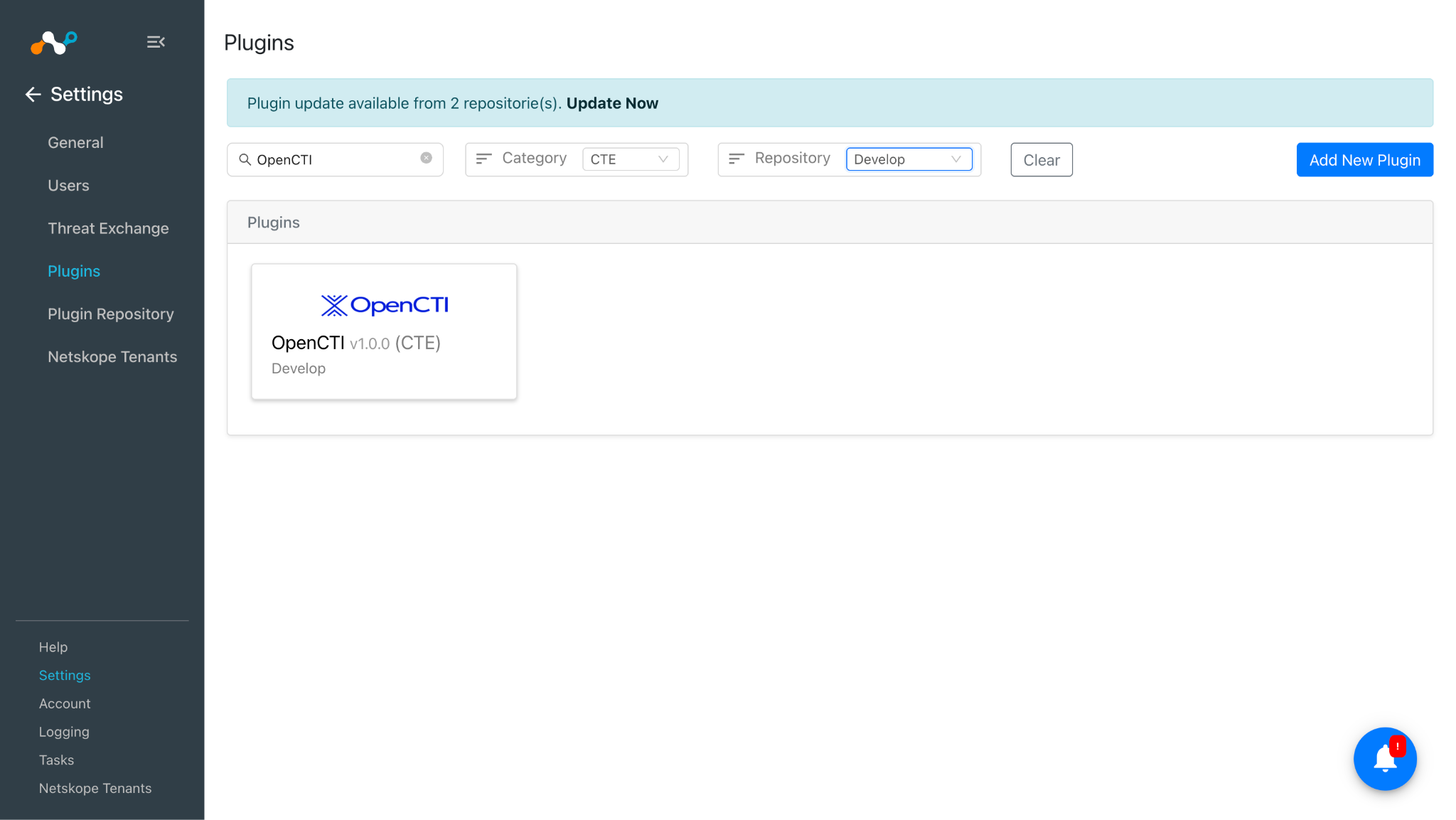
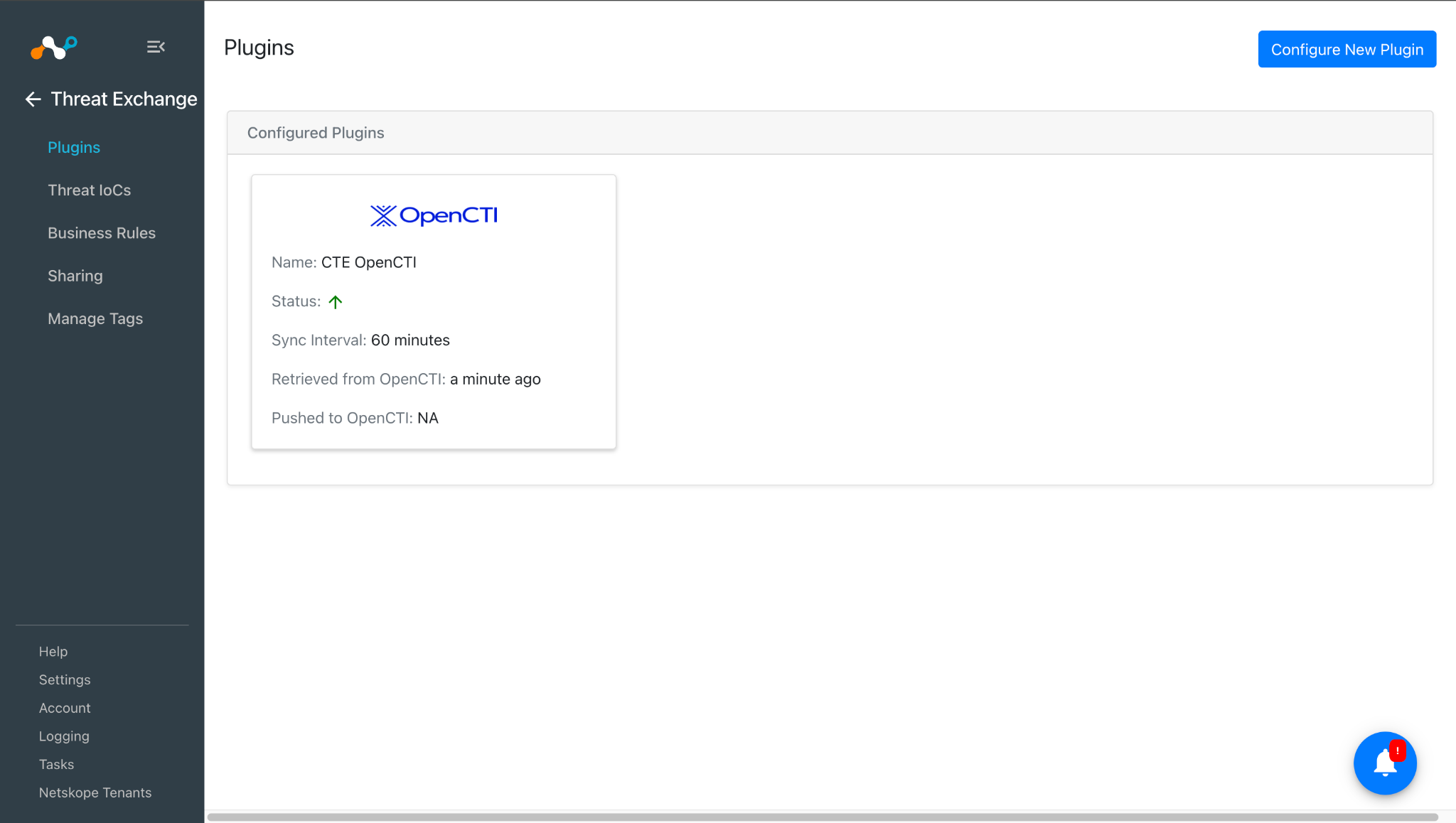
- In Cloud Exchange, go to Settings > Plugins.
- Search for and select the OpenCTI v1.0.0 (CTE) plugin box.
- Enter the basic information:
- Configuration Name: Unique name for the configuration.
- Sync Interval: Leave default.
- Aging Criteria: Expiry time of the plugin in days. (Default: 90)
- Override Reputation: Set a value to override the reputation of indicators received from this configuration. (Default: 5)
- Tags Aggregate Strategy: Choose whether to append new tags to existing IoC(s) or overwrite them. This parameter determines how tags are stored for indicators pulled for this configuration.
- Enable SSL Validation: Enable SSL Certificate validation.
- Use System Proxy: Enable if the proxy is required for communication.
- Click Next.
- Enter the configuration parameters:
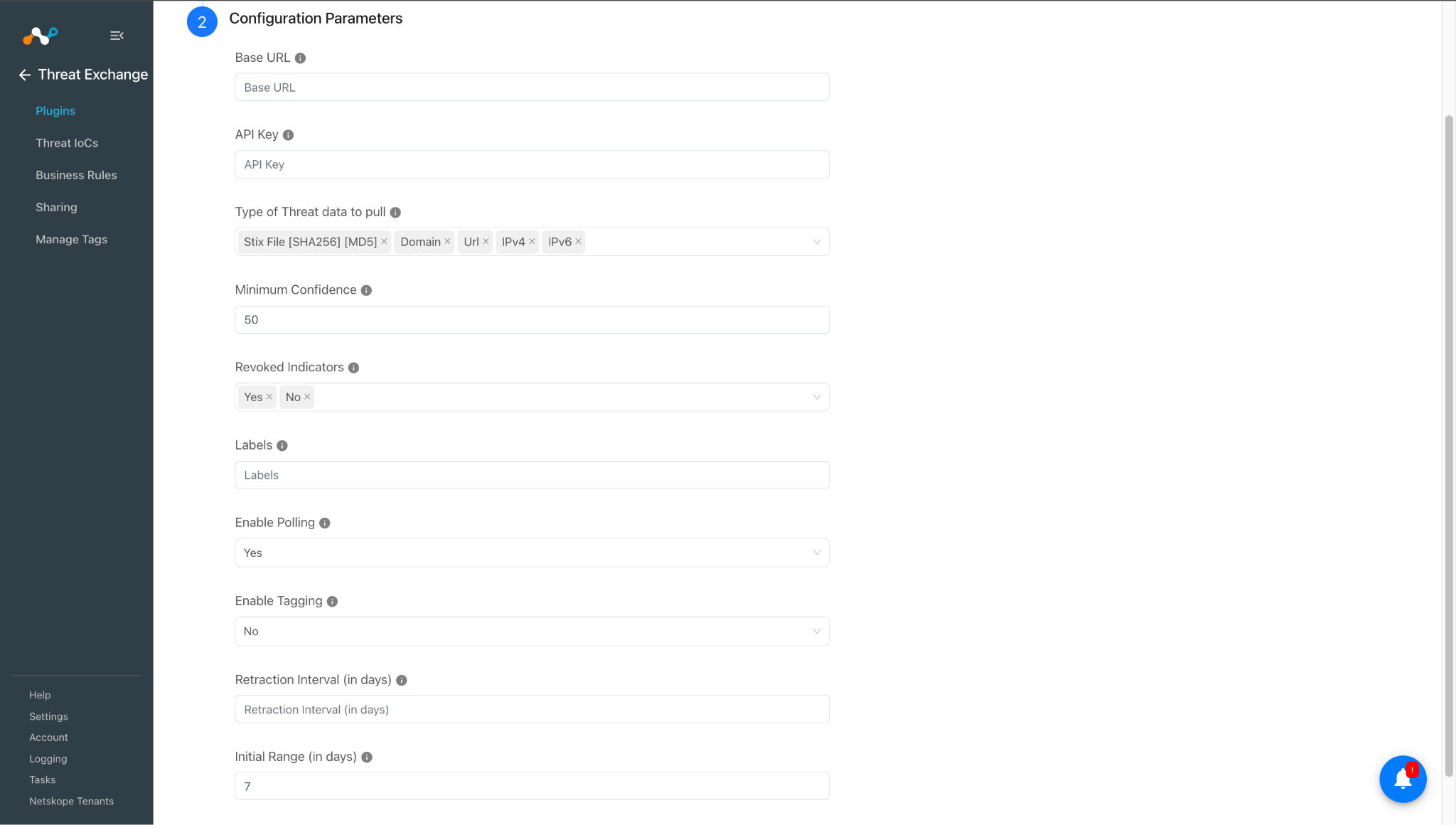
- Base URL: OpenCTI Base URL.
- API Key: Provide the API Key from ‘My Profile > API Key’ on the OpenCTI platform.
- Type of Threat data to pull: Type of Threat data to pull. Allowed values are Stix File [SHA256] [MD5], Domain, Url, IPv4, IPv6.
- Minimum Confidence: Enter the Minimum Confidence from the range 0 to 100. Only the indicators with confidence greater than or equal to the specified confidence will be fetched.
Note
If kept empty, then it will fetch all the available indicators.
Labels are referred to as Tags in Netskope CE. - Revoked Indicators: Only indicators with matching revoked status will be fetched. If no specific value is chosen, indicators with all available revoked statuses will be retrieved.
- Labels: Only indicators with matching Tags will be fetched. Add multiple Tags separated by commas. Example: tag1,tag2,tag3. Keep blank to fetch indicators from all Tags.
Note
Labels are referred to as Tags in Netskope CE.
- Enable Polling: Enable/Disable polling data from OpenCTI. Disable if you only need to push indicators to OpenCTI
- Enable Tagging: Enable/Disable tagging functionality.
- Retraction Interval (in days): Specify the number of days for which IoC retraction should be run for OpenCTI indicators.
Note
This parameter is applicable only for Netskope CE version 5.1.0 or later, and if IoC(s) Retraction is enabled in Threat Exchange Settings.
- Initial Range (in days): Number of days to pull the data for the initial run.
- Click Save.
Add a Threat Exchange Business Rule for OpenCTI
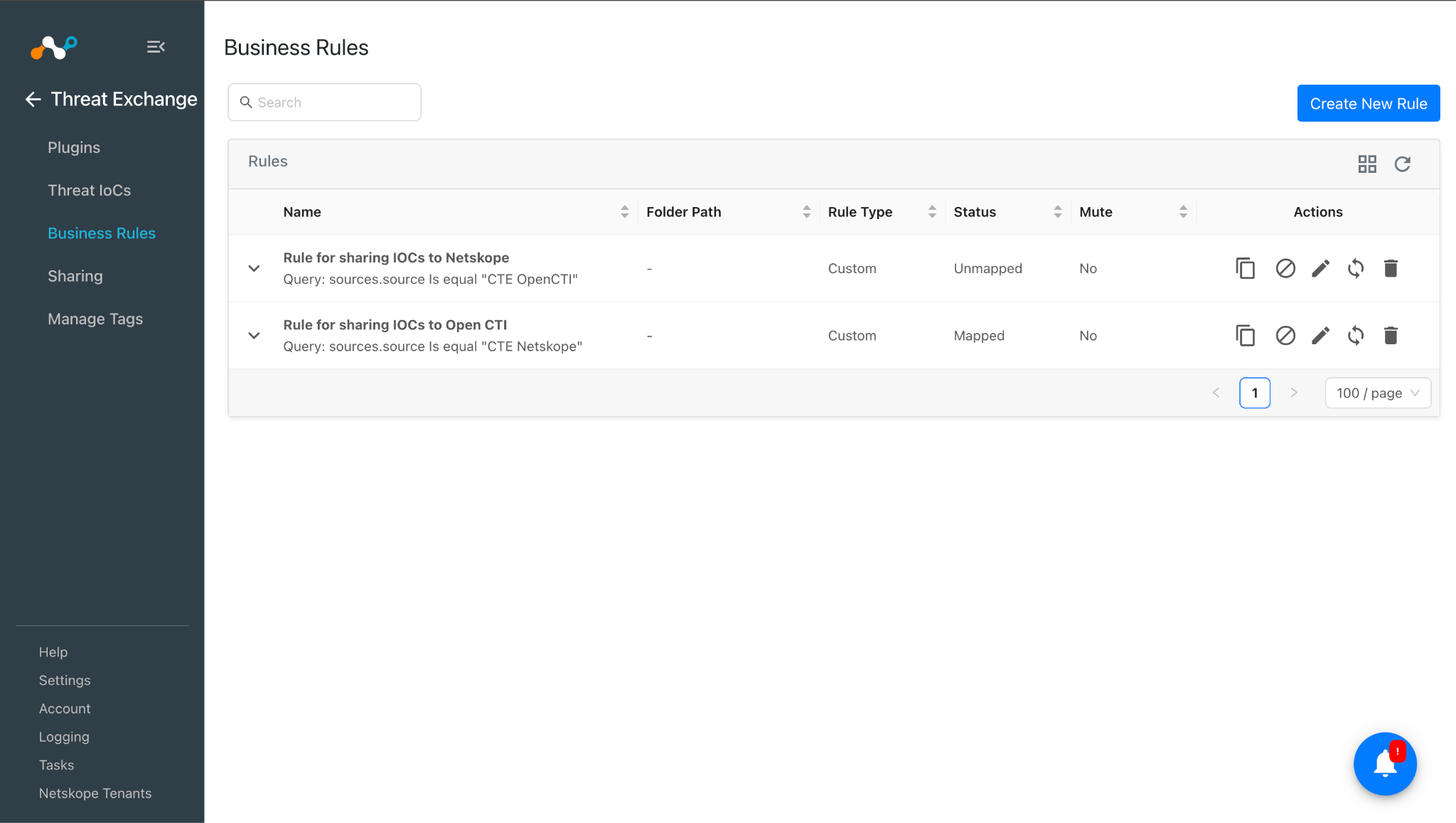
To share indicators fetched from the OpenCTI to the Netskope CE and vice versa you will need to have a business rule that will filter out the indicators that you want to share. To configure a business rule follow the below steps:
- Go to Threat Exchange > Business Rule and click Create New Rule.
- Add the filter according to your requirement in the rule and then click on Save.
Configuring Threat Exchange Sharing for Open CTI
To share IoCs from the Netskope CE to the OpenCTI platform, and vice-versa:
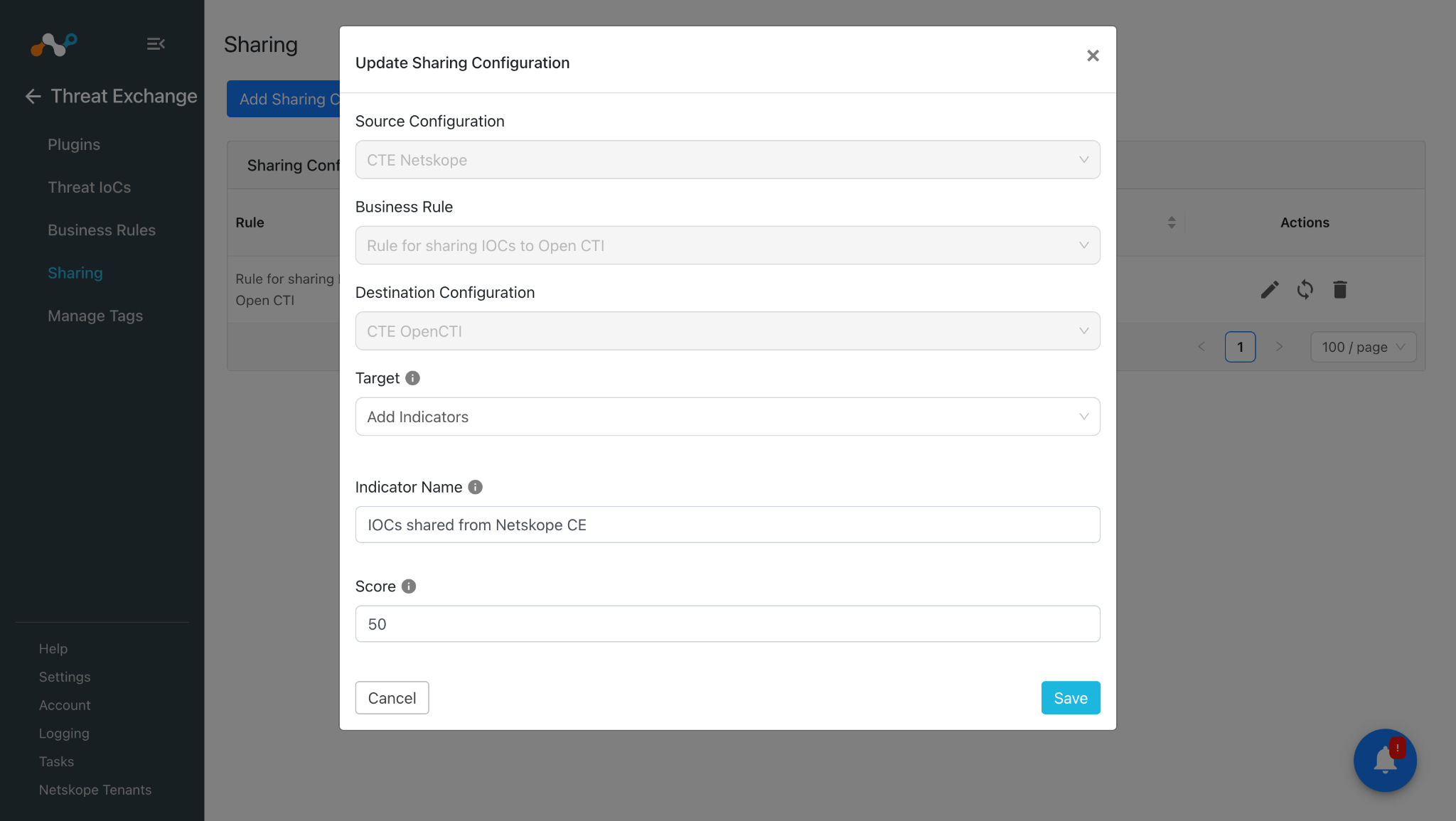
- Go to Threat Exchange > Sharing and click Add Sharing Configuration.
- Select your Source Configuration (CTE Netskope), a Business Rule, the Destination Configuration (CTE OpenCTI), and a Target. Click Save and follow these same steps in reverse for sharing OpenCTI’s IoCs to Netskope. Select your Source Configuration as CTE OpenCTI, a Business Rule, the Destination Configuration (CTE Netskope), and a Target.
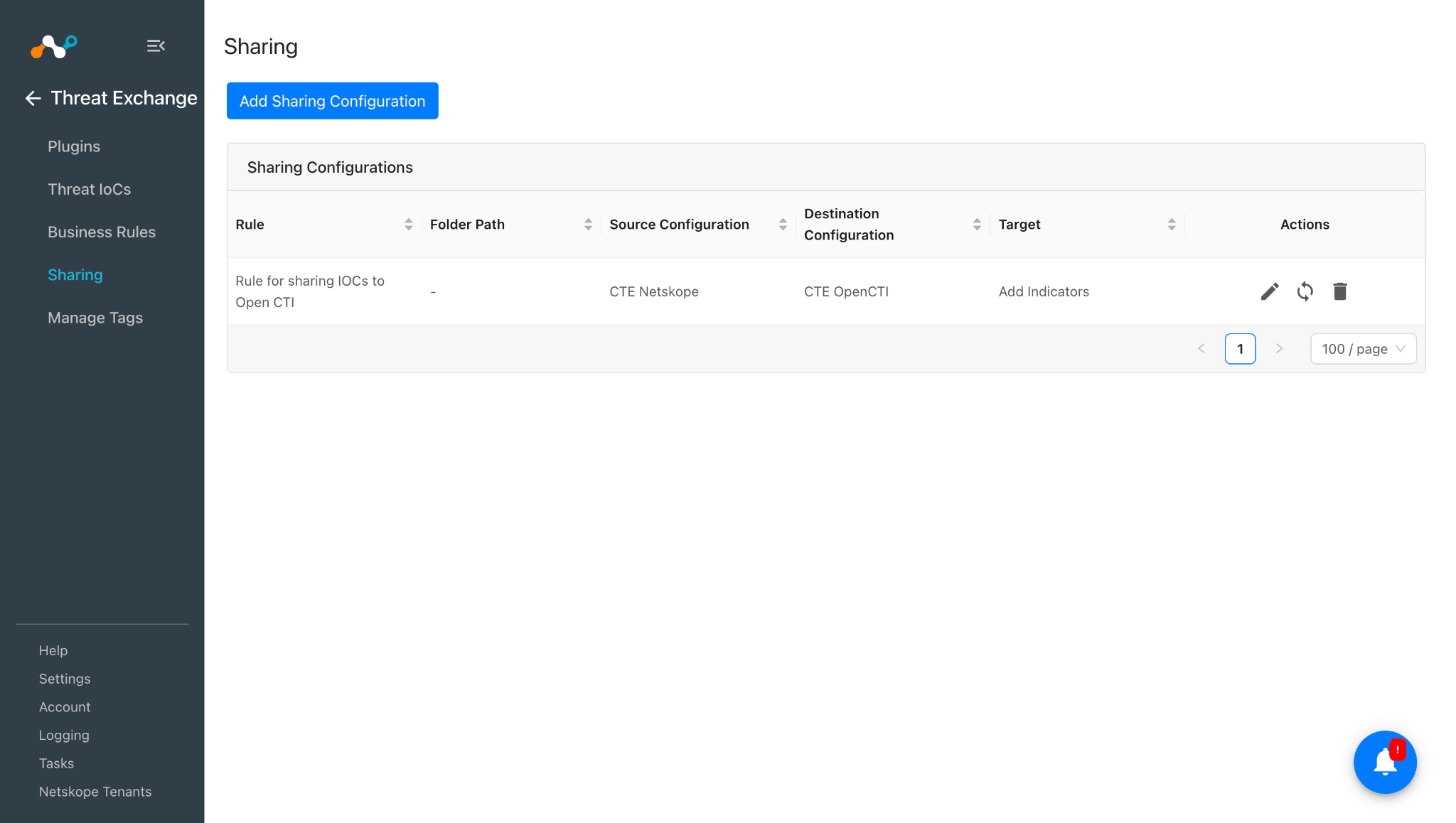
- Enter these values:
- Indicator Name: Name of the Indicators to be pushed to OpenCTI.
- Score: This score is updated with the decay rule applied to this indicator.
- Click Save.
Validate the Open CTI Plugin
Validate the Pull
In Threat Exchange, pulled data will be listed on the Threat IoCs page. You can filter the IoCs pulled from the platform using the filter: sources.source Like “<plugin configuration name>”


To verify pulled logs in Cloud Exchange, go to Logging and search logs from the CTE OpenCTI plugin.

To verify the data available for pulling on OpenCTI, log in to OpenCTI and go to Observations > Indicators.

Validate the Push
To validate the push in CE, go to Logging and filter shared logs for the OpenCTI plugin.
>

On the OpenCTI platform, go to Services > URL Protection > Managed URL, to check the shared IOCs on the platform.
Apply Filter for Label as “netskope-ce”.

Note
You can see the the label “netskope ce | netskope threat exchange” which is IOC source labeling. This indicates that the particular IOC was pulled from Netskope Threat Exchange plugin in the Netskope CE.


Validate the Retraction
You can filter the logs related to retraction by using the filter: sources.source Like “<plugin configuration name> [Retraction]”

We can validate the same on Threat IOCs page:

OpenCTI plugin also supports push retraction which means the IOCs from third party plugins that are shared to the OpenCTI plugin and later were marked as retracted in CE then those IOCs will be automatically deleted from OpenCTI platform through push retraction. You can verify the same by observing the Retraction Result field which says “<plugin configuration name>: retracted”.

When the IOCs shared from OpenCTI to Third Party are deleted from that platform then it will be marked as “<plugin-config-name>: retracted” in the Retraction Result. If they are not deleted from the Third party the Retraction Result will be pending else it will be retracted.

IOCs pulled from OpenCTI were shared to a URL list “CTE Demo” on the Netskope Tenant.

If any of the shared IOCs are marked as retracted in CE, it would be deleted from the Netskope tenant as well. Here, you can see the IOCs which were marked Retracted “Yes” in the retraction screenshot, were also deleted from the URL list on the Netskope tenant.

Troubleshooting
Unable to configure the OpenCTI plugin
It might be due to one of the following:
- Invalid Base URL
- Inavalid API key
What to do: Identify the root cause and follow the step for the specified issue.
Invalid Base URL
Refer to the Connectivity to the following hosts section and ensure your OpenCTI instance is working properly.
Inavalid API key
Refer to the Configuration on the OpenCTI Platform section to get the valid API Key for your OpenCTI instance.
Unable to pull IOCs from the OpenCTI platform
After the plugin configuration if the IOCs are not pulled from the platform it might be due to one of the following.
- No IOCs are available on the platform to pull
What to do: Check if the IOCs are available on the platform to pull.
Known Behavior
- While pushing the indicators on OpenCTI from Netskope CE there are two scenarios in which the API will neither create nor update indicators.
- If the Indicator Already Exists:
- If an indicator is pushed to OpenCTI and it already exists with a lower confidence value than the existing one, the API will not update the indicator. The indicator will remain unchanged, similar to how OpenCTI’s internal logic operates
- If the Older Indicator is Revoked:
- If the older version of an indicator has been revoked, the API will also not update or create a new version for that indicator. It will treat the revoked indicator as inactive and will not proceed with any changes.
- When deleting an indicator on OpenCTI, if the indicator is retracted from Netskope CE, the deletion background task will be triggered. This task can be tracked via the following URL: http://{base_url}/dashboard/data/processing/tasks.
- However, if this background task fails on OpenCTI due to any issues (e.g., connectivity, processing errors), the indicator deletion will not be successfully processed. As a result, the indicators shared by Netskope CE will still be marked as retracted, and the OpenCTI plugin will not be able to track the failure of the background task. Consequently, the retracted status of the indicator will persist in Netskope CE despite the failure in OpenCTI task processing.