

Overview
With Netskope Log Streaming integrated via Splunk Cloud Add-ons (such as AWS TA, MSCS TA, etc.), web transaction logs are ingested in JSON format. This allows Splunk to automatically extract fields using key-value pairs, improving searchability and ease of use.
However, unlike the Netskope TA and the deprecated web event streaming pipeline, where only raw web transaction log data was ingested without CSV headers, the JSON format includes field names along with values. As a result, this increases the overall data volume ingested into Splunk, which can lead to higher licensing costs.
To address this, you have the option to optimize ingestion volume by modifying the input configuration to ingest logs in raw CSV format instead of JSON.
Reducing Ingestion Volume
To reduce the amount of data being ingested, disable the option: Parse all files as CSV in the input configurations.
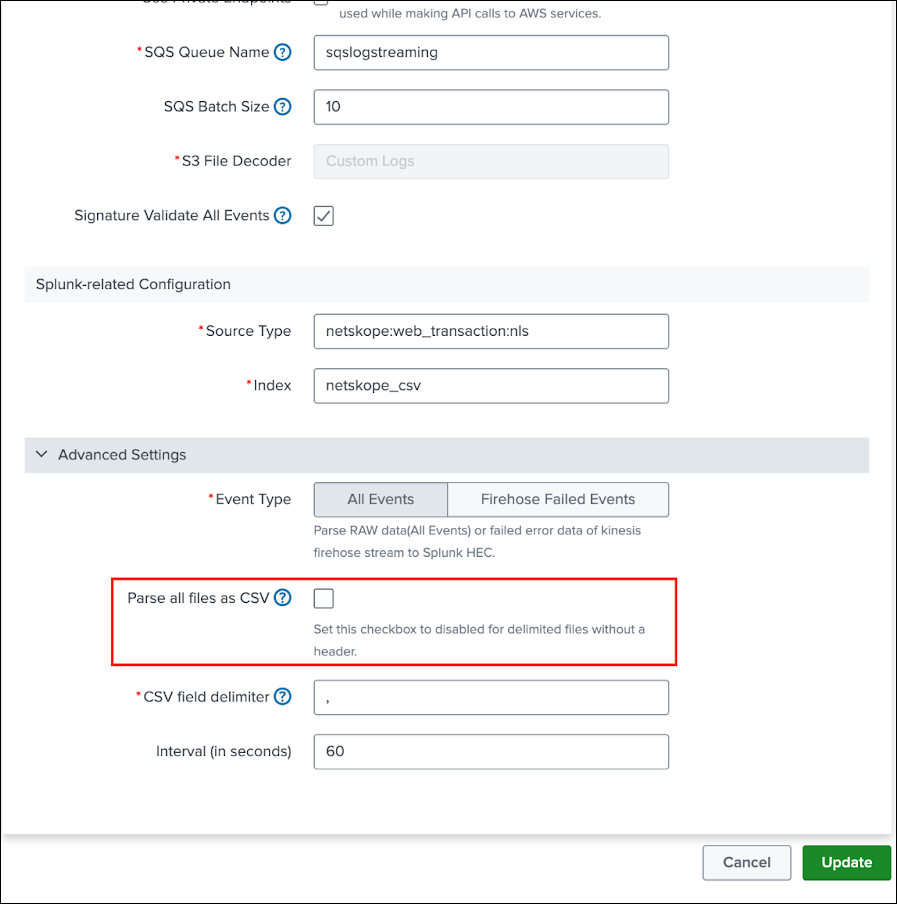
This change stops the conversion of logs into JSON format and instead allows the logs to be ingested in their raw CSV format. As a result, this significantly reduces the overall ingestion volume and helps lower the associated cost.
Important Considerations
While this approach helps reduce ingestion costs, it also introduces certain tradeoffs. Automatic field extraction will no longer be available, and the logs will appear as raw, unparsed data in Splunk. As a result, you will need to manually configure field extractions based on your requirements.
Manual Field Extraction (Required After Change)
Since field extraction will no longer happen automatically, you must define parsing rules using Splunk configurations such as:
- props.conf
- transforms.conf
Note that the structure of Netskope logs is determined by the fields selected in the tenant’s Log Streaming configuration, as well as the order in which those fields are defined.
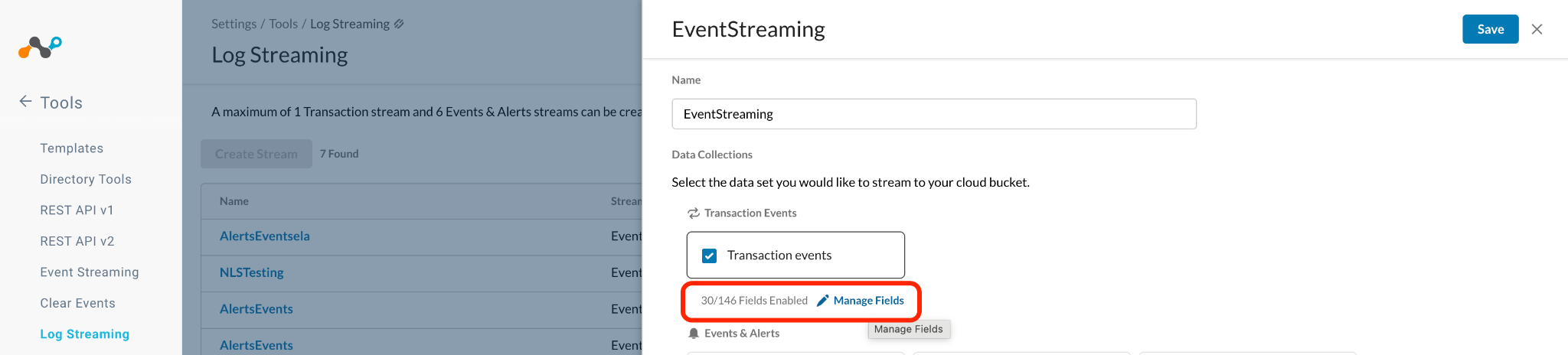
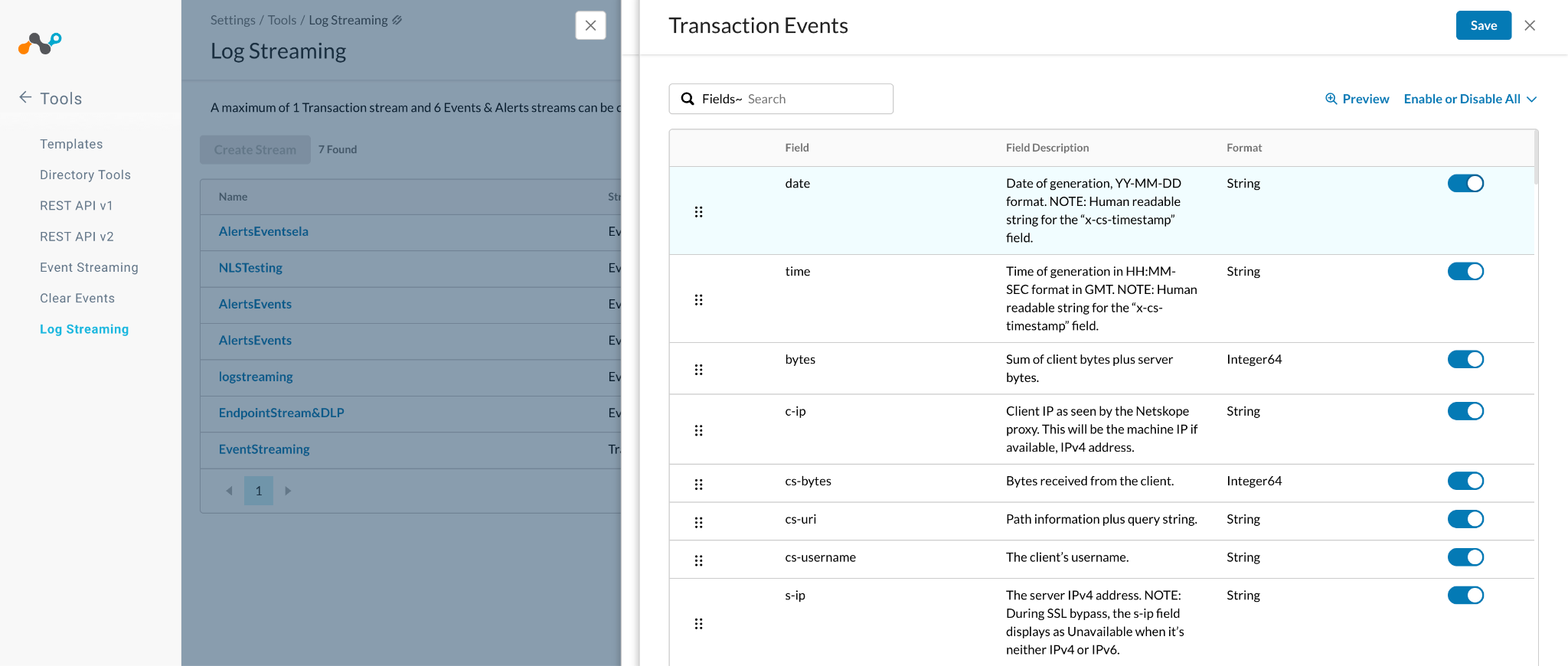
Because of this, there is no one-size-fits-all parsing configuration. You must create and customize your field extraction rules based on your specific configuration.
Working with Raw Logs: Field Extraction Guide
Here are some basic steps to help you get started.
Step 1: Generate Regex and Configuration Files
Use AI assistant tools like ChatGPT to automatically generate the required regex and Splunk configuration files.
- Provide the CSV header and a sample log entry.
- Ensure the field headers are listed in the exact order as configured in Netskope.
- Use the following structured prompt.
Prompt:
I have CSV logs with the following header:date,time,bytes,c-ip,cs-bytes,cs-uri,cs-username,s-ip,time-taken,x-c-browser,x-c-location,cs-content-type,cs-dns,cs-host,cs-method,cs-referer,cs-uri-port,cs-uri-query,cs-uri-scheme,cs-user-agent,sc-status,x-c-browser-version,x-c-country,x-c-device,x-c-region,x-cs-app-cci,x-cs-app-instance-id,x-cs-app-suite,x-cs-connect-port,x-cs-ip-connect-xffSample log: 2026-03-19,06:17:43,2600,172.31.30.26,2315,-,user@company.com,16.16.109.171,58,Native,Stockholm,application/json,example.com,example.com,POST,-,443,-,https,agent,200,-,SE,Windows,Stockholm,-,-,-,-,- Requirements: 1. Generate a REGEX with named capture groups for all fields. 2. Output Splunk configuration: props.conf transforms.conf 3. Ensure regex is production-ready and efficient. 4. Do NOT assume dynamic column order (fixed order only). 5. Add a nullQueue filter in transforms.conf to drop header rows (where raw event contains the header line) Output format: Regex props.conf transforms.conf |
Expected Outcome
- A production-ready regex with named capture groups.
- Properly formatted
props.confandtransforms.conf.
Step 2: Update the configuration in Netskope Add-on:
- Go to the Netskope TA local directory:
$SPLUNK_HOME/etc/apps/TA-NetskopeAppForSplunk/local/ - Create or update the following files:
- props.conf
- transforms.conf
- Add a new stanza for the
sourcetype:[netskope:web_transaction:nls] - Insert the generated configurations under the respective files.
- Under the input Configurations, add a new
sourcetypeasnetskope:web_transaction:nlsfrom the UI.
Expected Outcome
- Splunk is configured to parse Netskope logs using the defined regex.
- Header rows are filtered out using
nullQueue.
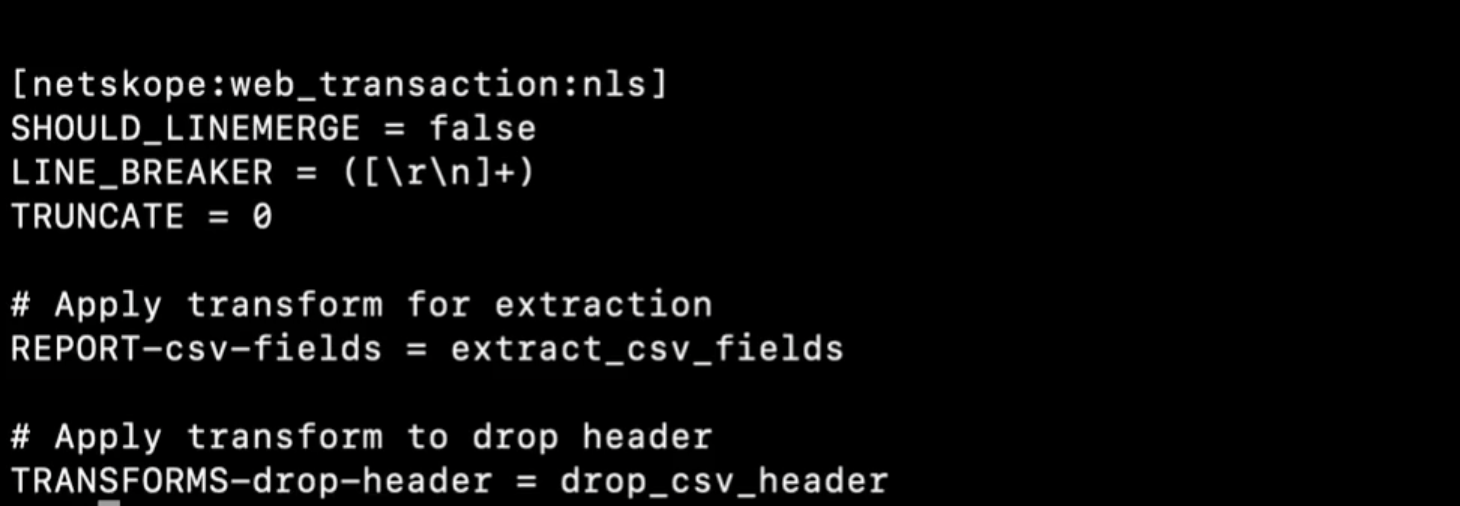
Sample stanza for props.conf
Sample stanza for transforms.conf
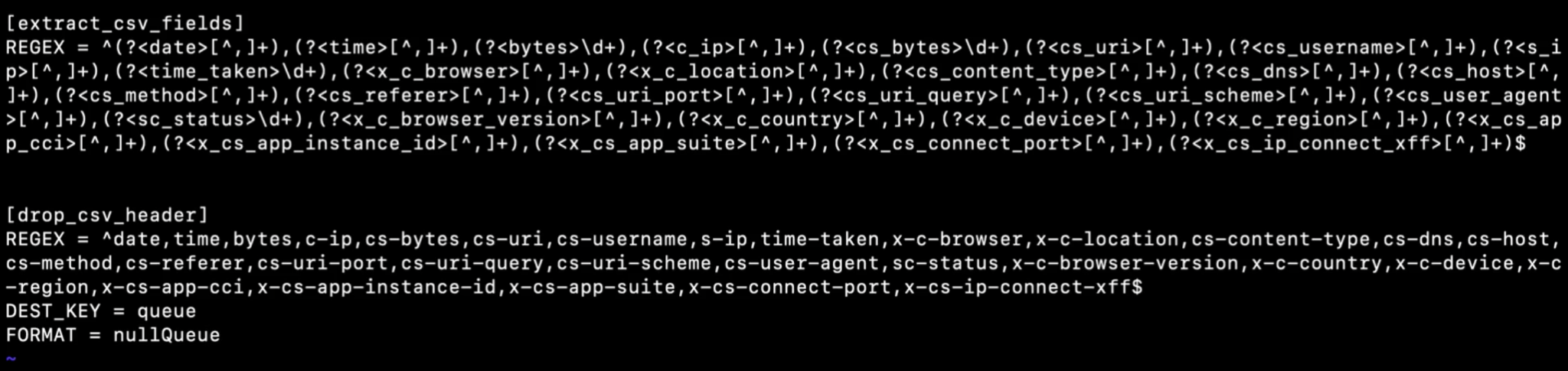
Step 3: Restart and Validate Splunk
Restart Splunk Enterprise.
Expected Outcome
- Logs must successfully ingest as CSV without fields.
- Fields are correctly extracted and searchable.
- Header rows are excluded from indexing.
Here’s a video demonstrating this process:
Validation and Best Practices
- Validate field extraction using Splunk search:
index=<your_index> | table * - To reduce initial ingestion volume, eliminate the fields you do not need from within the Netskope UI.
- Stream only required fields from Netskope. Keep track of the following which will mandate the creation of a new parser:
- Field order.
- Any future changes in Netskope Log Streaming configuration.