

Beta: Post-Quantum Cryptography key exchange support is available as a beta feature starting in Next Generation Secure Web Gateway (NG-SWG) Release 137. It isn’t self-service yet. Contact Netskope Support to enable it for your tenant.
Post-quantum cryptography (PQC) refers to cryptographic algorithms designed to resist attacks from both classical and quantum computers. As quantum computing capabilities mature and scale, widely used public-key algorithms such as RSA, ECDSA, and ECDHE are at risk of being vulnerable. Adversaries already use the “Harvest Now, Decrypt Later” threat where they capture encrypted traffic today to decrypt it later when quantum computing allows, making early PQC adoption a critical security priority.
Major browsers and TLS stacks are already deploying PQC key exchange by default. Chrome (v131+), Firefox (v135+), and OpenSSL (v3.5+) have enabled hybrid PQC key agreement, meaning TLS 1.3 traffic traversing Netskope NG-SWG increasingly involves PQC-based handshakes.
Starting with Release 137, Netskope NG-SWG introduces support for the X25519MLKEM768 hybrid PQC key-exchange algorithm in both front-end and back-end SSL connections, ensuring inspection continuity and adherence to modern encryption standards as PQC adoption grows.
Supporting PQC key exchange now means:
- Continuous inspection coverage as PQC becomes the default in modern browsers and servers.
- Protection against harvest-now, decrypt-later attacks for traffic that must remain confidential for years.
- A smooth path to quantum-safe security without disrupting existing policies, users, or legacy systems that haven’t adopted PQC.
PQC Key Exchange Algorithms
Modern Standards: ML-KEM
ML-KEM (previously known as CRYSTALS-Kyber) is the new global standard for secure key exchange. It is designed to replace classical encryption methods that may eventually be vulnerable to advanced quantum computing. By adopting ML-KEM now, you ensure your encrypted data remains private both today and in the future.
Why Hybrid Algorithms Matter
Netskope uses a hybrid approach for PQC, combining the best of classical security with quantum-resistant protection. This “defense-in-depth” strategy means your data is protected by two layers of encryption: one trusted classical layer and one advanced PQC layer. An attacker would have to break both to compromise your session.
The primary hybrid algorithm, X25519MLKEM768, provides this dual protection:
- X25519: The industry-standard classical protection used by most modern websites.
- ML-KEM-768: The specialized layer that protects against future quantum-based threats.
This specific hybrid combination is the default choice for modern browsers like Chrome, ensuring your security policies align with the latest industry standards without sacrificing compatibility.
What Netskope NG-SWG Supports
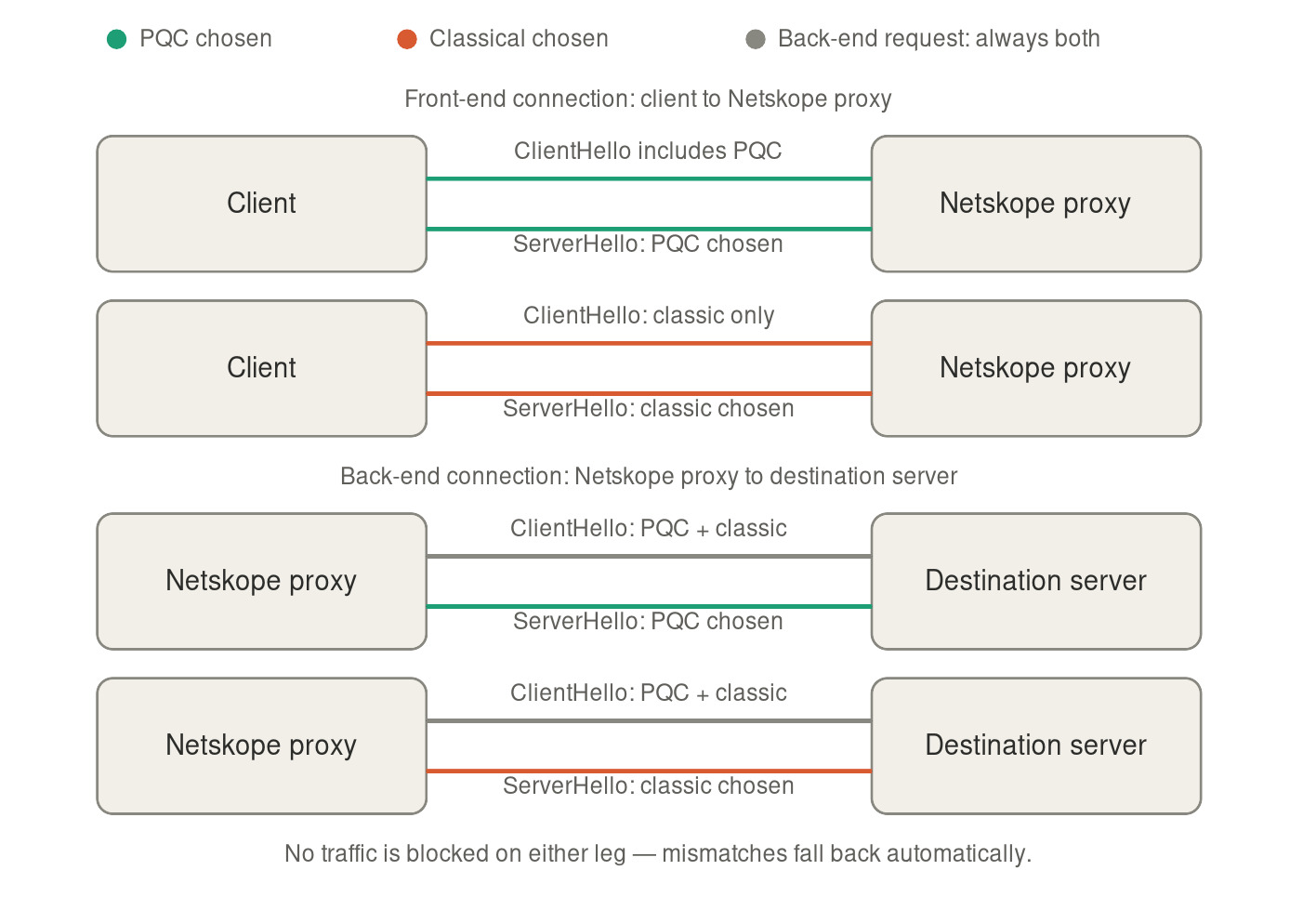
Netskope NG-SWG acts as a man-in-the-middle proxy. It terminates the client-side connection (front-end) and opens a separate connection to the destination server (back-end). PQC support applies independently to each leg.
| Connection Leg | Direction | PQC Algorithm Supported |
|---|---|---|
| Front-end | Client → Netskope proxy | X25519MLKEM768 |
| Back-end | Netskope proxy → Destination server | X25519MLKEM768 |
Both legs can negotiate X25519MLKEM768 when the connecting client or destination server supports it. The front-end and back-end flags are independently controlled, allowing staged enablement.
Supported access methods: All standard NG-SWG access methods (Netskope Client, Explicit Proxy, Proxy Chaining, GRE, IPSec, Secure Forwarder, are supported.
Backward compatibility: The feature is fully backward compatible. When a client or server does not support PQC, the handshake falls back gracefully to classical algorithms (such as X25519 or P-256). No sessions are dropped due to PQC unavailability.
How It Works
NG-SWG handles PQC key exchange transparently as part of its standard SSL inspection pipeline.
When a PQC-capable client (for example, a current Chrome) or a PQC-capable destination server is on the other end, Netskope negotiates the X25519MLKEM768 hybrid algorithm for that leg. Hybrid means the session key derives from both a classical algorithm (X25519) and a post-quantum algorithm (ML-KEM-768), so an attacker must break both to compromise the session.
If the client or destination server on either leg doesn’t support X25519MLKEM768, the handshake falls back to a classical algorithm such as X25519 or P-256. No sessions are dropped and no traffic is blocked due to a PQC mismatch.
What’s included in the beta release
- Support for the X25519MLKEM768 hybrid key-exchange algorithm — the default PQC algorithm used by Chrome and other modern clients.
- Independent controls for the front-end and back-end connections, so you can enable PQC on one leg while testing the other.
- Support across all standard SWG access methods, including Netskope Client, explicit proxy, proxy chaining, GRE, IPSec, and Secure Forwarder.
- Available in commercial and compliance environments.
- Full backward compatibility: connections with clients or servers that don’t support PQC continue to work as they do today.
Turn on PQC support
PQC support is managed by Netskope Support during this beta:
- Contact Netskope Support and request to enable the front-end and back-end feature flags for your tenant.
- Let them know whether you want to enable the front-end connection, the back-end connection, or both. You can start with one and expand later.
Limitations
- TLS 1.3 only: PQC key exchange applies to TLS 1.3 connections. TLS 1.2 sessions continue to use classical algorithms.
- X25519MLKEM768 only: Other hybrid ML-KEM variants (for example, p256_mlkem512, p256_mlkem768, x25519_mlkem512)aren’t supported in this release.
- Key exchange only: ML-DSA (post-quantum certificate signatures) isn’t part of this release.
- Performance overhead: PQC cryptographic handshakes use more CPU than classical algorithms. Netskope recommends monitoring CPU utilization after enablement, especially in high-throughput deployments.
- Beta enablement only: Netskope Support manages enablement through backend configuration. Self-service UI controls are not available in this release.
Standards and References
Related documentation