The Private Applications page is only available if you have access to Netskope Private Access (NPA). This page provides information about the usage and performance of private applications that are accessed through NPA. The summary view contains the latest information about applications usage and a filtered view displays information based on the selected filters. Go to Digital Experience Management > NPA to view this page.
Private Applications Summary
The Private Applications Summary section provides you with information about private applications usage and performance. Using the Reload button on the top right corner of the page, you can view the latest information in the widgets. This section contains widgets that provide an overview of the data usage, number of unique users, policies evaluated, active publishers, number of sessions etc. The Netskope POPs map provides a view of all the Netskope POPs that are being used to process traffic to and from various private applications. Applications Discovered and Application Ports Discovered widgets provide a tabular view with detailed information about the private applications and application ports.

An overview of your private application usage and performance for the last 7 days can be found in the following widgets:
- Uploaded (GB)
- Downloaded (GB)
- Data Centers
- Sessions
- Publisher Versions for Active Publishers
- Active Publishers
- Unique Users Seen
- Policies Evaluated
- Discovered Apps
- Netskope DataCenters
- Applications Discovered
- Application Ports Discovered
Filtered Widgets
You can use the filters in the filter menu to get a granular view of the private applications usage.

Tip
You can download data seen in the widgets. Go to Widget Downloads for more details.
The widgets in the Filtered Widgets section provide the following information:
- Last # of Days Filtered
- Filtered Application
- Filtered User
- Filtered Publisher
- Top Private Apps by Total Bytes
- Top Private Apps by Uploaded Bytes
- Top Private Apps by Downloaded Bytes
- Most Used Policies
- Policy Hit Trend
- Daily User Count for Private Apps
- Top Private Apps Traffic Volume Trend
- Trend of Uploaded & Downloaded bytes
- Top 10 Applications by session count
- Top 10 Users by session count
- Hourly Private App Usage by User Count
- Hourly Private App Usage by Session Count
- Private Access Publisher Usage by Bytes
Publisher Resource Consumption View
- Publisher CPU Usage (%)
- Publisher Memory Usage (%)
- Publisher Storage Usage (%)
- Publisher Memory Snapshot
- Publisher Storage Snapshot
Export Options
The Private Applications dashboard page and widgets can be exported in various formats using the Download options in the UI.
Dashboard Downloads
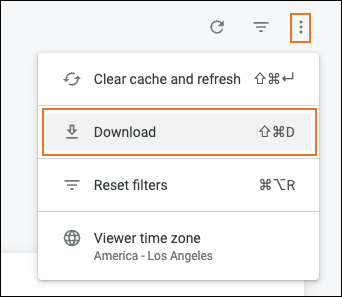
- In the top-right corner of the screen, click on the Dashboard Actions icon and select Downloads.
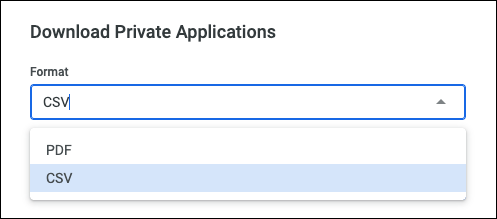
- Select a format from the dropdown.
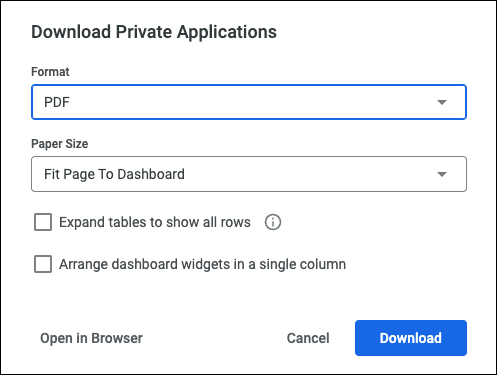
- If you select CSV, the file will be downloaded to your system is a ZIP file. For PDF downloads, there are options like page size, expanding tables, and arranging widgets. There’s also an option to view the data in a browser window. When finished, click Download to export the file to your system.
Widget Downloads
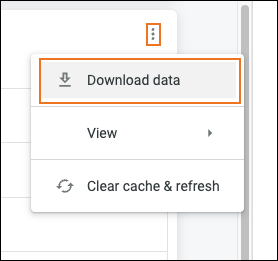
- In the top-right of the widget frame, click on the Widgets Actions icon and select Download Data.
- Select a format from the dropdown.
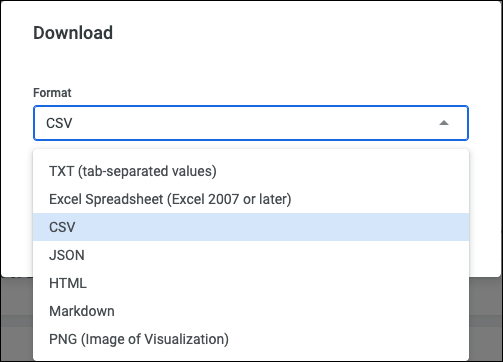
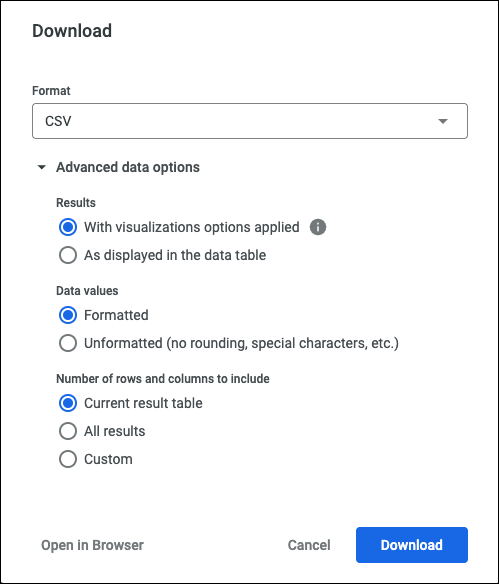
- For all of the formats except PNG, there are advanced options to choose from. There’s also an option to view the data in a browser window. When finished, click Download to export the file to your system.