

This document explains how to configure the Qualys v1.0.0 plugin with the Risk Exchange module of the Netskope Cloud Exchange platform. This plugin is used to fetch Assets data from the Cyber Security Asset management > Inventory page, Asset Vulnerabilities from the Vulnerability Management Detection & Response > Vulnerabilities page, Web Applications data from the Web Application Scanning > Applications page, and Web Application Findings from the Web Application Scanning > Detections page. This plugin also supports Add/Remove Asset Tag(s), Scan Assets, and Add/Remove Web Application Tag(s) actions.
Netskope normalization score calculation => 1000 – (Qualys Asset/Web Application Risk Score).
Prerequisites
- A Netskope tenant (or multiple, for example, production and development/test instances).
- A Netskope Cloud Exchange tenant with the Tenant plugin and Risk Exchange plugin already configured.
- The following modules enabled on Qualys:
- CyberSecurity Asset Management (CSAM)
- Web Application Scanning (WAS)
- Vulnerability Management, Detection and Response (VMDR)
- Cloud Agent (CA)
- Connectivity to the following host: https://qualysguard.qg3.apps.qualys.com/qglogin/index.html
Qualys Plugin Support
This plugin is used to fetch Assets data from the Cyber Security Asset management > Inventory page, Asset Vulnerabilities from the Vulnerability Management Detection & Response > Vulnerabilities page, Web Applications data from the Web Application Scanning > Applications page, and Web Application Findings from the Web Application Scanning > Detections page. This plugin also supports Add/Remove Asset Tag(s), Scan Assets, and Add/Remove Web Application Tag(s) actions.
Type of Data Pulled |
Actions |
|---|---|
Assets Web Applications | Add/Remove Asset Tag(s) Scan Assets Add/Remove Web Application Tag(s) No Action |
Mappings
Mapping will be used to view the pulled Assets or Web Application and their respective details. Mapped fields during plugin configuration will be visible on the Records page once the data is pulled. Here are the suggested mappings to be used while configuring the plugin.
Pull Mappings for Assets
|
Plugin Field |
Expected Datatype |
Suggested Field Name |
Suggested Aggregate Strategy |
Sample Value |
|---|---|---|---|---|
|
Asset ID |
String |
Asset ID |
Unique (Keep this Overwrite if you want to merge records with records pulled from Netskope Risk Exchange plugin) |
1035748148 |
|
Host ID |
String |
Host ID |
Overwrite |
572072142 |
|
Serial Number |
String |
Serial Number |
Overwrite |
VMware-42 12 5b fc 5c fa 1a 6b-8a 84 be 65 a7 02 f6 53 |
|
Risk Score |
Number |
Risk Score |
Overwrite |
Any in 0 to 1000 |
|
Netskope Normalized Risk Score |
Number |
Netskope Normalized Risk Score |
Overwrite |
Any in 0 to 1000 |
|
Criticality Score |
Number |
Criticality Score |
Overwrite |
Any in 1 to 5 |
|
Tags |
List |
Tags |
Overwrite |
Tag1, Tag2, Tag3 |
|
Asset Type |
String |
Asset Type |
Overwrite |
HOST |
|
IP Address |
String |
IP Address |
Overwrite |
10.50.9.73 |
|
DNS Name |
String |
DNS Name |
Overwrite |
ub22-50-9-73 |
|
Asset Name |
String |
Asset Name |
Overwrite |
ub22-50-9-73 |
|
BIOS Asset Tag |
String |
BIOS Asset Tag |
Overwrite |
BiosTag |
|
Users |
List |
Users |
Overwrite |
root, serviceuser, devuser |
|
Open Ports |
List |
Open Ports |
Overwrite |
8080, 9090, 10010 |
|
Network Interfaces IPv4 Address |
List |
Network Interfaces IPv4 Address |
Overwrite |
100.65.0.2, 10.50.9.73 |
|
Network Interfaces IPv6 Address |
List |
Network Interfaces IPv6 Address |
Overwrite |
fe80:0:0:0:a0:bded:7c67:d862, fe80:0:0:0:aede:48ff:fe00:1122 |
|
Network Interfaces Mac Address |
List |
Network Interfaces Mac Address |
Overwrite |
00:50:56:92:4f:14, 66:36:c1:6e:7c:30 |
|
Domain |
List |
Domain |
Overwrite |
ec.local |
|
Sub Domain |
List |
Sub Domain |
Overwrite |
ec.local |
|
OS |
String |
OS |
Overwrite |
Ubuntu Linux 20.04.6 |
|
Vulnerability QID |
String |
Vulnerability QID |
Append |
115284 |
|
Unique Vulnerability ID |
String |
Unique Vulnerability ID |
Append |
6943986864 |
|
Vulnerability Type |
String |
Vulnerability Type |
Append |
Potential or Confirmed |
|
Vulnerability Severity |
Number |
Vulnerability Severity |
Append |
Any in 1 to 5 |
|
Is SSL |
Number |
Is SSL |
Append |
1 or 0 |
|
Vulnerability Status |
String |
Vulnerability Status |
Append |
Active, New, Reopened, Fixed |
|
Vulnerability QDS Score |
String |
Vulnerability QDS Score |
Append |
Low Medium High Critical |
|
Vulnerability Category |
String |
Vulnerability Category |
Append |
Security Policy |
|
Is Patchable |
Number |
Is Patchable |
Append |
Yes or No |
|
Product |
String |
Product |
Append |
openssh |
|
Vendor |
String |
Vendor |
Append |
openbsd |
|
CVE ID |
String |
CVE ID |
Append |
CVE-2024-6387 |
|
Base CVSS Score |
Number |
Base CVSS Score |
Append |
5.5 |
|
Temporal CVSS Score |
Number |
Temporal CVSS Score |
Append |
4.5 |
Pull Mappings for Web Applications
|
Plugin Field |
Expected Datatype |
Suggested Field Name |
Suggested Aggregate Strategy |
Sample Value |
|---|---|---|---|---|
|
Web Application ID |
String |
Web Application ID |
Unique |
1043082757 |
|
Web Application Name |
String |
Web Application Name |
Overwrite |
User management app |
|
Web Application URL |
String |
Web Application URL |
Overwrite |
https://userapp.com |
|
Risk Score |
Number |
Risk Score |
Overwrite |
Any in 0 to 1000 |
|
Netskope Normalized Risk Score |
Number |
Netskope Normalized Risk Score |
Overwrite |
Any in 0 to 1000 |
|
Tags |
List |
Tags |
Overwrite |
Tag1, Tag2, Tag3 |
|
Finding QID |
String |
Finding QID |
Append |
150176 |
|
Finding Type |
String |
Finding Type |
Append |
VULNERABILITY, INFORMatION GATHERED, SENSITIVE CONTENT |
|
Potential |
String |
Potential |
Append |
False |
|
Finding Detection Score |
Number |
Finding Detection Score |
Append |
55 |
|
Finding Severity |
Number |
Finding Severity |
Append |
Any in 1 to 5 |
|
Finding Status |
String |
Finding Status |
Append |
Active, New, Reopened, Fixed |
|
Is Patchable |
String |
Is Patchable |
Append |
Yes or No |
|
Base CVSS Score |
Number |
Base CVSS Score |
Append |
5.5 |
|
Temporal CVSS Score |
Number |
Temporal CVSS Score |
Append |
4.5 |
|
Base CVSS3 Score |
Number |
Base CVSS3 Score |
Append |
6.5 |
|
Temporal CVSS3 Score |
Number |
Temporal CVSS3 Score |
Append |
5.0 |
Note
- The Normalized Risk Score under both the entities will be calculated based on the Risk Score field. Netskope normalization score calculation => 1000 – (Qualys Asset/Web Application Risk Score).
- Users can merge Asset records between Netskope Tenant and Qualys by keeping Serial Number as the common and unique field between both the plugin.
Permissions
- You should have a Manager role with Allow user full permissions and scope checked.
- For module level permissions, you can create a custom role with following module and then assign that custom role the the user:
- Vulnerability Management (VM / VMDR): Required to download host detection statuses, evaluate Qualys Detection Scores (QDS), and query the vulnerability KnowledgeBase.
- Web Application Scanning (WAS): Required to search for configured web application profiles, retrieve specific application findings, and update web app configurations like header injections.
- CyberSecurity Asset Management (CSAM) and Asset Management: Required to read or mutate the enterprise inventory, perform Global IT Asset Inventory queries, and manage dynamic tag taxonomies.
- Cloud Agent (CA): Required to interact with the agent architecture and launch on-demand scans.
- Tagging: Required for creating, adding or removing tags.
Note
For more information related to the module level permissions, contact the Qualys support team.
API Details
List of APIs used
| API Endpoint | Method | Use case |
|---|---|---|
| /auth | POST | Generate access token |
| /rest/2.0/search/am/asset | POST | Fetch all assets |
| /qps/rest/3.0/search/was/webapp | POST | Fetch all web application |
| /api/5.0/fo/asset/host/vm/detection/ | POST | Fetch asset vulnerability ID |
| /qps/rest/3.0/search/was/finding | POST | Fetch web application finding ID |
| /api/4.0/fo/knowledge_base/vuln/ | POST | Get vulnerability/finding details |
| /qps/rest/2.0/search/am/tag | POST | Fetch all tags |
| /qps/rest/2.0/create/am/tag | POST | Create tag |
| /qps/rest/2.0/update/am/hostasset | POSt | Add tag to asset |
| /qps/rest/2.0/update/am/hostasset | POSt | Remove tag from asset |
| /qps/rest/3.0/update/was/webapp/<web_app_id> | POST | Add tag to web app |
| /qps/rest/3.0/update/was/webapp/<web_app_id> | POST | Remove tag from web application |
| /qps/rest/1.0/ods/ca/agentasset | POST | Launch on demand scan on asset |
Generate access token
Endpoint: POST /auth
Headers
| Key | Value |
|---|---|
| Content-Type | application/x-www-form-urlencoded |
| User-Agent | netskope-ce-6.0.1-cre-qualys-v1.0.0 |
Request Body
| Key | Value |
|---|---|
| username | <username> |
| password | <password> |
| token | True |
Sample Response
eyJhbGciOiJIUzUxMiIsInR5cCI6IkpXVCJ9.eyJzdWIiOiJuZXRzazNnZSIsImxvZ2luUmVzcG9uc2UiOiJTVUNDRVNTRlVMIiwiaXNzIjoicWFzIiwiaXBBZGRyZXNzIjoiNDkuNDcuMTYuOCIsInBvcnRhbFVzZXJJZCI6NDQyNDI1ODUsInVzZXJ0eXBlIjoiZm8iLCJxd2ViVXNlcklkIjo4NjI3OTY2LCJhdWQiOiJxYXMiLCJjdXN0b21lclV1aWQiOiJhOTQ3OGVlZi05OTA1LWY1ODMtODNkZS0yOTc1MWQ1Njc4ZTIiLCJtb2R1bGVzQWxsb3dlZCI6WyJBU1NFVCBJTlZFTlRPUlkiLCJFQzIiLCJLQlgiLCJSRVBPUlQgQ0VOVEVSIiwiU1dDQSIsIkFETUlOIiwiQ0VSVFZJRVciLCJRV0VCX1ZNIiwiQ09OVElOVU9VUyBNT05JVE9SSU5HIiwiRlJFRSBBR0VOVCIsIlBDIEFHRU5UIiwiUEMgU0NBTk5FUiIsIlNFQ1VSRUNPTkZJRyIsIlVEIiwiVk0iLCJBU1NFVF9NQU5BR0VNRU5UIiwiUFMiLCJDTE9VRFZJRVciLCJHTE9CQUxfQUlfQ01EQl9TWU5DIiwiUE0iLCJQT1JUQUwgVEFHR0lORyIsIlNDQU4gQlkgSE9TVE5BTUUiLCJTRU0iLCJBR0VOVF9Td0NBIiwiQ09OVEFJTkVSX1NFQ1VSSVRZIiwiTURTIiwiUEMiLCJRR1MiLCJTQ0FfQUdFTlQiLCJTTSIsIlVOSUZJRURfREFTSEJPQVJEIiwiVkxBTiIsIlZNIEFHRU5UIiwiSVRBTSIsIlBDSSIsIlFXRUJfUEMiLCJUSFJFQVQgUFJPVEVDVCIsIlZJUlRVQUwgU0NBTk5FUiIsIldBUyIsIkFQSSIsIkNBIiwiQ0VSVF9WSUVXIiwiQ00iLCJDUyIsIlBBU1NJVkVfU0NBTk5FUiIsIlZNIFNDQU5ORVIiXSwiY3VzdG9tZXJJZCI6MjEzNTYzMiwic2Vzc2lvbkV4cGlyYXRpb24iOiI2MCIsInVzZXJVdWlkIjoiODljZmU2NjEtNTIxZi1lYjFkLTgzYzUtMTE4ZjU2YjE1MjgyIiwic3Vic2NyaXB0aW9uVXVpZCI6ImE5NDc4ZWVmLTk5MDUtZjU4My04M2RlLTI5NzUxZDU2NzhlMiIsImV4cCI6MTc2NzA5MzgzOSwiaXNUZ3RFeHBpcmVkIjoidHJ1ZSIsImp3dEV4cGlyeU1pbnV0ZSI6IjI0MCIsInN1YnNjcmlwdGlvbklkIjo4OTg1NjI0LCJ0b2tlblR5cGUiOiJiYXNpYyIsImlhdCI6MTc2NzA3OTQzOSwianRpIjoiVEdUMTk4MDgxMS1FS01KT3l0VktMYkZNUURBcFVQWnNzdEtidUNCTEpXWW1JUXRScUJwcEticFh2c2lpZkhYUllNZWRGaHhTQ213LXFhcy03N2I3YmY4YzVkLXE1bHRqIn0.45_IeJBPMDpwXciCxJby1OUraRkztNs1glbdr7DHjhvN6rCxr9Dq3eewja-uL4ORyDHONEN8ge8mWQU4sqqKCQ
Fetch all assets
Endpoint: POST <gateway_url>/rest/2.0/search/am/asset
Headers
| Key | Value |
|---|---|
| Accept | application/json |
| Content-Type | application/json |
| Authorization | Bearer <access_token> |
| User-Agent | netskope-ce-6.0.1-cre-qualys-v1.0.0 |
Query Parameters
| Key | Value | Description |
|---|---|---|
| pageSize | 300 | API Response size |
| lastSeenAssetId | 1035748148 | Last asset ID received from previous API response for fetching next page |
Request Body
{
    "filters": [
        {
            "field": "asset.lastUpdatedDate",
            "operator": "GREATER",
            "value": "2026-02-03T11:19:44Z"
        }
    ]
}
Sample Response
{
"responseMessage": "Valid API Access",
"count": 1,
"responseCode": "SUCCESS",
"lastSeenAssetId": 1035748148,
"hasMore": 1,
"assetListData": {
"asset": [
{
"assetId": 1035748148,
"assetUUID": "875eb84c-bf37-4dae-b2ee-484ffd4c23e5",
"hostId": 572072142,
"lastModifiedDate": "2026-01-18T15:56:06.000Z",
"agentId": "875eb84c-bf37-4dae-b2ee-484ffd4c23e5",
"createdDate": "2025-12-15T13:29:52.000Z",
"sensorLastUpdatedDate": "2026-01-18T15:56:06.000Z",
"assetType": "HOST",
"address": "10.50.9.73",
"dnsName": "ub22-50-9-73",
"assetName": "ub22-50-9-73",
"netbiosName": null,
"timeZone": "+05:30",
"biosDescription": "Phoenix Technologies LTD 6.00 12/12/2018",
"lastBoot": "2026-01-02T07:47:28.000Z",
"totalMemory": 9906,
"cpuCount": 6,
"lastLoggedOnUser": "root",
"domainRole": null,
"hwUUID": "fc5b1242-fa5c-6b1a-8a84-be65a702f653",
"biosSerialNumber": "VMware-42 12 5b fc 5c fa 1a 6b-8a 84 be 65 a7 02 f6 53",
"biosAssetTag": "No Asset Tag",
"isContainerHost": true,
"operatingSystem": {
"osName": "Ubuntu Linux 22.04.5",
"fullName": "Canonical Ubuntu Jammy Jellyfish (22.04.5 LTS)",
"category": "Linux / Unidentified",
"category1": "Linux",
"category2": "Unidentified",
"productName": "Ubuntu",
"publisher": "Canonical",
"edition": null,
"marketVersion": "Jammy Jellyfish",
"version": "22.04 LTS",
"update": "22.04 LTS 22.04.5 LTS",
"architecture": "x86_64",
"lifecycle": {
"gaDate": "2022-04-21T00:00:00.000Z",
"eolDate": "2027-04-30T00:00:00.000Z",
"eosDate": "2027-04-30T00:00:00.000Z",
"stage": "GA",
"lifeCycleConfidence": "Exact",
"eolSupportStage": "End of Standard Support",
"eosSupportStage": "End of Standard Support",
"detectionScore": 0
},
"taxonomy": {
"id": null,
"name": "Linux / Unidentified",
"category1": "Linux",
"category2": "Unidentified"
},
"productUrl": ",,",
"productFamily": null,
"installDate": "2022-05-13T16:34:48.000Z",
"release": "22.04.5",
"cpeId": null,
"cpe": "cpe:2.3:o:canonical:ubuntu_linux:22.04:*:*:*:lts:*:*:*",
"cpeType": "NIST"
},
"hardware": {
"fullName": "VMware VMware Virtual Platform VMware Virtual Platform",
"category": "Virtualized / Virtual Machine",
"category1": "Virtualized",
"category2": "Virtual Machine",
"manufacturer": "VMware",
"productName": "VMware Virtual Platform",
"model": "VMware Virtual Platform",
"lifecycle": {
"introDate": null,
"gaDate": null,
"eosDate": null,
"obsoleteDate": null,
"stage": "Unknown",
"lifeCycleConfidence": " "
},
"taxonomy": {
"id": null,
"name": "Virtualized / Virtual Machine",
"category1": "Virtualized",
"category2": "Virtual Machine"
},
"productUrl": ",,",
"productFamily": null
},
"userAccountListData": {
"userAccount": [
{
"name": "root"
},
{
"name": "devuser"
}
]
},
"openPortListData": {
"openPort": [
{
"port": 39956,
"description": "",
"protocol": "UDP",
"detectedService": "stagentsvc",
"firstFound": "2026-01-16T14:07:37.000Z",
"lastUpdated": "2026-01-16T14:07:37.000Z",
"authorization": null,
"detectionScore": null,
"discoverySources": "Cloud Agent"
},
{
"port": 50212,
"description": "",
"protocol": "UDP",
"detectedService": "stagentsvc",
"firstFound": "2026-01-16T14:07:37.000Z",
"lastUpdated": "2026-01-16T14:07:37.000Z",
"authorization": null,
"detectionScore": null,
"discoverySources": "Cloud Agent"
}
]
},
"volumeListData": {
"volume": [
{
"name": "/run/lock",
"free": 5242880,
"size": 5242880
}
]
},
"networkInterfaceListData": {
"networkInterface": [
{
"hostname": "ub22-50-9-73",
"addressIpV4": "100.65.0.2",
"addressIpV6": null,
"macAddress": "00-00-00-00-00-00",
"interfaceName": "sta0",
"dnsAddress": "10.0.1.94, 10.0.1.99",
"gatewayAddress": "10.50.0.1",
"manufacturer": "Xerox",
"macVendorIntroDate": 968371200000,
"netmask": null,
"addresses": null
},
{
"hostname": "ub22-50-9-73",
"addressIpV4": "10.50.9.73",
"addressIpV6": null,
"macAddress": "00:50:56:92:4f:14",
"interfaceName": "ens160",
"dnsAddress": "10.0.1.94, 10.0.1.99",
"gatewayAddress": "10.50.0.1",
"manufacturer": "VMware",
"macVendorIntroDate": 946944000000,
"netmask": null,
"addresses": null
},
{
"hostname": "ub22-50-9-73",
"addressIpV4": "192.168.250.1",
"addressIpV6": null,
"macAddress": "8e:bd:6e:0a:b8:14",
"interfaceName": "docker0",
"dnsAddress": "10.0.1.94, 10.0.1.99",
"gatewayAddress": "10.50.0.1",
"manufacturer": null,
"macVendorIntroDate": null,
"netmask": null,
"addresses": null
}
]
},
"softwareListData": {
"software": [
{
"id": 8052815498819100064,
"discoverySources": "Cloud Agent, Cloud Agent",
"fullName": "printer-driver-m2300w 0.51-15build1",
"softwareType": "Others",
"isIgnored": true,
"ignoredReason": "Device Drivers",
"category": "Unknown / Unknown",
"category1": "Unknown",
"category2": "Unknown",
"productName": "Unknown",
"component": null,
"publisher": "Unknown",
"edition": null,
"marketVersion": null,
"version": "0.51-15build1",
"update": "0.51-15build1",
"architecture": null,
"installDate": null,
"installPath": null,
"lastUpdated": "2026-01-17T07:14:32.000Z",
"lastUseDate": null,
"language": null,
"formerlyKnownAs": null,
"isPackage": false,
"isPackageComponent": false,
"packageName": null,
"productUrl": null,
"lifecycle": {
"gaDate": null,
"eolDate": null,
"eosDate": null,
"stage": "Unknown",
"lifeCycleConfidence": null,
"eolSupportStage": null,
"eosSupportStage": null,
"detectionScore": null
},
"supportStageDesc": null,
"license": {
"category": null,
"subcategory": null
},
"authorization": null,
"discoveredPublisher": null,
"discoveredName": "printer-driver-m2300w",
"discoveredVersion": "0.51-15build1",
"authorizationDetectionScore": null,
"cpeId": null,
"cpe": null,
"cpeType": null,
"softwareInstances": null
}
]
},
"softwareComponent": null,
"provider": null,
"cloudProvider": null,
"agent": {
"version": "7.2.3.8",
"configurationProfile": "NetskopeProfile1",
"activations": [
{
"key": "dc679ede-14e6-4847-b785-9c266f4d4082",
"status": "ACTIVE"
}
],
"connectedFrom": "163.116.213.162",
"lastActivity": 1768602133000,
"lastCheckedIn": 1768634073000,
"lastInventory": 1768572511000,
"udcManifestAssigned": false,
"errorStatus": false
},
"sensor": {
"activatedForModules": [
"VM",
"SCA",
"SwCA"
],
"pendingActivationForModules": [],
"lastVMScan": 1768634071000,
"lastComplianceScan": 1768522200000,
"lastFullScan": 1768634071000,
"lastVmScanDateScanner": 0,
"lastVmScanDateAgent": 1768634071000,
"lastPcScanDateScanner": 0,
"lastPcScanDateAgent": 1768522200000,
"firstEasmScanDate": null,
"lastEasmScanDate": null
},
"container": {
"product": "DOCKER",
"version": "28.2.2",
"noOfContainers": 1,
"noOfImages": 20,
"hasSensor": true
},
"inventory": {
"source": "QAGENT",
"created": 1765805392000,
"lastUpdated": 1768634073000
},
"inventoryListData": {
"inventory": [
{
"source": "Cloud Agent",
"created": 1765805391000,
"lastUpdated": 1768634072000
}
]
},
"activity": {
"source": "QAGENT",
"lastScannedDate": 1768634073000
},
"tagList": {
"tag": [
{
"tagId": 82163802,
"tagName": "UbuntuLinux",
"foregroundColor": 0,
"backgroundColor": -16711681,
"businessImpact": null,
"criticalityScore": null
},
{
"tagId": 82539085,
"tagName": "VirtualMachine",
"foregroundColor": 0,
"backgroundColor": 0,
"businessImpact": null,
"criticalityScore": null
}
]
},
"serviceList": {
"service": [
{
"description": null,
"name": "docker.service",
"status": "loaded/active/running"
}
]
},
"lastLocation": {
"city": "Mumbai",
"state": "Maharashtra",
"country": "India",
"name": "Mumbai, Maharashtra - India",
"continent": "Asia",
"postal": "400017"
},
"criticality": {
"default": true,
"score": 2,
"isDefault": true,
"lastUpdated": null
},
"businessInformation": null,
"assignedLocation": null,
"businessAppListData": null,
"riskScore": 327,
"passiveSensor": null,
"domain": null,
"subdomain": null,
"missingSoftware": [],
"whois": null,
"organizationName": null,
"isp": null,
"asn": null,
"easmTags": null,
"hostingCategory1": null,
"customAttributes": null,
"lparId": null,
"processor": {
"description": "Intel(R) Xeon(R) Bronze 3106 CPU @ 1.70GHz",
"speed": 1700,
"numCPUs": 6,
"noOfSocket": 3,
"threadsPerCore": 1,
"coresPerSocket": 2,
"multithreadingStatus": "DISABLED"
}
}
]
}
}
Fetch all web application
Endpoint: POST /qps/rest/3.0/search/was/webapp
Authorization: Basic Auth (Username + Password)
Headers
| Key | Value |
|---|---|
| Accept | application/json |
| Content-Type | application/json |
| X-Requested-With | netskope-ce-6.0.1-cre-qualys-v1.0.0 |
| User-Agent | netskope-ce-6.0.1-cre-qualys-v1.0.0 |
Request Body
{
    "ServiceRequest": {
        "preferences": {
            "limitResults": 1000,
            "startFromOffset": 1,
            "verbose": true
        },
        "filters": {
            "Criteria": [
                {
                    "field": "updatedDate",
                    "operator": "GREATER",
                    "value": "2026-02-01T12:00:00Z"
                }
            ]
        }
    }
}
Sample Response
{
    "ServiceResponse": {
        "lastId": 1043082757,
        "data": [
            {
                "WebApp": {
                    "updatedDate": "2026-02-26T13:10:24Z",
                    "id": 1044849387,
                    "riskScore": 41,
                    "createdDate": "2025-12-30T09:49:50Z",
                    "name": "Netskope App",
                    "tags": {
                        "count": 4,
                        "list": [
                            {
                                "Tag": {
                                    "id": 84663143,
                                    "name": "WebAppTag1"
                                }
                            },
                            {
                                "Tag": {
                                    "id": 84664135,
                                    "name": "WebAppTag2"
                                }
                            },
                        ]
                    },
                    "url": "https://plugin.xo.je",
                    "owner": {
                        "id": 44242585
                    }
                }
            }
        ],
        "responseCode": "SUCCESS",
        "count": 1,
        "hasMoreRecords": "true"
    }
}
Fetch asset vulnerability ID
Endpoint: POST /api/5.0/fo/asset/host/vm/detection
Authorization: Basic Auth (Username + Password)
Headers
| Key | Value |
|---|---|
| Content-Type | application/x-www-form-urlencoded |
| X-Requested-With | netskope-ce-6.0.1-cre-qualys-v1.0.0 |
| User-Agent | netskope-ce-6.0.1-cre-qualys-v1.0.0 |
Request Body
| Key | Value | Description |
|---|---|---|
| action | list | – |
| ids | Host_id1, host_id2 | Host ID of assets |
| show_qds | 1 | – |
| detection_updated_since | 2026-02-24T12:00:00Z | Time filter |
Sample Response
<?xml version="1.0" encoding="UTF-8" ?>
<!DOCTYPE KNOWLEDGE_BASE_VULN_LIST_OUTPUT SYSTEM "https://qualysapi.qg3.apps.qualys.com/api/4.0/fo/knowledge_base/vuln/knowledge_base_vuln_list_output.dtd">
<!-- This report was generated with an evaluation version of Qualys //-->
<KNOWLEDGE_BASE_VULN_LIST_OUTPUT>
<RESPONSE>
<DATETIME>2026-02-27T05:11:48Z</DATETIME>
<VULN_LIST>
<VULN>
<QID>115284</QID>
<VULN_TYPE>Potential Vulnerability</VULN_TYPE>
<SEVERITY_LEVEL>2</SEVERITY_LEVEL>
<TITLE>
<![CDATA[IP Forwarding Enabled]]>
</TITLE>
<CATEGORY>Local</CATEGORY>
<LAST_SERVICE_MODIFICATION_DATETIME>2026-01-30T16:00:19Z</LAST_SERVICE_MODIFICATION_DATETIME>
<PUBLISHED_DATETIME>2005-09-29T07:00:00Z</PUBLISHED_DATETIME>
<CODE_MODIFIED_DATETIME>2005-09-29T07:00:00Z</CODE_MODIFIED_DATETIME>
<PATCHABLE>0</PATCHABLE>
<SOFTWARE_LIST>
<SOFTWARE>
<PRODUCT>
<![CDATA[None]]>
</PRODUCT>
<VENDOR>
<![CDATA[none]]>
</VENDOR>
</SOFTWARE>
</SOFTWARE_LIST>
<CVE_LIST>
<CVE>
<ID>
<![CDATA[CVE-1999-0511]]>
</ID>
<URL>
<![CDATA[http://cve.mitre.org/cgi-bin/cvename.cgi?name=CVE-1999-0511]]>
</URL>
</CVE>
</CVE_LIST>
<DIAGNOSIS>
<![CDATA[If this machine is not a router or a firewall, then IP forwarding should not be activated.<P>Note: Disabling IP Forward on containers and/or Kubernetes hosts may cause issues and may not be applicable.]]>
</DIAGNOSIS>
<CONSEQUENCE>
<![CDATA[If this machine is not intended to be a router, then it may allow a malicious user to access your internal network.]]>
</CONSEQUENCE>
<SOLUTION>
<![CDATA[Disable IP forwarding by following the appropriate instructions below: <UL><LI>On Windows set the value of the following registry key to zero: HKEY_LOCAL_MACHINE\SYSTEM\CurrentControlSet\Services\Tcpip\Parameters\IPEnableRouter<LI>On Linux, insert this line in your startup script: "sysctl -w net.ipv4.ip_forward=0"<LI>On Solaris, HP-UX insert this line in your startup script: "ndd -set /dev/ip ip_forwarding 0"<LI>On Mac OS X, insert this line in your startup script: "sysctl -w net.inet.ip.forwarding=0"</UL>]]>
</SOLUTION>
<CVSS>
<BASE>7.5</BASE>
<TEMPORAL>6.0</TEMPORAL>
<VECTOR_STRING>CVSS:2.0/AV:N/AC:L/Au:N/C:P/I:P/A:P/E:U/RL:W/RC:C</VECTOR_STRING>
<ACCESS>
<VECTOR>3</VECTOR>
<COMPLEXITY>1</COMPLEXITY>
</ACCESS>
<IMPACT>
<CONFIDENTIALITY>2</CONFIDENTIALITY>
<INTEGRITY>2</INTEGRITY>
<AVAILABILITY>2</AVAILABILITY>
</IMPACT>
<AUTHENTICATION>1</AUTHENTICATION>
<EXPLOITABILITY>1</EXPLOITABILITY>
<REMEDIATION_LEVEL>3</REMEDIATION_LEVEL>
<REPORT_CONFIDENCE>3</REPORT_CONFIDENCE>
</CVSS>
<PCI_FLAG>1</PCI_FLAG>
<THREAT_INTELLIGENCE>
<THREAT_INTEL id="5">
<![CDATA[Easy_Exploit]]>
</THREAT_INTEL>
<THREAT_INTEL id="8">
<![CDATA[No_Patch]]>
</THREAT_INTEL>
<THREAT_INTEL id="14">
<![CDATA[Unauthenticated_Exploitation]]>
</THREAT_INTEL>
</THREAT_INTELLIGENCE>
<DISCOVERY>
<REMOTE>1</REMOTE>
<AUTH_TYPE_LIST>
<AUTH_TYPE>Unix</AUTH_TYPE>
</AUTH_TYPE_LIST>
</DISCOVERY>
</VULN>
</VULN_LIST>
</RESPONSE>
</KNOWLEDGE_BASE_VULN_LIST_OUTPUT>
<!-- This report was generated with an evaluation version of Qualys //-->
<!-- CONFIDENTIAL AND PROPRIETARY INFORMATION. Qualys provides it's Service "As Is," without any warranty of any kind. Qualys makes no warranty that the information contained in this report is complete or error-free. Copyright 2026, Qualys, Inc. //-->
Fetch web application findings
Endpoint: POST /qps/rest/3.0/search/was/finding
Authorization: Basic Auth (Username + Password
Headers
| Key | Value |
|---|---|
| Content-Type | application/json |
| Accept | application/json |
| X-Requested-With | netskope-ce-6.0.1-cre-qualys-v1.0.0 |
| User-Agent | netskope-ce-6.0.1-cre-qualys-v1.0.0 |
Request Body
{
    "ServiceRequest": {
        "preferences": {
            "limitResults": 1000,
            "startFromOffset": 1
        },
        "filters": {
            "Criteria": [
                {
                    "field": "lastDetectedDate",
                    "operator": "GREATER",
                    "value": "2026-02-24T10:53:40Z"
                },
                {
                    "field": "webApp.id",
                    "operator": "IN",
                    "value": "id1,id2,id3"
                }
            ]
        }
    }
}
Sample Response
{
"ServiceResponse": {
"responseCode": "SUCCESS",
"count": 34,
"data": [
{
"Finding": {
"webApp": {
"name": "Netskope App",
"id": 1044849387,
"url": "https://plugin.xo.je"
},
"potential": "false",
"lastDetectedDate": "2025-12-30T10:53:38Z",
"qid": 150497,
"name": "Progressive scan completely crawled and tested the website",
"lastTestedDate": "2025-12-30T10:53:38Z",
"firstDetectedDate": "2025-12-30T10:53:38Z",
"uniqueId": "06a187a3-ceae-435f-befd-0cd38f158ea8",
"type": "INFORMATION_GATHERED",
"findingType": "QUALYS",
"severity": "1",
"id": 18181479,
"detectionScore": 0
}
},
{
"Finding": {
"timesDetected": 3,
"webApp": {
"name": "Netskope App",
"id": 1044849387,
"url": "https://plugin.xo.je"
},
"status": "ACTIVE",
"potential": "false",
"lastDetectedDate": "2025-12-30T10:53:38Z",
"url": "http://plugin.xo.je/",
"qid": 150263,
"name": "Insecure Transport",
"lastTestedDate": "2025-12-30T10:53:38Z",
"firstDetectedDate": "2025-12-30T09:58:23Z",
"uniqueId": "a916d560-163b-4d13-800c-2c85d152f026",
"type": "VULNERABILITY",
"findingType": "QUALYS",
"isIgnored": "false",
"severity": "3",
"id": 38761268,
"detectionScore": 55
}
}
],
"hasMoreRecords": "false"
}
}
Get vulnerability/finding details
Endpoint: POST /api/4.0/fo/knowledge_base/vuln/
Authorization: Basic Auth (Username + Password
Headers
| Key | Value |
|---|---|
| Content-Type | application/x-www-form-urlencoded |
| X-Requested-With | netskope-ce-6.0.1-cre-qualys-v1.0.0 |
| User-Agent | netskope-ce-6.0.1-cre-qualys-v1.0.0 |
Request Body
| Key | Value | Description |
|---|---|---|
| action | list | – |
| details | all | – |
| ids | id1,id2 | QID of the asset vulnerability or web application finding |
Sample Response
<?xml version="1.0" encoding="UTF-8" ?>
<!DOCTYPE KNOWLEDGE_BASE_VULN_LIST_OUTPUT SYSTEM "https://qualysapi.qg3.apps.qualys.com/api/4.0/fo/knowledge_base/vuln/knowledge_base_vuln_list_output.dtd">
<!-- This report was generated with an evaluation version of Qualys //-->
<KNOWLEDGE_BASE_VULN_LIST_OUTPUT>
<RESPONSE>
<DATETIME>2026-02-27T05:11:48Z</DATETIME>
<VULN_LIST>
<VULN>
<QID>115284</QID>
<VULN_TYPE>Potential Vulnerability</VULN_TYPE>
<SEVERITY_LEVEL>2</SEVERITY_LEVEL>
<TITLE>
<![CDATA[IP Forwarding Enabled]]>
</TITLE>
<CATEGORY>Local</CATEGORY>
<LAST_SERVICE_MODIFICATION_DATETIME>2026-01-30T16:00:19Z</LAST_SERVICE_MODIFICATION_DATETIME>
<PUBLISHED_DATETIME>2005-09-29T07:00:00Z</PUBLISHED_DATETIME>
<CODE_MODIFIED_DATETIME>2005-09-29T07:00:00Z</CODE_MODIFIED_DATETIME>
<PATCHABLE>0</PATCHABLE>
<SOFTWARE_LIST>
<SOFTWARE>
<PRODUCT>
<![CDATA[None]]>
</PRODUCT>
<VENDOR>
<![CDATA[none]]>
</VENDOR>
</SOFTWARE>
</SOFTWARE_LIST>
<CVE_LIST>
<CVE>
<ID>
<![CDATA[CVE-1999-0511]]>
</ID>
<URL>
<![CDATA[http://cve.mitre.org/cgi-bin/cvename.cgi?name=CVE-1999-0511]]>
</URL>
</CVE>
</CVE_LIST>
<DIAGNOSIS>
<![CDATA[If this machine is not a router or a firewall, then IP forwarding should not be activated.<P>Note: Disabling IP Forward on containers and/or Kubernetes hosts may cause issues and may not be applicable.]]>
</DIAGNOSIS>
<CONSEQUENCE>
<![CDATA[If this machine is not intended to be a router, then it may allow a malicious user to access your internal network.]]>
</CONSEQUENCE>
<SOLUTION>
<![CDATA[Disable IP forwarding by following the appropriate instructions below: <UL><LI>On Windows set the value of the following registry key to zero: HKEY_LOCAL_MACHINE\SYSTEM\CurrentControlSet\Services\Tcpip\Parameters\IPEnableRouter<LI>On Linux, insert this line in your startup script: "sysctl -w net.ipv4.ip_forward=0"<LI>On Solaris, HP-UX insert this line in your startup script: "ndd -set /dev/ip ip_forwarding 0"<LI>On Mac OS X, insert this line in your startup script: "sysctl -w net.inet.ip.forwarding=0"</UL>]]>
</SOLUTION>
<CVSS>
<BASE>7.5</BASE>
<TEMPORAL>6.0</TEMPORAL>
<VECTOR_STRING>CVSS:2.0/AV:N/AC:L/Au:N/C:P/I:P/A:P/E:U/RL:W/RC:C</VECTOR_STRING>
<ACCESS>
<VECTOR>3</VECTOR>
<COMPLEXITY>1</COMPLEXITY>
</ACCESS>
<IMPACT>
<CONFIDENTIALITY>2</CONFIDENTIALITY>
<INTEGRITY>2</INTEGRITY>
<AVAILABILITY>2</AVAILABILITY>
</IMPACT>
<AUTHENTICATION>1</AUTHENTICATION>
<EXPLOITABILITY>1</EXPLOITABILITY>
<REMEDIATION_LEVEL>3</REMEDIATION_LEVEL>
<REPORT_CONFIDENCE>3</REPORT_CONFIDENCE>
</CVSS>
<PCI_FLAG>1</PCI_FLAG>
<THREAT_INTELLIGENCE>
<THREAT_INTEL id="5">
<![CDATA[Easy_Exploit]]>
</THREAT_INTEL>
<THREAT_INTEL id="8">
<![CDATA[No_Patch]]>
</THREAT_INTEL>
<THREAT_INTEL id="14">
<![CDATA[Unauthenticated_Exploitation]]>
</THREAT_INTEL>
</THREAT_INTELLIGENCE>
<DISCOVERY>
<REMOTE>1</REMOTE>
<AUTH_TYPE_LIST>
<AUTH_TYPE>Unix</AUTH_TYPE>
</AUTH_TYPE_LIST>
</DISCOVERY>
</VULN>
</VULN_LIST>
</RESPONSE>
</KNOWLEDGE_BASE_VULN_LIST_OUTPUT>
<!-- This report was generated with an evaluation version of Qualys //-->
<!-- CONFIDENTIAL AND PROPRIETARY INFORMATION. Qualys provides it's Service "As Is," without any warranty of any kind. Qualys makes no warranty that the information contained in this report is complete or error-free. Copyright 2026, Qualys, Inc. //-->
Fetch all tags
Endpoint: /qps/rest/2.0/search/am/tag?fields=id,name
Authorization: Basic Auth (Username + Password)
Headers
| Key | Value |
|---|---|
| Content-Type | application/json |
| Accept | application/json |
| X-Requested-With | netskope-ce-6.0.1-cre-qualys-v1.0.0 |
| User-Agent | netskope-ce-6.0.1-cre-qualys-v1.0.0 |
Request Body
{
  "ServiceRequest": {
  "preferences": {
  "limitResults": 1000,
  "startFromOffset": 1
    }
   }
}
Sample Response
 {
    "ServiceResponse": {
        "data": [
            {
                "Tag": {
                    "id": 82262213,
                    "name": "NetskopeTag1"
                }
            },
            {
                "Tag": {
                    "id": 82262214,
                    "name": "NetskopeTag2"
                }
            },
            {
                "Tag": {
                    "id": 82262215,
                    "name": "NetskopeTag3"
                }
            },
            {
                "Tag": {
                    "id": 82262216,
                    "name": "NetskopeTag4"
                }
            },
            {
                "Tag": {
                    "id": 82262217,
                    "name": "NetskopeTag5"
                }
            }
        ],
        "count": 5,
        "responseCode": "SUCCESS",
        "hasMoreRecords": "true",
        "lastId": 82262217
    }
}
Create tag
Endpoint: POST /qps/rest/2.0/create/am/tag
Authorization: Basic Auth (Username + Password)
Headers
| Key | Value |
|---|---|
| Content-Type | application/json |
| Accept | application/json |
| X-Requested-With | netskope-ce-6.0.1-cre-qualys-v1.0.0 |
| User-Agent | netskope-ce-6.0.1-cre-qualys-v1.0.0 |
Request Body
{
    "ServiceRequest": {
        "data": {
            "Tag": [
                {
                    "name": "NetskopeCloudExchange"
                }
            ]
        }
    }
}
Add tag to asset
Endpoint: POST /qps/rest/2.0/update/am/hostasset
Authorization: Basic Auth (Username + Password
Headers
| Key | Value |
|---|---|
| Content-Type | application/json |
| Accept | application/json |
| X-Requested-With | netskope-ce-6.0.1-cre-qualys-v1.0.0 |
| User-Agent | netskope-ce-6.0.1-cre-qualys-v1.0.0 |
Request Body
{
    "ServiceRequest": {
        "filters": {
            "Criteria": [
                {
                    "field": "id",
                    "operator": "IN",
                    "value": "1035748148"
                }
            ]
        },
        "data": {
            "HostAsset": {
                "tags": {
                    "add": {
                        "TagSimple": [
                            {
                                "id": "82263926"
                            }
                        ]
                    }
                }
            }
        }
    }
}
Sample Response
{
    "ServiceResponse": {
        "responseCode": "SUCCESS",
        "count": 1,
        "data": [
            {
                "HostAsset": {
                    "id": 1035748148
                }
            }
        ]
    }
}
Remove tag from asset
Endpoint: POST /qps/rest/2.0/update/am/hostasset
Authorization: Basic Auth (Username + Password)
Headers
| Key | Value |
|---|---|
| Content-Type | application/json |
| Accept | application/json |
| X-Requested-With | netskope-ce-6.0.1-cre-qualys-v1.0.0 |
| User-Agent | netskope-ce-6.0.1-cre-qualys-v1.0.0 |
Request Body
{
    "ServiceRequest": {
        "filters": {
            "Criteria": [
                {
                    "field": "id",
                    "operator": "IN",
                    "value": "1035748148"
                }
            ]
        },
        "data": {
            "HostAsset": {
                "tags": {
                    "remove": {
                        "TagSimple": [
                            {
                                "id": "82263926"
                            }
                        ]
                    }
                }
            }
        }
    }
}
Sample Response
{
    "ServiceResponse": {
        "responseCode": "SUCCESS",
        "count": 1,
        "data": [
            {
                "HostAsset": {
                    "id": 1035748148
                }
            }
        ]
    }
}
Add tag to web application
Endpoint: POST /qps/rest/3.0/update/was/webapp/<web_app_id>
Authorization: Basic Auth (Username + Password)
Path Parameters
| Key | Value | Description |
|---|---|---|
| web_app_id | 12345678 | ID of web application to add tag to |
Headers
| Key | Value |
|---|---|
| Content-Type | application/json |
| Accept | application/json |
| X-Requested-With | netskope-ce-6.0.1-cre-qualys-v1.0.0 |
| User-Agent | netskope-ce-6.0.1-cre-qualys-v1.0.0 |
Request Body
{
    "ServiceRequest": {
        "data": {
            "WebApp": {
                "tags": {
                    "add": {
                        "Tag": [
                            {
                                "id": "82263926"
                            }
                        ]
                    }
                }
            }
        }
    }
}
Sample Response
{
    "ServiceResponse": {
        "count": 1,
        "data": [
            {
                "WebApp": {
                    "id": 1043082757
                }
            }
        ],
        "responseCode": "SUCCESS"
    }
}
Remove tag from web application
Endpoint: POST /qps/rest/3.0/update/was/webapp/<web_app_id>
Authorization: Basic Auth (Username + Password)
Path Parameters
| Key | Value | Description |
|---|---|---|
| web_app_id | 12345678 | ID of web application to remove tag from |
Headers
| Key | Value |
|---|---|
| Content-Type | application/json |
| Accept | application/json |
| X-Requested-With | netskope-ce-6.0.1-cre-qualys-v1.0.0 |
| User-Agent | netskope-ce-6.0.1-cre-qualys-v1.0.0 |
Request Body
{
    "ServiceRequest": {
        "data": {
            "WebApp": {
                "tags": {
                    "remove": {
                        "Tag": [
                            {
                                "id": "82263926"
                            }
                        ]
                    }
                }
            }
        }
    }
}
Sample Response
{
    "ServiceResponse": {
        "count": 1,
        "data": [
            {
                "WebApp": {
                    "id": 1043082757
                }
            }
        ],
        "responseCode": "SUCCESS"
    }
}
Launch on demand scan on asset
Endpoint: POST /qps/rest/1.0/ods/ca/agentasset
Authorization: Basic Auth (Username + Password)
Query Parameters
| Key | Value | Description |
|---|---|---|
| scan | Inventory_Scan | Type of on-demand scan to be launched. Valid values are: Inventory_Scan, Vulnerability_Scan, PolicyCompliance_Scan, UDC_Scan, SCA_Scan, SWCA_scan Note: You can only launch one type of scan at one time. |
| overrideConfigCpu | true or false | Set this flag to define the CPU throttle limits that the on demand scan will use. – Set to true to override the CPU throttle limits set in the configuration profile. – Set to false to use the CPU throttle limit values set in the configuration profile. If you do not provide any value in the API request URL, the default value— false is considered. Note: By default, Cloud Agent for Windows uses a throttle value of 80, and Cloud Agent for Linux uses a value of 0 (no throttling). |
Headers
| Key | Value |
|---|---|
| Content-Type | application/json |
| Accept | application/json |
| X-Requested-With | netskope-ce-6.0.1-cre-qualys-v1.0.0 |
| User-Agent | netskope-ce-6.0.1-cre-qualys-v1.0.0 |
Request Body
{
    "ServiceRequest": {
        "filters": {
            "Criteria": {
                "field": "id",
                "operator": "IN",
                "value": "1035771068,1035771069"
            }
        }
    }
}
Sample Response
{
    "ServiceResponse": {
        "count": 1,
        "data": [
            {
                "SingleModuleResponse": {
                    "module": "Inventory Scan",
                    "count": 1,
                    "responseCode": "SUCCESS",
                    "assetIds": "[1035771068,1035771069]"
                }
            }
        ],
        "responseCode": "SUCCESS"
    }
}
Performance Matrix
Here are the performance readings conducted on a Large Cloud Exchange Stack with these VM specifications by pulling 500k Assets/Web Application records each from the Qualys plugin.
| Description | Specification |
|---|---|
|
Stack details |
Size: Large RAM: 32 GB CPU: 16 Cores |
|
Time taken to pull and update Assets records |
~ 30 minutes |
|
Time taken to pull and update Web Applications records |
~ 30 minutes |
User Agent
netskope-ce-6.0.1-cre-qualys-v1.0.0
Workflow
- Create a new user in Qualys and get the Username and Password.
- Get your Qualys API Server URL and API Gateway URL
- Configure the Qualys plugin.
- Configure a Business Rule for Qualys.
- Configure Risk Exchange Actions for Qualys.
- Validate the plugin.
Watch a Video
Click play to watch a video.
Create a User in Qualys
- In Qualys, go to VMDR > Users.

- Click New button.

- Provide the First Name, Last Name, Title, Phone, Email Address as per your requirements.

- Go to User Role and select Manager for the User Role, and make sure the GUI and API options are checked.

- Click Save.
- Go to the Admin console.

- Select the created user and click Edit.

- In the Roles and Scopes section, make sure Allow user full permissions and scope is checked, and then click Save.

- Log in with the newly created user, and set up a new password for that account. Copy the username and password as they will be used while configuring the plugin in Cloud Exchange.
Note
For more information related to the module level permissions, contact the Qualys support team.
Get your API Server URL and API Gateway URL
Refer to this Qualys documentation or reach out to the Qualys support team.
Configure the Qualys Plugin
- In Cloud Exchange, go to Settings > Plugin Store. Search for and select the Qualys v1.0.0 (CRE) plugin.

- Add a plugin configuration name and change sync interval if needed.

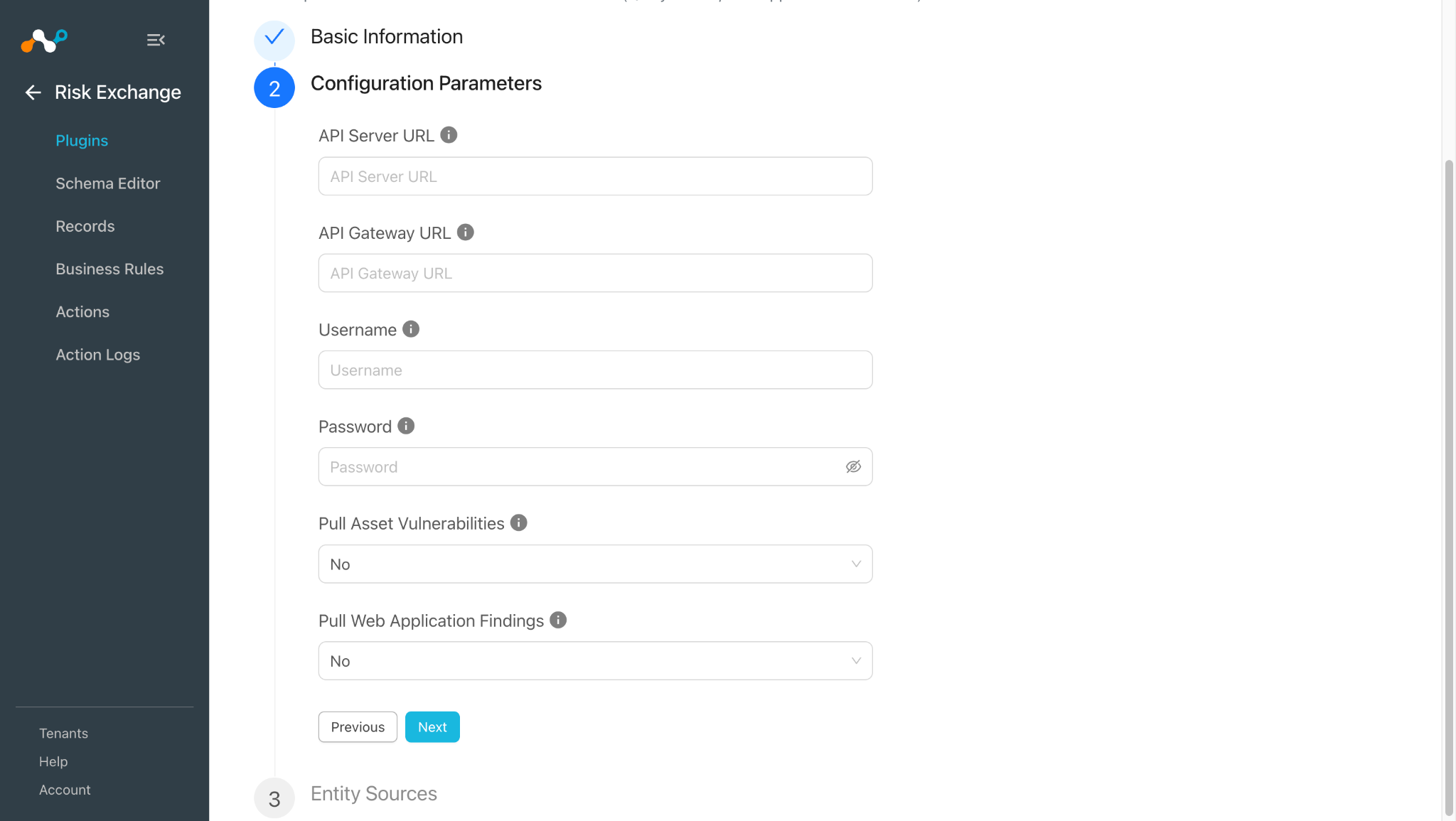
- Click Next and enter the Configuration Parameters:
- API Server URL: API Server URL of the Qualys instance. Refer this document on Qualys.
- API Gateway URL: API Gateway URL of the Qualys instance. Refer this document on Qualys.
- Username: The Username associated with the Qualys account.
- Password: The Password associated with the Qualys account.
- Pull Asset Vulnerabilities: Enable/Disable fetching asset vulnerabilities. Keep it Yes to enable.
- Click Next and select the required Entity from the Entity dropdown. Provide the field mappings per the requirements. You can create a new Entity by clicking Add New Entity.
To create a new field, click +Add field.
Provide the Field Label, Data Type, and Aggregate Strategy per your requirements.


Similarly, mappings for Web Applications are as follows:

- Click Save.

Note
Refer to the Mappings section before configuring the plugin.
Configure a Risk Exchange Business Rule for Qualys
- In Risk Exchange, go to Business Rules and click on Create New Rule in the top right corner.
- Enter the Rule Name. Select the Entity for Fields that were configured for the Qualys plugin, and configure the query based on your requirements.

- Click Save.

Configure a Risk Exchange Action for Qualys
The Qualys plugin supports the following action types:
Add/Remove Web Application Tag(s): Add/Remove Web Application Tag(s) action can be used to attach/unattach tags from Web Application on Qualys.
Add/Remove Asset Tag(s): Add/Remove Asset Tag(s) action can be used to attach/unattach tags from Asset on Qualys.
Scan Assets: Scan Assets action can be used to perform different types scans on Assets present on Qualys.
No Action: No action will be performed for this action. You can generate UBA alerts in Ticket Orchestrator by using this action and enabling the Generate Alerts toggle.
Note
You can perform multiple actions on the pulled records from Qualys on the Netskope Tenant. For performing the related actions on Netskope refer to the Netskope Risk Exchange plugin guide.
Add/Remove Web Application Tag(s)
- In Risk Exchange, go to Actions and click Add Action Configuration.
- Select the required Business Rule, Target Plugin Configuration, and Action from their respective dropdowns.
- Enable the Require Approval toggle if Approval is needed before performing action on the pulled records. Note that if the Require Approval toggle is enabled, then you need to manually approve the execution of each action from Risk Exchange > Action Logs in Cloud Exchange.


- Set the following Action Parameters:
- Action Type: Select Add Tag(s) to tag the Web Application, or Remove Tag(s) to untag the Web Application from Static field dropdown.
- Web Application ID: Select Web Application ID field from source or provide static multiple comma-separated Web Application IDs.
- Tag(s): Select source field for the tags or provide static multiple comma separated tags. Note that “tag1” and “ tag1 ” are considered different tags in Qualys.
- Click on Save.
Add/Remove Asset Tag(s)
- In Risk Exchange, go to Actions and click Add Action Configuration..
- Select the required Business Rule, Target Plugin Configuration, and Action from their respective dropdowns.
- Enable the Require Approval toggle if Approval is needed before performing action on the pulled records. Note that if the Require Approval toggle is enabled, then you need to manually approve the execution of each action from Risk Exchange > Action Logs in Cloud Exchange.


- Enter these Action Parameters:
- Action Type: Select Add Tag(s) to tag the asset, or Remove Tag(s) to untag the asset from the Static field dropdown.
- Asset ID: Select Asset ID field from source or provide static multiple comma-separated Asset IDs.
- Tag(s): Select source field for the tags or provide static multiple comma separated tags. Note that “tag1” and “ tag1 ” are considered different tags in Qualys.
- Click Save.
Scan Assets
- In Risk Exchange, go to Actions and click Add Action Configuration..
- Select the required Business Rule, Target Plugin Configuration, and Action from their respective dropdowns.
- Enable the Require Approval toggle if Approval is needed before performing action on the pulled records. Note that if the Require Approval toggle is enabled, then you need to manually approve the execution of each action from Risk Exchange > Action Logs in Cloud Exchange.

- Enter these Action Parameters:
- Asset ID: Select Asset ID field from source or provide static multiple comma separated Asset IDs.
- Scan Type: On-demand scan type.
- Override Config CPU: Set this flag to define the CPU throttle limits that the on demand scan will use.
- Click Save.
No Action
- In Risk Exchange, go to Actions and click Add Action Configuration.
- Select the required Business Rule, Target Plugin Configuration, and Action from their respective dropdowns.
- Enable the Require Approval toggle if Approval is needed before performing action on the pulled records.

- Click Save.
Validate the Qualys Plugin
Validate in Cloud Exchange
- In Risk Exchange, go to Records. Select the Entity that is selected while configuring the field mapping to view the pulled records.


- To verify the logs related to pulled records, go to Logging and apply the filter with the plugin name.


- Logs for performed actions:
Add/Remove Web Application Tag(s)

Add/Remove Asset Tag(s)

Scan Assets
- When a pulled record matches one of the configured business rules, the configured action will be performed on the record. This can be seen at Risk Exchange > Action Logs.

Validate in Qualys
- Qualys plugin fetches Assets data from the Cyber Security Asset Management > Inventory page, and Asset Vulnerabilities from the Vulnerability Management Detection & Response > Vulnerabilities page. Log in to Qualys and go to the Cyber Security Asset Management > Inventory.


- Click on an Asset to see more information about that particular asset:

- Qualys plugin fetches Web Applications data from the Web Application Scanning > Applications page, and Web Application Findings from the Web Application Scanning > Detections page. Log in to Qualys and go to Web Application Scanning > Applications.


- Click on a Web Application to see more information about that particular Web Application.

Validate the Add/Remove Web Application Tag(s) Action
- Log in to Qualys and to the Web Application Scanning > Applications.

- Click on a Web Application to see more information about that particular Web Application.
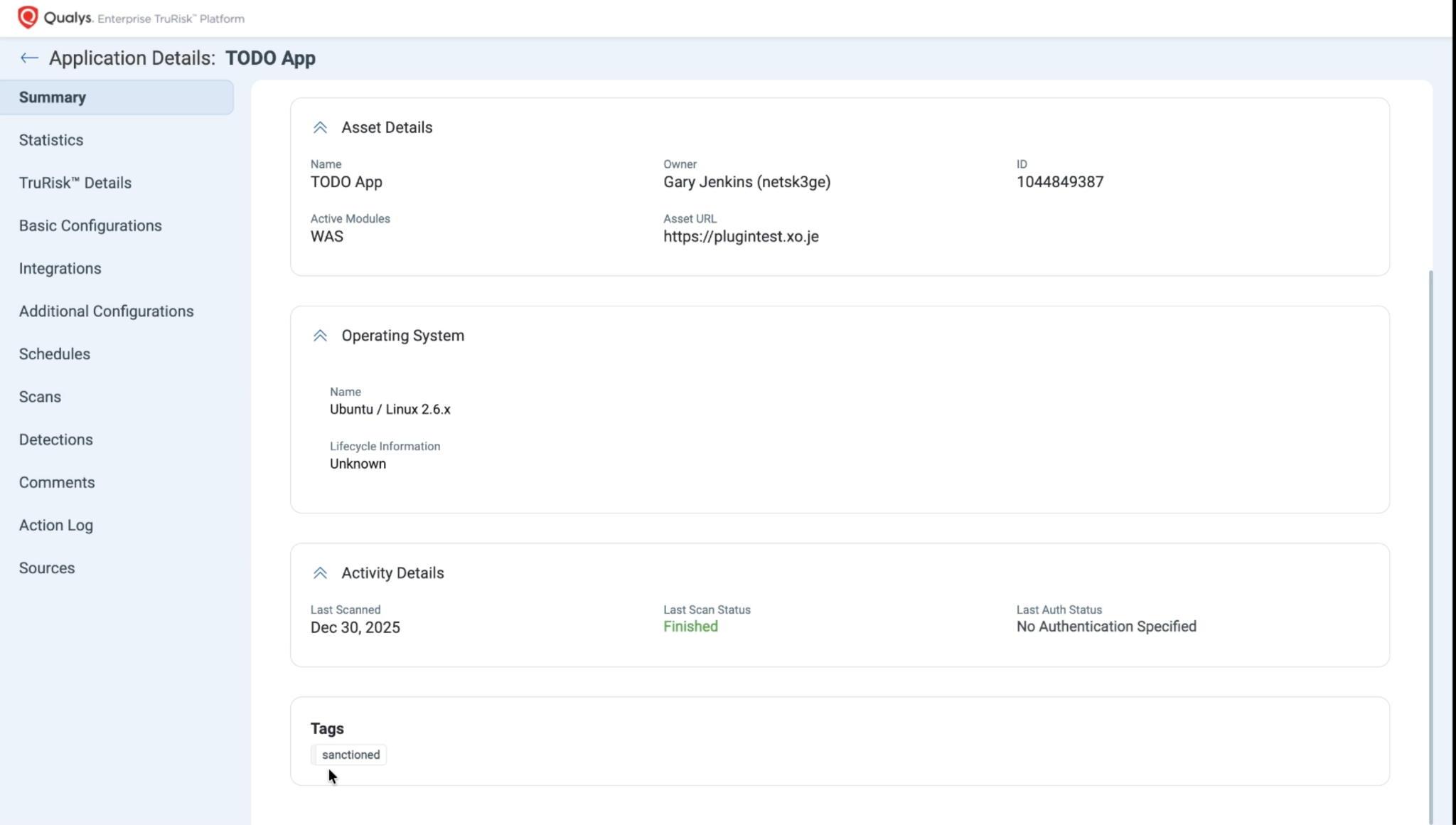
- The same Web Application after performing the Remove Tag action will look like this:

Validate the Add/Remove Asset Tag(s) Action
- Log in to Qualys and go to the Cyber Security Asset management > Inventory.

- Click on an Asset to see more information about that particular asset.

- The same Asset after performing the Remove Tag action will look like this:

Validate the Scan Asset Action
- Go to Cloud Agent Module in Qualys.


Note
On the Qualys platform, the status for only some of the Scans are visible. If you don’t find status for any specific action, then contact the Qualys support team.
Troubleshooting the Qualys Plugin
Unable to configure the CRE Qualys plugin
If you are unable to configure the Qualys plugin, it could be due to one of these reasons:
- Provided Incorrect API Server URL, API Gateway URL, Username and Password
- Provided Credentials don’t have sufficient permissions
What to do:
- To get the Access Key or Secret Key Secret, follow the steps under Configuration on Qualys section.
- To provide proper permissions to the configuration parameter, refer to the Configuration on Qualys section.
Unable to pull Assets or Web Application
If you are unable to pull Assets or Web Application from the Qualys plugin, it could be due to one of these reasons:
- No Asset or Web Application present on the Qualys platform
- An error is received while pulling the records from the platform.
- Mapping is not added while configuring the plugin in the entity source page.
What to do:
- Check on the Qualys platform to see if Assets/Web Applications exist or not.
- Receiving 500 error: The server might be down, wait for a while and check later.
- Receiving 401 error: The provided credentials while configuring the plugin no longer exist. Verify credentials and edit the plugin configuration with valid credentials if required.
- For Asset/Web Application, make sure that the mapping is added under Asset Entity/Web Application Entity, and the mandatory field is mapped while configuring the plugin.
Unable to View Asset or Web Application details on the Records page
If you are unable to view Web Application/Asset details on the record table, it could be due to the mappings for all the Qualys fields are not provided while configuring the Qualys plugin.
What to do:
- Make sure to provide the needed mapping while configuring the plugin.
- Make sure that the fields created in an entity are according to the suggested Mappings.
Known Behavior
- For the Network Interface IPv4, IPv6 and MAC address fields:
The API might provide empty values.
API Response
Cloud Exchange Records
- A single field in API response might have more than 1 value, like comma-separated values.
API Response
Cloud Exchange Records
To maintain the consistency of the data, these values are stored as it is without any processing.
Create a Tag API limitation
When creating a tag which contains the < or > symbol qualys does not give error even if the tag is the same, like if a tag called Cloud<>Exchange already exists on the Qualys platform, and you try to create the same tag qualys API does not give error but creates the tag again.
This might cause an issue during the add/remove tag actions. When fetching the tag ID, the wrong tag ID might be fetched since there are multiple tags with the same name existing on Qualys.