

You can limit traffic by the number of API calls or the number of tokens consumed. To configure rate limits for all or specific gateways, follow the steps below.
-
Log in to the Netskope tenant UI and go to Settings > Security Cloud Platform > AI Gateway > Rate Limit.
-
Click New Override.
-
In the New Rate Limit Override page, enter the values for the following parameters.
Parameter Details Name Enter a name for the rate limit override. This is a required field. Gateway Select an AI Gateway to which you want the rate limit override to be applied. Subset of Gateways/All Gateways Specify if you want to apply the rate limits to a subset of gateways or to all of the gateways. Match Criteria Specify the match criteria for the rate limit to be applied. As match criteria, you can select an AI provider, AI model name, and Token groups. You can select multiple token groups. If the value is left empty, the rate limit applies to all traffic (tenant level). -
Choose how you want to measure the limit:
Type Description API calls Limit traffic by the number of requests. Tokens Limit traffic by the number of tokens consumed. Token consumption includes both prompt (input) tokens and response (output) tokens combined. Note: You cannot change the Type after the rate limit override is created. To switch between API calls and Tokens, create a new override.The Tokens option is not available when the Match Criteria specifies a single AI Provider whose schema is “Other.” AI Gateway cannot reliably extract token counts from provider responses using the Other schema, so a token-based limit would not enforce correctly. If Match Criteria is left open to all providers (no specific AI Provider selected), this restriction cannot be applied automatically at configuration time. In that case, review your AI
Provider list before relying on a token-based limit, since any “Other” schema provider included in that scope will not be rate-limited by token count. -
Specify the limit value.
If Type = API calls If Type = Tokens If you selected API calls, specify the limit as number/per requests/day or Hour/gateway. If you selected Tokens, specify the limit as number of tokens/per day or Hour/gateway. 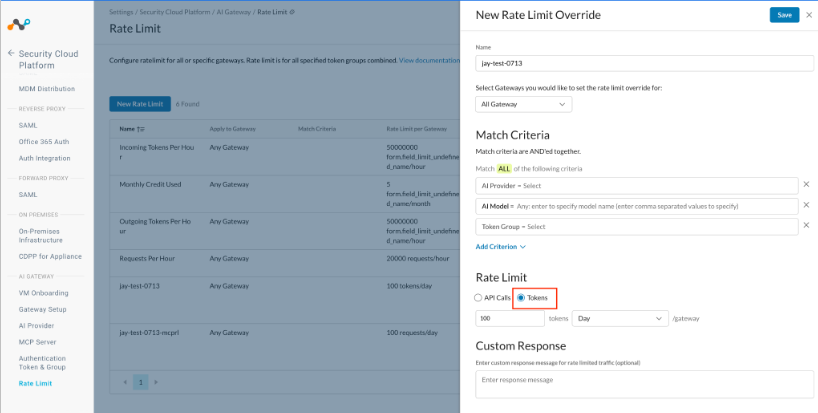
-
Add a custom response message in the Response Message text box. When the defined rate limit reaches the maximum limit, AI Gateway sends this custom message with the response code 429.

-
Track token consumption for your rate limit overrides on the Rate Limit page. Usage is available at the Tenant, AI Provider, Model, and AI Gateway Token Group level.