

DLP/TSS Integration with RBI
When this feature is enabled, you may see the following limitations.
Limitations:
- Policy based on custom headers in HTTP requests will only apply to the URL matching the isolate policy (initial request).
- Header based policies for isolated traffic will apply on headers sent/received by the remote browser engine, not the user’s device.
- Similarly, Policy based on device attributes in HTTP request will only apply to the URL matching the isolate policy (initial request).
Policy matching for isolated traffic supports most available attributes. These attributes include:
- access method
- Browser
- OS
- user id
- src ip
- egress ip
- domain
- categories
- device classification
Fine tune your isolate policy to only send the user browser requests to RBI
RBI sets an interactive browsing session in a managed, isolated environment to protect endpoints/users from malicious content embedded in the web code as they browse these pages. There must be a user browsing a webpage with a web browser.
Adding the browser source criteria to the isolate policy helps prevent undesired traffic hitting the isolate policy and being sent to RBI for isolation, since this is likely not isolatable content (e.g., API call by a desktop agent to fetch content in JSON format; it can’t be isolated).

Create Real-time Protection Policies for content that you cannot isolate
RBI protects users by isolating browsing of webpages. Given the nature of the Netskope Proxy (URLs) vs RBI (webpages only, a subset of URLs), some URL requests matching an isolate policy can reach the RBI platform, but be impossible to isolate (e.g., a URL to fetch a packet update or a config file from a user agent that is not a browser).
RBI cannot process those requests without breaking the business flow or interfering with the customers Real-time Protection policies; when these situations occur, RBI forwards the request to the destination, fetches the response, and forwards it to the Netskope proxy for additional processing.
Requests that are not isolated are regular HTTP requests. Setting controls for those requests requires Content policies and/or Real-time Protection policies. If you want to block, alert, or inspect the content of those responses for DLP or Threat Detection purposes, you must create Real-time Protection policies that address them.
1.Add the “browser” source criteria to all new or edited “isolate” policies.
RBI isolates traffic corresponding to a user, visiting a webpage with a web browser (e.g. Chrome, Firefox, etc.).
For new or edited “isolate” policies, you must add the “browser” source criteria to all “isolate” policies, preventing non-browser traffic match for these RBI policies. The list of browsers is restricted to supported RBI Browsers.
Adding the “browser” source criteria creates more effective “isolate” policies and reduces not isolable requests sent to RBI, which might affect user experience due to unnecessary traffic processing.
Existing “isolate” policies will keep working as is, with no changes. New and edited “isolate” policies require the “browser” criteria.

2. Add RBI categories to your threat policies.
Netskope recommends that your threat policy should also inspect responses that are not isolated, so no Malware will hit the endpoint for those situations where it is impossible to set up an isolated browsing session for the user.
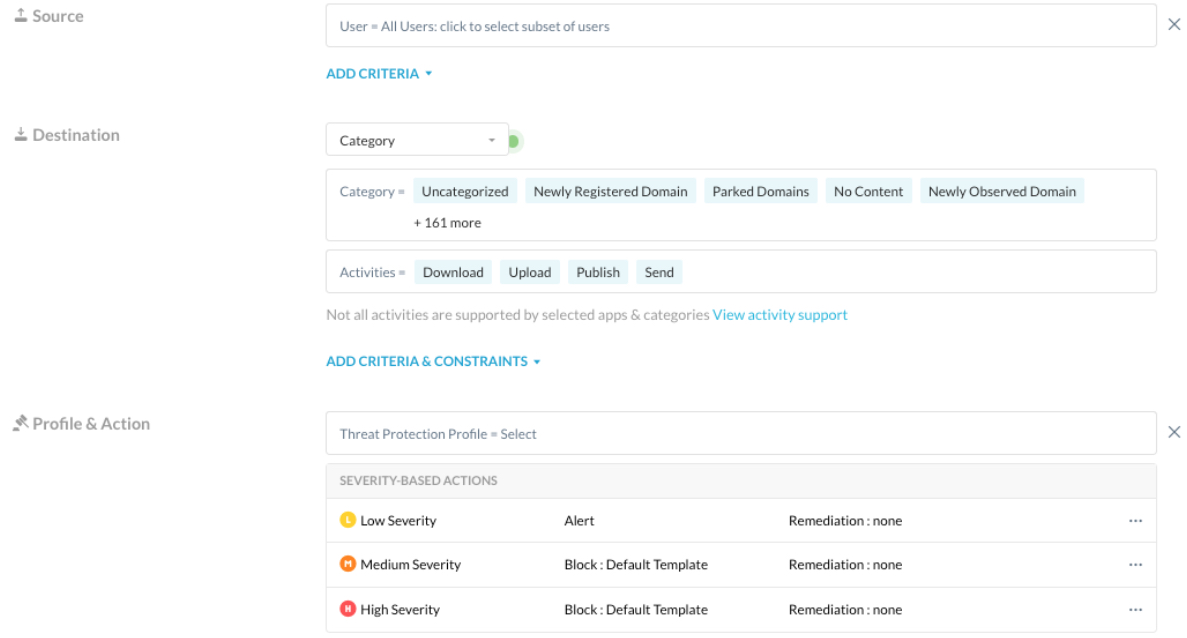
3. Create content inspection policies for isolated categories according to your security posture.
Create ‘Block’, ‘Alert’, or ‘Allow’ policies for activities in RBI categories. They will trigger requests that hit an RBI policy and yet they couldn’t be isolated (they were not a webpage). As of today, these policies need to be created on top of the isolate policy, following the proxy policy engine evaluation order:

Clipboard Limitations
There are some known clipboard limitations as outlined below.
LIMITATION 1: Browser Restrictions
Some browsers restrict access to the clipboard to paste information. The “Paste” button is disabled in the context menu if the user’s browser does not support it. This may apply if:
- The isolated web page is http (clipboard is only supported in https)
- The browser is Firefox
- The browser is Safari
If you use the “Paste” function, the system will suggest that you use the shortcut to paste the text.

LIMITATION 2: Browser Prompts the User and Asks for Permission
RBI presents a custom context menu that is rendered to the user which is different from the native context menu of the browser. The browser doesn’t recognize the user interaction and prompts the user for permission:

The answer collected from the user is stored in the local machine and this prompt will not be shown again for that domain during future isolated sessions. Permissions can be checked in the browser’s settings for a site:
