

eMudhra Intermediate CA Compromise
Vulnerability Description and Impact
Summary of Findings (Support article)
- What happened: On October 20, 2026, it was publicly disclosed that the private keys of eight eMudhra intermediate CAs had been generated incorrectly and could be recovered from their public certificates. The affected TLS intermediates chain to two root CAs: emSign ECC Root CA – G3 and AAA Certificate Services. Anyone holding these keys can potentially create certificates that impersonate any website or service.
- Who is at risk: Major browsers and operating systems (including Mozilla, Google Chrome, Apple, and Microsoft) already block these intermediates, and eMudhra has revoked them. The continued risk is to software that still trusts the two root CAs. Potential exploitation would require an attacker positioned in the network path of an affected connection.
- No compromise detected: Our investigation to date has not identified any unauthorized access, compromise, or exploitation related to this issue in the Cloud Exchange environment or internal enterprise system.
Affected Versions
- CE v6.1.0, v6.0.1, v6.0.0, v5.1.2, v5.1.1, v5.1.0, v5.0.1, v5.0.0, v4.x, v3.x: Expected to be affected in the same way. The recommended action is also to upgrade to v7.0.
Fixed Versions
- CE v7.0: contains the fix.
- Since the affected components of this vulnerability are os and python level packages which can not be patched on the existing docker container runtime; the change can not be backported to earlier CE versions.
Impact on Cloud Exchange
The CE core component makes outbound HTTPS connections to Netskope tenants and to the third-party systems that customers configure through plugins, such as SIEM, ITSM and cloud services. It validates the server certificates of those connections against the trust lists described above. A successful attack would let an attacker impersonate one of those endpoints, capture credentials or API tokens, and read or alter data in transit. Communication between CE’s own components (UI, core, MongoDB and RabbitMQ) uses certificates generated by Cloud Exchange and is not affected.
Standalone Deployment
The core container makes its outbound connections from a single host. An attacker would need to be on the network path between that host and the endpoint.
High Availability (HA) Deployment
Every node makes the same outbound connections, so every node is exposed. Traffic between the nodes runs on a private network with Cloud Exchange-generated certificates and is not affected.
Cloud Exchange as a VM (OVA, VHDX, AWS, Azure, KVM, Hyper-V)
The appliance images contain the same core component. The exposure is the same as for a standalone or HA deployment, depending on how the VM is deployed.
Network controls reduce, but do not remove, the risk. The permanent remediation is the corrected trust lists delivered in CE v7.0.
Mitigation Until the Upgrade
General guidance for customers who have neither upgraded nor escalated. These controls reduce exposure. They do not replace the upgrade or the hotfix.
- Keep the network path between Cloud Exchange and its endpoints under the customer’s control, and restrict Cloud Exchange egress to the required destinations (Netskope tenants and the configured plugin endpoints).
- Where Cloud Exchange reaches the internet through a proxy, make sure the proxy validates upstream certificates with up-to-date trust lists.
- Apply the operating system vendor’s updated CA package on the Cloud Exchange host (on Ubuntu 22.04, ca-certificates 20260816ubuntu0.22.04.1 or later). This protects host-level operations such as image pulls. It does not change the trust lists inside the Cloud Exchange containers.
- Plan the upgrade to v7.0.
Upgrade/Migrate Options for different CE versions
| Current CE version | Upgrade Path |
|---|---|
| v6.1.0 | v7.0.0 |
| v6.0.1 | v7.0.0 |
| v6.0.0 | v7.0.0 |
| v5.1.2 | v7.0.0 |
| v5.1.1 | v7.0.0 |
- Upgrade Cloud Exchange documentation for v7.0 (containerized and VM).
- If you run Cloud Exchange v5.1.0, v5.0.1 or v5.0.0 in a containerized deployment, refer to Upgrade Steps for Cloud Exchange v5.0.1 or v5.1.0 Containerized to Cloud Exchange v5.1.1 Containerized in the Cloud Exchange KB Articles.
- If you run Cloud Exchange v5.1.0, v5.0.1 or v5.0.0 as a VM, refer to Upgrade Steps for Cloud Exchange v5.0.1 or v5.1.0 VM Standalone Deployment to Cloud Exchange v5.1.1 VM Standalone Deployment in the Cloud Exchange KB Articles.
- If you upgrade Cloud Exchange as a VM from v5.1.0, v5.0.1 or v5.0.0, first upgrade the underlying Ubuntu OS to 22.04(refer to Cloud Exchange KB Articles 20.04 to 22.04) followed by upgrading the Ubuntu OS to 24.04(refer to Cloud Exchange KB Articles 22.04 to 24.04). For a containerized deployment, use the OS versions listed in the Cloud Exchange System Requirements.
- If you run Cloud Exchange v3.x or v4.x, refer to Upgrade Steps for Cloud Exchange v3.x or v4.x Containerized to Cloud Exchange v5.0.1 Containerized in the Cloud Exchange KB Articles.
MongoDB incorrect length handling in Zlib-compressed Protocol Headers
Vulnerability Description and Impact
MongoDB has identified a security vulnerability related to incorrect length handling in Zlib-compressed protocol headers. Under specific conditions, this issue may cause the MongoDB server to read uninitialized heap memory.
The vulnerability can be triggered by an unauthenticated client, but requires access to the internal network. Public internet exploitation is not possible under default configurations.
The vulnerability affects the following MongoDB versions:
- MongoDB Server 7.0 prior to 7.0.28
- MongoDB Server 8.0 prior to 8.0.17
- MongoDB Server 8.2 prior to 8.2.3
- MongoDB Server 6.0 prior to 6.0.27
- MongoDB Server 5.0 prior to 5.0.32
- MongoDB Server 4.4 prior to 4.4.30
- MongoDB Server 4.2, 4.0, and 3.6 (supported versions)
Standalone Deployment
- Definition:
- MongoDB operates within a Docker internal network.
- The MongoDB service port is not exposed to the VM or external networks.
- Exploit method requirement:
- Exploitation is possible only if an attacker gains privileged access to the Docker network within the VM.
High Availability (HA) Deployment
- Definition:
- Cloud-based HA deployments use a private IP network, as recommended.
- On-premises HA deployments also operate exclusively on a private network.
- Exploit method requirement:
- Successful exploitation would require an attacker to obtain access to the private network used for MongoDB communication.
Deployment architecture and network isolation controls in Cloud Exchange considerably reduce the overall risk. The MongoDB vulnerability does not introduce direct exposure to public networks, and requires prior network access to exploit.
Cloud Exchange will upgrade MongoDB to version 8.0.17, which includes the security fix.
For Cloud Exchange versions 5.x through 6.0.0, Netskope teams recommend several options to avoid this vulnerability in a docker network in Standalone, and in a private network in HA.
Standalone Deployment for v5.0.1 (deprecated), v5.1.0, v5.1.1, v5.1.2, v6.0.0, v6.0.1 and v6.1.0
- Go to the Cloud Exchange installation directory (For CE as a VM, go to /opt/cloudexchange/cloudexchange)
- Stop Cloud Exchange using this command: sudo ./stop
- Update the docker-compose.yml (Ubuntu and Docker based deployment) or podman-compose.yml (RHEL and Podman based deployment) file with these instructions in mongodb-primary sections of the yml file, and then save the file.
v6.0.0 Standalone
Before the yml file v6.0.0 update
Add this argument after the mongod keyword in the entrypoint section of the mongodb-primary.
--networkMessageCompressors snappy,zstd
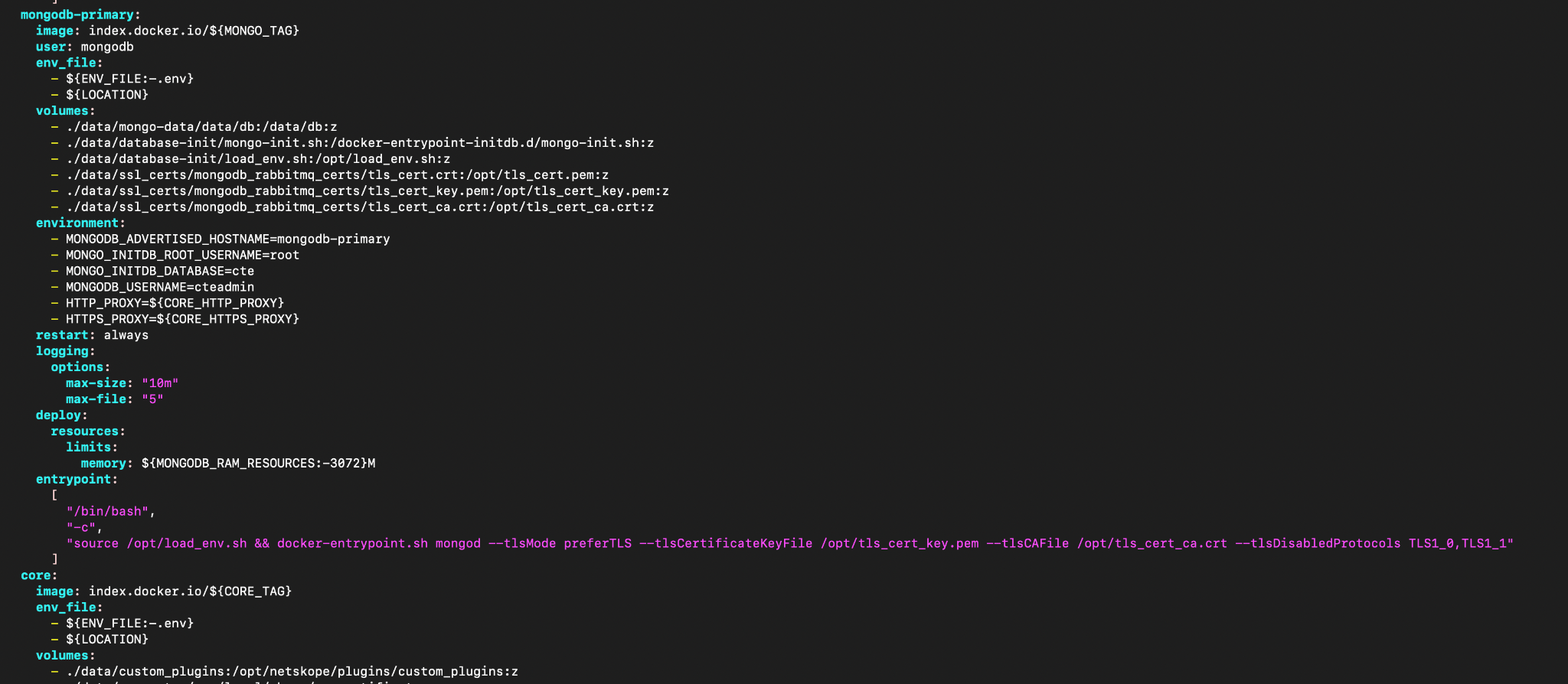
After the yml file v6.0.0 update

v5.1.2, v5.1.1 Standalone
Before the yml file v5.1.2, v5.1.1 update
Add this argument after the mongod keyword in entrypoint section of the mongodb-primary.
--networkMessageCompressors snappy,zstd
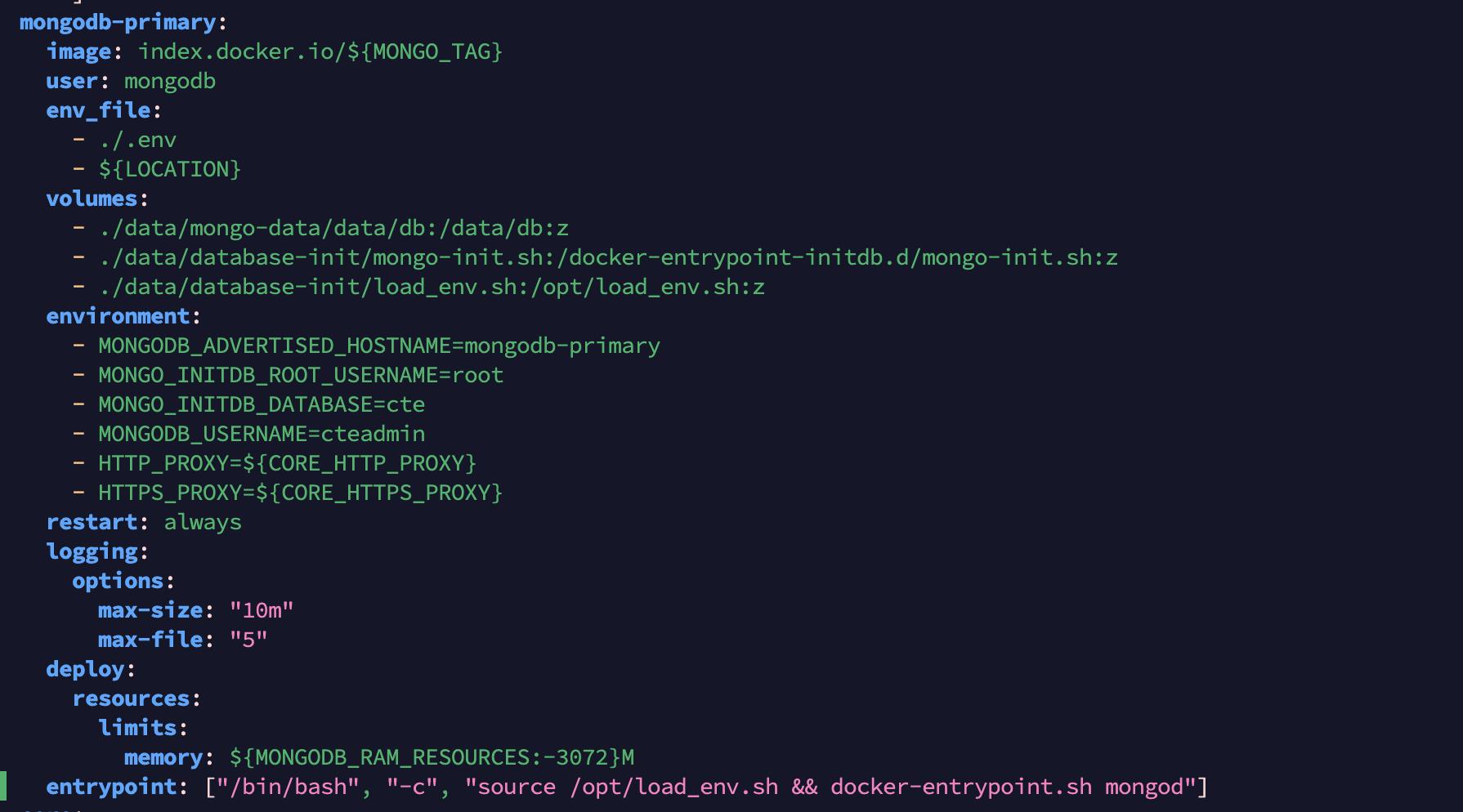
After the yml file v5.1.2, v5.1.1 update
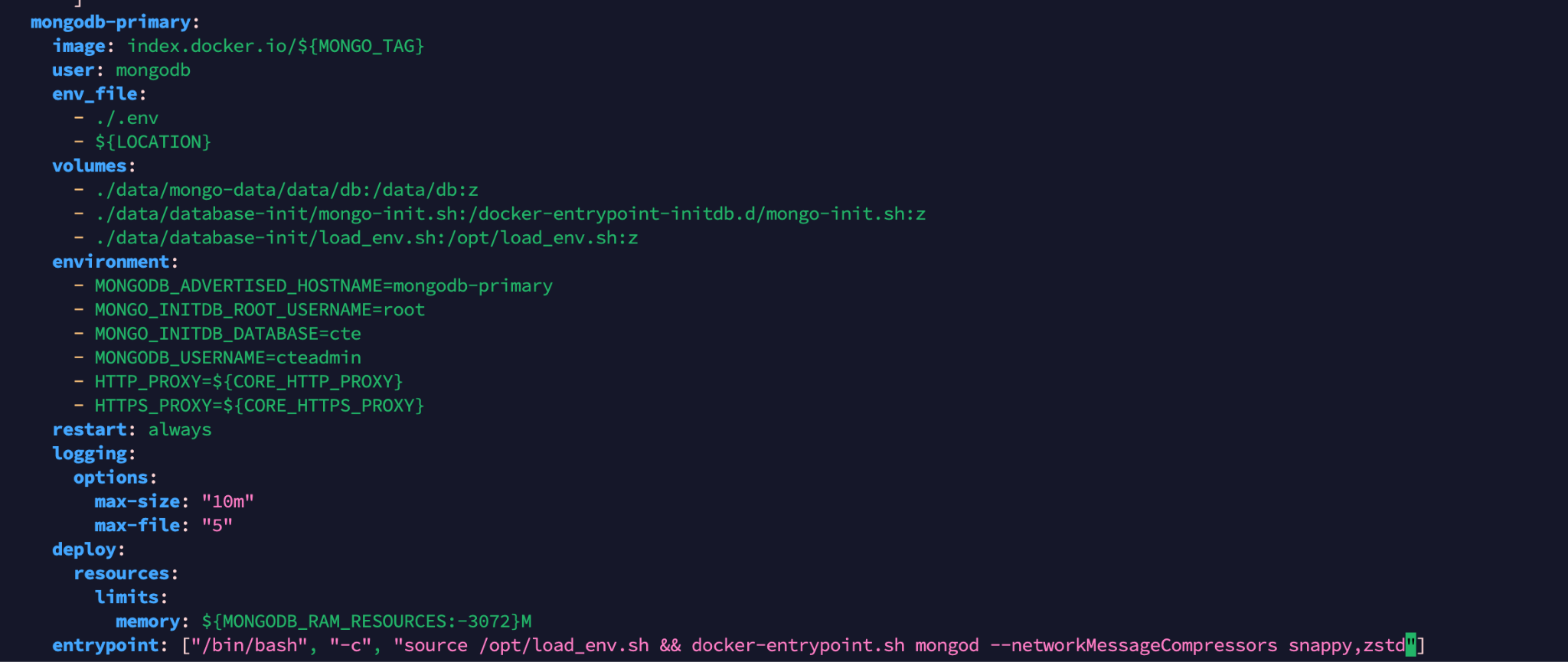
v5.0.1 (deprecated), v5.1.0 Standalone
Before the yml file v5.0.1, v5.1.0 update
Add this argument after the mongod keyword in entrypoint section of the mongodb-primary.
--networkMessageCompressors snappy,zstd
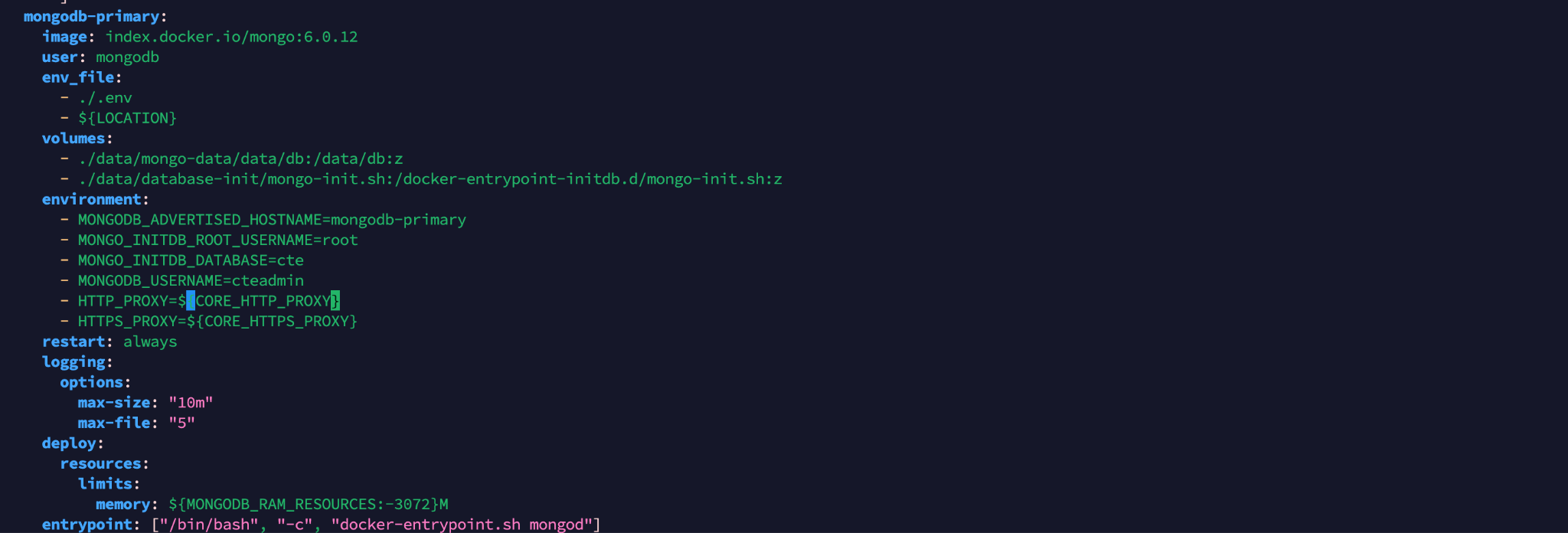
After the yml file v5.0.1, v5.1.0 update
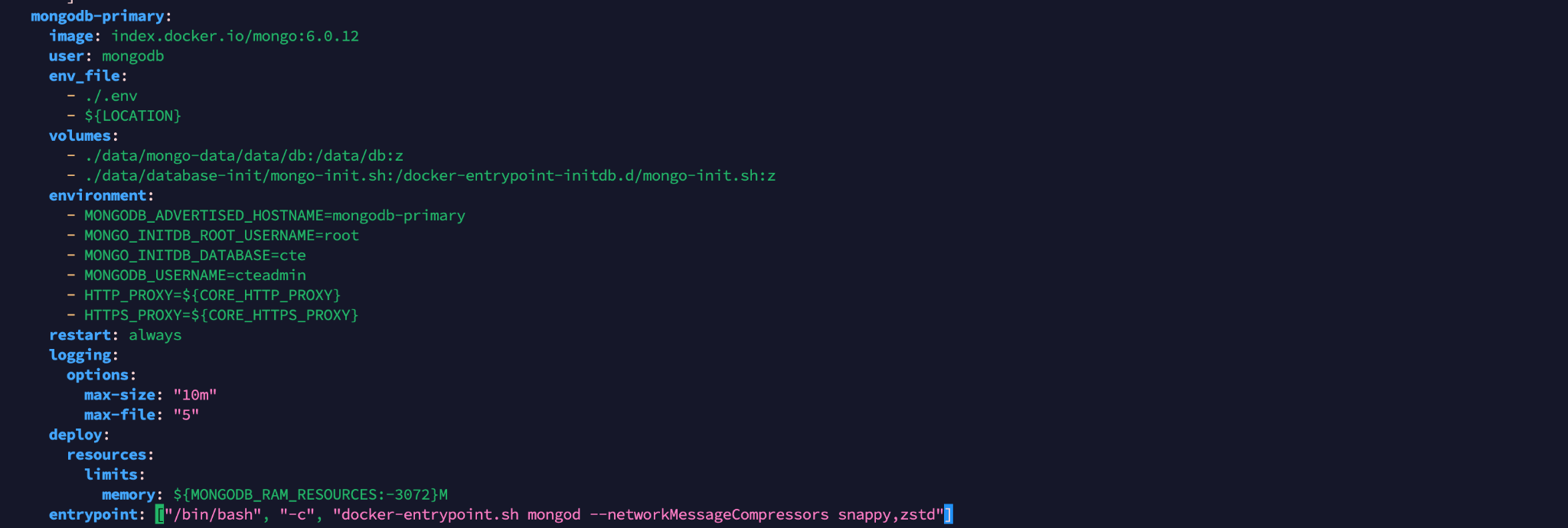
Start Cloud Exchange using this command:
sudo ./start
HA Deployment for v5.0.1 (deprecated), v5.1.0, v5.1.1, v5.1.2, v6.0.0, v6.0.1 and v6.1.0
- Go to the Cloud Exchange installation directory of the secondary nodes (For CE as a VM, go to /opt/cloudexchange/cloudexchange).
- Stop Cloud Exchange using this command for all secondary nodes one by one: sudo ./stop
- Go to the Cloud Exchange directory of the primary node (For CE as a VM, go to /opt/cloudexchange/cloudexchange).
- Stop Cloud Exchange using this command for the primary node. sudo ./stop
- Update the docker-compose-ha.yml (Ubuntu and Docker based deployment) or podman-compose-ha.yml (RHEL and Podman based deployment) file with these instructions in mongodb-primary sections of the yml file, and save the file in all HA nodes one by one.
v6.0.0 HA
Before the yml file v6.0.0 update
Add this argument after the mongod keyword in the entrypoint section of the mongodb-primary.
--networkMessageCompressors snappy,zstd
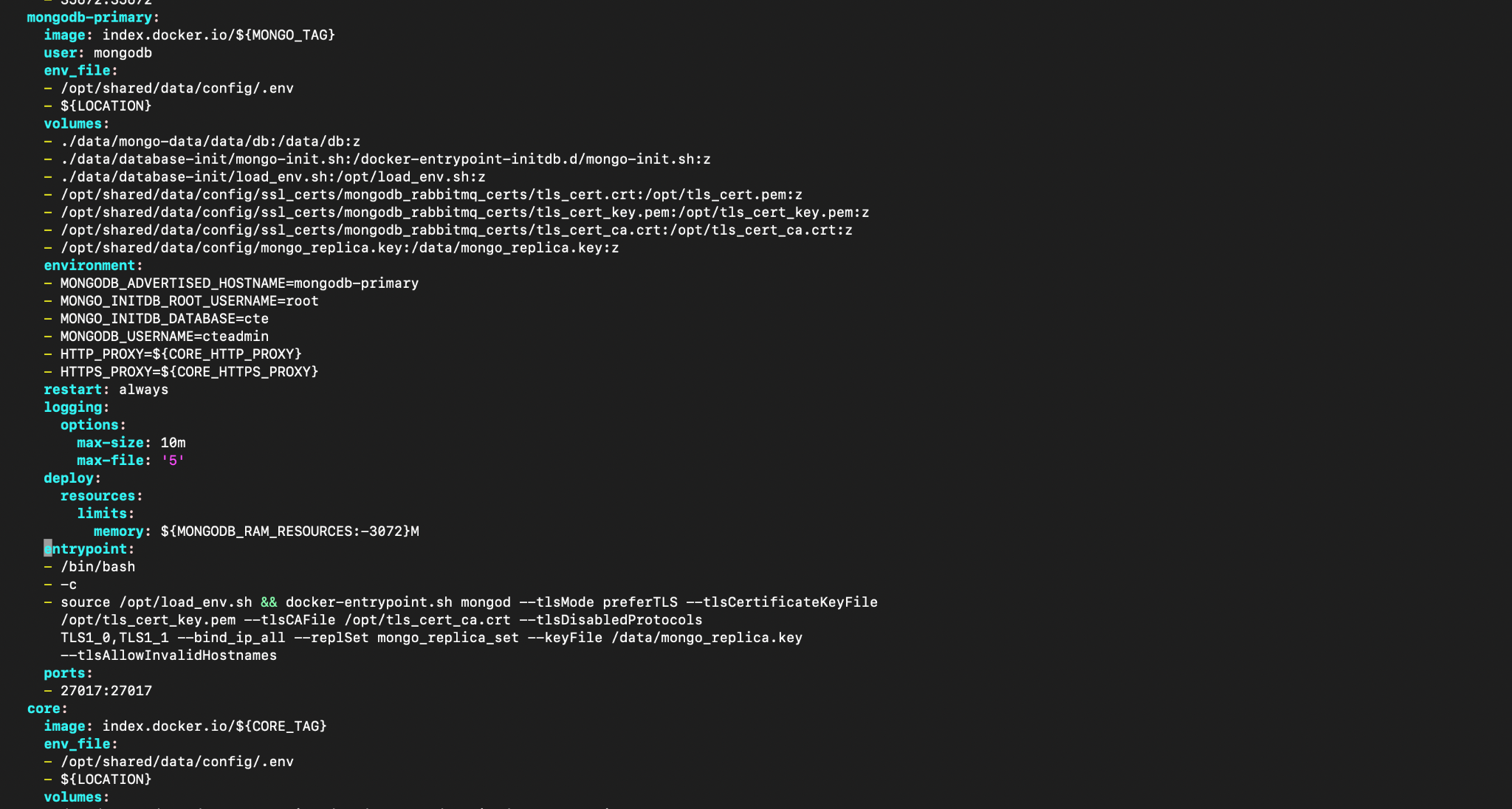
After the yml file v6.0.0 update

v5.1.2, v5.1.1 HA
Before the yml file v5.1.1, v5.1.2 update
Add this argument after the mongod keyword in the command section of the mongodb-primary.
--networkMessageCompressors snappy,zstd
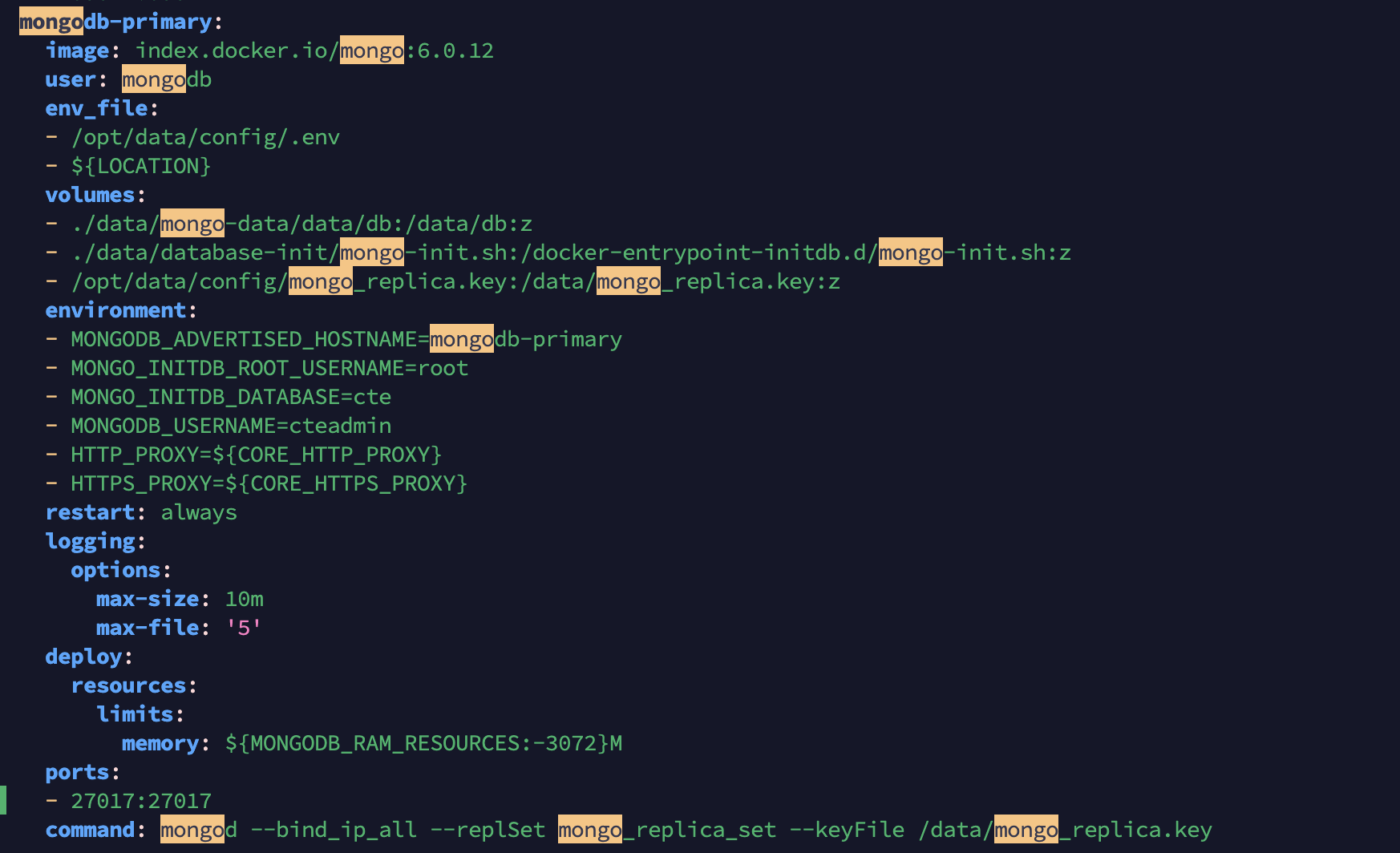
After the yml file v5.1.1, v5.1.2 update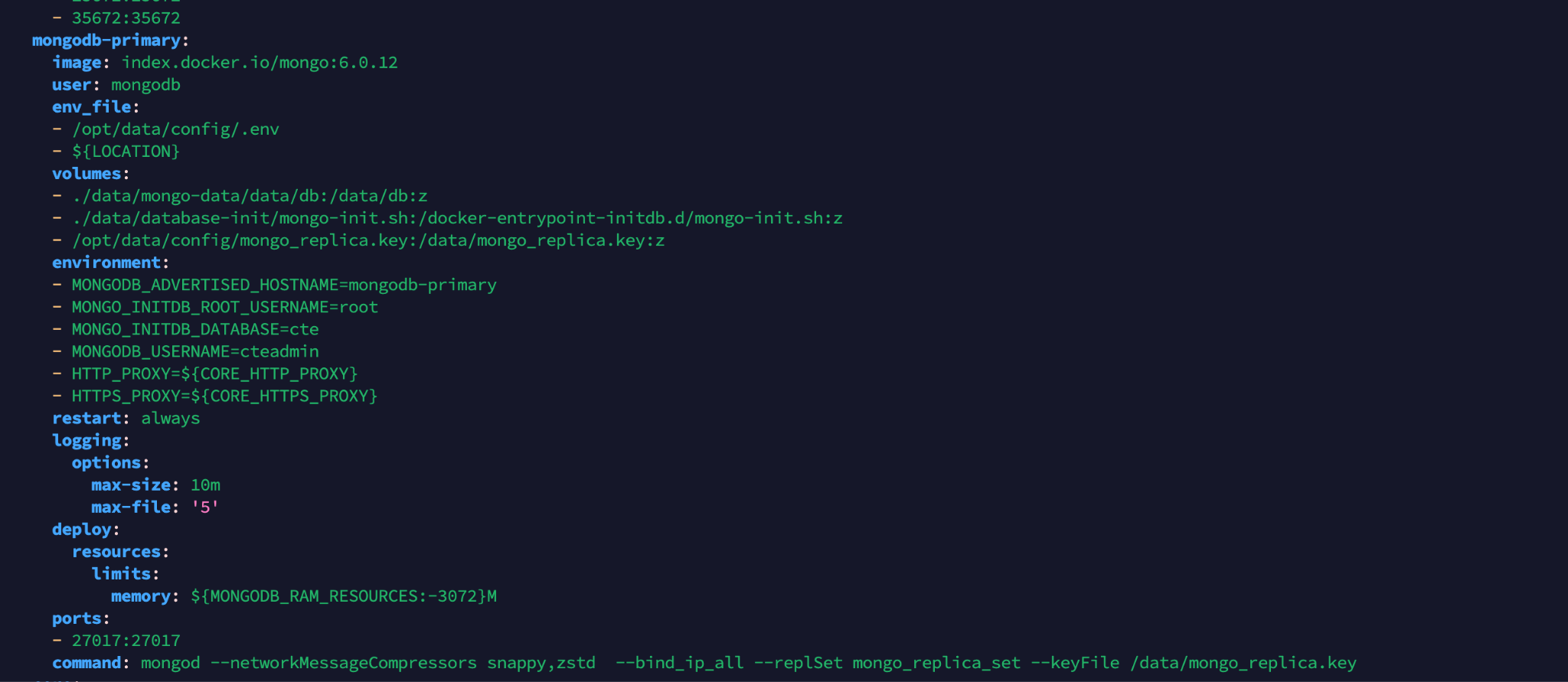
v5.0.1 (deprecated), v5.1.0 HA
Before the yml file v5.0.1, v5.1.0 update
Add this argument after the mongod keyword in the command section of the mongodb-primary.
--networkMessageCompressors snappy,zstd
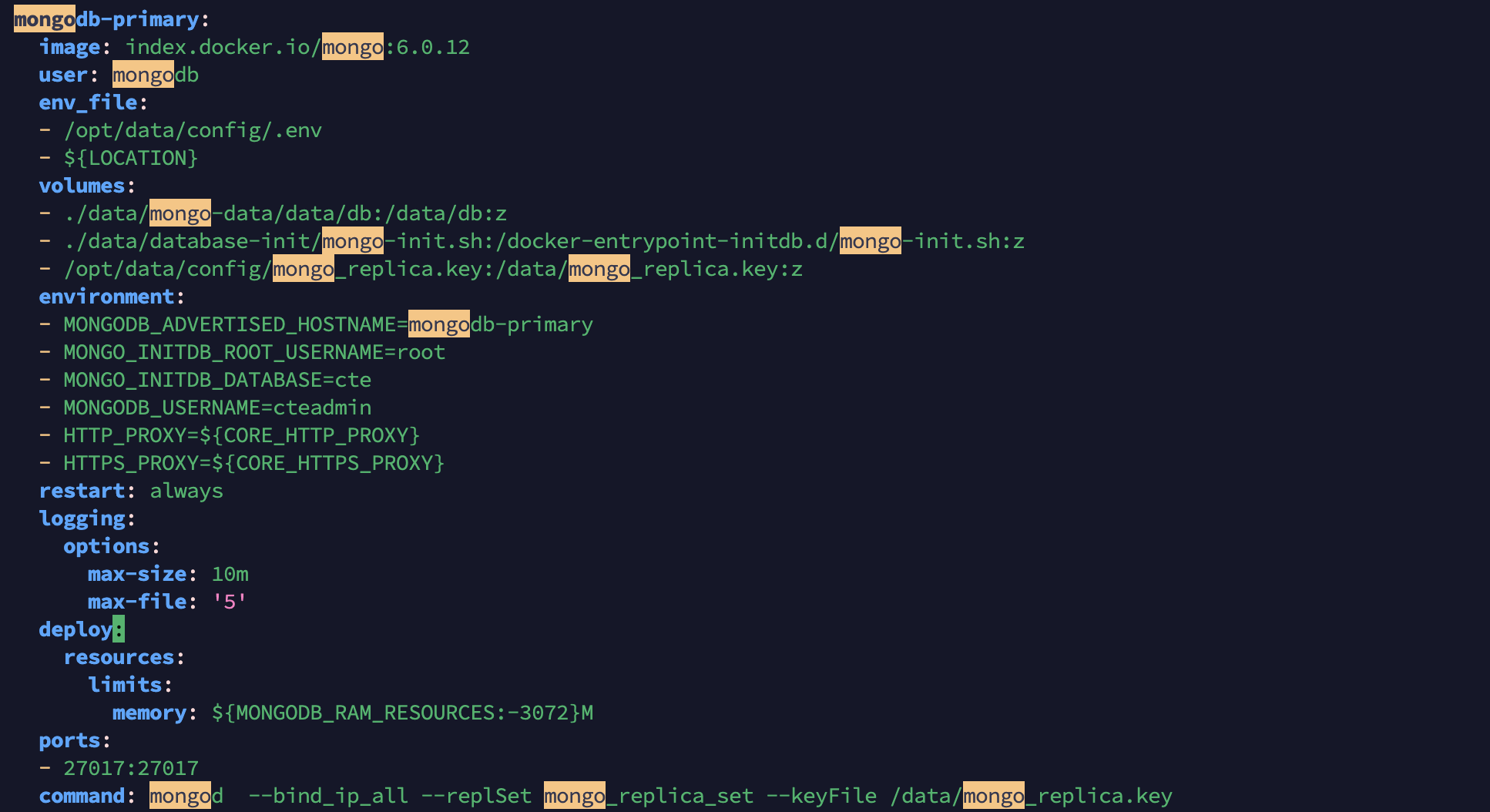
After the yml file v5.0.1, v5.1.0 update
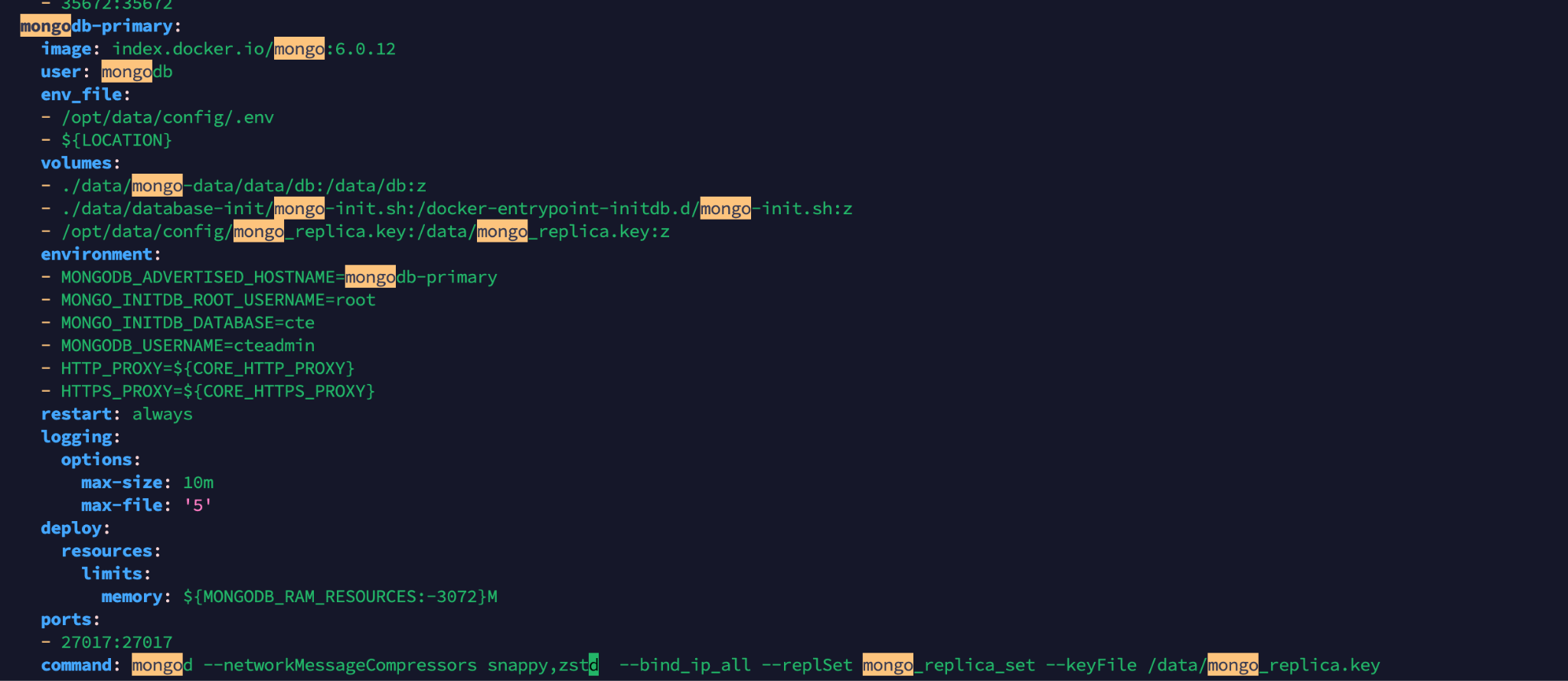
- Start the Cloud Exchange primary node using this command: sudo ./start
- Start the secondary Cloud Exchange nodes using this command: sudo ./start