

This document explains how to configure the SentinelOne Singularity XDR v1.0.0 plugin in the Netskope Cloud Exchange platform. This plugin is used to fetch Devices (Endpoints) from the Inventory > Endpoints page, Users (Identity) from the Inventory > Identity page, and Applications from the Vulnerabilities page from the SentinelOne Singularity XDR platform. The plugin supports performing Manage Device Tags, Move Device to Group, Isolate/Undo Isolate, Update Asset Criticality, Run Scan and Reboot Device actions on Devices. The plugin supports performing Update Asset Criticality action on Users.
Prerequisites
To complete this integration, you need:
- A Netskope tenant (or multiple, for example, production and development/test instances).
- A Netskope Cloud Exchange tenant with the Tenant plugin and Risk Exchange plugin already configured.
- Access to the Singularity Operations Center.
- The following licences for using SentinelOne Singularity XDR plugin:
- Identity Detection & Response (IDR)
- Endpoint Security – Complete
- Make sure you have the Vulnerability Management Add-on Module license enabled for your Endpoint Security – Complete license
- Connectivity to the following hosts: https://<your-tenant>.sentinelone.net
- Your SentinelOne Site Name.
SentinelOne Singularity XDR Plugin Support
This plugin is used to fetch Devices (Endpoints) from the Inventory > Endpoints page, Users (Identity) from the Inventory > Identity page, and Applications from the Vulnerabilities page from the SentinelOne Singularity XDR platform. The plugin supports performing Manage Device Tags, Move Device to Group, Isolate/Undo Isolate, Update Asset Criticality, Run Scan and Reboot Device actions on Devices. The plugin supports performing Update Asset Criticality action on Users.
| Type of Data Pulled | Actions |
|---|---|
| Devices (Endpoints) Users (Identity) Applications | Manage Device Tag(s) Move Device to Group Update Asset Criticality Isolate/Undo Isolate Run Scan Reboot Device No Action |
Mappings
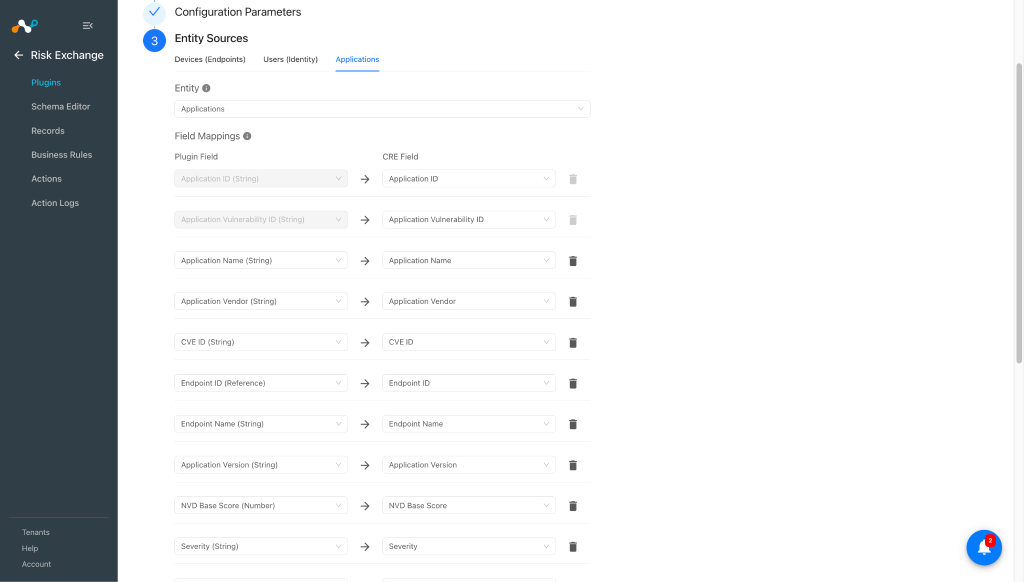
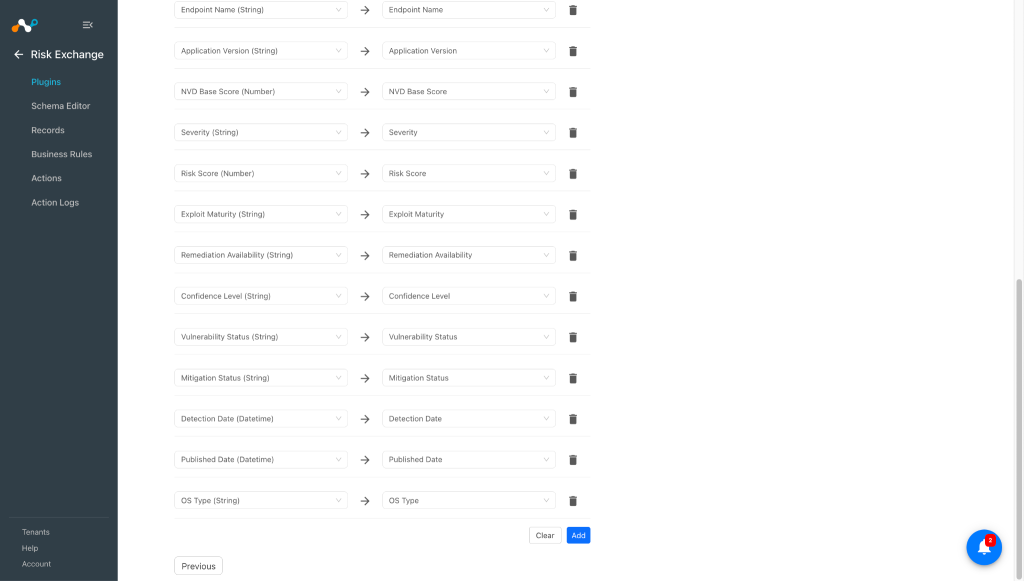
Mapping will be used to view the pulled Devices (Endpoints), Users (Identity), Applications and their respective details. Mapped fields during plugin configuration will be visible on the Records page once the data is pulled. Below is the suggested mapping that should be used while configuring the plugin.
Pull Mapping for Devices
| Plugin Field | Expected Datatype | Suggested Field Name | Suggested Aggregate Strategy | Sample Value |
|---|---|---|---|---|
| Agent ID | String | Agent ID | Unique | 2448495699704074860 |
| Asset ID | String | Asset ID | Unique | 6umdeth4ni5brpl2e2wjfei3im |
| Asset Name | String | Host Name | Overwrite | win11-50-10-99 |
| Serial Number | String | Serial Number | Overwrite | VMware-42 03 0d 0e 92 ed 5c 36-d9 a0 9b c4 b6 be 64 72 |
| Network Status | String | Network Status | Overwrite | connected |
| IP Address (Public) | String | IP Address | Overwrite | 106.213.69.80 |
| Internal IPv4 Addresses | List | IPv4 Addresses | Overwrite | [“10.50.10.99”] |
| Internal IPv6 Addresses | List | IPv6 Addresses | Overwrite | [“fe80::7a84:24a4:7a93:9e4b”] |
| MAC Addresses | List | MAC Addresses | Overwrite | [“00:50:56:83:5e:ba”] |
| Domain | String | Domain | Overwrite | EC |
| Device Review Status | String | Device Review Status | Overwrite | Not Trusted |
| Asset Criticality | String | Asset Criticality | Overwrite | high |
| Infection Status | String | Infection Status | Overwrite | Healthy |
| Risk Factors | List | Risk Factors | Overwrite | [“unresolved alerts”] |
| Asset Status | String | Asset Status | Overwrite | Active |
| Tags | List | Tags | Overwrite | [“Agent:Tag1”] |
| Last Logged In User | String | Last Logged In User | Overwrite | netskopeuser |
| OS Username | String | OS Username | Overwrite | root |
| AD User DN | Reference | AD User DN | Overwrite | CN=netskopeuser,CN=Users,DC=ec,DC=local Note: need to use reference entity as Users with Distinguished Name field. |
| Asset Contact Email | String | Asset Contact Email | Overwrite | netskope@netskope.com |
| Operating System | String | Operating System | Overwrite | Windows 11 Pro |
| OS Family | String | OS Family | Overwrite | Windows |
| Site Name | String | Site Name | Overwrite | CRE Singularity |
| Member Of | String | Member Of | Overwrite | CloudExchangeGroup |
Note
To merge device records between Netskope Tenant and SentinelOne Singularity XDR, you can use Serial Number as a unique and common field between them.
Pull Mapping for Users
| Plugin Field | Expected Datatype | Suggested Field Name | Suggested Aggregate Strategy | Sample Value |
|---|---|---|---|---|
| Asset ID | String | Asset ID | Unique | dpdcguxhdecy3nnhq4aquqzxsa |
| Distinguished Name | String | Distinguished Name | Unique | CN=netskopeuser,CN=Users,DC=ec,DC=local |
| User Principal Name | String | User Principal Name | Overwrite | netskope@ec.local |
| Domain | String | Domain | Overwrite | ec.local |
| Risk Factors | List | Risk Factors | Overwrite | [“unresolved alerts”] |
| Infection Status | String | Infection Status | Overwrite | Healthy |
| Asset Status | String | Asset Status | Overwrite | Active |
| Privileged Account | Boolean | Privileged Account | Overwrite | false |
| Account Enabled | Boolean | Account Enabled | Overwrite | true |
| Service Account | Boolean | Service Account | Overwrite | false |
| Asset Criticality | String | Asset Criticality | Overwrite | high |
| Member Of Groups | List | Member Of Groups | Overwrite | [“Remote Desktop Users”] |
| Bad Password Count | Number | Bad Password Count | Overwrite | 0 |
| Deleted | Boolean | Deleted | Overwrite | false |
| Tags | List | Tags | Overwrite | [“User:Tag1”] |
| Asset Contact Email | String | Asset Contact Email | Overwrite | netskope@netskope.com |
| String | Overwrite | netskopeuser@netskope.com | ||
| Site Name | String | Site Name | Overwrite | CRE Singularity |
| Display Name | String | Display Name | Overwrite | netskope user |
| Sam Account Name | String | Sam Account Name | Overwrite | netskopeuser |
| Last Logon Time | DateTime | Last Logon Time | Overwrite | 2026-03-16T11:07:33Z |
Note
To merge user records between Netskope Tenant and SentinelOne Singularity XDR, you can use Email as a unique and common field between them. Make sure you have common emails available on both the platforms and the API response from SentinelOne also provides the email address.
Pull Mapping for Applications
| Plugin Field | Expected Datatype | Suggested Field Name | Suggested Aggregate Strategy | Sample Value |
|---|---|---|---|---|
| Application ID | String | Application ID | Unique | 2066008415608298271 |
| Application Vulnerability ID | String | Application Vulnerability ID | Unique | 2454276368152639000 |
| Application Name | String | Application Name | Overwrite | 7-Zip |
| Application Vendor | String | Application Vendor | Overwrite | Igor Pavlov |
| CVE ID | String | CVE ID | Overwrite | CVE-2025-11001 |
| Endpoint ID | Reference | Endpoint ID | Overwrite | 2441356020949988360 Note: need to use reference entity as Devices with Agent ID field. |
| Endpoint Name | String | Endpoint Name | Overwrite | clw699 |
| Application Version | String | Application Version | Overwrite | 19.00 |
| NVD Base Score | Number | NVD Base Score | Overwrite | 7.80 |
| Severity | String | Severity | Overwrite | MEDIUM |
| Risk Score | Number | Risk Score | Overwrite | 5.70 |
| Exploit Maturity | String | Exploit Maturity | Overwrite | Proof of Concept |
| Remediation Availability | String | Remediation Availability | Overwrite | Official Fix |
| Confidence Level | String | Confidence Level | Overwrite | Confirmed |
| Vulnerability Status | String | Vulnerability Status | Overwrite | Detected |
| Mitigation Status | String | Mitigation Status | Overwrite | Not mitigated |
| Detection Date | DateTime | Detection Date | Overwrite | 2026-04-10T06:09:01.882869Z |
| Published Date | DateTime | Published Date | Overwrite | 2025-10-08T04:39:35Z |
| OS Type | String | OS Type | Overwrite | windows |
Note
To merge application records between Netskope Tenant and SentinelOne Singularity XDR, you can use Application Name as a unique and common field between them.
Permissions
- User should have a role with following permissions:
- Endpoints
- View
- Reconnect To Network
- Reboot
- Manage Endpoint Tags
- Initiate Scan
- Disconnect From Network
- Accounts
- View
- Applications
- View
- View Risks
- Scan Vulnerabilities
- Groups
- View
- Move to Group
- Create
- Roles
- Roles
- Sites
- View
- Task Management
- View
- Unified Asset Inventory
- View
- View Identity Assets
- View Endpoint Assets
- Edit
- Delete
- Create
- Assign Tags
- Unified Tags(Previously Endpoint Tags)
- View
- Create
- Endpoints
Note
Above permissions are for API endpoints, to view the records or performed actions on SentinelOne Singularity XDR UI, you need an admin account.
API Details
List of APIs used
| API Endpoint | Method | Use Case |
|---|---|---|
| /web/api/v2.1/sites | GET | Check platform connectivity and validate site name. |
| /web/api/v2.1/xdr/assets/surface/endpoint | GET | Pull device from the platform. |
| /web/api/v2.1/xdr/assets/surface/identity | GET | Pull users from the platform. |
| /web/api/v2.1/application-management/risks/applications | GET | Retrieve applications with vulnerabilities and risks. |
| /web/api/v2.1/application-management/risks | GET | Get risks and application vulnerabilities. |
| /web/api/v2.1/groups | GET | List all static and pinned groups. |
| /web/api/v2.1/groups | POST | Create a static or pinned group. |
| /web/api/v2.1/groups/<group_id>/move-agents | PUT | Move endpoint devices to a group. |
| /web/api/v2.1/agents/tags | GET | Fetch all tags. |
| /web/api/v2.1/tag-manager | POST | Create a new tag for devices. |
| /web/api/v2.1/agents/actions/manage-tags | POST | Add a tag to a device. |
| /web/api/v2.1/agents/actions/manage-tags | POST | Remove a tag from a device. |
| /web/api/v2.1/agents/actions/disconnect | POST | Disconnect a device from the network. (Isolate) |
| /web/api/v2.1/agents/actions/connect | POST | Reconnect a device to the network. (Undo-Isolate) |
| /web/api/v2.1/xdr/assets/action | POST | Update the criticality of an asset. |
| /web/api/v2.1/agents/actions/initiate-scan | POST | Initiate full disk scan on device. |
| /web/api/v2.1/application-management/scan | POST | Initiate application vulnerability scan on device. |
| /web/api/v2.1/agents/actions/restart-machine | POST | Restart device. |
Connectivity Check
API Endpoint: GET /web/api/v2.1/sites
Headers
| Key | Value |
|---|---|
| Authorization | ApiToken <token> |
| User-Agent | netskope-ce-6.1.0-cre-sentinelone-singularity-xdr-v1.0.0 |
Query Parameters
| Key | Value | Description |
|---|---|---|
| sortBy | name | Sort By field |
| sortOrder | asc | Sort by order |
| limit | 1000 | Max value 1000 |
| cursor | <next_page_cursor> | Cursor position returned by the last request. Use to iterate over more than 1000 items. |
Sample Response
{
    "data": {
        "allSites": {
            "activeLicenses": 0,
            "totalLicenses": 0
        },
        "sites": [
            {
                "accountId": "1268419425097944269",
                "accountName": "Netskope",
                "activeLicenses": 6,
                "createdAt": "2026-03-18T09:43:40.831461Z",
                "creator": "netskope",
                "creatorId": "2413779193746265055",
                "description": null,
                "expiration": null,
                "externalId": null,
                "healthStatus": true,
                "id": "2437714560078484067",
                "inheritAccountExpiration": false,
                "irFields": null,
                "isDefault": false,
                "licenses": {
                    "bundles": [
                        {
                            "displayName": "Endpoint Security - Complete",
                            "majorVersion": 1,
                            "minorVersion": 33,
                            "name": "complete",
                            "surfaces": [
                                {
                                    "count": -1,
                                    "name": "Total Agents"
                                }
                            ],
                            "totalSurfaces": -1
                        },
                        {
                            "displayName": "CNS Pro",
                            "majorVersion": 1,
                            "minorVersion": 19,
                            "name": "cloud_native_security_pro",
                            "surfaces": [
                                {
                                    "count": -1,
                                    "name": "Workloads"
                                }
                            ],
                            "totalSurfaces": -1
                        },
                        {
                            "displayName": "Data Ingest",
                            "majorVersion": 1,
                            "minorVersion": 9,
                            "name": "singularity_data_lake",
                            "surfaces": [
                                {
                                    "count": 1,
                                    "name": "Average GB/Day"
                                },
                                {
                                    "count": 0,
                                    "name": "Long-Range Query Credits"
                                }
                            ],
                            "totalSurfaces": 1
                        },
                        {
                            "displayName": "Hyperautomation",
                            "majorVersion": 1,
                            "minorVersion": 4,
                            "name": "hyperautomation",
                            "surfaces": [
                                {
                                    "count": -1,
                                    "name": "Action Packs"
                                }
                            ],
                            "totalSurfaces": -1
                        },
                        {
                            "displayName": "Identity Detection & Response (IDR)",
                            "majorVersion": 2,
                            "minorVersion": 4,
                            "name": "singularity_identity",
                            "surfaces": [
                                {
                                    "count": -1,
                                    "name": "Total Endpoints"
                                }
                            ],
                            "totalSurfaces": -1
                        }
                    ],
                    "modules": [
                        {
                            "displayName": "Remote Script Orchestration",
                            "majorVersion": 1,
                            "name": "rso"
                        },
                        {
                            "displayName": "RemoteOps Forensics",
                            "majorVersion": 1,
                            "name": "remote_ops_forensics"
                        },
                        {
                            "displayName": "Binary Vault - Benign Files",
                            "majorVersion": 1,
                            "name": "binary_vault_benign"
                        },
                        {
                            "displayName": "Cloud Funnel",
                            "majorVersion": 1,
                            "name": "cloud_funnel"
                        },
                        {
                            "displayName": "Vulnerability Management",
                            "majorVersion": 1,
                            "name": "vulnerability_management"
                        },
                        {
                            "displayName": "Purple AI SOC Analyst",
                            "majorVersion": 1,
                            "name": "purple_ai_soc_analyst"
                        }
                    ],
                    "settings": [
                        {
                            "displayName": "Enabled",
                            "groupName": "remote_shell_availability",
                            "setting": "Enabled",
                            "settingGroup": "remote_shell_availability",
                            "settingGroupDisplayName": "Remote Shell"
                        },
                        {
                            "displayName": "365 Days",
                            "groupName": "malicious_data_retention",
                            "setting": "365 Days",
                            "settingGroup": "malicious_data_retention",
                            "settingGroupDisplayName": "Malicious Data Retention"
                        },
                        {
                            "displayName": "Available",
                            "groupName": "marketplace_access_status",
                            "setting": "Available",
                            "settingGroup": "marketplace_access_status",
                            "settingGroupDisplayName": "Marketplace Access"
                        },
                        {
                            "displayName": "14 Days",
                            "groupName": "dv_retention",
                            "setting": "14 Days",
                            "settingGroup": "dv_retention",
                            "settingGroupDisplayName": "Deep Visibility Data Retention"
                        }
                    ]
                },
                "name": "CRE Singularity",
                "registrationToken": "eyJ1cmwiOiAiaHR0cHM6Ly911wYXJ0bmVycy5zZW50aW5lbG9uZS5uZXQiLCAic2IzZTRlNTRjZDAwYTkyYjljNGQ4NDdjMmMxODU0N2Q1YzRiNTUwZGM4YTRhODY1MDhjMiJ9",
                "siteType": "Trial",
                "sku": "Complete",
                "state": "active",
                "suite": "Complete",
                "totalLicenses": 0,
                "unlimitedExpiration": true,
                "unlimitedLicenses": true,
                "updatedAt": "2026-03-23T09:54:29.950520Z",
                "usageType": null
            }
        ]
    },
    "pagination": {
        "nextCursor": null,
        "totalItems": 7
    }
}
Pull Devices (Endpoints)
API Endpoint: GET /web/api/v2.1/xdr/assets/surface/endpoint
Headers
| Key | Value |
|---|---|
| Authorization | ApiToken <token> |
| User-Agent | netskope-ce-6.1.0-cre-sentinelone-singularity-xdr-v1.0.0 |
Query parameters:
| Parameter | Value | Description |
|---|---|---|
| siteIds | <site_id> | Site ID resolved from configured Site Name |
| limit | 1000 | Max records per page |
| cursor | <next_page_cursor> | Pagination cursor |
| skipCount | true | Skip total count for speed |
Sample Response
{
    "data": [
        {
            "activeCoverage": [
                "EPP",
                "IDR"
            ],
            "adsEnabled": false,
            "agent": {
                "agentVersion": "25.2.5.437",
                "antiTamperingStatus": "Enabled",
                "configurableNetworkQuarantine": false,
                "consoleConnectivity": false,
                "consoleMigrationStatus": "N/A",
                "customerIdentifier": "",
                "decommissioned": false,
                "detectionState": "install_to_dynamic",
                "diskEncryption": true,
                "dvConnectivity": "",
                "dvConnectivityLastUpdatedDt": "2026-03-23T19:21:24.46841Z",
                "firewallStatus": true,
                "hasLocalConfig": false,
                "id": "2441356020949988360",
                "installerType": ".msi",
                "lastLoggedInUser": "Crest",
                "lastReportedIp": "192.168.17.205",
                "location": [],
                "missingPermissions": [],
                "networkStatus": "connected",
                "operationalState": "na",
                "pendingActions": [],
                "pendingUninstall": false,
                "pendingUpgrade": false,
                "rangerStatus": "Enabled",
                "rangerVersion": "21.11.0.171",
                "remoteProfilingState": "disabled",
                "scanStartedTimeDt": "2026-03-23T10:18:50.535573Z",
                "scanStatus": "started",
                "subscribeOnDt": "2026-03-23T10:18:36.790704Z",
                "uninstalled": false,
                "upToDate": true,
                "uuid": "df0db53f4bc14b9d89c023494c0c7f4d",
                "vssProtectionStatus": "",
                "vssRollbackStatus": "",
                "vssServiceStatus": ""
            },
            "id": "qrrw3vjwit2vrtjc6sqtle3jra"
        }
    ]
}
Pull Users (Identity)
API Endpoint: GET /web/api/v2.1/xdr/assets/surface/identity
Headers
| Key | Value |
|---|---|
| Authorization | ApiToken <token> |
| User-Agent | netskope-ce-6.1.0-cre-sentinelone-singularity-xdr-v1.0.0 |
Query parameters
| Key | Value | Description |
|---|---|---|
| siteIds | site_id | SentinelOne site ID. Obtained from Site Name configuration Parameter. |
| limit | 1000 | Max Value 1000 |
| cursor | <next_page_cursor> | Cursor position returned by the last request. Used to iterate over more than 1000 items. |
| skipCount | true | If true, the total number of items will not be calculated, which speeds up execution time. |
| resourceType | AD User |
Sample Response
{
    "data": [
        {
            "accountExpires": "1970-01-01T00:00:00Z",
            "activeCoverage": [
                "ISPM"
            ],
            "adminCount": 0,
            "assetContactEmail": "",
            "assetCriticality": "",
            "assetEnvironment": "Active Directory",
            "assetStatus": "Active",
            "badPasswordCount": 0,
            "badPasswordTime": "1970-01-01T00:00:00Z",
            "category": "Identity",
            "cn": "netskopeuser",
            "createdTime": "2026-02-04T09:13:05Z",
            "deleted": false,
            "displayName": "netskopeuser",
            "distinguishedName": "CN=netskopeuser,CN=Users,DC=ec,DC=local",
            "domain": "ec.local",
            "enabled": true,
            "forest": "ec.local",
            "id": "dpdcguxhdecy3nnhq4aquqzxsa",
            "idSecondary": [
                "RANGER_AD:19488:S1TNT=ba0iSIleFakuSPme:8f4efa15-c7db-4946-ae1a-ea1cdbf7402a",
                "RANGER_AD:19488:8f4efa15-c7db-4946-ae1a-ea1cdbf7402a"
            ],
            "infectionStatus": "Healthy",
            "lastLogonTime": "2026-03-16T11:07:33Z",
            "lastModifiedTime": "2026-04-02T06:45:23Z",
            "lockOutTime": "1970-01-01T00:00:00Z",
            "logonCount": 15,
            "memberOf": [
                "Remote Desktop Users"
            ],
            "missingCoverage": [],
            "name": "netskopeuser",
            "notes": [
                {
                    "createdAt": "2026-04-05T07:45:32.089694Z",
                    "id": "fc7d1e8a-434e-4584-9977-ba9780882e78",
                    "note": "<div data-rich-text-editor-signature><p class=\"rich-text-editor_paragraph__Xhp0C\">This user is for client status data generation on Netskope tenant.</p></div>",
                    "updatedAt": "2026-04-05T07:45:32.089704Z",
                    "userId": "2413779193746265055",
                    "userName": "ashukla@netskope.com"
                }
            ],
            "objectCategory": "Person",
            "objectClass": [
                "top",
                "person",
                "organizationalPerson",
                "user"
            ],
            "objectGuid": "8f4efa15-c7db-4946-ae1a-ea1cdbf7402a",
            "objectSid": "S-1-5-21-1076376550-343107771-3680882144-1104",
            "parentDistName": "CN=Users,DC=ec,DC=local",
            "passwordLastSetTime": "2026-02-04T09:13:05Z",
            "passwordNeverExpire": true,
            "primaryGroupId": 513,
            "principalName": "EC\\netskopeuser",
            "privileged": false,
            "recycled": false,
            "resourceType": "AD User",
            "riskFactors": [],
            "s1AccountId": "1268419425097944269",
            "s1AccountName": "Netskope",
            "s1ManagementId": 19488,
            "s1ScopeId": "2437714560078484067",
            "s1ScopeLevel": "site",
            "s1ScopePath": "Netskope/CRE Singularity",
            "s1ScopeType": 1,
            "s1SiteId": "2437714560078484067",
            "s1SiteName": "CRE Singularity",
            "s1UpdatedAt": "2026-04-05T07:48:30Z",
            "samAccountName": "netskopeuser",
            "samAccountType": 805306368,
            "serviceAccount": false,
            "subCategory": "Users and Groups",
            "surfaces": [
                "Identity"
            ],
            "tags": [
                {
                    "applied_at": "2026-04-05T07:47:18.740705Z",
                    "applied_by_user_id": "2413779193746265055",
                    "id": "2450701933736065398",
                    "key": "User",
                    "key_value": "User:Tag1",
                    "read_only": false,
                    "reserved": false,
                    "source": "User",
                    "value": "Tag1"
                }
            ],
            "userAccountControl": 66048,
            "userPrincipalName": "netskopeuser@ec.local",
            "usnChanged": 32916,
            "usnCreated": 12841
        }
    ],
    "pagination": {
        "nextCursor": "eyJpZF9jb2x1bW4iOiAiTm9uZSIsICJpZF92YWx1ZSI6IG51bGwsICJpZF9zb3J0X29yZGVyIjogImFzYyIsICJzb3J0X2J5X2NvbHVtbiI6ICJOb25lIiwgInNvcnRfYnlfdmFsdWUiOiBbImNsb25lYWJsZSBkb21haW4gY29udHJvbGxlcnMiLCAiZGV1anhxNTJhcW9ybGR2cWxqMm96Y3ZjeWEiXSwgInNvcnRfb3JkZXIiOiAiYXNjIn0%3D",
        "totalItems": 56
    }
}
Pull Applications
Get Basic Application Details
API Endpoint: GET /web/api/v2.1/application-management/risks/applications
Headers
| Key | Value |
|---|---|
| Authorization | ApiToken <token> |
| User-Agent | netskope-ce-6.1.0-cre-sentinelone-singularity-xdr-v1.0.0 |
Query Parameters
| Key | Value | Description |
|---|---|---|
| siteIds | site_id | SentinelOne site ID. Obtained from Site Name configuration Parameter. |
| limit | 1000 | Max Value 1000 |
| cursor | <next_page_cursor> | Cursor position returned by the last request. Used to iterate over more than 1000 items. |
| skipCount | true | If true, the total number of items will not be calculated, which speeds up execution time. |
| sortBy | name | sort by field |
| sortOrder | asc | Ascending sorting order |
| applicationType | Application |
Sample Response
{
    "data": [
        {
            "applicationId": "2066008415608298271",
            "applicationType": "Application",
            "cveCount": 1,
            "daysDetected": 16,
            "detectionDate": "2026-03-20T09:55:13.780194Z",
            "endpointCount": 1,
            "endpointsWithoutTicket": 0,
            "estimate": false,
            "exploitCodeMaturity": null,
            "exploitedInTheWild": "Unknown",
            "highestNvdBaseScore": "4.70",
            "highestRiskScore": "2.60",
            "highestSeverity": "LOW",
            "name": "amd64-microcode 3.20191218.1ubuntu1.3",
            "remediationLevel": null,
            "statuses": [
                {
                    "count": 1,
                    "key": "NOT_MITIGATED",
                    "label": "Not mitigated",
                    "ticketCategory": null
                }
            ],
            "vendor": "Ubuntu Developers <ubuntu-devel-discuss@lists.ubuntu.com>"
        }
    ]
}
Pull Application Vulnerabilities
API Endpoint: GET /web/api/v2.1/application-management/risks
Headers
| Key | Value |
|---|---|
| Authorization | ApiToken <token> |
| User-Agent | netskope-ce-6.1.0-cre-sentinelone-singularity-xdr-v1.0.0 |
Query Parameters
| Key | Value | Description |
|---|---|---|
| siteIds | site_id | SentinelOne site ID. Obtained from Site Name configuration Parameter. |
| limit | 1000 | Max Value 1000 |
| cursor | <next_page_cursor> | Cursor position returned by the last request. Used to iterate over more than 1000 items. |
| skipCount | true | If true, the total number of items will not be calculated, which speeds up execution time. |
| sortBy | application | sort by field |
| sortOrder | asc | Ascending sorting order |
Sample Response
{
    "data": [
        {
            "application": "7-Zip 19.00",
            "applicationName": "7-Zip",
            "applicationVendor": "Igor Pavlov",
            "applicationVersion": "19.00",
            "cveId": "CVE-2025-11001",
            "cvssVersion": "3.1",
            "daysDetected": 20,
            "detectionDate": "2026-04-10T06:09:01.882869Z",
            "endpointId": "2441356020949988360",
            "endpointName": "clw699",
            "endpointType": "laptop",
            "exploitCodeMaturity": "Proof of Concept",
            "id": "2454276368152639000",
            "lastScanDate": "2026-04-15T10:24:22Z",
            "lastScanResult": "Succeeded",
            "markType": "",
            "markedBy": null,
            "markedDate": null,
            "mitigationStatus": "Not mitigated",
            "mitigationStatusChangeTime": null,
            "mitigationStatusChangedBy": null,
            "mitigationStatusReason": null,
            "nvdBaseScore": "7.80",
            "nvdCvssVersion": "3.1",
            "osType": "windows",
            "publishedDate": "2025-10-08T04:39:35Z",
            "reason": null,
            "remediationLevel": "Official Fix",
            "reportConfidence": "Confirmed",
            "riskScore": "5.70",
            "severity": "MEDIUM",
            "status": "Detected"
        }
    ],
    "pagination": {
        "nextCursor": "eyJpZF9jb2x1bW4iOiAiUmlza1ZpZXcuaWQiLCAiaWRfdmFsdWUiOiAyNDU0Mjc2MzY4MTUyNjM5MDAwLCAiaWRfc29ydF9vcmRlciI6ICJhc2MiLCAic29ydF9ieV9jb2x1bW4iOiAiUmlza1ZpZXcuZW5kcG9pbnRfbmFtZSIsICJzb3J0X2J5X3ZhbHVlIjogImNsdzY5OSIsICJzb3J0X29yZGVyIjogImFzYyJ9",
        "totalItems": 1570
    }
}
Move Device to Group
Get Groups
API Endpoint: GET /web/api/v2.1/groups
Headers
| Key | Value |
|---|---|
| Authorization | ApiToken <token> |
| User-Agent | netskope-ce-6.1.0-cre-sentinelone-singularity-xdr-v1.0.0 |
Query Parameters
| Key | Value | Description |
|---|---|---|
| siteIds | site_id | SentinelOne site ID. Obtained from Site Name configuration Parameter. |
| limit | 300 | Max Value 300 |
| cursor | <next_page_cursor> | Cursor position returned by the last request. Used to iterate over more than 1000 items. |
| skipCount | true | If true, the total number of items will not be calculated, which speeds up execution time. |
| sortBy | name | sort by field |
| sortOrder | asc | Ascending sorting order |
| types | static,pinned | Types of groups to list in the action configuration parameter. |
Sample Response
{
    "data": [
        {
            "createdAt": "2026-04-02T13:54:36.500484Z",
            "creator": "Netskope",
            "creatorId": "2413779193746265055",
            "description": "Manual group created via API.",
            "filterId": null,
            "filterName": null,
            "id": "2448712492137993273",
            "inherits": true,
            "isDefault": false,
            "name": "API Group",
            "rank": null,
            "registrationToken": "eyJ1cmwiOiAiaHR0cHM6Ly91c2VhMS1wYXJ0bmVycy5zZW50aW5lbG9uZS5uZXQiLCAic2l0ZV9rZXkiOiAiZ18xZjAyYmQwYTlhYmM3YTZjNThmMmQyYjJiMWE3MzUwMDhiMTdkYTRjOTEzNzg5YzVjYzU2MGE1MzlhZTY4NmQ1In0=",
            "siteId": "2437714560078484067",
            "totalAgents": 0,
            "type": "static",
            "updatedAt": "2026-04-02T13:54:37.150255Z"
        }
    ],
    "pagination": {
        "nextCursor": "eyJpZF9jb2x1bW4iOiAiR3JvdXAuaWQiLCAiaWRfdmFsdWUiOiAyNDQ4NzEyNDkyMTM3OTkzMjczLCAiaWRfc29ydF9vcmRlciI6ICJhc2MiLCAic29ydF9ieV9jb2x1bW4iOiAiR3JvdXAubmFtZSIsICJzb3J0X2J5X3ZhbHVlIjogIkFQSSBHcm91cCIsICJzb3J0X29yZGVyIjogImFzYyJ9",
        "totalItems": 4
    }
}
Create Group
API Endpoint: POST /web/api/v2.1/groups
Headers
| Key | Value |
|---|---|
| Authorization | ApiToken <token> |
| User-Agent | netskope-ce-6.1.0-cre-sentinelone-singularity-xdr-v1.0.0 |
Request Body
{
    "data": {
        "name": "Group name",
        "description": "Group Created via Cloud Exchange",
        "inherits": "True",
        "siteId": "225494730938493804",
        "type": "static or pinned"
    }
}
Sample Response
{
    "data": {
        "createdAt": "2026-04-02T13:55:03.282857Z",
        "creator": "netskope",
        "creatorId": "2413779193746265055",
        "description": "Pinned group created via API.",
        "filterId": null,
        "id": "2448712716877190565",
        "isDefault": false,
        "name": "API Pinned Group",
        "rank": null,
        "registrationToken": "eyJ1cmwiOiAiaHR0cHM6Ly91c2VhMS1wYXJ0bmVycy5zZW50aW5lbG9uZS5uZXQiLCAic2l0ZV9rZXkiOiAiZ19iNDMyZmM4M2I1YjRmM2U0MTY1ZDM5ODQ0ZDVlMGY0YjZlNzdjNDlkZDM3MzI1NDA3ZmUxOWQ0ODg5Y2MyYmM5In0=",
        "siteId": "2437714560078484067",
        "type": "pinned",
        "updatedAt": "2026-04-02T13:55:05.443663Z"
    }
}
Move device to Group
API Endpoint: PUT /web/api/v2.1/groups/<group_id>/move-agents
Headers
| Key | Value |
|---|---|
| Authorization | ApiToken <token> |
| User-Agent | netskope-ce-6.1.0-cre-sentinelone-singularity-xdr-v1.0.0 |
Path Parameters
| Key | Value | Description |
|---|---|---|
| group_id | <group_id> | ID of group to add Endpoint to. |
Request Body
{
    "filter": {
        "agentIds": [
            "agent_id",
            "agent_id"
        ],
        "siteIds": [
            "2437714560078484067"
        ]
    }
}
Manage Device Tags
Fetch All Tags
API Endpoint: GET /web/api/v2.1/agents/tags
Headers
| Key | Value |
|---|---|
| Authorization | ApiToken <token> |
| User-Agent | netskope-ce-6.1.0-cre-sentinelone-singularity-xdr-v1.0.0 |
Query parameters
| Key | Value | Description |
|---|---|---|
| siteIds | site_id | SentinelOne site ID. Obtained from Site Name configuration Parameter. |
| limit | 1000 | Max Value 1000 |
| cursor | <next_page_cursor> | Cursor position returned by the last request. Used to iterate over more than 1000 items. |
| skipCount | true | If true, the total number of items will not be calculated, which speeds up execution time. |
| sortBy | key | sort by field |
| sortOrder | asc | Ascending sorting order |
| includeEndpointCounters | false | |
| includeChildren | true | This will fetch tags that belong to child objects inside the site (i.e. tags belonging to specific groups) |
Sample Response
{
    "data": [
        {
            "allowEdit": true,
            "createdAt": "2026-04-03T06:55:54.754516Z",
            "createdBy": "netskope (netskope@netskope.com)",
            "description": "API test",
            "endpointsInCurrentScope": 0,
            "id": "2449226531386302599",
            "key": "Agent",
            "scopeId": "2437714560078484067",
            "scopeLevel": "site",
            "scopePath": "Global\\Netskope\\CRE Singularity",
            "totalEndpoints": 0,
            "type": "agents",
            "updatedAt": "2026-04-03T06:55:54.754526Z",
            "updatedBy": "netskope (netskope@netskope.com)",
            "value": "Tag1"
        }
    ],
    "pagination": {
        "nextCursor": "eyJpZF9jb2x1bW4iOiAiVGFnTWFuYWdlclZpZXcuaWQiLCAiaWRfdmFsdWUiOiAyNDQ5MjI2NTMxMzg2MzAyNTk5LCAiaWRfc29ydF9vcmRlciI6ICJhc2MiLCAic29ydF9ieV9jb2x1bW4iOiAiVGFnTWFuYWdlclZpZXcua2V5IiwgInNvcnRfYnlfdmFsdWUiOiAiQWdlbnQiLCAic29ydF9vcmRlciI6ICJhc2MifQ%3D%3D",
        "totalItems": 0
    }
}
Create Tag
API Endpoint: POST /web/api/v2.1/tag-manager
Headers
| Key | Value |
|---|---|
| Authorization | ApiToken <token> |
| User-Agent | netskope-ce-6.1.0-cre-sentinelone-singularity-xdr-v1.0.0 |
Request Body
{
    "data": {
        "key": "<tag_key>",
        "type": "agents",
        "value": "<tag_value>",
        "description": "Tag created from Cloud Exchange"
    },
    "filter": {
        "siteIds": [
            "<site_id>"
        ]
    }
}
Sample Response
{
    "data": {
        "createdAt": "2026-04-03T07:08:24.221290Z",
        "createdById": "2413779193746265055",
        "description": "API test",
        "id": "2449232818371190824",
        "key": "Agent1",
        "scopeId": "2437714560078484067",
        "scopeLevel": "site",
        "type": "agents",
        "updatedAt": "2026-04-03T07:08:24.221299Z",
        "updatedById": "2413779193746265055",
        "value": "Tag1"
    }
}
Add Tag to Device
API Endpoint: POST /web/api/v2.1/agents/actions/manage-tags
Headers
| Key | Value |
|---|---|
| Authorization | ApiToken <token> |
| User-Agent | netskope-ce-6.1.0-cre-sentinelone-singularity-xdr-v1.0.0 |
Request Body
{
    "data": [
        {
            "operation": "add",
            "tagId": "tag_id"
        }
    ],
    "filter": {
        "siteIds": [
            "site_id"
        ],
        "ids": [
            "agent_id1",
            "agent_id2"
        ]
    }
}
Sample Response
{
    "data": {
        "affected": 1
    }
}
Remove Tag from Device
API Endpoint: POST /web/api/v2.1/agents/actions/manage-tags
Headers
| Key | Value |
|---|---|
| Authorization | ApiToken <token> |
| User-Agent | netskope-ce-6.1.0-cre-sentinelone-singularity-xdr-v1.0.0 |
Request Body
{
    "data": [
        {
            "operation": "remove",
            "tagId": "tag_id"
        }
    ],
    "filter": {
        "siteIds": [
            "site_id"
        ],
        "ids": [
            "agent_id1",
            "agent_id2"
        ]
    }
}
Sample Response
{
    "data": {
        "affected": 1
    }
}
Isolate/Undo-Isolate
Isolate device(Disconnect from Network)
API Endpoint: POST /web/api/v2.1/agents/actions/disconnect
Headers
| Key | Value |
|---|---|
| Authorization | ApiToken <token> |
| User-Agent | netskope-ce-6.1.0-cre-sentinelone-singularity-xdr-v1.0.0 |
Request Body
{
    "filter": {
        "ids": [
            "agent_id1",
            "agent_id2"
        ],
        "siteIds": [
            "site_id"
        ]
    }
}
Sample Response
{
    "data": {
        "affected": 1
    }
}745
Undo-Isolate device(Reconnect to Network)
API Endpoint: POST /web/api/v2.1/agents/actions/connect
Headers
| Key | Value |
|---|---|
| Authorization | ApiToken <token> |
| User-Agent | netskope-ce-6.1.0-cre-sentinelone-singularity-xdr-v1.0.0 |
Request Body
{
    "filter": {
        "ids": [
            "agent_id1",
            "agent_id2"
        ],
        "siteIds": [
            "site_id"
        ]
    }
}
Sample Response
{
    "data": {
        "affected": 1
    }
}
Update Asset Criticality
API Endpoint: POST /web/api/v2.1/xdr/assets/action
Headers
| Key | Value |
|---|---|
| Authorization | ApiToken <token> |
| User-Agent | netskope-ce-6.1.0-cre-sentinelone-singularity-xdr-v1.0.0 |
Request Body
{
    "actionName": "<action_value>",
    "id__in": [
        "<asset_id1>",
        "<asset_id2>"
    ]
}
| Allowed action Value (<action_value>) |
|---|
| mark_asset_criticality_low |
| mark_asset_criticality_medium |
| mark_asset_criticality_high |
| mark_asset_criticality_critical |
| clear_asset_criticality |
Sample Response
{
    "data": [
        {
            "message": "Mark Critical Value Criticality Started"
        }
    ]
}
Run Scan
Initiate Full Disk Scan
API Endpoint: POST /web/api/v2.1/agents/actions/initiate-scan
Headers
| Key | Value |
|---|---|
| Authorization | ApiToken <token> |
| User-Agent | netskope-ce-6.1.0-cre-sentinelone-singularity-xdr-v1.0.0 |
Request Body
{
    "filter": {
        "ids": [
            "<agent_id>1",
            "<agent_id2>"
        ],
        "siteIds": [
            "site_id"
        ]
    }
}
Sample Response
{
    "data": {
        "affected": 1
    }
}
Initiate Application Vulnerability Scan
API Endpoint: POST /web/api/v2.1/agents/actions/initiate-scan
Headers
| Key | Value |
|---|---|
| Authorization | ApiToken <token> |
| User-Agent | netskope-ce-6.1.0-cre-sentinelone-singularity-xdr-v1.0.0 |
Request Body
{
    "filter": {
        "siteIds": [
            "2437714560078484067"
        ],
        "agentIds": [
          "2448495699704074860"
        ]
    }
}
Sample Response
{
    "data": {
        "success": true
    }
}
Reboot Device
API Endpoint: POST /web/api/v2.1/agents/actions/restart-machine
Headers
| Key | Value |
|---|---|
| Authorization | ApiToken <token> |
| User-Agent | netskope-ce-6.1.0-cre-sentinelone-singularity-xdr-v1.0.0 |
Request Body
{
    "filter": {
        "siteIds": [
            "site_id"
        ],
        "ids": [
            "agent_id1",
            "agent_id2"
        ]
    }
}
Sample Response
{
    "data": {
        "affected": 1
    }
}
Performance Matrix
The performance readings were conducted on a Large CE Stack with these VM specifications by pulling 500k Devices/Users/Application records each from the SentinelOne Singularity XDR plugin.
| Description | Specification |
|---|---|
| Stack details | Size: Large RAM: 32 GB CPU: 16 Cores |
| Time taken to pull Device records | ~ 30 minutes |
| Time taken to pull User records | ~ 30 minutes |
| Time taken to pull Application records | ~ 30 minutes |
User Agent
netskope-ce-6.1.0-cre-sentinelone-singularity-xdr-v1.0.0
Workflow
- Get your API Token .
- Configure the SentinelOne Singularity XDR plugin.
- Add a Business Rule.
- Add Actions.
- Validate the plugin.
Watch a Video
Click play to watch a video:
Get API Token from SentinelOne Singularity XDR
-
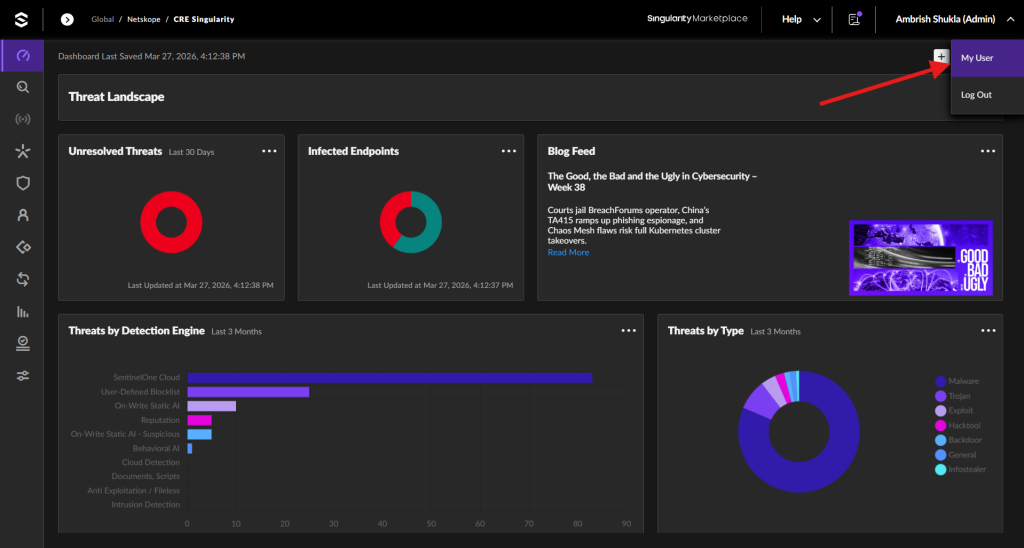
Use the Singularity Operation Center for the plugin. To enable it, click Profile and then click My User.
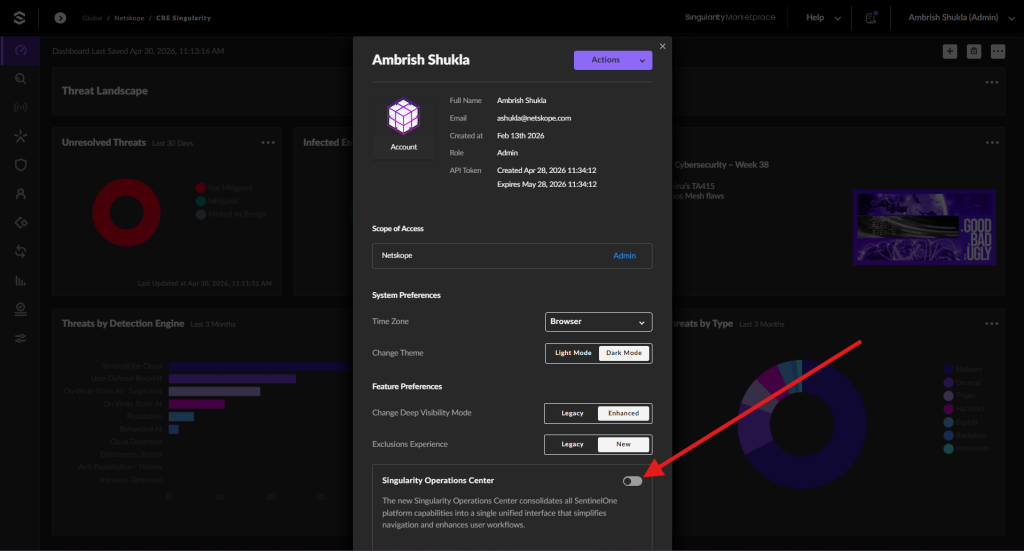
Enable the Singularity Operation Center toggle to access the Singularity Operation Center.
-
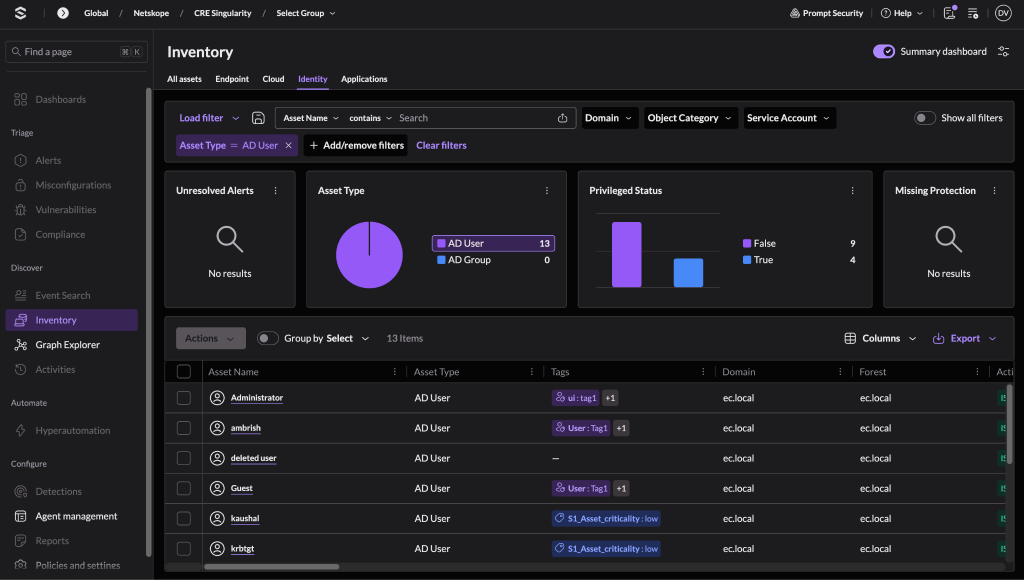
Log in to your SentinelOne Singularity XDR instance with an account that has these permissions.
-
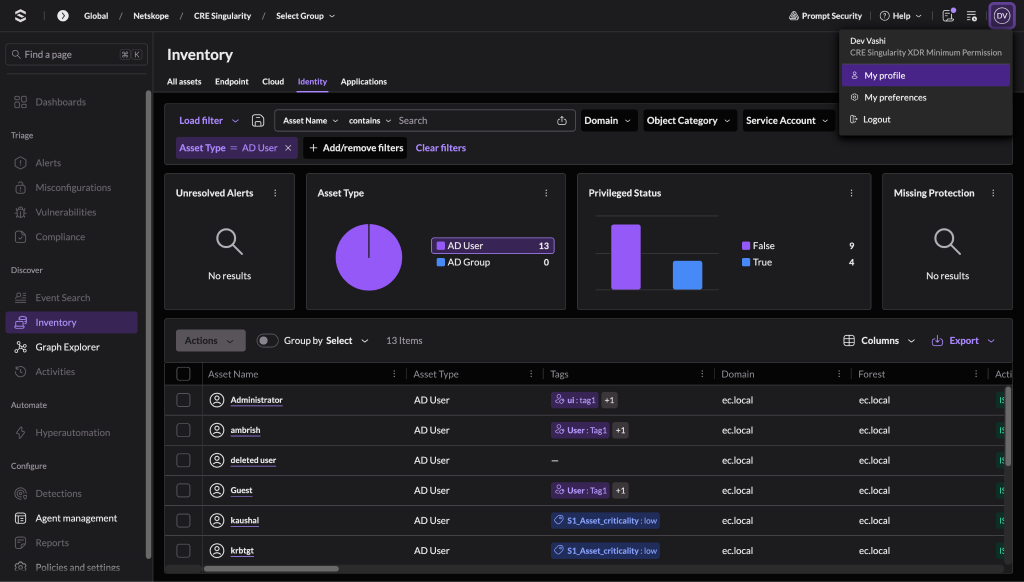
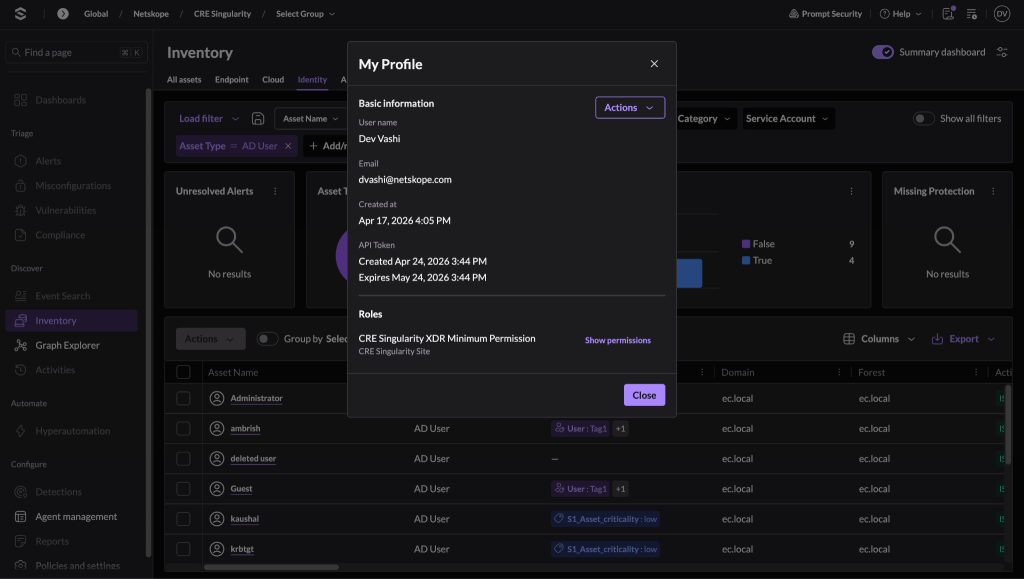
Go to the My profile section and click Actions.
-
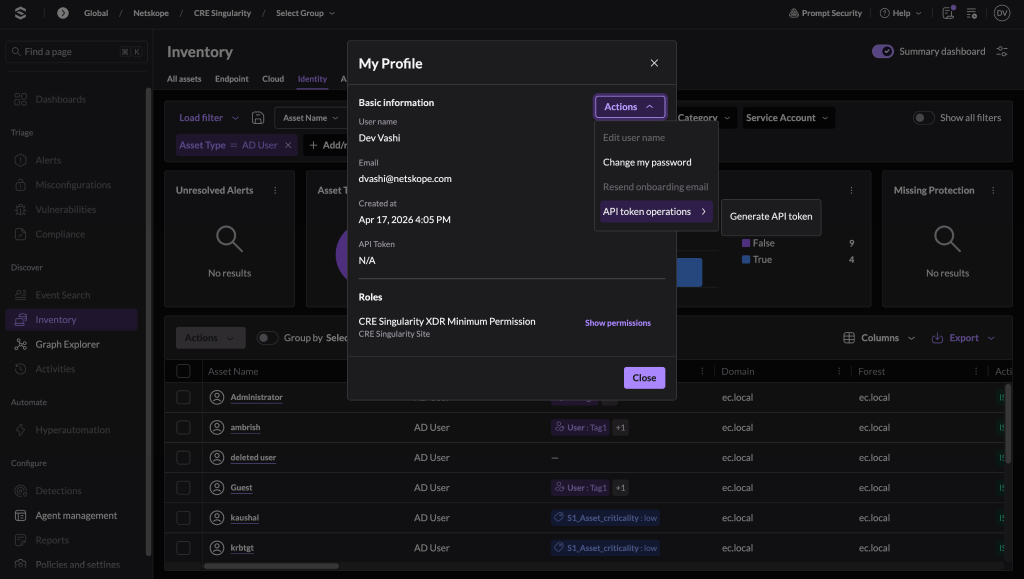
Click Generate API token. Copy the generated token to use while configuring the SentinelOne Singularity XDR plugin.


Configure the SentinelOne Singularity XDR Plugin
-
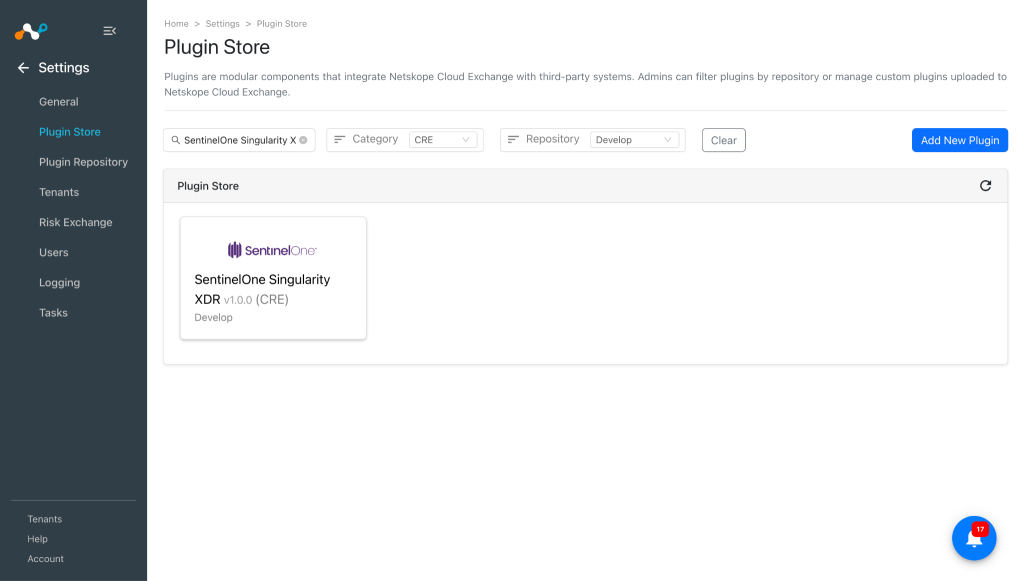
In Cloud Exchange, go to Settings > Plugins. Search for and select the SentinelOne Singularity XDR v1.0.0 (CRE) plugin.
-
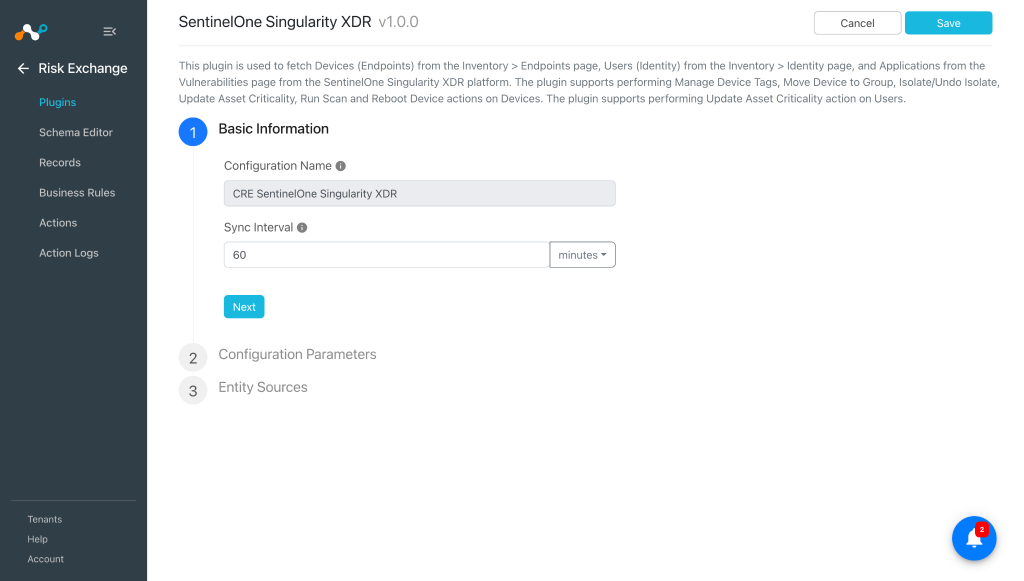
Add a plugin configuration name and change sync interval if needed.
-
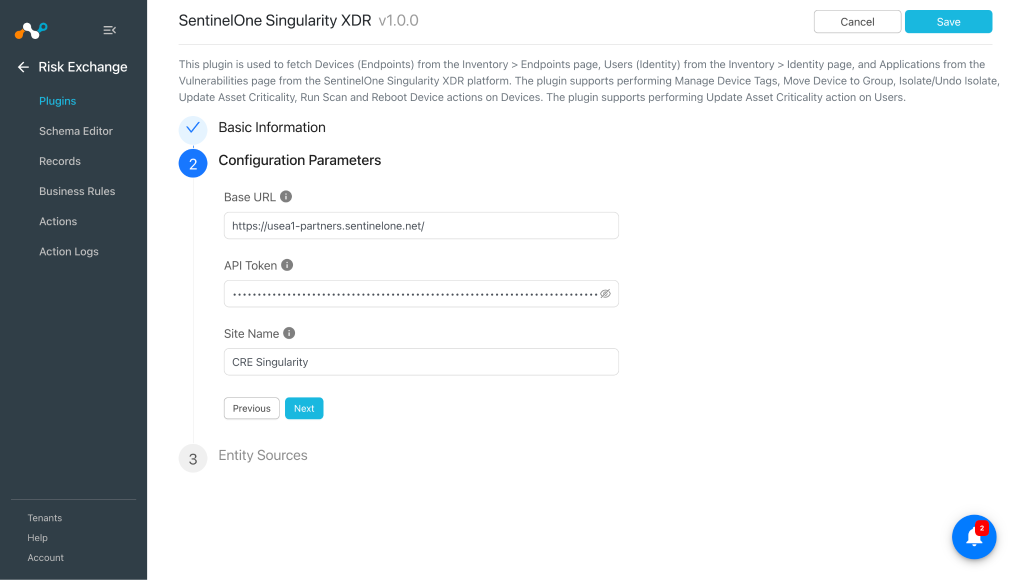
Click Next and add the Configuration Parameters:
- Base URL: Base URL of the SentinelOne instance (like https://<your-tenant>.sentinelone.net.
- API Token: API token to authenticate SentinelOne. Use the API Token generated previously.
- Site Name: Name of the SentinelOne site to fetch assets from. Go to Policies and settings > Scopes > Sites in SentinelOne to get the Site Name. Only one Site Name value is allowed.
-
Click Next and select the required Entity from the Entity dropdown, and then provide the field mapping per your requirements. You can create a new Entity by clicking Add New Entity.
To create a new field, click Add Field.
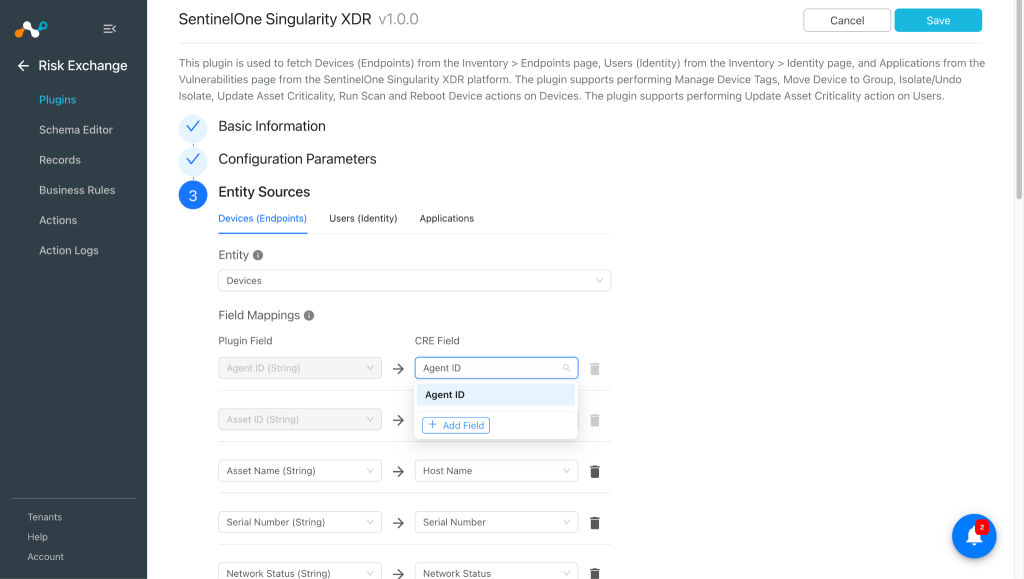
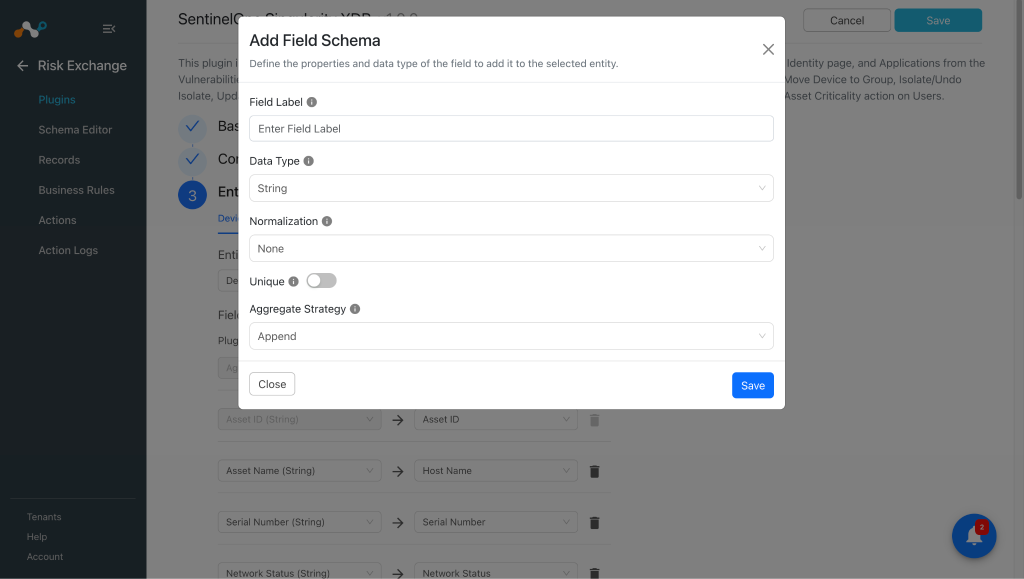
Provide the Field Label, Data Type, and Aggregate Strategy per your requirements, and then click Save.
Map the created fields:
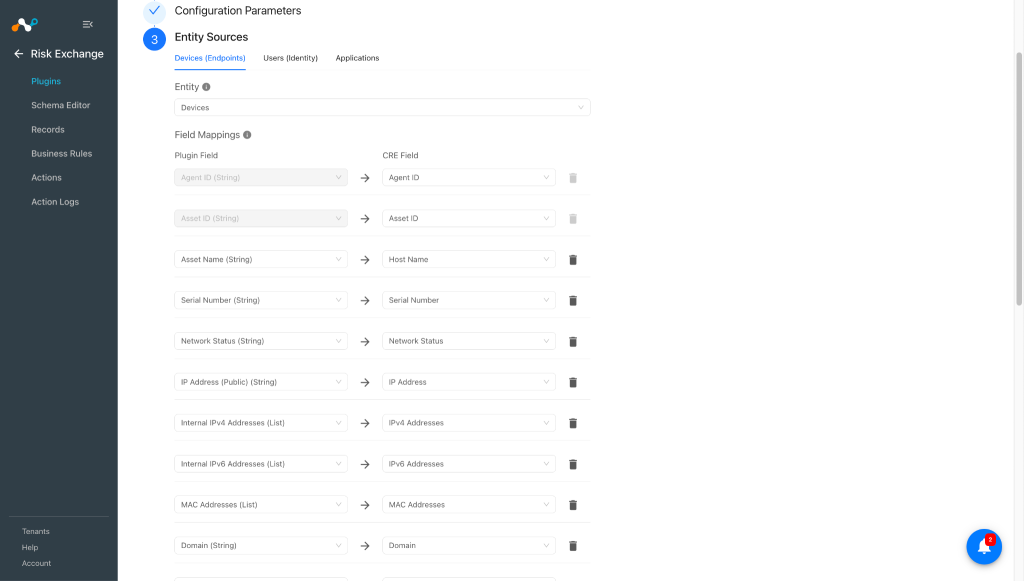
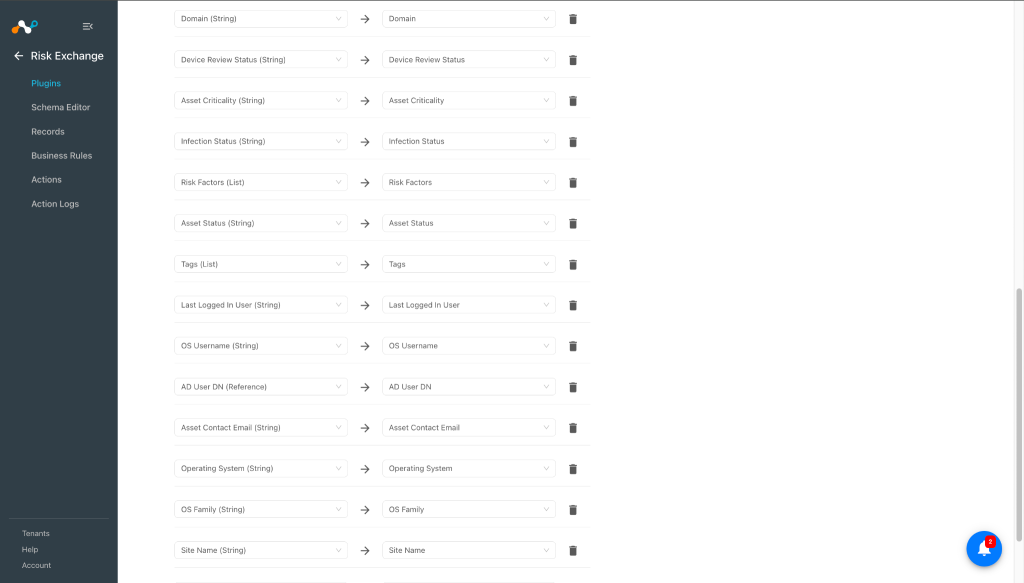
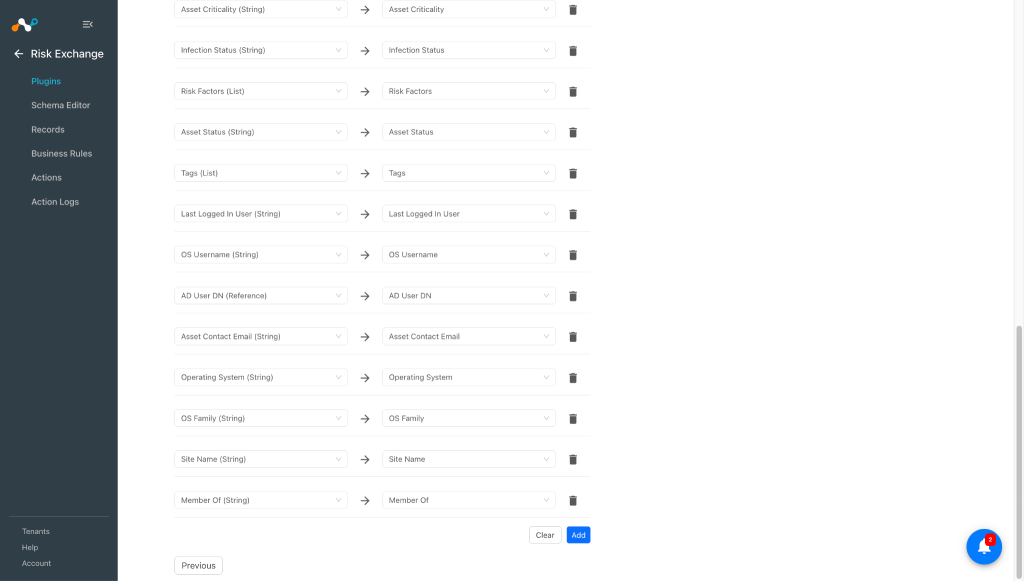
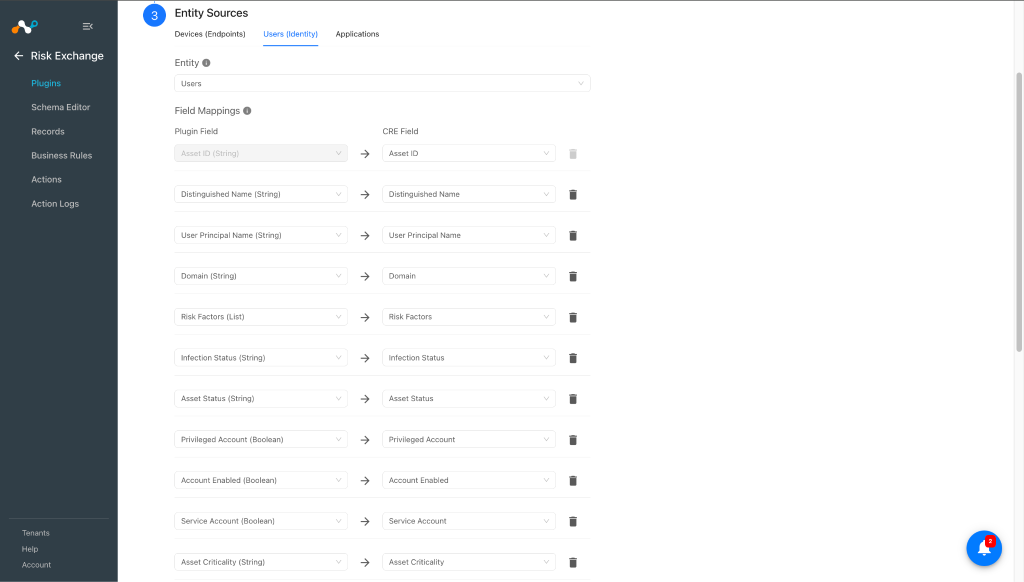
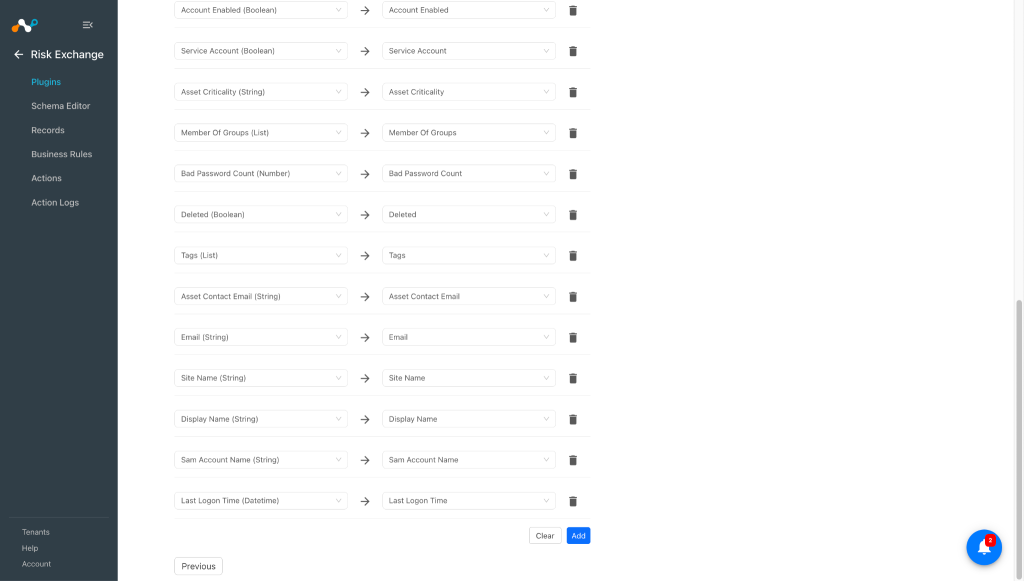
Similarly, map fields for the User entity:
Note
Refer to the Mappings section before configuring the plugin.
-
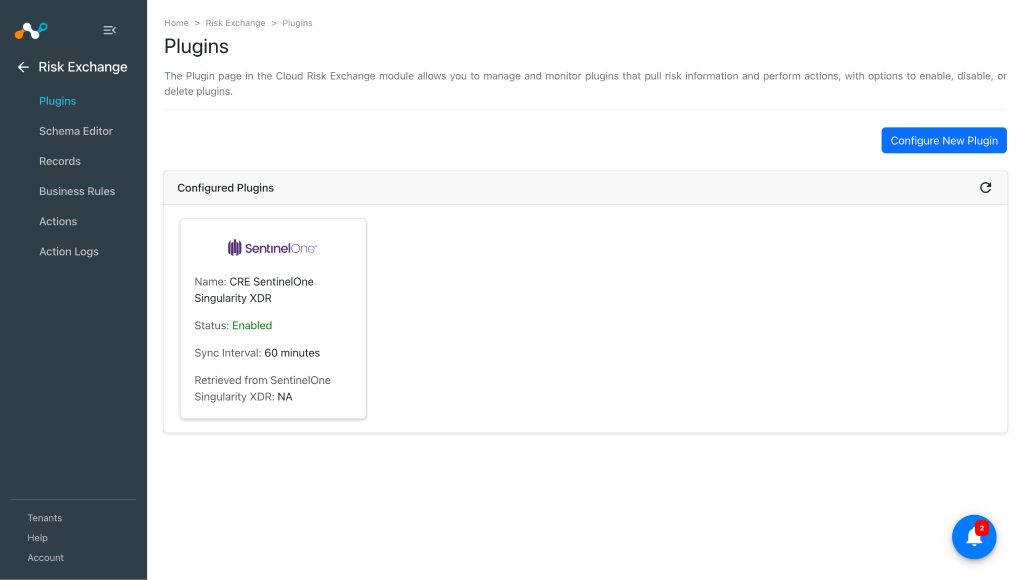
Scroll up and click Save.


Add a Risk Exchange Business Rule for the SentinelOne Singularity XDR Plugin
-
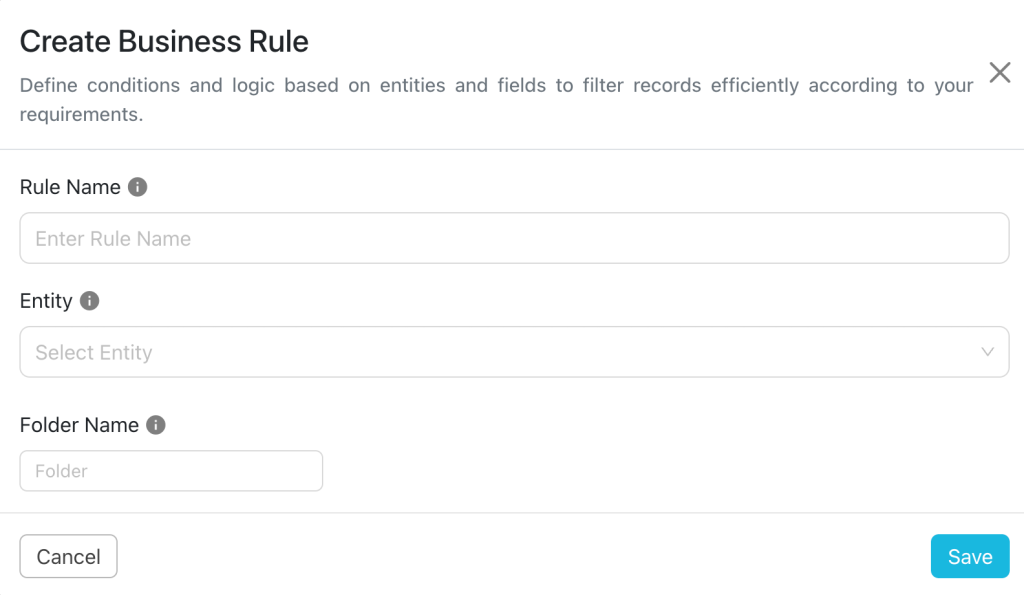
Go to the Risk Exchange > Business Rules and click Create New Rule.
-
Enter a Rule Name and select the Entity for the Fields that were configured for the SentinelOne Singularity XDR plugin, and then configure the query based on your requirements.
-
Click Save.

Add an Risk Exchange Action for the SentinelOne Singularity XDR Plugin
The SentinelOne Singularity XDR supports the following action types:
- Manage Device Tag(s)
- Manage Device Tag(s) action can be used to attach/unattach tags from Devices on SentinelOne Singularity XDR.
- Move Device to Group
- Move Device to Group action can be used to move a Device to a Group.
Note: One device can be a member of only 1 group at a time on SentinelOne Singularity XDR platform.
- Move Device to Group action can be used to move a Device to a Group.
- Isolate/Undo Isolate
- Isolate/Undo Isolate can be used to Isolate/Undo Isolate device on SentinelOne Singularity XDR.
- Update Asset Criticality
- Update Asset Criticality action can be used to update the Asset Criticality on SentinelOne Singularity XDR.
Note: This action can be used for Devices and Users entity.
- Update Asset Criticality action can be used to update the Asset Criticality on SentinelOne Singularity XDR.
- Run Scan
- Run Scan action can be used to perform 2 types of scan on the devices present on SentinelOne Singularity XDR.
- Full Disk Scan
- Application Vulnerability Scan
- Run Scan action can be used to perform 2 types of scan on the devices present on SentinelOne Singularity XDR.
- Reboot Device
- Reboot Device action can be used to reboot devices present on SentinelOne Singularity XDR.
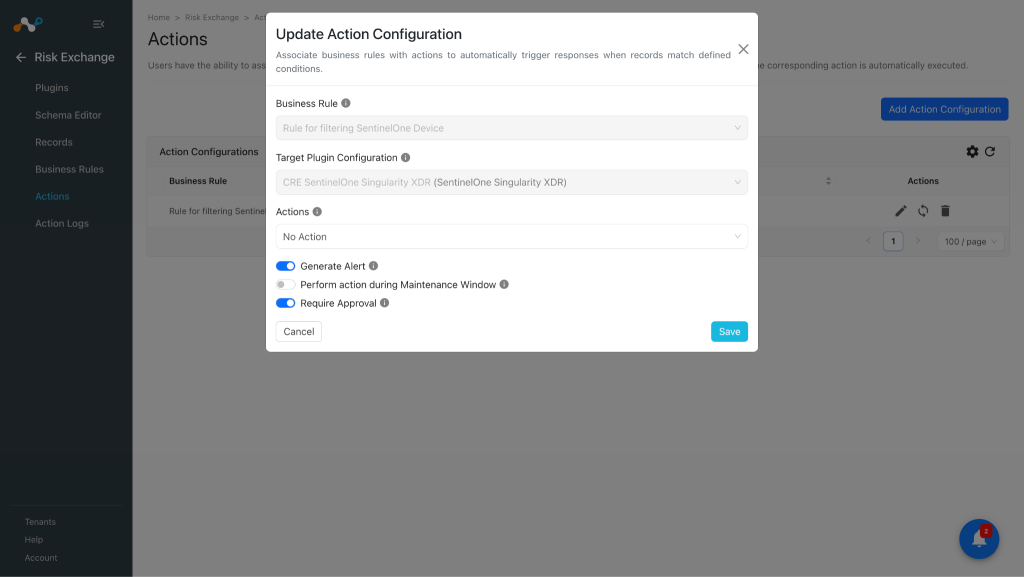
- No Action
- No action will be performed for this action. Users can generate UBA alerts in CTO by using this action and enabling the generate alerts toggle button.
Note
You can perform multiple actions on the pulled records from SentinelOne Singularity XDR on the Netskope Tenant, for performing the related actions on Netskope refer to the Netskope Risk Exchange plugin guide.
Manage Device Tag(s)
-
In Risk Exchange, go to Actions and click Add Action Configuration.
-
Select the required Business Rule, Target Plugin Configuration, and Action from their respective dropdowns.
-
Enable the “Require Approval” radio button if Approval is needed before performing action on the pulled records. Note that, if “Require Approval” toggle is enabled then users need to manually approve the execution of each action from the Home > Risk Exchange > Action Logs page on Cloud Exchange.
-
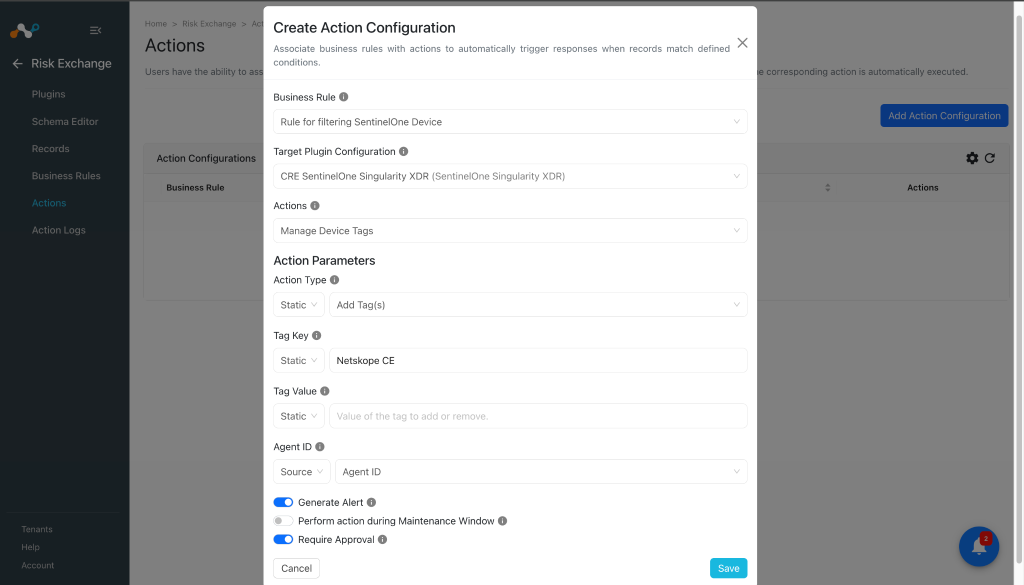
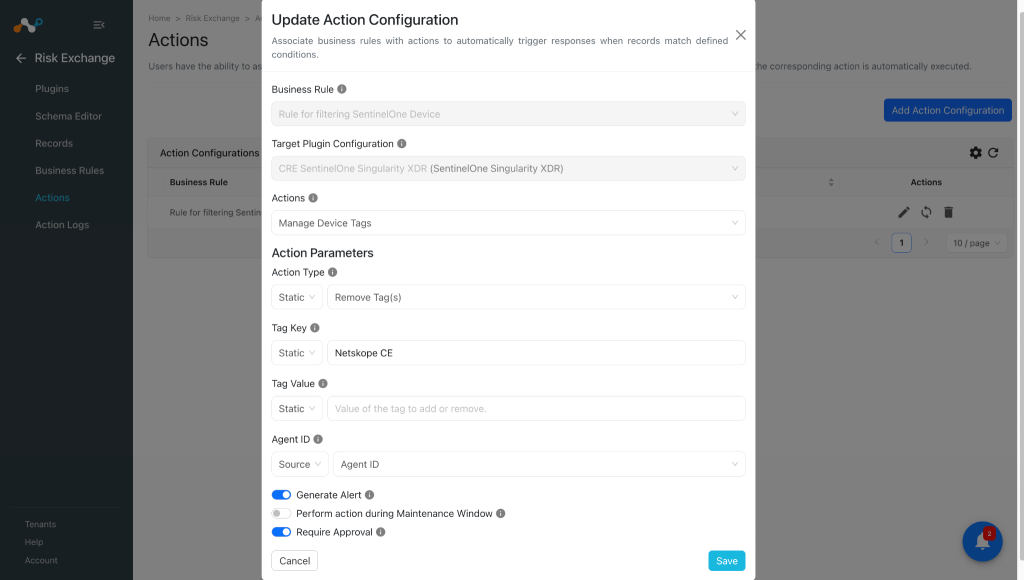
Set the following Action Parameters:
- Action Type: Select action to perform on device(s). Select Add Tag(s) to attach tags to the device and select Remove Tag(s) to detach tag from the device.
- Tag Key: Key of the tag to add or remove. Only 1 static value is allowed in this field with a character limit of 500.
- Tag Value: Value of the tag to add or remove. Multiple comma separated values are allowed with a character limit of 500 for each tag.
- Agent ID: Agent ID of the device to perform the tag action on.
-
Click Save.


Move Device to Group
-
In Risk Exchange, go to Actions and click Add Action Configuration.
-
Select the required Business Rule, Target Plugin Configuration, and Action from their respective dropdown.
-
Enable the “Require Approval” radio button if Approval is needed before performing action on the pulled records. Note that, if “Require Approval” toggle is enabled then users need to manually approve the execution of each action from the Home > Risk Exchange > Action Logs page on Cloud Exchange.
-
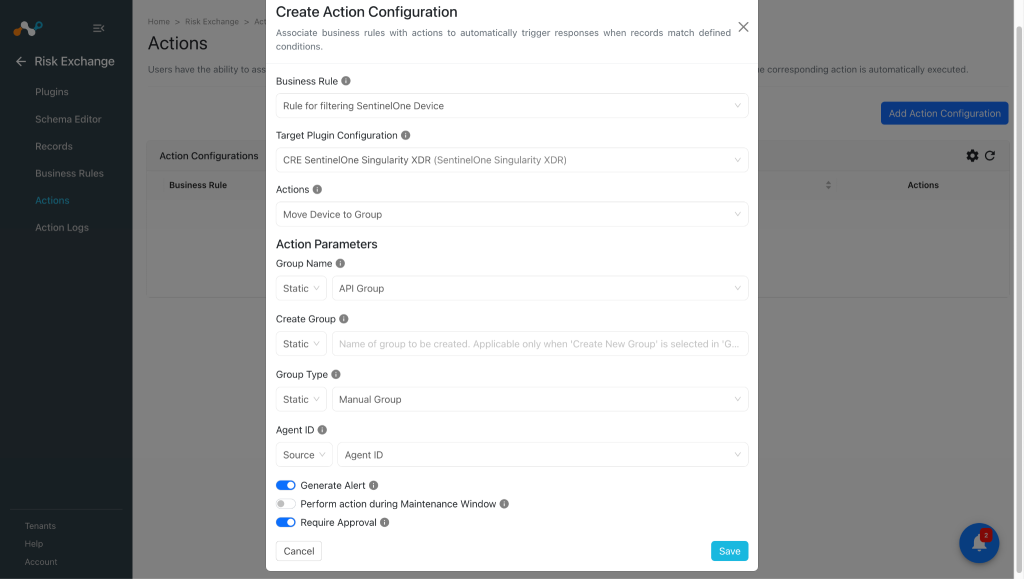
Set the following Action Parameters:
- Group Name: Name of group to move the device to. Select ‘Create New Group’ to create a new group. Need to map it as a static value. To create a new group select Create New Group from the static drop down and provide the Group name in the Create Group field as well as Group type below it.
- Create Group: Name of group to be created. Applicable only when ‘Create New Group’ is selected in the ‘Group Name’ action parameter.
- Group Type: Type of group to create. Applicable only when ‘Create New Group’ is selected in the ‘Group Name’ action parameter. Note: Need to map this as static value to select value from the drop down
- Agent ID: Agent ID of the device to perform the tag action on.
-
Click Save.

Update Asset Criticality
-
In Risk Exchange, go to Actions and click Add Action Configuration.
-
Select the required Business Rule, Target Plugin Configuration, and Action from their respective dropdown.
-
Enable the “Require Approval” radio button if Approval is needed before performing action on the pulled records. Note that, if “Require Approval” toggle is enabled then users need to manually approve the execution of each action from the Home > Risk Exchange > Action Logs page on Cloud Exchange.
-
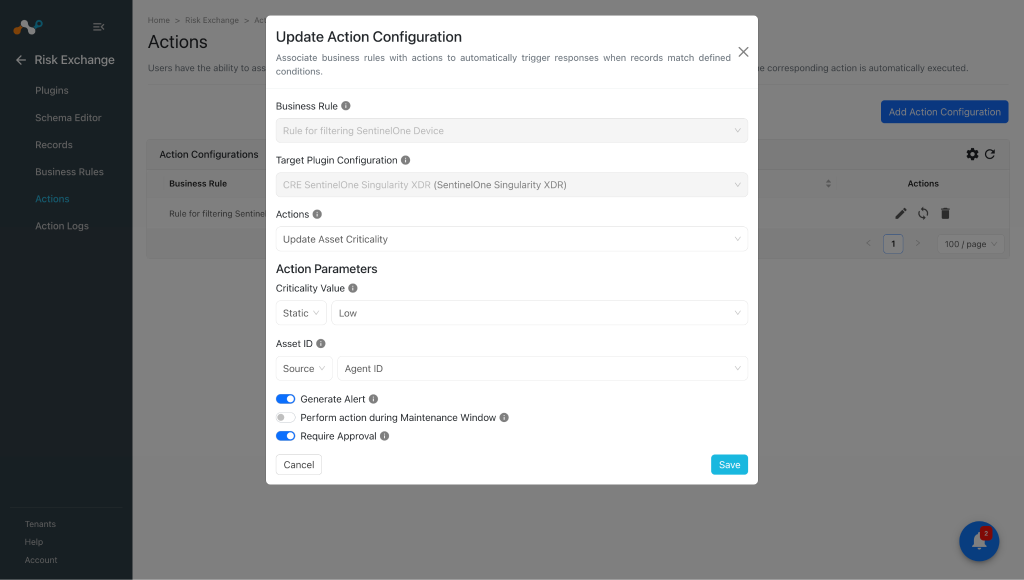
Set the following Action Parameters:
- Criticality Value: Criticality level to assign to the asset. Note: Need to map this as a static value to select values from the dropdown list.
- Asset ID: The ID of an asset whose criticality is to be changed.
-
Click Save.

Isolate/Undo Isolate
-
In Risk Exchange, go to Actions and click Add Action Configuration.
-
Select the required Business Rule, Target Plugin Configuration, and Action from their respective dropdown.
-
Enable the “Require Approval” radio button if Approval is needed before performing action on the pulled records. Note that, if “Require Approval” toggle is enabled then users need to manually approve the execution of each action from the Home > Risk Exchange > Action Logs page on Cloud Exchange.
-
Set the following Action Parameters:
- Action Type: The action type to perform. Need to map it as a static value from the drop down list.
- Agent ID: The ID of device to perform the action on.
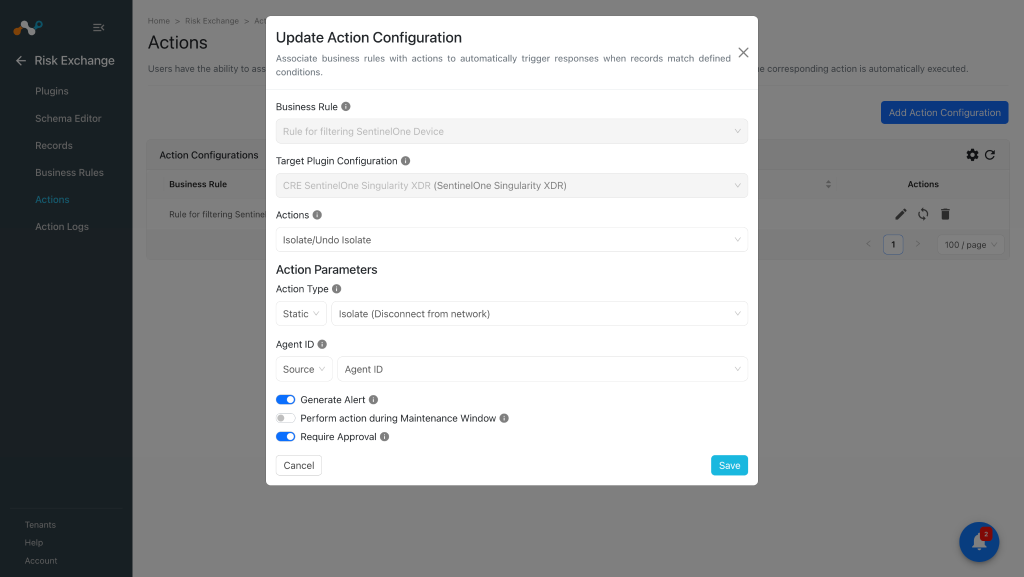
-
Click Save.


Run Scan
-
In Risk Exchange, go to Actions and click Add Action Configuration.
-
Select the required Business Rule, Target Plugin Configuration, and Action from their respective dropdown.
-
Enable the “Require Approval” radio button if Approval is needed before performing action on the pulled records. Note that, if “Require Approval” toggle is enabled then users need to manually approve the execution of each action from the Home > Risk Exchange > Action Logs page on Cloud Exchange.
-
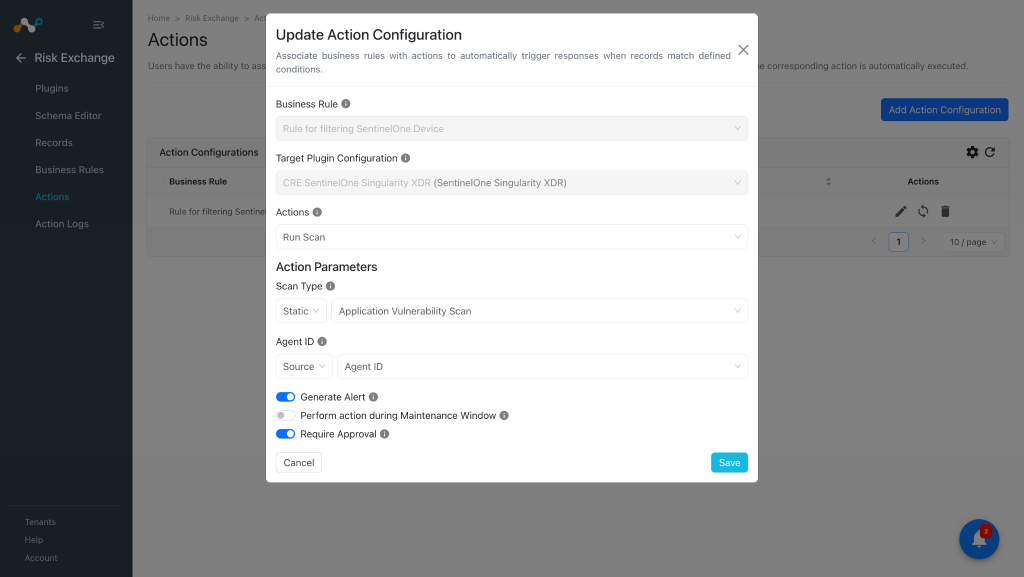
Set the following Action Parameters:
- Scan Type: Type of scan to run. Need to map it as a static value from the drop down list.
- Agent ID: The ID of device to perform the action on.
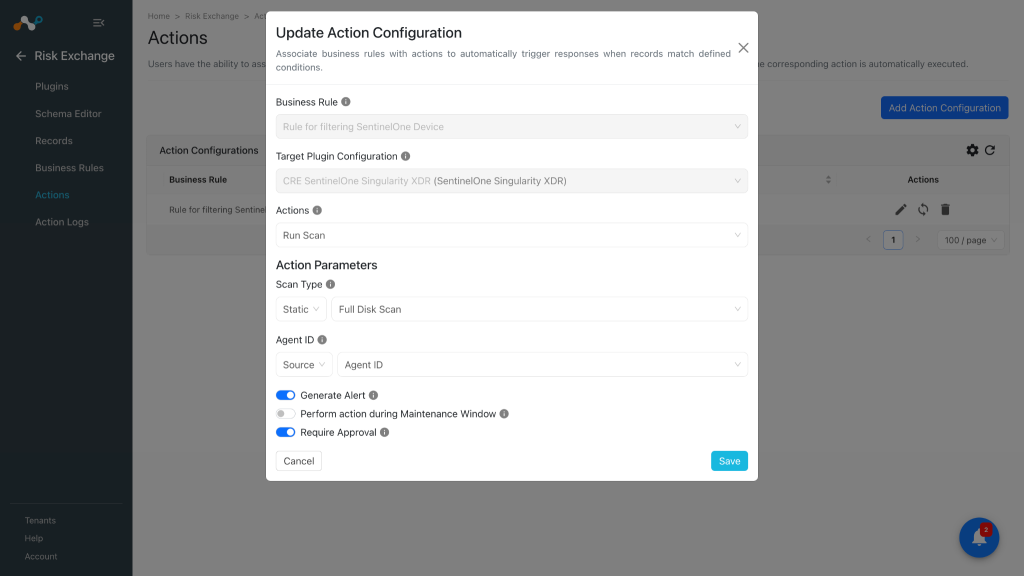
-
Click Save.


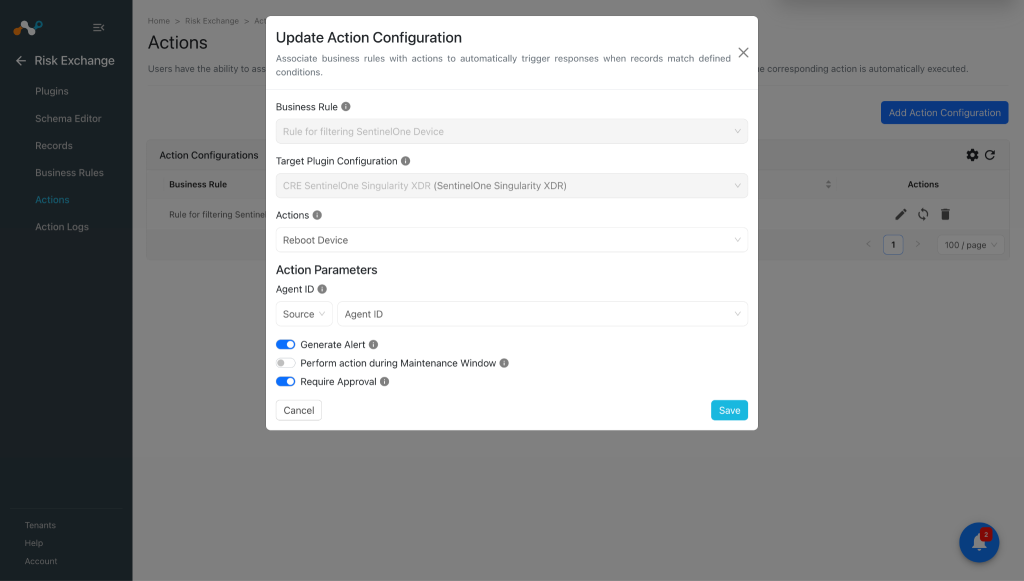
Reboot Device
-
In Risk Exchange, go to Actions and click Add Action Configuration.
-
Select the required Business Rule, Target Plugin Configuration, and Action from their respective dropdown.
-
Enable the “Require Approval” radio button if Approval is needed before performing action on the pulled records. Note that, if “Require Approval” toggle is enabled then users need to manually approve the execution of each action from the Home > Risk Exchange > Action Logs page on Cloud Exchange.
-
Set the following Action Parameters:
- Agent ID: The ID of device to perform the action on.
-
Click Save.

No Action
-
In Risk Exchange, go to Actions and click Add Action Configuration.
-
Select the required Business Rule, Configuration, and Action from their respective dropdowns.
-
Enable the “Require Approval” radio button if Approval is needed before performing action on the pulled records.
-
Click Save.

Validate the SentinelOne Singularity XDR Plugin
Validate on Cloud Exchange
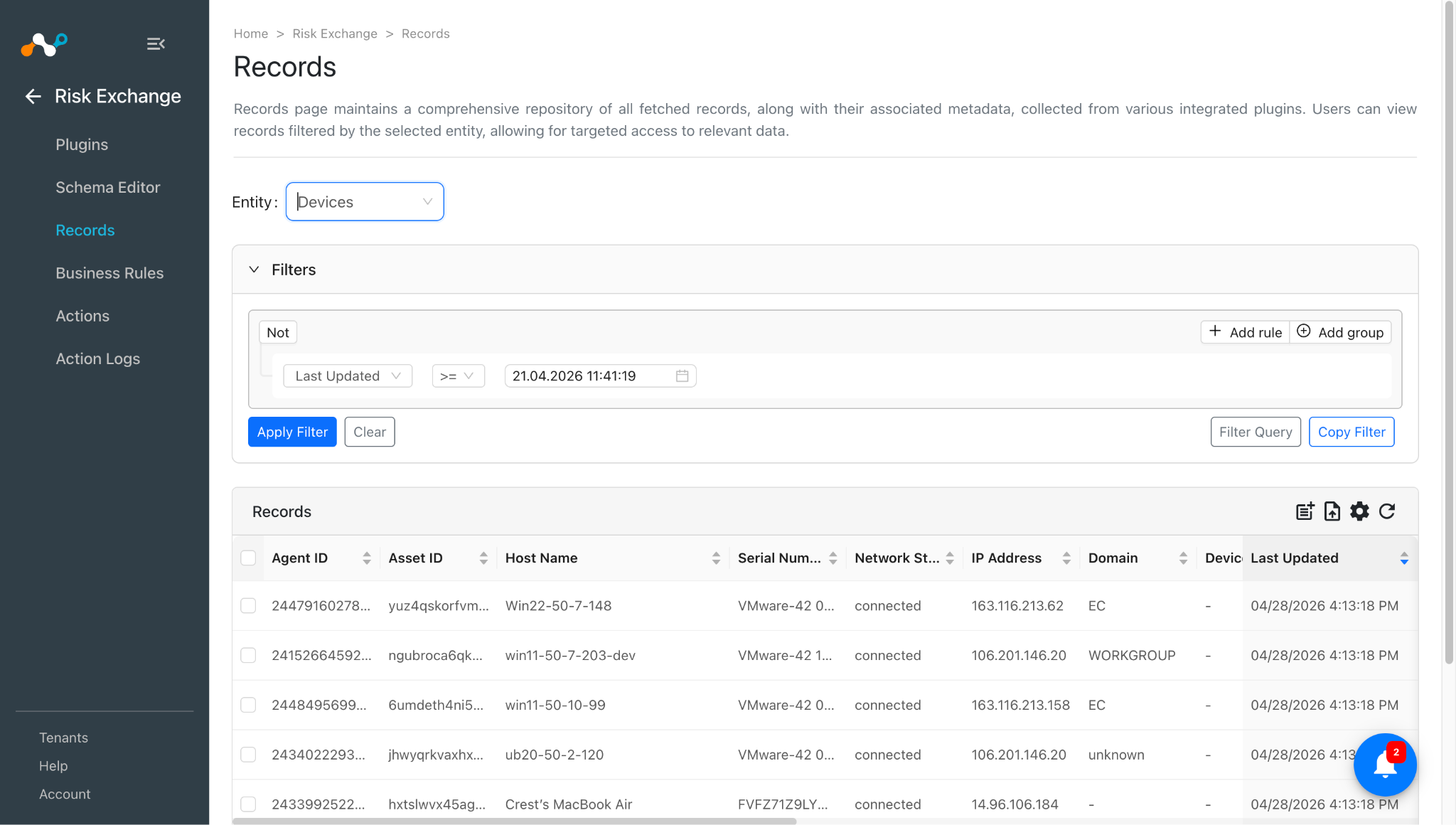
To validate the pulling:
Go to Risk Exchange and click Records. Select the Entity that is selected while configuring the field mapping to view the pulled records.
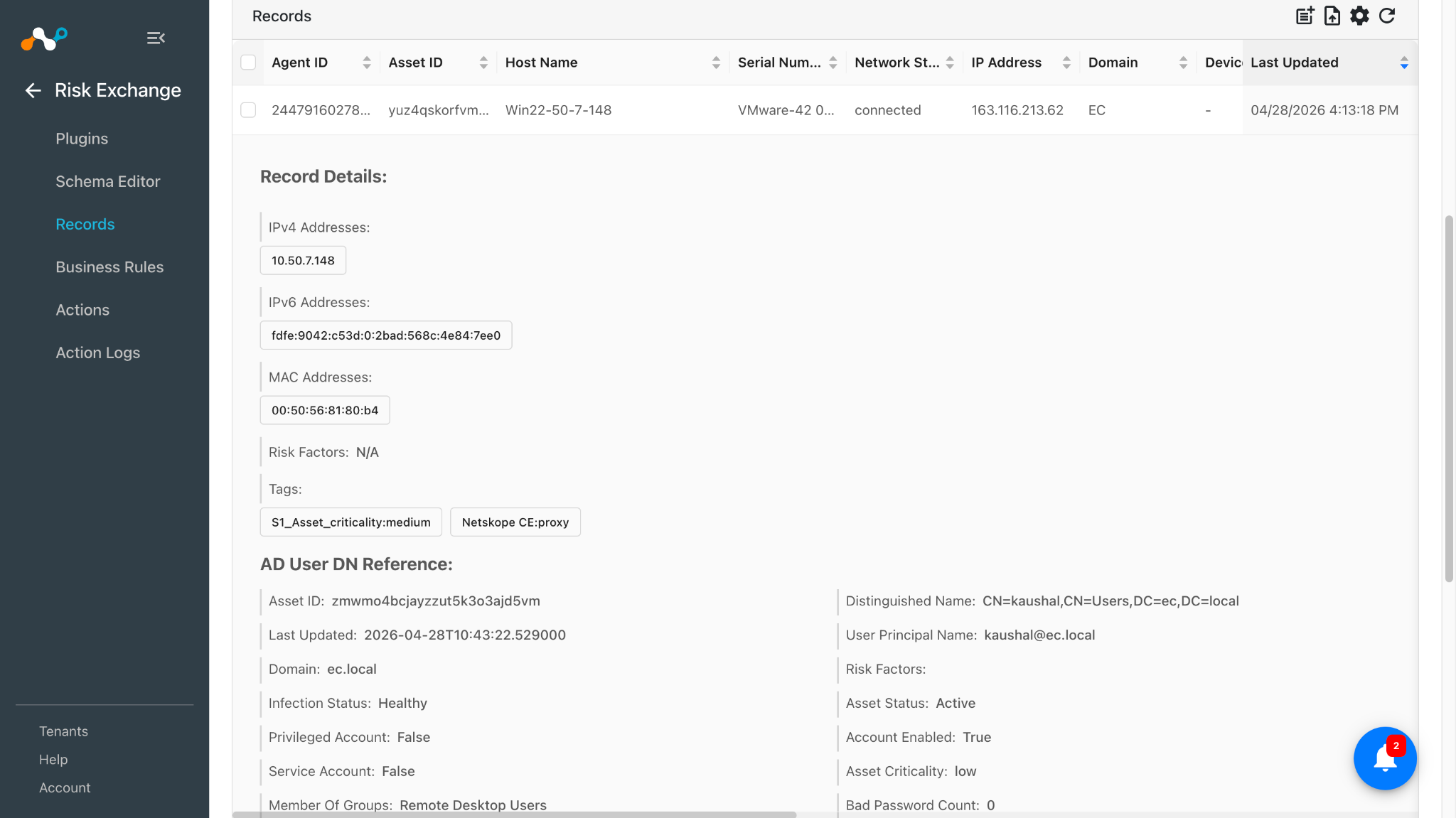
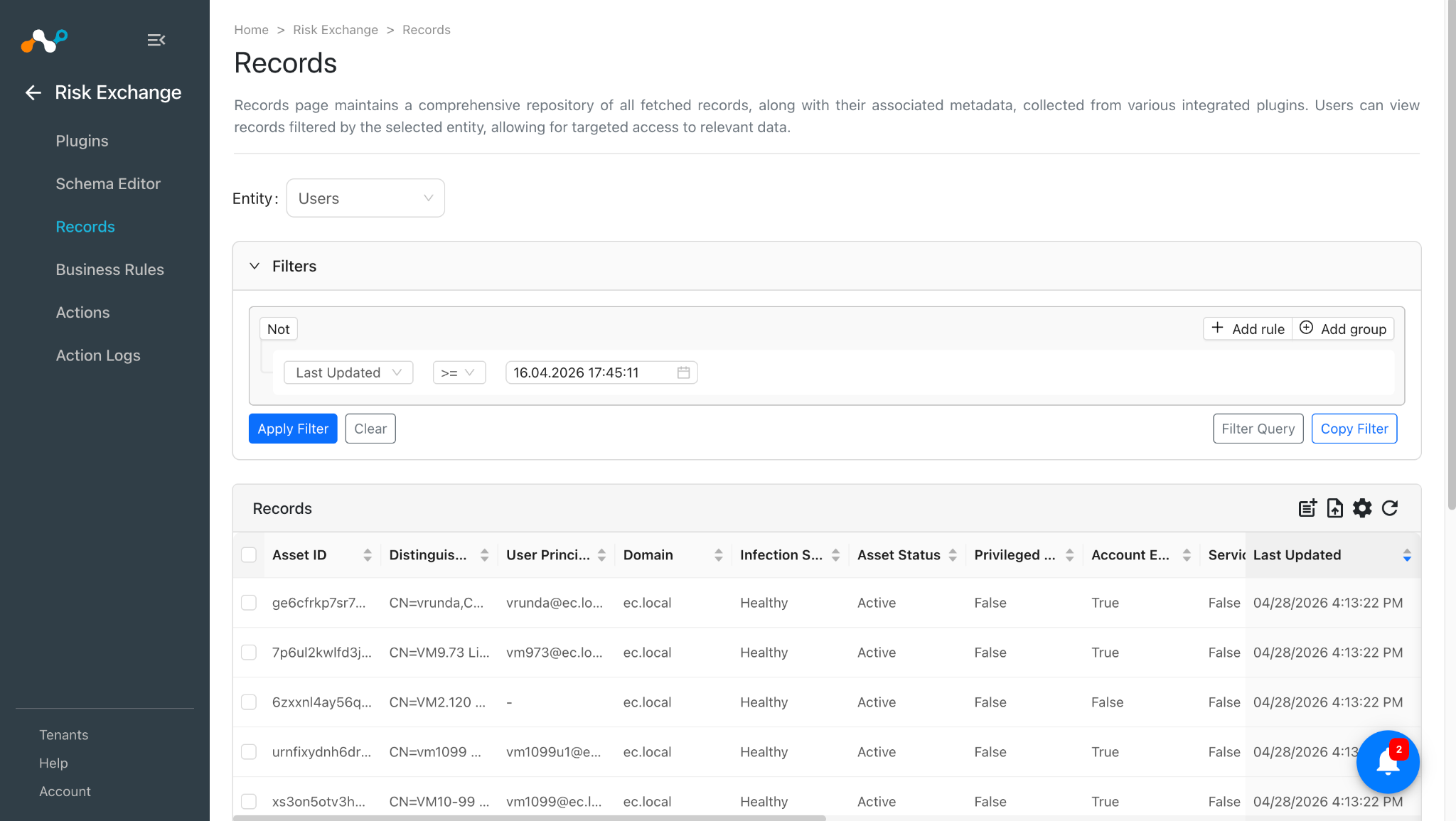
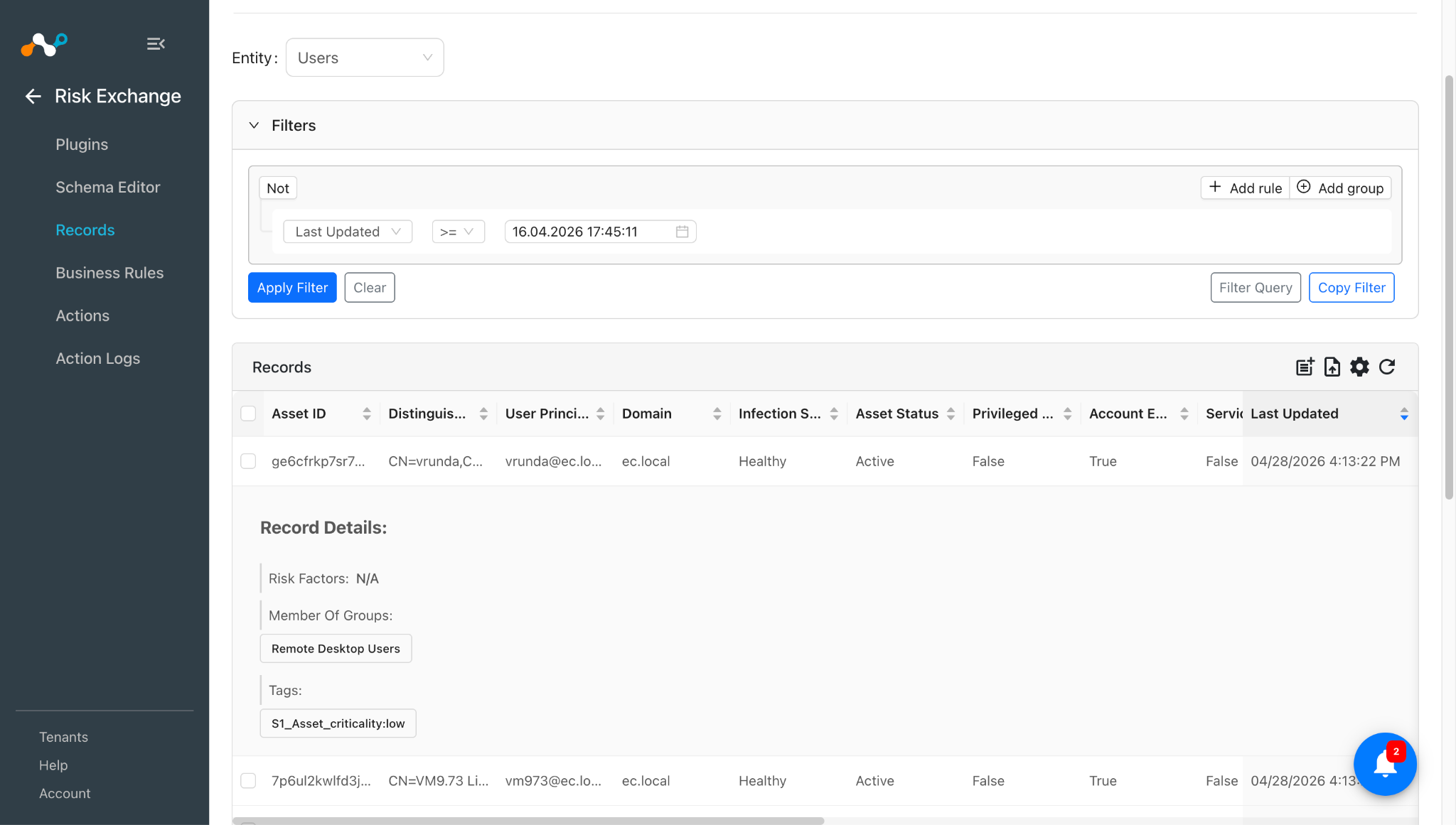
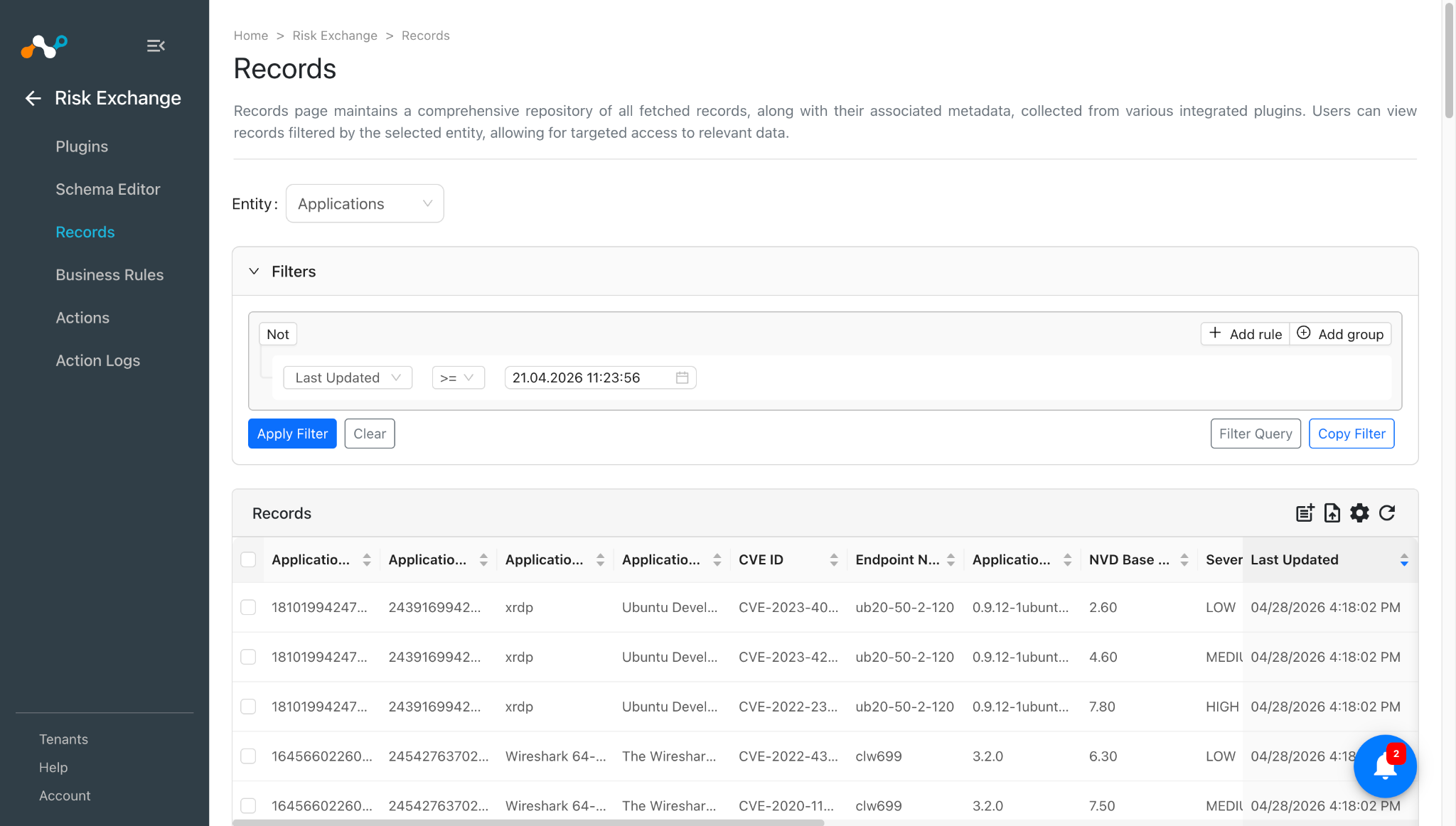
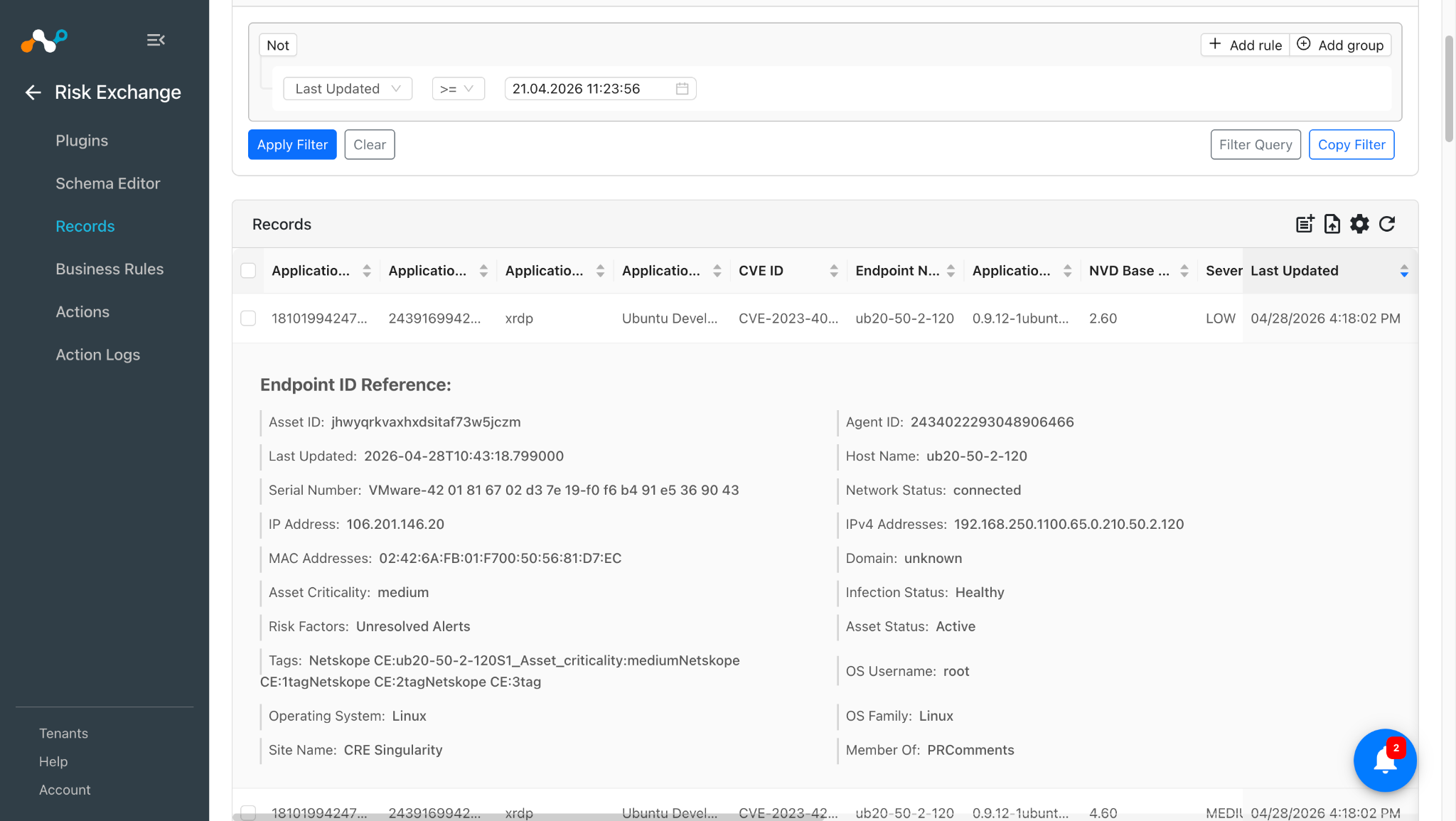
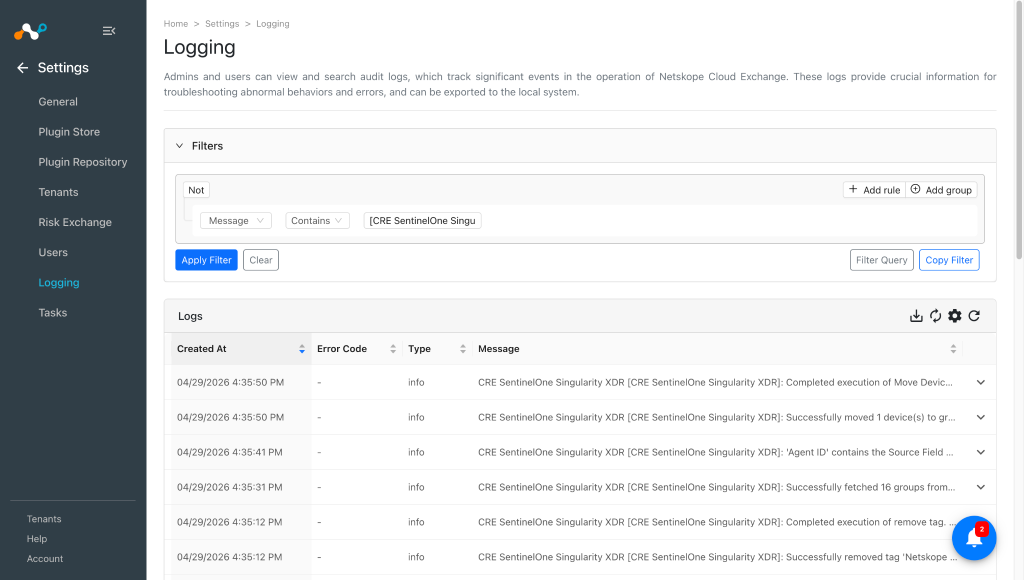
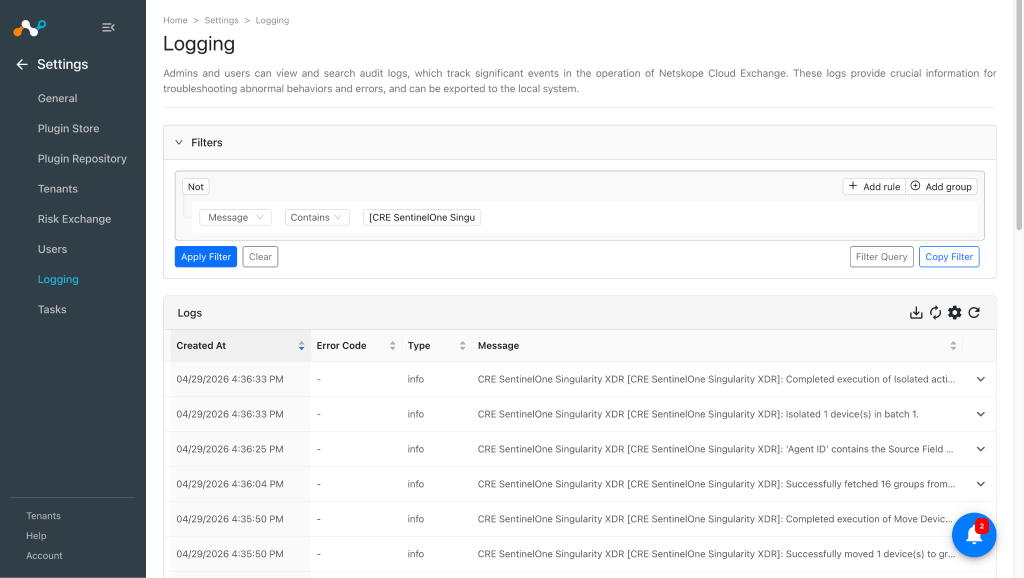
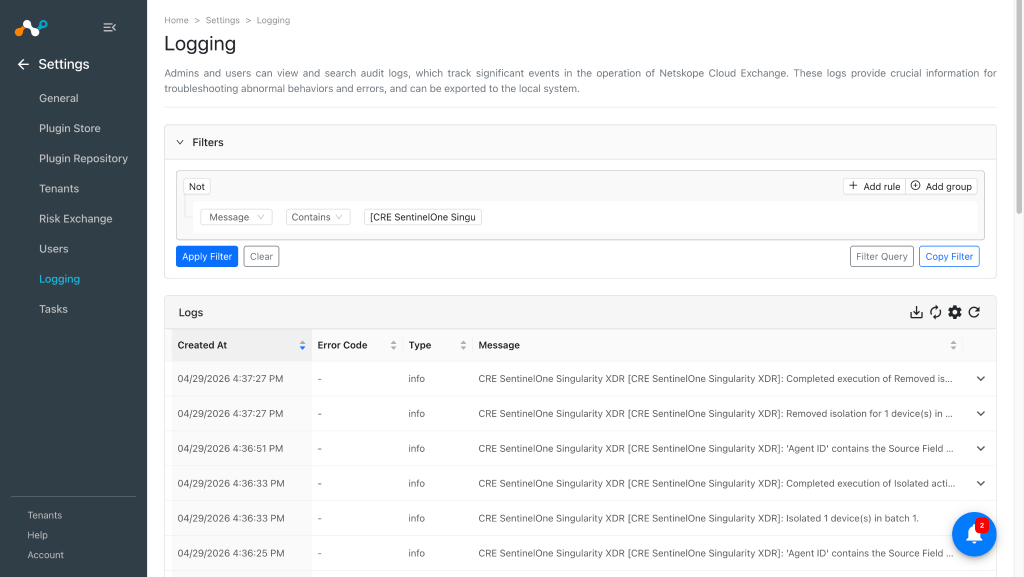
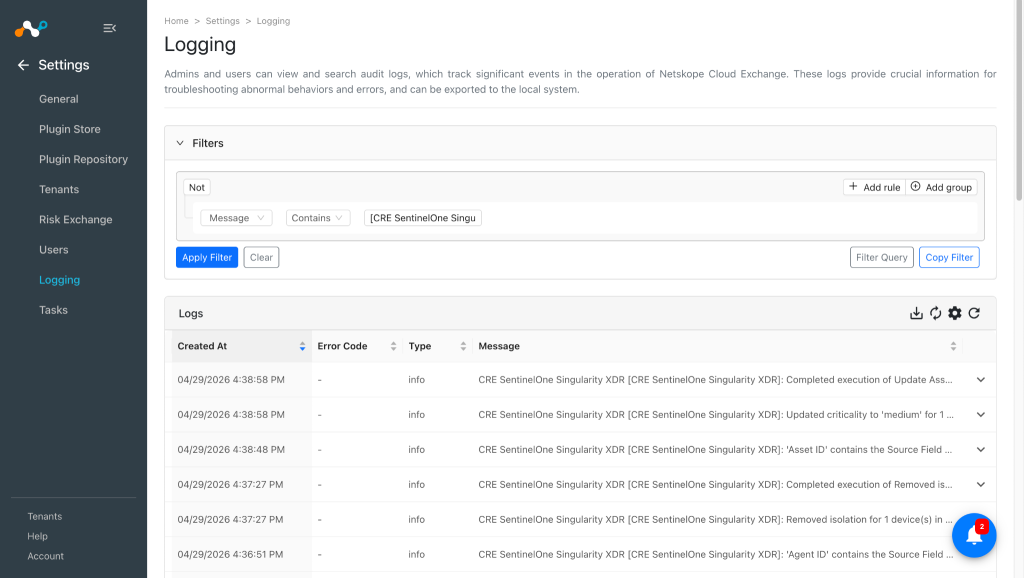
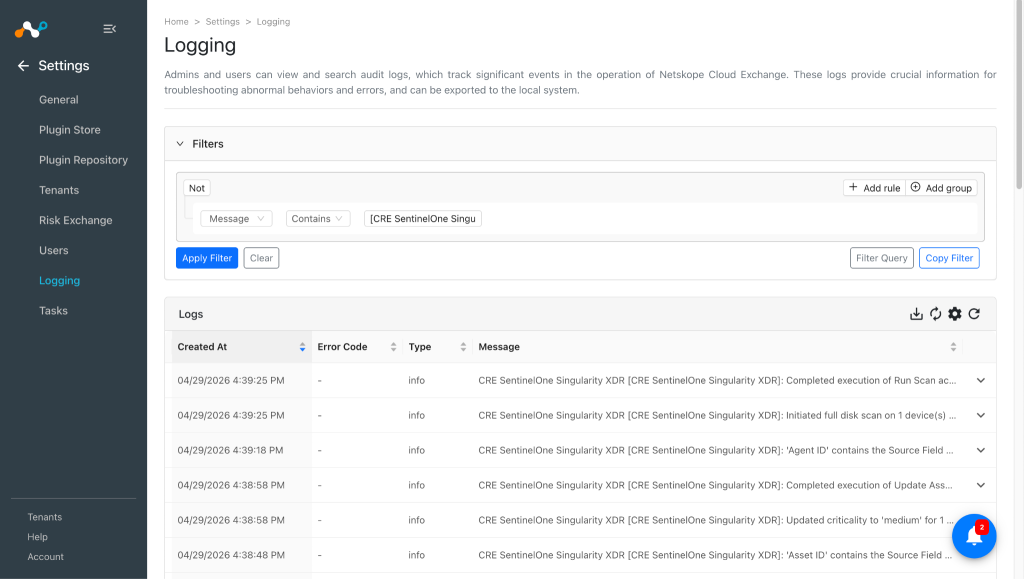
To verify the logs related to pulled records, go to the Settings > Logging and apply the filter with plugin name or plugin configuration name.
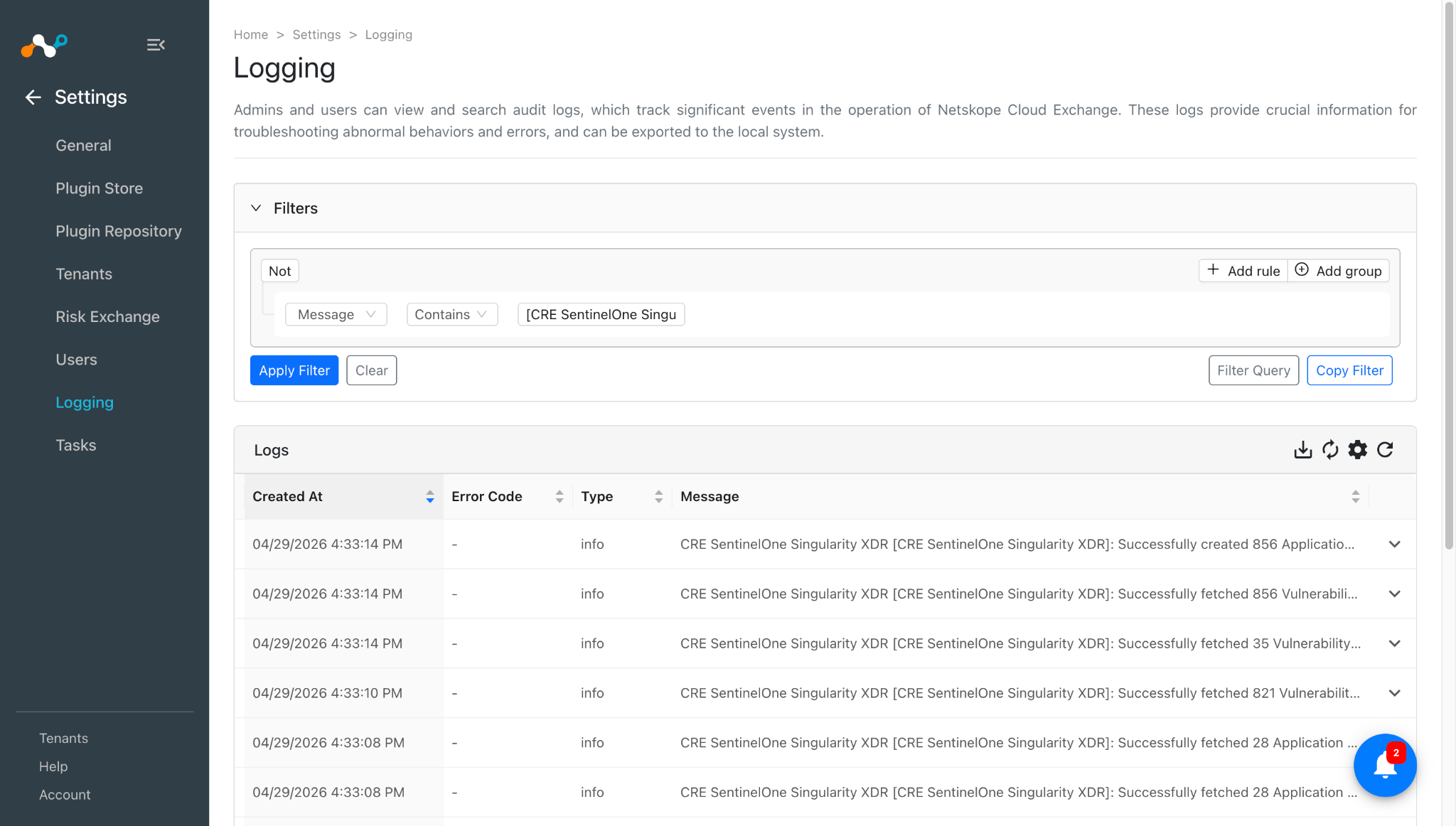
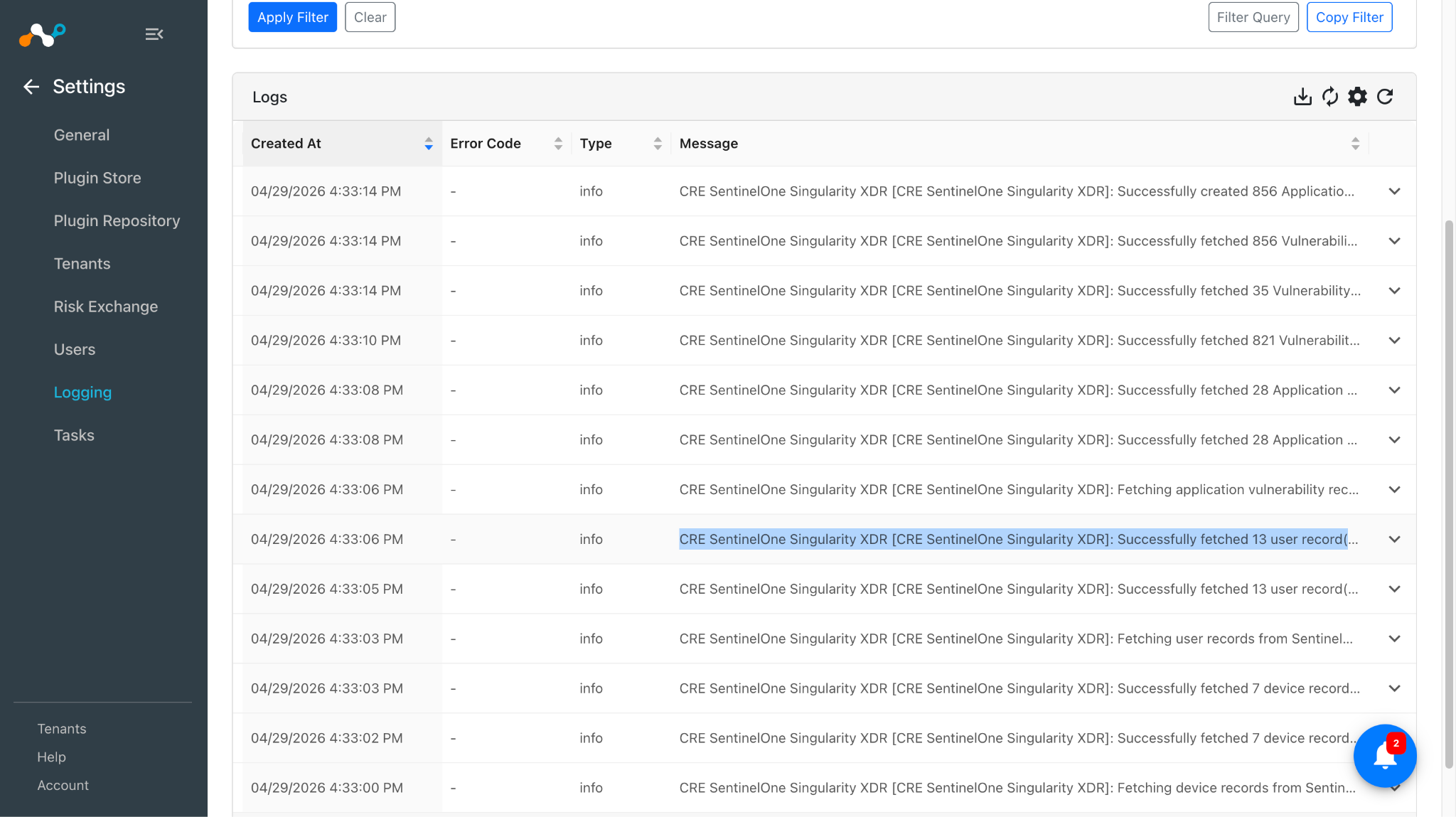

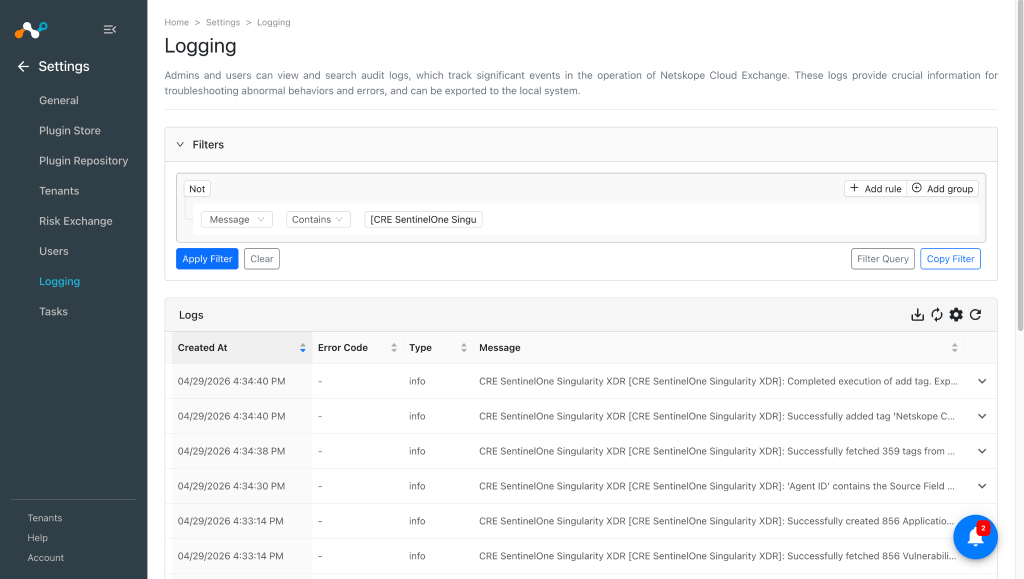
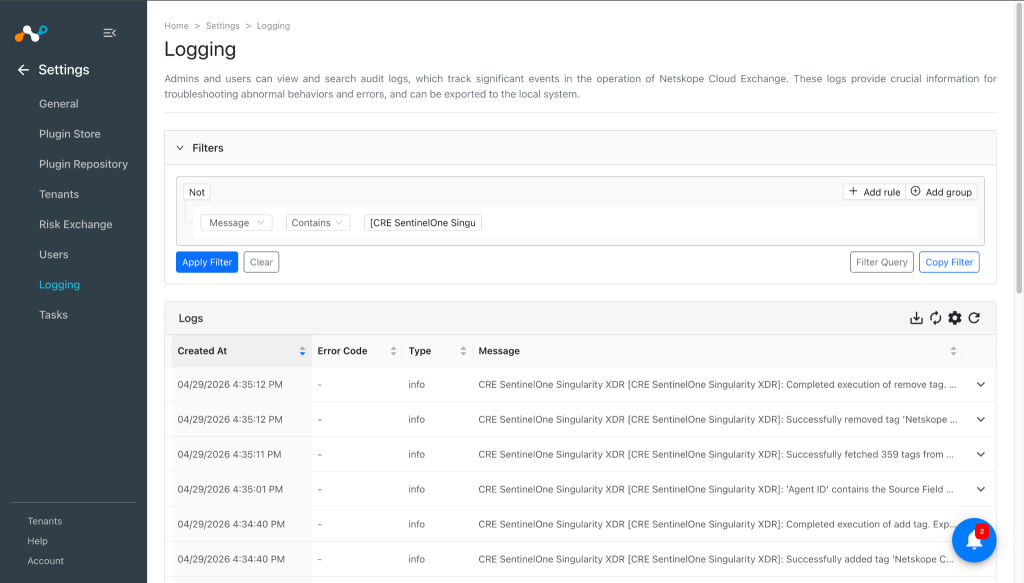
Logs for performed actions:
-
Manage Device Tag(s)
-
Move Device to Group
-
Isolate/Undo Isolate
-
Update Asset Criticality
-
Run Scan
-
Reboot Device
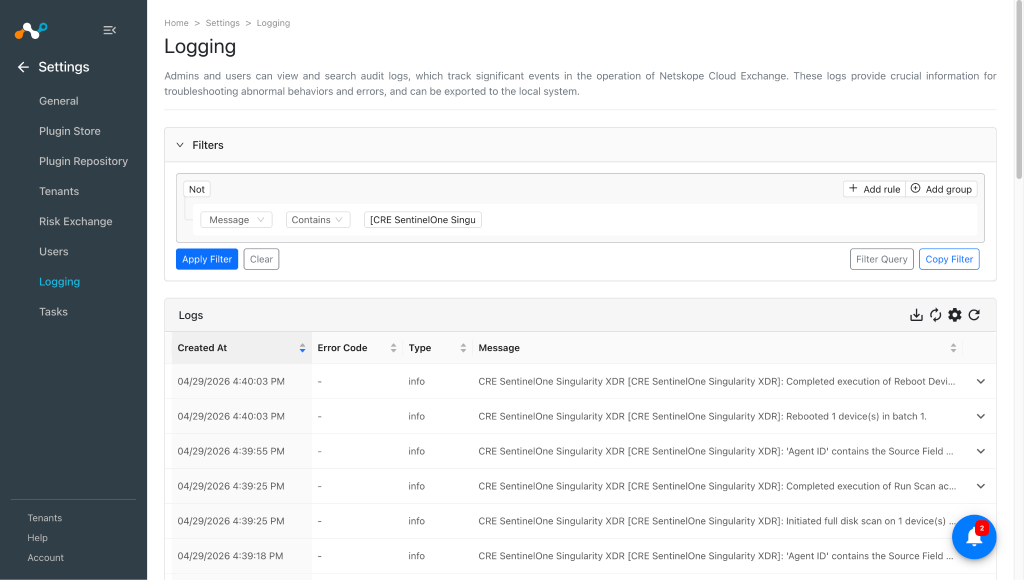


When a pulled record matches one of the configured business rules, the configured action will be performed on the record. This can be seen in Risk Exchange at Action Logs.

Validate on SentinelOne Singularity XDR
Note
To view the records and verify performed action on SentinelOne Singularity XDR UI, you need an admin account.
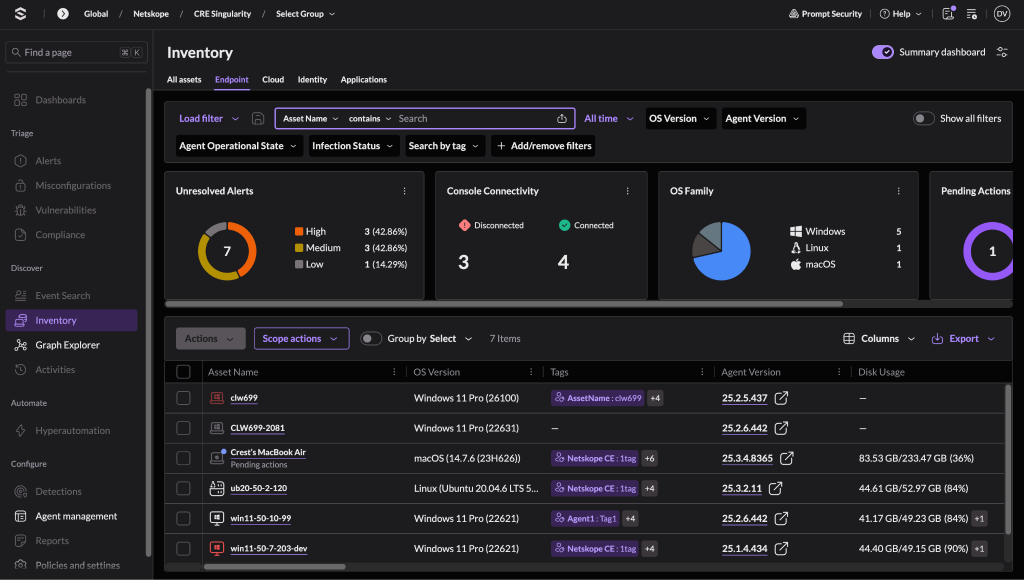
- SentinelOne Singularity XDR plugin fetches Devices (Endpoints) from the Inventory > Endpoints page, Users (Identity) from the Inventory > Identity page, and Applications from the Vulnerabilities page from the SentinelOne Singularity XDR platform.
- Log in to your SentinelOne Singularity XDR instance and navigate to the Inventory page.
-
Click Endpoint to view the available devices.
-
Click Identity to view the available users.
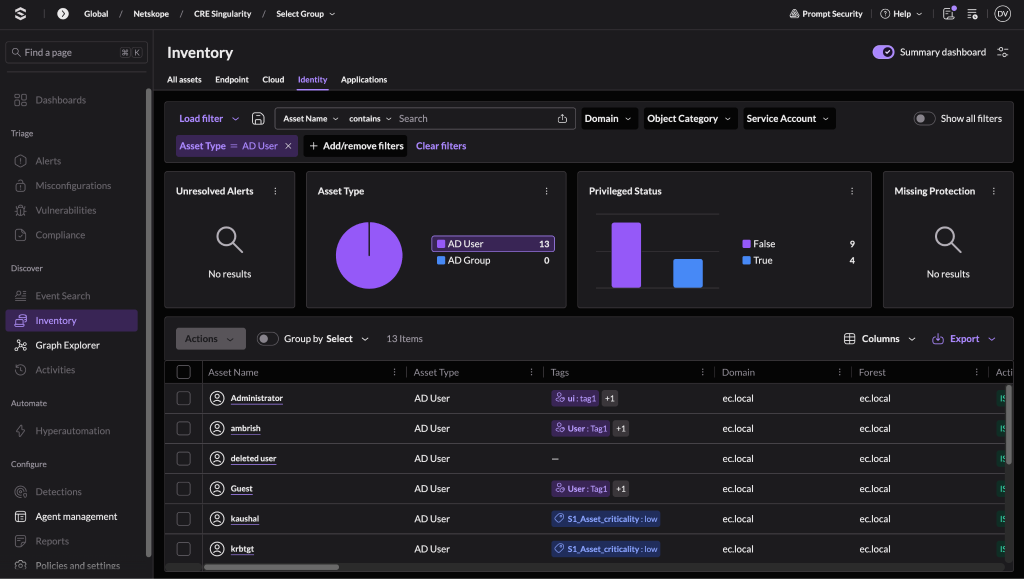
Note
Only AD Users will be pulled by SentinelOne Singularity XDR plugin.
-
Go to Vulnerabilities to view the Vulnerabilities.
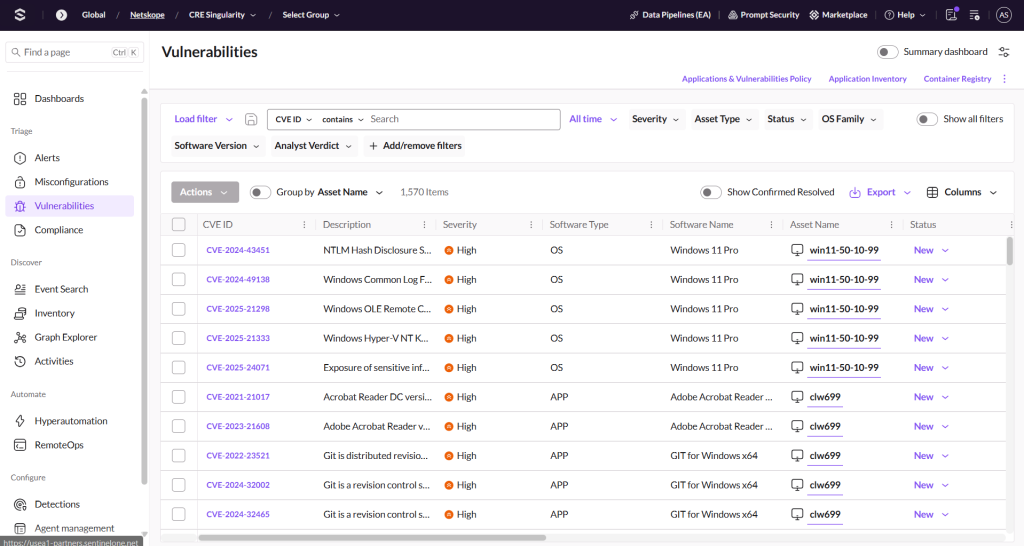
Note
Only vulnerabilities that have Software type = APP will be pulled by the SentinelOne Singularity XDR plugin.


Validate the Manage Device Tag(s) Action
-
Log in to your SentinelOne Singularity XDR instance and go to the Inventory page.
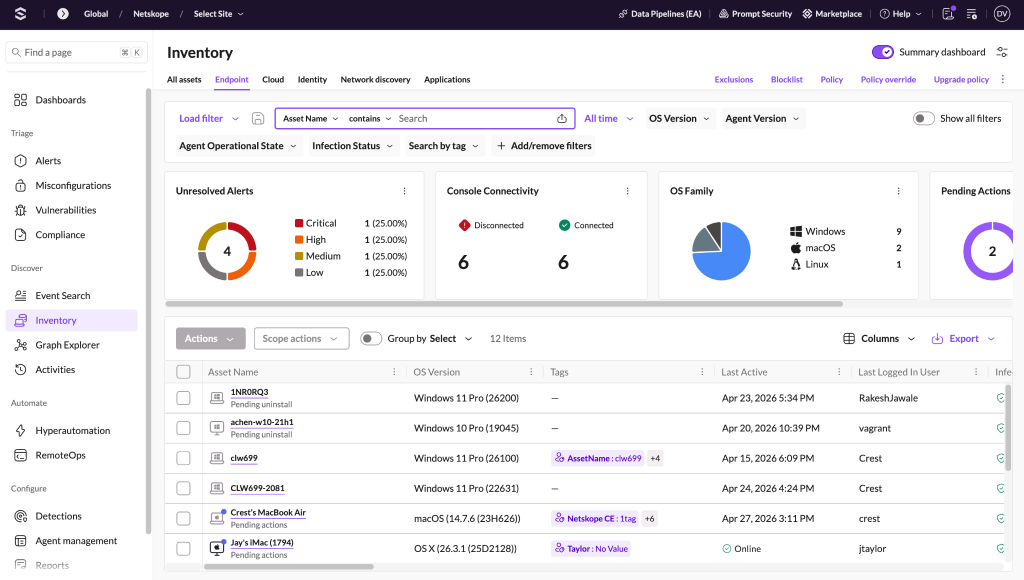
-
Click on a particular device to open its details and go to the Tags page.
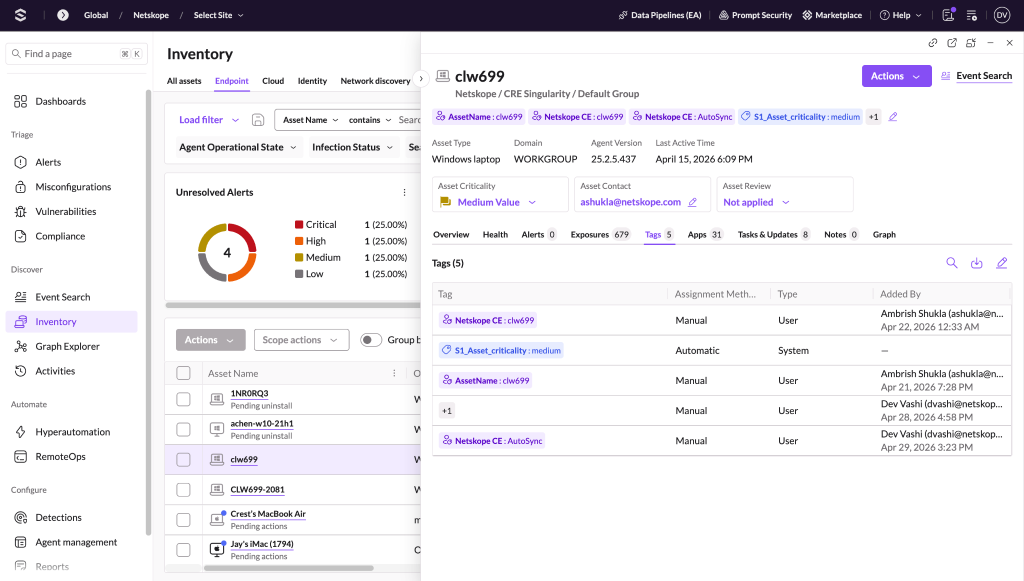


Validate the Move Device to Group Action
-
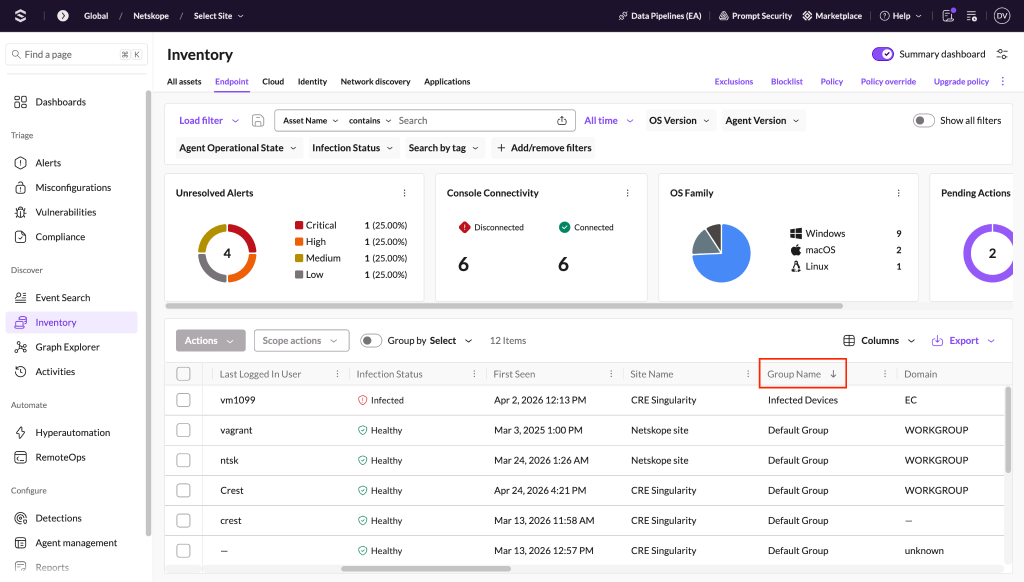
Log in to your SentinelOne Singularity XDR instance and navigate to the Inventory page.
-
Scroll right and look for the Group Name column to see the Group Name for a particular device.

Validate the Isolate/Undo Isolate Action
-
Log in to your SentinelOne Singularity XDR instance and go to the Inventory page.
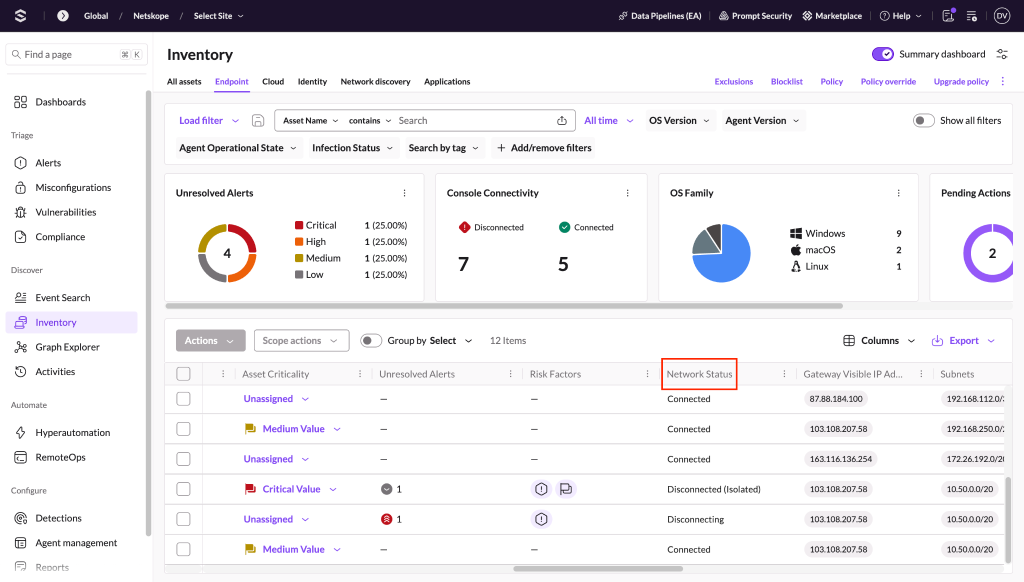
-
Scroll right and look for the Network Status Column to see the Network Status for particular Device.

Validate the Update Asset Criticality Action
-
Log in to your SentinelOne Singularity XDR instance and go to the Inventory page.
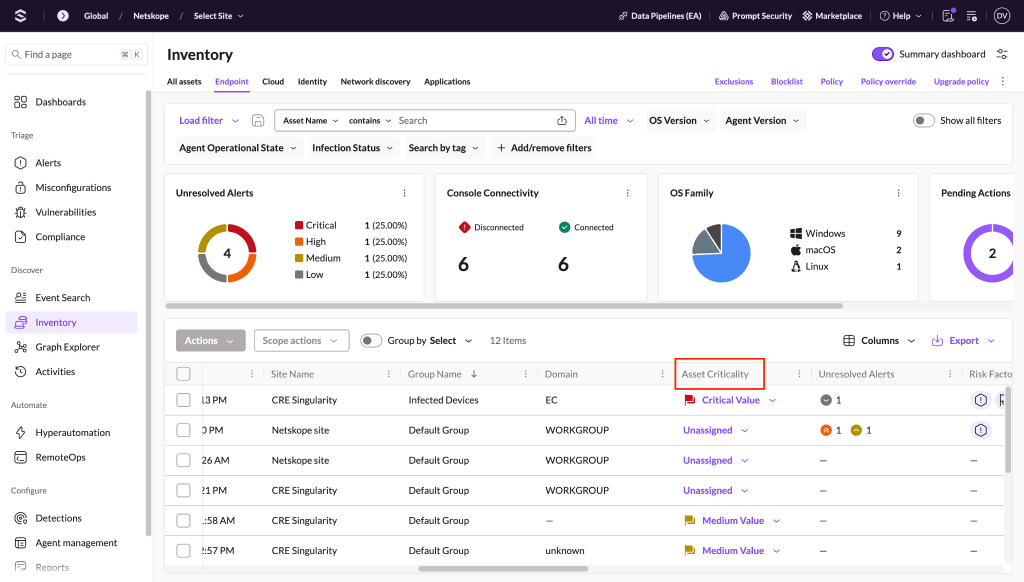
-
Scroll right and look for the Asset Criticality column to see the Asset Criticality for a particular device.

Validate the Run Scan Action
-
Log in to your SentinelOne Singularity XDR instance and go to the Inventory page.
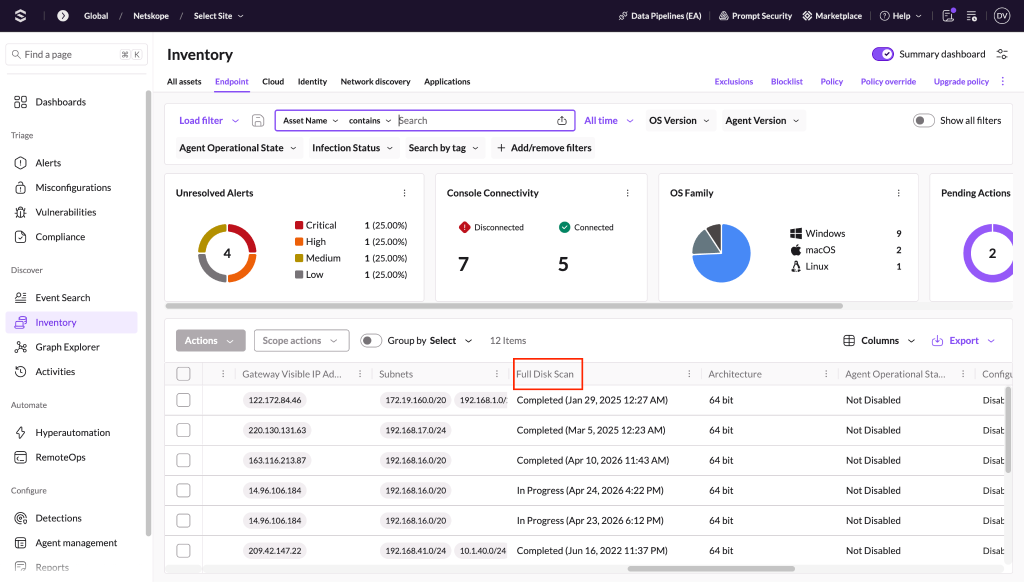
-
Scroll right and look for the Full Disk Scan column to see the Full Disk Scan status for a particular device.
Note
There is no column for Application Vulnerability Scan. For more information about Application Vulnerability Scan, you can contact the SentinelOne Singularity XDR support team.

Validate Reboot Action
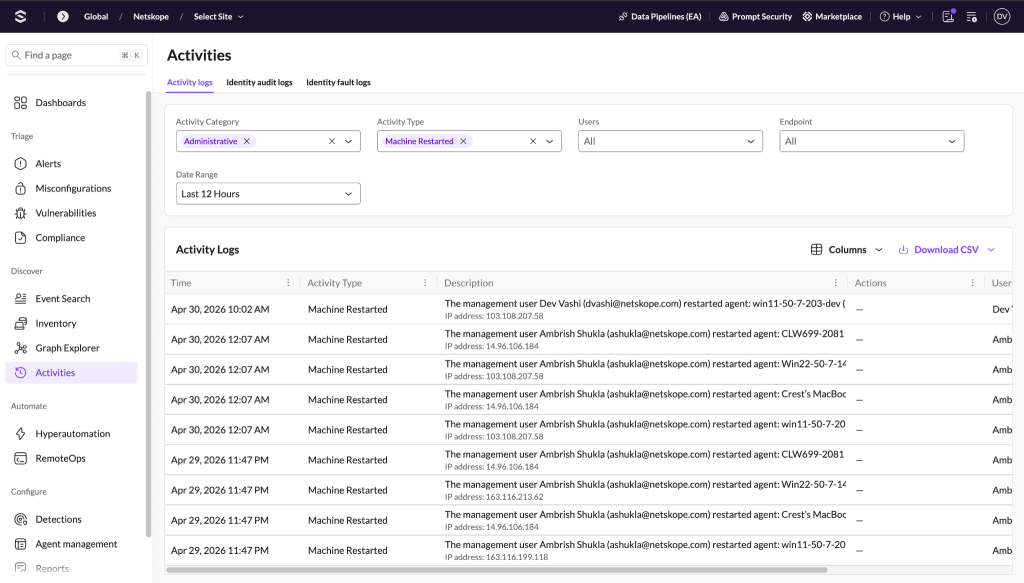
-
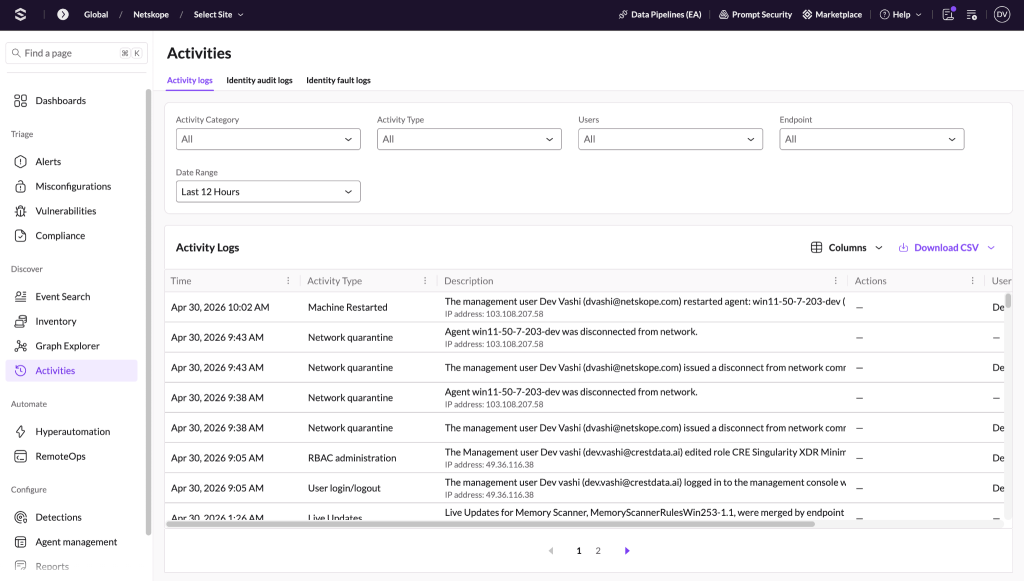
Log in to your SentinelOne Singularity XDR instance and go to the Activities page.
-
Apply filter with Activity Type as Machine Restarted.


Troubleshooting
Unable to configure the SentinelOne Singularity XDR plugin
If you are unable to configure the SentinelOne Singularity XDR plugin, it could be due to one of these reasons:
- Provided Incorrect API TokenL or Base URL
- Provided Credentials don’t have sufficient permissions
What to do:
- To get the API Token follow the steps under the Configuration on SentinelOne Singularity XDR section.
- Provide proper permissions to the configuration parameter.
Unable to pull Devices or Users or Applications
If you are unable to pull Devices or Users or Applications from the SentinelOne Singularity XDR plugin, it could be due to one of these reasons:
- No Devices or Users or Applications present on the SentinelOne Singularity XDR platform.
- An error is received while pulling the records from the platform.
- Mapping is not added while configuring the plugin in the entity source page.
What to do:
- Check on the SentinelOne Singularity XDR platform if Devices or Users or Applications exist or not.
- Receiving 500 error: The server might be down, wait for a while and check later.
- Receiving 401 error: The provided credentials while configuring the plugin no longer exist. Verify credentials and edit the plugin configuration with valid credentials if required.
- Make sure that the mapping is added under Devices/Users/Applications Entity and the mandatory field is mapped while configuring the plugin.
Unable to View Devices or Users or Applications details on the Records page
If you are unable to view Devices or Users or Applications details on the record table, it could be due to the Mapping for all the SentinelOne Singularity XDR fields was not provided while configuring the plugin.
What to do:
- Make sure to provide the needed mapping while configuring the plugin.
- Make sure that the fields created in an entity are according to the suggested Mappings.
Known Behaviors
- Newly created tags are sometimes not added to the device. To overcome this you need to execute the same action again to get the tags reflected on SentinelOne Singularity XDR platform.
- If one of the tags from the list of tags fails while performing actions related to tags then that action will be marked as Failed on the Action logs page irrespective of other tags being attached.
- For Manage Device Tag(s), Move Device to Group, Isolate/Undo Isolate and Reboot Device actions, SentinelOne APIs only give count for Success. For example: If a user performs Manage Device Tag(s) action on 100 devices to Add tags and out of which tags are only added to 90 devices then the API will only return count as 90, so we will not be able to figure out the list of devices on which tags were not added.
- For Update Asset Criticality action, SentinelOne API does not even give count for Success. So, in case of partial failure, action logs in CE will show status as Success.