

This topic helps you configure AWS S3 protocol connector for IBM QRadar. You must create a Log Source using the Amazon AWS S3 REST API protocol to collect compressed CSV data from the S3 bucket.
To create a log source in QRadar (through the Log Source Management app) for ingesting data with Amazon AWS S3 REST API protocol from Netskope, complete the following steps:
1. Open the QRadar Log Source Management app from the QRadar console.

2. A separate window will pop up. Click on + New Log Source button as shown below:

3. Select Log Source type as “Netskope”.

4. Select Amazon AWS S3 REST API protocol and click Configure Log Source Parameters on the Select Protocol Type page.
Refer this IBM document for more information regarding Amazon AWS S3 REST API Protocol.
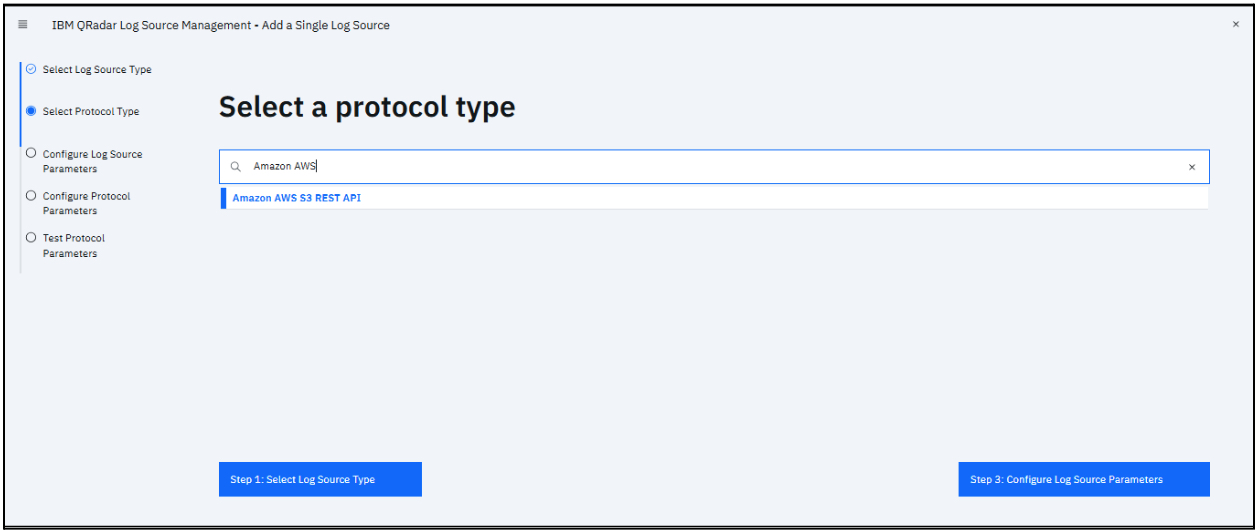
5. On the Configure the Log Source parameters page, enter the required log source parameters:
- Name: Name of the Log Source to be created.
- Extension: Select NetskopeCustom_ext
6. Uncheck Coalescing Events to avoid grouping the events on the basis of Source and Destination IP. Click Configure Protocol Parameters to proceed.

7. On the Configure protocol parameters page:
- Specify the Log Source Identifier for the log source to be created.
- Select the Authentication Method.
- Enter the value of the Access Key ID and Secret Key if the selected authentication method is Access Key ID / Secret Key.
- Select the S3 Collection Method and fill all the necessary fields.
8. Enable the Use Proxy option and enter the proxy details.
9. Click Test Protocol Parameters to test.

10. Click Finish and then close the Log Source Management App window.

11. After closing Log Source Management App window, deploy the changes.
Deploying QRadar
- Navigate to the Admin panel.
- Click Deploy Changes. Best practice is to deploy the full configuration by clicking the Advanced dropdown.
