

Welcome to the New Experience
The new Netskope Knowledgebase portal has a refreshing new design with focus on improving your experience in accessing topics of interest and providing a clutter free reading space. The new design is built with focus on search first navigation.

Homepage
The homepage layout has left sidebar and the product tiles. The product tiles are linked to the latest release notes of that product. Only the latest release notes of a product are available via the product tiles in the homepage.
Left Sidebar
The left sidebar has the Release Notes Search widget and an on-demand left-nav (Table of Contents (ToC) ) sections.
Release Notes Search Widget
The Release Notes search widget is a convenient way to search for a product’s release notes. The widget is visible at all times in the Knowledge Portal. All versions of a product’s release notes are available via the widget.
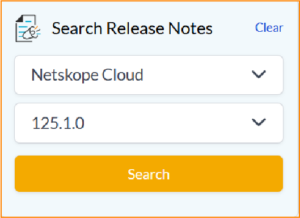
To search for a product’s release note, select a product and then select the version.
Click Submit to view the release notes.
Release Notes
The release notes of each product has also been redesigned for a better reading experience. You can now access the various sections of an release notes via a tabbed menu.

Header Menu
The updated header menu has a broad classification of Netskope product offerings. The products are classified under Security Services, AI Security, Network Services, Analytics Services, and Integrations. Hover over the product category to see the product offerings. The header menu also includes full site search.

When you select a product from the header menu, all the articles for that product are listed in the left nav (sidebar).

Mini ToC
The mini ToC is a nifty widget that stays on the right side of the portal.

The mini ToC widget houses the following:
-
The first section lists the main headings (heading 1 and heading 2) of the current topic. Clicking on a link in the mini ToC scrolls the page to that location of the page.
-
Click the feedback icon to share your valuable feedback about the documentation. For comments / feedback on products or any other services, write to support@netskope.com.
-
Click the PDF icon to generate a PDF of the topic in view.
-
Click the eye icon to collapse the mini ToC for a distraction free reading experience.