

This article provides a list of error messages related to the Netskope service and GRE tunnel configuration and explains how to resolve them.
To view the GRE tunnel status and error messages, go to Settings > Security Cloud Platform > GRE Site and hover over  under Tunnel Status.

NS_ALERT_TENANT_TUNNEL_RESTRICTED

This error occurs when your GRE tunnel is not in service for this Netskope POP because your tenant might be under maintenance. If the issue persists, contact Netskope Support.
NS_ALERT_POP_UNDER_MAINTENANCE

This error occurs when the Netskope POP is not in service because it might be under maintenance. To check the Netskope POP status, see the Netskope Trust Portal. If the issue persists, contact Netskope Support for additional debugging.
NS_ALERT_DOWNSTREAM_SERVICES_HC_FAILURE

This error occurs when there is a failure in the health check from the tunnel gateway towards downstream services (e.g., proxy, Cloud Firewall, etc.).
NS_ALERT_TUNNEL_DOWN_INACTIVE

This error occurs when there are no events received for the GRE tunnel in the last 60 minutes. If the issue persists, contact Netskope Support.
NS_ALERT_TRAFFIC_NOT_SEEN

This error occurs when there is no traffic seen in the GRE tunnel. While the GRE tunnel status is down ; it’s actually active and tunnel status will change to up  as soon as Netskope receives the traffic.
NS_ALERT_KEEPALIVE_NOT_SEEN

This error occurs when the keepalive/probing packets aren’t seen over the GRE tunnel.
NS_ALERT_INFO_NOT_AVAILABLE
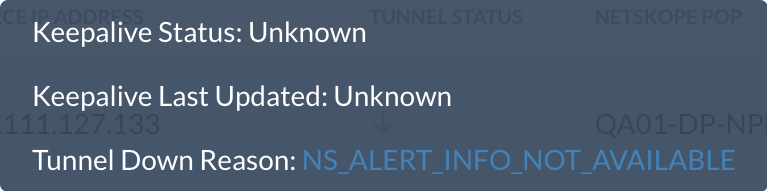
This error occurs when the GRE tunnel is down for an unknown reason, and Netskope doesn’t have any event entry for the respective connection.
NS_ALERT_SCHEDULED_UPGRADE

This error occurs when a scheduled maintenance is in progress for the Netskope POP.
NS_ALERT_EMERGENCY_UPGRADE

This error occurs when an emergency maintenance is happening for the Netskope POP.
NS_ALERT_RELEASE_DEPLOYMENT

This error occurs when a deployment is happening for the Netskope POP.