Overview
With Netskope One DSPM’s Open APIs, you can build integrations that leverage Netskope One DSPM’s intelligence to further enrich your data applications & ecosystem. Specific examples include:
- Ingesting Data Tags from your external data catalog systems
- Controlling the classification of your data set fields
- Export Netskope One DSPM’s insights to power outcomes in other platforms such as SIEMs, SOARs, and ticketing systems
This article will explain how to access our developer documentation and execute our available API methods.
All available Netskope One DSPM API routes are described within master Swagger UI documentation, which can be accessed on your Netskope console by navigating to All available Netskope One DSPM API routes are described within master Swagger UI documentation, which can be accessed on your Netskope console by navigating to Settings > Tools > REST API v2.
Trying Out Methods
Our documentation supports trying out the different methods directly within the Swagger UI. To enable this functionality:
- Click the Authorize button.
- The Available authorizations modal is displayed.
- In the Value field, paste a valid Netskope Rest API Token.
- Click the Authorize button, then click the Close button.
Now you can try individual methods by:
- Click the individual method you wish to execute.
- The individual method’s section expands.
- Next to the Parameters header, click the Try it out button.
- If necessary, populate any required Parameters (including editing any request body examples).
a. Multiple filters can be applied per field. Below are some examples of specific syntax you can use forGET /api/v2/dspm/classificationmanagement/columns
i. Get all columns classified as Name or Email address:classification eq 1 or classification eq 2
ii. Get all high-sensitivity columns that are not reviewed:sensitivity_level_id eq 3 and reviewed eq false - Click the Execute button.
- The Responses section is now displayed.
- Review the Responses section for the system’s response to your request.
Examples of other supported filter syntaxes:
| Scenario | Filter Syntax |
|---|---|
| Begins with | startswith(location.column, 'FIRST')startswith(location.column, 'first') |
| Contains (case-specific) | substringof('firstn', location.column)substringof('FIRSTN', location.column) |
| Contains (case-insensitive) | substringof(tolower('FiRsTn'), location.column)substringof(tolower('FiRsTn'), tolower(location.column))substringof('firstn', tolower(location.column))substringof(tolower('firstn'), tolower(location.column)) |
| Not equal | account_id ne 1234567890 |
Open API and Data Tags
You can use Netskope DSPM’s Open APIs to build integrations and ingest Data Tags from external data catalog systems.
For information on how Data Tags are created, managed, and displayed in the Netskope DSPM user interface, see Manage DSPM Data Tags.
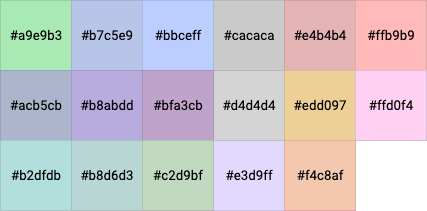
All Data Tags have an assigned color to make them distinctive within the Netskope DSPM user interface. When defining tags via the API, you must use the supported hex color codes to ensure proper UI rendering.