

Note
This feature is available with IPSec, GRE, or Netskope Client traffic steering methods.
405: “method not allowed, please contact support to migrate v1 DNS Profiles”
If this error is seen, please reach out to the Netskope customer support team at support@netskope.com
DNS profiles allow you to control, inspect, and log all or blocked DNS traffic. When configuring a DNS profile, you can configure the actions taken for specific domain categories and choose to allow or block specific domains. Additionally, you can choose to block all DNS tunnels and select DNS tunnels to exempt.
To create a DNS profile:
- Navigate to Policies > DNS.
- Click New DNS Profile. The DNS Profile page appears.
- Enter a name for the DNS profile.
- Select your Inheritance Group. Search for it by clicking on the field.
- Select if you want to generate events for Only blocked DNS traffic or All DNS traffic.
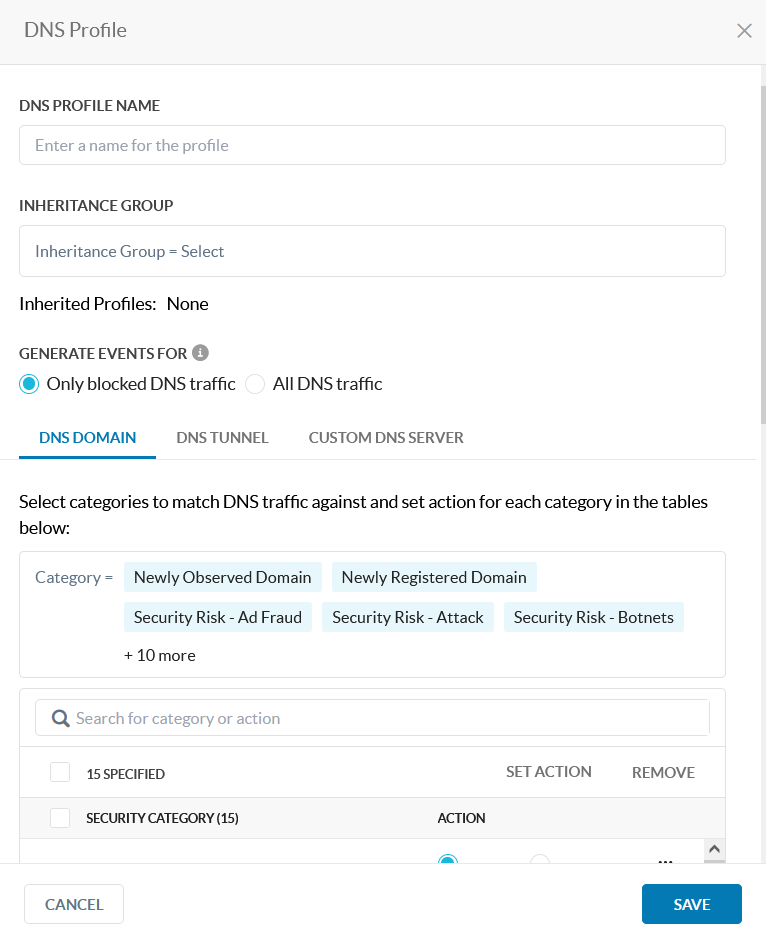
- Under the DNS Domain tab, you can do the following:
This section allows you to configure actions for the available domain categories. You can also search for a category or action.
Available actions include None, Block, or Sinkhole. If the detected DNS traffic doesn’t match any of the domain categories, then Netskope will take no action.

- If you chose Sinkhole as the action for a domain category, enter a Sinkhole IP Address.

- For the Domain Allowlist and Domain Blocklist fields, you can specify the domains you want to allow or block all DNS requests from.
For the domain, you must specify the Record Type or choose All Record Types. You can click + Add to add more domains or click Import From CSV to upload a CSV file (the maximum upload is 8 MB).
Note
The Domain Blocklist takes precedence over the Domain Allowlist.

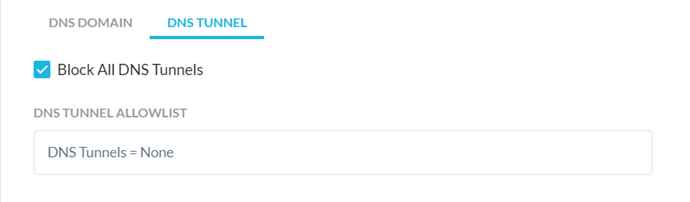
- Under the DNS Tunnel tab, you can enable Block All DNS Tunnels.

- If you enable Block All DNS Tunnels, you can also configure the DNS Tunnel Allowlist. Select or search for DNS tunnels from the dropdown list.
- Under Custom DNS Server, you can enable the Custom DNS functionality and enter up to five public IPv4 addresses separated by comma or newline for forwarding. The DNS servers are evaluated in the order they are input into the window.

Netskope will forward the destination to these DNS servers for resolution when the default DNS servers are private, unreachable from Netskope cloud, or rejecting the requests.
The Always use custom DNS servers instead of default server option will replace the destination address with the custom DNS server’s IP address for all DNS traffic.
The Use Netskope DNS resolver option will use Netskope’s internal DNS resolver if the default and custom DNS servers fail. - Click Save to save the DNS profile.
Note
Custom DNS servers do not work over nonstandard ports.
Non-DNS TCP application traffic sent over port 53 are assumed to be DNS traffic and treated accordingly.
Custom DNS server cannot be changed in the middle of TCP flow if server is marked as unreachable during flow’s lifetime as this requires a new connection sequence with the new server.
After you create a DNS profile, you must add it to a Real-time Protection policy. To learn more: Real-time Protection Policies.
Destination Profiles and Inheritance Groups

Destination Profiles replace the current domain lists used in Allowlist and Blocklist.
This feature also enables support for Inheritance Groups, using which you can add a number of DNS profiles as Parent profile – which can be Protected or Unprotected. The DNS profiles in the Inheritance Group are evaluated in addition to the Child DNS profile from the matched Real time policy rule.
Terminology:
- Child DNS Profile – DNS Profile used in the matched Real Time Policy rule
- Parent DNS Profiles – A group of DNS Profiles which are categorized as “Protected” or “Unprotected”
- Protected Parent DNS Profiles – The Parent DNS Profiles whose action can’t be overridden by the Child DNS Profile. Evaluated before Child DNS Profile is evaluated
- Unprotected Parent DNS Profiles – The Parent DNS Profiles whose action can be overridden by the Child DNS Profile. Evaluated after Child DNS Profile is evaluated
- Inheritance Group – As entity where Parent DNS Profiles can be added in “Protected” or “Unprotected” groups
To create an Inheritance Group:
-
Click Inheritance Groups > New Inheritance Group.

-
Fill in the Inheritance Group Name and select which Protected Parent DNS Profiles and Unprotected Parent DNS Profiles.
Child DNS Profiles override Unprotected Parent DNS Profiles but are overridden by Protected Parent DNS Profiles