

This document explains how to configure the Mimecast v2.0.1 plugin with the Threat Exchange module in the Netskope Cloud Exchange platform. This plugin is used to fetch the indicators of type URL from the Email Security > URL Protection > Logs page, SHA256 and MD5 from the Mimecast platform.
This plugin also supports sharing the URL indicators to the Email Security > URL Protection > URL Tools > Managed URLS page using the Create Managed URL action, and sharing of SHA256 and MD5 indicators using the Perform Operation action to the Mimecast.
To access the plugin, you would need an API application on Mimecast and user credentials. Refer these Mimecast guides here for detailed steps.
Prerequisites
To complete this configuration, you need:
- Netskope Tenant (or multiple, for example, production and development/test instances)
- A URL List on your Netskope tenant.
- A Netskope Cloud Exchange tenant with the Tenant plugin and Threat Exchange plugin already configured.
- Mimecast platform credentials.
- Mimecast administrator console with URL Protection service.
- Access to create a Custom Admin Role.
- Access create Custom API 2.0 Integration.
- Subscription to Bring Your Threat Intelligence (BYOTI) package for file hash.
- Connectivity to the following hosts: https://login.mimecast.com/u/login/?gta=administration#/login
Mimecast Plugin Support
This plugin is used to fetch the indicators of type URL from the Email Security > URL Protection > Logs page, SHA256 and MD5 from the Mimecast platform. This plugin also supports sharing the URL indicators to the Email Security > URL Protection > URL Tools > Managed URLS page using the Create Managed URL action, and sharing of SHA256 and MD5 indicators using the Perform Operation action. To access the plugin, you would need an API application on Mimecast and user credentials. Refer to these Mimecast guides for detailed steps.
| Fetched Indicator Types | Shared Indicator Types |
|---|---|
| URL, MD5, SHA256 | URL, MD5, SHA256 |
IoC Retraction
IoC Retraction (Pull): Indicators fetched from Mimecast and that are not within the retraction interval range will be marked as Retracted = Yes in Cloud Exchange.
IoC Retraction (Push): Indicators fetched from Source Plugin and that were already shared to Mimecast will be deleted from Mimecast once they are marked Retracted in Cloud Exchange.
| Retraction Type | Supported Retraction Type |
|---|---|
| IoC Retraction (Pull) | Yes (URLs, SHA256 and MD5) |
| IoC Retraction (Push) | Yes (URLs) |
Note
For retraction to work, it is mandatory to enable the IoC(s) Retraction toggle under Settings > Threat Exchange.

Mappings
Mappings for Pull (Netskope Fields – Mimecast Fields)
| Cloud Exchange Fields | Mimecast Fields |
|---|---|
| value | value |
| type | type |
| Comment | Sent from <SenderAddress> |
Mappings for Push (Hashes)
| Cloud Exchange Fields | Mimecast Fields |
|---|---|
| value | value |
| type | type |
| provider | NetskopeCE |
| description | comments (max length is 20 characters) |
| operation_type | BLOCK/ALLOW/DELETE |
Mappings for Push (URLs)
| Cloud Exchange Fields | Mimecast Fields |
|---|---|
| value | value |
| action | BLOCK/DELETE |
Permissions
- Administration Console access
- Access to create a Custom Admin Role with following permissions:
- Account | Dashboard | Read
- Monitoring | URL Protection | Read
- Services | URL Protection | Edit (Read and Write)
- Gateway | Tracking | Read
- BYO Threat Intelligence | Upload
- Subscription to Bring Your Threat Intelligence (BYOTI) package for file hash sharing.
API Details
List of APIs Used
| API Endpoint | Method | Use Case |
|---|---|---|
| /oauth/token | POST | Validate Credentials |
| /api/account/get-account | POST | Fetch account details endpoint |
| /api/ttp/threat-intel/get-feed | POST | Fetch Hashes endpoint |
| /api/ttp/url/get-logs | POST | Fetch URLs endpoint |
| /api/byo-threat-intelligence/create-batch | POST | Push Hashes (MD5 and SHA256) |
| /api/ttp/url/decode-url | POST | Decode URLs |
| /api/ttp/url/create-managed-url | POST | Push URLs |
| /api/ttp/url/get-all-managed-urls | POST | Get all URLs |
| /api/ttp/url/delete-managed-url | POST | Delete URLs |
Get Bearer Token
API Endpoint: https://api.services.mimecast.com/oauth/token
Method: POST
Request Headers
| Key | Value |
|---|---|
| client_id | Mimecast Client ID |
| client_secret | Mimecast Client Secret |
| grant_type | client_credentials |
| User-Agent | netskope-ce-6.0.1-cte-mimecast-v2.0.1 |
| Accept | application/json |
Sample API Response
{
    "access_token": "V9RteK0pwTxPscMCCd6xs20f05Ob",
    "token_type": "Bearer",
    "expires_in": 1799,
    "scope": ""
}
Validate Credentials
API Endpoint: https://api.services.mimecast.com/api/account/get-account
Method: POST
Request Headers
| Key | Value |
|---|---|
| Authorization | Bearer <Bearer Token> |
| User-Agent | netskope-ce-6.0.1-cte-mimecast-v2.0.1 |
| Accept | application/json |
Sample API Response
{
    "meta": {
        "status": 200
    },
    "data": [
        {
            "region": "us",
            "archive": false,
            "gateway": true,
            "passphrase": "",
            "supportCode": "5656",
            "maxRetention": 30,
            "maxRetentionConfirmed": true,
            "minRetentionEnabled": false,
            "automatedSegmentPurge": true,
            "type": "full",
            "policyInheritance": false,
            "databaseCode": "test",
            "searchReason": false,
            "contentAdministratorDefaultView": "",
            "adminSessionTimeout": 720,
            "exportApi": false,
            "exgestAllowQuery": false,
            "exgestAllowExtraction": true,
            "expressAccount": false,
            "cybergraphV2Enabled": true,
            "accountCode": "",
            "accountName": "",
            "adminEmail": "",
            "contactEmail": "testuser@gmail.com",
            "domain": "",
            "userCount": 10,
            "umbrellaAccounts": [
                "CU2A110,CUSA131A2,CUSA133A2,CUSA42A10,CUS"
            ],
            "mimecastId": "01-1234-123",
            "contactName": "test user",
            "telephone": "123-123-123",
            "packages": [
                "Auto Responders (Site) [1005]",
                "Impersonation Protection [1060]",
            ]
        }
    ],
    "fail": []
}
Fetch Hashes (Md5 and Sha256)
API Endpoint: https://api.services.mimecast.com/api/ttp/threat-intel/get-feed
Method: POST
Request Headers
| Key | Value |
|---|---|
| Authorization | Bearer <Bearer Token> |
| User-Agent | netskope-ce-6.0.1-cte-mimecast-v2.0.1 |
| Accept | application/json |
Request Body
{
    "data": [
        {
            "fileType": "csv",
            "feedType": "malware_grid"
        }
    ]
}
Sample API Response:
key|FileMimeType|FileName|FileSize|MD5|Observations|RecipientAddress|Route|SHA1|SHA256|SenderAddress|SenderDomain|SendingIP|Timestamp
0|||||1||Out||d693862cb6d4d22647921963dfe4be863fc8568b2676c4353663455dd585c426|null|null|209.221.13.136|2025-02-09T17:30:00.342Z
1|||||1||Out||7236787ed35fd54966f7d345b0698bc7a52bdc165d79c58a54fe05ca5be28c94|null|null|209.221.13.136|2025-02-09T17:30:01.364Z
2|||||1||Out||42de9806857b28c1fc8ac95cb0f16a146f62645f2468eae82e0ea62f0af4a057|null|null|70.165.34.181|2025-02-09T17:30:13.946Z
3|||||1||Out||e8960a547ad4f7f14331468f126375e2f100c7bdeb27cedec4bb3b9175e1727d|null|null|205.144.127.200|2025-02-09T17:30:20.958Z
4|||||1||Out||5e5aa18e4182f8f5544a2e742209297b77e56b7fb2b262b1ce3cafe6ecc7acc7|null|null|209.221.13.136|2025-02-09T17:30:31.256Z
Fetch URLs
API Endpoint: https://api.services.mimecast.com/api/ttp/url/get-logs
Method: POST
Request Headers
| Key | Value |
|---|---|
| Authorization | Bearer <Bearer Token> |
| User-Agent | netskope-ce-6.0.1-cte-mimecast-v2.0.1 |
| Accept | application/json |
Request Body
{
    "meta": {
        "pagination": {
            "pageSize": 1,
            "pageToken": ""
        }
    },
    "data": [
        {
            "from": "2024-02-03T10:16:31+00:00",
            "scanResult": "malicious",
            "oldestFirst": true
        }
    ]
}
Sample API Response
{
    "meta": {
        "pagination": {
            "pageSize": 1,
            "totalCount": 17,
            "next": "eNqNkk9vgkAQxb_Lnj2wUExj4sFQwTWAVSx_9ga7qIssEHYRoel379aemtSEwxzmZWZ-L5n3CZr0nAs25oyCBZyBps1vrO7Eu5LB4pSWIp8ByeXPmKyveQUWIB-2dWb42lHHnOihRgY0VxokxqEkXDPd46rfBSYkgynTCJaJbo_UMkUSvbBdsRaoWPfuo7zBLYiJirp3rb_7Hnu2vxKoCkfqhEN2vErvbQVd1bscNlkUFknsay6_XzKG5p7VM6p6HG_lLtB6783raOx1WVRKHPkXYuy7zLG7f_h3z5rM16fzz1P5vT-db0znr5_yT0HPiGNX-EN52Bxqpd2Vpz6JaHnkr79_q_wbqQ4jKppM_ZunUSiwheaI-yKN_DZ01N0ACcTtMdHDDjtlh1U26GYLcQzpab9cghm45a1gdfWIW5uTuqVCpq18BPDrG9034fE"
        },
        "status": 200
    },
    "data": [
        {
            "clickLogs": [
                {
                    "userEmailAddress": "benjamin.rogers@demo-int.netskope-1.mime-api.com",
                    "fromUserEmailAddress": "sheila.tweed@demo-int.netskope-1.mime-api.com",
                    "url": "http://www.mccutchen.com",
                    "ttpDefinition": "Default Internal URL Protect Definition",
                    "subject": "Final Oxy Certificate----For the \"Data Room\"",
                    "action": "warn",
                    "adminOverride": "N/A",
                    "userOverride": "None",
                    "scanResult": "malicious",
                    "category": "Phishing & Fraud",
                    "sendingIp": "Internal IP",
                    "userAwarenessAction": "N/A",
                    "date": "2025-01-20T16:29:55+0000",
                    "actions": "None",
                    "route": "internal",
                    "creationMethod": "Entry Scan",
                    "emailPartsDescription": [
                        "Body"
                    ],
                    "messageId": "<3b899e671d27739b-274723@hapi.b41.one>",
                    "tagMap": {
                        "UrlReputationScan": {
                            "Status": [
                                "CustomerAll",
                                "VerdictBlock"
                            ],
                            "Type": [
                                "Malware, Phishing & Fraud"
                            ],
                            "UrlBlock": [
                                "ORIGINAL:http://www.mccutchen.com -> META_REDIRECT:http://www70.mccutchen.com (Blocked as MALWARE,PHISHING)",
                                "ORIGINAL:http://www.mccutchen.com -> META_REDIRECT:http://www70.mccutchen.com -> EXTRACTED:http://www70.mccutchen.com (Blocked as MALWARE,PHISHING)"
                            ],
                            "Url": [
                                "http://www70.mccutchen.com"
                            ]
                        }
                    }
                }
            ]
        }
    ],
    "fail": []
}
Decode URLs
API Endpoint: https://api.services.mimecast.com/api/ttp/url/decode-url
Method: POST
Request Headers
| Key | Value |
|---|---|
| Authorization | Bearer <Bearer Token> |
| User-Agent | netskope-ce-6.0.1-cte-mimecast-v2.0.1 |
| Accept | application/json |
Request Body
{
    "data": [
        {"url": "www.katzlaw.com"},
        {"url": "http://exlorer.msn.com/intl.asp"}
    ]
}
Sample API Response
{
    "meta": {
        "status": 200
    },
    "data": [
        {
            "url": "www.katzlaw.com",
            "success": true
        },
        {
            "url": "http://exlorer.msn.com/intl.asp",
            "success": true
        }
    ],
    "fail": []
}
Push Hashes
API Endpoint: https://api.services.mimecast.com/api/byo-threat-intelligence/create-batch
Method: POST
Request Headers
| Key | Value |
|---|---|
| Authorization | Bearer <Bearer Token> |
| User-Agent | netskope-ce-6.0.1-cte-mimecast-v2.0.1 |
| Accept | application/json |
Request Body
{
    "data": [
        {
            "hashList": [
                {
                    "hash": "9e953050c61f6fedf4305f65a81224a1145ccf7dff2acf2963c40ee7468cd9d1",
                    "provider": "NetskopeCE",
                    "description": "Test API"
                }
            ],
            "operationType": "DELETE"
        }
    ]
}
Sample API Response
{
    "meta": {
        "status": 200
    },
    "data": [
        {
            "batchIdToken": "eNoNjkkOgjAAAP_SqyaCVEtNPDTEAC5ERAgQL9A2KZVFNhGMf5frzGHmC1pO-4ZnDOxAMcBxjDz5hDB0IEFCCbpLYIa4D-i6Ju3pU3AopfOaSoGPhnqLnQNjiWOGj1Xd-Tqxkhzp0q3DPFrA3L0PzRgTNZrSsxZJoRjZ1bU1mRHL9fdgCWjfdlXBG1oxPucN3yM6JhrazC5NOirs-UpVtwjDJXjzps2qcga_P2ieOls",
            "status": "NOT_STARTED",
            "operationType": "DELETE",
            "hashCount": 2,
            "createTime": "2025-02-17T06:56:23.211Z[UTC]"
        }
    ],
    "fail": []
}
Push URLs
API Endpoint: https://api.services.mimecast.com/api/ttp/url/create-managed-url
Method: POST
Request Headers
| Key | Value |
|---|---|
| Authorization | Bearer <Bearer Token> |
| User-Agent | netskope-ce-6.0.1-cte-mimecast-v2.0.1 |
| Accept | application/json |
Request Body
{
    "data": [
        {
            "url": "http://example3.com",
            "action": "permit",
            "comment": "Netskope CE",
            "matchType": "explicit"
        }
    ]
}
Sample API Response
{
{
    "meta": {
        "status": 200
    },
    "data": [
        {
            "id": "wOi3MCwjYFYhZfkYlp2RMKIAOwgBXweUUcu0eTwirzBO48Dj4FQ1bYgyujdIycvnuKUxo9kpfZR5qr5gR1Wv_KCXbJQmclXmiZ8N_Fx_3R1RaxOE0x9IT9PFiD1mEL4W",
            "scheme": "http",
            "domain": "example3.com",
            "port": -1,
            "path": "",
            "queryString": "",
            "matchType": "explicit",
            "action": "permit",
            "comment": "Netskope CE",
            "disableUserAwareness": false,
            "disableRewrite": false,
            "disableLogClick": false
        }
    ],
    "fail": []
}
Get Managed URLs
API Endpoint: https://api.services.mimecast.com/api/ttp/url/get-all-managed-urls
Method: POST
Request Headers
| Key | Value |
|---|---|
| Authorization | Bearer <Bearer Token> |
| User-Agent | netskope-ce-6.0.1-cte-mimecast-v2.0.1 |
| Accept | application/json |
Request Body
{
    "data": [
        {
            "domainOrUrl": "http://example3.com",
            "exactMatch": true
        }
    ]
}
Sample API Response
{
    "meta": {
        "pagination": {
            "pageSize": 1,
            "totalCount": 1
        },
        "status": 200
    },
    "data": [
        {
            "id": "wOi3MCwjYFYhZfkYlp2RMKIAOwgBXweUUcu0eTwirzBO48Dj4FQ1bYgyujdIycvnuKUxo9kpfZR5qr5gR1Wv_KCXbJQmclXmiZ8N_Fx_3R1RaxOE0x9IT9PFiD1mEL4W",
            "scheme": "http",
            "domain": "example3.com",
            "port": -1,
            "path": "",
            "queryString": "",
            "matchType": "explicit",
            "action": "permit",
            "comment": "Netskope CE",
            "disableUserAwareness": false,
            "disableRewrite": false,
            "disableLogClick": false
        }
    ],
    "fail": []
}
Delete Managed URLs
API Endpoint: https://api.services.mimecast.com/api/ttp/url/delete-managed-url
Method: POST
Request Headers
| Key | Value |
|---|---|
| Authorization | Bearer <Bearer Token> |
| User-Agent | netskope-ce-6.0.1-cte-mimecast-v2.0.1 |
| Accept | application/json |
Request Body
{
    "data": [
        {
            "id": "wOi3MCwjYFYhZfkYlp2RMKIAOwgBXweUUcu0eTwirzBO48Dj4FQ1bYgyujdIycvnonkzMQDptATGOwyPSUGB5daY0iCYXSXKVRGrZu_YX6VRaxOE0x9IT9PFiD1mEL4W"
        }
    ]
}
Sample API Response
{
    "meta": {
        "status": 200
    },
    "data": [],
    "fail": []
}
Performance Matrix
Here is the performance reading conducted for fetching and pushing 100K IoCs in each plugin lifecycle on a Large Cloud Exchange instance with these specifications.
| Description | Specification |
|---|---|
| Stack details | Size: Large RAM: 32 GB CPU: 16 Cores |
| Indicators fetched from Mimecast | ~37K per minute |
| Indicators shared to Mimecast (SHA256 and MD5) | ~1.6K per minute |
| Indicators shared to Mimecast (URLs) | ~700 IOCs per minute |
Note
For URL sharing, readings are taken after sharing 30k URLs to Mimecast.
User Agent
netskope-ce-6.0.1-cte-mimecast-v2.0.1
Workflow
- Get your Mimecast credentials.
- Configure the Mimecast Plugin.
- Configure a business rule for Mimecast.
- Configure sharing for Netskope and Mimecast.
- Validate the Mimecast Plugin.
Watch a Video
Click play to watch a video.
Get your Mimecast Credentials
- Log in to your Mimecast instance.
- Make note of the region in Mimecast Instance Base URL, in the form of
https://login-<region>.mimecast.com/. You will need this when configuring the Mimecast Plugin in Threat Exchange.
Create a Custom Admin Role
- Go to Account > Admin Roles.
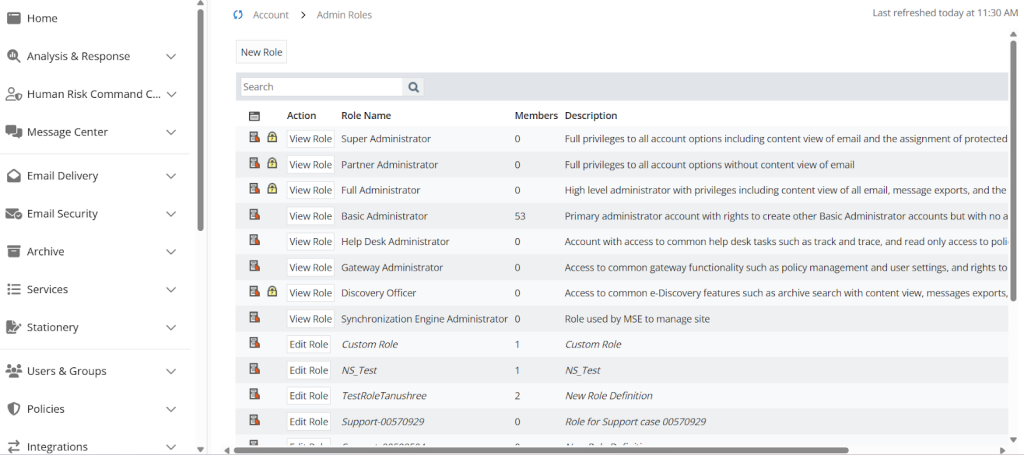
- Click New Role.
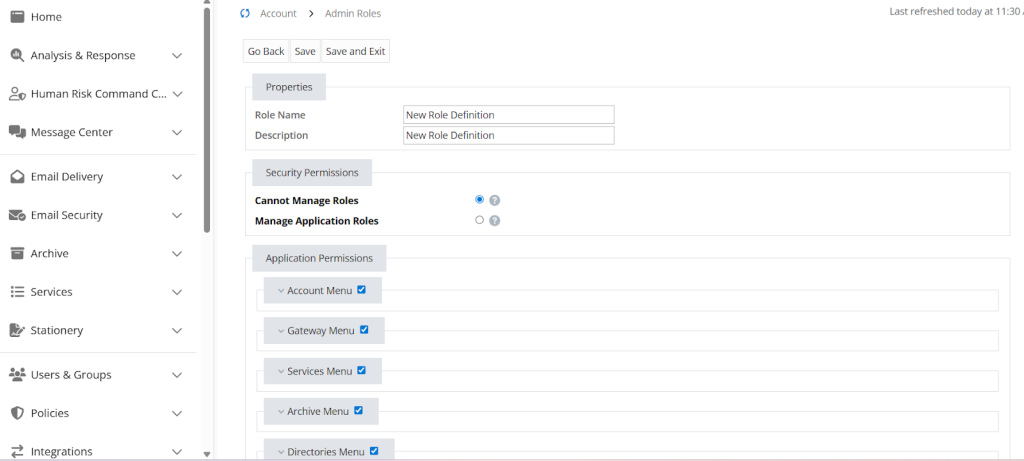
- In the Properties section, enter these parameters:
- Role Name: Enter a name.
- Description: Briefly describe the role’s purpose.
- In the Application Permissions section, enable the following permissions:
- Account | Dashboard | Read
- Monitoring | URL Protection | Read
- Services | URL Protection | Edit
- Gateway | Tracking | Read
- BYO Threat Intelligence | Upload
- Click Save and Exit.


Generate API 2.0 Keys
- Go to Integrations > Integrations Hub.
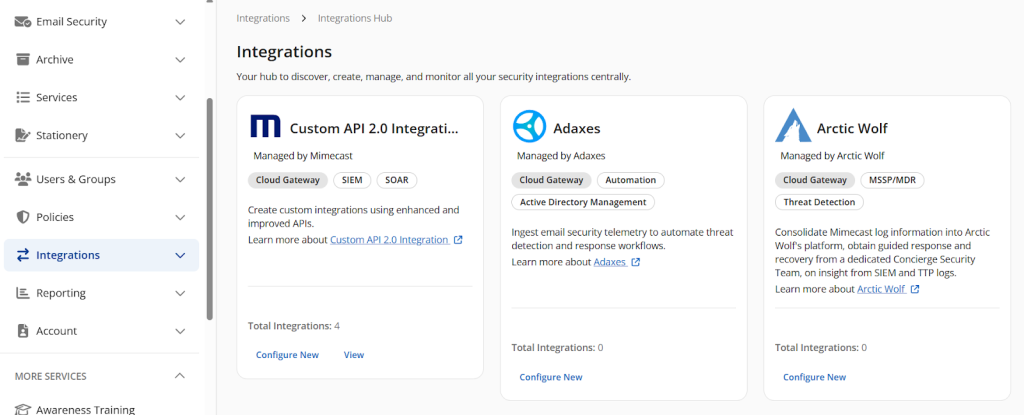
- Find the Mimecast API 2.0 tile and click Configure New.
- Enter the Application Details:
- Application Name: Enter a unique name for this integration.
- Products: You have to select only five products.
- Account Management
- Email Security Cloud Gateway
- Security Events
- Threat Management
- Policy Management
- Application Role: Select the same role which you have created in the above steps.

- Enter a Technical Point of Contact and email.
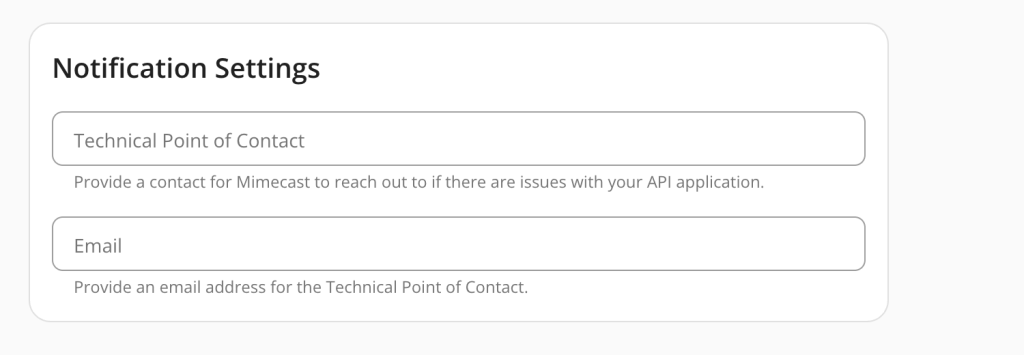
- Click Save and a popup will display your Client ID and Client Secret. Copy them; there are needed to configure the plugin.


Note
For further information, go to the official Mimecast site https://developer.services.mimecast.com/apis.
Configure the Mimecast Plugin in Cloud Exchange
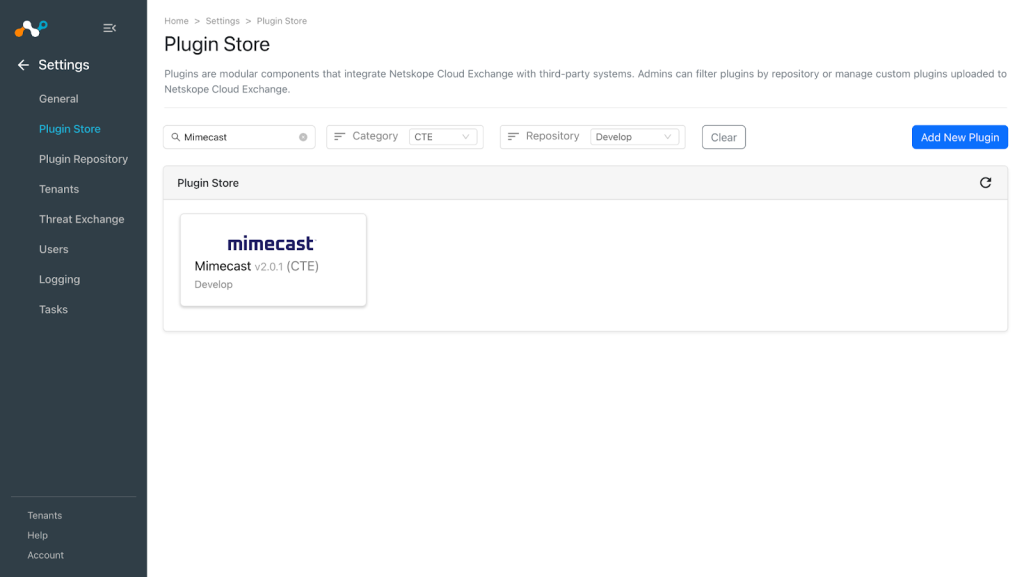
- In Cloud Exchange, go to Settings > Plugin Store.
- Search for and select the Mimecast v2.0.1 (CTE) plugin.
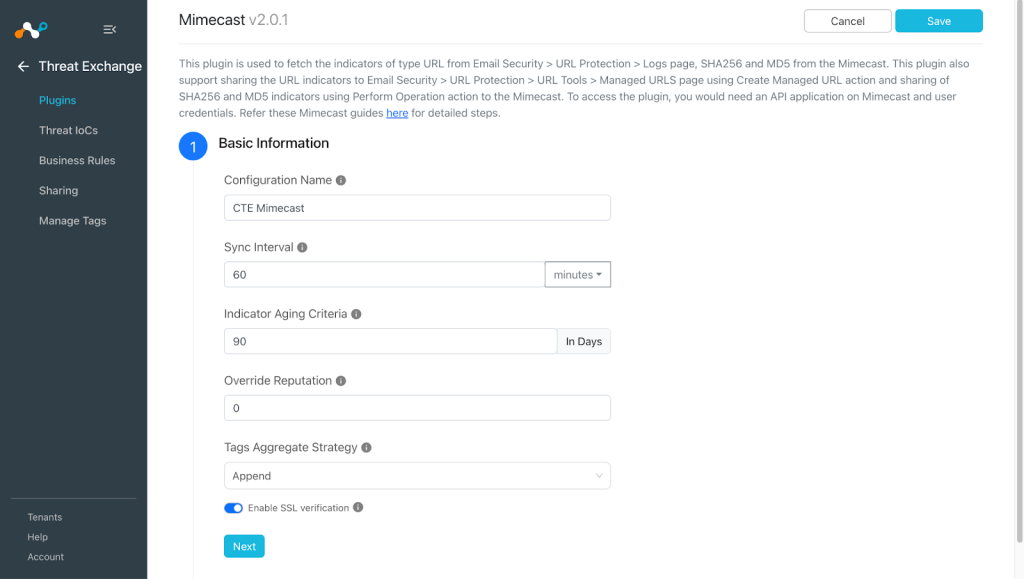
- Enter the Basic Information:
- Configuration Name: Unique name for the configuration.
- Sync Interval: Leave the default.
- Aging Criteria: Expiry time of the plugin in days. (Default: 90)
- Override Reputation: Set a value to override the reputation of indicators received from this configuration. (Default: 5)
- Tags Aggregate Strategy: Choose whether to append new tags to existing IoC(s) or overwrite them. This configuration parameter determines how tags are stored for indicators pulled for this configuration.
- Enable SSL Validation: Enable SSL Certificate validation.
- Use System Proxy: Enable if the proxy is required for communication.
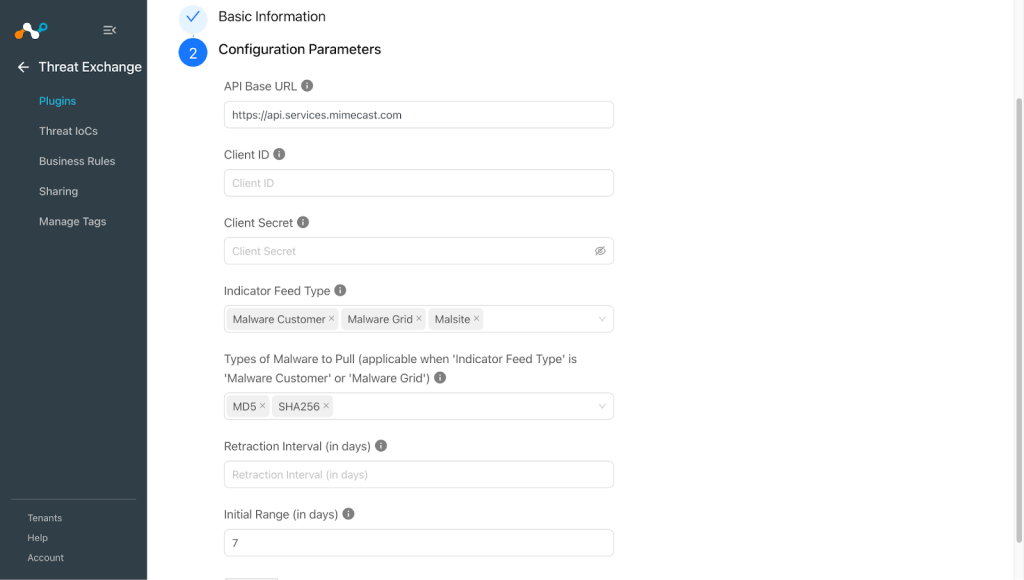
- Click Next and enter the Configuration Parameters:
- API Base URL: Mimecast API Base URL including region.
- Client ID: Mimecast API Client ID.
- Client Secret: Mimecast API Client Secret.
- Indicator Feed Type: The scope of data to fetch. Use Malware Customer to pull data from the account. Use Malware Grid to pull the data form the region grid. Use Malsite to pull URLs from URL Protection.
- Types of Malware to Pull (applicable when feed_type is Malware Customer or Malware Grid): The scope of data to fetch. Use Malware Customer to pull data from the account. Use Malware Grid to pull the data form the region grid. Use Malsite to pull URLs from URL Protection.
- Retraction Interval (in days): Specify the number of days for which IoC retraction should be run for Mimecast indicators. Note that this parameter is applicable only for Netskope CE version 5.1.0 or later, and if IoC(s) Retraction is enabled in your Threat Exchange Settings.
- Initial Range (in days): Number of days to pull the data for the initial run.
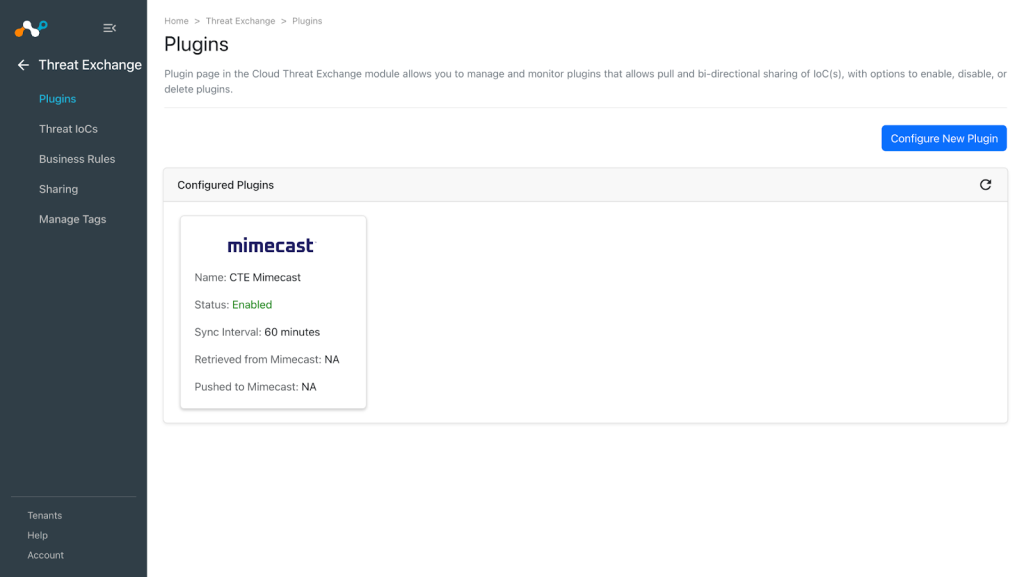
- Click Save.


Create a Threat Exchange Business Rule for Mimecast
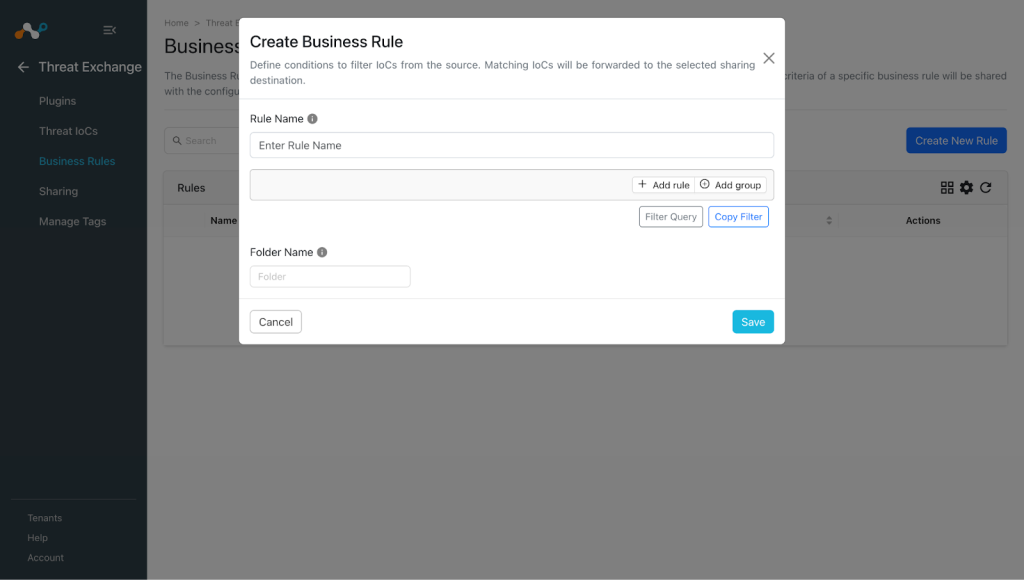
To share indicators fetched from the Mimecast to Cloud Exchange, and vice-versa, you will need to have a business rule that will filter out the indicators that you want to share.
- In Threat Exchange, go to Business Rules and click Create New Rule.
- Add the filter according to your requirement in the rule, and then click Save.

Configure Sharing for Netskope and Mimecast
To share IoCs from Cloud Exchange to the Mimecast platform, or vice-versa:
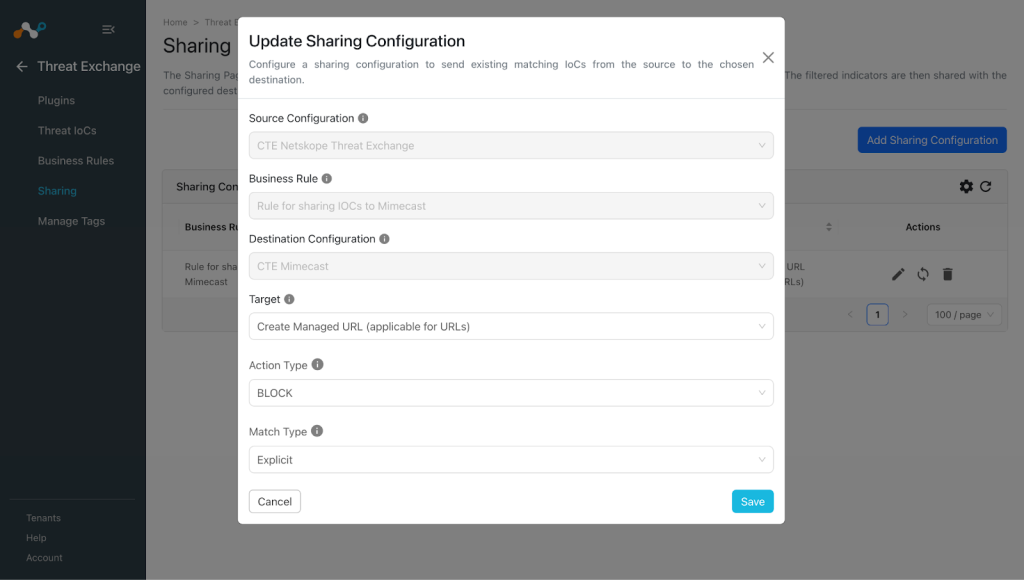
- In Threat Exchange, go to Sharing and click Add Sharing Configuration.
- Select your Source Configuration (Netskope CTE), Business Rule, Destination Configuration (Mimecast), and Target.
Select the existing IoC List Name, or create a new IoC list on the platform. The Mimecast plugin supports 2 types of actions under Target.- Create Managed URL (applicable for sharing URLs to Mimecast)
- Supported Action types:
- BLOCK
- PERMIT
- Supported Match types:
- Explicit
- Domain
- Supported Action types:
- Perform Operation (applicable for sharing File hashes (SHA256, MD5) to Mimecast)
- Supported Operations:
- ALLOW
- BLOCK
- DELETE
- Supported Operations:
- Create Managed URL (applicable for sharing URLs to Mimecast)
- Click Save.
- Click Add Sharing Configuration, and follow the same steps, but vice-versa for sharing Mimecast IoCs to Netskope. Select your Source Configuration (Mimecast), Business Rule, Destination Configuration (Netskope CTE), and Target.
- Click Save.

Validate the Mimecast Plugin
In order to validate the workflow, you must have Netskope Alerts and/or Mimecast attributes/indicators. Polling Intervals were defined during plugin configuration.
Validate the Pull
Pulled data will be listed on Threat IoCs. You can filter the IoCs pulled from the platform using the filter: sources.source Like “<plugin name>”


To verify pulled logs in Cloud Exchange, go to Logging and search logs from the CTE Mimecast plugin.


To verify the data available for pulling on Mimecast, log in to Mimecast Platform and go to Email Security > URL Protection > Logs. Note that Mimecast plugin only pulls Malicious URLs.

Note that the location from where hashes are pulled and pushed is not certain. According to the doc (here) it must be in the Mimecast Threat Dashboard. If you can’t find this, contact your Mimecast admin.
Validate the Push
To validate the push in Cloud Exchange, go to Logging and filter shared logs for the Mimecast plugin.


Go to Threat IoCs and filter logs shared with the Mimecast plugin.


On the Mimecast platform, go to Email Security > URL Protection > Managed URL to check the shared IoCs of type URL on the platform.

To filter the IoCs shared from Cloud Exchange, you can use a Domain or comment filter with the string Netskope CE.

Validate the Retraction
You can filter the logs related to retraction by using the filter: sources.source Like “<plugin configuration name> [Retraction]”.

You can validate the same at Threat IoCs:

When the IoCs shared from a Netskope Threat Exchange plugin, or 3rd-party plugin, to Mimecast, it will be retracted in Cloud Exchange and marked as “<plugin-config-name>: retracted” in the Retraction Result after they are deleted from the Mimecast Platform. If they are not deleted from the destination platform, then the Retraction Result will be pending.
Here you can see an IoC that was pulled from Netskope Tenant and shared to the Mimecast platform, and it is marked as Retracted = Yes in Cloud Exchange. Initially, its retraction result will be pending, meaning it is not yet deleted from the Mimecast platform. After it is deleted from the Mimecast platform, then its retraction result will be marked as retracted in Cloud Exchange as you can see in the screenshot. This means it was deleted from the Mimecast platform.

The same can be verified in the logs at Logging in Cloud Exchange.

URL List on Netskope where three IoCs pulled from Mimecast where already shared:

When the IoCs shared from Mimecast to a 3rd-party will be retracted in Cloud Exchange, it will be marked as “<plugin-config-name>: retracted” in the Retraction Result, which means they are deleted from the destination platform. If they are not deleted from the destination platform, then the Retraction Result will be pending.

URL List on Netskope Tenant after one of the URL was deleted as it was marked as retracted on Cloud Exchange:

Troubleshooting the Mimecast Plugin
Unable to configure the Mimecast plugin
If the plugin configuration fails, it may be due to one of these reasons:
- Invalid Client ID and Client Secret
- Incorrect permissions
What to do: Refer the Get your Mimecast Credentials and Permissions sections to generate valid Client ID and Client Secret.
Unable to pull IoCs from the Mimecast platform
After the plugin configuration if the IoCs are not pulled from the platform it might be due to one of the following.
- No IoCs are available on the platform to pull
- IoCs are not available for the given time range or does not match the configuration parameters.
What to do: Identity your root cause from above and follow below steps to resolve the issue.
No IoCs are available on the platform to pull
Check if the IoCs are available on the platform to pull. If available, check the resolution for the next point.
IoCs are not available for the given time range
If the IoCs are available on the platform to pull, but the plugin has not pulled the IoCs in Cloud Exchange, check the number of days mentioned in the initial range parameter of the plugin configuration. On the Mimecast platform, check if you have data for the given time range.

If the data is still available for the given time range it might be possible that the IoCs for the provided filter in the plugin configuration are not available, so check the values from the plugin configuration parameter and filter the same on the Anomali platform.

Unable to push the IoCs to Mimecast
If you are not able to push the IoCs on the platform it may be due to the following reasons:
- insufficient permissions
- maximum limit of the Mimecast instance is reached
What to do:
- Make sure your tenant have the subscription to Bring Your Threat Intelligence (BYOTI) package for file hash.
- Make sure Client ID and Client Secrets have proper permissions. Refer Get your Mimecast Credentials.
- Quota for sharing file hash can be found from this endpoint “/api/byo-threat-intelligence/get-quota”
- Quota for sharing URLs is not known, contact your Mimecast support team for it. Refer Limitations section.
Known Behaviors
- The location from where hashes are pulled and pushed is not certain. According to the doc (here), it must be in the Mimecast Threat Dashboard. If you don’t find this, contact your Mimecast admin.
- While upgrading the plugin if you use the Skip button, then the API Base URL, Client ID and Client Secret will be kept empty. Also the plugin configuration will be disabled. To enable that plugin configuration you need to manually edit the plugin configuration, and add the values for API Base URL, Client ID, and Client Secret.
- Rate Limit issue: The Mimecast documentation does not specify rate limits, such as the number of requests allowed per second or minute. Despite retrying 60 seconds after receiving a 429 status code, the rate limit is exceeded again after just two to three API requests. Without clear information on API limits, not able to handle this. This could potentially lead to an infinite loop, causing the pulling task to fail after some time. It has been observed that the rate limit is only exceeded for the pull hash API frequently, and not for the pull URL API. This may affect pulling and retraction workflow for hashes
Limitations
- The plugin pull and push for MD5 and SHA256 has been verified with the API responses only as we are not able to see the Hashes on the platform.(Although Threat Dashboard is enabled). The quota for pushing hashes was unavailable, so hash sharing could not be tested.
- On our Mimecast instance, we have observed that Mimecast does not allow sharing URLs more than 30k. For sharing URLs beyond 30k, Mimecast APIs return 200 status code. Also, the Mimecast official documentation does not have any maximum limit for sharing URLs to the endpoint /api/ttp/url/create-managed-url.
{
    "meta": {
        "status": 200
    },
    "data": [],
    "fail": [
        {
            "key": {
                "url": "http://test.yahoo.com/",
                "matchType": "explicit",
                "action": "block",
                "comment": "Netskope CE",
                "overrideUrl": false,
                "disableUserAwareness": false,
                "disableRewrite": false,
                "disableLogClick": false
            },
            "errors": [
                {
                    "code": "err_managed_url_create_failure",
                    "message": "Managed URL create failure",
                    "retryable": false
                }
            ]
        }
    ]
}
- Due to this CTE Mimecast plugin will keep sharing URLs if user tries to share beyond the maximum limit, and users might observe logs similar to below log.
CTE Mimecast [CTE Mimecast push hash perf]: Successfully shared 0 URLs for batch 5000. Total URLs shared: 16.
