

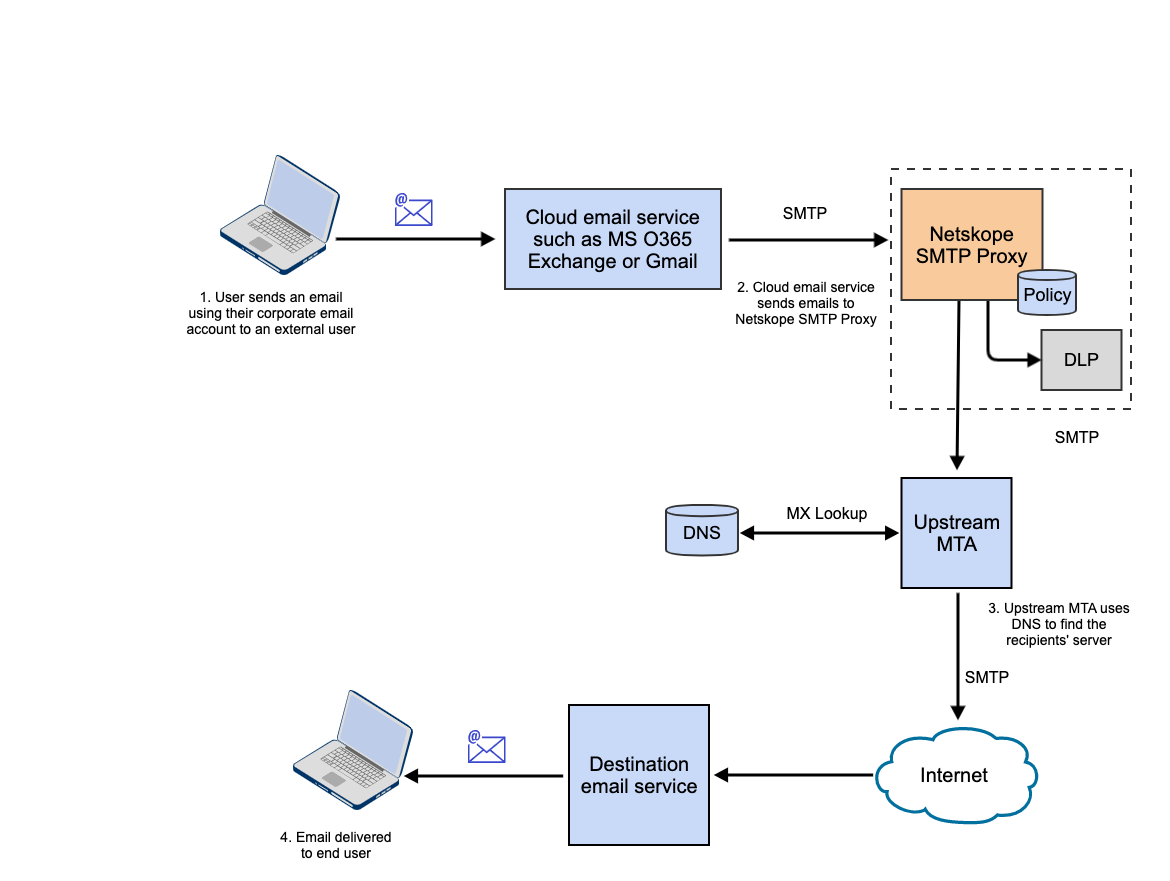
The Netskope SMTP Proxy can be used as a service to scan outgoing emails over SMTP for DLP violations. In this solution, an email initiated by the user is received by a cloud email service such as MS O365 Exchange or Gmail. The email is then passed through the Netskope SMTP Proxy integrated into your SMTP workflow. Netskope SMTP Proxy verifies the contents of the email against Real-time Protection policies and acts on DLP violations based on the policy configuration. The email is then passed on to an upstream MTA which looks up the DNS of the destination email service and sends the email to the recipient’s server.
SMTP Proxy can process multiple email messages in a single SMTP session. This reduces the load on email servers and reduces the email latency for high-volume messaging.
Note
SMTP Proxy is not offered for applications accessed through China PoPs.
The SMTP Proxy ensures that a valid and allowed sender is specified in the SMTP envelope. This is done to prevent the service as being used as an open proxy. In the case of “out of office” emails, the sender will be empty.These are allowed to be relayed through the service but there is a requirement on two parameters:
- SNI
- An optional attribute must be configured in the SMTP settings.
Email servers such as Google, O-365 do send the SNI but the customer must configure an optional attribute in the SMTP MSA settings. Once this attribute matches what’s in the email, the email will be permitted. Also, all emails must match this attribute, not just the one without the sender.
The following flow diagram provides an overview of the solution.
Prerequisites
- Exchange must be working and connected to an upstream MTA like Mimecast or Proofpoint. If you are not using an upstream MTA in your environment, you can loopback traffic from Netskope to Exchange or Gmail. For more information see, Send traffic from Netskope back to Exchange or Send traffic from Netskope back to Gmail
- Your SMTP setup must be using an upstream MTA that does not require authentication.
- Netskope requires TLS on port 25.
- Only TLS 1.2 and 1.3 are supported.
Limitations
- Emails of any size can be forwarded to an MTA. The default size the DLP Engine will process is 64MB with a 120 second timeout.
- The SMTP proxy has an implementation limit on the number of RCPT commands. This will cause it to reply with a 452 soft error to the upstream email server for any remaining RCPT TO commands. This will force the upstream device to break up the email into multiple copies after retrying for the remaining recipients. For more information, see the SMTP RFC.
- When creating a Netskope Real-time Protection policy, you can specify an SMTP header. Netskope SMTP Proxy adds this custom header to the email when the email content matches the policy definition.
If the custom header specified in the Netskope policy is the same as the standard header in the email, then Netskope SMTP Proxy replaces the value of the standard header with the value of the custom header.
For example, if the standard header in the email is
X-ns-Exchange-CrossTenant-Network-Message-Id : "1234ABC"and the custom header specified in your Netskope policy isX-NS-Exchange-CrossTenant-Network-Message-Id: "5678DEF"then, the value of the message ID in the standard header is replaced with the value of the message ID from the custom header. So, the final value of the header sent to the next hop MTA would be “5678DEF”.Note
- Netskope recommends that you use the naming convention
X-NETSKOPE-<custom-header-name>when specifying a custom header in the Netskope DLP policy. - Netskope SMTP Proxy adds the header,
x-netskope-inspected: trueto every email. This header should also not be provided as a custom header in a policy action. - Headers are case insensitive,
x-netskope-inspectedis the same asX-NETSKOPE-Inspected.
- Netskope recommends that you use the naming convention
- If a policy contains multiple DLP profiles, each with a custom SMTP header and more than one profile matches, then only the action from the first profile will apply. The result will be that only one custom header will be added.
- In the Netskope UI under Settings > Security Cloud Platform > Configuration, none of the options on this page apply to the SMTP Proxy, including the Dynamic Trust Store.
Tenant Verification for Microsoft Office 365 and Gmail

A custom header can be utilized during tenant identification. This can be beneficial when the SNI isn’t available and the same domain is configured in more than one tenant.
Navigate to Settings > Security Cloud Platform > SMTP and check Use Tenant Verification fields for Netskope Tenant Identification.
Upon checking the box, an infobox will pop up in the UI. Explaining that the required key value pairs need to be configured in the Email Server Settings.

You will see the Tenant Verification field appear.
Microsoft O365:

Gmail:

- Subject Recording and Search
- View DLP Incidents related to SMTP Proxy
- Configure the Upstream MTA to use Netskope Headers
- Netskope SMTP Proxy Use Cases
- DLP Behavior with SMTP Proxy
- Configure Netskope SMTP Proxy with Gmail
- Configure Netskope SMTP Proxy with Microsoft O365 Exchange
- Configure Real-time Protection Policies for Email Outbound
- View Netskope SMTP Proxy Alerts
- Configure Netskope SMTP Proxy with a Custom MSA